shellby-mcp
Health Warn
- License — License: MIT
- Description — Repository has a description
- Active repo — Last push 0 days ago
- Low visibility — Only 8 GitHub stars
Code Fail
- process.env — Environment variable access in ecosystem.config.cjs
- fs module — File system access in ecosystem.config.cjs
- network request — Outbound network request in experiments/mcp-2026-tasks-probe/server.test.ts
- process.env — Environment variable access in experiments/mcp-2026-tasks-probe/server.ts
- network request — Outbound network request in experiments/mcp-2026-tasks-probe/server.ts
- rm -rf — Recursive force deletion command in package.json
- rm -rf — Recursive force deletion command in scripts/build-apply-patch.sh
- fs module — File system access in scripts/build-apply-patch.sh
- spawnSync — Synchronous process spawning in scripts/chatgpt-browser.mjs
- process.env — Environment variable access in scripts/chatgpt-browser.mjs
- network request — Outbound network request in scripts/chatgpt-browser.mjs
- spawnSync — Synchronous process spawning in scripts/peekaboo-permissions.mjs
- process.env — Environment variable access in scripts/peekaboo-permissions.mjs
Permissions Pass
- Permissions — No dangerous permissions requested
No AI report is available for this listing yet.
Shellby MCP turns ChatGPT Web into a local coding agent with full computer access, persistent tools, and multi-agent capabilities.
Shellby MCP
A local MCP server that gives ChatGPT Web persistent shells, direct file editing, Computer Use, browser-backed subagents, webpage tools, and reusable skills on macOS.



Quick start · Operations · Security · Maintainer wiki
[!CAUTION]
Shellby MCP runs with the full permissions of your local macOS user. An authorized ChatGPT caller can run commands, edit files, fetch webpages, and control supported applications.
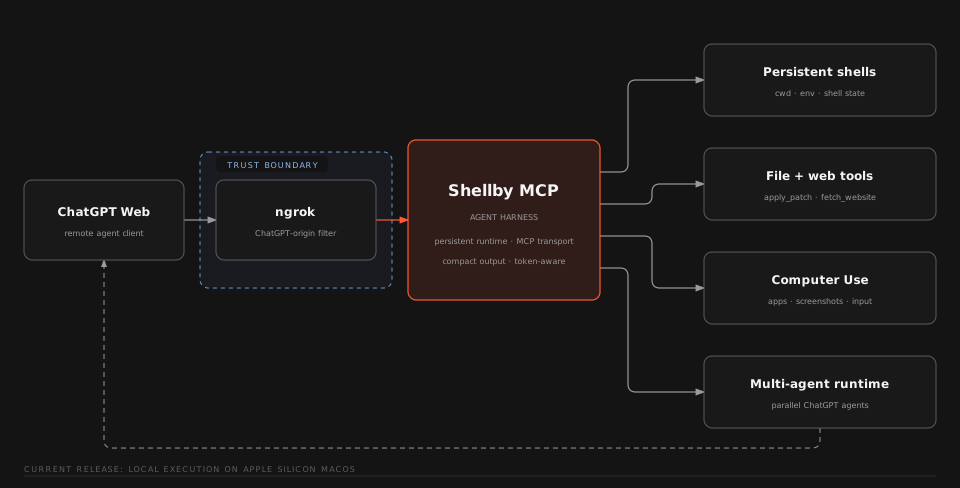
Capabilities
| Capability | Description |
|---|---|
| Persistent shells | Named login shells retain cwd, environment, processes, and command history across MCP calls. |
Native apply_patch |
Native ChatGPT apply_patch binary used to edit files independently of shell state. |
| Computer Use | Focused macOS observation and interaction backed by Peekaboo. |
| Browser subagents | Detached ChatGPT Web conversations with follow-up context and concurrent result retrieval. |
| Web and images | Rendered webpage extraction, bounded document pagination, and native image transport. |
| Dynamic skills | Reusable workflows loaded from <workspace>/skills/*/SKILL.md. |
Requirements
- macOS on Apple Silicon or Intel
- Node.js 22.13.0 or newer
- npm
- An ngrok account and CLI
- A ChatGPT Plus or Higher account with Developer Mode turned on
Google Chrome is optional and is used for browser-backed subagents. Computer Use is optional and uses the Peekaboo package installed with this repository.
Quick start
Install with your coding agent
skills/install-shellby-mcp/SKILL.md
Manual install
[!TIP]
The manual install process should be ran from Terminal.app for the best macOS permission context.
Install ngrok, clone the repository, and install dependencies:
brew install --cask ngrok
git clone https://github.com/Serbyte-Development/shellby-mcp.git
cd shellby-mcp
npm ci
Authenticate ngrok:
ngrok config add-authtoken <your-token>Get an authtoken from the ngrok dashboard if needed.
Run guided setup:
npm run setupSetup checks the machine, prepares the workspace, builds Shellby MCP, checks Computer Use permissions, and prepares a dedicated Chrome profile when Chrome is installed. Sign into ChatGPT in the dedicated Chrome window if it opens.
Run the first managed start from Terminal.app:
npm startThis creates or reuses the repository-local PM2 runtime, starts Shellby MCP and ngrok, launches the configured ChatGPT browser, waits for local health, and prints the public
/mcpURL. Starting from Terminal.app gives the managed process tree the intended macOS permission context for Computer Use.In ChatGPT Developer Mode, create a custom MCP app with the printed
https://.../mcpURL and select No Auth.
[!IMPORTANT]
The first trusted remote tool call binds the installation to that ChatGPT subject. Usenpm run auth:resetonly when you intend to clear that binding.
Verify the installation
npm run status
curl -fsS http://127.0.0.1:3333/healthz
npm run print-url
The local MCP endpoint is http://127.0.0.1:3333/mcp.
Optional capabilities
Computer UseShellby uses the package-local Peekaboo CLI by default. Check or grant permissions with:
npm run setup:computer
Screen Recording enables observation. Accessibility and Event Synthesizing enable actions. MCP_PEEKABOO_BIN can select another Peekaboo executable.
See Computer Use for runtime details.
Browser-backed ChatGPT subagentsRun the dedicated browser setup when Chrome was unavailable during initial setup or when you want to configure it later:
npm run setup:chatgpt
This creates a dedicated Chrome profile under ~/.shellby/chatgpt-chrome and attaches over CDP at 127.0.0.1:9222. Sign into ChatGPT once in that profile. Future npm start runs launch it automatically.
Conversation URL and turn count are persisted for reused agent_id values. Use npm run reset-agents to forget those local mappings.
See Browser ChatGPT Subagents for lifecycle details.
Operations
| Command | Purpose |
|---|---|
npm start |
Build and start or reload Shellby MCP, ngrok, and the configured ChatGPT browser. |
npm run restart |
Clear the current audit log, rebuild, and reload the managed runtime. |
npm run status |
Show PM2 process state. |
npm run logs |
Follow PM2 logs. |
npm run print-url |
Print the active public /mcp URL. |
npm run stop |
Stop the managed Shellby MCP and ngrok processes. |
npm run auth:reset |
Clear the bound remote ChatGPT subject after confirmation. |
npm run reset-agents |
Forget persisted subagent conversation mappings. |
PM2 is installed as a repository dependency.
Update an existing installation
git pull
npm ci
npm start
Configuration
Copy .env.example to .env when you need to change a default.
| Variable | Default | Purpose |
|---|---|---|
MCP_CWD |
~/Desktop/agent-workspace |
Initial workspace and AGENTS.md root. |
MCP_SHELL |
/bin/zsh |
Persistent login shell executable. |
MCP_PEEKABOO_BIN |
package-local Peekaboo | Optional Peekaboo executable override. |
MCP_CHATGPT_CDP_ENDPOINT |
http://127.0.0.1:9222 |
Chrome DevTools endpoint for subagents. |
MCP_CHATGPT_PROFILE_DIRECTORY |
unset | Optional profile inside the dedicated Chrome data directory. |
MCP_CHATGPT_PROJECT_URL |
unset | Optional ChatGPT Project URL for new subagent conversations. |
NGROK_URL |
unset | Optional fixed ngrok domain. |
NGROK_BIN |
ngrok |
Optional ngrok executable override. |
NGROK_AUTHTOKEN |
unset | Optional ngrok token supplied through environment configuration. |
CHROME_BIN |
standard macOS path | Optional Chrome executable override. |
Host, port, runtime limits, and other fixed settings are defined in src/config.ts.
Troubleshooting
Setup or startup failsRun:
npm run preflight
npm run status
npm run logs
preflight checks the supported macOS/Node environment, local dependencies, ngrok installation, and ngrok authentication. If /healthz does not become available after startup, inspect PM2 status and logs first.
Run npm run setup:computer from Terminal.app and follow Peekaboo's permission guidance. Keep the managed Shellby process associated with the same intended Terminal permission context.
Check whether that PM2 daemon manages other applications before killing it. ./node_modules/.bin/pm2 kill stops every application attached to the daemon. After recreating it, run npm start from Terminal.app.
More startup and recovery details are in Configuration and Startup.
Security
- The checked-in ngrok traffic policy exposes the local MCP endpoint to ChatGPT.
- Direct localhost MCP access is unauthenticated. Do not expose the local endpoint through another untrusted proxy.
- Trusted remote tool calls are bound to the first ChatGPT subject stored in
~/.shellby/auth.json. - The dedicated authenticated Chrome profile is part of the trust boundary for browser subagents.
agent-commands.yamlcan contain sensitive tool inputs. It is gitignored and permission-restricted and should be treated as private.
See SECURITY.md for reporting and scope.
Development
npm run dev
npm run lint
npm run type-check
npm test
npm run build
Use npm run inspect for the MCP inspector and npm run schemas to print the published tool schemas. Authenticated browser tests are excluded from CI. See Build and Test.
Documentation
The maintainer wiki contains implementation and operational details:
- Project Overview
- Architecture Map
- Configuration and Startup
- Computer Use
- MCP Tool Surface
- Build and Test
- Open Questions and Risks
Contributing
Read CONTRIBUTING.md before opening a pull request. Run the development validation commands above for code changes.
License
MIT. The vendored apply_patch binary retains its upstream OpenAI Codex license and notices under vendor/apply-patch/.
Reviews (0)
Sign in to leave a review.
Leave a reviewNo results found