dotfiles
Health Pass
- License — License: MIT
- Description — Repository has a description
- Active repo — Last push 0 days ago
- Community trust — 16 GitHub stars
Code Pass
- Code scan — Scanned 12 files during light audit, no dangerous patterns found
Permissions Pass
- Permissions — No dangerous permissions requested
No AI report is available for this listing yet.
How to live with macOS since 2020: Hammerspoon, Karabiner hyper layers, Birman layouts, one `up` to update 200+ apps, Claude Code
servitola dotfiles




This is my answer to the question: "How to live with your MacOS?"
I use this configuration and adjust it on 3 of my Macs: Mac Studio M1Pro, MacBook Pro 16 M3Pro, MacBook Pro 16 i9 2019 since January 21, 2020. I try to sync every single property that can be synced.
CAUTION: I use this configuration, and it works, but the installation was not debugged on a new machine. Also I have some specific details which can't fit others surely. They are described in the end of this readme.
I will be glad if you find any issues and report them — please open a GitHub Issue.
Problems solved FAQ
Q: I want all file types to be opened with the proper app on double tap always
A: Look at the Script which sets default apps. Add an extension or UTI to the
HANDLERSmap under the app's bundle id, then run it. Get your app's bundle id.Q: I want my main English keyboard layout to turn on automatically everywhere except in my messenger (I use Telegram)
A: Look at the AutoKeyboardLayout.spoon, a Hammerspoon Spoon that sets the layout when an application is focused
Q: I want to manipulate my windows from my keyboard and I want only 4 or fewer easy positions
A: The easiest window management:
ctrl + alt + arrow keys. It is a Spoon of its own now: PowerWindows.spoon — every window in its place, one key.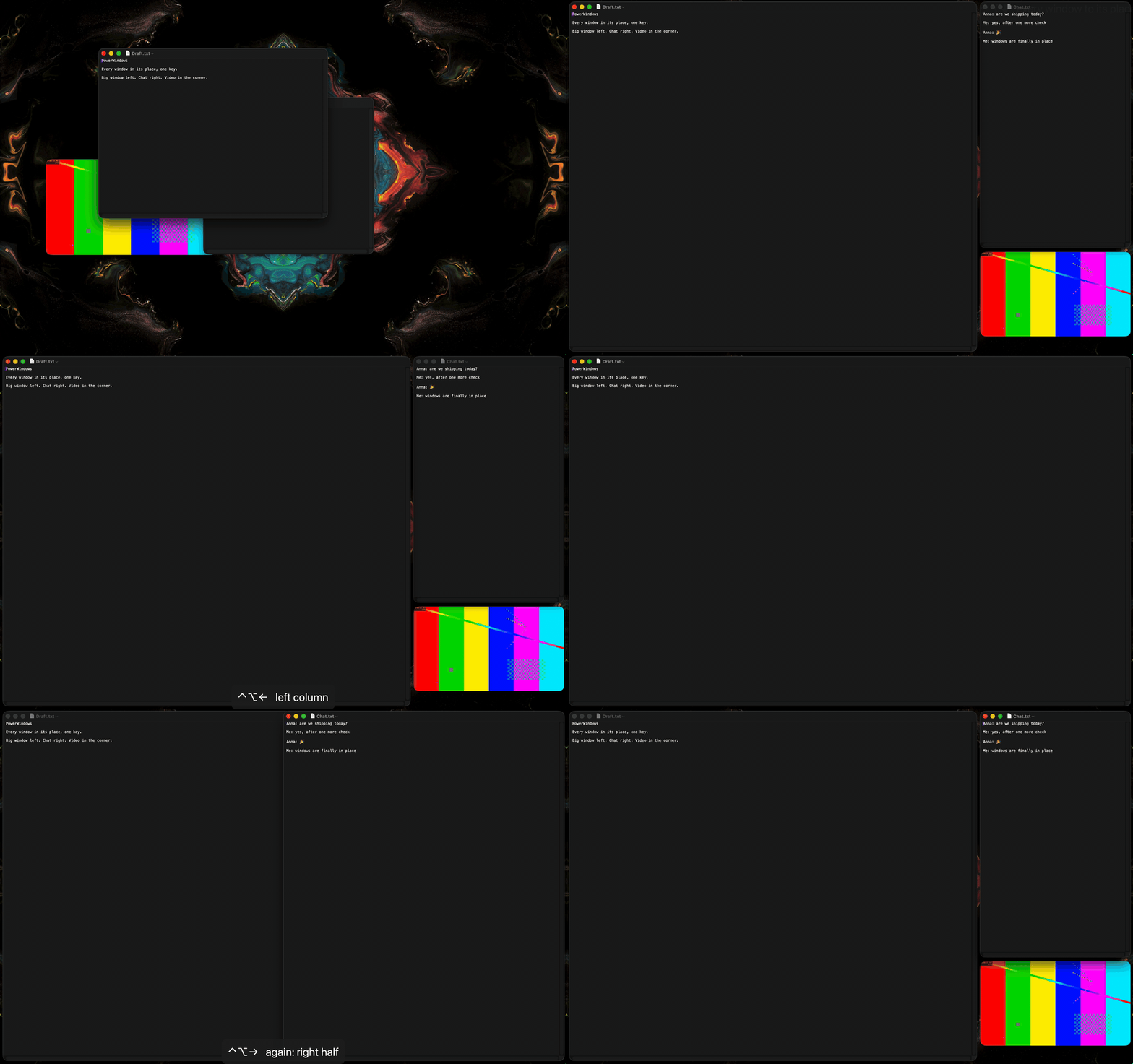
Q: I let AI agents drive my Mac and I want to see when to keep my hands off the mouse
A: The screen edges glow while an agent clicks and types: ScreenGlow.spoon
Q: I want my Terminal to assist me and I know almost nothing
A: I use Zap (open-source Warp fork) and I have the best setup for ZSH with oh-my-zsh and powerlevel10k theme. It is very helpful.
Q: I want to search my entire command history instantly with fuzzy search and sync across machines
A: I use Atuin. It replaces your shell history with a SQLite database. Press
Ctrl-Rfor fuzzy search through all your commands. Up arrow searches your current directory. It syncs encrypted across machines.Q: I want to update all my applications at once
A: Autoupdate Everything with the
upcommand. Runupfrom Terminal. It also cleans a lot of cache folders. I have 200+ applications and feel no pressure.Q: I want my work web links to be opened in Firefox and the other stuff in another browser
A: Look at
hammerspoon/link_router.lua(rules for LinkRouter.spoon). There are some RegEx to identify different types of links. Just set Hammerspoon as your default browser inSystem Preferences → General → Default web browser.Q: I want to understand all the shortcuts I can use on macOS and with this repository
A: See the complete keyboard shortcuts reference with every layer visualized. Below is the main Hyper layer:
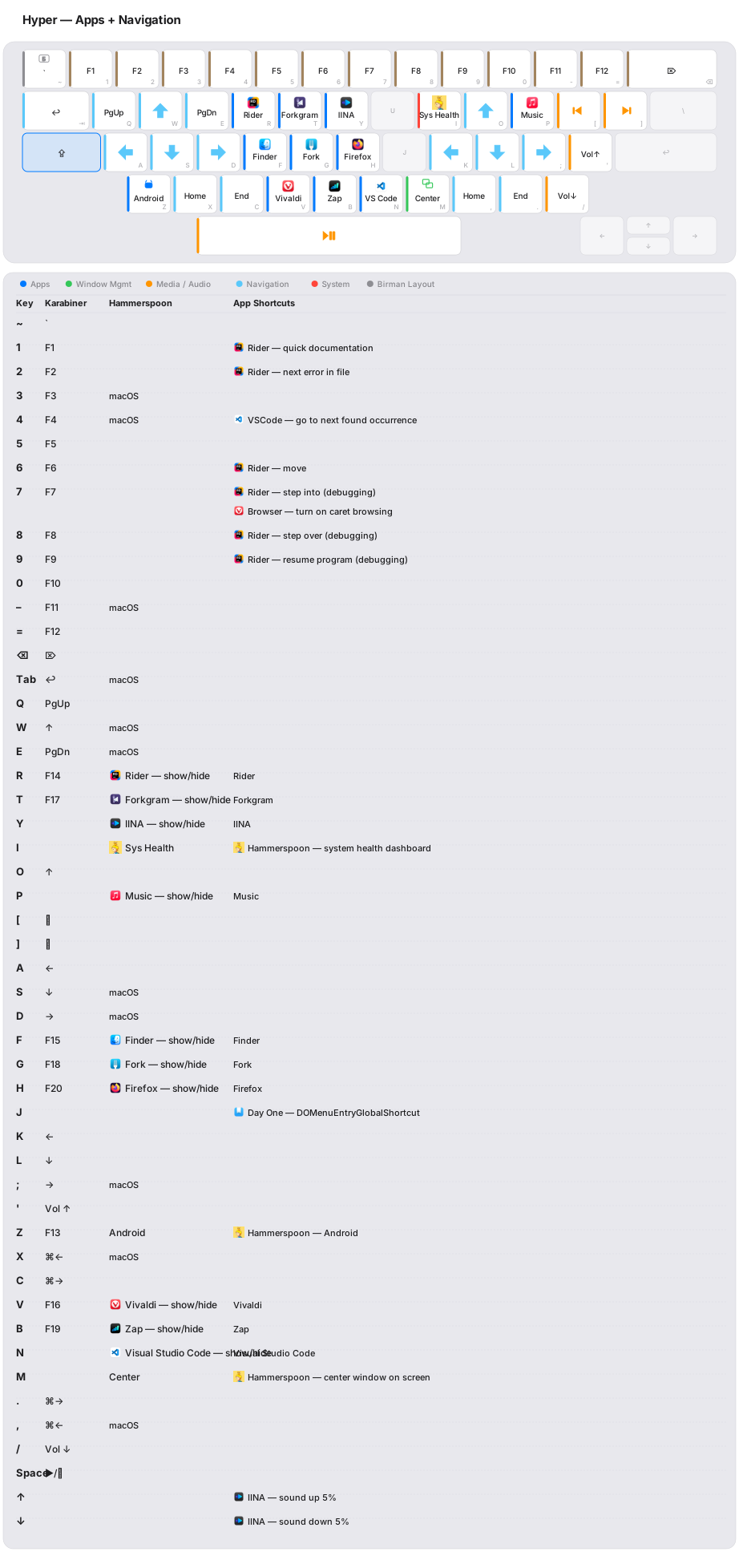
Auto-generated from Lua config + Karabiner rules. View all layers or run python3 docs/keyboard/generate.py to regenerate.
Q: I want to control my environment variables (Exports)
A: Look at Zsh exports.sh
Q: I want to have a firewall - free and easy to use
A: I use LuLu
Q: I want to draw lines on my screenshots. I take screenshots for work
A: I use Shottr. It is installed with all programs using homebrew here. Check out its Tips & Tricks. They are really helpful.
Q: I use an external audiocard and I want to control its volume in a standard way and use an equalizer depending on the device
A: I use eq. It is installed with all programs using homebrew here.
Q: I use Spotlight, but it's not as powerful as I want. I want to calculate numbers, use AI, search Google
A: I use raycast. It is installed with all programs using homebrew here. Check out its extensions
Q: I want to save my global NPM packages list and install/update them
A: Check the npm-list list of global packages I install with script
Q: I want to save my global Python packages list and install/update them
A: Check the pythong-list list of global packages I install with script
Q: I want to convert audio file to text
A: I use whisper-x. I use CPU conversion. I use alias 'w' for 'whisperx' with biggest model
Convert with best quality:
w ~/test.mp3
- Q: I want to download a video from YouTube or RuTube:
- A: I use yt-dlp. Just use the yt-dlp command with any link. For example:
yt-dlp https://www.youtube.com/watch?v=QhROKjpuLMM
yt-dlp https://www.youtube.com/user/ButKorn/videos
- Q: I want to download a mp3 from YouTube or RuTube:
- A: Same yt-dlp usage. Try my aliases in zsh to do so.
Audio as .mp3 and save to Desktop:
yta https://www.youtube.com/watch?v=i6JjquwFNU4
Video as .mp4 and save to Desktop:
ytv https://www.youtube.com/watch?v=8ApNlMcNEY0
Q: I want to hide comments and speed up videos on YouTube. And also 1000 of options. You're surely find yours:
A: I use Improve YouTube. Install it and import my settings from here
Q: I want to have multiple buffers and not switch between windows multiple times. I want to copy and paste multiple things at once.
A: I use maccy. It is installed with all programs using homebrew here.
Q: I want to find out what is taking up space on my hard drive
A: I use GrandPerspective
Q: How to install this repository?
A: With regular Makefile. Run
cd ~/projects/dotfiles && makein Terminal.Q: But where to download in the first place?
A: You must clone or download the zip file of this repo to
~/projects/dotfiles. Rename the paths across the code if you want to use a different path.
mkdir ~/projects
cd ~/projects
git clone https://github.com/servitola/dotfiles.git
You will be asked to install command tools - agree.
Q: What is the best way to maintain this project?
A: I use VSCode. When you open the project's folder, you will be suggested all the necessary plugins to install. For git, I use PreCommit to check that my commits don't have extra spaces and secrets.
Q: What is important to do next?
A: Next, do the following:
- Replace my name and email in GitConfig with yours. Also remove all 'proxy' lines from there since they are specific for my work.
- Remove proxy from ClaudeConfig. They are specific for my work
- Set screenshot shortcuts to other shortcuts (even if they are turned off) so that Shottr can take them.
Q: I want to understand what this repository installs exactly
A: Check the Makefile script. It installs all the programs (mostly with homebrew), deletes configs at default places, creates symlinks, and completes the setup.
Extra:
- JetBrains Rider settings
- AnnePro2 ObinsKit config with light scheme
Reviews (0)
Sign in to leave a review.
Leave a reviewNo results found