SharkBay
Health Warn
- License — License: GPL-3.0
- Description — Repository has a description
- Active repo — Last push 0 days ago
- Low visibility — Only 8 GitHub stars
Code Fail
- os.homedir — User home directory access in electron/ipc.ts
- process.env — Environment variable access in electron/main.ts
- process.env — Environment variable access in src/core/codegraph-manager.ts
Permissions Pass
- Permissions — No dangerous permissions requested
No AI report is available for this listing yet.
macOS workbench for multi-agent coding — run and monitor multiple AI coding CLIs (Claude Code, Codex, Gemini, Kiro, and more) side by side, with project terminals, an embedded browser, Git at a glance, a Markdown task protocol, and remote control from Telegram.
SharkBay
macOS workbench for multi-agent vibe coding
Features
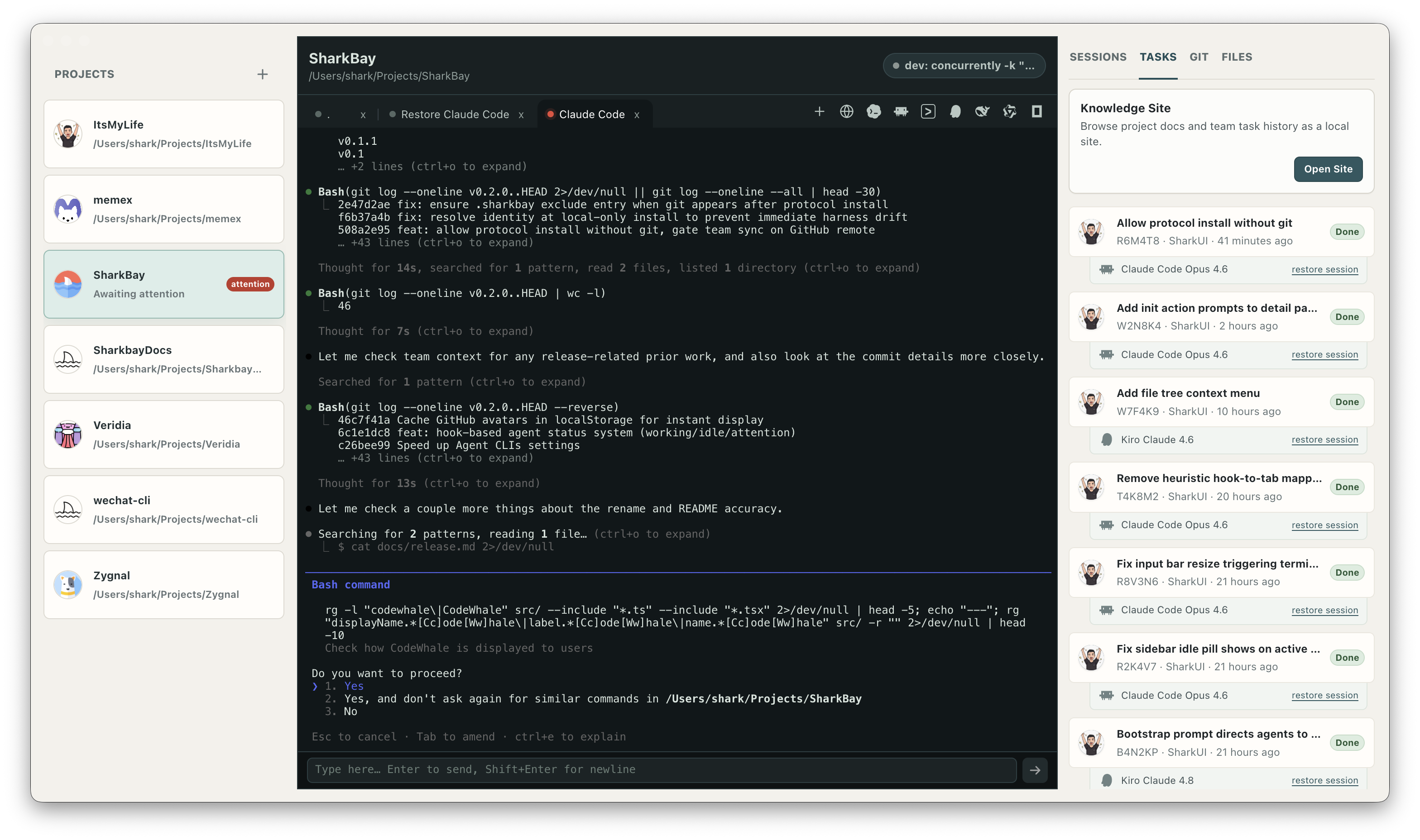
Multi-Agent Support
Launch and manage multiple AI coding agents from one workspace.
Supported agents: Claude Code · Codex · Gemini · Kiro · CodeWhale · Qwen · OpenCode · Cursor CLI
Agent Status
Real-time hook-based status indicators (working/idle/attention) — see what each agent is doing without switching terminals.
Island Overlay
macOS Dynamic Island–style floating notch displaying live agent session states with animated shark mark and glow ring — always visible, click-through transparent areas.
Appearance
Theme, color scheme (526 options), and font customization — including CJK fonts with instant preview and keyboard navigation.
Bottom Prompt Input
Dedicated input bar at the bottom of agent terminals for composing prompts with comfortable editing, slash-command forwarding, and project-scoped history.
Multi-Project Workspace
Manage local projects in a unified sidebar. Add, remove, and switch between repositories instantly.
Create a new branch worktree from a project context menu and register it as a SharkBay project in one step.
Terminal Tabs
Open a new shell tab with Cmd+T, keep per-project tabs alive, and reorder terminal tabs by dragging.
GitHub-Compatible Task Protocol
Project-local .sharkbay harness with Markdown task records, synced through a GitHub remote branch. Works with any agent that reads files.
Sessions
Browse all agent sessions per project — see model versions, auto-generated titles, and restore any previous session with one click.
Team Context Sharing
Task records provide shared context across agents and team members, synced through a GitHub remote branch.
Integrated Browser
Embedded browser tabs for local dev servers and web URLs, right next to your terminals — no app-switching.
Dev Environment Quick Launch
Auto-discovers dev / dev:* scripts from package.json and Python CLI web commands. Start and stop services without leaving the workbench.
Git at a Glance
Branch name, dirty state, changed files, and recent reflog activity — all visible in the project panel without running commands.
Quick File Editor
Built-in CodeMirror editor with syntax highlighting for 20+ languages. Open, edit, and save project files in tabs — Cmd+S to save, dirty state tracking, 5 MB file support.
Knowledge Site
Auto-generated HTML site from project docs and team task history — readable, browsable context for humans and agents alike.
Documentation
- Product notes
- Architecture
- Development guide
- Testing
- Release and packaging
- Task Protocol
- Agent guide
- Roadmap
Tech Stack
Electron · React · TypeScript · Vite · xterm · @lydell/node-pty · CodeMirror
Requirements
- macOS
- Node.js >= 20.11
- Git
ghCLI (only for team context sync)
Development
npm install
npm run dev
Checks
npm run typecheck
npm test
npm run build
Packaging
npm run pack    # unpacked app for smoke testing
npm run dist    # distributable macOS artifacts in release/
License
SharkBay is licensed under the GNU General Public License v3.0 only. See LICENSE.
Reviews (0)
Sign in to leave a review.
Leave a reviewNo results found