rigspark
Health Pass
- License — License: MIT
- Description — Repository has a description
- Active repo — Last push 0 days ago
- Community trust — 20 GitHub stars
Code Pass
- Code scan — Scanned 12 files during light audit, no dangerous patterns found
Permissions Pass
- Permissions — No dangerous permissions requested
No AI report is available for this listing yet.
Which local LLMs can your computer run? Hardware-aware CLI, TUI and GUI: yes/slow/no verdicts and tok/s from your GPU VRAM and RAM, then verified installs via Ollama, llama.cpp, MLX and LM Studio. Native Rust.
RigSpark
Know what your computer can run before you download it.
RigSpark is a hardware-aware native Rust CLI that gives local AI models a yes / slow / no verdict, explains the fit, and estimates tokens per second before you commit to the weights.
Website · Install · Guide · Latest release









New in 3.0: a redesigned browser workspace. Every feature is still there,
but each control appears only when you need it, and the Models view now loads
the full ranked catalog.
See what changed →
Let Sparky check your rig
RigSpark keeps the first question simple: will this model actually run here?
The answer comes from a curated offline catalog and your detected hardware, not
from a download you have already waited for.
1. Install RigSpark

Homebrew on macOS or Linux:
brew install shashankswe2020-ux/tap/rigspark
On a Mac you can also install the desktop app: download RigSpark_aarch64.dmg
(Apple Silicon) or RigSpark_x86_64.dmg (Intel) from the
latest release
and drag RigSpark to Applications. The app is signed with a Developer ID and
notarized by Apple, so it opens without a Gatekeeper warning. The app bundles llama.cpp, so it needs no other
runtime: on first launch, Download & start fetches a verified starter model
that fits your Mac. It lives in the menu bar and launches at login (turn that
off in Tools); closing the window keeps your model serving, and
Quit RigSpark stops it. Updates install after their signature is verified.
On Windows, download RigSpark_x64-setup.exe from the
latest release
and run it. It installs for the current user without admin rights. The installer
is not code-signed yet, so if SmartScreen warns, choose More info → Run
anyway. The Windows app bundles a CPU build of llama.cpp, and its advice for
that runtime counts system memory only.
For the command line on Windows and other platforms, download a
prebuilt archive,
extract it, and add the folder to PATH. Keep rigspark, llmup, andrigspark-gui together.
The RigSpark binaries need no Node.js, Python, or compiler. Inference backends
have their own requirements.
If Sparky helps you, please consider sponsoring the project:
https://buymeacoffee.com/shashanksw9
Cargo, checksums, unsigned macOS archives, and upgrades →
· Docker caveats →
2. Sparky sizes up your hardware
Start with advice. It is deterministic, works offline, and does not require an
inference backend:
rigspark recommend
rigspark can-run llama3.1:8b
rigspark catalog --all
recommendranks the catalog for this machine.can-runchecks one model before you download it.catalog --alllets you browse the bundled model data.
Use --json for automation and --accessible for screen-reader-friendly
output. llmup remains a compatibility alias.
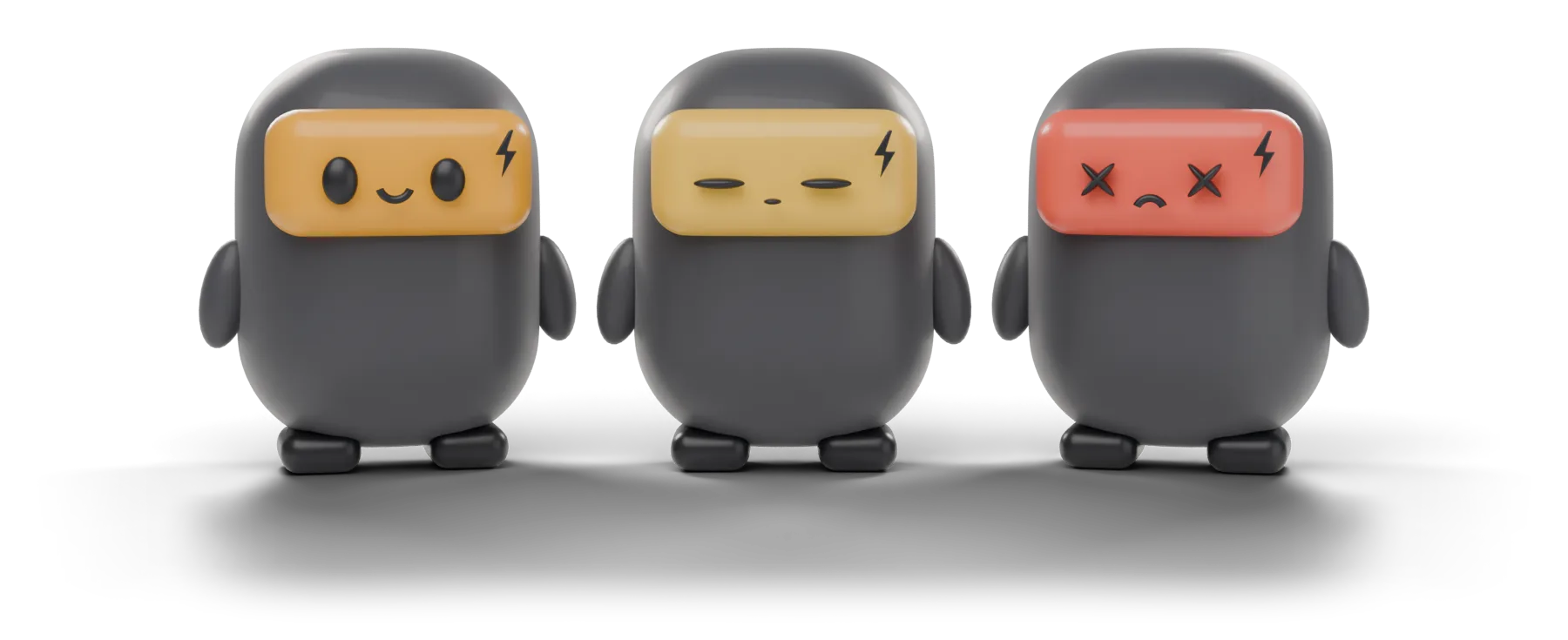
3. Read the face: yes, slow, or no
| Verdict | What Sparky means |
|---|---|
| yes | The model fits with the required headroom. |
| slow | It fits, but the expected experience may be constrained. |
| no | It does not safely fit the detected memory budget. |
Every verdict includes the reason. When RigSpark cannot source a figure, it saysunknown rather than inventing one. Throughput ranges are estimates, not
benchmarks.
4. Pick a model, verify it, and start
Once you have a fit, move from advice to a running model:
rigspark up llama3.1:8b    # pull, verify, and serve
rigspark chat              # chat with the active model
rigspark ls                # inspect managed models
rigspark switch            # change the active model
rigspark down              # stop when done
RigSpark supports:
- Ollama — recommended default and managed child process
- llama.cpp — native local serving
- MLX — Apple Silicon
- LM Studio — attach to an already running server
- BitNet — Microsoft's I2_S weights on CPU, using your compiled bitnet.cpp server
Managed weights pass an integrity check before serving. Servers bind to127.0.0.1 by default.
For Microsoft's official BitNet b1.58 2B-4T:
export RIGSPARK_BITNET_SERVER=/absolute/path/to/BitNet/build/bin/llama-server
rigspark up bitnet-b1.58:2b --backend bitnet --context 4096
rigspark chat
rigspark down
Build the server using Microsoft's instructions.
On Apple Silicon, use the tested pinned build and ARM patch;
unmodified builds can produce invalid output or crash, and BLAS must be disabled.
Stock llama.cpp cannot load this I2_S artifact. RigSpark downloads and verifies
the weights, not the runtime. Keep the variable set for chat, doctor and shutdown.
The initial integration is CPU-only; speed and KV-memory estimates stay unknown.
See the per-model benchmark reports for the recorded
BitNet chat results, methodology, and limitations.
Backend setup and lifecycle details →
Faster serving: speculative decoding and parallel agents
rigspark up qwen3:14b --backend llamacpp           # drafts with qwen3:0.6b automatically
rigspark up qwen3:8b --backend llamacpp --speculative ngram
rigspark up qwen3:14b --context 16384 --parallel 4 # four agents at once on Ollama
rigspark bench --concurrency 4                     # measure the active server
--speculative auto|draft|ngram|off. On llama.cpp, models with a catalog
drafter use it by default. RigSpark downloads the drafter, verifies its
SHA-256 and reserves its memory before checking fit. If the drafter does not
fit, RigSpark starts without it.ngramdrafts from the context and needs no
extra weights. Ollama handles speculative decoding inside its own model tags.--parallel N(1–16) sets concurrent request slots. llama.cpp slots share one
unified KV pool. Ollama allocates a full context for each slot, so it needs--contextand known KV geometry to size the memory (or--bypass).rigspark benchmeasures the active server with fixed, versioned prompts:
time to first token, prefill and decode tok/s, draft acceptance, and
combined throughput across concurrent requests. The prefill, decode and draft
figures come from the runtime's own counters; anything it does not report
shows asunknown.
Connect your coding agent
rigspark connect claude     # Claude Code via the local Anthropic Messages API
rigspark connect codex      # Codex via the local OpenAI Responses API
rigspark connect opencode   # OpenCode via an inline provider config
rigspark connect pi         # prints the snippet for Pi, Hermes, OpenClaw or Cline
connect points the agent at the active loopback server for that launch only.
It never rewrites the agent's own config files. Add --dry-run to print the
command and environment instead of starting the agent.
5. Continue in the browser workspace
rigspark gui
Choose a model, inspect the same hardware verdicts, chat, and use agents, skills,
and MCP tools from the loopback-only browser workspace.
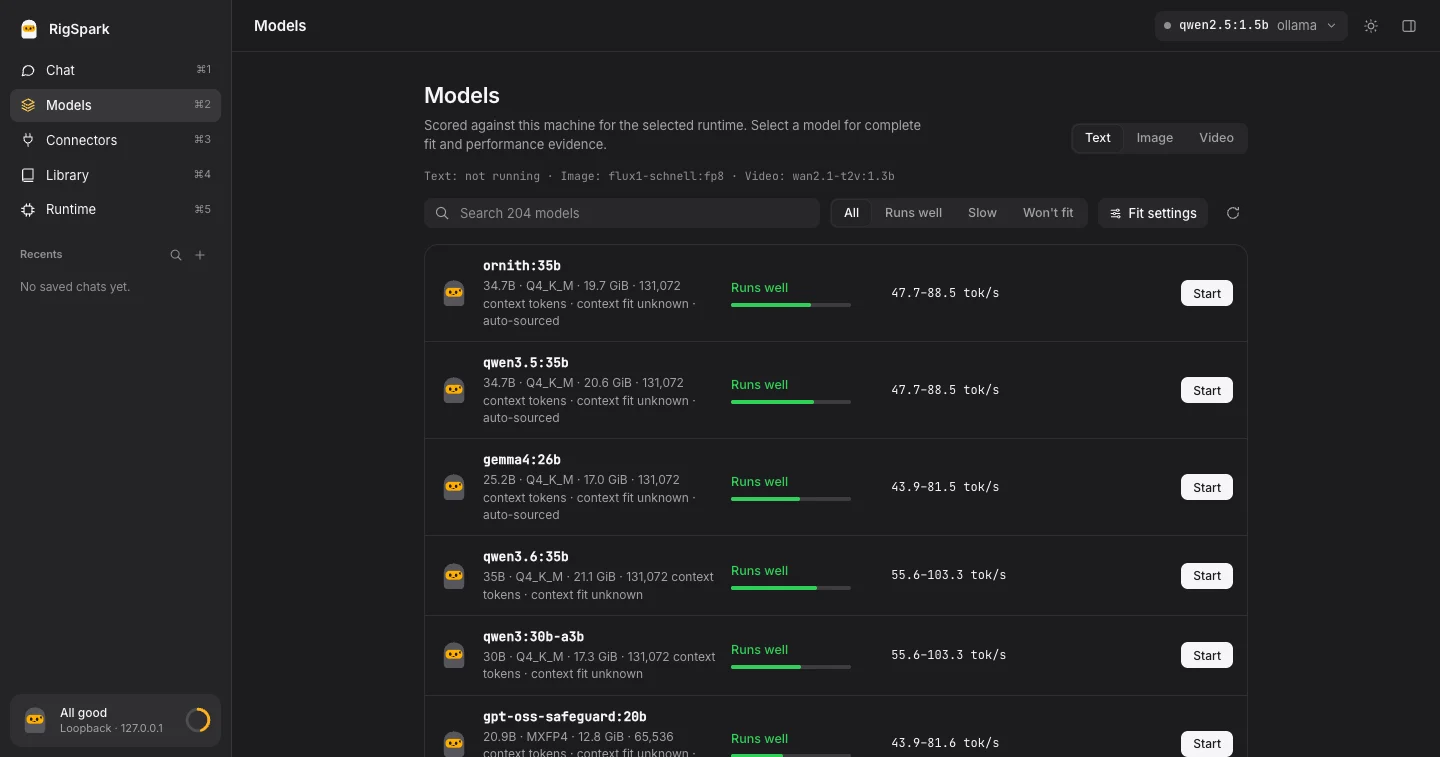
- One model chip in the top bar holds the model, runtime, harness, and agent
pickers. - Models lists the whole ranked catalog with search, Runs well / Slow /
Won't fit filters, and a Fit settings popover for context and KV cache. - The inspector (⌘I, or click Sparky) shows live memory, CPU, disk, and the
latest call's token usage. Sparky's mood follows real RAM pressure. - Light and dark themes, with ⌘1–⌘5 to switch views.
Local chat stays on your machine. Cloud harnesses and external tools can send
data to their own providers, so RigSpark keeps those boundaries visible.
Browser workspace, agents, and tools →
6. Let Sparky create images and short videos
RigSpark can orchestrate open-weight image and video models through your own
ComfyUI installation.
rigspark catalog --generation
rigspark generate image --prompt "a lighthouse at dusk" --comfyui-dir ~/ComfyUI
rigspark generate video --prompt "a fox running in snow" --comfyui-dir ~/ComfyUI
rigspark generate --tui
Start ComfyUI on its default loopback address, 127.0.0.1:8188. RigSpark
downloads pinned weights, verifies their SHA-256 digest, installs only its
built-in local workflows, and refuses paid Partner API nodes. Generation speed
stays unknown when no defensible measurement is available.
In rigspark gui, switch the composer from Text to Image or Video.
Generated media renders inline and is never sent to the language model.
For UI/UX mockups, select ming-image:ming_image_0.1_design_int8_convrot
under Models → Image → Use in Chat, then generate in Image mode. This exact
25.94 GB weight pairing was tested with ComfyUI 0.38.0 on a 36 GiB Apple Silicon
Mac. Other Ming variants remain fit-only; NVIDIA/CUDA and peak inference memory
are not certified. Generated lettering can be garbled.
rigspark generate ming-image:ming_image_0.1_design_int8_convrot \
  --prompt "A plant-care app onboarding screen, soft green palette, flat UI design" \
  --comfyui-dir ~/ComfyUI
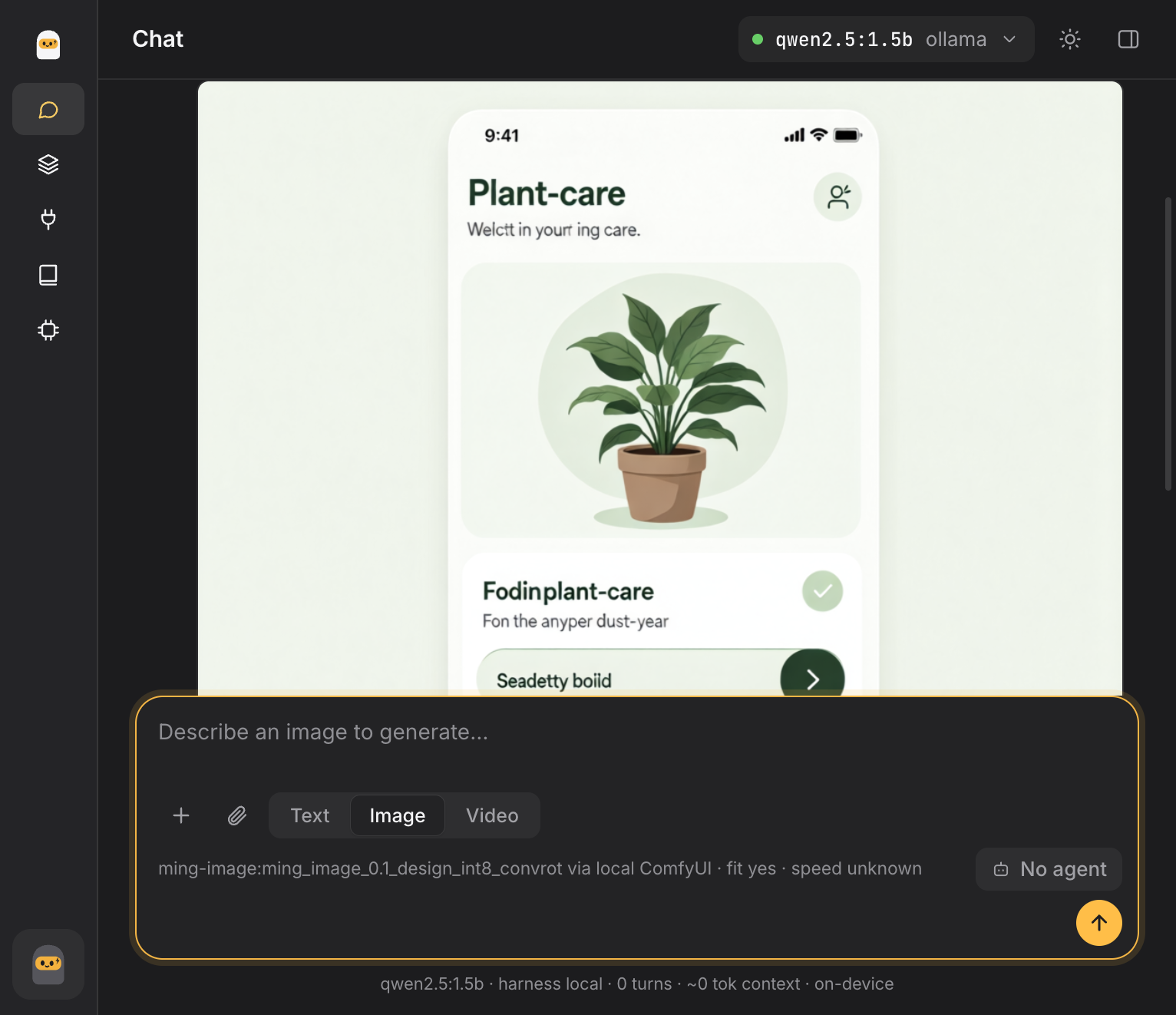
In the GUI, switch the composer to Image and pick a shape (Thumbnail
16:9, Wallpaper 9:16 or Square) and how many versions (1, 2 or 4),
each on its own seed. Keep a seed to steer one picture with new words. Then
download it, copy it into any app, or Send to app…: with Canva, Figma or
another connector added under Connectors, the chat hands the file to that
app's tools (each call asks for your approval) for text, layouts and resizing.
RigSpark serves the model; editing stays in the tools you already use.
Pictures are made one at a time, and the time per picture is measured on your
machine after the first one. From the CLI, pass --aspect landscape or--aspect portrait to rigspark generate image.
Image and video generation specification →
7. Talk to it: spoken replies and dictation
In rigspark gui, open Models → Voice and start a voice model:
- Speak (text to speech):
kokoro-82morchatterboxthrough
mlx-audio on Apple Silicon
(pip install -U mlx-audio). - Listen (speech to text): Whisper large-v3-turbo, small or base.en through
whisper.cpp'swhisper-server(brew install whisper-cpp, or setRIGSPARK_WHISPER_SERVER). RigSpark downloads the pinned ggml file and
verifies its SHA-256 before loading it.
Then turn on Speak replies in the composer, press the microphone to
dictate, or switch the composer to Voice to have a script written and
read aloud, or to read your exact text. Audio plays inline and downloads as
WAV. On Linux or Windows, attach any loopback server with OpenAI's/v1/audio/speech or /v1/audio/transcriptions (Kokoro-FastAPI, LocalAI)
under Runtime → Voice settings. Voice servers bind to 127.0.0.1, fit
covers weight memory only, and voice speed stays unknown until measured.
Why the answers are trustworthy
- Offline advice. Recommendation commands use a bundled, curated catalog and
make no network calls. - Honest unknowns. Missing bandwidth, model geometry, or measurements stay
visiblyunknown. - Fail-closed integrity. Managed weights must match their catalog digest, or
a documented size-floor fallback, before RigSpark serves them. - Loopback by default. Local servers listen on
127.0.0.1, not the public
network. - Reproducible decisions. The same hardware and catalog produce the same
recommendation. - One adapter boundary. Ollama, llama.cpp, MLX, LM Studio, and BitNet sit behind the
same runtime lifecycle and safety gates.
Add any GGUF model from Hugging Face
The bundled catalog is curated and signed. For anything newer or more
specific, add it yourself:
rigspark add --search "qwen3 coder"          # search GGUF repositories
rigspark add unsloth/Qwen3-0.6B-GGUF          # list quants, add the largest that fits
rigspark add unsloth/Qwen3-0.6B-GGUF:Q4_K_M  # or name one
rigspark up hf.co/unsloth/qwen3-0.6b-gguf:q4_k_m --backend llamacpp
In the browser workspace, use Models → Add from Hugging Face.
RigSpark reads the repository and one GGUF header to size every
quantization against your machine. It then pins the repository commit and
each file's SHA-256 in ~/.rigspark/catalog/local.json. up downloads
through llama.cpp or Ollama (hf.co/owner/repo:quant) and refuses to
serve weights whose digest does not match. Repositories need a recognized
open-weight license. Projector files and split (multi-part) GGUFs are
skipped.
Added models appear in recommend, can-run and the GUI marked added by
you. Remove one with rigspark add --remove <id>. Network access happens
only when you search or add; advice stays offline.
Update the catalog when you choose
Catalog updates are explicit; recommendations and normal startup remain
offline.
rigspark catalog --status
rigspark catalog --update
RigSpark verifies the signed catalog before activating it atomically. An invalid
signature, incompatible schema, or network failure leaves the current snapshot
unchanged. Recovery falls back through the previous verified snapshot and then
the bundled catalog, with visible warnings.
New models arrive weekly. A scheduled pipeline admits every new Ollama library
model whose facts it can read from the shipped artifact (size, digest, context,
architecture, open license), plus Comfy-Org image and video releases, and
publishes a signed catalog once the quality gate passes. These entries are marked
auto-sourced, keep fail-closed digest verification, and show unknown for
anything that could not be sourced. Image and video models without a built-in
workflow yet get a fit verdict and are labelled workflow coming.
rigspark recommend --month 1        # only models released or added in the last month
rigspark catalog --all --month 3
In the terminal UI, m cycles the same 1, 2 and 3 month windows; the browser
workspace has a Released in selector.
rigspark catalog --refresh is a maintainer preview of enrichment against the
bundled registry snapshot; it does not install a published catalog.
Catalog provenance, trust, and recovery →
A 20-second tour

The tour runs rigspark recommend, shows models that do and do not fit, then
opens the same verdicts and a local chat in rigspark gui.
Watch in 1080p with sound ·
Earlier demo on YouTube
Find your next command
| Goal | Command |
|---|---|
| Rank models for this machine | rigspark recommend |
| Check one model | rigspark can-run <model> |
| Diagnose hardware and runtimes | rigspark doctor |
| Browse text models | rigspark catalog --all |
| Browse image and video models | rigspark catalog --generation |
| Start a verified model | rigspark up <model> |
| Open the terminal UI | rigspark |
| Open the browser workspace | rigspark gui |
| Generate local media | rigspark generate |
| Benchmark the active server | rigspark bench |
| Connect a coding agent | rigspark connect <agent> |
| Add a model from Hugging Face | rigspark add <owner/repo> |
| Stop the active model | rigspark down |
Run rigspark --help for the complete CLI.
Project map
crates/rigspark-core/— catalog, memory sizing,
ranking, advice, and reportscrates/rigspark-runtime/— hardware detection,
backend adapters, lifecycle, state, and harnessescrates/rigspark-gui/— loopback HTTP/SSE host and
embedded browser clientcrates/rigspark-cli/— native CLI, terminal UI, and
catalog maintenanceapps/desktop/src-tauri/— native desktop shell
Build from source
RigSpark is a Rust workspace pinned to Rust 1.98.1:
cargo build --workspace --locked
cargo test --workspace --locked -- --test-threads=2
cargo clippy --workspace --all-targets --locked -- -D warnings
cargo fmt --all -- --check
cargo native-retirement
No Node.js or TypeScript tooling is part of the project.
Want to help? Read CONTRIBUTING.md and pick an issue labelledgood first issue.
Keep exploring
- Commands, custom context, and installed models
- Terminal UI
- How hardware advice works
- Scripting and exit codes
- FAQ and troubleshooting
- Development guide
- Project specification
- Changelog
Let Sparky check your rig.
Download RigSpark ·
Star on GitHub ·
Buy me a coffee
Support RigSpark
RigSpark is free, MIT-licensed, and built in spare time. If it saved you a
download that would never have run, you can
buy me a coffee ☕.
Keywords: local LLM, run LLM locally, LLM hardware requirements, VRAM
calculator, tokens per second, Ollama, llama.cpp, MLX, LM Studio, Rust CLI.
Reviews (0)
Sign in to leave a review.
Leave a reviewNo results found