Jctx
Health Warn
- License — License: MIT
- Description — Repository has a description
- Active repo — Last push 0 days ago
- Low visibility — Only 5 GitHub stars
Code Pass
- Code scan — Scanned 1 files during light audit, no dangerous patterns found
Permissions Pass
- Permissions — No dangerous permissions requested
This tool scans Java, Kotlin, and Python project directories to generate a single, structured text or markdown file. The output is formatted specifically to provide AI chat models with full context about a codebase's architecture, classes, and methods.
Security Assessment
Overall risk: Low. The static code scan found no dangerous patterns, no hardcoded secrets, and no dangerous permission requests. The application strictly operates as a local file scanner and writer. It reads your source code files to compile the context document, meaning it interacts directly with your proprietary or sensitive code. However, it does not appear to execute any shell commands, make external network requests, or transmit your data over the internet. Your codebase remains entirely local.
Quality Assessment
The project is very new and currently has low community visibility with only 5 GitHub stars, which means it has not been widely battle-tested or peer-reviewed. However, it is actively maintained (last updated today), includes a clear description, and uses the standard, permissive MIT license. Because it requires no external dependencies and runs entirely on basic Python, the attack surface is minimal and the tool is easy to inspect.
Verdict
Safe to use, though you should keep in mind that the low visibility means limited community oversight.
Turn any Java or Kotlin project into an AI-ready context file in one command.
Jctx — Give AI full understanding of your Java, Kotlin & Python codebase
Stop pasting files. Get real architecture-aware answers.
Generate complete project context in seconds.
Turn any Java, Kotlin, or Python project into a single AI-ready context.txt (or context.md) in seconds.
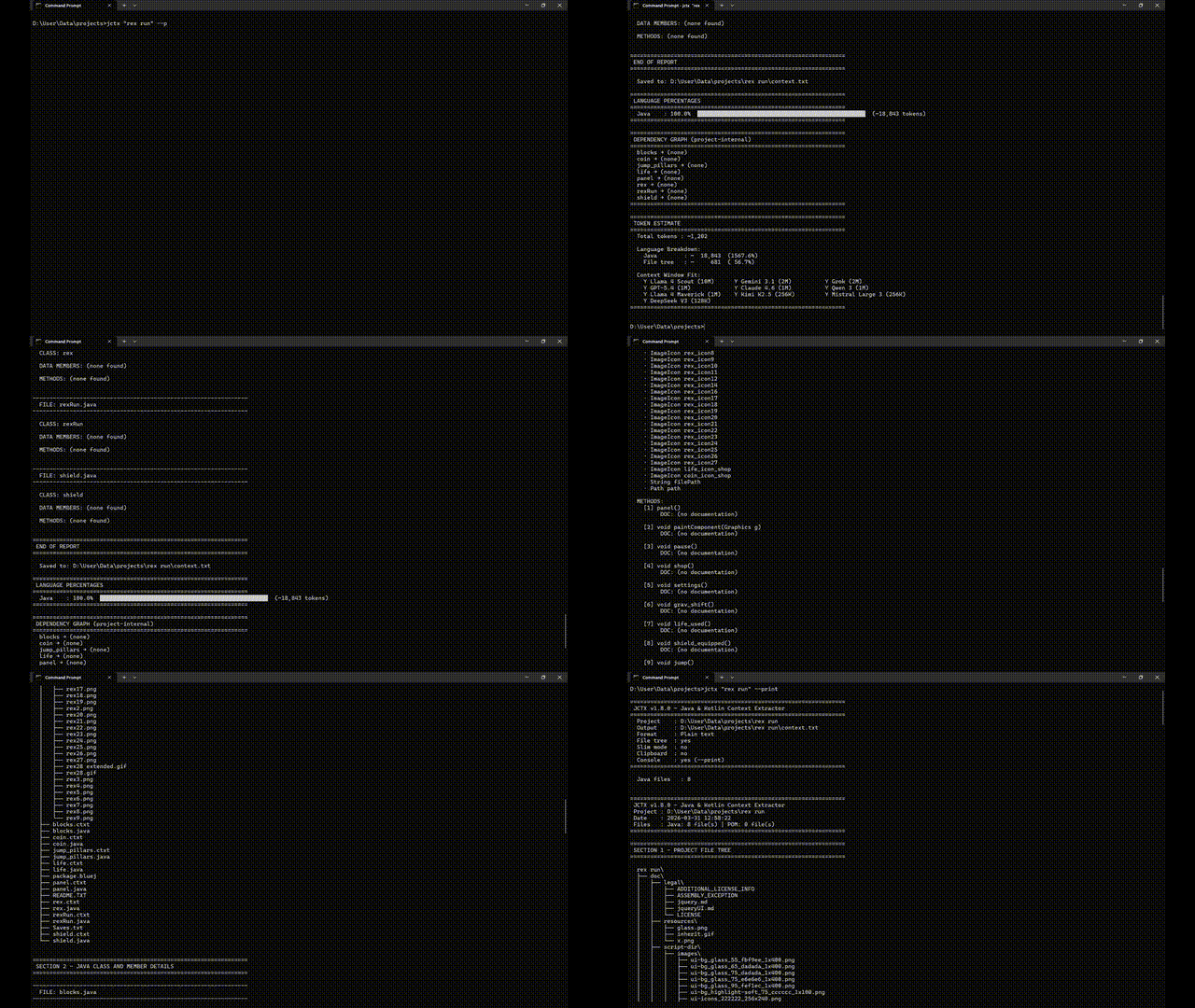
Jctx "C:\projects\MyApp"
→  context.txt written  (Java: 39 files | Kotlin: 12 files | Python: 15 files | POM: 1 file | Gradle: 1 file)
No config. No dependencies. Just Python and a folder.
Why it exists
You're working on a Java, Kotlin, or Python project. You open an AI chat to get help. Before you can even ask your question, you spend 10 minutes copy-pasting files, explaining your class structure, summarising what each module does.
Before:
ChatGPT suggests random classes
After:
ChatGPT tells exactly which class to modify and why
Jctx does all of that in one command.
It scans your project and writes a clean, structured context.txt (or context.md) — every class, every field, every method signature, every Javadoc/KDoc/docstring comment, and your build files — formatted so an AI can immediately understand your entire codebase.
It also provides Token Count Estimation, Language Percentages, and a Dependency Graph — all printed to your console automatically.
Paste it. Ask your question. Get useful answers.
Output (real example)
Click to expand sample context.txt (Plain Text - Default)================================================================
JCTX v2.1.0 - Java, Kotlin & Python Context Extractor
Project : C:\projects\Talken
Date : 2026-03-31 12:00:00
Files : Java: 39 file(s) | Kotlin: 5 file(s) | Python: 2 file(s) | POM: 1 file(s) | Gradle: 1 file(s)
================================================================
================================================================
SECTION 1 - PROJECT FILE TREE
================================================================
Talken\
├── src\
│ └── main\
│ ├── java\
│ │ └── org\
│ │ └── flexstudios\
│ │ └── talken\
│ │ ├── Controls.java
│ │ └── TalkenClient.java
│ └── kotlin\
│ └── org\
│ └── flexstudios\
│ └── talken\
│ └── UserProfile.kt
├── build.gradle
└── pom.xml
================================================================
SECTION 2 - POM.XML CONTENT
================================================================
----------------------------------------------------------------
FILE: pom.xml
----------------------------------------------------------------
<?xml version="1.0" encoding="UTF-8"?>
<project>
<modelVersion>4.0.0</modelVersion>
<groupId>org.flexstudios</groupId>
<artifactId>talken</artifactId>
<version>1.0.0</version>
</project>
================================================================
SECTION 3 - KOTLIN CLASS AND MEMBER DETAILS
================================================================
----------------------------------------------------------------
FILE: src\main\kotlin\org\flexstudios\talken\UserProfile.kt
----------------------------------------------------------------
CLASS: UserProfile
DOC : Represents the user's local profile settings.
DATA MEMBERS:
· private val String displayName
· private val String email
METHODS:
[1] String getAboutSection()
DOC: (no documentation)
================================================================
END OF REPORT
================================================================
Install
Option 1: PyPI (Recommended)
The easiest way to install Jctx on any OS (Windows, macOS, Linux) is via pip:
pip install jctx
The jctx command will be instantly available in your terminal.
Option 2: Manual Download (Windows)
- Download The Latest Release Zip.
- Unzip it
- Right-click
Setup.bat→ Run as administrator - Open a new terminal
jctx "C:\path\to\your\java\project"
No admin rights? Copy
jctx.py+jctx.batanywhere and runjctx.batdirectly.
Not on Windows? Run
python jctx.py "path/to/project"on any OS with Python 3.8+.
Usage
Jctx <project_folder> [--md] [--slim] [--no-tree] [--clipboard] [--print] [--version] [--help]
| Flag | Effect |
|---|---|
| (none) | Saves context.txt into your project folder and prints token estimates |
--md |
Outputs a cleanly formatted Markdown file (context.md) instead of plain text |
--slim |
Slim mode: output only class names and method signatures (omits fields and docs) to save tokens |
--no-tree |
Skips the file tree section (shorter output) |
--clipboard |
Copies the generated report directly to your clipboard |
--print |
Also prints to the console |
--version |
Shows the Jctx version |
--help |
Shows help |
How to use the output
Paste context.txt (or the contents of context.md) into any AI chat and ask your question:
"Here's my Java/Kotlin/Python project structure: [paste]. I want to refactor the messaging module to use WebSockets — where should I start?"
Works great with Claude, ChatGPT, Gemini, and any other AI that accepts long text input.
Console Metrics
After generating the file, Jctx prints a full analytics dashboard to your console:
Language Percentages
Shows the exact split of Java vs Kotlin vs Python code by lines of code:
================================================================
 LANGUAGE PERCENTAGES
================================================================
  Java    :  60.2%  ██████████████████████████████░░░░░░░░░░░░░░░░░░░░  (4,120 lines)
  Kotlin  :  28.1%  ██████████████░░░░░░░░░░░░░░░░░░░░░░░░░░░░░░░░░░░░  (1,920 lines)
  Python  :  11.7%  █████░░░░░░░░░░░░░░░░░░░░░░░░░░░░░░░░░░░░░░░░░░░░░  (800 lines)
================================================================
Dependency Graph
Automatically maps which of your project classes depend on which — scans both import statements and in-body type references (catches same-package dependencies too). Only shows project-internal references, no external library noise:
================================================================
 DEPENDENCY GRAPH (project-internal)
================================================================
  EncryptionModule → (none)
  MessagingModule → EncryptionModule, UserProfile
  TalkenClient → EncryptionModule, MessagingModule, UserProfile
  UserProfile → (none)
================================================================
Token Count Estimate
Shows the total token count with a breakdown by section and checks whether your context fits each major AI model's context window:
================================================================
 TOKEN ESTIMATE
================================================================
  Total tokens : ~34,767

  Language Breakdown:
    Java        : ~  23,400  ( 59.3%)
    Kotlin      : ~  10,910  ( 27.6%)
    Python      : ~   4,560  ( 11.6%)
    Build files : ~     290  (  0.7%)
    File tree   : ~     312  (  0.8%)

  Context Window Fit:
    Y Llama 4 Scout (10M)      Y Gemini 3.1 (2M)          Y Grok (2M)
    Y GPT-5.4 (1M)             Y Claude 4.6 (1M)          Y Qwen 3 (1M)
================================================================
.jctxignore — Custom Exclusions
Place a .jctxignore file in the project root to exclude additional directories or files from context extraction:
# Skip test directories
**/test/**

# Skip generated code
generated/

# Skip specific file patterns
*.test.java
| Pattern | Meaning |
|---|---|
dirname/ |
Skip any directory named dirname |
**/test/** |
Skip any directory named test anywhere in the tree |
*.test.java |
Skip files matching the glob pattern |
# comment |
Lines starting with # are ignored |
When a .jctxignore is detected, the console banner shows:
.jctxignore: yes (2 dirs, 1 patterns)
What it extracts
| What | Detail |
|---|---|
| File tree | Full project structure, build folders excluded |
| Build Files | Full content of your pom.xml, build.gradle, requirements.txt, and pyproject.toml |
| Classes | Java/Kotlin classes and interfaces, Python classes, plus all docstrings/JavaDocs/KDocs |
| Fields | Type, name, access modifier, val/var (Kotlin), instance vars (self.x), inline comments |
| Methods | Numbered list — return type, name, params, decorators, top-level Python/Kotlin functions |
Auto-ignored: build/, target/, .idea/, .git/, node_modules/, .gradle/, .class, .jar, and all other build artifacts. Customize further with .jctxignore.
Requirements
- Python 3.8 or newer — python.org
- Works on Windows, macOS, Linux
Roadmap
- Kotlin support
- Markdown output mode (
context.md) - Multi-language project estimations (mixed Java + Kotlin percentages)
- Token count estimate alongside output
- Clipboard support and Slim mode
- Dependency graph (project-internal)
-
.jctxignorecustom exclusions - Cross-platform packaging (PyPI / pip)
- Python language support
- Architecture diagram generation (
--diagram)
License
MIT — free to use, modify, and share.
Reviews (0)
Sign in to leave a review.
Leave a reviewNo results found