promptops
Health Warn
- License — License: Apache-2.0
- Description — Repository has a description
- Active repo — Last push 0 days ago
- Low visibility — Only 5 GitHub stars
Code Fail
- rm -rf — Recursive force deletion command in .github/workflows/build.yml
Permissions Pass
- Permissions — No dangerous permissions requested
No AI report is available for this listing yet.
The best way to run CLI AI coding agents. Launch, orchestrate and monitor Claude Code, Codex, Gemini CLI and more in parallel — native desktop app.
 PromptOps





English · Italiano · Français · Español · Deutsch · Português · 中文 · 日本語 · Русский · العربية · हिन्दी · Polski · Nederlands · Svenska · 한국어
The multi-project, multi-session ADE for CLI AI coding agents.
Run Claude Code, Codex, Gemini CLI and every other CLI agent side by side — organized by client, project and session, on your machine, with your own subscriptions.
Download PromptOps Desktop
This repository is home to the PromptOps Desktop releases and to the open-source edition: no account, no sign-in, no PromptOps server, and you build it yourself. PromptOps Desktop is the ready-to-run app, with Teams, sync and the mobile app. What leaves your machine →
Quick Start
- Download PromptOps Desktop or run
npx @shellonback/promptops. Or build the open-source edition yourself. - Add a workspace: pick the project folder your agents will work on.
- Start a session with an agent CLI you already use (Claude Code, Codex, Gemini CLI…). PromptOps detects the installed ones.
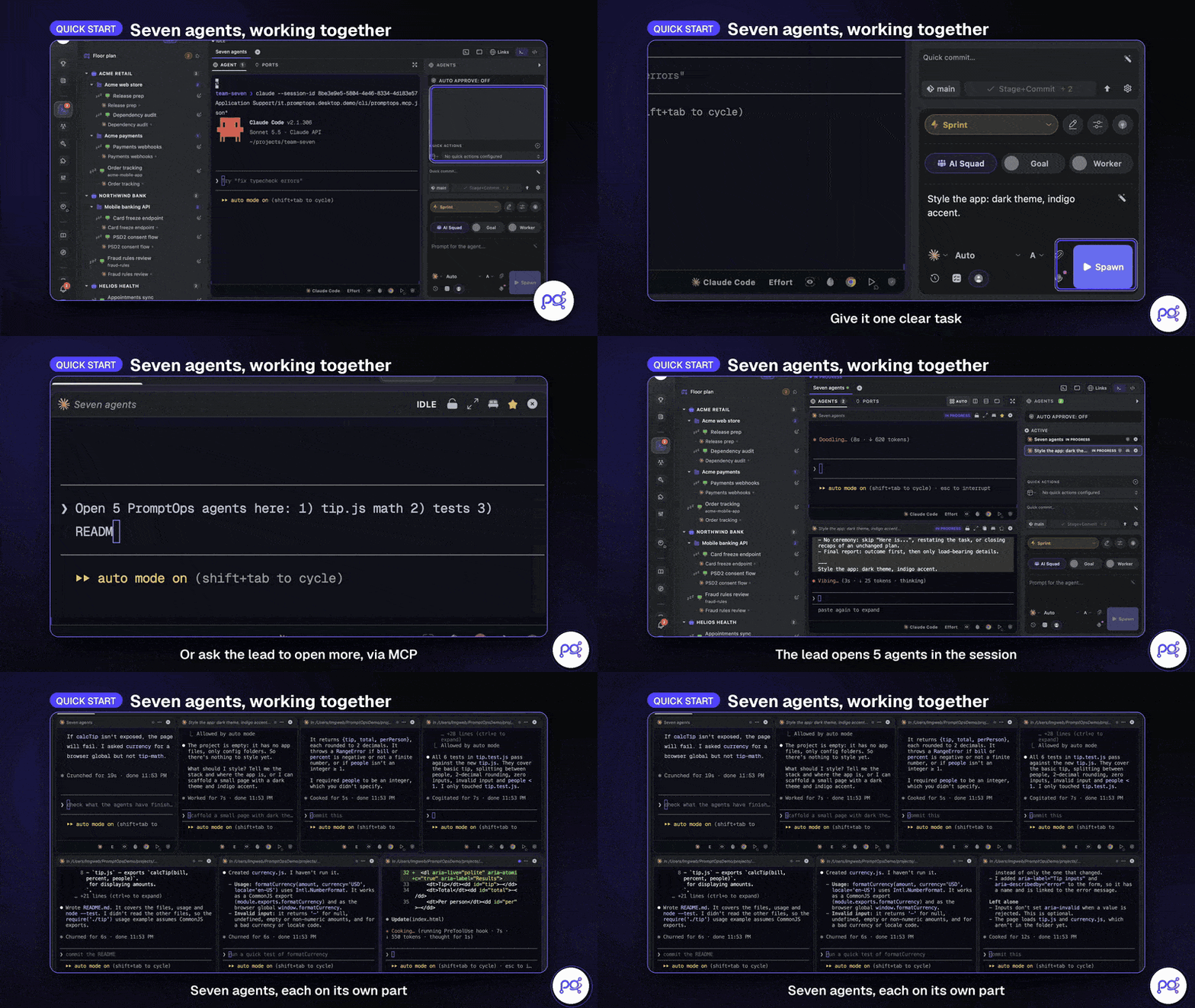
- Let it open more agents: ask the lead "Open 3 PromptOps agents here: one for the tests, one for the README, one for a review", and they appear next to it, each on its own part. Claude Code and Codex get the PromptOps MCP server automatically; every other agent can do the same through the
promptops ctlcommand in its terminal.
Features
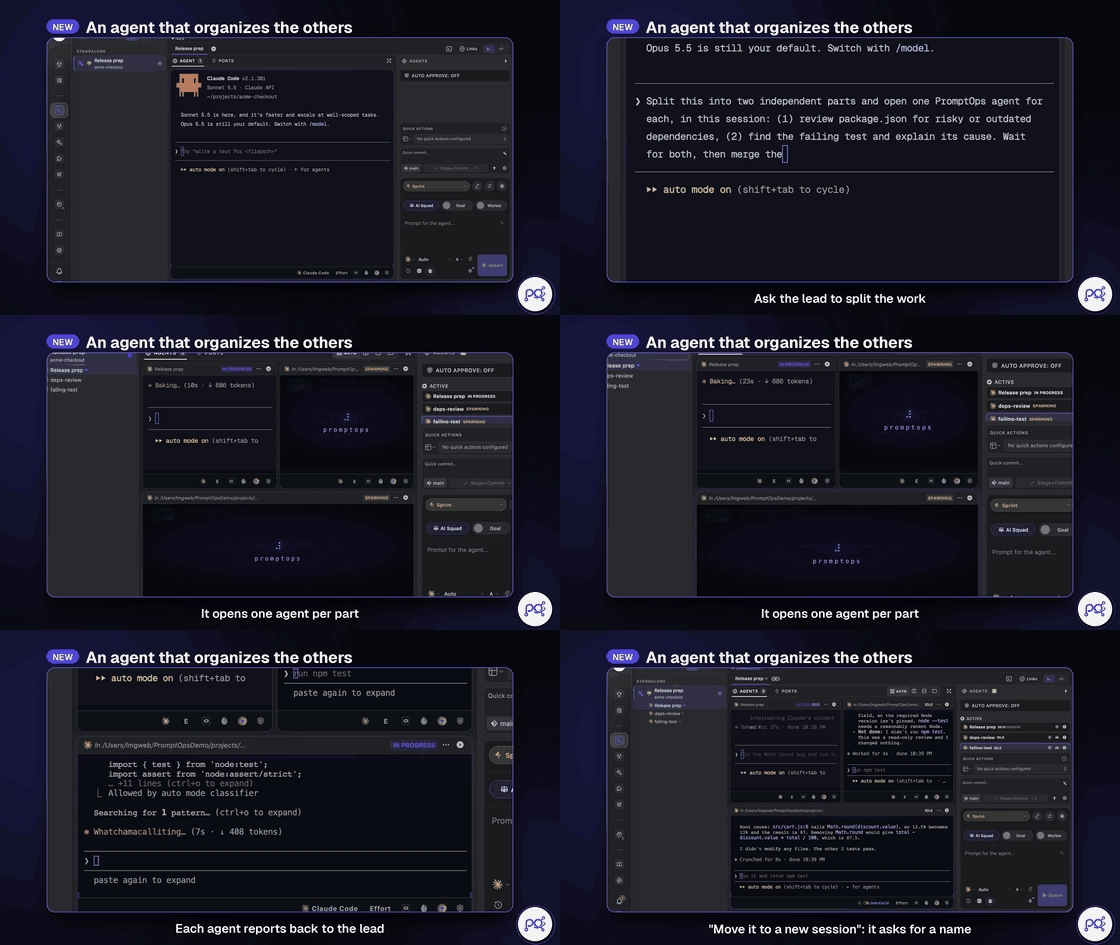
Agents That Run AgentsAsk your lead agent to split the work: through the built-in MCP server it opens one agent per part, collects their reports and moves work to a new session. Risky actions stay behind your approval. |
|
|
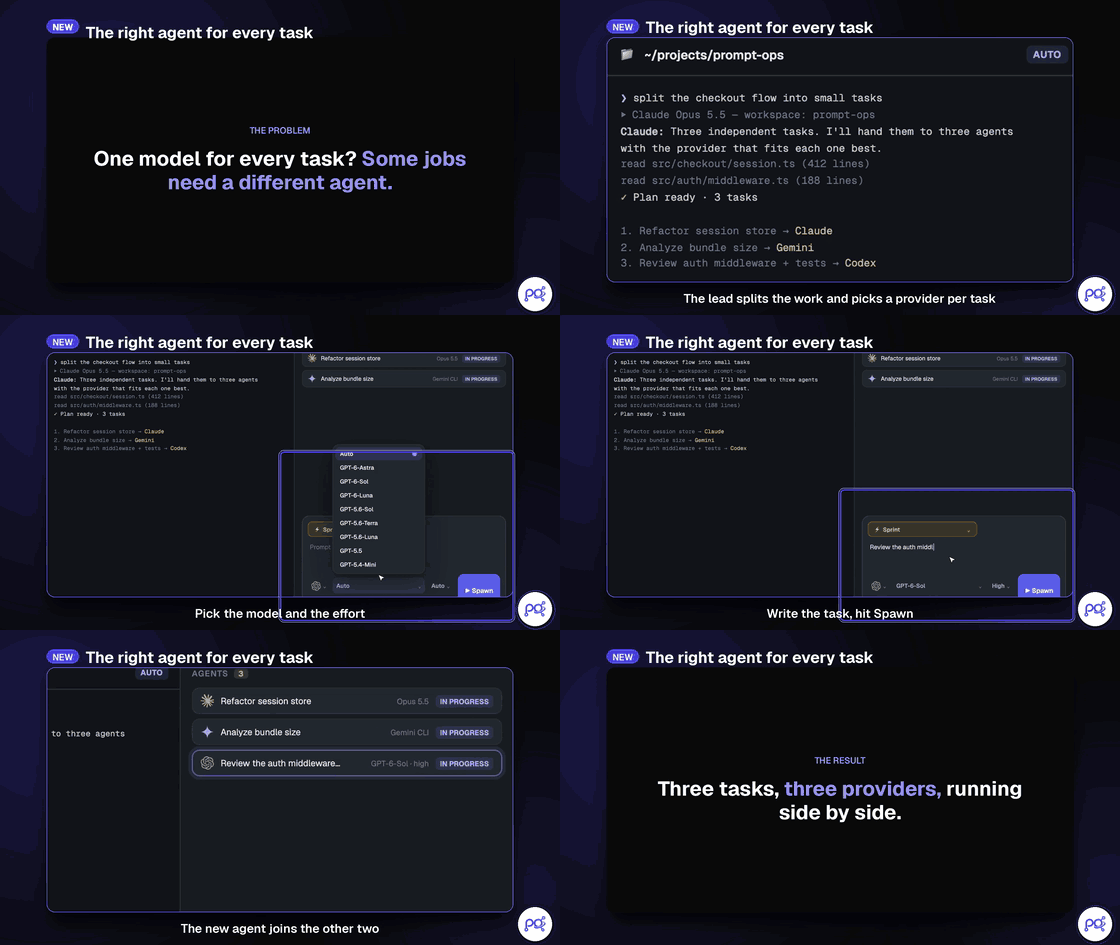
The Right Agent for Every TaskPick the provider, model and effort per sub-agent: Claude on the refactor, Gemini on the bundle analysis, Codex on the review — all in one session. Working modes (Sprint, Architect, Detective, Paranoid…) map to each CLI's native flags. |
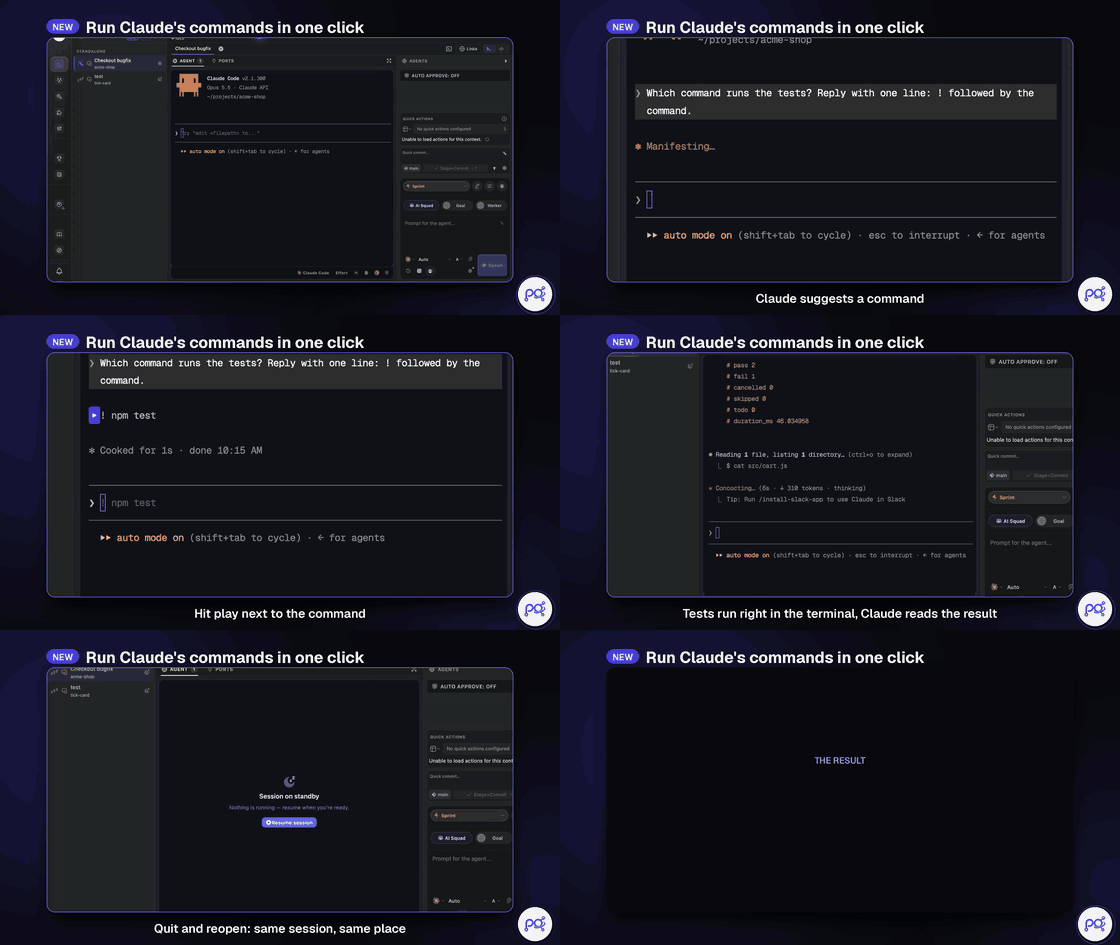
One-Click Commands, Sessions That SurviveWhen Claude suggests a command, hit play next to it: it runs in the terminal and the agent reads the result. Quit and reopen the app — same sessions, same agents, same place. |
|
|
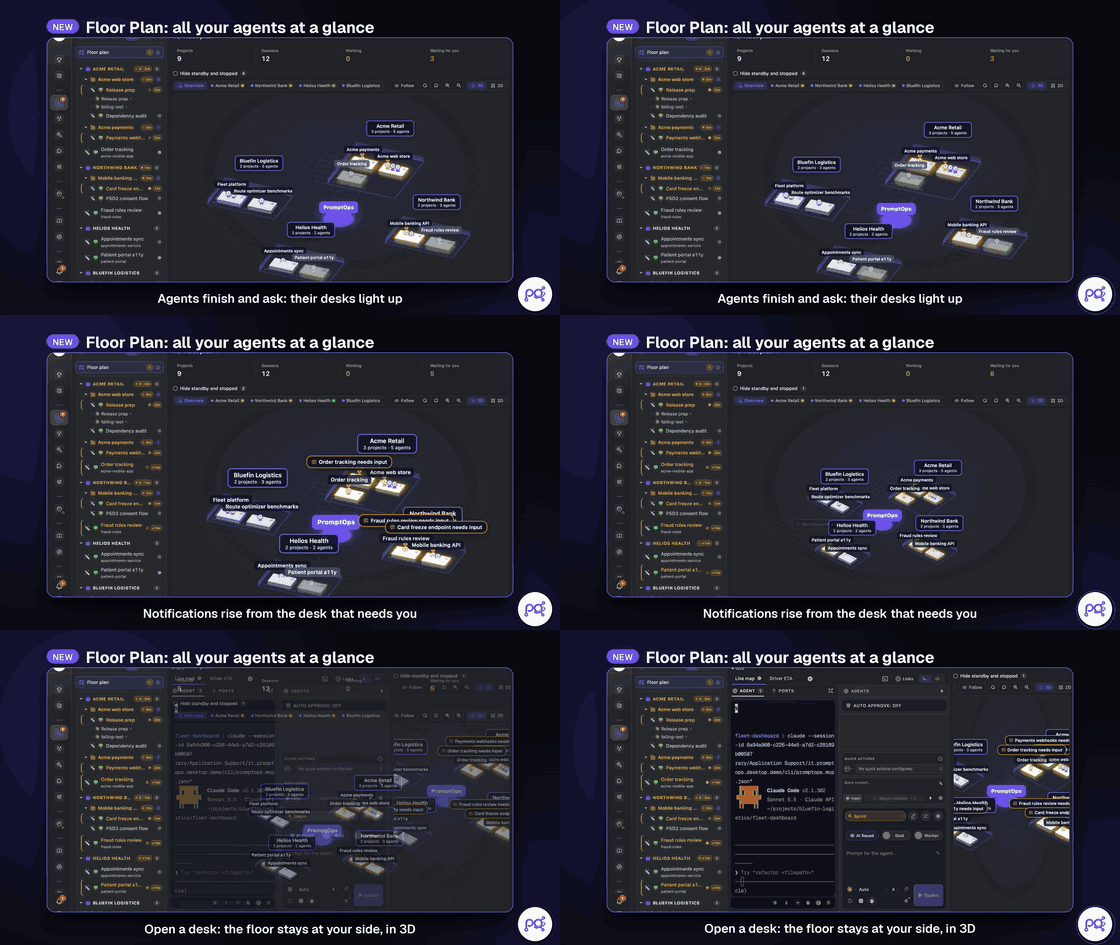
Floor PlanEvery client, every session, one floor. Desks light up when an agent finishes or needs you, and the floor stays at your side, in 3D or 2D, while you work. |
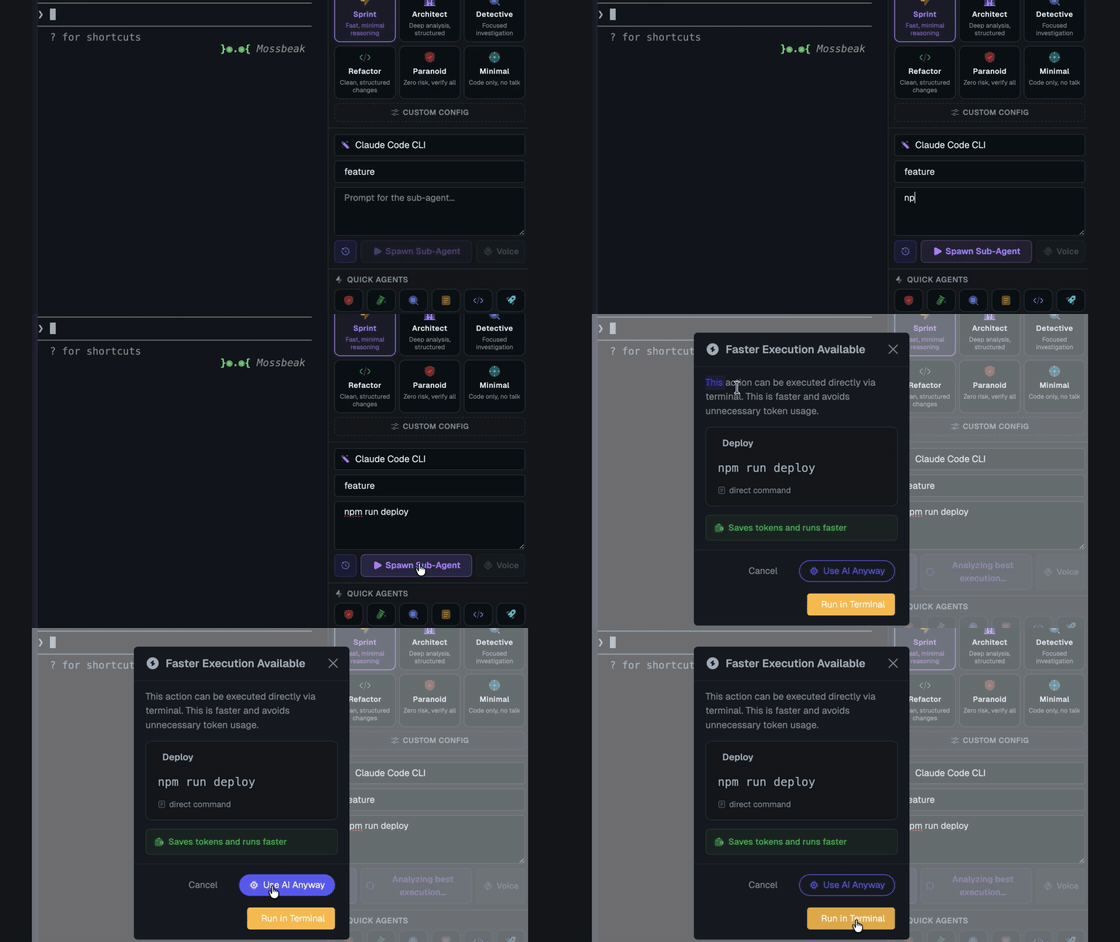
Token Efficiency EngineWhen a sub-agent prompt is just a command, PromptOps offers to run it straight in the terminal: faster, and no tokens spent. Every session shows its real token usage, cache hits and cost, read from the agent's own transcript. |
|
|
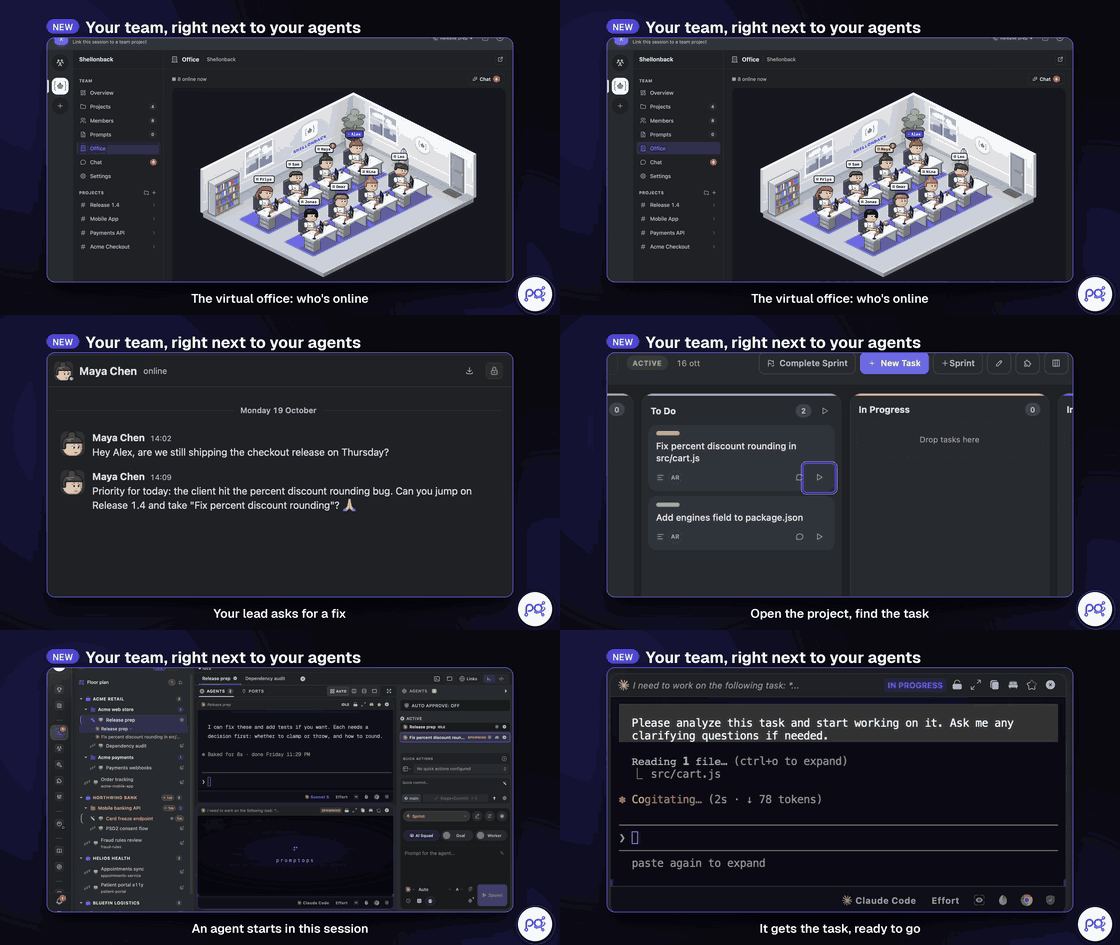
Teams PromptOps DesktopYour team right next to your agents: a virtual office, chat, project boards and sprints. Hit play on a task and an agent picks it up in your session; drag it to Done when the tests pass. Teams needs a server, so it lives in PromptOps Desktop, the hosted edition. In the open-source edition it shows a lock and runs no code. |
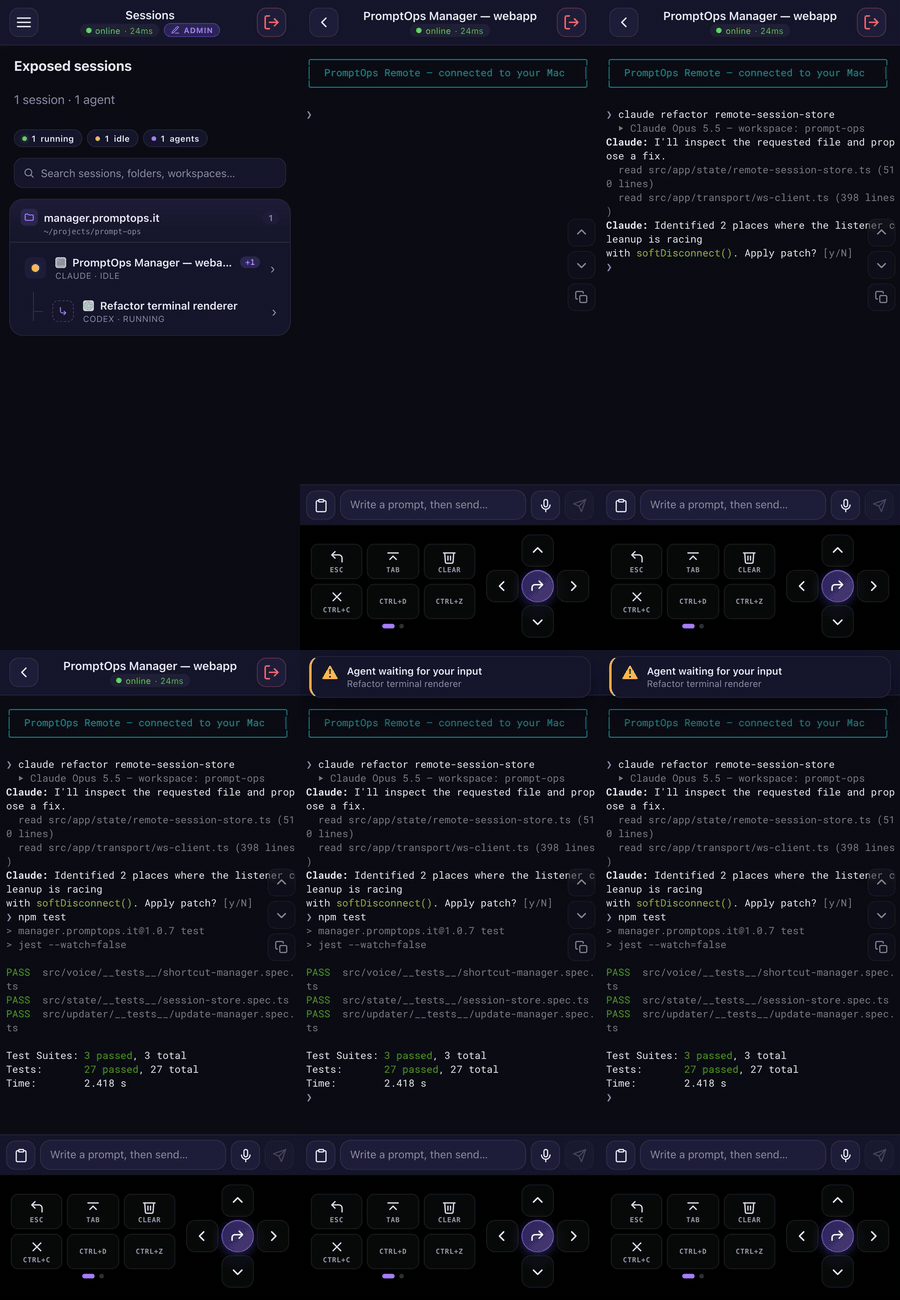
PromptOps Remote PromptOps DesktopYour sessions, from your phone too. With the PromptOps Remote app you see your desktop sessions and agents live, answer when an agent is waiting for your input and, if you allow it, type or dictate prompts from your phone. Pair it with the desktop QR code, no ports to open. |
|


Also in the box:
- Session Vault — Sessions, prompts, notes and settings encrypted record by record with AES-256-GCM, key in your OS keychain. Passphrase-encrypted backups to move to another computer or recover lost data. Format and threat model →
- Prompt library — Versioned prompts with variables, categories, tags and stars, one click away from any agent.
- Plugins you build locally — A sandboxed plugin host and Plugin Studio: scaffold a plugin in a folder, let an agent write it, reload it live. Share it with a pull request to the official catalog. Plugin guide →
- Built-in dev tools — Git explorer and AI commit messages, database explorer, code editor, Docker and ports panels, SSH terminals.
- Provider limits, handled — When an agent hits its plan limit, PromptOps shows which other installed CLIs can take over and switches with one click.
- Voice prompts on your device — Local Whisper transcription; your own Groq key only as a fallback, if you save one in Settings.
- Usage and speed — Token usage per session and a side-by-side speed test of the models you have access to.
- Native and light — Rust and Tauri 2 with a native PTY. No bundled Chromium.
Supported Agents
Works with any CLI agent — if it runs in a terminal, it runs in PromptOps.
 Claude Code
 Codex
Codex
 Gemini CLI
 Antigravity
 GitHub Copilot
 Cursor
 Grok
Grok
 Muse
Muse
 Hermes
 Z.AI
Z.AI
 Kimi
Kimi
 OpenCode
PromptOps CLI
+ any CLI agent
OpenCode
PromptOps CLI
+ any CLI agent
PromptOps launches the official CLIs with the accounts you already pay for. No proxy, no token resale: each agent talks to its own provider, under its own terms.
Product names and logos belong to their owners. PromptOps is an independent project, not affiliated with or endorsed by them.
Missing one? Adding a provider is a well-defined change — see CONTRIBUTING.md.
Install
PromptOps Desktop — ready to run
macOS, Windows and Linux. Includes Teams, sync across devices, the mobile app and SSO, and needs an account.
- Download from GitHub Releases, notarized on macOS.
- Or, with Node.js 18 or newer:
npx @shellonback/promptops. It installs and opens PromptOps Desktop, and refuses any download that is not signed with the PromptOps release key.
It encrypts your session data with the same algorithm as the open-source edition; the difference is that the key is held by our servers, so your sessions can follow you. See PRIVACY.md.
Open-source edition — build it yourself
No account and no server: everything stays on your computer. There are no prebuilt binaries of this edition; build it with the commands below.
These are the exact commands our CI runs on a clean macOS, Windows and Linux machine for every change.
1. Install the tools — Node.js 24.15 or newer (22.22.3 or a newer 22.x also works: Angular requires it), Rust (stable), Git and CMake.
macOSxcode-select --install
brew install node cmake
curl --proto '=https' --tlsv1.2 -sSf https://sh.rustup.rs | sh
Install Visual Studio Build Tools with the Desktop development with C++ workload, then in PowerShell:
winget install OpenJS.NodeJS.LTS Rustlang.Rustup Git.Git Kitware.CMake LLVM.LLVM
Open a new terminal afterwards so the new tools are on your PATH. WebView2 is already part of Windows 10 and 11.
sudo apt-get update
sudo apt-get install -y build-essential curl wget file git cmake clang \
  libwebkit2gtk-4.1-dev libgtk-3-dev libayatana-appindicator3-dev \
  librsvg2-dev libssl-dev libxdo-dev
curl -fsSL https://deb.nodesource.com/setup_24.x | sudo -E bash - && sudo apt-get install -y nodejs
curl --proto '=https' --tlsv1.2 -sSf https://sh.rustup.rs | sh
On Fedora, Arch and others, install the same libraries from the Tauri prerequisites page.
2. Get the code and its dependencies (same on every platform):
git clone https://github.com/shellonback/promptops.git
cd promptops/apps/web
npm ci
cd ../desktop
npm ci
3. Run it with hot reload:
npm run dev
The first build compiles the Rust side and takes a few minutes; later starts are fast.
4. Or build the installer for your platform:
npm run build
On macOS the DMG step opens a Finder window for a moment to lay out the disk image (set CI=true to skip it). You will find it in apps/desktop/src-tauri/target/release/bundle/ (.dmg on macOS, .exe on Windows, .deb and .AppImage on Linux). These builds are not code-signed. On macOS, the first time you open the app, go to System Settings → Privacy & Security and choose Open Anyway, or run xattr -dr com.apple.quarantine /Applications/PromptOps.app. On Windows, SmartScreen asks you to confirm with More info → Run anyway.
Community & Support
- Feedback & ideas: Missing something? Open an issue.
- Telegram: releases, experiments and early access on t.me/promptoperations.
- Privacy: The open-source edition has no telemetry, no analytics and no update checks. PromptOps Desktop needs an account and talks to PromptOps servers. PRIVACY.md explains what each edition sends and where.
- Security: Report vulnerabilities privately, as described in SECURITY.md.
- Open source and hosted: what lives here and what needs PromptOps Desktop, and who decides: GOVERNANCE.md.
- Show support: Star the repo to follow along.
Developing
Want to contribute or run locally? See CONTRIBUTING.md. Commits are signed off (DCO).
| Path | What it is |
|---|---|
apps/desktop |
Tauri 2 shell in Rust: terminals, agents, local data store, Session Vault, MCP server and CLI |
apps/web |
Angular interface |
apps/npm |
npx @shellonback/promptops: installs PromptOps Desktop, verifying the release signature |
docs |
Design notes: the architecture, the Session Vault, the plugin guide, dependencies and how releases are made |
Languages
PromptOps speaks 15 languages: English, Italiano, Français, Español, Deutsch, Português, 中文, 日本語, Русский, العربية, हिन्दी, Polski, Nederlands, Svenska and 한국어. Switch from the bottom bar.
License
PromptOps is free and open source under the Apache License 2.0. Third-party licenses are listed in THIRD-PARTY-NOTICES.txt.
"PromptOps" and the PromptOps logo are trademarks of Shellonback S.r.l. — see TRADEMARK.md.
Reviews (0)
Sign in to leave a review.
Leave a reviewNo results found