quoracle
Health Pass
- License — License: AGPL-3.0
- Description — Repository has a description
- Active repo — Last push 0 days ago
- Community trust — 26 GitHub stars
Code Fail
- fs module — File system access in assets/tailwind.config.js
- rm -rf — Recursive force deletion command in priv/groves/livebench/scripts/prepare-data.sh
- eval() — Dynamic code execution via eval() in priv/groves/livebench/scripts/score-coding.sh
- exec() — Shell command execution in priv/groves/livebench/scripts/score-coding.sh
- rm -rf — Recursive force deletion command in priv/groves/livebench/scripts/score-coding.sh
Permissions Pass
- Permissions — No dangerous permissions requested
This tool is a Phoenix LiveView application that orchestrates recursive, multi-agent AI systems. It routes complex tasks through a consensus of multiple language models, persisting state to a database and providing a real-time dashboard.
Security Assessment
The application handles sensitive data by design, as it requires LLM API keys to function, though no hardcoded secrets were detected. It does not request dangerous permissions. However, the scan flagged several significant issues in its benchmarking shell scripts, including `rm -rf` recursive force deletions, `eval()` dynamic code execution, and direct shell command execution. While the broader context of these scripts is to evaluate model performance, the inclusion of dynamic execution and forceful deletion commands introduces non-trivial risk. A file system access flag was also raised for a frontend asset. Overall risk: Medium.
Quality Assessment
The project appears to be actively maintained with a repository push as recent as today. It operates under the standard AGPL-3.0 license and has garnered a modest but positive community trust signal with 26 GitHub stars. The documentation is extensive and clearly outlines the architecture, configuration, and current status, indicating a well-thought-out project.
Verdict
Use with caution, primarily in isolated development environments rather than unsupervised production, due to the inherently sensitive API key handling and risky shell execution features.
Recursive agent orchestration with multi-LLM consensus
Quoracle
Recursive agent orchestration with multi-LLM consensus.
Quoracle is a Phoenix LiveView application that lets you build hierarchical agent systems where every decision is made by consensus across multiple language models. Instead of trusting one model to get it right, Quoracle queries your entire model pool and only executes the action they agree on. Agents spawn child agents, communicate via messages, and persist their full state to PostgreSQL -- all visible in real time through a browser-based dashboard.
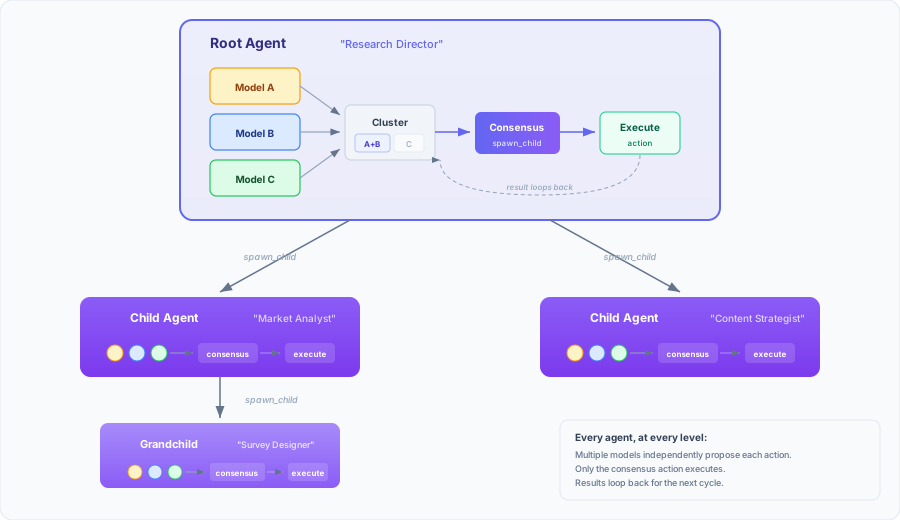
What this is for: Exploring multi-agent orchestration, experimenting with consensus-driven AI, and running complex tasks that benefit from diverse model perspectives. If you've ever wished you could throw three different LLMs at a problem and take the best answer, this is that -- but recursive.
What this is not for: Simple chatbot interfaces, single-model workflows (you'd be better served by something lighter), or unsupervised production deployments (see Security).
Table of Contents
- Prerequisites
- Setup
- First Run
- Usage Tips
- Groves
- Security
- Tech Rundown
- Configuration Reference
- Current Status
- Contributing
- License
Prerequisites
What you need depends on how you're deploying:
All deployments:
- API keys for at least one supported LLM provider, plus an embedding model (see First Run)
Development (building from source):
- Elixir >= 1.18 with OTP >= 27
- PostgreSQL >= 14 (tested with 17)
- libvips -- required for vision/image features
- Debian/Ubuntu:
sudo apt install libvips libvips-dev - Fedora/RHEL:
sudo dnf install vips vips-devel - macOS:
brew install vips
- Debian/Ubuntu:
Docker:
- Docker and Docker Compose (PostgreSQL is included)
Release tarball:
- PostgreSQL >= 14
- libvips (runtime library only, no dev headers needed)
- Debian/Ubuntu:
sudo apt install libvips - Fedora/RHEL:
sudo dnf install vips
- Debian/Ubuntu:
- No Elixir or Erlang required -- the release is self-contained
Setup
Three ways to run Quoracle, depending on your situation.
Development
The standard "clone and go" workflow:
git clone https://github.com/shelvick/quoracle.git
cd quoracle
PostgreSQL needs password authentication for Ecto (it connects via TCP, so peer auth won't work). If you haven't set a password for your database user:
sudo -u postgres psql -c "ALTER USER postgres PASSWORD 'postgres';"
Then:
mix setup
This pulls dependencies, compiles everything, creates the database, runs migrations, and builds assets.
You'll also need an encryption key to store API credentials:
export CLOAK_ENCRYPTION_KEY=$(openssl rand -base64 32)
Without it the app still starts, but you won't be able to add model credentials, which means you won't be able to do much of anything.
You can put this (and other env vars) in a .env file in the project root for convenience. The dev server doesn't source it automatically, but you can use direnv or source .env before starting:
cp .env.example .env
# edit .env, then:
source .env
mix phx.server
Open http://localhost:4000.
Docker
git clone https://github.com/shelvick/quoracle.git
cd quoracle
cp .env.example .env
Edit .env and fill in the required values. Generate each key in your terminal, then paste the output:
# Run each command and paste its output into .env
openssl rand -base64 64 | tr -d '\n'   # → paste as SECRET_KEY_BASE
openssl rand -base64 32                 # → paste as CLOAK_ENCRYPTION_KEY
Then:
docker-compose up
The database URL and bind address are handled automatically by docker-compose.yml -- you don't need to touch those.
Release Tarball
Download the latest release tarball from GitHub Releases, or build one yourself:
MIX_ENV=prod mix deps.get --only prod
MIX_ENV=prod mix compile
MIX_ENV=prod mix assets.deploy
MIX_ENV=prod mix release
The tarball extracts into a quoracle-VERSION/ directory. Inside you'll find a .env.example -- copy it to .env and fill in all three required values:
DATABASE_URL=ecto://user:password@localhost/quoracle
SECRET_KEY_BASE=<generate with: openssl rand -base64 64 | tr -d '\n'>
CLOAK_ENCRYPTION_KEY=<generate with: openssl rand -base64 32>
Create the database and start the server:
bin/migrate    # creates database (if needed) and runs migrations
bin/server     # runs migrate, then starts the application
Both bin/migrate and bin/server source .env automatically if it's present in the release root.
By default Quoracle binds to 127.0.0.1. Set PHX_BIND_ADDRESS=0.0.0.0 if you need it on all interfaces (Docker does this automatically). See Configuration Reference for all options.
First Run
Once Quoracle is running, open the dashboard and head to Settings (top-right).
1. Add Credentials
Go to the Credentials tab. This is where you give Quoracle access to your LLM providers.
Quoracle supports (in theory) any model listed on models.dev via the ReqLLM library. The model spec format is provider:model-name. A few common examples:
| Provider | Model Spec Format | Extra Fields |
|---|---|---|
| OpenAI | openai:gpt-4o |
-- |
| Anthropic | anthropic:claude-sonnet-4-20250514 |
-- |
google:gemini-2.5-pro |
-- | |
| Google Vertex AI | google-vertex:gemini-2.5-pro |
Resource ID (project ID) |
| Azure OpenAI | azure:gpt-4 |
Deployment ID |
| Groq | groq:llama-3.3-70b-versatile |
-- |
Local/self-hosted models are also supported. If you're running Ollama, vLLM, LM Studio, LlamaCpp, or TGI, use the corresponding provider prefix and fill in the Endpoint URL field (e.g., http://localhost:11434 for Ollama). The API key is optional for local models.
| Provider | Model Spec Format | Endpoint URL |
|---|---|---|
| Ollama | ollama:llama3 |
http://localhost:11434 |
| vLLM | vllm:llama3 |
http://localhost:8000 |
| LM Studio | lmstudio:model-name |
http://localhost:1234 |
This is not an exhaustive list -- any provider supported by ReqLLM should work. API keys are encrypted at rest with AES-256-GCM.
You need at least one credential to do anything, but the real value of Quoracle comes from having multiple models from different providers.
2. Configure Model Roles
Switch to the Model Config tab. Here you assign models to specific system functions:
- Embedding model -- used for semantic similarity within consensus and for deduplicating agent lessons. Required.
- Answer engine model -- powers the
answer_engineaction (web search/grounding). Pick a model with web search capability; Google models get native search grounding, but any model that supports search will work. - Summarization model -- used when spawning child agents to summarize the accumulated context that gets passed down the hierarchy.
- Image generation models -- for the
generate_imagesaction.
These should be configured before you start creating tasks. If an agent tries to use a feature (say, the answer engine) and no model is configured for it, it will fail at runtime rather than degrade gracefully.
3. Create Profiles
Switch to the Profiles tab. A profile defines which models participate in consensus and what actions the agent is allowed to take.
Model pool: Pick at least one model, but three is the sweet spot for consensus. Mixing providers (e.g., one OpenAI, one Anthropic, one Google) gives you the most diverse perspectives.
Max refinement rounds (0–9) controls how many times the consensus pipeline can iterate before forcing a decision. The default is 4. Lower values make agents decide faster (and cheaper); higher values let them deliberate longer on complex tasks. Temperature descent adapts automatically to the configured round count.
Capability groups control what actions are available:
| Group | What It Unlocks |
|---|---|
file_read |
Read files from disk |
file_write |
Write and edit files |
external_api |
Call external APIs (call_api action) |
hierarchy |
Spawn/dismiss child agents, adjust budgets |
local_execution |
Shell commands, MCP tools |
Some actions are always available regardless of groups: wait, orient, todo, send_message, fetch_web, answer_engine, generate_images, batch operations, and skill management.
Note that profile names and descriptions are visible to parent agents when they're deciding which profile to assign to a child. A well-named profile like "Cautious Researcher -- read-only analysis, no execution" helps the parent make better delegation decisions.
4. Create a Task
Back on the main dashboard, click New Task. The form has three sections:
Agent Identity (shapes the system prompt):
- Profile -- which consensus profile to use (see above)
- Role -- who the agent is ("Senior DevOps Engineer", "Security Auditor")
- Skills -- comma-separated skill names to pre-load (see Usage Tips)
- Cognitive Style -- how the agent thinks: Efficient, Exploratory, Problem Solving, Creative, or Systematic
- Output Style -- response format: Detailed, Concise, Technical, or Narrative
- Delegation Strategy -- Sequential or Parallel child spawning
- Global Constraints -- hard rules enforced across the entire agent hierarchy
- Global Context -- project background shared with all agents
Task Work (shapes the user prompt):
- Task Description -- what the agent should accomplish (this is the only required field)
- Success Criteria -- how the agent knows it's done
- Immediate Context -- relevant situational information
- Approach Guidance -- methodology hints
Budget -- maximum spend in USD across all models for this task's entire agent tree.
Hit create, and the root agent will begin its first consensus cycle.
Usage Tips
Writing Good Profiles
The model pool is where most of the magic happens. A few things we've found:
- Three models is the sweet spot. Two can disagree with no tiebreaker. Four works but costs more without much benefit. Three gives you a clear majority.
- Mix providers. An all-OpenAI pool is just GPT with extra steps. Claude Sonnet + GPT + Gemini gives you genuinely different reasoning styles.
- Match capability groups to the task. Fewer available actions means a smaller decision space, which means fewer opportunities for the model to go sideways. A research agent that only reads the web doesn't need
local_execution. A deployment agent does. Give agents exactly the capabilities they need and no more. - Create specialized profiles. "Researcher" (read-only, no execution), "Builder" (full access), "Analyst" (external API + file read) -- then pick the right one per task.
- Put thought into the name and description. Parent agents see them when choosing which profile to give a child. "Careful Code Reviewer" and "Fast Prototyper" will lead to different delegation patterns even with identical capability groups.
Using Skills
Skills are reusable knowledge files that get injected into an agent's system prompt. By default they live at ~/.quoracle/skills/, but this is configurable in Settings > System:
~/.quoracle/skills/
  deployment/
    SKILL.md          # required -- main skill content
    scripts/           # optional -- shell scripts referenced by the skill
    references/        # optional -- documentation, links
    assets/            # optional -- images, files
  code-review/
    SKILL.md
A SKILL.md is YAML frontmatter plus markdown:
---
name: deployment
description: Production deployment procedures for our infrastructure
metadata:
  complexity: medium
---

# Deployment

## Steps
1. Validate configuration against schema
2. Run preflight checks
3. ...
Attach skills at task creation by listing them comma-separated in the Skills field. Agents can also learn additional skills at runtime via the learn_skills action. Think of skills as giving your agent a procedures manual rather than hoping it figures things out from scratch.
The format is compatible with skills from other agentic tools -- if you already have skill files from another framework, they should work here, though you may want to edit out any tool-specific instructions that don't apply.
Prompting Well
The prompt fields map directly to how the LLM sees its instructions. A few patterns that work:
Role is the most impactful field. Be specific. "Software engineer" is vague; "Senior Python backend engineer specializing in async systems" gives the model a much clearer persona to adopt.
Task Description + Success Criteria work as a pair. The description says what, the criteria say when you're done. Vague criteria lead to agents that spin their wheels ("improve the codebase" vs. "all tests pass and coverage exceeds 80%").
Cognitive Style matters more than you'd think. Systematic works well for multi-step procedures. Exploratory is better for research tasks where you don't know exactly what you're looking for. Problem Solving shines for debugging.
Global Constraints propagate to every agent in the hierarchy, including children and grandchildren. Use them for hard rules: "Never modify files in the /prod directory", "All API calls must use HTTPS", "Budget per child must not exceed $0.50".
Approach Guidance is your chance to nudge the methodology without mandating it. "Consider using blue-green deployment" is a suggestion; putting it in constraints makes it a rule.
Groves
Skills tell a single agent how to do something. But non-trivial tasks need trees of agents working together -- a coordinator dispatching workers, governance rules that apply to the whole hierarchy, schemas that keep shared data consistent, filesystem boundaries that keep agents in their lane. When all of that coordination lives in natural language inside skill files, agents forget rules under context pressure, misconfigure children, and produce malformed output. The failure rate compounds with tree depth.
Groves solve this by moving coordination logic out of prose and into a machine-readable manifest that Quoracle enforces mechanically. A grove declares the full agent tree: who spawns whom, what rules apply, what data contracts exist, and how to start the whole thing with a single click.
The analogy: If skills are Docker containers, groves are Docker Compose files. Individual containers are useful on their own. A compose file declares how they work together -- networking, volumes, startup order, shared config. You docker-compose up instead of manually starting each container with the right flags.
What's in a Grove
A grove is a directory containing a manifest (GROVE.md), skills, governance rules, schemas, and bootstrap configuration:
~/.quoracle/groves/
  my-grove/
    GROVE.md                       # Manifest (required)
    skills/                        # Skills belonging to this grove
      coordinator/
        SKILL.md
      worker/
        SKILL.md
    governance/                    # Rules injected into agent prompts
      safety-rules.md
    schemas/                       # JSON Schema for data validation
      output.schema.json
    bootstrap/                     # Pre-fills the task creation form
      global-context.md
      task-description.md
      success-criteria.md
    scripts/                       # Supporting tooling
    README.md                      # Optional documentation
By default, Quoracle looks for groves in ~/.quoracle/groves/. You can change this in Settings > System. Quoracle also ships with example groves in priv/groves/ -- copy them to your groves directory to use them.
Skill resolution: When an agent requests a skill by name, Quoracle checks the active grove's skills/ directory first, then falls back to the global ~/.quoracle/skills/ directory. Grove-local skills shadow global skills of the same name, so a grove can carry customized versions without affecting anything else.
The GROVE.md Manifest
Same format as SKILL.md -- YAML frontmatter between --- delimiters. The frontmatter declares everything Quoracle needs to bootstrap and enforce the agent tree:
---
name: my-grove
description: >
  Multi-agent research system. Coordinator dispatches
  specialist workers, aggregates findings.
version: "1.0"

topology:
  root: coordinator
  edges:
    - parent: coordinator
      child: worker
      auto_inject:
        skills: [worker]

bootstrap:
  skills: [coordinator]
  role: "Research Coordinator"
  cognitive_style: systematic
  delegation_strategy: parallel
  global_context_file: bootstrap/global-context.md
  task_description_file: bootstrap/task-description.md
  success_criteria_file: bootstrap/success-criteria.md

governance:
  hard_rules:
    - type: shell_pattern_block
      pattern: "rm -rf|dd if="
      message: "Destructive commands are forbidden."
      scope: all

    - type: action_block
      actions: [execute_shell]
      message: "Workers may not run shell commands."
      scope: [worker]

  injections:
    - source: governance/safety-rules.md
      inject_into: [coordinator, worker]
      priority: high

schemas:
  - name: output.json
    definition: schemas/output.schema.json
    validate_on: file_write
    path_pattern: "runs/*/output.json"

workspace: "~/.quoracle/projects/my-grove"

confinement:
  coordinator:
    paths:
      - ~/.quoracle/projects/my-grove/runs/**
    read_only_paths:
      - ~/.quoracle/projects/my-grove/data/**
  worker:
    read_only_paths:
      - ~/.quoracle/projects/my-grove/data/**
---
Each top-level section is described below.
Bootstrap
The bootstrap section pre-fills the task creation form when you select a grove from the dropdown on the dashboard. Instead of copy-pasting role descriptions, constraints, and context into a dozen form fields every time, you select the grove and the form fills itself.
Bootstrap supports two kinds of fields:
File references (read from the grove directory at selection time):
global_context_file,task_description_file,success_criteria_file,immediate_context_file,approach_guidance_file
Inline values (passed through directly):
role,cognitive_style,delegation_strategy,output_style,profile,budget_limit,global_constraints,skills
File paths are relative to the grove root. Path traversal attempts (../, absolute paths, symlinks escaping the grove) are rejected.
Governance
Governance rules are the things you really don't want an agent to forget under context pressure. Instead of inlining "CRITICAL: Never run destructive commands" into every skill and hoping the LLM retains it, you declare it once in the manifest and Quoracle enforces it at two layers: the prompt (so the model knows the rule) and the runtime (so it can't violate it even if it tries).
Hard rules come in two types:
shell_pattern_block -- rejects shell commands matching a regex pattern before they execute:
- type: shell_pattern_block
  pattern: "rm -rf|dd if="
  message: "Destructive commands are forbidden."
  scope: all
action_block -- blocks specific action types entirely:
- type: action_block
  actions: [execute_shell, call_mcp]
  message: "Workers may not run shell commands or MCP tools."
  scope: [worker]
scope controls which skills the rule applies to. Use a list of skill names, or all for every agent in the grove.
Injections are governance documents that get auto-injected into agent system prompts:
injections:
  - source: governance/safety-rules.md
    inject_into: [coordinator, worker]
    priority: high
priority: high places the content before skill content in the prompt. normal (default) places it after. Either way, delivery is guaranteed -- no manual inlining, no version drift, one source of truth.
Filesystem Confinement
The confinement section declares which paths each skill is allowed to read and write. Quoracle enforces this at the action layer -- file_read, file_write, and execute_shell all check confinement before proceeding.
confinement:
  coordinator:
    paths:                              # Read + write
      - ~/.quoracle/projects/runs/**
    read_only_paths:                    # Read only
      - ~/.quoracle/projects/data/**
  worker:
    read_only_paths:
      - ~/.quoracle/projects/data/**
Patterns support * (single directory segment) and ** (any depth). Tilde (~) is expanded at parse time. A coordinator that tries to write outside its declared paths gets a confinement violation error. A worker that tries to write anything (only read_only_paths declared) gets blocked.
Skills not listed in confinement are unrestricted. This is intentional -- confinement is opt-in per skill, and unlisted skills get a log warning rather than a hard failure.
Schema Validation
The schemas section defines JSON Schema files that Quoracle validates against before writing. If an agent tries to write a file with a missing required field or a wrong type, the write is rejected with field-level error messages that the agent can act on.
schemas:
  - name: output.json
    definition: schemas/output.schema.json
    validate_on: file_write
    path_pattern: "runs/*/output.json"
path_pattern is a glob relative to the grove's workspace. Only files matching the pattern are validated -- everything else passes through. When multiple schemas match (unlikely but possible), the most specific pattern wins.
Schema files use standard JSON Schema (Draft 2020-12). Put them in the grove's schemas/ directory.
Spawn Topology
The topology section declares the expected agent tree structure -- who spawns whom, and what gets auto-injected when they do.
topology:
  root: coordinator
  edges:
    - parent: coordinator
      child: worker
      auto_inject:
        skills: [worker]
        profile: my-profile
When a coordinator spawns a child matching the worker skill, Quoracle automatically injects the declared skills and profile. The parent agent still decides when to spawn, but doesn't have to remember how to configure the child correctly.
Auto-inject fields:
skills-- merged with any skills the parent already specified (union, no duplicates)profile-- used as a fallback if the parent didn't specify oneconstraints-- a file path (optionally with#section-nameanchor) whose content gets merged with downstream constraints
Edges declare valid relationships, not mandatory ones. An agent is free to not spawn a child if it doesn't need to. The topology is a declaration of what's expected, not an execution plan.
Shipped Groves
Quoracle ships with two groves in priv/groves/ that demonstrate the full feature set. Both are LLM benchmarks -- they make good examples because benchmarks naturally need everything groves offer: coordinated agent trees, strict governance (no cheating), filesystem confinement, and schema-validated output.
mmlu-pro -- 12,032 multiple-choice questions across 14 academic subjects. A coordinator dispatches one answerer per question, collects results, and scores everything via a shell script. Governance blocks internet access and external knowledge sources for answerers. Schema validation ensures well-formed reports.
livebench -- ~1,150 questions per release across 6 categories (math, reasoning, coding, language, data analysis, instruction following). Same coordinator/worker pattern with category-specific Python scoring scripts.
To try them:
mkdir -p ~/.quoracle/groves
cp -r priv/groves/mmlu-pro ~/.quoracle/groves/
cp -r priv/groves/livebench ~/.quoracle/groves/
Each grove has a README.md with setup instructions (dataset preparation, Python dependencies for scoring, etc.) -- read it before running. Then select the grove from the dropdown when creating a new task and the bootstrap config will pre-fill the form.
Of course, groves aren't just for benchmarks. Any multi-agent workflow benefits -- research pipelines, code review systems, data processing chains, anything where a coordinator delegates to specialized workers and you want the coordination enforced rather than hoped for.
Creating Your Own Grove
The simplest grove is a GROVE.md with a bootstrap section -- it just pre-fills the task form. Add sections as your system grows more complex:
Start with bootstrap. Define the role, skills, and prompt fragments your root agent needs. This alone saves you from manually filling out the task form every time.
Add governance when you need rules. If you find yourself inlining "NEVER do X" into every skill, move it to a governance injection. If you need mechanical enforcement (not just prompting), add hard rules.
Add topology when you spawn children. If your root agent spawns child agents, declare the edges so children get auto-injected with the right skills and profiles.
Add confinement when you need boundaries. If agents should only read/write specific directories, declare the paths. This is especially important for agents with
local_executionorfile_writecapabilities.Add schemas when you share structured data. If agents write JSON files that other agents or scripts need to parse, define a JSON Schema so malformed writes are caught at write time rather than downstream.
Groves are the unit of distribution. If you build something useful, the entire grove directory is self-contained and shareable.
Security
Quoracle stores API keys and secrets encrypted at rest using AES-256-GCM via Cloak. Sensitive values in action parameters (like {{SECRET:my_api_key}}) are resolved at execution time and scrubbed from results before they're fed back to the LLMs.
That said, there are important limitations.
What Quoracle Does
- Encrypts credentials and secrets at rest -- AES-256-GCM, key derived from
CLOAK_ENCRYPTION_KEY - Scrubs secrets from action results -- API keys, auth headers, and secret values are stripped from results before models see them
- Tags untrusted content -- results from external sources (shell output, web fetches, API responses) are wrapped in
NO_EXECUTEtags with cryptographically random IDs, making it difficult for injected instructions to escape their context - Multi-model consensus as a defense layer -- prompt injection against a single model doesn't help if the other models in the pool disagree. A successful injection would need to compromise a majority of models simultaneously, which is substantially harder. If you find a prompt injection that reliably defeats a multi-model profile, we'd consider that a bug -- please report it.
- Enforces capability groups -- agents can only execute actions their profile allows
- Per-agent budgets -- spending limits with escrow-based allocation to children
- Secret templating --
{{SECRET:name}}syntax keeps secrets out of prompt fields entirely
What Quoracle Does Not Do
- No user authentication. There is no login system. Anyone who can reach the web interface has full access to everything -- dashboard, settings, credentials. Quoracle assumes a single-user deployment or a trusted network.
- No sandbox for shell execution. The
execute_shellaction runs commands as the application's OS user. Capability groups gate whether an agent can run commands, not which commands. - No network isolation. Agents with
external_apiorfetch_webcan reach any endpoint the host machine can reach.
The practical advice: Run Quoracle in a VM or container where you're comfortable with the LLMs having the same access you'd give a junior developer you trust but want to keep an eye on. Don't expose the web interface to the public internet. Use capability groups to limit blast radius.
Tech Rundown
Agent Architecture
Agents are GenServers under a DynamicSupervisor. When an agent needs to execute an action, it spawns an ephemeral Router process for that specific action. The Router handles execution, returns the result, and terminates. This keeps action execution isolated -- one slow API call doesn't block another agent's shell command.
The agent itself has zero hardcoded decision logic. It doesn't know what "deploy" means or how to "write code." It receives messages, asks its model pool what to do, and executes whatever consensus returns. All intelligence lives in the LLMs and the prompt fields you configure.
Recursive Hierarchy
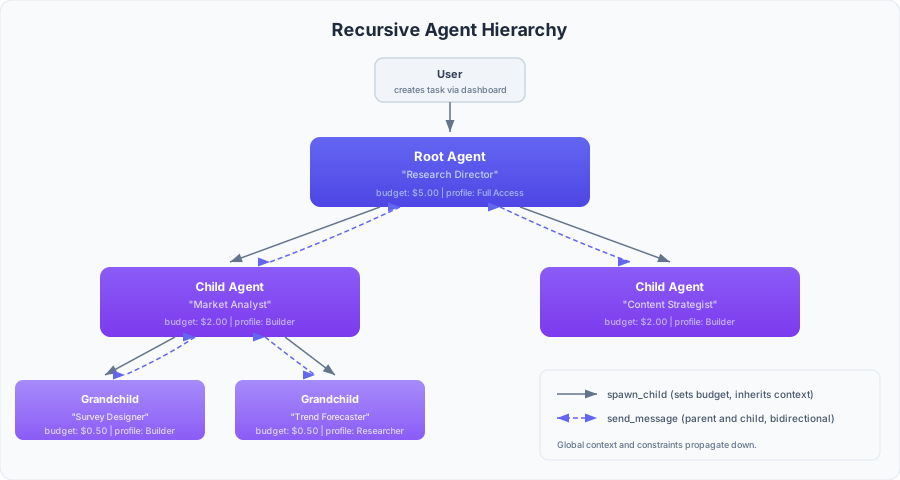
Agents can spawn child agents via the spawn_child action. Children inherit their parent's global context and constraints, plus whatever new prompt fields the parent specifies. Communication flows through direct messages between parent and child. Budget is allocated from parent to child with escrow-based tracking.
Persistence & Real-Time UI
Everything is persisted to PostgreSQL: tasks, agents, logs, messages, action results, costs. The LiveView dashboard subscribes to PubSub topics for real-time updates -- you see consensus decisions, action results, and inter-agent messages as they happen.
The dashboard has three panels: a task tree (left) showing the agent hierarchy, a log viewer (middle) with per-agent filtering, and a mailbox (right) for messages between you and your root agents.
Consensus Pipeline
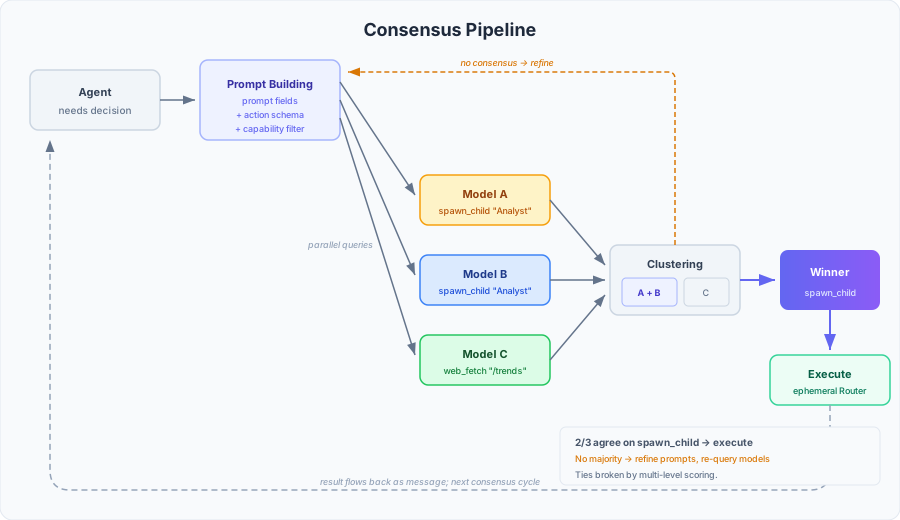
When an agent needs to make a decision, here's what happens:
- Prompt building -- the agent's prompt fields are assembled into a system prompt (identity, constraints, context) and a user prompt (task, criteria, situational info). Available actions are filtered by capability groups and serialized as a JSON schema.
- Parallel model query -- every model in the pool receives the same prompt simultaneously via
Task.async. Each model returns a candidate action with reasoning. - Action parsing -- responses are parsed into structured actions. Invalid or malformed responses are filtered out.
- Fingerprint clustering -- similar actions are grouped. "spawn_child with role DevOps" from two models clusters together even if the exact phrasing differs.
- Winner selection -- the largest cluster wins. Ties are broken by a multi-level scoring algorithm that considers action priority, wait parameters, and completion flags to select the most conservative option.
- Execution -- an ephemeral Router process spawns to handle the action (API call, file op, shell command, etc.) and terminates when done.
- Loop -- the result flows back as a message, and the agent enters its next consensus cycle.
Per-Model Conversation History
Each model in the consensus pool maintains its own separate conversation history. There are a few reasons for this:
- Context window utilization -- different models have different context limits. Per-model history lets each model use its full window without being constrained by the smallest in the pool.
- Independent condensation -- models decide for themselves when and how to summarize their history, preserving what they consider important.
- Cross-model memory -- when one model condenses away a detail that another model retained, the retained detail can still influence consensus. Models effectively remind each other of things the group might otherwise forget.
Actions
Agents choose from a broad action set, gated by capability groups:
| Category | Actions |
|---|---|
| Always available | wait, orient, todo, send_message, fetch_web, answer_engine, generate_images, batch_sync, batch_async, create_skill, learn_skills |
| File read | file_read |
| File write | file_write |
| External API | call_api |
| Hierarchy | spawn_child, dismiss_child, adjust_budget |
| Local execution | execute_shell, call_mcp |
Batch operations (batch_sync, batch_async) let agents execute multiple actions in a single consensus cycle -- sequentially or in parallel. Skill management (create_skill, learn_skills) lets agents author and load reusable knowledge on the fly.
PubSub Isolation
Every component receives its PubSub instance as an explicit parameter -- no global topics, no named processes, no process dictionary. This means the full test suite of 6000+ tests runs with async: true.
Configuration Reference
All configuration is via environment variables. In development, these override the defaults in config/dev.exs. In production, all three "required" variables must be set.
| Variable | Required | Default | Description |
|---|---|---|---|
DATABASE_URL |
yes | ecto://postgres:postgres@localhost/quoracle_dev (dev) |
PostgreSQL connection URL |
SECRET_KEY_BASE |
yes | (from dev.exs in dev) | Phoenix session signing key. Generate with openssl rand -base64 64 | tr -d '\n' |
CLOAK_ENCRYPTION_KEY |
yes | -- | AES-256-GCM encryption key for credentials/secrets. Generate with openssl rand -base64 32 |
PHX_HOST |
no | localhost |
Hostname for URL generation |
PORT |
no | 4000 |
HTTP listen port |
POOL_SIZE |
no | 10 |
Database connection pool size |
PHX_BIND_ADDRESS |
no | 127.0.0.1 |
Listen address. Set to 0.0.0.0 for all interfaces (Docker sets this automatically) |
ECTO_IPV6 |
no | -- | Set to true to enable IPv6 for database connections |
In development, DATABASE_URL and SECRET_KEY_BASE have sensible defaults and only need to be set if you want to override them. CLOAK_ENCRYPTION_KEY has no default -- the app starts without it, but credential storage won't work.
Current Status
Quoracle should be considered beta. The core consensus pipeline, agent hierarchy, and action system are functional and well-tested, but the project is under active development.
Things that work well:
- Multi-model consensus with 3+ providers
- Recursive agent spawning and communication
- Real-time dashboard with full observability
- Credential encryption and secret management
- Capability-based action gating
- Persistent state with task restoration on restart
- Local/self-hosted model support (Ollama, vLLM, LM Studio, LlamaCpp, TGI)
- Grove-based task templates with JSON Schema validation for file writes and hard rule enforcement (shell pattern blocking, filesystem confinement per agent role)
Known limitations:
- No user authentication (single-user assumption)
- No sandboxing for shell/file operations
- Multi-model consensus multiplies API costs and latency (every decision queries N models, and refinement rounds multiply that further)
- UX is a work in progress
If a particular feature or improvement is important to you, please file an issue.
Contributing
Contributions are welcome. If you're thinking about a large change, please open an issue first so we can discuss the approach before you invest significant effort.
# Run the full test suite
mix test

# Code quality checks
mix format --check-formatted
mix credo --min-priority=high
mix dialyzer
All tests run with async: true. If you're adding new tests, please maintain this -- see the project's concurrency patterns in the test support modules for how we handle PubSub isolation, database sandboxing, and GenServer cleanup.
License
Quoracle is licensed under the GNU Affero General Public License v3.0.
Reviews (0)
Sign in to leave a review.
Leave a reviewNo results found