quota-station
Health Pass
- License — License: NOASSERTION
- Description — Repository has a description
- Active repo — Last push 0 days ago
- Community trust — 11 GitHub stars
Code Fail
- rm -rf — Recursive force deletion command in .github/workflows/homebrew.yml
- rm -rf — Recursive force deletion command in .github/workflows/release.yml
Permissions Pass
- Permissions — No dangerous permissions requested
No AI report is available for this listing yet.
Menu bar (macOS) and tray (Windows) app that shows your Claude Code, Codex and Antigravity quota, switches between accounts, and manages MCP servers, skills and instruction files. English and Vietnamese.
Quota Station
English · Tiếng Việt
Quota Station is a macOS menu bar and Windows system tray app for developers who use
Claude Code, Codex and Antigravity. It reads quota usage right on your computer,
switches between accounts in one click (or automatically when a Claude account runs out), and
manages the agents' MCP servers, skills, plugins and instruction files in one place. Available
in English and Vietnamese for macOS 13+ and Windows 10/11 (x64) — download from
Releases or see Install.
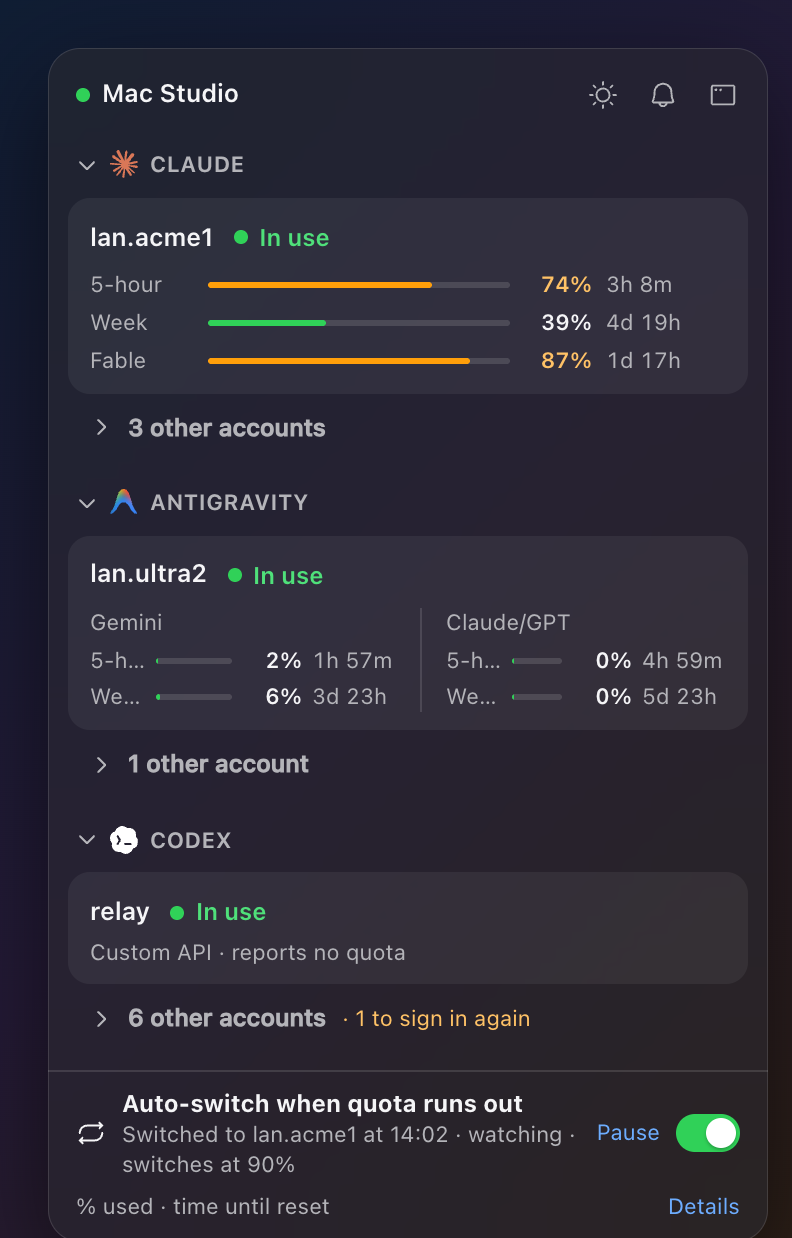
Popover (opened by clicking the macOS menu bar or Windows system tray icon): quota bars and reset times for Claude, Antigravity and Codex, with Auto-switch when quota runs out at the bottom.
Features
- Auto-switch when quota runs out: With two or more Claude accounts (Pro, Max or Team), turn
onAuto-switch when quota runs outin theClaudetab or popover footer: when the active
account hits 90% of its 5-hour or weekly window (Settings › Services), Claude Code moves to
the account with the most quota left while running sessions keep going. Checks every 3 minutes,
notifies you on each switch, and can be paused anytime (Pause). - Menu bar, popover and
Overview: The menu bar shows a compact gauge with the active
account and percent used (lan.acme1 74%), and left-clicking opens the popover with every
quota window. The main window'sOverviewtab lists all Claude, Antigravity and Codex accounts
in one place withSwitchon each inactive account. - Claude, Codex and Antigravity accounts: Add and switch between multiple Claude accounts
(browser sign-in, current Claude Code login, or setup-token), multiple ChatGPT accounts and
custom API providers fromconfig.tomlfor Codex (keeping ChatGPT plugins working, plus
scheduledWake ChatGPT), and multiple Google accounts for Antigravity.app andagy
(signing in uses the OAuth client of the Antigravity installed on the same computer, so there
is nothing to set up; details). - MCP servers, skills, plugins and instruction files: Toggle MCP servers and skills per
agent (Claude Code,Codex,Antigravity) in one shared table, install or update skills
from GitHub, view installedPlugins, and trackCLAUDE.md,AGENTS.mdandGEMINI.md
(Instruction files). Changes are previewed together, written with automatic backups, and can
be undone. - Config sets and Backup: Save groups of MCP servers and skills as
Config setsto apply or
undo across the Mac in one step. Back up your setup to iCloud Drive (or a chosen folder) and
restore item by item on any Mac—API keys are never stored in a backup pack. - Stats, Agent updates, History and Notifications: View local Claude Code and Codex token
usage and equivalent API cost (Stats), check and run updates for the agent CLIs (Updates),
review switchHistory, and get notifications when quota runs low, an account must sign in
again, or an env var (such asANTHROPIC_API_KEY) overrides a login. - Themes, screenshot privacy and Advanced tools: Pick light or dark mode, six theme packs,
and turn offShow emailsfor screenshots.Settings › Advanced › Show advanced featuresaddsAuto-switch accounts(your own auto-switch rules), syncing rules and agent configs to other
Macs over SSH (Copy to another Mac), andUpdate from source.
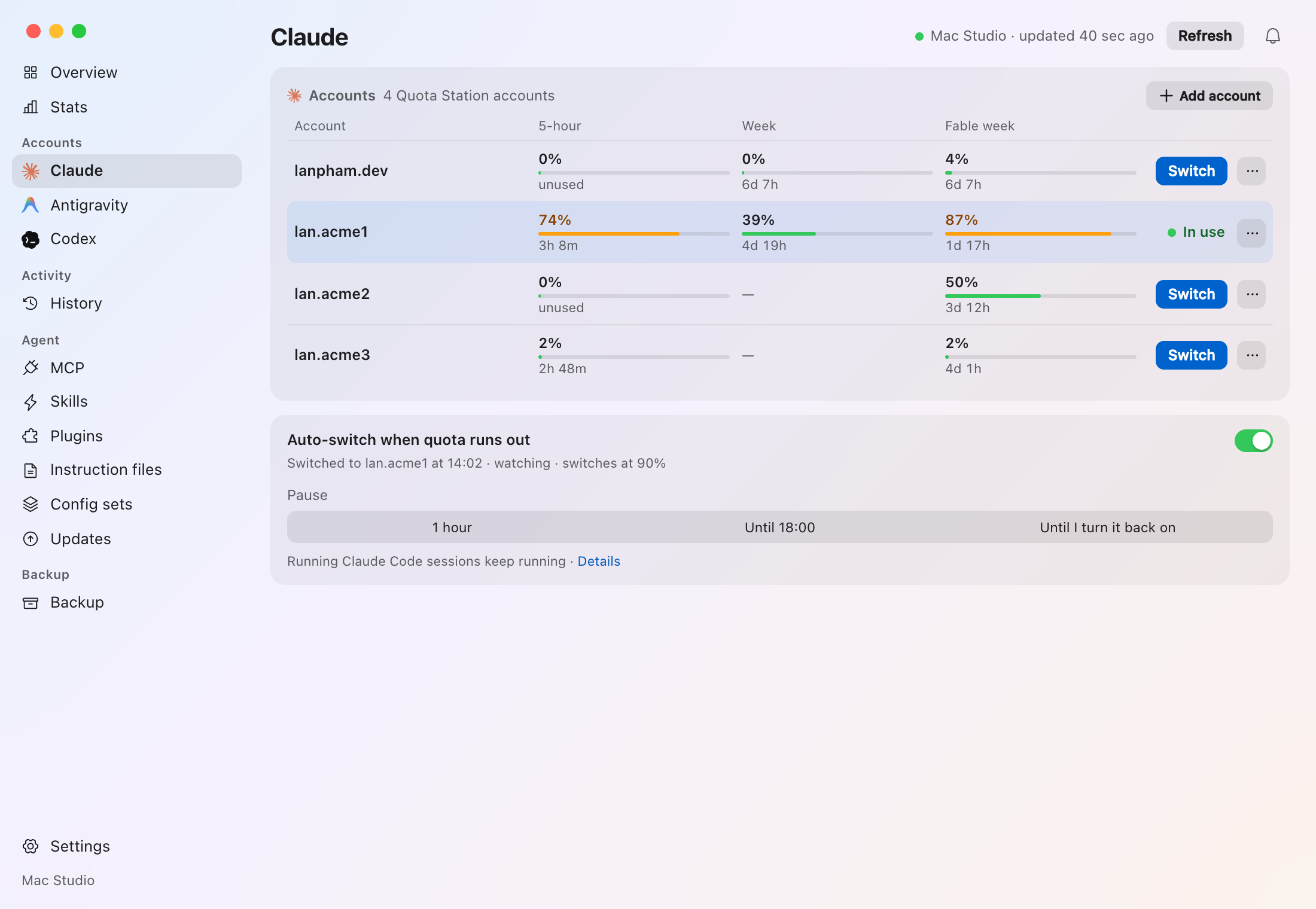
Main window › Claude tab: four Claude accounts with 5-hour, Week and Fable week windows, and Auto-switch when quota runs out below.
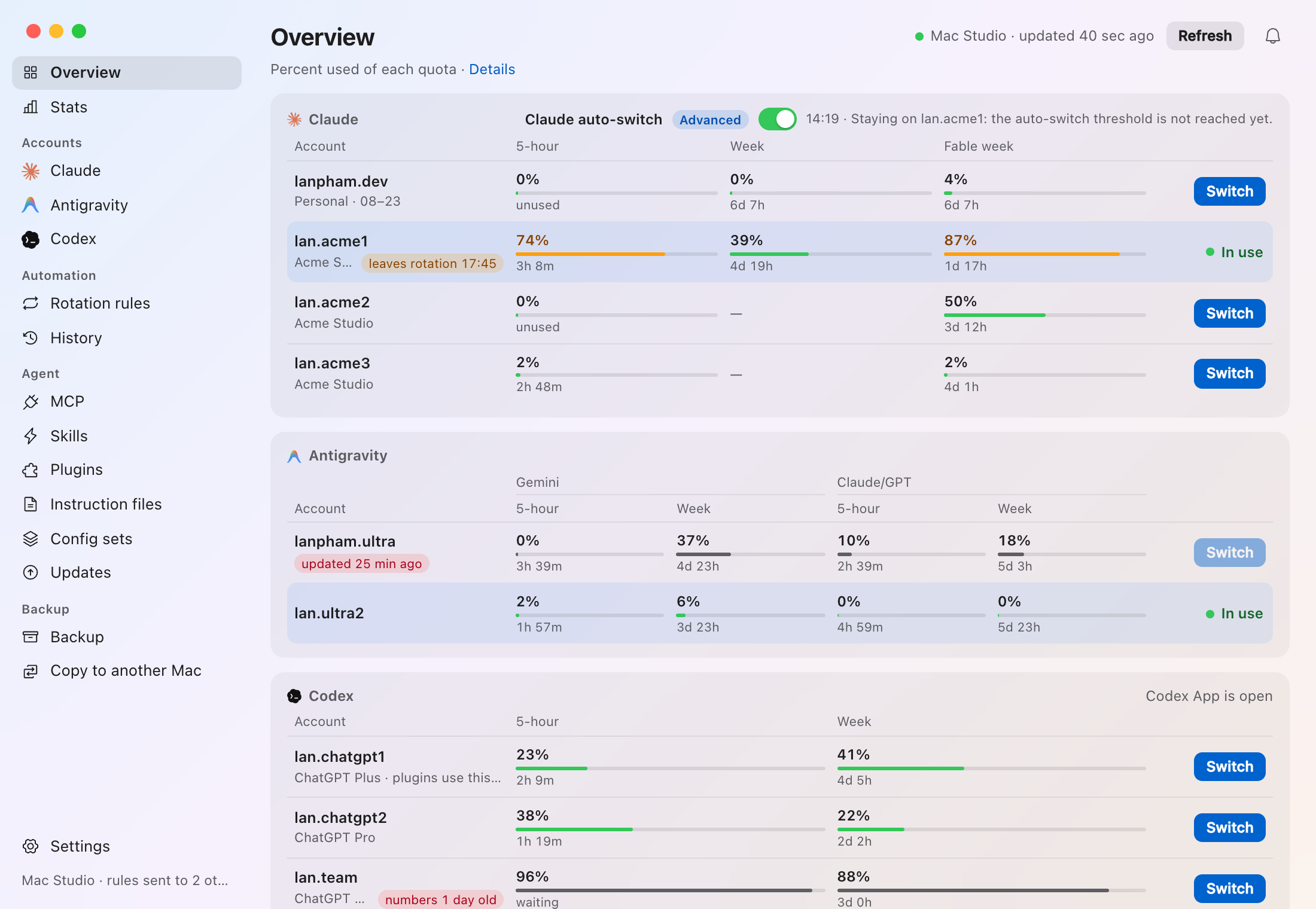
Main window › Overview tab: all Claude, Antigravity and Codex accounts in one view, with the navigation sidebar on the left.
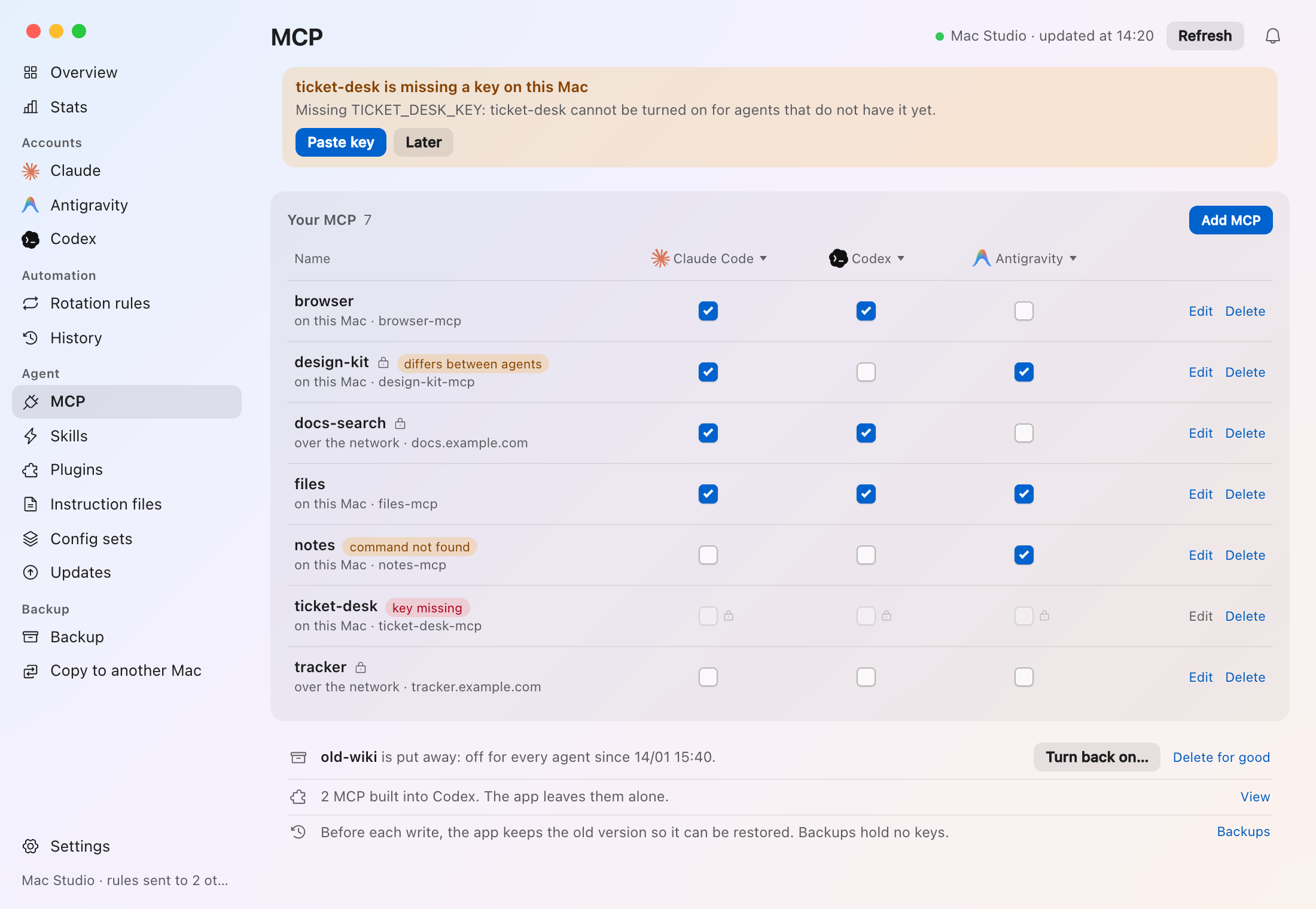
Main window › MCP tab: every MCP server across Claude Code, Codex and Antigravity with per-agent checkboxes, batch preview and undo.
All screenshots use synthetic test data, never real accounts. Full feature guide: docs/features.md.
Install
Download from the latest release for
macOS 13+ (Apple Silicon or Intel) or Windows 10/11 (x64).
macOS (Homebrew):
brew install --cask shin315/tap/quota-stationmacOS (DMG): Download
Quota.Station_<version>_universal.dmg, open it and dragQuota StationtoApplications(Developer ID signed and notarized by Apple; chooseOpenon first
launch).macOS (from source): On a Mac with Rust 1.85+ and Node.js 20+, clone the repo and run
scripts/install.sh(docs/development.md):git clone https://github.com/shin315/quota-station.git cd quota-station scripts/install.shWindows: Download
Quota.Station_<version>_x64-setup.exeand run it (installs per user, no
admin rights needed). Because the installer is not signed, chooseKeep(Keep anywayin
Edge) if the browser warns, and in SmartScreen clickMore info›Run anyway.
Turn on Settings › General › Open at login to start Quota Station with your computer. Moving
from an older Claude switcher? See the cutover guide.
Privacy and safety
- Quota is read on your computer from each service's own endpoint using the agents' existing
sign-ins—no Quota Station account, no telemetry, and no server of the app's own. - Nothing is written to an agent's config files without a preview and confirmation first; every
write keeps a backup and stops if the file changed since the preview. - Tokens and API keys live in the macOS Keychain (or user-only / Windows-sealed folders) and
never appear in windows, logs or backup packs.
Details and terms-of-service notes are in SECURITY.md and
docs/how-it-works.md.
Update
Downloaded builds check GitHub Releases daily (Settings › General › Updates) and notify you
when a new version is out. From the first release after 1.1.1, Download and install downloads
it, checks its signature, installs it over the running copy and reopens the app (on Windows the
installer closes the app and opens the new version). Copies on 1.1.1 or older install the new.dmg or .exe from the browser over the old copy once more (quit first on macOS).
Homebrew installs update with Homebrew; the app shows the command:
brew upgrade --cask shin315/tap/quota-station
Source builds update with Update from source in Settings › Advanced or:
git pull --ff-only && scripts/install.sh
Nothing installs until you press the button. Source builds never install a downloaded release.
Uninstall
Turn off Open at login (Settings › General) and Auto-switch when quota runs out (Claude
tab), then quit Quota Station. On macOS, move /Applications/Quota Station.app to the Trash,
or run:
brew uninstall --cask quota-station
On Windows, uninstall Quota Station in Settings › Apps › Installed apps. To also remove
saved settings, account folders and Keychain / Credential Manager items, see
Uninstalling and removing data.
Documentation
- docs/features.md — Every feature and screen in detail
- docs/how-it-works.md — Quota readers, account storage, CLI, files read/written, OAuth client file and uninstall cleanup
- docs/development.md — Building from source, build features, browser preview and tests
- docs/claude-accounts.md · docs/themes.md · docs/ui-guidelines.md · docs/releasing.md · SECURITY.md
MIT, except the optional Antigravity accounts component (CC BY-NC-SA 4.0). Licenses and third-party credits are in NOTICE, LICENSE, LICENSES/ and THIRD_PARTY.md.
Reviews (0)
Sign in to leave a review.
Leave a reviewNo results found