meterbar.dev
Health Warn
- License — License: MIT
- Description — Repository has a description
- Active repo — Last push 0 days ago
- Low visibility — Only 7 GitHub stars
Code Pass
- Code scan — Scanned 12 files during light audit, no dangerous patterns found
Permissions Pass
- Permissions — No dangerous permissions requested
This is a lightweight macOS menu bar application that monitors and displays usage limits for AI coding assistants like Claude Code, Codex CLI, and Cursor.
Security Assessment
The application accesses sensitive data by reading local authentication tokens and SQLite databases to function as intended. However, the automated code scan of 12 files found no dangerous patterns, no hardcoded secrets, and no excessive or dangerous permissions requested. The README clearly states that no API keys are needed, as it simply reads existing local credentials. The app is not currently notarized by Apple, which is a minor security consideration requiring a manual gatekeeper bypass to run. Overall risk is rated as Low.
Quality Assessment
The project is actively maintained, with the most recent push occurring today. It uses a standard permissive MIT license. The primary concern is its low visibility and community trust level; it currently has only 5 GitHub stars and a relatively unknown developer footprint. Being a native Swift application built with SwiftUI for macOS 13.0+, it is a focused desktop utility rather than an expansive or complex system.
Verdict
Safe to use, though users should be aware of the tool's low community visibility and the manual system permission bypass required for the non-notarized pre-built binary.
Track your AI coding assistant usage limits from the macOS menu bar

MeterBar
Track your AI coding assistant usage limits from the menu bar




Note: MeterBar is currently in active development. The app is not yet available on the Mac App Store but will be published soon. For now, you can build from source or download pre-built binaries from the Releases page.
A lightweight macOS menu bar app that monitors Claude Code, Codex CLI, and Cursor usage at a glance.
Screenshots
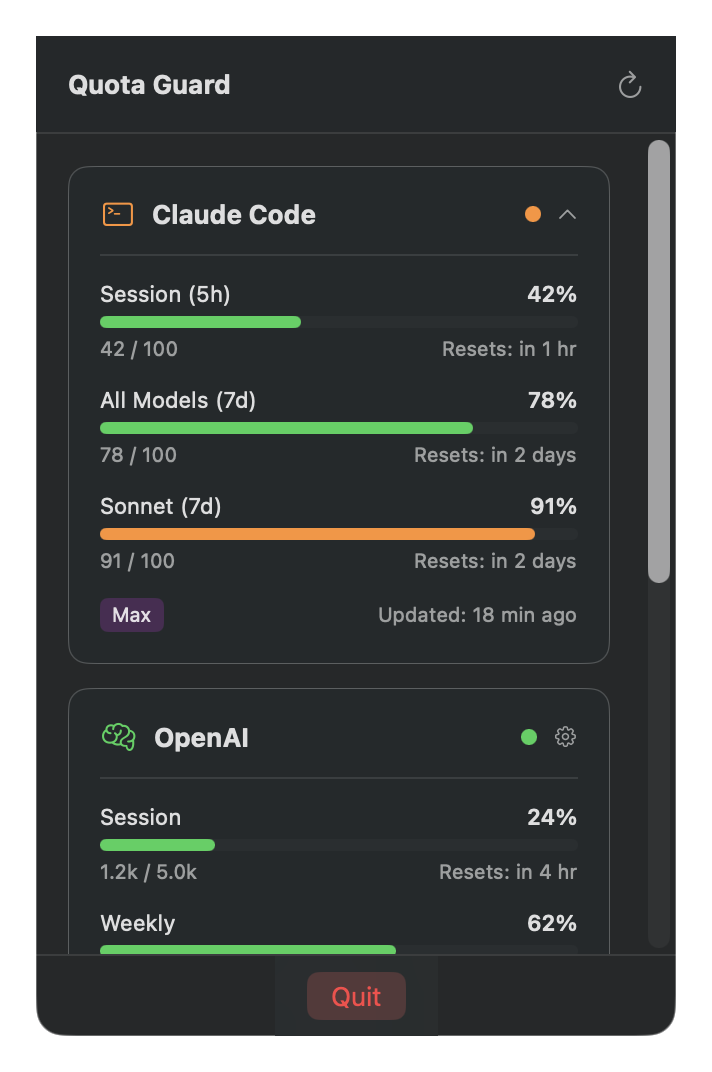
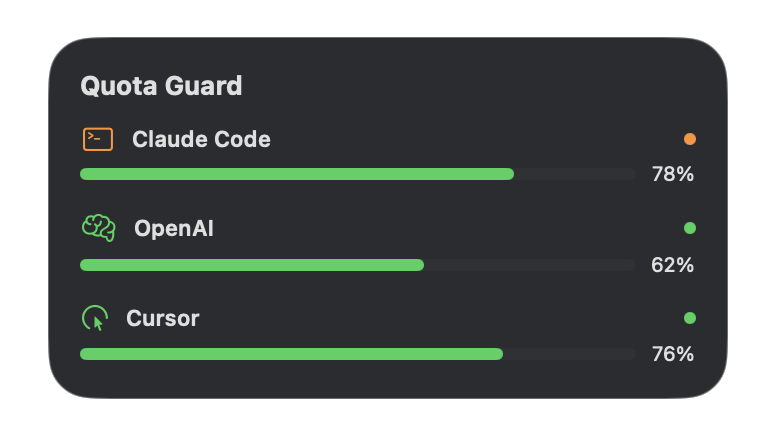
Features
- Menu Bar App: Quick access to usage data from your menu bar
- Widget Support: macOS widget for at-a-glance monitoring
- Multi-Service Support: Track Claude Code, Codex CLI, and Cursor
- Zero Configuration: Automatically reads credentials from CLI tools (no API keys needed)
- Real-time Updates: Background refresh every 15 minutes
- Pace-aware Bars: Usage bars show quota left with an expected-pace marker and burn-rate projection
- Color-coded Status: Green (healthy), Orange (tight), Red (critical/exhausted)
Supported Services
| Service | Auth Method | Metrics Tracked |
|---|---|---|
| Claude Code | Claude CLI /usage output |
5h session, 7-day all models, 7-day Sonnet |
| Codex CLI | OAuth token from codex login |
5h limit, weekly limit, code review |
| Cursor | Local SQLite database | Monthly usage |
Installation
Agent Install Prompt
Paste this into your local coding agent to have it install MeterBar for you:
Install MeterBar on this Mac. First verify this is macOS 26 or newer and that Homebrew is available. Install with: brew tap VincentShipsIt/tap && brew install --cask VincentShipsIt/tap/meterbar. If Homebrew is missing, ask before installing Homebrew. After installing, verify /Applications/MeterBar.app exists and that the meterbar CLI is linked, then open MeterBar. Do not ask me for API keys or paste secrets; for usage data, tell me to run claude login, codex login, and log into Cursor if I want those providers tracked.
Homebrew (Recommended)
brew tap VincentShipsIt/tap
brew install --cask VincentShipsIt/tap/meterbar
To update:
brew upgrade --cask VincentShipsIt/tap/meterbar
Manual Download
Download the latest release from meterbar.dev.
Releases after v1.6.1 are Developer ID signed and notarized, so direct downloads open without Gatekeeper warnings. For v1.6.1 and earlier (ad-hoc signed only), right-click and select "Open" the first time, or run xattr -cr /Applications/MeterBar.app.
Build from Source
Prerequisites: macOS 26+, Xcode 26+
git clone https://github.com/VincentShipsIt/meterbar.app.git
cd meterbar.app
open MeterBar.xcodeproj
# Build and run (Cmd+R)
Setup
Claude Code
- Install Claude Code CLI:
npm install -g @anthropic-ai/claude-code - Log in:
claude login - The app runs
claude /usageand parses the CLI usage output - Add extra Claude accounts in Settings by pointing each one at a separate
CLAUDE_CONFIG_DIR
Codex CLI
- Install Codex CLI:
npm install -g @openai/codex - Log in:
codex login - Select your team/workspace when prompted
- The app automatically reads credentials from
$CODEX_HOME/auth.json(~/.codex/auth.jsonby default)
Cursor
- Install and log into Cursor IDE
- The app automatically reads from Cursor's local database
Usage
- Launch the app - It appears in your menu bar with the tightest quota's percent left
- Click the icon - The popover shows every provider's quota windows
- Open the dashboard - Full view with limits, 30-day token costs, and settings
- Refresh - Click the refresh icon to update metrics
Understanding the Display
Each quota window shows the percent left, a pace marker for where usage
should be at this point in the window, reset countdowns, and — when a limit is
exhausted — a countdown to when usage resumes.
Status Colors
| Color | Meaning |
|---|---|
| Green | more than 25% of the quota left |
| Orange | 25% or less left - quota is tight |
| Red | 10% or less left - critical or exhausted |
CLI Tool
MeterBar includes a command-line tool for scripts and automation.
# Show current usage
meterbar usage

# JSON output for scripts
meterbar usage --json

# Filter by provider (claude, codex, cursor)
meterbar usage --provider claude

# Show token costs from the app's last local scan
meterbar cost

# JSON output
meterbar cost --json
meterbar cost reports the MeterBar app's cached 30-day scan (run one from
the app's Costs tab), so the CLI and the app always show the same numbers.
The CLI is automatically installed when using Homebrew. For manual installs, it's located at:
/Applications/MeterBar.app/Contents/Helpers/meterbar
How It Works
MeterBar reads usage data from local CLI output, local credential stores, and provider APIs:
claude /usage            # Claude Code usage
macOS Keychain           # Legacy Claude Code OAuth fallback only
~/.claude/               # Claude Code account metadata and local sessions
$CODEX_HOME/auth.json    # Codex CLI OAuth token (defaults to ~/.codex/auth.json)
~/Library/Application Support/Cursor/  # Cursor local DB
It then uses the respective local source or API to fetch current usage data:
- Claude Code (legacy OAuth fallback only):
https://api.anthropic.com/api/oauth/usage - Codex:
https://chatgpt.com/backend-api/wham/usage
Claude Code usage uses claude /usage first so MeterBar does not need to read Claude Code's OAuth token during normal operation. A legacy OAuth fallback can be enabled in Settings under Claude Code.
- Additional Claude accounts are tracked by running
claude /usagewith each account's configuredCLAUDE_CONFIG_DIR. - Cursor: Local SQLite queries
No provider API keys are required for CLI-backed services - the app uses local CLI/session data where possible and does not read Claude Code's OAuth token during normal operation.
Privacy & Security
- All credentials remain in their original locations (managed by CLI tools)
- No data sent to external servers (only calls to the providers' own usage endpoints)
- The main app is not sandboxed — it must read other tools' credential/log files
(~/.claude,~/.codex, Cursor's local database) and run theclaudebinary. The
widget extension is sandboxed. Hardened runtime is enabled for both. - No analytics, telemetry, or crash reporting
- Open source for full transparency
Architecture
- SwiftUI - Modern declarative UI
- Combine - Reactive data flow
- Hardened Runtime - Enabled for app and widget (the main app is un-sandboxed by
design so it can read local CLI credential/log files) - URLSession - Native networking
Troubleshooting
"Not Connected" or "Not configured" for a service
Make sure you're logged into the CLI tool:
claude login   # For Claude Code
codex login    # For Codex CLI
If the app still shows "Not Connected" or "Not configured", re-run the login command. MeterBar treats expired local OAuth tokens as disconnected so it does not keep making failing usage requests.
Codex showing "Free" instead of Team
Run codex logout && codex login and select your team workspace when prompted.
App can't read credentials
The app reads CLI credential files from $CODEX_HOME/auth.json (~/.codex/auth.json by default) and Cursor's local database. If you built from source with App Sandbox enabled, those reads will fail — the shipped configuration keeps the main app un-sandboxed for this reason.
Contributing
Contributions welcome! Please open an issue first to discuss changes.
License
MIT License - see LICENSE for details.
Reviews (0)
Sign in to leave a review.
Leave a reviewNo results found