ai-cli-bridge
Health Warn
- License — License: MIT
- Description — Repository has a description
- Active repo — Last push 0 days ago
- Low visibility — Only 5 GitHub stars
Code Warn
- network request — Outbound network request in docker-compose.yml
- network request — Outbound network request in public/admin.js
- process.env — Environment variable access in src/config.ts
Permissions Pass
- Permissions — No dangerous permissions requested
This tool is a self-hosted HTTP bridge that lets you use your existing Claude Max or ChatGPT Pro subscriptions as a local REST API. It wraps the official CLI tools behind an Express server, allowing web apps and other HTTP clients to make requests without paying per-token.
Security Assessment
The tool accesses environment variables to manage configuration, which is a standard and expected practice. It makes outbound network requests to relay your prompts to the AI providers. A significant security consideration is that it relies on executing the underlying AI CLI processes on your machine. However, the developer explicitly notes the use of `execFile` rather than a raw shell execution, which safely prevents shell injection attacks. There are no hardcoded secrets, and the project uses SHA-256 hashed keys with timing-safe authentication to protect your admin and user accounts. Overall risk is rated as Medium, primarily due to the inherent nature of proxying authentication and acting as a gateway to paid subscription services.
Quality Assessment
The project is highly active, with its most recent push occurring today. It uses the permissive MIT license and includes a comprehensive README detailing features, quick-start guides, and deployment instructions. The main drawback is its extremely low community visibility. With only 5 GitHub stars, the tool has not been widely peer-reviewed or battle-tested by a large user base, so hidden bugs or edge-case vulnerabilities may exist.
Verdict
Use with caution—it is actively maintained and demonstrates solid security design, but the lack of community adoption means you should inspect the code yourself before relying on it.
Use your Claude Max / ChatGPT Pro subscription as an API. Self-hosted Express + Bun HTTP bridge that wraps the Claude Code CLI and OpenAI Codex CLI into an authenticated REST API with SSE streaming, hashed API keys, per-user rate limits, token & cost tracking, request logs, and an admin dashboard.
ai-cli-bridge
Turn your Claude Max / OpenAI Pro subscriptions into a private HTTP API that any project can consume.
This server wraps the Claude Code CLI and Codex CLI behind an Express API. Instead of paying per-token, requests are backed by your existing subscription.
Why
AI API calls are expensive at scale. If you already pay for Claude Max ($100-200/mo) or OpenAI Pro ($200/mo), that usage is locked to the CLI tools — they can't be called from web apps, plugins, or other HTTP clients. This project bridges that gap.
| Approach | Auth | Billing |
|---|---|---|
| SDK (Anthropic/OpenAI) | API key | Per-token |
| CLI wrapper (this project) | OAuth subscription | Monthly flat rate |
Features
- Two providers — Claude Code CLI (
/generate) and Codex CLI (/generate-codex) - Per-user API keys — SHA-256 hashed, shown once at creation, timing-safe auth
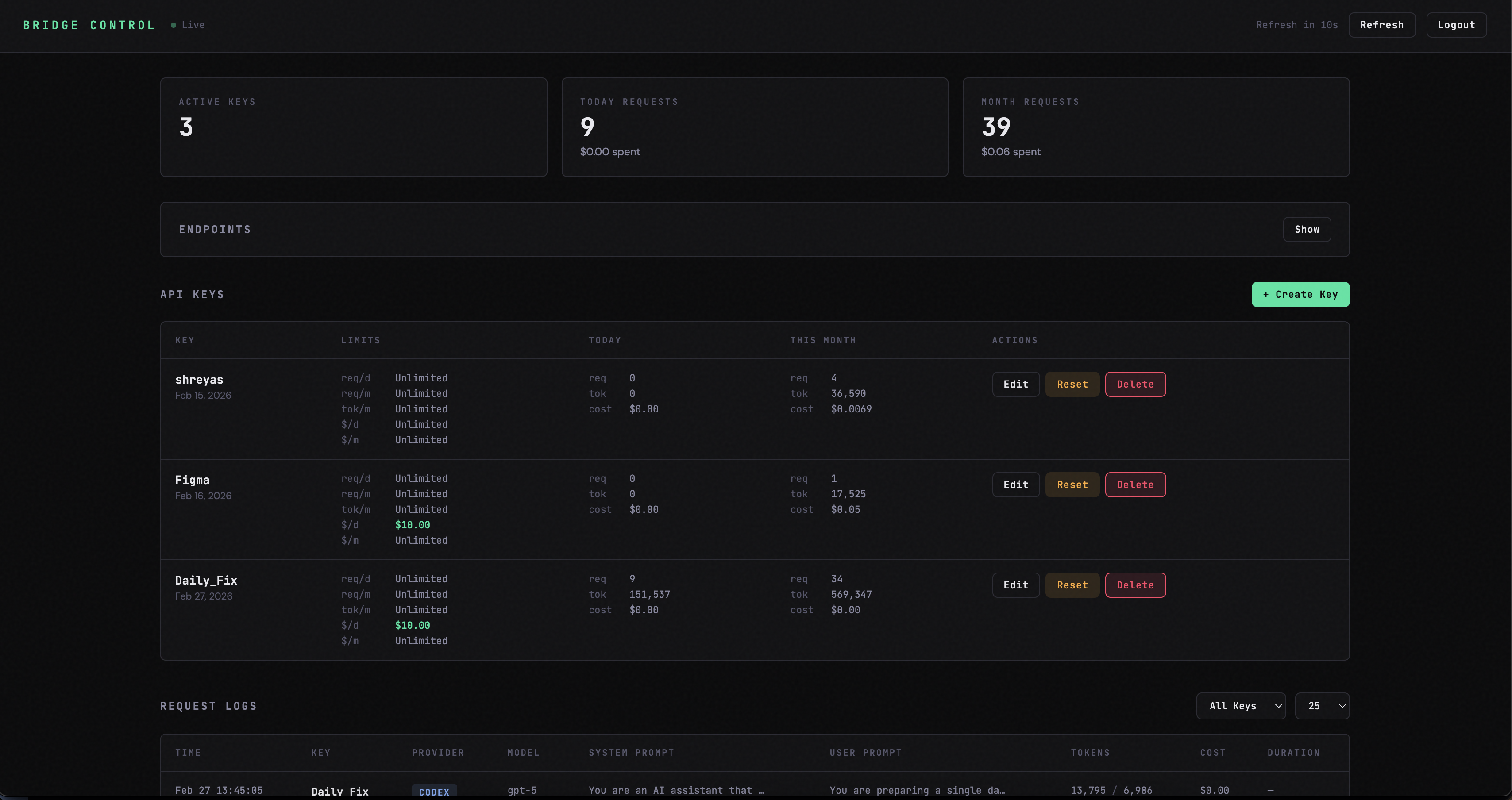
- Per-key usage limits — requests/day, requests/month, tokens/month, cost/day, cost/month
- Admin dashboard — manage keys, monitor usage, view request logs
- Usage tracking — in-memory with periodic disk flush, auto-pruning
- Security —
execFile(no shell injection), CSP, HSTS, rate limiting, input validation - Deploy anywhere — Docker support, systemd service, Cloudflare Tunnel template
Quick Start
Prerequisites
- Bun 1.2+
- Claude Code CLI and/or Codex CLI installed and authenticated
Local Development
git clone https://github.com/Shreyas-Dayal/ai-cli-bridge.git
cd ai-cli-bridge
bun install
cp .env.example .env    # Edit to set BRIDGE_ADMIN_KEY
bun dev                 # Starts on http://localhost:3456
Docker
cp .env.example .env    # Edit to set BRIDGE_ADMIN_KEY
docker compose up --build -d
Verify
curl http://localhost:3456/health
# → {"status":"ok"}
Usage
Generate (Claude)
curl -X POST http://localhost:3456/generate \
  -H "Authorization: Bearer <USER_KEY>" \
  -H "Content-Type: application/json" \
  -d '{"systemPrompt":"Reply concisely.","userPrompt":"What is 2+2?"}'
Generate (Codex)
curl -X POST http://localhost:3456/generate-codex \
  -H "Authorization: Bearer <USER_KEY>" \
  -H "Content-Type: application/json" \
  -d '{"systemPrompt":"Reply concisely.","userPrompt":"What is 2+2?"}'
Response Shape
Both endpoints return a consistent response shape:
{
  "content": [{ "type": "text", "text": "4" }],
  "usage": {
    "input_tokens": 1234,
    "output_tokens": 56
  },
  "cost_usd": 0.003
}
Claude responses also include duration_ms, cache_creation_input_tokens, and cache_read_input_tokens. Codex cost is estimated from a built-in pricing table.
Streaming
Add "stream": true to the request body to receive Server-Sent Events instead of a JSON response:
curl -N -X POST http://localhost:3456/generate \
  -H "Authorization: Bearer <USER_KEY>" \
  -H "Content-Type: application/json" \
  -d '{"systemPrompt":"Reply concisely.","userPrompt":"Write a haiku about coding.","stream":true}'
SSE events:
| Event | Data | Description |
|---|---|---|
text |
{"text":"chunk"} |
Incremental text as it arrives |
usage |
{"usage":{...},"cost_usd":0.003} |
Token counts and cost (sent once, at end) |
done |
{} |
Stream complete |
error |
{"error":"message"} |
Error occurred |
Streaming works on both /generate and /generate-codex. Omitting stream or setting it to false returns the standard JSON response.
API Endpoints
User (Bearer user-key)
| Method | Path | Description |
|---|---|---|
GET |
/health |
Health check (no auth) |
POST |
/generate |
Claude Code CLI (stream: true for SSE) |
POST |
/generate-codex |
Codex CLI (stream: true for SSE) |
Admin (Bearer admin-key)
| Method | Path | Description |
|---|---|---|
GET |
/admin/keys |
List all keys + usage |
POST |
/admin/keys |
Create a key |
GET |
/admin/keys/:name |
Key details |
PATCH |
/admin/keys/:name |
Update limits |
DELETE |
/admin/keys/:name |
Revoke a key |
POST |
/admin/keys/:name/reset-usage |
Reset usage counters |
GET |
/admin/logs |
Request logs (?key=&limit=) |
Key Management
Create your first user key:
curl -X POST http://localhost:3456/admin/keys \
  -H "Authorization: Bearer <ADMIN_KEY>" \
  -H "Content-Type: application/json" \
  -d '{"name":"my-app","maxCostPerMonth":10.00}'
The raw key is returned once — save it. Only the SHA-256 hash is stored on disk.
Key names must be 1-50 characters: alphanumeric, hyphens, and underscores only. All limits default to 0 (unlimited). Available limits: maxRequestsPerDay, maxRequestsPerMonth, maxTokensPerMonth, maxCostPerDay, maxCostPerMonth.
Deployment
The recommended production setup is a cheap VPS ($4-6/mo) behind a Cloudflare Tunnel.
See GUIDE.md for a complete step-by-step deployment walkthrough, and DEPLOY.md for a quick deployment reference.
Configuration
All settings are via environment variables. See .env.example for the full list. Invalid values (e.g. PORT=abc) will cause the server to fail fast on startup with a clear error message.
| Variable | Default | Description |
|---|---|---|
PORT |
3456 |
Server port (1-65535) |
BRIDGE_ADMIN_KEY |
— | Required. Admin key for /admin/* endpoints |
DATA_DIR |
./data |
Directory for keys.json, usage.json, logs.json |
CORS_ORIGINS |
— | Comma-separated origins (empty = allow all) |
RATE_LIMIT_WINDOW_MS |
60000 |
Rate limit window in ms (min 1000) |
RATE_LIMIT_MAX_REQUESTS |
30 |
Max requests per window (min 1) |
CLAUDE_DEFAULT_MODEL |
claude-sonnet-4-20250514 |
Default Claude model |
CLAUDE_TIMEOUT_MS |
120000 |
Claude CLI timeout in ms (min 1000) |
CLAUDE_MAX_BUFFER_BYTES |
10485760 |
Claude CLI max stdout buffer (min 1024) |
CODEX_DEFAULT_MODEL |
gpt-5.3-codex |
Default Codex model |
CODEX_TIMEOUT_MS |
180000 |
Codex CLI timeout in ms (min 1000) |
CODEX_MAX_BUFFER_BYTES |
10485760 |
Codex CLI max stdout buffer (min 1024) |
Codex cost estimation uses pricing from codex-pricing.json. Edit that file when prices change — no rebuild needed, just restart. Claude CLI returns cost directly.
Security
- No shell injection — CLI invocations use
execFile(array args, no shell) - Timing-safe auth —
crypto.timingSafeEqualfor key comparison - Security headers — CSP, HSTS, X-Frame-Options DENY, Referrer-Policy, Permissions-Policy
- Rate limiting — global limiter + separate admin endpoint limiter
- Input validation — key name format, non-negative limits, prompt length cap (500K chars)
- File permissions — data files written with
0o600(owner-only)
See SECURITY.md for vulnerability reporting and deployment hardening guidance.
Project Structure
src/
  server.ts               Express app, routes, middleware
  config.ts               Environment variable parsing
  keys.ts                 Key CRUD, usage tracking, limits
  middleware/auth.ts       Per-user + admin auth (timing-safe)
  providers/
    claude.ts             Claude Code CLI wrapper
    codex.ts              Codex CLI wrapper
public/                   Admin dashboard (HTML/CSS/JS)
data/                     Runtime data (gitignored)
codex-pricing.json        Codex model pricing (editable, no rebuild)
Dockerfile                Docker image definition
docker-compose.yml        Docker orchestration
ai-cli-bridge.service     systemd service file
cloudflared-config.yml    Cloudflare Tunnel template
.github/workflows/ci.yml  CI build check on push/PR
Disclaimer
This project may violate the Terms of Service of the underlying CLI providers. You are responsible for reviewing and complying with the applicable terms before using this software.
- Anthropic — As of February 2026, Anthropic's Consumer Terms of Service prohibit using OAuth tokens from Free, Pro, or Max subscriptions in any third-party product, tool, or service. Wrapping the Claude Code CLI behind an HTTP API and sharing access with other users likely falls under this prohibition. See Anthropic's policy clarification for details.
- OpenAI — OpenAI's Terms of Use prohibit sharing account credentials and reselling access. Exposing a Codex CLI subscription as a multi-user API may constitute account sharing.
This project is provided as-is for educational and experimental purposes. The authors are not responsible for any consequences arising from its use. If the providers update their terms or enforcement, your access may be revoked without notice.
Contributing
See CONTRIBUTING.md for development setup, code style, and PR guidelines.
License
Reviews (0)
Sign in to leave a review.
Leave a reviewNo results found