palisade-waf
Health Pass
- License — License: Apache-2.0
- Description — Repository has a description
- Active repo — Last push 0 days ago
- Community trust — 11 GitHub stars
Code Fail
- rm -rf — Recursive force deletion command in deploy/install.sh
- exec() — Shell command execution in internal/security/challenge/fp.min.js
Permissions Pass
- Permissions — No dangerous permissions requested
No AI report is available for this listing yet.
A single-binary Web Application Firewall + reverse proxy for Go, built on Coraza (OWASP CRS) with a built-in admin dashboard.



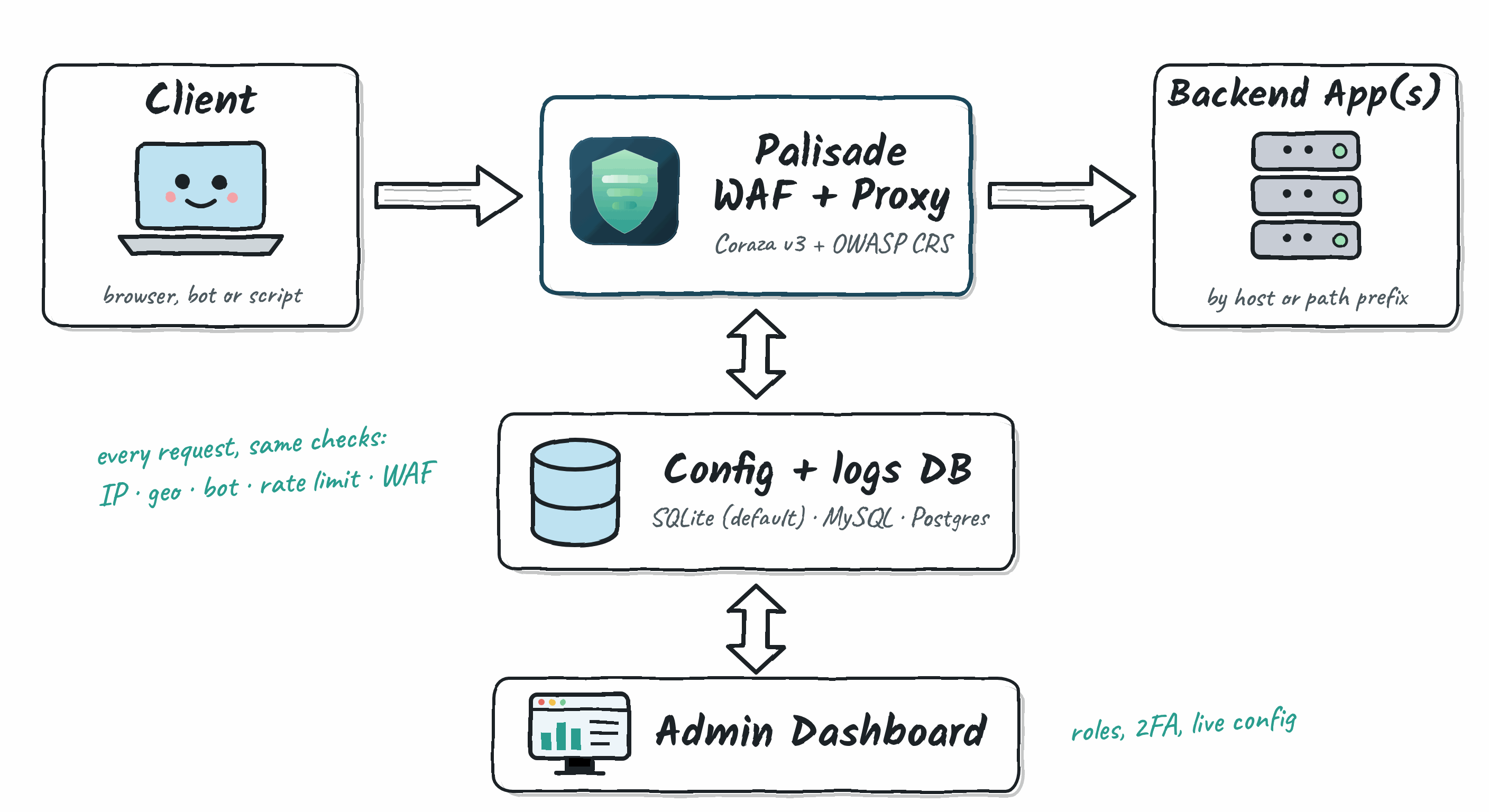
Palisade is a web application firewall you can scp to a server: a WAF and reverse proxy in a single Go binary, built on OWASP Coraza and the OWASP Core Rule Set, with a built-in admin dashboard. It uses one binary, one SQLite file, CLI flags for bootstrap settings, and dashboard-managed runtime settings. There is no config file, external database, or Node toolchain. Docker is available for local development but is not required.
Features
WAF protection: Coraza v3 with the OWASP Core Rule Set embedded in the binary. It blocks SQLi, XSS, RCE, path traversal, restricted file access, and known scanner user agents out of the box. Custom
.confrules can be loaded on top of CRS.Reverse proxy / multi-app routing: route by Host header (virtual hosting) or by path prefix, with automatic prefix stripping like nginx
location, to as many backend apps as you need.IP & country blocking: manual IP allow/block rules plus GeoIP2-based country blocking (MaxMind GeoLite2), with Cloudflare-aware real-IP extraction and opt-in trusted proxy CIDRs for
X-Forwarded-For/X-Real-IP.TLS: plain HTTP, automatic Let's Encrypt certificates, or your own cert/key, globally or per service. Upload a cert or enable auto-issue for a backend from the dashboard.
Admin dashboard: HTMX/Tailwind UI for live traffic and threat charts, filterable request logs with live tail, IP/geo rule management, and service management. Changes apply immediately, with no restart.
Prometheus metrics:
/admin/metricsexposes request volume, latency, and per-cause block counters (IP/geo/WAF) alongside Go runtime metrics. For Prometheus, scrape/admin/api/v1/metricswith an API key from Settings (a read-only key is enough) viaauthorization: { credentials: cwaf_… }; the/admin/metricspath is for a logged-in browser session.MCP server for AI assistants (read-only):
/admin/api/v1/mcp(Streamable HTTP) lets Claude, Cursor and other MCP clients search logs, read one request, see stats, look up an IP, and list services and rules. No tool can change anything, so an attacker'sUser-Agent: ignore previous instructions…has nothing to act on. Use a read-only API key from Settings:{ "mcpServers": { "palisade": { "type": "http", "url": "https://waf.example.com/admin/api/v1/mcp", "headers": { "Authorization": "Bearer cwaf_…" } } } }With Claude Code:
claude mcp add --transport http palisade https://waf.example.com/admin/api/v1/mcp --header "Authorization: Bearer cwaf_…".Health probes:
/_cz/healthz(process up) and/_cz/readyz(database reachable) for load balancers and orchestrators; the Docker image wirespalisade healthcheckinto itsHEALTHCHECK.SQLite storage: request logs, IP/geo rules, services, and TLS state all live in one
waf.dbfile. No Postgres, Redis, or MySQL to run.
Installing
Option A: native binary
curl -fsSL https://waf-install.astrareconslabs.com/palisade-waf/install.sh | sudo bash
This downloads the release binary for your architecture (amd64/arm64), verifies its SHA256 checksum (and, when cosign is installed, the signature on checksums.txt), creates a dedicated non-root system user, installs a systemd unit, and starts the service. The user is named palisade and is granted only CAP_NET_BIND_SERVICE, so it can bind ports 80/443 without running as root. The installer prompts for an admin email and password, or generates credentials, then seeds them into the database with palisade setup.
Check it's running:
sudo systemctl status palisade
sudo journalctl -u palisade -f
There is no config file to edit. Installer settings are either flags in the systemd unit (sudo systemctl cat palisade) or database values managed from the dashboard. The installer rewrites the unit on every upgrade, so put any extra flags (e.g. --trusted-proxies) on the PALISADE_FLAGS= line of /etc/palisade/palisade.env, which it never overwrites, then sudo systemctl restart palisade. Data, certs, and waf.db live under /var/lib/palisade/.
Upgrading
Re-run the same command:
curl -fsSL https://waf-install.astrareconslabs.com/palisade-waf/install.sh | sudo bash
The installer detects the existing binary at /usr/local/bin/palisade and switches to upgrade mode. It downloads and verifies the latest release, replaces the binary, rewrites the systemd units, and restarts the service. It skips the interactive prompts. Admin credentials and TLS certificates are never touched on upgrade. Pin a specific version with curl -fsSL ... | sudo PALISADE_VERSION=v2.5.1 bash.
MySQL and Postgres are no longer supported; Palisade stores everything in SQLite. The installer moves an install that ran on one of them: before replacing the binary it runs palisade config export with the old one, then imports the file into /var/lib/palisade/waf.db. Services, rules, users, API keys and settings come across. The request log does not, and the old database is left untouched. Releases before v3.2.5 have no config export, so upgrade those to v3.2.7 first (PALISADE_VERSION=v3.2.7). Without the installer, run the same two steps yourself:
# with the previous release, against the old database
palisade config export --db-driver postgres --db 'postgres://...' --db-key-file /etc/palisade/db.key --out config.json
# with this release
palisade config import --db /var/lib/palisade/waf.db --db-key-file /etc/palisade/db.key config.json
Then drop --db-driver and point --db at the SQLite file. A MySQL or Postgres --db-driver or connection string now fails at startup with these steps.
Versions before v2.5.1 are deprecated. The installer only installs v2.5.1 or later, and it no longer migrates old Coraza WAF Mod (coraza-waf-mod) installs. To move one of those to Palisade, run the v2.5.1 installer once: curl -fsSL https://raw.githubusercontent.com/sinhaparth5/palisade-waf/v2.5.1/deploy/install.sh | sudo bash.
Option B: build from source
Requires Go 1.27+.
git clone https://github.com/sinhaparth5/palisade-waf.git
cd palisade-waf
make build      # go generate (minifies JS) + go build -> ./palisade

# Seed an admin account (password is read from stdin, not a flag):
echo "your-password" | ./palisade setup --admin-email [email protected]

./palisade   # defaults: --listen :8080 --db waf.db --certs ./certs
make run builds and runs in one step. Run setup first, at least once, so you can log in. The project uses Go only; the SQLite driver is modernc.org/sqlite, with no CGO. See palisade --help, or the flag table in CLAUDE.md, for every bootstrap option (--listen-tls, --listen-h3, --waf-rules, --geo-db, --retention, --tls-cert/--tls-key, --trusted-proxies).
Search-engine and link-preview crawlers skip the bot challenge only when their source checks out (reverse DNS or network), never on user agent alone. To let your own monitor through, pin it to the IP it connects from:
./palisade --trusted-crawlers "dev-portal-uptime=x.x.x.x" # ua=cidr[,cidr];ua2=ip
The pin lives in your service's flags, not the repo. It skips only the challenge; the WAF, rate limits and IP rules still apply.
Option C: cross-compiled release binaries
make dist        # cross-compiles Linux amd64/arm64 binaries, CGO_ENABLED=0
make checksums   # writes dist/checksums.txt
Option D: Docker for local development
docker compose run --rm waf setup --db /data/waf.db --admin-email [email protected]
docker compose up --build
Dockerfile (multi-stage, scratch final image) and compose.yml are for local container development only. The image runs as uid 65532: map ports below 1024 (or add --cap-add NET_BIND_SERVICE), and if a volume was created by an image that still ran as root, fix its owner once with docker run --rm -v <volume>:/data alpine chown -R 65532:65532 /data. Use Option A for systemd-based installs.
Usage
- Start the server. There is no config file, only CLI flags for bootstrap settings.
- Before first login, seed an admin account with
palisade setup --admin-email [email protected](password read from stdin).install.shdoes this for you interactively. - Open the admin dashboard at
http://<host>:<port>/admin(the path is currently fixed at/admin) and log in with that email and password. - Add backend apps from Services: give each service a name, a match rule (Host or path Prefix), and a backend URL. The wizard checks that the backend is reachable before saving. Services live in the database, with no config-file seeding step.
- Manage IP rules, country blocking, and request logs from their dashboard pages. Changes take effect immediately.
- Optionally enable TLS per service from the Manage button on its row. Upload a cert, or turn on auto-issue after setting an ACME contact email from the Settings page or passing
--domain/--acme-emailtopalisade setup.
GeoIP setup (optional)
Country blocking uses the bundled MaxMind GeoLite2 Country database by default, so fresh builds work without manually copying an .mmdb file. This product includes GeoLite Data created by MaxMind, available from https://www.maxmind.com.
To override the bundled database with a newer external copy:
- Create a MaxMind account from the GeoLite2 signup page.
- In the MaxMind account portal, generate a license key for database downloads.
- Download
GeoLite2-CountryinGeoIP2 Binary (.mmdb)format, then extractGeoLite2-Country.mmdb. - Put the file somewhere readable by the service, for example:
sudo mkdir -p /var/lib/palisade
sudo cp GeoLite2-Country.mmdb /var/lib/palisade/
- Point the binary at it with
--geo-db:
./palisade --geo-db /var/lib/palisade/GeoLite2-Country.mmdb
(For a systemd install, add --geo-db ... to PALISADE_FLAGS= in /etc/palisade/palisade.env and sudo systemctl restart palisade.)
Leave --geo-db unset to use the bundled database. GeoLite users must keep the database updated; MaxMind requires old database versions to be replaced or destroyed within 30 days of a new release, so release builds should refresh the bundled .mmdb regularly.
Development
make build   # build (runs go generate first — required after editing static/js/src/*.js)
make test    # go test ./...
make clean   # remove binary, minified JS, dist/
See CLAUDE.md for architecture notes if you're working on the codebase.
Reviews (0)
Sign in to leave a review.
Leave a reviewNo results found