budi
Health Warn
- No license — Repository has no license file
- Description — Repository has a description
- Activity unknown — Cannot determine last activity
- Low visibility — Only 0 GitHub stars
Code Fail
- network request — Outbound network request in crates/budi-daemon/static/js/api.js
- network request — Outbound network request in crates/budi-daemon/static/js/events.js
- network request — Outbound network request in crates/budi-daemon/static/js/views-sessions.js
- network request — Outbound network request in crates/budi-daemon/static/js/views-settings.js
- os.homedir — User home directory access in extensions/cursor-budi/src/sessionStore.ts
- rm -rf — Recursive force deletion command in homebrew/setup-tap.sh
- rm -rf — Recursive force deletion command in scripts/install-standalone.sh
- rm -rf — Recursive force deletion command in scripts/install.sh
Permissions Pass
- Permissions — No dangerous permissions requested
This Rust-based tool provides local cost analytics for AI coding agents like Claude Code and Cursor. It tracks token usage, costs, and session health through a local web dashboard without uploading data to the cloud.
Security Assessment
Overall risk: Medium. The tool claims to be entirely local-first, but it contains several code patterns that require careful consideration. Multiple JavaScript files make outbound network requests, which needs verification to ensure no telemetry or data is being silently exfiltrated. The code accesses the user's home directory, which is flagged as a failure in our automated scan. However, based on the documentation, this is expected behavior—the tool monitors local agent log files and databases found within the home folder. Additionally, the installation and setup scripts (including Homebrew and standalone shell scripts) use `rm -rf` recursive force deletion commands. While common in installation scripts for cleaning up temporary files, this is a high-risk operation that users should inspect manually before executing. No hardcoded secrets or dangerous permission requests were found.
Quality Assessment
The project appears to be in its early stages, showing very low community visibility with minimal GitHub stars. The repository lacks a confirmed license file in the automated scan, though the README displays an MIT license badge. The low visibility means there has been limited peer review from the broader open-source community to vet the codebase.
Verdict
Use with caution — the tool is potentially safe if you audit the installation scripts and JavaScript files, but its low community adoption and unverified licensing warrant hesitation before relying on it in sensitive environments.
AI cost analytics for coding agents — know where your tokens and money go
budi




Local-first cost analytics for AI coding agents. See where your tokens and money go across Claude Code, Cursor, and more.
brew install siropkin/budi/budi && budi init
No cloud. No uploads. Everything stays on your machine.
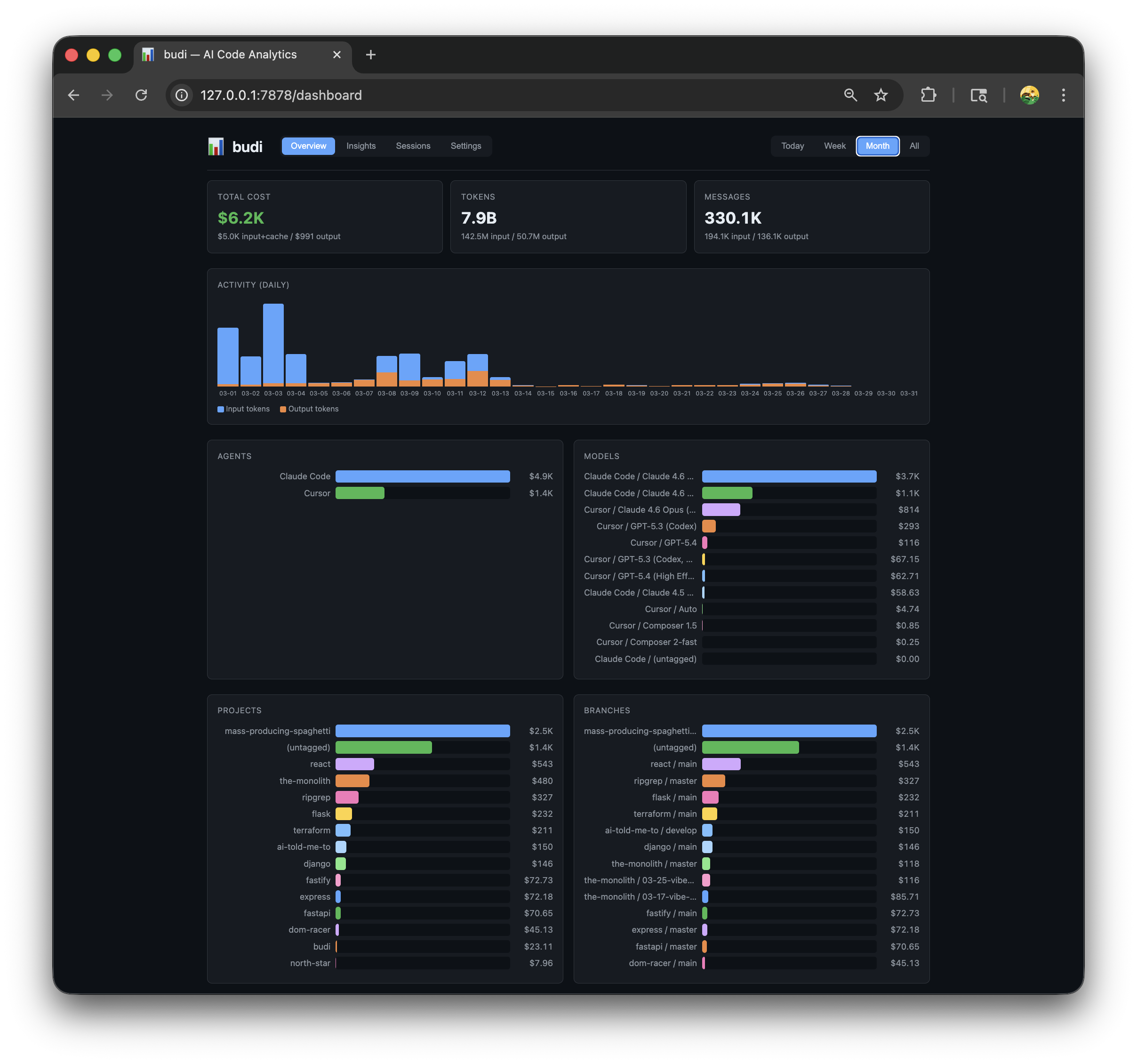
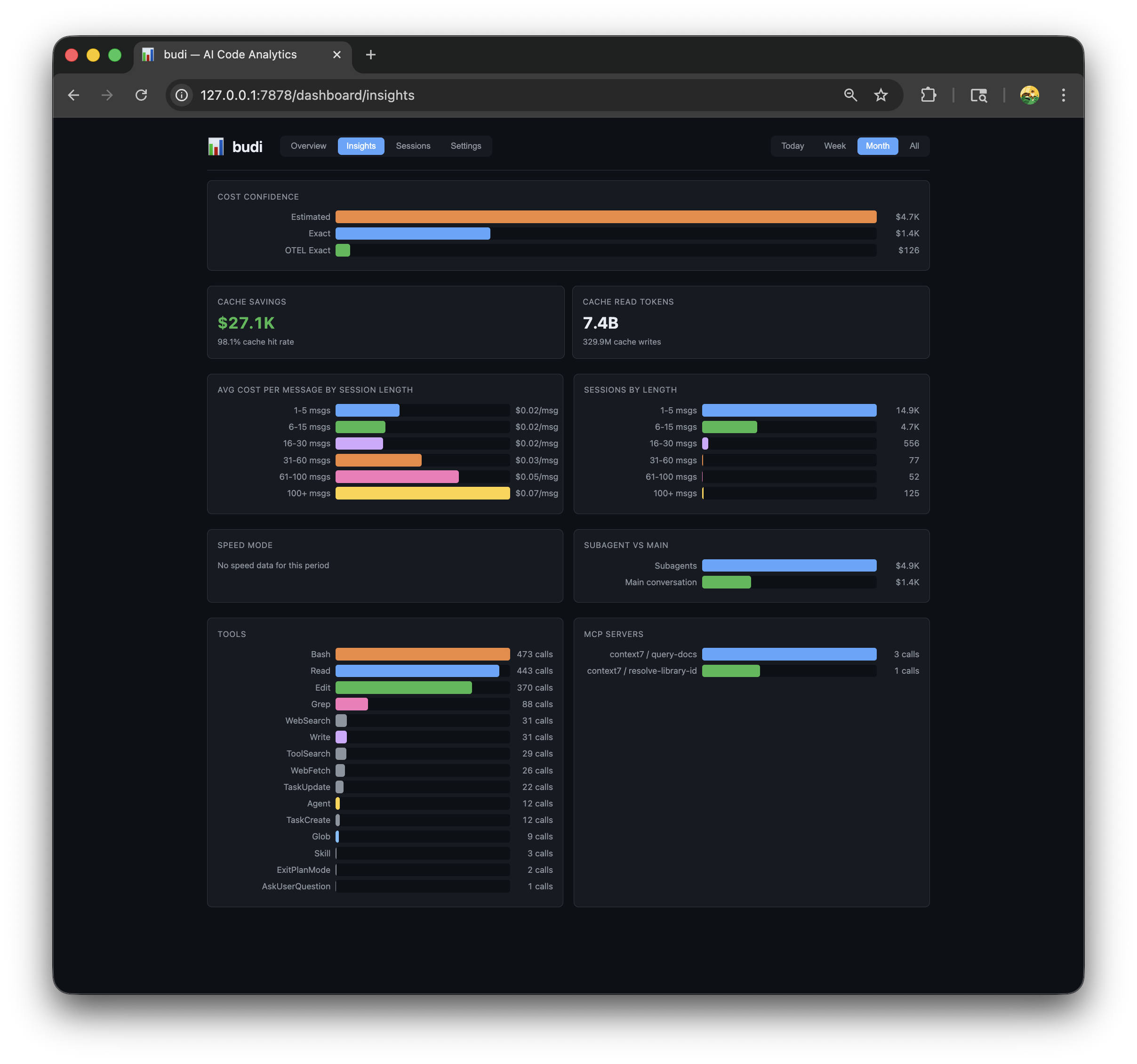
Insights — cache efficiency, session cost curve, tool usage, subagent costs
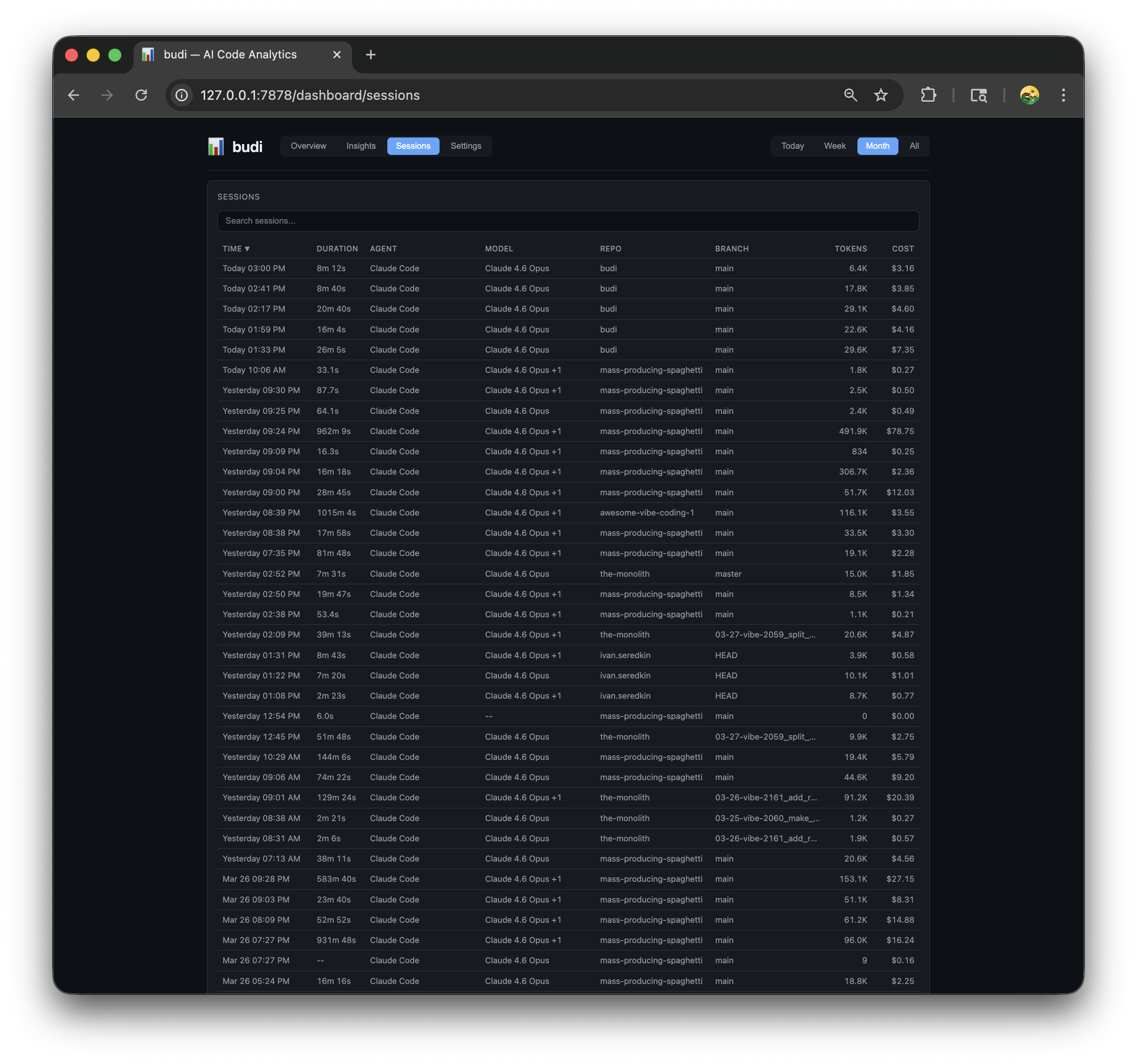
Sessions — searchable session list with drill-down to individual messages and session health
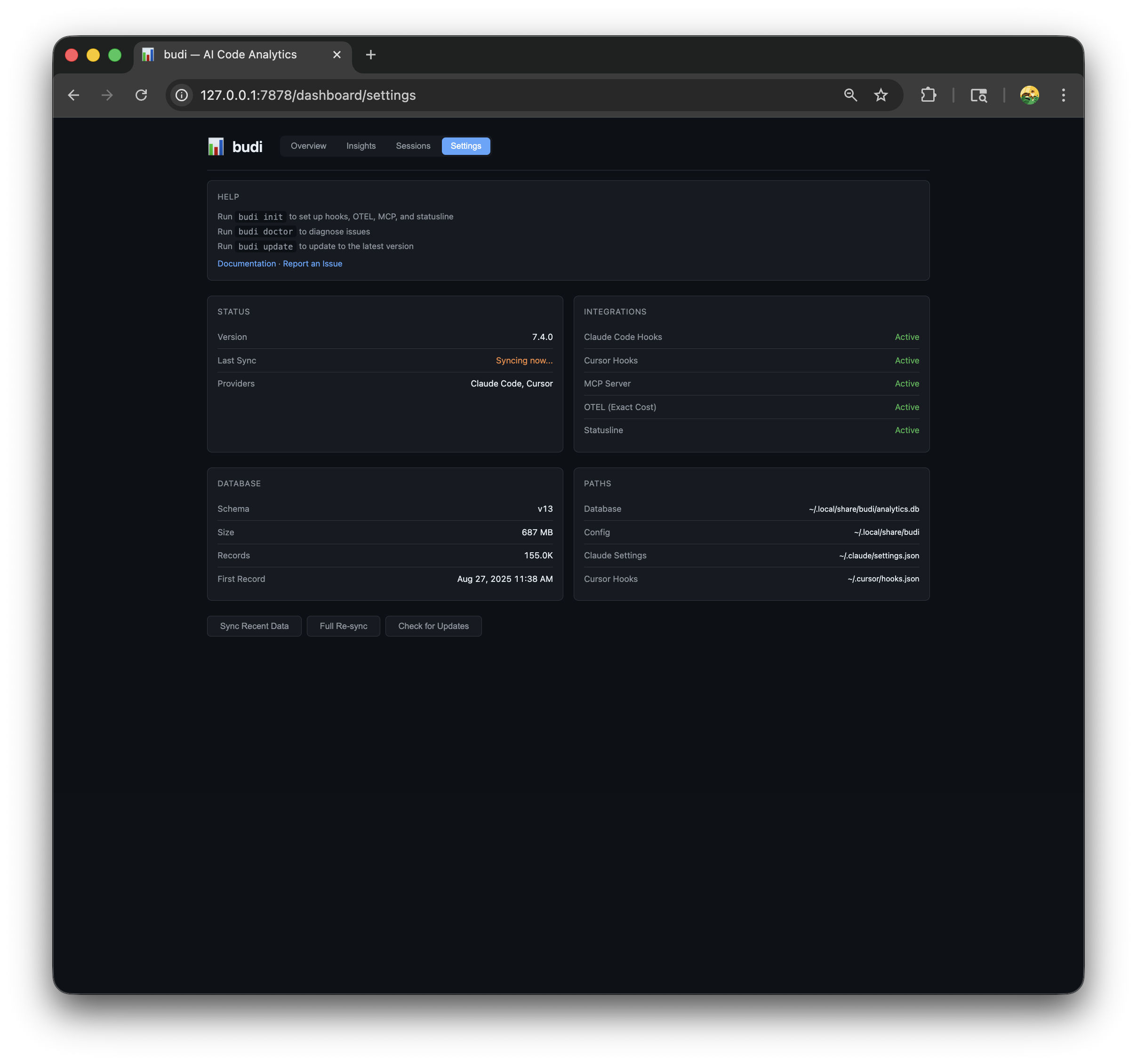
Settings — integration status, database info, sync controls
What it does
- Tracks tokens, costs, and usage per message across AI coding agents
- Exact cost via OpenTelemetry for Claude Code (includes thinking tokens)
- Attributes cost to repos, branches, tickets, and custom tags
- Session health — detects context bloat, cache degradation, cost acceleration, and retry loops with actionable, provider-aware tips
- Web dashboard at
http://localhost:7878/dashboard - Live cost + health status line in Claude Code and Cursor
- Background sync every 30 seconds — no workflow changes needed
- ~6 MB Rust binary, minimal footprint
Platforms
budi targets macOS, Linux (glibc), and Windows 10+ (x86_64 and ARM64 where Rust tier-1 builds exist). Paths follow OS conventions (HOME / USERPROFILE, XDG-style data under ~/.local/share/budi on Unix, %LOCALAPPDATA%\budi on Windows). Daemon port takeover after upgrade uses lsof/ps/kill on Unix and PowerShell Get-NetTCPConnection plus tasklist/taskkill on Windows (requires PowerShell, which is default on supported Windows versions).
Supported agents
| Agent | Status | How |
|---|---|---|
| Claude Code | Supported | OpenTelemetry (exact cost) + JSONL transcripts + hooks |
| Cursor | Supported | Usage API + hooks |
| Copilot CLI, Codex CLI, Cline, Aider, Gemini CLI | Planned |
Install
Use Homebrew if you have it. Otherwise use the shell script (macOS/Linux) or PowerShell script (Windows). Build from source only if you want to contribute.
Homebrew (macOS / Linux): requires Homebrew
brew install siropkin/budi/budi && budi init
Shell script (macOS / Linux): requires curl and tar (glibc-based systems only; Alpine/musl users should build from source)
curl -fsSL https://raw.githubusercontent.com/siropkin/budi/main/scripts/install-standalone.sh | bash
Windows (PowerShell): requires PowerShell 5.1+
irm https://raw.githubusercontent.com/siropkin/budi/main/scripts/install-standalone.ps1 | iex
Windows notes: binaries install to %LOCALAPPDATA%\budi\bin. Stopping or upgrading the daemon uses taskkill (or PowerShell) instead of Unix pkill. On startup, budi-daemon asks PowerShell for listeners on its port and terminates another budi-daemon if present. PATH is updated in the user environment — restart your terminal after install.
From source: requires Rust toolchain — clones the repo and builds release binaries
git clone https://github.com/siropkin/budi.git && cd budi && ./scripts/install.sh
Or paste this into your AI coding agent:
Install budi from https://github.com/siropkin/budi following the install instructions in the README
All installers automatically run budi init after installation. Homebrew users need to run budi init manually.
One install on PATH. Do not mix Homebrew with ~/.local/bin (macOS/Linux) or with %LOCALAPPDATA%\budi\bin (Windows): you can end up with different budi and budi-daemon versions and confusing restarts. Keep a single install directory ahead of others on PATH (or remove duplicates). budi init warns if it detects multiple binaries.
budi init starts the daemon, installs hooks for Claude Code and Cursor, configures OpenTelemetry for exact cost tracking, sets up the status line, and syncs existing data. Restart Claude Code and Cursor after install to activate hooks, telemetry, and the status line. The daemon uses port 7878 by default — make sure it's available (customize in ~/.config/budi/config.toml with daemon_port).
To install a specific version, set the VERSION environment variable: VERSION=v7.1.0 curl -fsSL ... | bash (or $env:VERSION="v7.1.0" on PowerShell).
Run budi doctor to verify everything is set up correctly.
Status line
Budi adds a live cost display to Claude Code, installed automatically by budi init:
🟢 budi · $4.92 session · session healthy
The default coach preset shows your current session cost plus a health indicator. When Budi spots a problem, the short tip explains what to do next:
🟡 budi · $12.50 session · Context growing — /compact soon
New sessions start green — the default is always positive:
🟢 budi · $0.42 session · new session
Customize slots in ~/.config/budi/statusline.toml:
slots = ["today", "week", "month", "branch"]
Available slots: today, week, month, session, branch, project, provider.
For Starship integration, add to ~/.config/starship.toml:
[custom.budi]
command = "budi statusline --format=starship"
when = "curl -sf http://localhost:7878/health >/dev/null 2>&1"
format = "[$output]($style) "
style = "cyan"
shell = ["sh"]
Cursor extension
Budi includes a Cursor/VS Code extension that shows session health and cost in the status bar and a side panel. It is auto-installed by budi init when Cursor is detected on your machine.
The status bar shows today's sessions with health at a glance (🟢 3 🟡 1 🔴 0). Click it to open the health panel with session details, vitals, and tips. Active session tracking works via hooks — no manual setup needed.
Manual install (if auto-install was skipped or you want to rebuild):
cd extensions/cursor-budi
npm install && npm run build
npx vsce package --no-dependencies -o cursor-budi.vsix
cursor --install-extension cursor-budi.vsix --force
Then reload Cursor: Cmd+Shift+P → Developer: Reload Window.
Update
budi update                      # downloads latest release, migrates DB, restarts daemon
budi update --version 7.1.0     # update to a specific version
Works for all installation methods — automatically detects Homebrew and runs brew upgrade when appropriate.
Restart Claude Code and Cursor after updating to pick up any changes.
CLI
budi init                     # start daemon, install hooks, sync data
budi open                     # open web dashboard
budi doctor                   # check health: daemon, database, config
budi stats                    # usage summary with cost breakdown
budi stats --models           # model usage breakdown
budi stats --projects         # repos ranked by cost
budi stats --branches         # branches ranked by cost
budi stats --branch <name>    # cost for a specific branch
budi stats --tag ticket_id    # cost per ticket
budi stats --tag ticket_prefix # cost per team prefix
budi sync                     # sync recent data (last 30 days)
budi sync --all               # load full history (all time)
budi sync --force             # re-ingest all data from scratch (use after upgrades)
budi update                   # check for updates (auto-detects Homebrew)
budi update --version 7.1.0  # update to a specific version
budi health                  # show session health vitals for most recent session
budi health --session <id>   # health vitals for a specific session
budi uninstall                # remove hooks, status line, config, and data
budi uninstall --keep-data    # uninstall but keep analytics database
budi mcp-serve                # run MCP server (used by Claude Code, not called directly)
All data commands support --period today|week|month|all and --format json.
Tags & cost attribution
Every message is automatically tagged with: provider, model, repo, branch, ticket_id, ticket_prefix, activity, composer_mode, permission_mode, duration, dominant_tool, user_email.
Add custom tags in ~/.config/budi/tags.toml:
[[rules]]
key = "team"
value = "platform"
match_repo = "github.com/org/repo"

[[rules]]
key = "team"
value = "backend"
match_repo = "*Backend*"
MCP server
Budi includes an MCP (Model Context Protocol) server so AI agents can query your cost data and configure budi directly from conversation. Installed automatically by budi init into ~/.claude/settings.json.
Example prompts:
- "What's my AI coding cost this week?"
- "Which model is costing me the most?"
- "Show me cost per branch this month"
- "Set up tag rules for my team repos"
Available tools (15):
| Tool | Description |
|---|---|
get_cost_summary |
Total cost, tokens, messages for a period |
get_model_breakdown |
Cost breakdown by model |
get_project_costs |
Cost breakdown by repo/project |
get_branch_costs |
Cost breakdown by git branch |
get_branch_detail |
Detailed stats for a specific branch |
get_tag_breakdown |
Cost breakdown by any tag key |
get_provider_breakdown |
Cost breakdown by agent (Claude Code, Cursor) |
get_tool_usage |
Tool call frequency + MCP server stats |
get_activity |
Daily activity chart data |
get_config |
Current budi configuration |
set_tag_rules |
Configure custom tag rules |
set_statusline_config |
Configure statusline slots |
sync_data |
Trigger data sync |
get_status |
Daemon health, schema, sync state |
session_health |
Session health vitals, tips, and overall state |
All analytics tools accept a period parameter: today, week, month, all (default: month).
The MCP server is a thin HTTP client to the daemon — it never touches the database directly. Communication uses stdio (JSON-RPC), and all logging goes to stderr.
Session health
Budi monitors four vitals for every active session and turns them into plain-language tips.
The scoring is intentionally conservative:
- New sessions start green — the default is always positive. Vitals only turn yellow or red when there is clear evidence of a problem.
- It measures the current working stretch, so a
/compactresets context-based checks. - It looks at the active model stretch for cache reuse, so model switches do not poison the whole session.
- Cost acceleration uses per-user-turn costs when hook data provides prompt boundaries, and falls back to per-reply costs otherwise.
- It prefers concrete next steps over internal jargon.
Tips are provider-aware: Claude Code suggestions mention /compact or /clear, Cursor suggestions point you toward a fresh composer session, and unknown providers receive neutral advice. Different providers may intentionally get different recommendations for the same health issue.
| Vital | What it detects | Yellow | Red |
|---|---|---|---|
| Context Growth | Context size is growing enough to add noise | 3x+ growth with meaningful absolute growth | 6x+ growth with large absolute context size |
| Cache Reuse | Recent cache reuse is low for the active model stretch | Below 60% recent reuse | Below 35% recent reuse |
| Cost Acceleration | Later turns/replies cost much more than earlier ones | 2x+ growth and meaningful cost per unit | 4x+ growth and high cost per unit |
| Retry Loops | Agent is stuck in a failing tool loop | One suspicious retry loop | Repeated or severe retry loops |
Health state appears in the status line, the Cursor extension panel, and the session detail page in the dashboard. Yellow means "pay attention soon"; red means "intervene now or start fresh."
Privacy
Budi is 100% local — no cloud, no uploads, no telemetry. All data stays on your machine in ~/.local/share/budi/. Budi only stores metadata: timestamps, token counts, model names, and costs. It never reads, stores, or transmits file contents, prompt text, or AI responses.
How it works
A lightweight Rust daemon (port 7878) receives real-time OpenTelemetry events, syncs JSONL transcripts, and processes hook events — merging all sources into a single SQLite database. The CLI is a thin HTTP client — all queries go through the daemon.
Details
How budi compares| budi | ccusage | Claude /cost |
|
|---|---|---|---|
| Multi-agent support | Yes (Claude Code + Cursor) | Claude Code only | Claude Code only |
| Exact cost (incl. thinking tokens) | Yes (via OTEL) | No | Approximate |
| Cost history | Per-message + daily | Per-session | Current session |
| Web dashboard | Yes | No | No |
| Status line + session health | Yes (with actionable tips) | No | No |
| Per-repo breakdown | Yes | No | No |
| Cost attribution (branch/ticket) | Yes | No | No |
| Privacy | 100% local | Local | Built-in |
| Setup | budi init |
npx ccusage |
Built-in |
| Built with | Rust | TypeScript | — |
┌──────────┐    HTTP     ┌──────────────┐    SQLite    ┌──────────┐
│ budi CLI │ ──────────▶ │ budi-daemon  │ ───────────▶ │  budi.db │
└──────────┘             │  (port 7878) │              └──────────┘
                         │              │                    ▲
┌──────────┐    HTTP     │  - OTEL recv │    Pipeline       │
│ Dashboard│ ──────────▶ │  - 30s sync  │ ──────────────────┘
└──────────┘             │  - analytics │    Extract → Normalize
                         │  - hooks     │      → Enrich → Load
┌──────────┐    HTTP     └──────────────┘
│ MCP      │ ──────────▶ (stdio JSON-RPC, 14 tools)
│ Server   │  thin client
└──────────┘
                          ▲   ▲   ▲   ▲
             OTEL ────────┘   │   │   └───── Cursor API
         (exact cost)         │   │       (usage events)
                   JSONL ─────┘   │
                 (transcripts)    │
                                  │
┌──────────┐  hooks    ┌──────────┐  hooks
│ Claude   │ ──────────│ budi hook│──────── Cursor
│ Code     │  (stdin)  │  (CLI)   │ (stdin)
└──────────┘           └──────────┘
  │
  └── OTLP HTTP/JSON ──▶ POST /v1/logs (auto-configured)
The daemon is the single source of truth — the CLI never opens the database directly. Each message row is enriched from multiple sources: OTEL provides exact cost, JSONL provides context (parent messages, working directory), and hooks provide session metadata (repo, branch, user).
Data model — six tables, four data entities + two supporting:
| Table | Role |
|---|---|
| messages | Single cost entity — all token/cost data lives here (one row per API call) |
| sessions | Lifecycle context (start/end, duration, mode) without mixing cost concerns |
| hook_events | Raw event log for tool stats and MCP tracking |
| otel_events | Raw OpenTelemetry event storage for debugging/audit |
| tags | Flexible key-value pairs per message (repo, ticket, activity, user, etc.) |
| sync_state | Tracks incremental ingestion progress per file for progressive sync |
Both Claude Code and Cursor support lifecycle hooks that budi uses for real-time event capture. Hooks are installed automatically by budi init into ~/.claude/settings.json and ~/.cursor/hooks.json. They are non-blocking (async: true) and wrapped with || true so that budi can never interfere with your coding agent — even if budi crashes or is uninstalled.
| Data | Claude Code | Cursor |
|---|---|---|
| Session start/end | SessionStart, SessionEnd | sessionStart, sessionEnd |
| Tool usage + duration | PostToolUse | postToolUse |
| Context pressure | PreCompact | preCompact |
| Subagent tracking | SubagentStop | subagentStop |
| Prompt classification | UserPromptSubmit | — |
| File modifications | — | afterFileEdit |
When Claude Code has telemetry enabled, it sends OTLP HTTP/JSON events to budi's daemon for every API request. This provides exact cost data including thinking tokens — closing the accuracy gap that JSONL-only parsing has (JSONL's output_tokens doesn't include thinking tokens).
budi init automatically configures the following env vars in ~/.claude/settings.json:
{
  "env": {
    "CLAUDE_CODE_ENABLE_TELEMETRY": "1",
    "OTEL_EXPORTER_OTLP_ENDPOINT": "http://127.0.0.1:7878",
    "OTEL_EXPORTER_OTLP_PROTOCOL": "http/json",
    "OTEL_METRICS_EXPORTER": "otlp",
    "OTEL_LOGS_EXPORTER": "otlp"
  }
}
All telemetry stays local — it goes directly from Claude Code to budi's daemon on localhost. No data leaves your machine.
How the data merges: Each API call produces data from three sources. OTEL provides exact cost and token counts (including thinking tokens). JSONL provides message context (parent UUID, working directory, git branch). Hooks provide session metadata (repo, branch, user email). Budi merges all three into a single message row — regardless of which source arrives first.
Cost confidence levels:
| Level | Source | Accuracy |
|---|---|---|
otel_exact |
OTEL api_request event |
Exact (includes thinking tokens) |
exact |
Cursor Usage API / Claude Code JSONL tokens | Exact tokens, calculated cost |
estimated |
JSONL tokens x model pricing | ~92-96% accurate (missing thinking tokens) |
Messages with otel_exact or exact confidence show exact cost in the dashboard. Estimated costs are prefixed with ~.
If you already use OTEL elsewhere: If OTEL_EXPORTER_OTLP_ENDPOINT is already set to a non-localhost URL, budi init won't overwrite it. You can use an OTEL Collector with multiple exporters to send data to both budi and your existing endpoint.
The daemon runs on http://127.0.0.1:7878 and exposes a REST API.
System:
| Method | Endpoint | Description |
|---|---|---|
| GET | /health |
Health check |
| POST | /sync |
Sync recent data (last 30 days) |
| POST | /sync/all |
Load full transcript history |
| POST | /sync/reset |
Wipe sync state + full re-sync |
| GET | /sync/status |
Syncing flag + last_synced |
| POST | /hooks/ingest |
Receive hook events |
| GET | /health/integrations |
Hooks/MCP/OTEL/statusline status + DB stats |
| GET | /health/check-update |
Check for updates via GitHub |
| POST | /v1/logs |
OTLP logs ingestion (exact cost from Claude Code) |
| POST | /v1/metrics |
OTLP metrics ingestion (stub for future use) |
Analytics:
| Method | Endpoint | Description |
|---|---|---|
| GET | /analytics/summary |
Cost and token totals |
| GET | /analytics/messages |
Message list (paginated, searchable) |
| GET | /analytics/projects |
Repos ranked by usage |
| GET | /analytics/branches |
Cost per git branch |
| GET | /analytics/branches/{branch} |
Cost for a specific branch |
| GET | /analytics/cost |
Cost breakdown |
| GET | /analytics/models |
Model usage breakdown |
| GET | /analytics/providers |
Per-provider breakdown |
| GET | /analytics/activity |
Token activity over time |
| GET | /analytics/tags |
Cost breakdown by tag |
| GET | /analytics/tools |
Tool usage frequency and duration |
| GET | /analytics/mcp |
MCP server usage stats |
| GET | /analytics/statusline |
Status line data |
| GET | /analytics/cache-efficiency |
Cache hit rates and savings |
| GET | /analytics/session-cost-curve |
Cost per message by session length |
| GET | /analytics/cost-confidence |
Breakdown by cost confidence level |
| GET | /analytics/subagent-cost |
Subagent vs main agent cost |
| GET | /analytics/sessions |
Session list (paginated, searchable) |
| GET | /analytics/sessions/{id}/messages |
Messages for a specific session |
| GET | /analytics/sessions/{id}/tags |
Tags for a specific session |
| GET | /analytics/session-health |
Session health vitals and tips |
| GET | /admin/providers |
Registered providers |
| GET | /admin/schema |
Database schema version |
| POST | /admin/migrate |
Run database migration |
Most endpoints accept ?since=<ISO>&until=<ISO> for date filtering.
Troubleshooting
Dashboard shows no data:
- Run
budi doctorto check health - Run
budi syncto sync recent transcripts - For full history:
budi sync --all
Daemon won't start:
- Check if port 7878 is in use:
lsof -i :7878 - Kill stale processes:
pkill -f "budi-daemon serve" - Restart:
budi init
Hooks not working:
- Run
budi doctor— it validates hook installation - Make sure you restarted Claude Code / Cursor after
budi init - Re-install:
budi init(safe to run multiple times)
Status line not showing:
- Restart Claude Code after
budi init - Check:
budi statuslineshould output cost data
Uninstall
budi uninstall # stops daemon, removes hooks, status line, config, and data
budi uninstall removes hooks, status line, config, and data but not the binaries themselves. Remove binaries separately:
# Homebrew:
brew uninstall budi

# Shell script (macOS / Linux):
rm ~/.local/bin/budi ~/.local/bin/budi-daemon
# or use the full uninstall script:
curl -fsSL https://raw.githubusercontent.com/siropkin/budi/main/scripts/uninstall.sh | bash

# From source (cargo install):
cargo uninstall budi budi-daemon

# Windows (PowerShell):
irm https://raw.githubusercontent.com/siropkin/budi/main/scripts/uninstall-standalone.ps1 | iex
Options: --keep-data to preserve the analytics database and config, --yes to skip confirmation.
Exit codes
budi init returns 0 on success, 2 on partial success (init completed but hooks had warnings), 1 on hard error.
License
Reviews (0)
Sign in to leave a review.
Leave a reviewNo results found