Brain
Health Warn
- License — License: MIT
- Description — Repository has a description
- Active repo — Last push 0 days ago
- Low visibility — Only 7 GitHub stars
Code Fail
- rm -rf — Recursive force deletion command in .claude/settings.json
- rm -rf — Recursive force deletion command in .github/workflows/checks.yml
Permissions Pass
- Permissions — No dangerous permissions requested
No AI report is available for this listing yet.
A company memory your AI agents keep and your people sign: sourced pages in git, private by default, set up with one sentence to Claude Code.
Company brain template
A company memory your AI agents keep and your people sign.




How it works ·
What you get ·
Try it ·
Start ·
Docs
Agents: read For agents first
Company knowledge is scattered across mail, chat, calls and documents, AI agents forget it
between sessions, and handing all of it to one feels risky. Say one sentence to Claude Code
and it sets this up: your agent keeps everything in git with a source on every line, and
private work stays private.
[!NOTE]
Status: alpha, version 0.x. It runs on Windows, macOS and Linux with Python 3.10 or
newer, and needs Claude Code and a GitHub account. A minor release may still change the
shape; each one ships its migration.
How it works
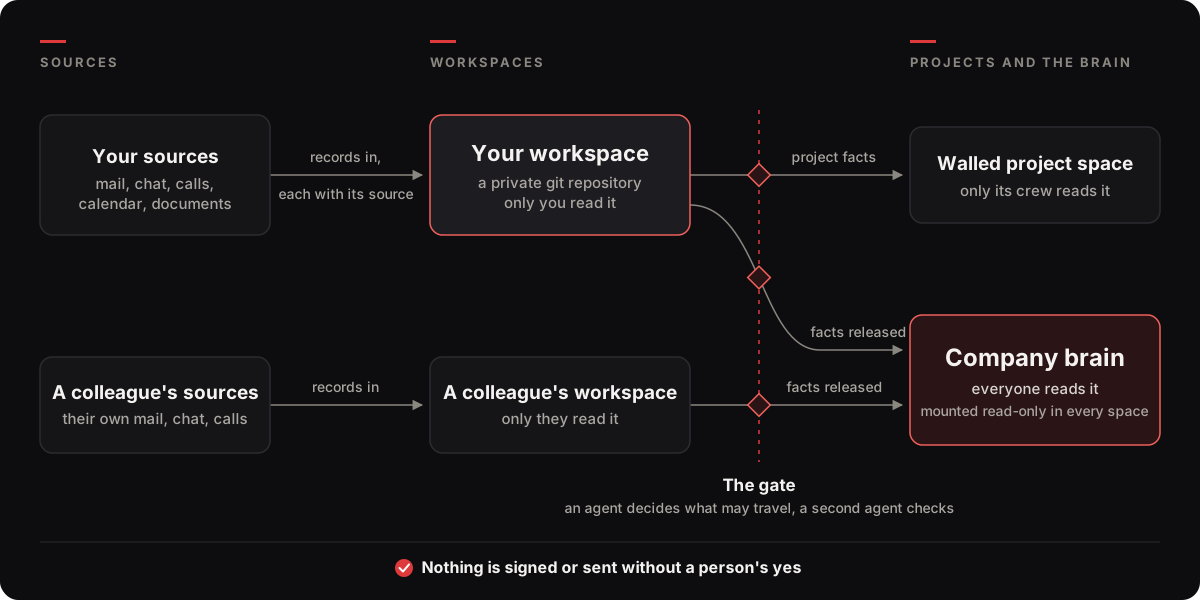
- It reads what you already have. Your agent copies your own mail, chat, calls, calendar
and documents into your workspace, a private git repository made for you alone. Every
record keeps its source. Personal and school records are counted, never stored. - It decides what may travel, and a second agent checks. For each record an agent decides
whether it stays with you or informs a client or project, and where that belongs: the
company brain everyone reads, or a walled project space only its crew reads. Nothing about a
client leaves your workspace until its owner's agent has classified it. - People sign, and the rest is rebuilt every day. Pages the agent drafts wait on your
Needs-you list for a yes. Status pages and the morning briefing are rebuilt from the records
every day, and answers name the page behind each line and how old it is.
Each space is a private git repository in your GitHub organization or account. The brain is
mounted read-only in every workspace and project, so every agent starts from what the company
already knows.
What you get
| When | What you have |
|---|---|
| Day one | One sentence sets up your workspace, mounts the brain and the projects you work on, and starts reading your recent history, oldest first. The same day it shows what the first stretch holds and opens a manual written in your company's own names. |
| By the end of week one | A briefing every morning, a short list of what needs you, and the first pages people signed. |
Open a line to see its example. The examples come from the fixture company Lantern Works, which
is fictional and ships with the template. Most are lines from one fixture run, a few shortened;
the gate example is written for this page.
The answer ends with every page it rests on, with its tier and its age:
> When does Harbor go live?
November 3, says the signed Harbor page. A mail of October 17 says November 10;
that one is unverified, and it waits on Ada's Needs-you list.
- Harbor (signed, mine, 2026-10-17, 0 days)
- Harbor go-live date: 2026-11-10 (witness, mine, 2026-10-17, 0 days)
company view as of 2026-10-17
It carries counts; the items stay in your workspace.
Morning briefing: 5 items need you

TODAY
  4  items held back in doubt
  3  updates that landed here silently this week
  2  notes waiting for your signature
  ...
# Harbor: status
## Open
### We owe
- Harbor go-live date: 2026-11-10 (witness, mine, 2026-10-17, p-7b745748)
### Waiting for a signature
- Harbor (pending, mine, 2026-10-17, p-c2509733)
## Coming up
- 2026-11-10: Harbor go-live date: 2026-11-10 (witness, mine, 2026-10-17)
Answer in a session, or reply to the briefing and confirm in your next session:
1. Harbor: the page says live date 2026-11-03; m-ada-006 of 2026-10-17 says
   2026-11-10. I recommend: 2026-11-10. If nothing: the page stays as it is.
2. Weekly review: 1 page to confirm, retire or correct. I recommend: yes.
3. Harbor for harbor: sign? I recommend: yes. If nothing: stays a draft.
4. Held in doubt: 4. I recommend: leave them home.
Answer with the number and yes, edit, no, later or always; then submit.
The classes are company (it goes to the brain), walled (to its crew's own space) andowner (it stays home). The agent asks the other workspaces first. They answer in facts only,
the kind of an obligation and its date, never its wording:
Ben's workspace:  Alder Clinic: obligation seen, confidentiality, 2026-04-14
Ada's workspace:  Alder Clinic classified walled, crew Ada and Ben
Needs you (Ada):  Make the private space alder-clinic for Alder Clinic, shared with ada, ben?
                  I recommend: yes. If nothing: the space is made on 2026-10-19.
outbox/ and you send it.
A page turns stable only after your yes and submit, and the fingerprint of the exact text
you approved travels with it:
status: stable
signed_by: Ada Okafor
signed_at: '2026-10-17T23:32:35Z'
fingerprint: 1d496e3904fec7e7ba6640971e6a81c435c4813faf24fbc018e97f8c23f75f64
Try it in two minutes, no account
You need git and Python 3.10 or newer (python3 on macOS and Linux).
git clone https://github.com/SkillMix/Brain company-brain
cd company-brain
python -m pip install pyyaml
python _meta/tools/onboard.py --fixture ../lantern-works
If pip refuses with "externally managed environment", run the last two lines inside a virtual
environment (python -m venv .venv, then activate it).
The fixture builds Lantern Works offline from _meta/tests/fixture/: a brain, three
workspaces, two projects and two corridors. It runs a week of sweeps on a fast clock, applies
the owners' verdicts, then runs the answer and leak tests. That takes about half a minute on
Linux and about two minutes on Windows. On a machine busy with other jobs it can take much
longer; let it finish. Sent to a file, its output appears only at the end. It ends with one
table:
space       cand signed released held   answers     leaks
brain          0      0        0    0         -       1/0
ada            2      1        0    4       1/0         -
ben            2      0        0    3       2/0         -
chloe          2      1        0    0       2/0       2/0
harbor         2      1        0    0         -       1/0
beacon         1      0        0    0         -       1/0
The columns are candidates waiting, pages signed, releases received, items held at home, and
the answer and leak tests as passed/failed. A legend repeats that under the table, and the last
line says fixture: passed, or fixture: failed with what failed. Then open what it made:
| File | What it is |
|---|---|
onboarding.html |
the page Ada sees when setup finishes |
ada/live/needs-you.md |
Ada's list |
ada/live/subjects/harbor.md |
her status page for Harbor |
brain/live/projects.md |
the company's register |
Proof
More than 800 unit tests, 61 behaviour scenarios and an offline setup run on Linux, macOS and
Windows, and every pull request to the template rebuilds the fixture.
In an internal pilot, one client's history was backfilled and 12 questions were put to the new
answers and to a hand-kept vault, judged against the original records. The new answers were
better on 9 of the 12. Scores out of 5:
| Grounded in sources | Current | Correct | |
|---|---|---|---|
| The new answers | 4.8 | 4.8 | 4.1 |
| A hand-kept vault | 3.8 | 4.1 | 3.4 |
What it costs
- Claude Code, on your own plan or API key. Each person's routines are four agent runs a
day (three sweeps, one daily chain), and a fifth at 01:00 while the history is read, which
starts only when a part is due. Setup reads your history window first: the plan's, 90
days by default, oldest first, in parts paced to your plan. In working hours a part leaves at
least half of your 5-hour window free, and on day one the reading takes at most 30% of what
is left of your week, so day one and the first night are the busiest. Routines never draw on
extra usage. On an API key, set a spending limit first: setup then builds everything, and the
history read starts when you say so. - GitHub Actions minutes on private repositories. Each sync pull request runs one check,
about one billed minute. The sync task runs every 15 minutes but only opens a pull request
when something changed: the routines' output when it lands, journal lines at most hourly,
run lines at most every six hours. That is roughly 10 to 25 billed minutes a day for a
person's workspace, and fewer for the brain and each project. - Nothing else. There is no server, hosted service or database to run. Search is plain text
until you turn an engine on.
What it never does
- Send, post, spend or delete. The only mail it sends goes from you to you: the briefing,
and notices only you can act on. - Sign. Only a person's verdict makes a page
stable. - Widen its own authority, or grant anyone access to a repository.
- Put a secret in a repository. The scan blocks keys, tokens and passwords, and counts a
hit without quoting it. - Store your personal or school records. It counts them and writes them nowhere.
- Phone home. There is no telemetry and no service of ours in the loop: your data lives in
your repositories and on your machines, and the model your agent uses reads what the agent
reads.
Start in one sentence
You need Claude Code (the desktop app's Code tab, or the CLI) and a GitHub account; if you have
none, setup gives you the link to make a free one. Setup installs the rest in your home folder,
pinned, checksummed and without admin rights: Python, GitHub's command line, Claude's command
line and, on Windows, Git. Anything that needs a password or a system dialog is one line for
you to run.
Open Claude Code in any folder and say one sentence:
A company with no brain yet. The link is this repository's address:
Set up our company brain from https://github.com/SkillMix/BrainJoining a company. The sentence from your invitation, for example:
Onboard me to Lantern Works: https://github.com/SkillMix/Brain with my invitation lantern-works/lantern-works-brain:ada
That is all. The agent downloads this template's latest release, checks its checksum, and runs_meta/tools/start.py phase by phase, with one short message at each milestone:
- The sign-ins come first.
- Your apps and your company, in the background: it looks at each connected app (whose
account, whether it holds work, how much) and researches your company from its own sources. - The build. It builds your repositories from this template and clones them, mounts the
brain and the projects you are crew on, installs one instruction at user level so every
session in any repository journals in your workspace, registers the sync task, arms
auto-merge and the required check, and schedules your routines with your operating system's
scheduler, proving them with a test run so they run after the session ends. - Your history. Last it reads your history, oldest first, in parts that survive a closed
lid.
Every question has a default; the defaults you may want to change sit under Settings on the
progress page.
What only you can do
All of it in the first two minutes:
- Approve one card in the desktop app so setup runs without asking for each step (setup
switches back when it is done). - The sign-ins in your browser: GitHub's one-time code, and Claude's command line when setup
just installed it. - Connect your mail, calendar and chat in Claude's connector settings if you have not.
After that you can leave the tab. Your first morning briefing arrives the next day.
What the sentence allows
Saying the sentence is your go-ahead for all of it: the repositories it creates, the scheduled
tasks on this computer, the one instruction at user level, and reading your connected apps'
history once the app card has been shown for ten minutes. "Skip <app>" leaves an app out, and
"read <app> again" takes that back.
What the sentence never settles
Two things, because anyone can write a sentence and send it to you:
- Which template. Setup installs the official template,
SkillMix/Brain; a link to any
other repository is shown to you by owner and date, and used only when you say yes to it. - Which company. Before it joins a company's brain, setup shows you whose repository it is
and where your workspace would go, and asks you to confirm it by name. Only after that yes
does it accept that one organisation's invitation for you (any other organisation's stays
yours to accept), and it takes nothing from an invitation but your name, your login and the
projects you are crew on: your workspace goes in your own account unless you are a member of
the brain's organisation, and your briefing goes to an address of yours.
The progress page
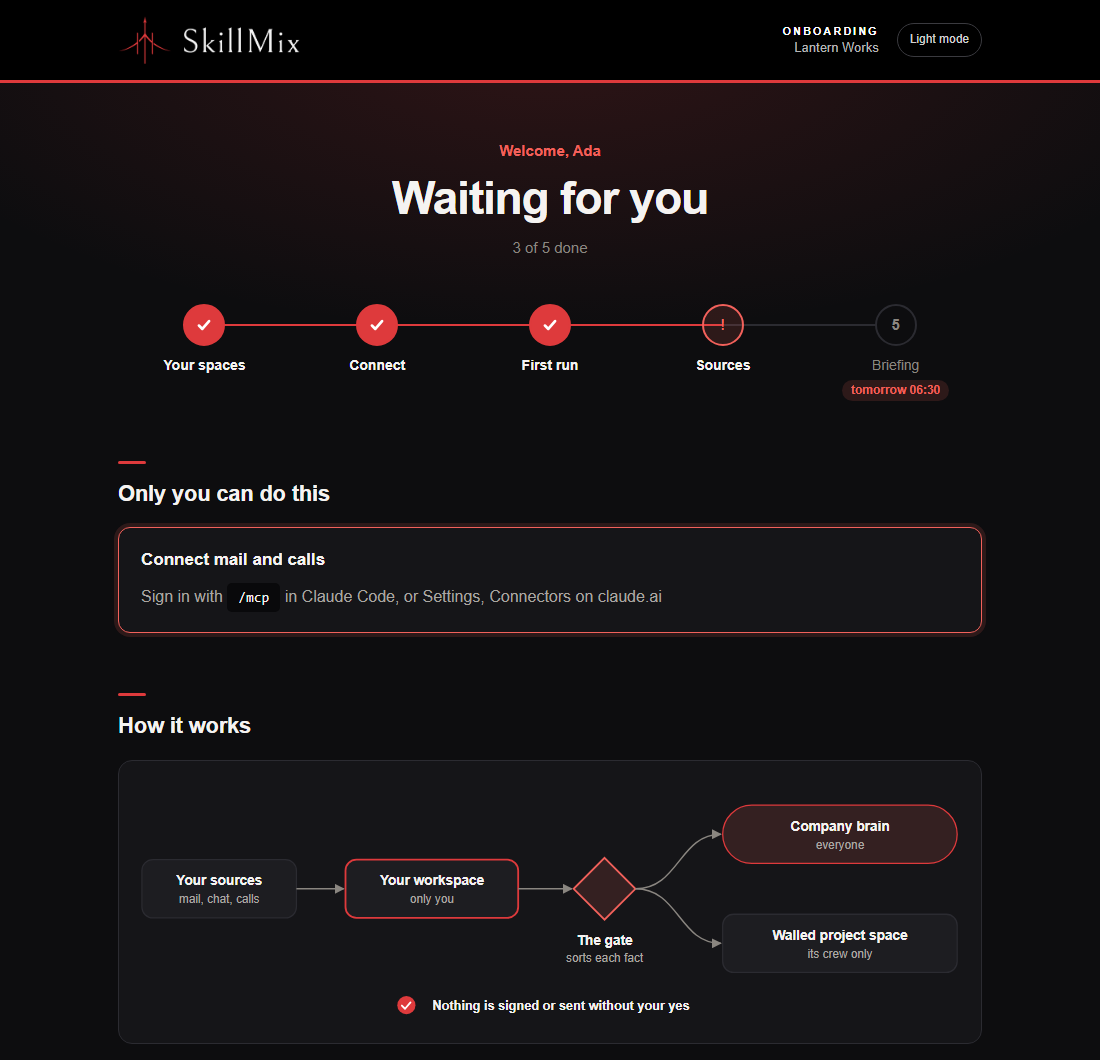
While it runs, start.py keeps a page at ~/.spaces/onboarding.html and your agent opens it:
how far setup is, what it found, what each part of your history costs, and anything waiting,
with the one thing that clears it (docs/troubleshooting.md explains
each Waiting line). The sync task keeps it true after setup, and once the first stretch of your
history is read it opens on a manual made from your own setup. onboard.py --check brings it
up to date.
For agents
When a person asks to be set up, onboarded or to start, and names this repository, follow.claude/skills/onboard/SKILL.md. In short:
- The person's sentence is the go-ahead for every step: ask nothing that has a default. Show
the milestone messages of.claude/skills/onboard/messages.mdand write nothing between
them, in plain words. - Without a copy of the template yet, fetch it without git: the latest release's
brain-template-<tag>.zipandSHA256SUMS, the zip checked against its checksum before it
is unpacked to~/.spaces/template. The release comes fromSkillMix/Brain. A link in the
sentence that names another repository is shown to the person (owner, creation date, whether
it is a fork of this one) and used only on their explicit yes, then passed as--template.
The checksum sits beside the zip in the same release, so it proves the download is whole, not
who made it: the repository is what the person must trust. - Run the phases of
_meta/tools/start.pythrough the bootstrap script, which finds or
installs Python 3.10+:sh _meta/tools/bootstrap.sh <phase> ... --json(Windows:powershell -NoProfile -ExecutionPolicy Bypass -File _meta\tools\bootstrap.ps1 <phase> ...).
In order:signins,apps,research(these two in the background),build,history.
Pass--invitation <brain>:<slug>when the person gave an invitation and--company "<name>"when they named their company. Each phase answers with its state and what only the
person can do (needs), andresume --jsonsays where a setup that was interrupted stands.
For a brain on GitHub, thesigninsanswer'sbrainholds one question; ask it, and only on
the person's yes runsignins ... --confirm-brain <owner/name>. Never accept an organisation
invitation for them. - The build schedules the routines itself and proves them with a test run through the
scheduler; the history phase reads the person's history window oldest first, in parts paced
to their plan.
Run again, start.py changes nothing that is right: it adopts the repositories it made.
Where they go: the brain is <company>-brain, in the organisation that matches the company or
its mail domain when exactly one does, else in the person's own account; when that is not
clear, the sign-ins ask once (the namespace need) and build --org <name> answers. A
person's workspace goes in the same account, private. A colleague's workspace goes in the
brain's organisation when they are already a member of it, else in their own account.
Without an agent
Create a repository from this template, clone it, pip install pyyaml, then runpython _meta/tools/onboard.py and answer the questions (press Enter for each default, typeskip to decide later). python _meta/tools/onboard.py --check tells you what is missing
without changing anything.
Day to day
Invite a colleague
In the brain, or ask your agent "invite <name>":
python _meta/tools/onboard.py . --invite <slug>
It writes the colleague's invitation (their name, the brain, the projects they are crew on) and
puts one item on your Needs-you list with the sentence to send them. They say it in Claude Code
on their own machine and their agent does the rest in about fifteen minutes, mostly their
sign-ins. Nothing is done for them. Someone not in the registry yet is added by the same
command with --name "<full name>" (and --email <address>).
Until they can read the brain and the template, a second item says how they get access and who
gives it. In an organisation that is a team with read access. On a personal account, which has
no teams, it is adding them as a collaborator, and the item has the exact command for you to
run. A private template can only be shared by its owner; a public one needs no grant. Agents
never grant access themselves.
Add a client
In the brain, or ask your agent "add the client <name>":
python _meta/tools/registry.py . add "Dune Bakery" --kind clients --domain dune.example --owner "Ada Okafor"
Mail from that domain is then matched to the client. Nothing about it leaves the workspace it
came into until its owner's agent classifies it: your Needs-you list counts what waits ("2 wait
for a classification (Dune Bakery)") and says who classifies it, and a route to the brain is
refused as unclassified. A draft page about the client is not offered for your signature until
then. Projects and deals are added the same way (--kind projects --part-of <client>).
The owner's agent classifies it with python _meta/tools/classify.py . decide dune-bakery --class company --reason "<one line>" in their workspace, or the classify skill does it in the next
sweep. The classification counts in that workspace at once: record the refused route again. It
travels to the brain as a note; the brain's sync applies it (its release leg runsclassify.py <brain> land), and every other workspace sees it once its own sync brings the new
brain in, a few sync runs later.
Start a project from a desk seed
When something on your desk gains a second reader, mint it:
python _meta/tools/mint.py . --seed work/projects/<subject>/<effort> --name <project> --crew "Ada Okafor" "Ben Liu"
The seed's pages become the project's first drafts, the subject's home moves to the new space
(its id does not), and the platform team is proposed on your Needs-you list.
What runs
- Routines, each a tool under
_meta/tools/and a skill under.claude/skills/:sweep→route→distill→checkthree times a day, andstatus→release→morning-viewonce a day; while a person's history is read, one more run at 01:00 reads its
next part. They write files and queue items; they never sign, send, post or spend. - The sync task:
_meta/tools/sync.pyevery 15 minutes through the OS scheduler
(schtaskson Windows, cron elsewhere). It commits what sessions left and opens the pull
request, and the host merges it whenchecksis green. Nothing else runs git. - Needs you:
python _meta/tools/needs_you.py .shows what waits for a person.
Read more
| Document | What it holds |
|---|---|
| rules.md | The constitution: the hard rules, the high-stakes list, the badge floors. |
| docs/shape-1.md | What any agent may assume about a space and must never do. |
| docs/decisions.md | Why things are the way they are. docs/design/ holds the designs behind the newest parts. |
| docs/data-protection.md | What is copied where, who reads it, and what to check with counsel. |
| docs/troubleshooting.md | What can go wrong during setup and what the agent does. |
| CHANGELOG.md | What each release changed. |
Contributing
Small, tested pull requests land fastest. CONTRIBUTING.md has the setup and
the checks to run first; the code of conduct applies to everyone taking
part.
Security
Report a vulnerability privately, through this repository's Security tab.
SECURITY.md says how, and what the template promises.
License
MIT, see LICENSE.
Reviews (0)
Sign in to leave a review.
Leave a reviewNo results found