point
Health Pass
- License — License: MIT
- Description — Repository has a description
- Active repo — Last push 0 days ago
- Community trust — 10 GitHub stars
Code Fail
- rm -rf — Recursive force deletion command in build.sh
- rm -rf — Recursive force deletion command in get.sh
- rm -rf — Recursive force deletion command in install.sh
- rm -rf — Recursive force deletion command in make-dmg.sh
- rm -rf — Recursive force deletion command in make-signing-cert.sh
Permissions Pass
- Permissions — No dangerous permissions requested
No AI report is available for this listing yet.
Talk less. Point more. Hold a key, talk, and circle: your AI agent gets your words plus a screenshot. On-device, open source, macOS.
 Point
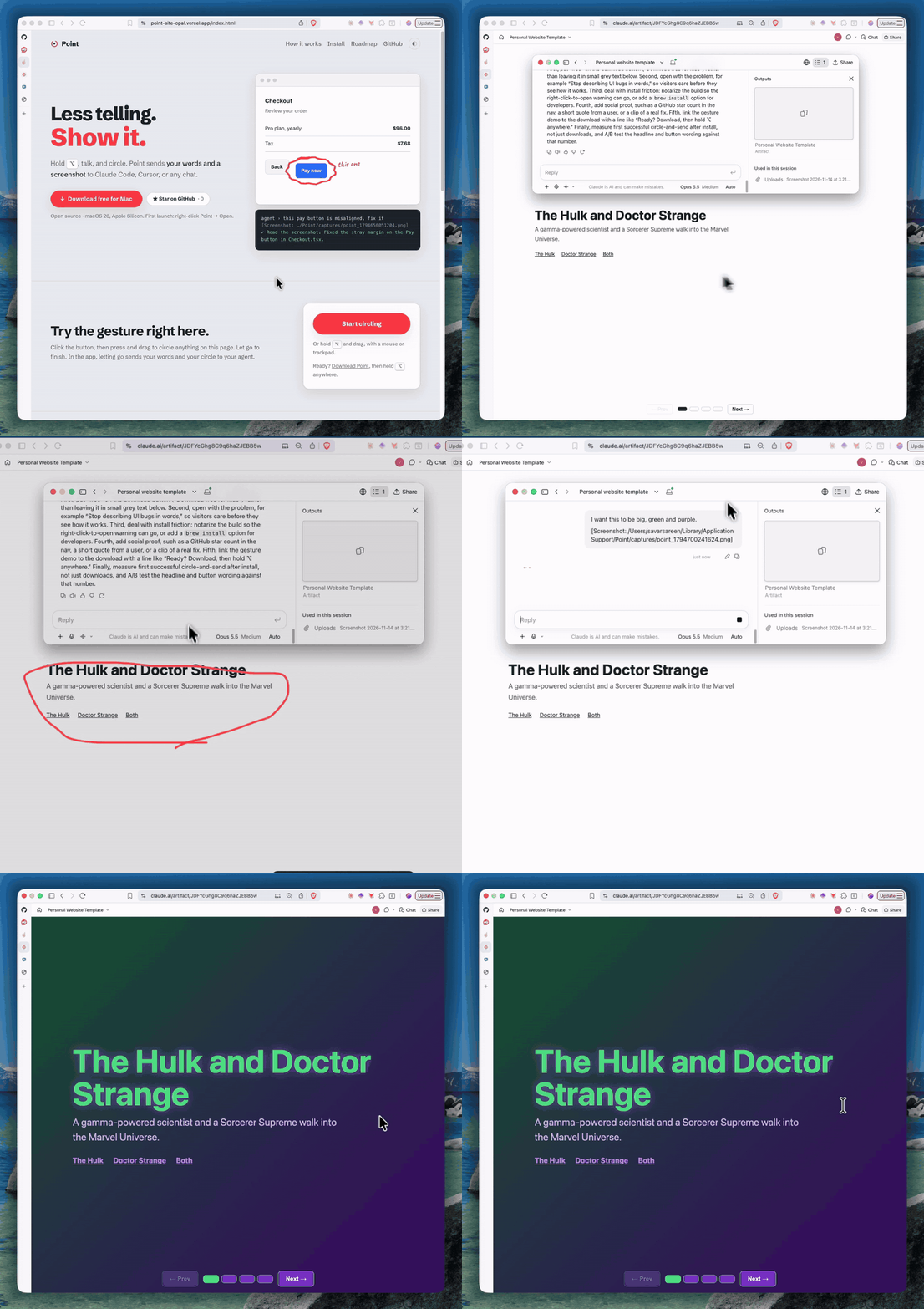
Talk less. Point more.
Hold a key, talk, and circle the thing on your screen. Point hands Claude Code, Cursor, ChatGPT, or any chat your words plus a screenshot of exactly what you pointed at. Without drawing, it's fast on-device dictation.
pointandtell.app · ⬇ Download Point.dmg · macOS 26, Apple Silicon · free and open source · voice never leaves your Mac
| Gesture | What happens |
|---|---|
| Hold Right ⌥ and talk | Dictation. Your words are pasted at the text cursor and left on the clipboard. |
| …and draw a loop while holding | Your words, plus a screenshot with your loop drawn on it. Chats (claude.ai, ChatGPT, the Claude app, Slack) get the image itself; terminals and code editors (Claude Code, Cursor) get its file path. |
| Double-tap Right ⌥ (or ⌃⇧N) | Toggle a sticky pad that floats over everything. Autosaved, persistent, 1,440 characters. Hold Right ⌥ while it's open to dictate into it. |
Prefer another key? Pick Right ⌥, Left ⌃, Right ⌘, or Fn from the menu bar icon → Trigger key.
Prefer boxes to loops? Settings → Mark → Rectangle lets you drag a red box instead of drawing a circle.
Transcription runs on-device with Apple's SpeechAnalyzer (macOS 26). No audio leaves your Mac.

Install
Requires macOS 26 on Apple Silicon.
Download: Point.dmg, open it, and drag Point to Applications. Point isn't notarized by Apple yet, so the first launch is blocked: open System Settings → Privacy & Security and click Open Anyway.
Or paste this into Terminal, which skips that block:
curl -fsSL https://raw.githubusercontent.com/sksareen/point/master/get.sh | bash
It downloads the latest release into Applications and opens it (read the script). Then grant Accessibility and Microphone when asked, and Screen Recording the first time you draw a loop.
A notarized download and a Homebrew cask are coming.
Claude Code plugin
Point works in Claude Code with nothing extra: it pastes your words and the screenshot's path. The plugin adds two things on top.
/plugin install point --marketplace sksareen/point
- Claude reads captures properly. It opens the screenshot first, treats your red loop or rectangle as "this", and allows for dictation mishearings.
/point:lastpulls in your most recent capture without pasting. Circle something in any app, switch to Claude Code, and type/point:last fix this./point:last 3reads the last three.
On Claude Code older than 2.1.275, run /plugin marketplace add sksareen/point and then /plugin install point@point-mac.
Build from source
Requires macOS 26 and Xcode command-line tools.
git clone https://github.com/sksareen/point && cd point
./make-signing-cert.sh   # once: stable signing so macOS remembers permissions
./install.sh             # builds, installs to /Applications, launches
On first run, grant Accessibility (to see the key), Microphone, and, the first time you draw a loop, Screen Recording. Turn on Launch at login from the menu bar icon.
Why the signing cert? macOS ties privacy permissions to an app's code signature. Ad-hoc signatures change on every build, so macOS silently forgets Point's permissions after each rebuild. A self-signed certificate keeps the identity stable. If codesign keeps asking for your keychain password, run the security set-key-partition-list command that make-signing-cert.sh prints.
The Point window
Menu bar icon → Open Point… shows every capture as a time machine: newest first, grouped by day, searchable, with ↑/↓ to move through time. Each capture shows the screenshot (click for full size), the transcript, and the recording you can play back. Settings… has the trigger key, launch at login, permission status with one-click fixes, and the vocabulary list.
Your data
Everything lives in ~/Library/Application Support/Point/:
captures/point_<id>.png: screenshots (only when you drew a loop)captures/point_<id>.wav: exactly what the speech model heard (16 kHz mono)captures/point_<id>.json: transcript, timings per stage, and an emptyreferencefield. Fill in what you actually said to score accuracy.sticky.txt: the sticky padvocab.txt: words to bias transcription toward (names, jargon), one per line. Edit it in Settings → Vocabulary.
Layout
Sources/
  main.swift          app entry, menu bar, Accessibility, ⌃⇧N
  TriggerKey.swift    which modifier key drives Point (menu setting)
  Gesture.swift       trigger hold/double-tap, overlay, screenshot, paste
  Transcriber.swift   Transcriber protocol + Apple on-device implementation
  Sticky.swift        the sticky pad
  Window.swift        the Point window: captures time machine + Settings (SwiftUI)
  LoginItem.swift     launch at login, version, menu items
  SauronHook.swift    optional: logs screenshots to Sauron if it's installed
plugin/ is the Claude Code plugin (two skills); .claude-plugin/marketplace.json lists it.
The speech engine sits behind the Transcriber protocol, so swapping in whisper.cpp or Parakeet is one new file.
Roadmap
Next: a notarized download and Homebrew, a faster start, voice commands ("search Porter Robinson on YouTube"), and recording a bug repro with zoom on clicks. Later: older Macs via Whisper or Parakeet, and agents that ask you to point.
Far out, a wand: aim at any screen, click to select, hold to draw, and talk while you point.
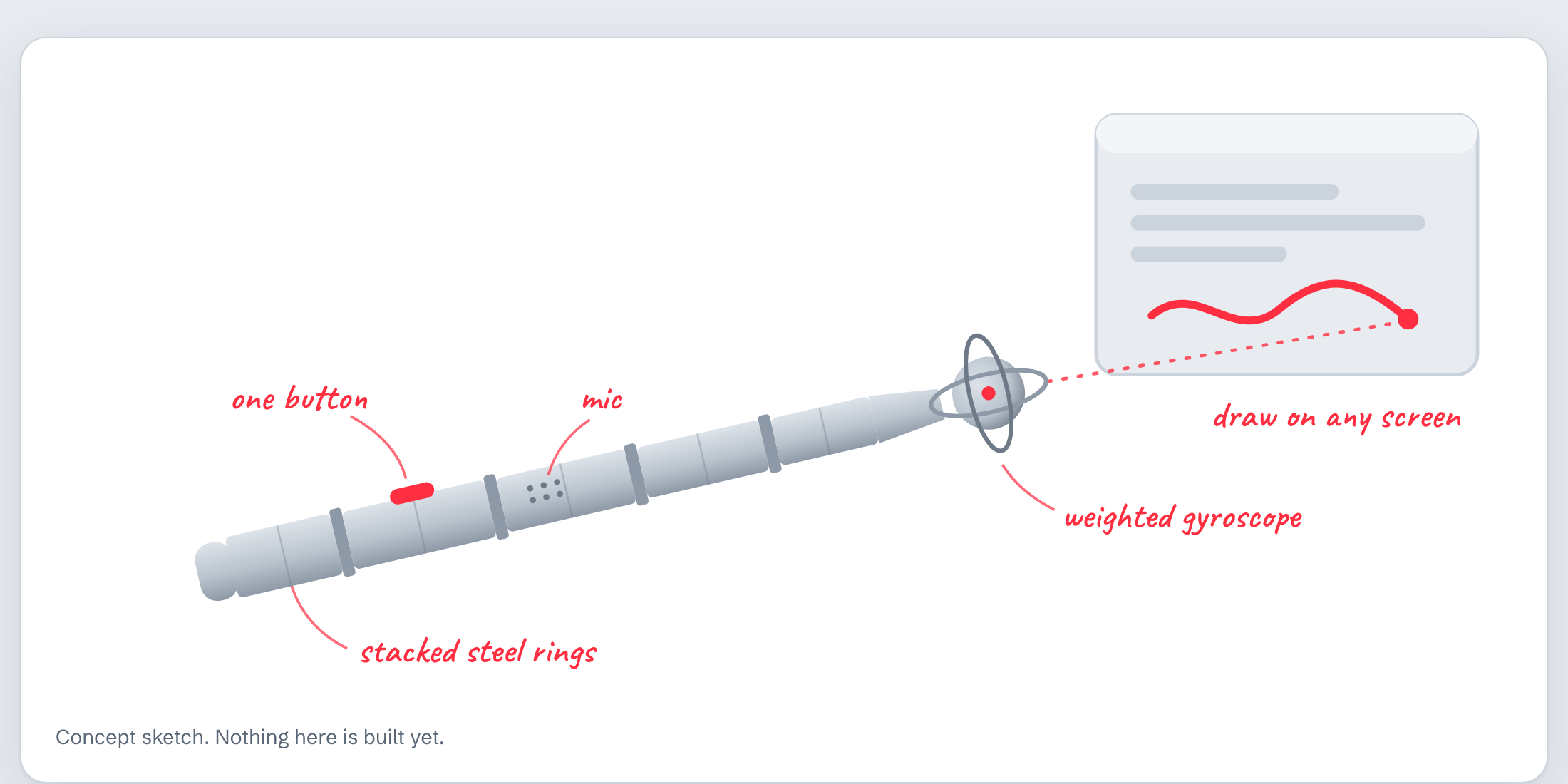
Ideas welcome in issues.
Status
Early preview (0.1.2). Known: about 200–270 ms from key-down until the mic is live, so your first syllable can be clipped if you start talking instantly.
Reviews (0)
Sign in to leave a review.
Leave a reviewNo results found