codex-sdd-loop
Health Warn
- License — License: MIT
- Description — Repository has a description
- Active repo — Last push 0 days ago
- Low visibility — Only 5 GitHub stars
Code Warn
- process.env — Environment variable access in scripts/tapd-mcp-server.mjs
- network request — Outbound network request in scripts/tapd-mcp-server.mjs
Permissions Pass
- Permissions — No dangerous permissions requested
No AI report is available for this listing yet.
A Codex plugin that brings OpenSpec-style proposal, planning, implementation, validation, and archive workflows into AI coding.
Codex SDD Loop
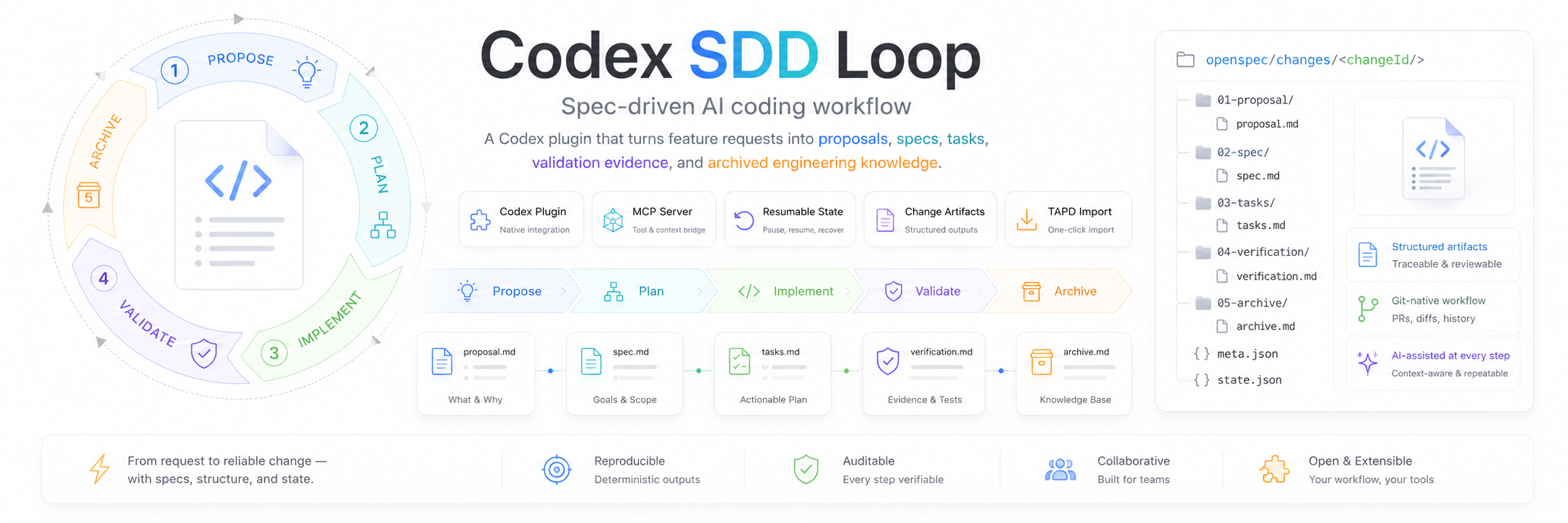
Spec-driven development for Codex. Turn feature requests into proposals, specs, tasks, validation evidence, and archived engineering knowledge.


What is Codex SDD Loop?
Codex SDD Loop is a Codex plugin that brings the OpenSpec development loop into everyday AI-assisted engineering. Instead of jumping directly from a prompt to code, it keeps every change inside a traceable workflow:
- Propose - clarify scope, background, out-of-scope work, and acceptance criteria.
- Plan - generate specs, design notes, task lists, verification plans, and implementation notes.
- Implement - work through tasks with durable progress tracking.
- Validate - check artifacts, task completion, hooks, and spec-vs-code drift.
- Archive - preserve the finished change and accumulate project knowledge.
The plugin is built around Codex skills plus a local MCP server. Skills guide the agent's behavior; the MCP server creates files, maintains workflow state, validates changes, and exposes status/continuation tools.
Why use it?
- Human gates where they matter - review scope, design, validation, and archive readiness before the workflow advances.
- Resumable work - interrupted sessions can continue from
.openspec-codex/state.jsonwithout re-explaining the change. - Change-scoped artifacts - every feature or fix lives under
openspec/changes/<changeId>/. - Custom team process - project config, schemas, templates, rules, and hooks can be adapted to your engineering workflow.
- Audit-friendly output - proposals, specs, tasks, verification evidence, and archives stay in your repository.
Quick Start
Prerequisites
- Codex desktop app with local plugin support
- Node.js 18 or newer
- npm 9 or newer
Install from GitHub
git clone https://github.com/skyloevil/codex-sdd-loop.git
cd codex-sdd-loop
npm install --prefix mcp-server
npm run build --prefix mcp-server
Then install the plugin in Codex:
- Open Codex Settings.
- Go to Plugins.
- Choose Add from folder.
- Select the cloned
codex-sdd-loopdirectory.
The plugin manifest is in .codex-plugin/plugin.json, and the MCP server configuration is in .mcp.json.
Basic Usage
Start with a request in Codex:
Use Codex SDD Loop to propose: Add user avatar upload
The workflow creates a change directory like this:
openspec/changes/add-user-avatar-upload-20260627/
  proposal.md
  specs/spec.md
  design.md
  tasks.md
  verification.md
  implementation-notes.md
After the proposal is reviewed, continue the flow:
Use Codex SDD Loop to plan this change
Use Codex SDD Loop to implement the next task
Use Codex SDD Loop to validate the current change
Use Codex SDD Loop to archive the completed change
You can also recover context at any point:
Use Codex SDD Loop to show status
Use Codex SDD Loop to continue
Optional TAPD Requirement Import
Codex SDD Loop includes an optional tapd-requirement MCP adapter that can fetch a TAPD story before proposal generation. This is useful when the source requirement lives in TAPD and the Codex prompt only contains a story URL.
Before using TAPD import, configure your TAPD API account and password in your local environment. Do not commit real credentials to this repository.
For local terminal testing, you can create a private .tapd.env.local file:
TAPD_API_USER=your_tapd_api_user
TAPD_API_PASSWORD=your_tapd_api_password
.tapd.env.local is ignored by git. For Codex plugin usage, provide the same variables through your shell environment, personal Codex MCP configuration, or another local secret mechanism available to your Codex runtime.
The bundled TAPD MCP adapter also attempts to load .tapd.env.local from the current project root and from the Codex SDD Loop plugin root. If another project cannot see tapd-requirement:fetch_story, reload Codex MCP servers after updating the plugin and confirm that the plugin MCP server is exposed in that session. If the tool is visible but fails with missing credentials, the MCP process cannot see TAPD_API_USER or TAPD_API_PASSWORD.
The plugin MCP configuration uses plugin-root-relative commands (cwd: "." with ./... paths), so the OpenSpec and TAPD MCP tools are available from any project directory once the plugin is installed and MCP servers are reloaded.
After reloading Codex MCP servers, trigger proposal generation with a TAPD story URL:
Use Codex SDD Loop to propose https://www.tapd.cn/tapd_fe/<workspace_id>/story/detail/<story_id>
The TAPD adapter parses the URL, calls the TAPD stories API, and returns normalized proposalInput fields for the OpenSpec proposal workflow. The raw TAPD API response is also included for custom field inspection.
Commands and Skills
Codex SDD Loop ships with focused Codex skills:
| Skill | Purpose |
|---|---|
propose |
Create or refine the proposal and confirm scope. |
plan |
Produce specs, design, task, verification, and implementation artifacts. |
implement |
Execute tasks while updating progress and implementation notes. |
validate |
Check required artifacts, task completion, hooks, and drift. |
archive |
Move completed work into the archive and knowledge base. |
status |
Summarize active change state and next action. |
continue |
Resume from the state machine. |
customize |
Explain schema, template, rule, and hook customization. |
tapd-openspec-proposal |
Fetch a TAPD story before proposal generation. |
MCP Tools
The MCP server exposes structured tools used by the skills and by Codex:
| Tool | Description |
|---|---|
openspec_init_project |
Create openspec/config.yaml, default schemas, change directories, and state. |
openspec_create_change |
Create a change directory and default artifacts. |
openspec_create_or_update_artifact |
Write proposal, specs, design, tasks, verification, or notes. |
openspec_get_status |
Return active change, gates, paths, phase, and next action. |
openspec_get_next_actions |
Derive the next workflow step from artifacts, gates, hooks, and tasks. |
openspec_create_goal |
Create a goal-compatible loop state for the active change. |
openspec_get_goal |
Return objective, loop status, usage, blockers, evidence, and next decision. |
openspec_continue_loop |
Advance the loop to the next action, validation, hook, human review, archive, complete, or blocked decision. |
openspec_record_iteration |
Record task execution feedback, files, commands, checks, errors, and evidence references. |
openspec_record_validation_evidence |
Store structured validation evidence in state, verification.md, and verification.json. |
openspec_request_human_review |
Create a pending human review gate for risk, validation, archive, or business approval. |
openspec_resolve_human_review |
Resolve a pending human review and map approved core reviews back to OpenSpec gates. |
openspec_update_goal_status |
Mark a loop complete, blocked, or cancelled while enforcing completion and blocker rules. |
openspec_update_task |
Mark task checkboxes complete or reopen them. |
openspec_validate |
Validate artifact presence, task status, and required hooks. |
openspec_archive_change |
Archive the active change and record knowledge-base metadata. |
openspec_get_pending_hooks |
List configured hooks for a workflow point. |
openspec_record_hook_result |
Record hook results in state and verification evidence. |
Workflow
flowchart LR
    A["Requirement"] --> B["Propose"]
    B --> C{"Scope approved?"}
    C -->|Yes| D["Plan"]
    C -->|No| B
    D --> E{"Design approved?"}
    E -->|Yes| F["Implement"]
    E -->|No| D
    F --> G["Validate"]
    G --> H{"Checks pass?"}
    H -->|No| F
    H -->|Yes| I["Archive"]
    I --> J["Knowledge Base"]
State Model
Workflow state is stored in .openspec-codex/state.json. Version 2 supports multiple tracked changes with one active change:
{
  "version": 2,
  "activeChangeId": "add-user-avatar-upload-20260627",
  "changes": {
    "add-user-avatar-upload-20260627": {
      "phase": "implement",
      "preset": "full",
      "paths": {
        "changeDir": "openspec/changes/add-user-avatar-upload-20260627",
        "proposal": "openspec/changes/add-user-avatar-upload-20260627/proposal.md",
        "tasks": "openspec/changes/add-user-avatar-upload-20260627/tasks.md"
      },
      "gates": {
        "scope": true,
        "design": true,
        "validation": false,
        "archive": false
      },
      "nextAction": "Implement the next incomplete task."
    }
  },
  "updatedAt": "2026-06-27T00:00:00.000Z"
}
This file is intentionally project-local so Codex can resume an interrupted OpenSpec workflow.
Customization
Initialize a project to create the default OpenSpec workspace:
Use Codex SDD Loop to initialize this project
Generated configuration lives in:
openspec/
  config.yaml
  schemas/
    spec-driven/
      schema.yaml
      templates/
You can customize:
- Schemas - choose which artifacts are required for full features, hotfixes, and small tweaks.
- Templates - define team-specific proposal, spec, design, task, verification, and notes formats.
- Rules - require architecture, compatibility, API, persistence, caching, or testing constraints.
- Hooks - call MCP tools, commands, or skills before and after workflow steps.
Example hook configuration:
hooks:
  pre_archive:
    - kind: skill
      name: implementation-notes-backfill
      required: true
Development
Install dependencies:
npm install --prefix mcp-server
Build the MCP server:
npm run build --prefix mcp-server
Run tests:
npm test --prefix mcp-server
Run the server locally:
npm run dev --prefix mcp-server
Project Structure
codex-sdd-loop/
  .codex-plugin/
    plugin.json
  .mcp.json
  assets/
    icon.png
    logo.png
    logo-dark.png
  mcp-server/
    src/
      index.ts
      openspec.ts
      state.ts
      types.ts
    test/
      openspec.test.ts
    package.json
    tsconfig.json
  skills/
    archive/
    continue/
    customize/
    implement/
    plan/
    propose/
    status/
    tapd-openspec-proposal/
    validate/
  scripts/
    tapd-mcp-server.mjs
Relationship to OpenSpec
This project follows the OpenSpec-style workflow and is designed for Codex plugin usage. It is inspired by the structured development loop promoted by Fission-AI/OpenSpec, while focusing on local MCP tools, resumable state, and Codex skills.
Contributing
Contributions are welcome. Please keep changes spec-driven:
- Open an issue or proposal describing the behavior change.
- Add or update tests for MCP server behavior when applicable.
- Run
npm test --prefix mcp-server. - Keep generated dependencies such as
node_modules/out of commits.
License
Codex SDD Loop is released under the MIT License.
Reviews (0)
Sign in to leave a review.
Leave a reviewNo results found