chain-of-custody
Health Warn
- License — License: MIT
- Description — Repository has a description
- Active repo — Last push 0 days ago
- Low visibility — Only 5 GitHub stars
Code Pass
- Code scan — Scanned 3 files during light audit, no dangerous patterns found
Permissions Pass
- Permissions — No dangerous permissions requested
No AI report is available for this listing yet.
A role-based engineering team for Claude Code, where written specs are the only thing that crosses between agents.
Chain of Custody
Make Claude Code work like a small software team: it plans your app, designs each feature, writes the code, reviews its own work, and shows you each piece running on your machine.
You bring an idea, or a feature you want added to an existing project. Chain of Custody turns Claude into a team with a clear division of labor. A product manager asks what you actually need. An architect designs how to build it. A tech lead splits the design into tasks. Specialist engineers write the code. Separate reviewers check the design before any code is written and check the code before it's accepted.
There's nothing to install and nothing to configure. It's a folder of instructions (.claude/) that you copy into your project. Claude Code picks it up automatically, and adapters for Codex and Cursor are included.
What it looks like
Building a new app from an idea takes two commands:
you     /planner
        I want a simple app where my book club can suggest books and vote on next month's pick.

claude  Asks a handful of plain-language questions (Who can sign in? Can anyone add a book?).
        Recommends a tech stack and explains why in plain terms.
        Writes a build plan:
          1. A minimal app that runs, with one passing test
          2. Sign-in for club members
          3. Suggest a book
          4. Vote on suggestions
          5. Show this month's winner
        Waits for your approval.

you     Looks good.
        /orchestrate

claude  Builds the plan one item at a time: designs it, writes it, tests it, reviews it.
        At each checkpoint it starts the app on your machine and shows you the feature working.
        Waits for you to approve, reject with feedback, or stop.
Everything happens locally. Nothing is deployed and nothing is pushed to GitHub until you decide to do it.
For smaller jobs there are shortcuts: describe one feature and it runs the same team on just that feature, or type /tech-lead for a bug fix and it sends one engineer to fix it.
Why not just ask Claude?
Asking Claude directly works well for small edits. On anything bigger, a single long chat tends to go wrong in predictable ways:
- It forgets. Decisions from early in the conversation get lost as the context fills up.
- It skips the thinking. It jumps to writing code before working out the design, and the gaps show up later as bugs.
- It grades its own homework. The same session that wrote the code reviews the code.
- It leaves no record. A month later, nobody can say why something was built the way it was.
Chain of Custody fixes this by making every step produce a written document and hand it to the next role:
| Step | Who | Writes |
|---|---|---|
| 1. What are we building? | Product Manager (/pm) |
requirements.md |
| 2. How will we build it? | Architect (/architect) |
technical-design.md and api-contract.md |
| 3. Is the design sound? | Design Critic | A list of problems to fix before coding starts |
| 4. Who builds which part? | Tech Lead (/tech-lead) |
One brief per engineer |
| 5. Build it | Engineers (database, backend, app, admin app, infra) | Code, tests, and a report of what they did |
| 6. Is the code right? | Code review | Approval, or specific fixes to make |
Each role starts with a clean slate and reads only the document it was handed, so nothing depends on what an earlier conversation happened to remember. Those documents stay in your project as a paper trail of who decided what, and why. That's where the name comes from: like evidence in a court case, the work changes hands only with a signed record of each handoff.
Who it's for
- Solo developers and small teams who use Claude Code and want it to behave like a disciplined engineering team rather than a freeform assistant.
- People with an idea who aren't deeply technical. You'll be asked product questions in plain language ("Can a regular user see other people's records, or only their own?"). Technical choices are recommended and explained for you. Start with the plain-language guide, and keep the glossary handy.
It works on an empty folder or an existing codebase, in any language or framework.
Quick start
1. Copy the .claude/ folder into your project. This is the only required step.
git clone https://github.com/smaharj1/chain-of-custody.git /tmp/chain-of-custody
cd /path/to/your/project
cp -r /tmp/chain-of-custody/.claude .
⚠️ Already have a
.claude/folder in this project? Copying will merge into it and can overwrite yoursettings.json,CLAUDE.md, and any agents or commands you've added. Back it up first (cp -r .claude .claude.backup) and merge by hand. The kit'ssettings.jsonadds two safety hooks (guard-git.sh,guard-main-edit.sh) and an empty permission allowlist, so fold those into your file rather than replacing it, and append the kit'sCLAUDE.mdto yours.
2. Ignore the kit's log and lock files by adding these lines to your project's .gitignore:
.claude/metrics.jsonl
.claude/loop.jsonl
.claude/orchestrate.lock
.claude/settings.local.json
.claude/worktrees/
Do commit build-plan.json and BUILD_PLAN.md when they appear. They're the build plan, and the loop needs them to pick up where it left off.
3. Start Claude Code and pick the command that matches what you're doing.
claude
| You want to... | Type | What happens |
|---|---|---|
| Build a new app, or a big batch of features | /planner, then /orchestrate |
The Planner interviews you and writes a build plan. The Orchestrator builds it item by item and shows you each piece running. |
| Add one feature to an existing project | Just describe it (or /pm) |
The PM asks questions, then hands off to /architect and /tech-lead for that one feature. |
| Fix a bug or make a small change | /tech-lead |
Sends one engineer straight to the fix. It'll tell you if the job is bigger than it looks. |
| Think through a technical design | /architect |
Works through the tradeoffs with you and writes the design. |
That's it. There are no templates to fill in and no setup questionnaire. The agents work out what they need to know about your project on their own (see How the agents learn your project).
Optional: copy the human-readable guides too, so they sit next to your code. /planner uses choosing-your-stack.md if it finds it and recommends a stack on its own if it doesn't.
mkdir -p docs
cp /tmp/chain-of-custody/docs/{choosing-your-stack,getting-started,faq}.md docs/
Links in those guides to GLOSSARY.md, this README, and examples/ point back at the kit, so keep your clone around or bookmark the repo.
What still needs you
The loop runs on its own between checkpoints, but some things can't be automated:
| Moment | Why |
|---|---|
| Approving the plan | Nothing gets built until you've said yes to the plan. |
| Checkpoints | By default the loop stops after each milestone, starts your app, and shows you the working feature. You approve it, reject it with feedback (it undoes the item and tries again), or stop. Set autonomy: per-feature in .claude/loop.config.md to see every item. |
| Product questions | "Can a regular user see other people's records?" The answer isn't in any codebase. |
| Secrets | When an item needs an API key (payments, email), the loop stops and asks. No agent can invent a credential. |
| Security blocks | If the security reviewer finds a Critical or High issue, the item won't be marked done until you fix it or record a waiver with a reason. |
| The very first item | On a new project, item one is the skeleton every later item copies. If something looks off, say so then rather than ten items later. |
| Publishing | Finished work stays on your machine. When you're happy, ask Claude to push it. |
How it works
The handoff chain
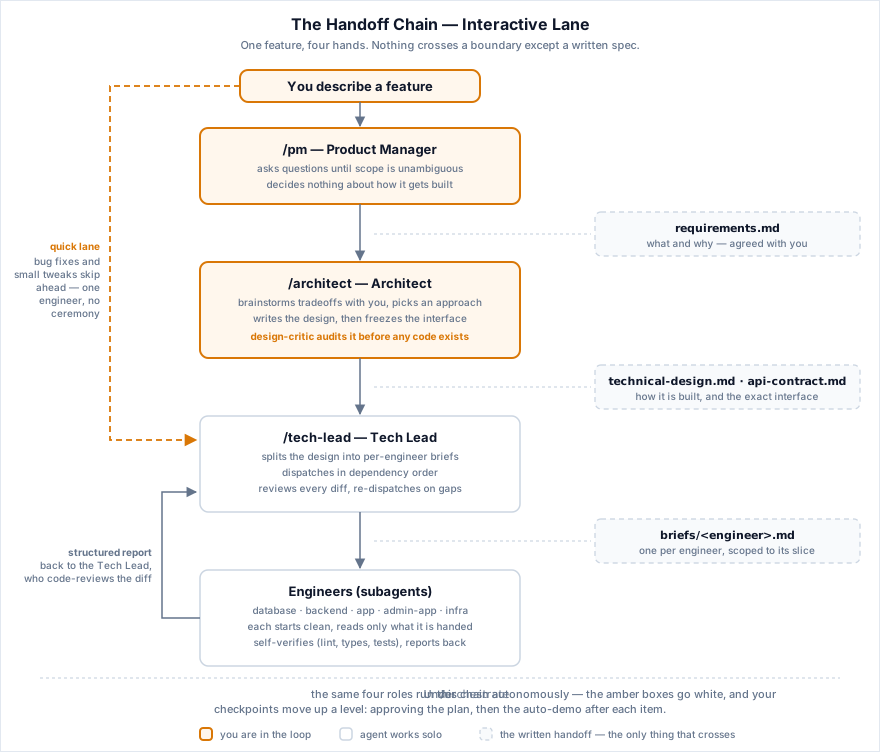
Every arrow in the diagram is a file. This is the chain you drive by hand with /pm, /architect, and /tech-lead, one feature at a time.
You describe a feature
  |
  v
/pm  -->  Asks you questions
  |       Writes docs/features/<slug>/requirements.md
  v
/architect  -->  Talks through tradeoffs with you
  |              Writes technical-design.md + api-contract.md
  |              Runs design-critic (catches problems before code)
  v
/tech-lead  -->  Writes one brief per engineer
  |              Dispatches engineers in dependency order
  |              Reviews each engineer's code
  |              Handles escalations and re-dispatch
  v
Engineers (subagents)  -->  Read their project notes + brief + design + contract
                            Write code that matches the project's existing patterns
                            Run lint and tests on their own work
                            Report back what they did and what they learned
The build loop
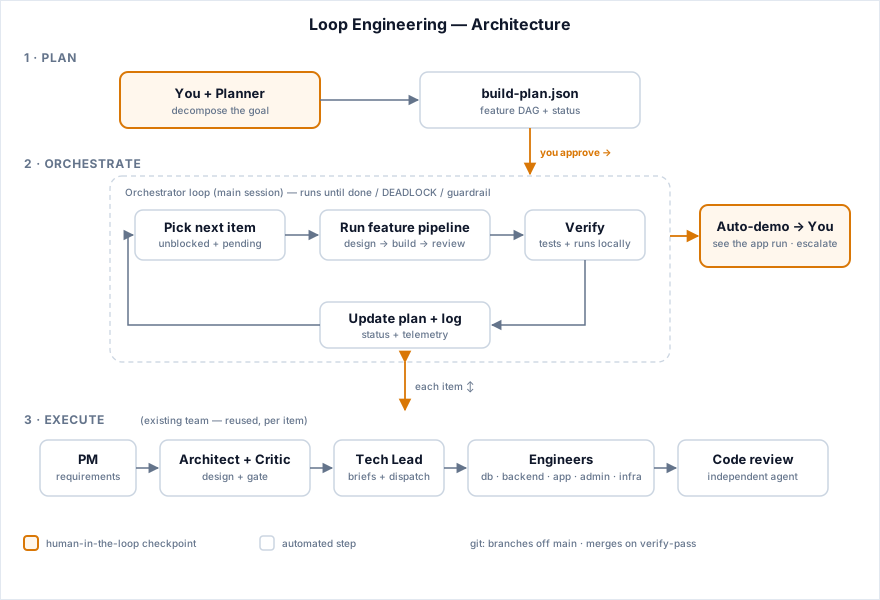
/planner and /orchestrate wrap that same team in a loop so it can build a whole idea instead of one feature.
/plannerinterviews you, makes the big technical decisions with you, and writesbuild-plan.json: a checklist ordered so that nothing is built before the things it depends on. It also writes down how to run and test your app. It never builds anything itself, and finishes by telling you to run/orchestrate./orchestratetakes the next ready item, runs it through the team (design, build, review, security check where relevant), verifies that the tests really ran and passed, merges it into your localmain, and moves on. At checkpoints it starts the app and shows you the result.
Inside the loop the team runs without you in the chair, so three things change. The PM and Architect work out requirements from the plan item instead of interviewing you. Requirements are passed along directly instead of being written to requirements.md. And code review goes to a separate code-reviewer agent, because the Orchestrator wrote the design and the briefs and shouldn't also be the one approving the result.
How often the loop stops for you, how much work it may do per run, and the commands it uses to test your app all live in .claude/loop.config.md.
The team
| Agent | Writes code? | Job |
|---|---|---|
| Database Engineer | Yes | Schema changes and migrations |
| Backend Engineer | Yes | API endpoints, services, business logic |
| App Engineer | Yes | The main frontend app |
| Admin App Engineer | Yes | An admin dashboard |
| Infra Engineer | Yes | Infrastructure-as-code |
| Design Critic | No | Reviews the design before any code is written |
| Code Reviewer | No | Independent review of each change inside /orchestrate (interactive work uses the code-review skill instead) |
| Security Reviewer | No | Security audit. Runs automatically in the loop on items touching sign-in, payments, file uploads, or user input; run it yourself before a deploy or PR otherwise |
The reviewers only read. They report problems and never edit code themselves.
How the agents learn your project
To write code that fits your project, the engineers need to know its stack, its structure, its conventions, and which existing file is the best example to copy. That knowledge lives in short notes called primers (.claude/context/*.md), and the agents write them, not you.
Each primer ships as an empty template. The first role that needs one fills it in from evidence: the code itself on an existing project, or the decisions the Planner made with you on a new one. You're never asked what an ORM is or which router you use. You're only asked product questions that can't be read from code. The full rules are in primer-protocol.md.
| Primer | Written by | When |
|---|---|---|
.claude/CLAUDE.md |
Planner, then the first build item | Tech stack and repo layout, written at plan time and updated once the skeleton exists |
.claude/context/architect.md |
Architect | Before its first design |
.claude/context/backend.md, database.md, shared-frontend.md, app.md, admin-app.md, infra.md |
Tech Lead or Architect | Before the first engineer in that area starts |
.claude/context/local-dev.md |
Planner | At plan time. The run, test, and reset commands are proven by running them, not guessed |
.claude/loop.config.md |
Planner | At plan time |
.claude/context/engineer-protocol.md, primer-protocol.md |
Nobody | Shared kit rules. Leave these alone |
Primers stay current on their own. The engineer writing the code is the first to notice when a primer is out of date, so every engineer report includes a ## Primer Delta section listing new patterns, dead references, or conventions the code has moved past. Engineers report but don't edit. The role holding the whole picture (the Tech Lead at wrap-up, the Orchestrator after each item) applies the change. If a primer and correct code disagree, the code wins and the primer gets fixed.
When something can't be known yet, such as an example file on a brand-new project, the section is marked TODO(primer) and /orchestrate keeps a checkpoint at every item until it's resolved. Missing run or test commands are a hard stop instead, because the loop can't verify anything without them.
They're plain markdown, and reading what the agents wrote about your project is a good use of ten minutes. Correct anything you know is wrong. To see how much detail a filled-in primer should have, look at examples/: every primer written out for a made-up app called TaskFlow, plus one feature's full set of handoff documents. It's a writing reference, not a demo. There's no code behind it.
Starting from scratch
On an empty folder, start with /planner, not /pm. Engineers normally copy patterns from existing code, and an empty folder has none, so:
- The Planner always makes item one a runnable skeleton: a minimal app, a test setup, and one passing test. You never scaffold the project by hand.
- That skeleton sets the patterns (folder layout, error handling, naming) that every later item copies. Give it more attention than the rest.
- Once it ships, the Orchestrator points the primers at its files as the examples to follow, and the normal workflow takes over.
/orchestrate runs git init for you if the folder isn't a repository yet.
Prerequisites
Required
- Claude Code, installed and signed in. Any recent version works (the kit uses agent definitions in
.claude/agents/, PreToolUse hooks, and the Skill tool). git. The loop builds each item on a branch and merges it locally.python3on your PATH. The two safety hooks use it, and without it they quietly switch themselves off, which removes the git guardrails.- Permissions set up before long loop runs. Claude Code asks before running any command it hasn't been allowed to run, regardless of the loop's autonomy setting, so an unattended run will stall at the first new command. The kit ships an empty allowlist on purpose. Before a long run, add your project's run, test, and build commands to
permissions.allowin.claude/settings.json. The Planner offers to do this for you. For interactive work the prompts are normal.
Recommended
- context7 MCP for up-to-date library docs. ⚠️ The agent files expect it installed as a plugin named
context7(tools namedmcp__plugin_context7_context7__*). If you install it as a plain MCP server instead, the tools are namedmcp__context7__*and you'll need to update thetools:line in all eight agent files, or the agents silently lose access to docs. - superpowers plugin (
superpowers:brainstorming), which/pmand/planneruse for interviews. Both work without it. - code-review plugin (
code-review:code-review), the Tech Lead's review skill. There's a manual fallback.
Optional
- A browser-preview MCP so checkpoints can include screenshots, and push notifications for checkpoint alerts. Without them the loop describes the demo in text and flags checkpoints in the transcript.
Using Codex or Cursor
The .claude/ folder is the single source of truth. Thin adapters point other coding agents at it, so the workflow is the same everywhere:
- Codex:
AGENTS.mdfor repository instructions, orskills/chain-of-custody/SKILL.mdas a reusable skill. - Cursor:
.cursor/rules/chain-of-custody.mdc, an always-on project rule.
Copy the adapter your tool loads along with .claude/.
Customizing
Change the team to match your project. The Tech Lead only dispatches engineers that exist, so adding or removing an agent file is all it takes.
- No admin app or no infrastructure? Delete
agents/admin-app-engineer.mdandcontext/admin-app.md, oragents/infra-engineer.mdandcontext/infra.md. - More than one frontend (a mobile app, say)? Duplicate
agents/app-engineer.mdasmobile-app-engineer.md, update itsname:field, and copycontext/app.mdtocontext/mobile-app.md. Leave the copy as a template and the agents will fill it in. Note that checkpoints can't screenshot a phone simulator, so mobile demos fall back to API and test checks. - No frontend at all (an API or CLI tool)? Delete the app agents and
context/shared-frontend.md. The API contract template becomes your interface contract. See the FAQ. - Rename an agent? Rename the file and update
name:in its frontmatter. - A different language? Nothing to change. The agents work out your stack from the code.
- Want another specialist, like a UI designer? Add
agents/ui-designer.mdfollowing the pattern of the existing agents.
Which files are yours and which are the kit's:
- Yours, written by the agents:
.claude/CLAUDE.md,.claude/context/*.md(except the two protocol files),.claude/loop.config.md,.claude/settings.json. Review and correct them freely. Never overwrite them when updating the kit. - The kit's, safe to replace on update:
.claude/agents/,.claude/commands/,.claude/context/engineer-protocol.md,.claude/context/primer-protocol.md,.claude/hooks/,.claude/spec/,.claude/templates/,.claude/KIT_VERSION. You can edit the templates, but an update will overwrite your changes, so keep a note of them.
Updating the kit
Your copy records its version in .claude/KIT_VERSION, and every change is listed in CHANGELOG.md.
- Check your
.claude/KIT_VERSIONand read the CHANGELOG entries since that version. - Re-copy the kit's files listed above from the new release (skip
agents/if you've added or renamed agents, and merge by hand instead). - Never overwrite your own files listed above. If a CHANGELOG entry touches one of them, such as a new settings hook, merge that change by hand.
Reference
File structure.claude/
CLAUDE.md # Project description + conventions (agent-written)
KIT_VERSION # Which kit release this copy came from
settings.json # Claude Code settings (permissions + the two safety hooks)
loop.config.md # Loop settings: autonomy, budgets, verify commands, db, git
agents/ # Subagent definitions
backend-engineer.md # Backend API engineer
database-engineer.md # Database/migration engineer
app-engineer.md # Main frontend app engineer
admin-app-engineer.md # Admin dashboard engineer
infra-engineer.md # Infrastructure engineer
security-reviewer.md # Security auditor (read-only)
design-critic.md # Design reviewer, before code (read-only)
code-reviewer.md # Independent code reviewer in the loop (read-only)
commands/ # Slash commands
pm.md # /pm: requirements
architect.md # /architect: technical design
tech-lead.md # /tech-lead: briefs, dispatch, review
planner.md # /planner: whole-idea build plan
orchestrate.md # /orchestrate: run the plan item by item
context/ # Primers: project knowledge (agent-written)
engineer-protocol.md # Shared rules for all engineers (kit logic)
primer-protocol.md # How agents write and maintain primers (kit logic)
architect.md # System architecture
backend.md # Backend patterns
database.md # Schema + migrations
shared-frontend.md # Conventions shared by frontend apps
app.md # Main app
admin-app.md # Admin app
infra.md # Infrastructure
local-dev.md # How to run, test, and reset the app locally
hooks/
guard-git.sh # Blocks push, rebase, and other shared-history git commands
guard-main-edit.sh # Blocks app-code edits directly on main
spec/
loop-engineering.md # The authoritative loop spec /orchestrate follows
templates/ # Document templates the roles fill in
requirements.md
technical-design.md
api-contract.md
brief.md
build-plan.md
metrics.jsonl # Interactive telemetry (auto-created, gitignored)
loop.jsonl # Loop telemetry (auto-created, gitignored)
orchestrate.lock # Run lock (auto-created, gitignored)
build-plan.json # The build plan (commit this)
BUILD_PLAN.md # Readable view of the plan (commit this)
docs/
getting-started.md # Plain-language guide
choosing-your-stack.md # Stack recommendations by project type
faq.md # Testing, CI, deploying, teams, non-web projects
features/<feature-slug>/ # Created per feature; scratch space, not long-term
requirements.md
technical-design.md
api-contract.md
briefs/<engineer>.md
reports/<engineer>.md
examples/ # Filled-in documents for a fictional app (TaskFlow).
# A writing reference. No code, not a runnable demo.
docs/assets/ (diagrams) and docs/design/ (the kit's own review history) exist only in this repo. Don't copy them.
- Brief gaps. When an engineer can't find something it needs, it reports a "brief gap" instead of guessing. These tell the Tech Lead what to include in future briefs.
- Primer deltas. Described above: engineers report where the project notes are out of date, and the lead role fixes them.
- Telemetry. After every feature or task, the Tech Lead appends a line to
.claude/metrics.jsonlwith timing, retry counts, and brief gaps. The loop logs to.claude/loop.jsonl, including which primers were updated per item, so a long run of "nothing to update" stands out as possible drift.
Project status
V1. The build loop runs items one at a time. Running items in parallel and a dedicated mode for scaffolding new projects are planned but not built yet. The full design, and the review rounds behind it, are in .claude/spec/loop-engineering.md.
More documentation
- Getting started: a plain-language walkthrough, no coding experience assumed
- Glossary: every term used here, explained
- FAQ: testing, CI, deploying, teams, monorepos, non-web projects
- Choosing your stack: what technology to use if you don't know
- Examples: filled-in documents for a fictional project, to calibrate against
License
MIT. See LICENSE.
Reviews (0)
Sign in to leave a review.
Leave a reviewNo results found