kroki-diagrams
Health Warn
- License — License: MIT
- Description — Repository has a description
- Active repo — Last push 0 days ago
- Low visibility — Only 5 GitHub stars
Code Fail
- rm -rf — Recursive force deletion command in install-pi.sh
Permissions Pass
- Permissions — No dangerous permissions requested
Security Assessment: Overall risk is Medium. The tool requires access to your code and documents to read and generate diagrams, meaning it handles your workspace data. It explicitly makes network requests to the external Kroki service (kroki.io) to render the diagram files. While no hardcoded secrets or dangerous permissions were found, the install script contains a recursive force deletion command (`rm -rf`). Though this is common in setup scripts, it is a sensitive shell execution that could be destructive if the environment variables are misconfigured.
Quality Assessment: The project is highly active, receiving updates as recently as today. It uses the permissive and standard MIT license, making it highly accessible. However, community trust and visibility are currently very low. With only 5 GitHub stars, the project has not been widely adopted or battle-tested by a large user base.
Verdict: Use with caution.
Agent skill for generating clean Kroki diagrams, interactive SVG viewers, and auto-built diagram indexes.
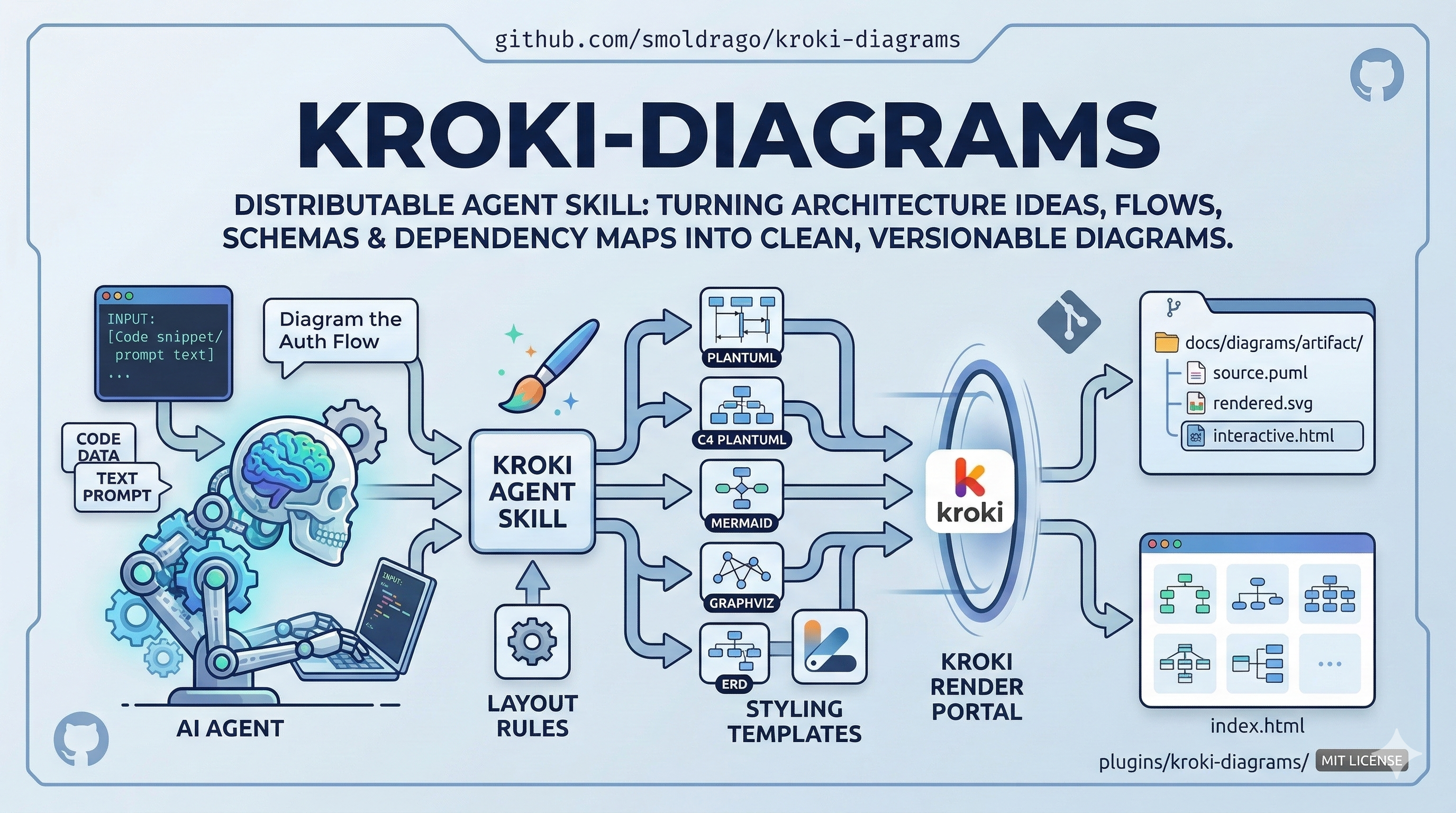
kroki-diagrams
A distributable agent skill for turning architecture ideas, flows, schemas, and dependency maps into clean, versionable diagrams.

What Is Kroki?
Kroki is a diagram rendering service. Instead of drawing boxes manually in a GUI, you write diagrams as text using engines like PlantUML, Mermaid, Graphviz, and ERD syntax, then Kroki renders them to SVG, PNG, PDF, or text output.
That gives you a few big advantages:
- diagrams live in your repo as source files
- changes are diffable in git
- diagrams can be regenerated automatically
- you can use the best diagram engine for each use case instead of forcing everything into one tool
This skill packages that workflow for coding agents so they do not just dump raw diagram syntax or pick a random engine. It helps them choose the right diagram type, style it sanely, render it, and optionally make it interactive.
Quick Demo
https://github.com/user-attachments/assets/e22072b9-ae73-4405-b6ad-659f2cefc868
What This Skill Actually Does
From start to finish, the skill:
- reads your code, docs, or prompt
- decides whether you need a sequence diagram, C4 diagram, graph, ERD, Mermaid flow, or even a plain text tree
- chooses the most appropriate engine
- applies layout and styling rules to avoid spaghetti diagrams
- writes the diagram source file into a sensible repo-local folder
- renders the source through Kroki
- optionally builds an
interactive.htmlviewer around the SVG - automatically updates an
index.htmlpage for the diagram collection
So it is not just “render this diagram.” It is a full diagram production workflow.
Feature Set
- Use-case-first diagram selection instead of engine-first guessing
- Support for
plantuml,c4plantuml,graphviz,mermaid, anderd - Readability rules for layout direction, grouping, spacing, and diagram splitting
- Engine-specific style templates so diagrams start from a sane visual baseline
- Interactive HTML wrappers for supported SVG outputs
- Auto-generated collection
index.htmlpages with list and card views - Repo-friendly output placement like
docs/diagrams/<artifact-name>/ - Shareable Kroki URLs for generated diagram sources
- Cross-agent packaging for Claude Code, Codex, and Pi
Interactive Viewer Features
When you render an interactive wrapper, the generated HTML viewer can provide:
- click-to-select node highlighting
- connected-node and edge emphasis
- directional edge flow when the SVG exposes source and target metadata
- neutral current-style edge animation when direction is not reliable
- dimming of unrelated nodes without making them disappear
- fit-to-view on load
- pan and zoom controls
- a generated diagram index page for browsing many diagrams
Support is strongest for:
- PlantUML
- C4-PlantUML
- Graphviz
Best-effort support exists for:
- Mermaid
- ERD
Supported Use Cases
This skill is built for tasks like:
- architecture diagrams
- request and sequence flows
- system context and container diagrams
- dependency graphs
- orchestration DAGs
- schema and data relationship diagrams
- planning structures and work breakdowns
- repo layout visualizations
Examples:
- “diagram our authentication flow”
- “show the runtime topology of this service”
- “generate a dependency graph for these modules”
- “make an ERD from this schema”
- “visualize this product workflow”
How It Works In Practice
The packaged skill payload lives at plugins/kroki-diagrams/.
Important pieces:
SKILL.md
The main workflow and decision rules.render_kroki_diagram.py
Renders diagram source through Kroki, prints a shareable URL, writes metadata, and refreshesindex.html.build_interactive_kroki_html.py
Wraps rendered SVG output in an interactive HTML viewer.build_diagram_index.py
Builds the collection browser page for a directory of diagram artifacts.references/
Holds the selection matrix, style templates, layout rules, and support notes the agent reads on demand.
Typical Output Structure
The skill usually writes one folder per diagram artifact:
docs/diagrams/my-diagram/
  source.puml
  rendered.svg
  interactive.html
  .diagram-meta.json
And at the parent level it can maintain:
docs/diagrams/index.html
That index is useful once a repo accumulates a larger diagram library.
Example Render Flow
Normal SVG render:
python3 plugins/kroki-diagrams/scripts/render_kroki_diagram.py \
  --engine plantuml \
  --input /path/to/source.puml \
  --output /path/to/rendered.svg
SVG render plus interactive viewer:
python3 plugins/kroki-diagrams/scripts/render_kroki_diagram.py \
  --engine plantuml \
  --input /path/to/source.puml \
  --output /path/to/rendered.svg \
  --interactive-output /path/to/interactive.html
What you get back:
- rendered SVG output
- optional interactive HTML
- a shareable Kroki URL
- per-artifact metadata
- an updated collection
index.htmlby default
Bundled Examples
This repo includes a ready-to-open sample set under examples/interactive-playground/.
It includes medium-complex examples across the main supported engines:
- PlantUML sequence flow
- C4-PlantUML container architecture
- Graphviz orchestration DAG
- Mermaid operational flowchart
- ERD schema diagram
Start with:
To rebuild the sample outputs from source:
cd examples/interactive-playground
./render_all.sh
Why Use This Instead Of Plain Mermaid Everywhere?
Because different diagram jobs want different engines.
- PlantUML is strong for sequence and architecture diagrams
- C4-PlantUML is better for C4 modeling than generic Mermaid boxes
- Graphviz is much better for dense graph layouts
- Mermaid is great for simpler flows and broad compatibility
- ERD syntax is useful for schema views
This skill handles that selection step so the agent does not force one engine onto every problem.
Install
Claude Code
/plugin marketplace add smoldrago/kroki-diagrams
/plugin install kroki-diagrams@kroki-diagrams-marketplace
OpenAI Codex
git clone --depth 1 https://github.com/smoldrago/kroki-diagrams.git /tmp/kroki-diagrams
cp -r /tmp/kroki-diagrams/plugins/kroki-diagrams ~/.agents/skills/kroki-diagrams
rm -rf /tmp/kroki-diagrams
Invoke with $kroki-diagrams or let Codex trigger it implicitly.
Pi
curl -fsSL https://raw.githubusercontent.com/smoldrago/kroki-diagrams/main/install-pi.sh | bash
Or clone and run:
git clone --depth 1 https://github.com/smoldrago/kroki-diagrams.git
cd kroki-diagrams
./install-pi.sh
Repo Layout
.claude-plugin/
  plugin.json
  marketplace.json
plugins/
  kroki-diagrams/
    .claude-plugin/plugin.json
    SKILL.md
    agents/openai.yaml
    references/
    scripts/
install-pi.sh
Limitations
- This repo packages the skill, not a standalone desktop app
- Interactivity depends on inline SVG output and engine-emitted metadata
- Not every Kroki engine is supported equally
- Some diagram problems are better split into multiple diagrams instead of one giant graph
Credits
- Kroki for the rendering service that turns text-based diagram source into generated outputs across multiple diagram engines
- The PlantUML, C4-PlantUML, Graphviz, Mermaid, and ERD ecosystems that make the underlying diagram formats possible
Roadmap
- UI refinement and general "desloppification" of the interactive viewer
- Dark mode support
- Better edge-case handling for large diagrams and inconsistent SVG structures
- UI polishing across the viewer and generated index pages
- Product presets for common use cases like architecture, sequence, schema, and planning
- Theme packs for different visual directions and documentation contexts
License
MIT
Reviews (0)
Sign in to leave a review.
Leave a reviewNo results found