restheart
Health Pass
- License — License: AGPL-3.0
- Description — Repository has a description
- Active repo — Last push 0 days ago
- Community trust — 874 GitHub stars
Code Warn
- fs module — File system access in .github/workflows/native-image-release.yml
Permissions Pass
- Permissions — No dangerous permissions requested
This tool acts as an agent-ready backend for MongoDB, exposing your database through a native Model Context Protocol (MCP) server, alongside REST, GraphQL, and WebSocket APIs.
Security Assessment
Overall Risk: Medium. The primary security consideration is inherent to its purpose: it acts as a direct pipeline to your MongoDB database, meaning it inherently accesses and transmits sensitive data depending on your database contents. The application itself does not request dangerous permissions, execute unexpected shell commands, or contain hardcoded secrets. A code scan flagged file system access, but this is safely isolated within its GitHub Actions continuous integration workflows rather than the core application. It also features robust built-in authentication and authorization (JWT, OAuth2, LDAP) to help secure data access.
Quality Assessment
The project is highly mature and extremely well-maintained. It is actively developed, with its most recent code push occurring just today. It has garnered nearly 900 GitHub stars, reflecting a strong level of community trust and real-world adoption. Furthermore, it operates under the AGPL-3.0 license, which is standard for open-source software but does require careful review if you plan to modify and distribute the code in a commercial product.
Verdict
Safe to use.
The Agent-Ready Backend for MongoDB.
 RESTHeart
The Agent-Ready Backend for MongoDB







What is RESTHeart?
RESTHeart is the agent-ready backend for MongoDB: it exposes your data through a native MCP server and full REST and GraphQL APIs, so AI agents and developers can read and write without custom integration code.
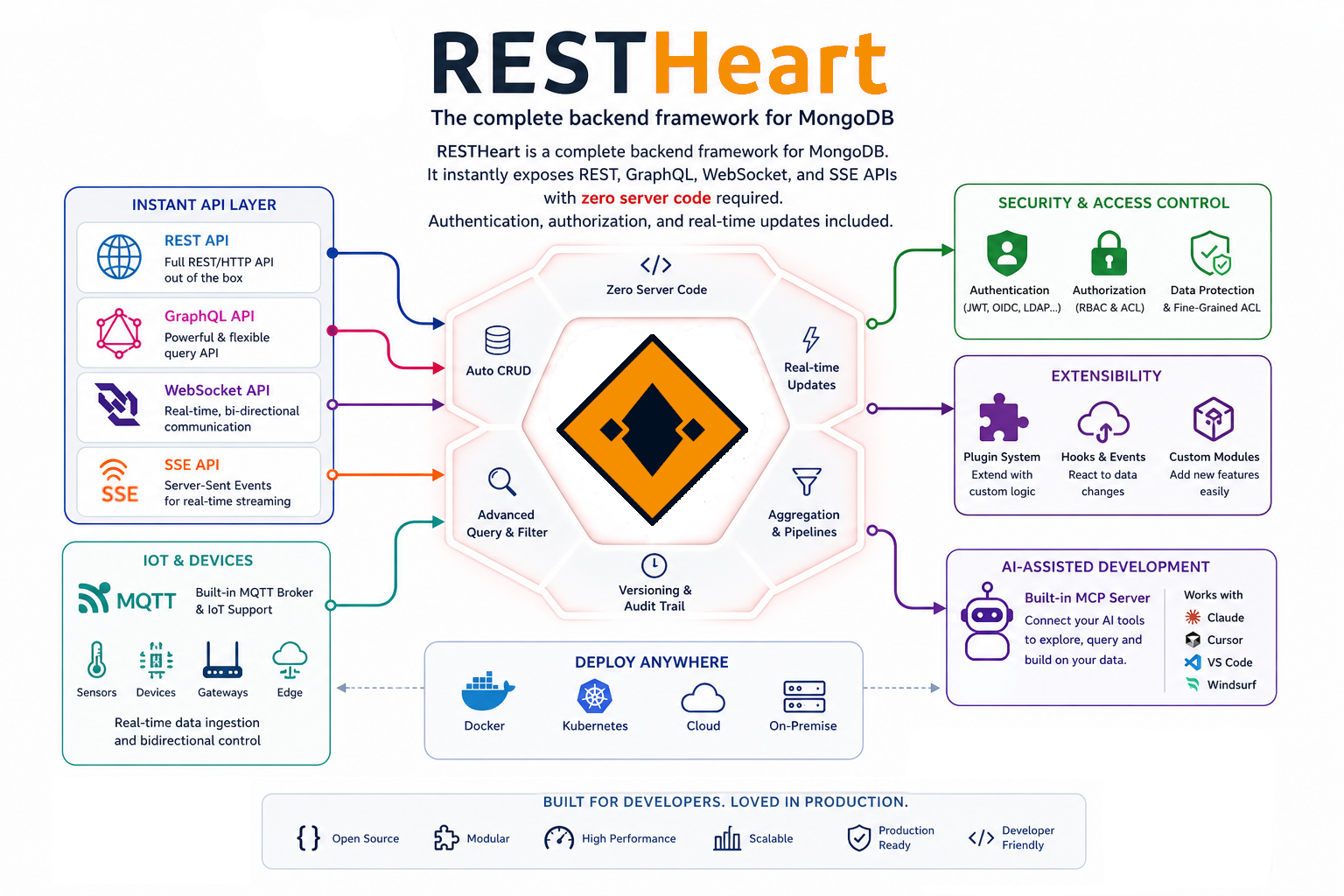
RESTHeart gives AI agents and developers instant, secure access to MongoDB. It ships with a native MCP server that any MCP-compatible client (Claude, Claude Code, Cursor, VS Code) can connect to out of the box, plus full REST, GraphQL, and WebSocket APIs for traditional application development. Built-in authentication and authorization, zero backend boilerplate, and a plugin framework for custom business logic when you need it.
Available as a Docker image and GraalVM native binary. Built on Java 25, Undertow, and virtual threads.
Core capabilities:
- MCP Server: Native Model Context Protocol server. Connect any MCP-compatible AI client (Claude, Claude Code, Cursor, VS Code) directly to your MongoDB data with one line of config.
- REST API: Full CRUD, aggregations, filtering, sorting, pagination
- GraphQL: Schema-driven mapping to MongoDB queries
- WebSocket: Real-time change streams and data sync
- SSE: Server-Sent Events for live dashboards, IoT feeds, and event streams
- IoT / MQTT: Connect devices and ingest telemetry directly into MongoDB (coming soon)
- Authentication and Authorization: JWT, OAuth2, LDAP, MongoDB-based users, ACL rules
- Plugin system: Extend with Java, Kotlin, JavaScript, or TypeScript for custom business logic
AI Agents & MCP
RESTHeart ships with a native Model Context Protocol (MCP) server. Any MCP-compatible AI client can connect directly to your MongoDB data — no custom integration code required.
MCP endpoint:
http(s)://<restheart-host>/mcp/
Connect with Claude Code:
claude mcp add --transport http restheart http://localhost:8080/mcp/
Connect with Claude Desktop (add to claude_desktop_config.json):
{
  "mcpServers": {
    "restheart": {
      "type": "http",
      "url": "http://localhost:8080/mcp/"
    }
  }
}
Connect with stdio clients (VS Code, Zed — requires Node.js 18+):
{
  "restheart": {
    "command": "npx",
    "args": ["mcp-remote", "http://localhost:8080/mcp/"]
  }
}
Public demo MCP endpoints (no authentication required):
https://sophia-api.restheart.com/mcp/restheart/    — RESTHeart docs knowledge base
https://sophia-api.restheart.com/mcp/cloud/        — RESTHeart Cloud docs knowledge base
Quick Start
# Start MongoDB + RESTHeart with Docker Compose
curl https://raw.githubusercontent.com/SoftInstigate/restheart/master/docker-compose.yml \
  --output docker-compose.yml && docker compose up --attach restheart

# Test it
curl http://localhost:8080/ping
Default credentials: admin / secret (change in production)
More options: https://restheart.org/docs/foundations/quick-start
Example: Query MongoDB via HTTP
const url = encodeURI('https://demo.restheart.org/messages?filter={"from":"Bob"}&pagesize=1');

fetch(url)
  .then(response => response.json())
  .then(json => console.log(JSON.stringify(json, null, 2)));
That's it. No Express routes, no Mongoose schemas, no middleware setup.
📄 Full documentation: https://restheart.org/docs/
Use Cases
- AI agent backends: Give your agents a production-grade MongoDB backend via MCP. No custom integration code.
- API development without boilerplate: Skip CRUD code, focus on business logic
- Mobile and web backends: Get REST/GraphQL APIs immediately
- Real-time applications: WebSocket and SSE for chat, notifications, and live dashboards
- IoT backends: Collect and store sensor data via MQTT, query it via REST (coming soon)
- MongoDB Data API replacement: Self-hosted alternative to the deprecated Atlas Data API (migration guide)
- Legacy modernization: Add modern APIs to existing MongoDB databases
- PostgreSQL with MongoDB API: Use via FerretDB for PostgreSQL storage (tutorial)
Extend with Plugins
Write custom logic only when you need it. RESTHeart handles the rest.
Java Plugin
@RegisterPlugin(name = "greetings")
public class GreeterService implements JsonService {
    @Override
    public void handle(JsonRequest req, JsonResponse res) {
        res.setContent(object()
            .put("message", "Hello World!")
            .put("timestamp", Instant.now()));
    }
}
JavaScript Plugin
export const options = {
    name: "greetings",
    uri: "/greetings"
}

export function handle(request, response) {
    response.setContent(JSON.stringify({
        message: 'Hello World!',
        timestamp: new Date().toISOString()
    }));
    response.setContentTypeAsJson();
}
Plugin types:
- Services: custom REST endpoints
- Interceptors: modify requests and responses, add validation
- Initializers: run code at startup
- Providers: dependency injection
📖 Plugin development: https://restheart.org/docs/plugins/overview/
🔧 Use restheart-cli for scaffolding, testing, and hot-reload.
Deployment
Docker
docker pull softinstigate/restheart:latest

docker run -p 8080:8080 \
  -v ./restheart.yml:/opt/restheart/etc/restheart.yml \
  softinstigate/restheart
Kubernetes
Stateless architecture supports horizontal scaling. Configure with ConfigMaps and Secrets.
Native Executables
Prebuilt binaries for macOS, Linux, and Windows with faster startup and lower memory footprint.
See docs/native-executables.md for download links.
RESTHeart Cloud
Fully managed service: cloud.restheart.com
- Instant provisioning
- Automatic scaling
- Free tier available
- Premium plugins (Webhooks, Sophia AI, Facet)
Database Compatibility
| Database | Support Level | Notes |
|---|---|---|
| ✅ MongoDB | Full | All versions 3.6+ |
| ✅ MongoDB Atlas | Full | Cloud-native support |
| ✅ Percona Server | Full | Drop-in MongoDB replacement |
| ⚙️ FerretDB | Partial | PostgreSQL-backed (tutorial) |
| ⚙️ AWS DocumentDB | Partial | Most features work |
| ⚙️ Azure Cosmos DB | Partial | MongoDB API compatibility layer |
Community and Support
- 📄 Documentation: API reference and guides
- 🤖 Ask Sophia: AI documentation assistant
- 💬 Slack: Community chat
- 🐛 GitHub Issues: Bug reports and feature requests
- 💡 Stack Overflow: Tag
restheart
Contributing
Contributions welcome. RESTHeart is open source (AGPL).
- Report bugs and request features via GitHub Issues
- Submit pull requests
- Improve documentation
- Share use cases
See CONTRIBUTING.md for guidelines.
License
RESTHeart core is licensed under the GNU AGPL v3.
The plugin SDK (restheart-commons, Maven artifact org.restheart:restheart-commons) is licensed under the Apache License 2.0. Plugins and extensions that depend only on restheart-commons are not subject to the AGPL v3 and may be distributed under any license you choose, including proprietary licenses. This follows the same pattern used by MongoDB: the server is AGPL, the drivers and SDKs are Apache 2.0.
See PLUGIN_EXCEPTION for the formal terms of this permission.
Commercial license: If you need to modify RESTHeart core without open-sourcing your changes, commercial licenses are available. See restheart.com/on-premises.
Built with ❤️ by SoftInstigate | GitHub | Website | Cloud

Reviews (0)
Sign in to leave a review.
Leave a reviewNo results found