codesynapse
Health Warn
- License — License: MIT
- Description — Repository has a description
- Active repo — Last push 0 days ago
- Low visibility — Only 5 GitHub stars
Code Fail
- rm -rf — Recursive force deletion command in bench/index-for-qa.sh
Permissions Pass
- Permissions — No dangerous permissions requested
No AI report is available for this listing yet.
MCP server for code intelligence - maps source code into a knowledge graph so AI tools understand architecture, not just files. Built in Rust.

Code intelligence MCP server — gives AI coding assistants architecture-level knowledge of your codebase.




Quick Start · MCP Tools · Languages · Configuration · Uninstall · Troubleshooting · Contributing

AI coding tools answer questions about individual files well. They cannot reason about architecture — class hierarchies, call chains, blast radius of a change, which module owns a concept. grep and file search return noise, not signal.
Codesynapse fixes this. It builds a structural knowledge graph from your source code (nodes = classes, functions, files; edges = calls, extends, implements, contains), merges graphs from multiple modules into a single global graph, and exposes 32 MCP tools backed by hybrid BM25 + dense vector search. Every session with Claude Code or Cursor starts with full graph context — not a blank slate.
Runs entirely local. No GPU, no cloud APIs, no infrastructure.
Demo
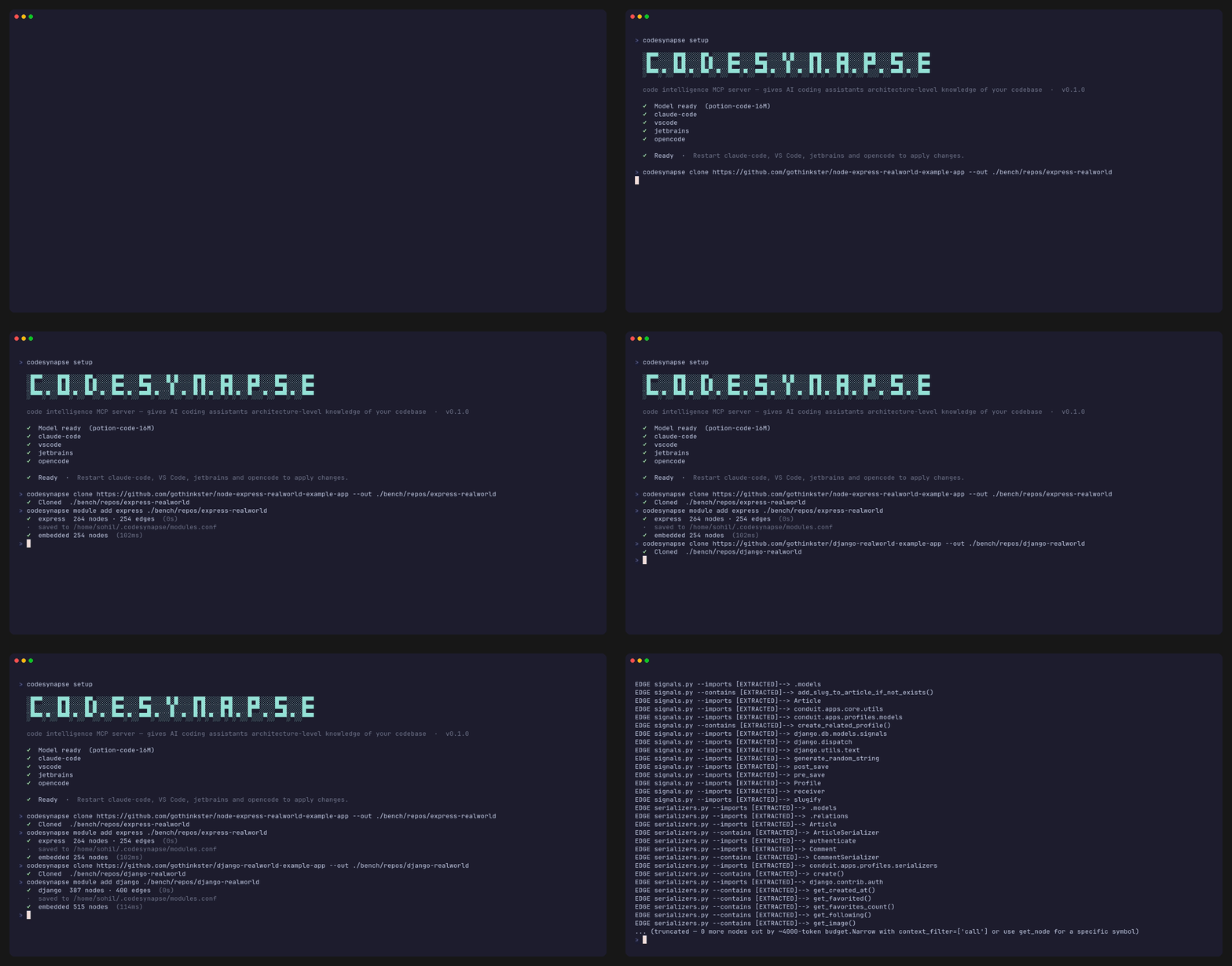
Why codesynapse?
| Python graphify | graphify-rs | semble | code-review-graph | codegraph | cbm | Sourcegraph Cody | continue.dev | codesynapse | |
|---|---|---|---|---|---|---|---|---|---|
| Language | Python | Rust | Python | Python | TypeScript | C | Cloud | VS Code ext. | Rust |
| MCP tools | ✗ | ✗ | 2 | 30 | 10 | ~8 | ✗ | ✗ | 32 |
| Structural graph | Partial | General KG | ✗ | ✓ | ✓ | ✓ | ✓ | ✗ | ✓ |
| Blast radius | ✗ | ✗ | ✗ | ✓ | ✓ | ✗ | ✓ | ✗ | ✓ |
| Hybrid BM25 + dense | ✗ | BM25 only | ✓ | Optional | ✗ (FTS5) | ✗ | ✓ | ✗ | ✓ |
| Fully local | ✓ | ✓ | ✓ | ✓ | ✓ | ✓ | ✗ | ✗ | ✓ |
| No cloud API needed | ✓ | ✓ | ✓ | ✗ (semantic) | ✓ | ✓ | ✗ | ✗ | ✓ |
| Multi-module graph | ✗ | ✗ | ✗ | ✓ | ✓ | ✗ | ✓ | ✗ | ✓ |
| Cross-module hierarchy | ✗ | ✗ | ✗ | ✗ | ✓ | ✗ | ✓ | ✗ | ✓ |
| File reads eliminated | — | — | — | — | 100% | partial | — | — | 100% |
| No telemetry by default | ✓ | ✓ | ✓ | ✓ | ✗ (opt-out) | ✓ | ✗ | ✗ | ✓ (opt-in) |
| Runtime | Python | Rust | Python | Python | Node.js | C binary | Cloud | Node.js | Rust binary |
codegraph is the closest alternative — TypeScript, local, 10 MCP tools, blast radius, multi-module. Key gap: lexical FTS5 search only (no dense embeddings), so synonym and concept queries miss results that BM25+dense RRF catches. cbm (codebase-memory-mcp) is a C binary with a SQLite graph store — fast cold-start indexing (no embedding pass), but no hybrid search and requires multiple file reads per query (8–10 observed vs 0 for codesynapse). semble uses the same Model2Vec + BM25 + RRF search stack but is search-only — no structural graph, no blast radius, no hierarchy. code-review-graph has graph + MCP but is Python and requires a cloud API for semantic search. graphify-rs is the Rust rewrite of the original Python graphify tool — general-purpose knowledge graphs, not MCP-native or code-intelligence-focused.
Codesynapse is the Rust rewrite of Python graphify with full MCP integration, structural graph analysis, and zero cloud dependencies.
Benchmarks
Measured on real open-source repos (redis, tokio, django-framework). Docker, --cpus=4 --memory=8g, 3 runs median. Full methodology and per-question scores: BENCHMARKS.md.
Competitors: codegraph (TypeScript, SQLite FTS5), cbm/codebase-memory-mcp (C, SQLite graph store, no embeddings).
Indexing speed — cold-start index time:
| Repo | codesynapse | codegraph | cbm |
|---|---|---|---|
| redis (C, ~700 files) | 3.8s | 60.8s | 5.9s |
| tokio (Rust, ~900 files) | 4.6s | 36.8s | 2.0s |
| django-framework (Python, ~2k files) | 17.5s | 306s | 12.4s |
codesynapse indexes 8–17× faster than codegraph. cbm is faster than codesynapse on indexing because it skips the embedding pass — but that means every query requires multiple file reads (8–10 observed), while codesynapse queries return zero file reads.
Query accuracy (Claude judge, 0–10 scale, on questions where the answer symbol name doesn't appear in the question — e.g. "what handles access control?" → IsAuthenticated):
| codesynapse | codegraph | cbm | baseline | |
|---|---|---|---|---|
| avg score | 8.9 | 9.0 | 8.7 | 8.6 |
| file reads per query | 0 | 0 | 8–10 | — |
Scores are comparable across tools. The codesynapse advantage is operational: zero file reads means lower token cost per session and no context blowout on large codebases. codegraph's lexical-only search (SQLite FTS5) should struggle on synonym queries, but Claude compensates with follow-up tool calls — so both reach similar scores via different paths.
How it works
flowchart TD
    A[("Source code\n(any repo)")] -->|parallel tree-sitter AST\n30+ languages| B["per-module graph.json"]
    B -->|global_add — prefix node IDs, merge| C[("global-graph.json\n~/.codesynapse/")]
    C -->|embed_global_graph\npotion-code-16M · CPU-only · mtime-gated| D[("embeddings.json\n~/.codesynapse/")]
    C & D --> E[["MCP server\n32 tools · hybrid BM25 + dense RRF"]]
    E --> F["Claude Code · Cursor · OpenCode\nCodex CLI · Hermes · Kiro · any MCP client"]

    style A fill:#f6f8fa,stroke:#57606a,color:#24292f
    style B fill:#ddf4ff,stroke:#54aeff,color:#0550ae
    style C fill:#dafbe1,stroke:#4ac26b,color:#1a7f37
    style D fill:#fff8c5,stroke:#d4a72c,color:#4d2d00
    style E fill:#ede9fe,stroke:#8957e5,color:#512a97
    style F fill:#ffeef8,stroke:#bf3989,color:#6e1e5c
Key design choices:
| Decision | Reason |
|---|---|
| Hybrid BM25 + dense RRF | BM25 handles symbol names precisely; dense closes the synonym gap. RRF fusion gives best of both. |
Model2Vec potion-code-16M |
Static embeddings — no forward pass at query time, ~1.5ms queries, CPU-only, 64 MB model. |
| Sled embedded DB | Zero-dependency, file-based, fast random access by node ID. No server process. |
| Tree-sitter AST extraction | Grammar coverage across 30+ languages. No language server or build system required. |
| Per-module → global merge | Enables cross-module blast radius and hierarchy without loading all modules into memory. |
| Mtime-gated embedding regen | Embeddings only regenerated when global-graph.json is newer. Zero overhead for unchanged graphs. |
Language support
| Group | Languages |
|---|---|
| Systems | Rust, C, C++, Go, Zig, Fortran, Verilog |
| JVM | Java, Kotlin, Scala, Groovy |
| Web / Frontend | JavaScript, TypeScript, Svelte, Vue, PHP |
| Scripting | Python, Ruby, Lua, Bash, PowerShell |
| Mobile / Apple | Swift, Objective-C, Dart |
| Functional | Haskell, Elixir, Racket, Julia |
| Other | SQL, C#, CMake, Pascal |
Installation
Prerequisites:
- ~500 MB free disk (graph store + model, downloaded on first
setup) - Internet connection on first run (model download only)
Option A — One-liner
Linux / macOS:
curl -fsSL https://raw.githubusercontent.com/sohilladhani/codesynapse/master/install.sh | sh
Windows (PowerShell):
irm https://raw.githubusercontent.com/sohilladhani/codesynapse/master/install.ps1 | iex
Or download a specific binary from releases:
| Platform | Binary |
|---|---|
| Linux x86_64 | codesynapse-linux-x86_64 |
| macOS Apple Silicon | codesynapse-macos-aarch64 |
| Windows x86_64 | codesynapse-windows-x86_64.exe |
chmod +x codesynapse-*
sudo mv codesynapse-* /usr/local/bin/codesynapse
Option B — Package managers
macOS (Homebrew):
brew tap sohilladhani/codesynapse
brew install codesynapse
Windows (Scoop):
scoop bucket add cs https://github.com/sohilladhani/scoop-codesynapse
scoop install codesynapse
Nix:
nix run github:sohilladhani/codesynapse        # run directly
nix profile install github:sohilladhani/codesynapse  # install permanently
Or add to your flake:
inputs.codesynapse.url = "github:sohilladhani/codesynapse";
# then: inputs.codesynapse.packages.${system}.default
Option C — Build from source
Requires Rust stable toolchain (install):
cargo install codesynapse-cli
Quick start
# 1. Register the MCP server with Claude Code and/or Cursor (auto-detects both)
codesynapse setup

# Other clients (if not auto-detected):
codesynapse opencode install  # OpenCode
codesynapse codex install     # Codex CLI
codesynapse hermes install    # Hermes Agent
codesynapse kiro install      # Kiro

# 2. Index a repository
codesynapse module add myrepo /path/to/your/repo

# 3. Restart your AI client

# 4. Ask architecture questions — the 32 MCP tools are now available
That's it. From this point, queries like "what handles auth token expiry?" or "show blast radius of UserService" are answered from the graph — not from file search.
Add more repositories:
codesynapse module add backend /path/to/backend
codesynapse module add frontend /path/to/frontend
# Graphs are merged — cross-module queries work automatically
Refresh after code changes:
codesynapse module refresh myrepo
List indexed modules:
codesynapse module list
Remove a module:
codesynapse module remove myrepo
# Prunes its nodes from the global graph and deregisters it
Keep the graph current with git (optional):
codesynapse hook install # installs a post-merge git hook — auto-refreshes on pull
MCP tools
32 tools across six categories, callable from Claude Code, Cursor, or any MCP-compatible client.
| Category | Tools |
|---|---|
| Graph search | codesynapse_query_vector, codesynapse_query_semantic, codesynapse_blast_radius, codesynapse_blast_radius_scored, codesynapse_blast_radius_multi, codesynapse_hierarchy, codesynapse_list_graphs, codesynapse_module_summary, codesynapse_build |
| Code reading | codesynapse_resolve, codesynapse_outline, codesynapse_read, codesynapse_read_method, codesynapse_read_with_callees |
| Navigation | codesynapse_find_callers, codesynapse_find_usages |
| Graph analysis | codesynapse_query_graph, codesynapse_get_node, codesynapse_get_neighbors, codesynapse_get_community, codesynapse_god_nodes, codesynapse_graph_stats, codesynapse_shortest_path, codesynapse_find_all_paths, codesynapse_weighted_path, codesynapse_community_bridges, codesynapse_diff, codesynapse_pagerank, codesynapse_detect_cycles, codesynapse_smart_summary, codesynapse_find_similar |
| Observability | codesynapse_stats |
Full parameter reference and examples: docs/MCP-TOOLS.md
Common queries in Claude Code:
"What handles auth token expiry?"          → codesynapse_query_vector
"Show blast radius of UserService"         → codesynapse_blast_radius
"What does UserRepository extend?"         → codesynapse_hierarchy
"Read the validate() method"               → codesynapse_read_method
"Who calls PaymentService.charge()?"       → codesynapse_find_callers
Configuration
Place codesynapse.toml in your project root. All fields are optional.
# Output directory for exported graph (default: codesynapse-out/)
output = "codesynapse-out"

# Skip LLM extraction for doc/paper files (default: false)
no_llm = false

# Index source code only, skip docs and papers (default: false)
code_only = false

# Export formats: "json", "html", "graphml", "obsidian"
formats = ["json", "html"]

# LLM config for semantic extraction of docs/papers (optional)
[llm]
provider = "anthropic"           # "anthropic" | "openai" | any OpenAI-compatible
model = "claude-sonnet-4-20250514"
api_key = "sk-..."               # or set ANTHROPIC_API_KEY / OPENAI_API_KEY env var
base_url = "https://..."         # optional, for OpenAI-compatible providers

# Custom model path (default: auto-resolved by codesynapse setup)
[embeddings]
model_path = "./models/potion-code-16M"
Repository layout
codesynapse/
├── codesynapse-core/       # Extraction, graph, embedding, global graph
├── codesynapse-cli/        # CLI binary (module add/refresh/list, build, setup)
├── codesynapse-mcp/        # MCP server — 32 tools, JSON-RPC over stdio
├── codesynapse-serve/      # BM25 + dense hybrid search engine
├── codesynapse-tui/        # Terminal UI
├── codesynapse-grpc/       # gRPC server
├── codesynapse-graphql/    # GraphQL API
├── codesynapse-wasm/       # WebAssembly bindings
├── models/
│   └── potion-code-16M/    # Static embedding model (downloaded by setup)
├── tests/                  # Integration tests
└── docs/
    ├── ARCHITECTURE.md
    └── MCP-TOOLS.md
Runtime data lives in ~/.codesynapse/:
~/.codesynapse/
├── global-graph.json       # Merged graph (all modules)
├── embeddings.json         # node_id → Vec<f32> dense embeddings
├── modules.conf            # name|/path module registry
├── global-manifest.json    # Per-module hash + metadata
├── tool_stats.jsonl        # MCP tool call log
├── models/potion-code-16M/
└── modules/<name>/graph.json
Uninstall
Remove from all AI clients:
# Re-run setup and remove the entry manually from the config files setup wrote:
#   Claude Code:  ~/.claude.json       (key: mcpServers.codesynapse)
#   Cursor:       ~/.cursor/mcp.json   (key: mcpServers.codesynapse)
#   Windsurf:     ~/.codeium/windsurf/mcp_config.json
#   OpenCode:     ~/.config/opencode/opencode.json
Remove a specific module:
codesynapse module remove myrepo
Full cleanup (removes all indexed data):
rm -rf ~/.codesynapse/
Manual MCP setup
If codesynapse setup doesn't auto-detect your client, add this entry manually:
Claude Code (~/.claude.json):
{
  "mcpServers": {
    "codesynapse": {
      "type": "stdio",
      "command": "codesynapse",
      "args": ["mcp"]
    }
  }
}
Cursor (~/.cursor/mcp.json):
{
  "mcpServers": {
    "codesynapse": {
      "type": "stdio",
      "command": "codesynapse",
      "args": ["mcp"]
    }
  }
}
For other clients, pass the same command/args pair to their MCP server config.
CLI skill (MCP-free fallback)
If MCP is blocked by your org's network policy, codesynapse ships a CLI skill for Claude Code and a rules file for Cursor. Your AI client shells out to codesynapse directly instead of using the MCP protocol.
Claude Code — copy into your project:
mkdir -p /path/to/your/project/.claude/skills
cp -r integrations/claude-code/skills/codesynapse-cli /path/to/your/project/.claude/skills/
Cursor — copy into your project:
mkdir -p /path/to/your/project/.cursor/rules
cp integrations/cursor/rules/codesynapse-cli.mdc /path/to/your/project/.cursor/rules/
The integrations/ directory ships with the repository. Restart your client after copying.
pi extension
For pi users, install the codesynapse extension:
pi install npm:codesynapse-pi
This wires up 12 curated codesynapse tools and injects graph-awareness into every pi session automatically.
Troubleshooting
MCP server not connecting
- Verify
codesynapseis on your PATH:which codesynapse - Run
codesynapse setupagain — it re-writes the client config - Restart your AI client after setup
No results from graph queries
- Check modules are indexed:
codesynapse module list - Rebuild the global graph:
codesynapse build - Ensure the model downloaded:
codesynapse setup(downloadspotion-code-16Mon first run)
Stale results after code changes
- Refresh the module:
codesynapse module refresh myrepo - Or install the git hook for automatic refresh:
codesynapse hook install
codesynapse setup says no embedding model
codesynapse setup downloads the model automatically. If it fails:
- Check your internet connection and re-run
codesynapse setup - Download manually from HuggingFace:
Place all three files inhttps://huggingface.co/minishlab/potion-code-16M/resolve/main/model.safetensors https://huggingface.co/minishlab/potion-code-16M/resolve/main/tokenizer.json https://huggingface.co/minishlab/potion-code-16M/resolve/main/config.json~/.codesynapse/models/potion-code-16M/, then re-runcodesynapse setup.
Graph query is slow
- First query after startup is slower — embeddings load from disk
- Subsequent queries are fast (~1.5 ms encode + BM25 + cosine)
Telemetry
Telemetry is off by default. Enable it explicitly if you want to help improve codesynapse:
codesynapse telemetry on    # opt in
codesynapse telemetry off   # opt out + delete local queue
When enabled, codesynapse sends anonymous daily rollups: tool names, call counts, and coarse token-savings buckets. No query content, no file paths, no source code, no IPs. See TELEMETRY.md for the full data contract.
Contributing
Contributions welcome. Please read CONTRIBUTING.md before opening a PR.
- Bug reports: use the bug report template
- Feature requests: use the feature request template
- Code: run
cargo test --workspaceandcargo clippy --workspace -- -D warningsbefore submitting
This project follows the Contributor Covenant code of conduct.
License
MIT — see LICENSE.
Reviews (0)
Sign in to leave a review.
Leave a reviewNo results found