Scopeon
Health Warn
- License — License: NOASSERTION
- Description — Repository has a description
- Active repo — Last push 0 days ago
- Low visibility — Only 8 GitHub stars
Code Warn
- fs module — File system access in .github/examples/ai-cost-gate.yml
Permissions Pass
- Permissions — No dangerous permissions requested
This is an MCP server written in Rust that provides AI context observability. It helps developers track token usage, measure prompt cache efficiency, estimate remaining context window capacity, and monitor real-time costs per session or project.
Security Assessment
Overall Risk: Medium. The tool inherently accesses sensitive data—it reads your local AI session logs and git history to calculate costs and usage metrics. File system access was flagged in an example CI configuration file. The repository did not request any dangerous permissions, and no hardcoded secrets were found. Because it is designed to track your usage, the tool reads your data to function, but poses minimal system-level threat.
Quality Assessment
The project is actively maintained, with its most recent push happening today. It is built in a memory-safe language and uses a standard CI pipeline. However, community trust and visibility are currently very low. With only 8 GitHub stars, the tool has not yet been widely tested or vetted by a large audience. The automated license scanner returned "NOASSERTION," but the README clearly states it is dual-licensed under MIT or Apache-2.0.
Verdict
Use with caution — the codebase appears safe and professionally structured, but its extremely low community adoption means it lacks the extensive peer review typically expected for production environments.
AI context observability for Claude Code & friends — token breakdown, cache ROI, cost tracking, CI gates
◈  ╔═╗╔═╗╔═╗╔═╗╔═╗╔═╗╔╗╔
   ╚═╗║  ║ ║╠═╝║╣ ║ ║║║║
   ╚═╝╚═╝╚═╝╩  ╚═╝╚═╝╝╚╝
   AI Context Observability
   for Claude Code & friends
The AI context observatory — for every coding agent, every token, every dollar.
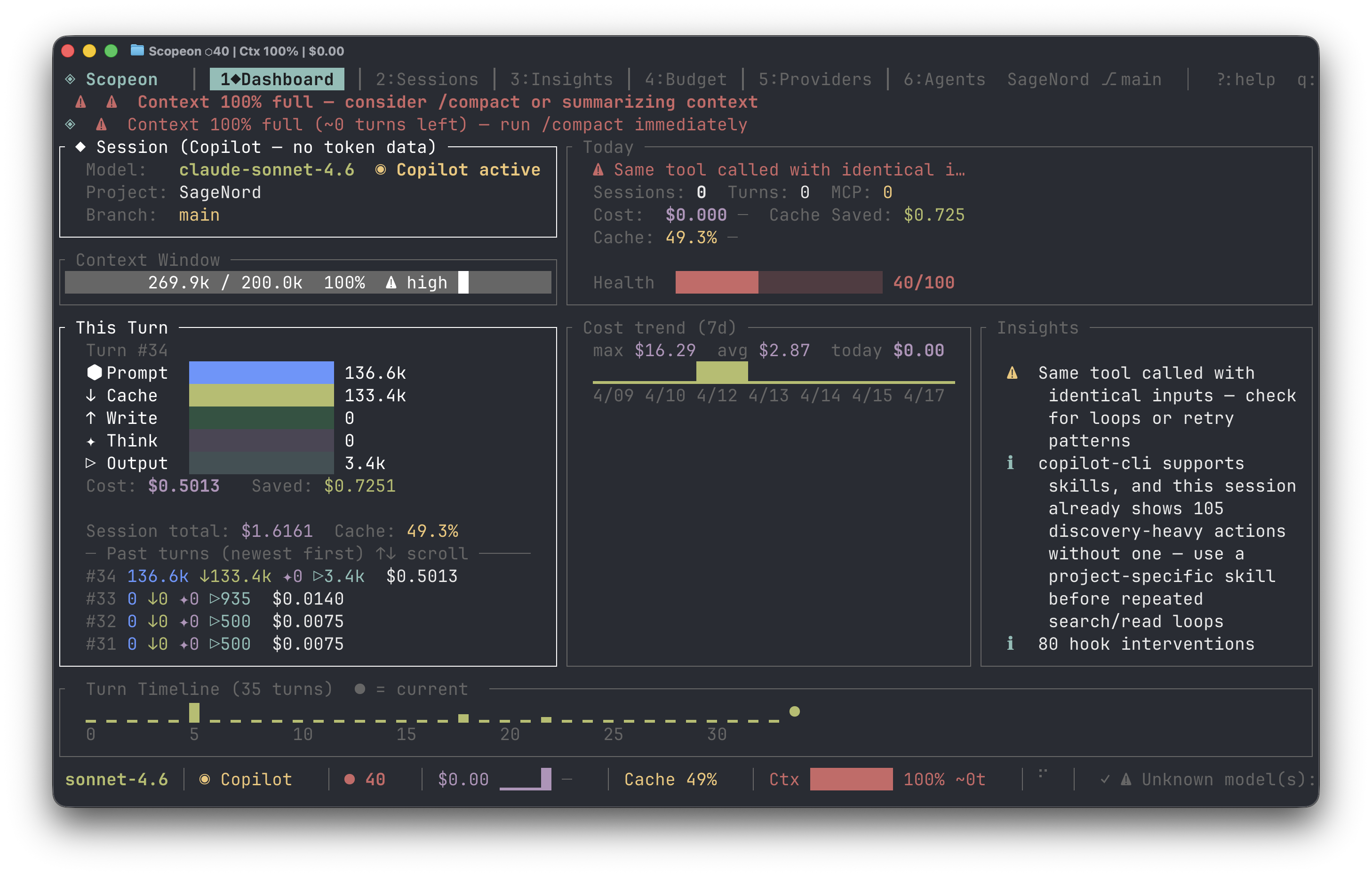




Install · Quick Start · Docs · Contributing
You fire up Claude Code and start building. An hour later: "Context window full." You have no idea what burned it — was it the MCP tools? The thinking budget? Yesterday's file edits? You're flying blind on a meter that costs real money.
Scopeon gives you the instrument panel.
Why Scopeon?
| Without Scopeon | With Scopeon |
|---|---|
| "Why is this session so expensive?" | Turn-by-turn cost breakdown with waste signals |
| "Is the prompt cache actually working?" | Hit-rate gauge, USD saved, optimization suggestions |
| "How close am I to the context limit?" | Real-time fill bar + "~12 turns remaining" prediction |
| "Which project costs the most?" | Per-project / per-branch cost breakdown |
| "Did my optimization actually help?" | compare_sessions before/after diff |
| "Can I gate AI cost in CI?" | scopeon ci report --fail-on-cost-delta 50 |
| "How is my whole team using AI?" | scopeon team — per-author cost from git history, no server needed |
| "Can teammates see my live metrics?" | scopeon serve — privacy-filtered API + SSE stream for IDEs |
| "Can I see AI cost in Grafana / Datadog?" | Prometheus bridge or OTLP push — docs/opentelemetry.md |
What you get
🔬 X-ray vision into every token — see exactly what burned your context: input, cache reads/writes, thinking budget, output, MCP calls — broken down turn by turn. No more guessing.
💸 Know your real cost before the bill arrives — live USD per turn, per session, per project, per day. Set budgets with actual alerts, not surprises.
⚡ Prompt cache that actually tells you if it's working — hit-rate gauge, dollars saved vs. uncached baseline. Know in seconds whether your cache setup is doing anything.
⏳ "You have ~12 turns left" — Scopeon tracks context fill rate over time and tells you how many turns remain before the wall. Stop being blindsided mid-task.
🔔 Context advisory before the crisis — compaction advisory fires at 55–79% fill when context is accelerating, so you compact at the optimal moment — not after it's too late.
📡 Zero-token ambient awareness — every 30 s the MCP server pushes a free status heartbeat to the agent. No polling, no token spend, just continuous situational awareness.
🧭 See what the agent actually did — provenance-aware history shows which skills, MCPs, hooks, tasks, and subagents were involved, with exact vs. estimated support called out per provider.
🤖 Your AI agent monitors itself — 17 MCP tools let Claude Code query its own token stats, provenance history, trigger alerts, and compare sessions — without you doing anything.
🚦 Fail PRs on AI cost spikes — one command in CI, zero config. scopeon ci report --fail-on-cost-delta 50 catches runaway cost before it merges.
🌐 Live browser dashboard + IDE stream — scopeon serve → WebSocket-powered charts at localhost:7771 and a GET /sse/v1/status SSE feed for IDE extensions. No npm, no Node, just Rust.
👥 Team cost from git history — scopeon team reads AI-Cost: trailers from git log and prints a per-author cost table. No server, no cloud, works from any machine.
🐚 Cost follows you everywhere — in your shell prompt, in every git commit as an AI-Cost: trailer, in Slack via digest webhooks.
🔒 Fully local, forever — no cloud backend, no account, no telemetry. Your prompts never leave the machine. Ever.
Screenshots

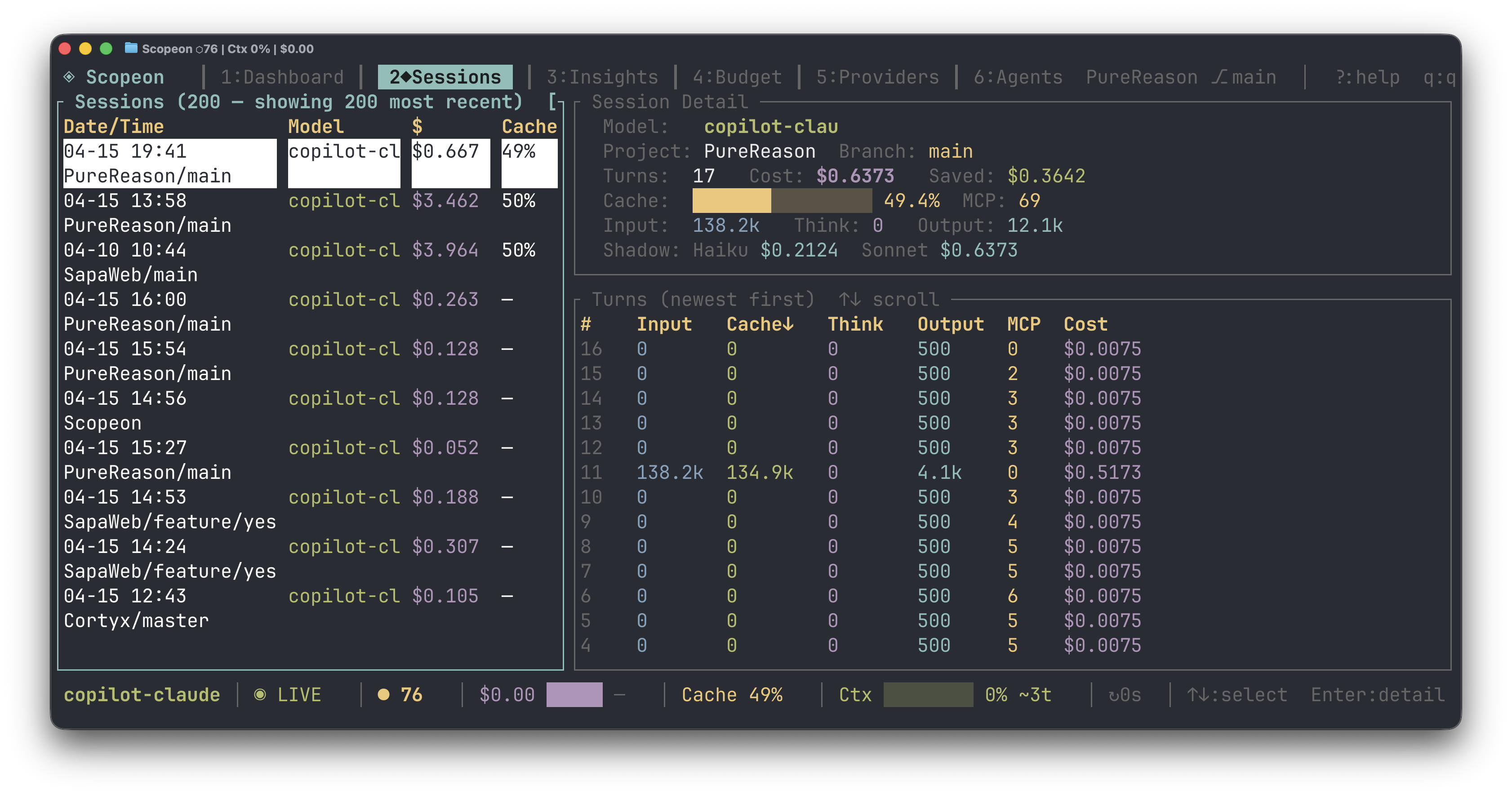
Sessions — full session list with per-turn cost, cache %, MCP call count
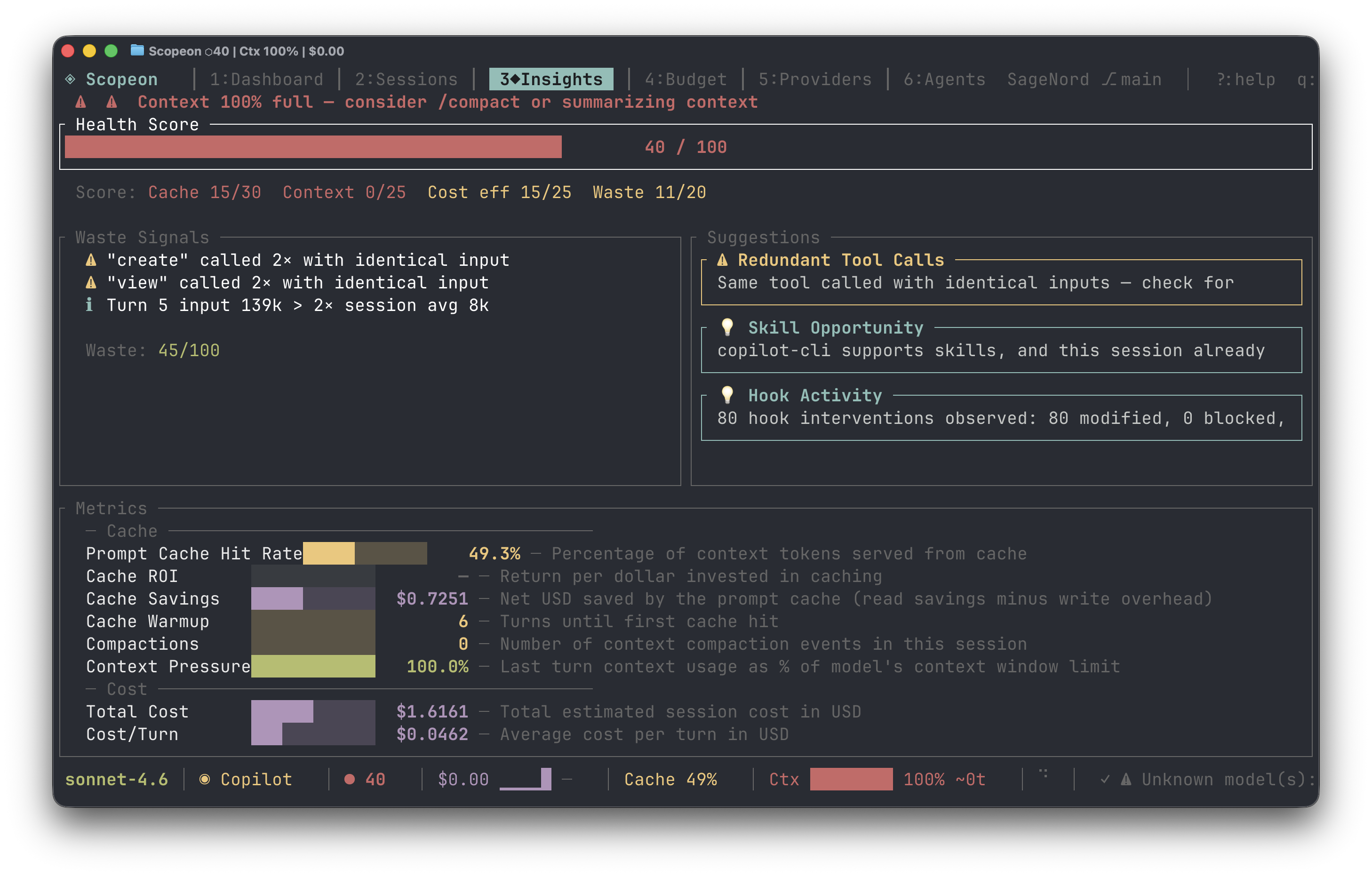
Insights — health score, waste signals, cache ROI & optimization tips
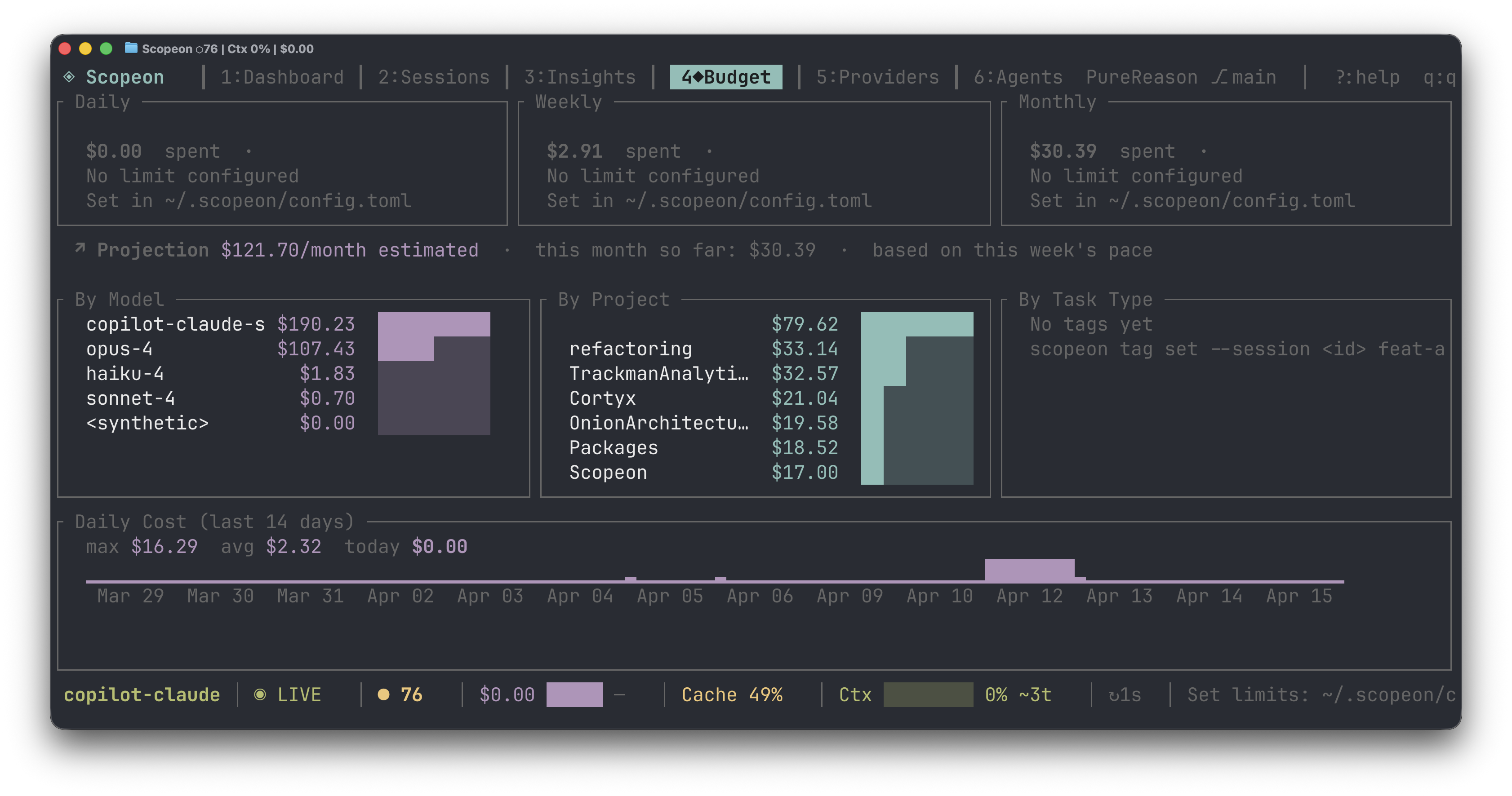
Budget — daily/weekly/monthly spend, by model, by project, 14-day chart
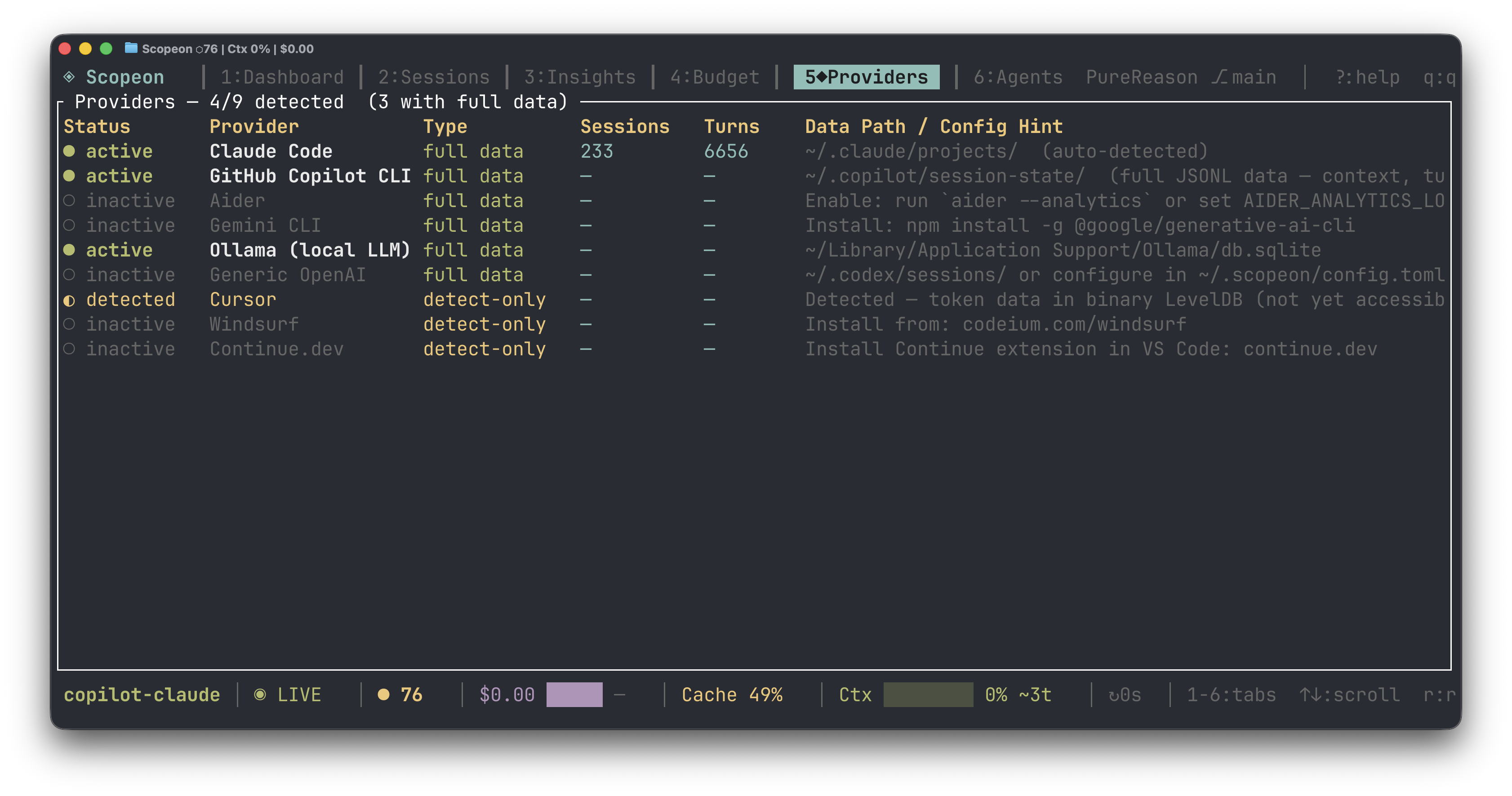
Providers — auto-detected agents with data path & session stats
Installation
Fastest: cargo binstall (pre-built binary)
cargo install cargo-binstall   # one-time
cargo binstall scopeon
curl one-liner (macOS & Linux)
curl -fsSL https://raw.githubusercontent.com/sorunokoe/Scopeon/main/install.sh | sh
From source
cargo install --git https://github.com/sorunokoe/Scopeon
Requirements: Rust 1.88+ · macOS 12+ or Linux (glibc 2.31+) · Windows 10+
Pre-built binaries
Download from GitHub Releases:
| Platform | Asset |
|---|---|
| macOS Apple Silicon | scopeon-vX.Y.Z-aarch64-apple-darwin.tar.gz |
| macOS Intel | scopeon-vX.Y.Z-x86_64-apple-darwin.tar.gz |
| Linux x86_64 | scopeon-vX.Y.Z-x86_64-unknown-linux-gnu.tar.gz |
| Linux ARM64 | scopeon-vX.Y.Z-aarch64-unknown-linux-gnu.tar.gz |
| Windows x86_64 | scopeon-vX.Y.Z-x86_64-pc-windows-msvc.zip |
Quick Start
scopeon onboard    # auto-detect AI tools, configure MCP + shell integration
scopeon            # open the TUI dashboard
scopeon serve      # browser dashboard → http://localhost:7771
scopeon status     # quick inline stats, no TUI
scopeon doctor     # health diagnostics
Connect to Claude Code (MCP)
scopeon init
# → writes MCP server config to ~/.claude/settings.json
# Claude Code now has 17 Scopeon tools + proactive push alerts
All commands
scopeon [start]                # daemon + TUI (default)
scopeon tui                    # TUI only (no file watching)
scopeon mcp                    # MCP server over stdio
scopeon status                 # inline stats
scopeon serve [--port N] [--tier 0-3]

scopeon tag set <id> feature   # tag sessions for cost attribution
scopeon export --format csv --days 30
scopeon reprice                # recalculate costs after a price change

scopeon digest [--days N] [--post-to-slack <url>]
scopeon badge [--format markdown|url|html]
scopeon ci snapshot --output baseline.json
scopeon ci report  --baseline baseline.json [--fail-on-cost-delta 50]

scopeon shell-hook             # emit shell prompt hook (bash/zsh/fish)
scopeon git-hook install       # add AI-Cost trailer to commits
scopeon onboard                # interactive setup wizard
scopeon doctor                 # health diagnostics
Documentation
| Topic | Link |
|---|---|
| Full feature list | docs/features.md |
| TUI guide (tabs, shortcuts, Zen, Replay, filter) | docs/tui.md |
| MCP tools & push notifications | docs/mcp.md |
| Webhook escalation | docs/webhooks.md |
| CI cost gate | docs/ci.md |
| Shell & git integration | docs/shell-git.md |
| Team mode & REST API | docs/team.md |
| OpenTelemetry integration | docs/opentelemetry.md |
| Supported providers | docs/providers.md |
| Configuration reference | docs/configuration.md |
| Architecture & codebase map | ARCHITECTURE.md |
Supported Providers
Claude Code · GitHub Copilot CLI · Aider · Cursor · Gemini CLI · Ollama · Generic OpenAI
Scopeon discovers log files automatically — no config needed for standard install paths.
Adding a new provider takes ~50 lines of Rust. See docs/providers.md.
Data & Privacy
- Local-first — no cloud backend, no accounts, no API keys required
- Reads token counts and costs only — never prompt text or code
scopeon serveis read-only and localhost-bound by default- Webhooks are opt-in; payloads contain only metric data
Contributing
Contributions are warmly welcomed — bug fixes, new providers, dashboard features.
git clone https://github.com/sorunokoe/Scopeon
cd Scopeon
make          # fmt-check + clippy + test (same as CI)
make install  # install to ~/.cargo/bin
- CONTRIBUTING.md — dev workflow, PR process, adding providers
- ARCHITECTURE.md — codebase map: crate roles, data flow, schema
Every PR must pass the full CI suite (fmt · clippy · tests on Linux/macOS/Windows · MSRV · docs).
Changelog
See CHANGELOG.md for the full version history.
License
Dual-licensed under MIT OR Apache-2.0 — use it however you like.
Built with ❤️ in Rust · Report a bug · Request a feature · Discussions
If Scopeon saved you money or context headaches, consider giving it a ⭐
Reviews (0)
Sign in to leave a review.
Leave a reviewNo results found