skald
Health Pass
- License — License: NOASSERTION
- Description — Repository has a description
- Active repo — Last push 0 days ago
- Community trust — 16 GitHub stars
Code Fail
- exec() — Shell command execution in deploy/cloudflare-worker/skald-edge.js
- network request — Outbound network request in deploy/cloudflare-worker/skald-edge.js
Permissions Pass
- Permissions — No dangerous permissions requested
No AI report is available for this listing yet.
Every visit, truly told. Self-hosted web analytics from your server access log: see people, AI assistants (ChatGPT, Claude, Perplexity), crawlers and bots that JavaScript analytics miss. Every figure counted twice. No cookies, no third-party script. Python, SQLite, Docker.

Skald
Say it “skawld” (/skɔːld/), one syllable, rhymes with “called”: an old Norse poet who told what happened.
Every visit, truly told.
Self-hosted web analytics that reads your server's own access log, so you see the people,
the AI assistants, the crawlers and the bots that a JavaScript tracker never sees.







Live demo · Quick start · Screenshots · Comparison · Install guide · Security · FAQ · Hosted / commercial
Your analytics cannot see the new visitors
More and more people ask ChatGPT, Claude or Perplexity before they visit a website. When they do,
the assistant fetches your pages to write its answer. AI companies also crawl your site to train
their models. None of that runs JavaScript, so Google Analytics, Plausible and other script-based
tools never count it. Google Analytics also drops known bots on purpose.
Skald reads the one record that sees every visit: your web server's access log. Every request
lands in exactly one of five groups, and the five add up to the log exactly.
| Group | What is in it |
|---|---|
| People | A browser that is none of the groups below. Self-reported, so an upper bound. |
| AI assistants | Split by why they came: to train, because someone just asked a question, or a person who clicked a link in an AI answer. |
| Search engines | Google, Bing and other classic indexing. |
| Bots and scanners | Monitors, SEO tools, chat link previews, and probes hunting for .env or wp-login. |
| Your own traffic | Your team, your crawler, your tests. Kept apart, never counted as people. |
How much of your traffic is AI assistants reading your pages? Only your server's log can say: a
script-based tool shows none of it. Skald's first run answers it for your own site, from the log you
already have, with every request in exactly one of these groups.
Why Skald
See AI assistants and crawlersGPTBot, ClaudeBot, PerplexityBot, ChatGPT-User and the rest, by name, with the pages they fetched. |
Trust the namesA crawler's claim is checked against its owner's published addresses or DNS (Google, Bing, Apple, |
Every figure counted twiceA separate audit recounts every figure from the raw log with its own parser and rules. If the two |
Private by design, yours to setNo script and no cookie are needed in the visitor's browser, and everything stays on your server. |
Live, not 48 hours lateToday · Live, in the top bar of every tab, shows today so far, redrawn every 2 minutes. The |
Results, not just visitsLeads, funnels and conversions, in one section with one row of options. Leads and demos booked |
Find the AI traffic hiding in "Direct"A click from a ChatGPT or Perplexity answer often arrives with no referrer, so other tools file it |
Works where your site livesYour own server's log, or the host's: Vercel and Netlify log drains, a Cloudflare Worker |
Follow one person across daysSearch an IP address, an email or a lead and see that person's visits on every day kept (source, |
Nothing hidden, and setup that checks itselfSpam, duplicate and test leads, and cancelled, removed and test conversions, are listed in full, |
Features
The dashboard
- Five sections, with tabs inside: Overview, Traffic, Leads & sales, AI & bots and Site. Each
answer has one place. - Today · Live and Compare with… in the top bar, on every tab.
- Long lists (requests, pages not found, sources, pages, countries) are grids whose search,
filters, sort and page stay in the address, so a link opens the same view. Old links redirect.
Traffic and audience
- Five groups that add up to the log, every day, every site.
- Visitors, visits, pages read, countries (with a flag beside each, everywhere), browsers, systems,
devices, sources, referring sites, UTM campaigns and ad networks (from the click ID, never its value). - A new outside source starts a new visit: someone who opens the site directly and comes back from
ChatGPT minutes later is two visits, the second from ChatGPT, so an AI assistant's visit is never
hidden inside an earlier one. - Anonymous journeys: each visit's pages in order, kept 7 days by default.
- People: each visit kept with its IP address and browser (395 days by default), and one search for
an IP, an email, a lead or a visitor ID that shows that person's visits, leads and conversions
across days, linked. Admins and owners only, every search in the audit log. Keeping IPs and emails
is a setting: on for a new install, off on an install upgraded from before 2.4.0. - Engagement by source and device (pages per visit, one-page visits, visit length), returning
visitors by source, exit rate per page. - Campaign tag problems flagged: a source with no medium, an unknown medium, an ad click with no
tags, tags on internal links. - Compare with… in the top bar: the previous period, the same period last year, or any range
up to 12 months, as A, B and the change on every tab that compares, leads and demos booked included. Insights
(working, dropped, new, gone), and a page's story: its first Googlebot, first AI crawler, first
person and first lead.
AI and machines
- AI assistants by name and by reason, with the pages each one fetched.
- AI clicks that lost their referrer, estimated: a direct visit to a page an assistant fetched
minutes before is shown as "likely" from that assistant, on AI & bots and on Leads & sales.
Kept apart, never added to any count. - Crawler verification, fake crawlers filed apart.
- Block AI crawlers per assistant, or only their training crawlers (AI & bots > Crawler rules),
applied by the web server (robots.txtstays reachable). Skald blocks; it does not charge. - Your
robots.txtrules shown beside what each crawler actually fetched. - AI alerts: an assistant starts or stops reading a page, or the visits it likely sends jump or
vanish. Whole, checked days only. - A suggested
llms.txtfrom the pages people and assistants read most, to copy and publish
yourself.
Results
- One section, Leads & sales: Pipeline, Bookings, Funnels, Events and People. Pipeline's one row
of options: count from your lead database (the default) or from your tools, never both in one
figure; source, action, stage, show what was left out, and the period. - Leads and demos booked on the Overview (two tiles, and each day's leads as dots on the main
chart), and today's leads and bookings as they arrive with Today · Live. - A Leads column and a lead rate (leads per visitor, from 10 visitors up) on Sources, Pages and
Places & devices; lead findings in Insights; leads against another period (Compare with…). - Leads by first and last source, crossed with the status your team set, and time from first
visit to lead. - Saved funnels counted every day by source and device, with drop-off and time to go through.
- Conversions from signed webhooks; forms and bookings started but not finished.
- One Calendly or Cal.com account that books for several businesses: keep only your own event types.
- Goals from in-page events, per 100 visits by source.
- Spam, duplicate and test leads, and cancelled, removed and test conversions, each listed in full.
A lead-database sync that takes a row away keeps it, with when and why; a test row is marked
from the command line, listed and never counted. - Outgoing signed webhooks to your CRM, Zapier or Slack, never with a name or email.
Site
- Health, Alerts, Requests, Not found, Speed and Data quality, as tabs of one section.
- 404s and who met them (people, probes, crawlers), server errors by page, page speed, uptime from
the heartbeat with every outage. - Alerts: site down, logging stopped, 5xx burst, 404 surge, crawler burst, new crawler, traffic
drop. A failed morning run sends one short mail. - A data-quality panel: unreadable lines, gaps, duplicates, log age.
- Deploy and change markers on every chart.
Team, data and agents
- Accounts: organisations, owner/admin/viewer roles, invites, two-step sign-in, scoped API tokens
and an audit log. Or a single nginx password, if that is all you need. - Settings in the dashboard: retention windows, what is kept about people, mail, sites, internal
addresses, integrations (with each road's status), security. skald doctor: one line per part (daily run, missing days, logs, the dashboard, the hook
receiver, each hook's secret and last delivery, the script tag, mail, a newer version, disk), each
with its fix. A daily run that held back names the step and why.- Several sites in one install, each with its own settings and its own logo. After sign-in, a
card per site: its logo, a Live dot, and today's visitors, leads and demos booked ("-" when a
figure is not known yet, never 0). The same logo is on the menu's site button, in the site
switcher and on the browser tab. It comes from the site itself (its app icon, then its favicon;
never an outside icon service), from an upload, or is the site's first letter on a colour
(Settings > Sites > Logo). - Export any table as CSV or JSON, print to PDF, a report builder, and daily and weekly email
reports (refused if the figures do not add up). - A read-only JSON API and an MCP server with 14 read-only tools for Claude, ChatGPT and other
AI agents (the person search only with a token that may read private data). - In-app Help in plain words, with four how-to guides (pick your road, send leads from your backend
in 5 minutes, demo bookings, Docker first install), keyboard shortcuts, a command palette, light
and dark themes, and a phone layout. - A notice when a new release is out, and one-command upgrades with a backup and a rollback.
Inputs
- nginx and Apache logs (combined or extended), Caddy JSON.
- Countries from the log (Cloudflare's country, or nginx's
cc=). A log without one (Caddy, a plain
combined log) gets each address's country from a GeoIP file you give it (SKALD_COUNTRY_DB;
DB-IP's free country file works, and its credit is shown). Without one, Unknown, never guessed. - CDN logs: Cloudflare Logpush, CloudFront, Fastly. Pages served from the CDN cache are counted too.
- Vercel and Netlify log drains, and the Skald Worker for Cloudflare on any plan (it posts each
request after the page has gone out; with your server's log, only cache hits are kept). skald-ship: one standard-library Python file that sends another server's log to Skald.- Beacon-only mode for a site with no readable log (it then sees people only, since bots run no
script).
See it
Try the live demo: the whole dashboard with 60 days of sample
data for a made-up site, in your browser, flags, leads and bookings, the left-out leads and the
removed conversions included. Nothing to install. Settings, saving and the person search need your own Skald.
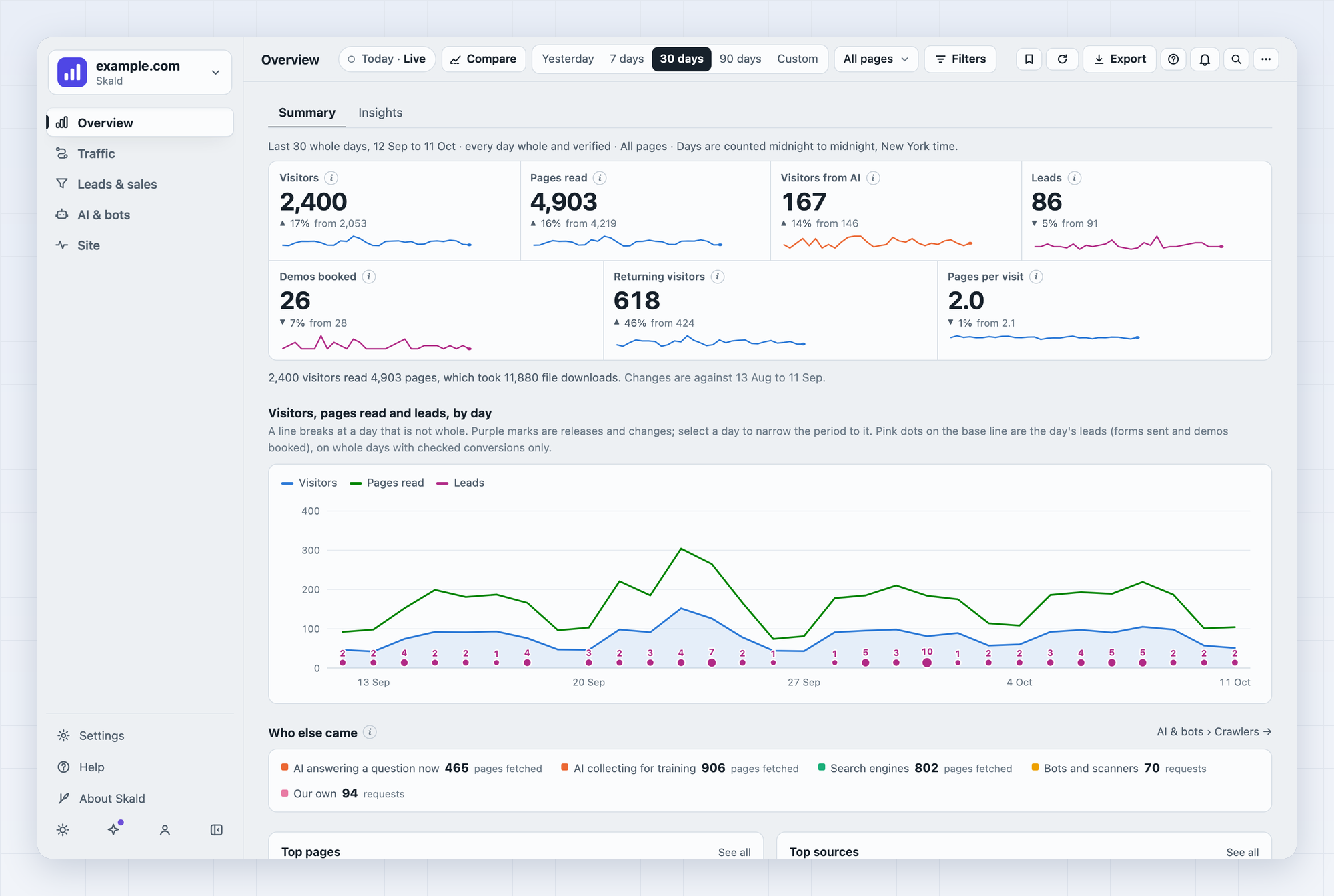
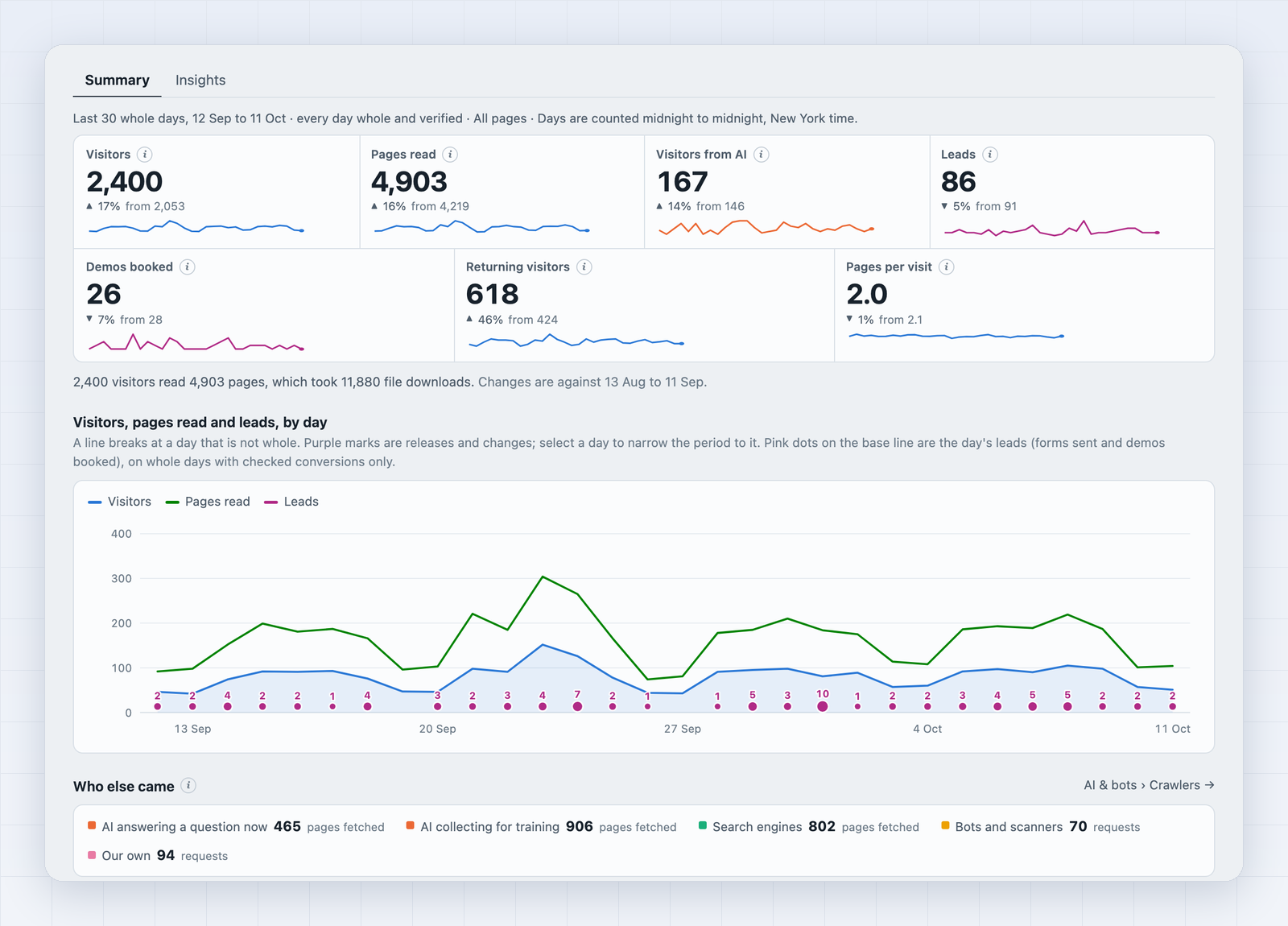 Overview. The period at a glance, five groups that add up. |
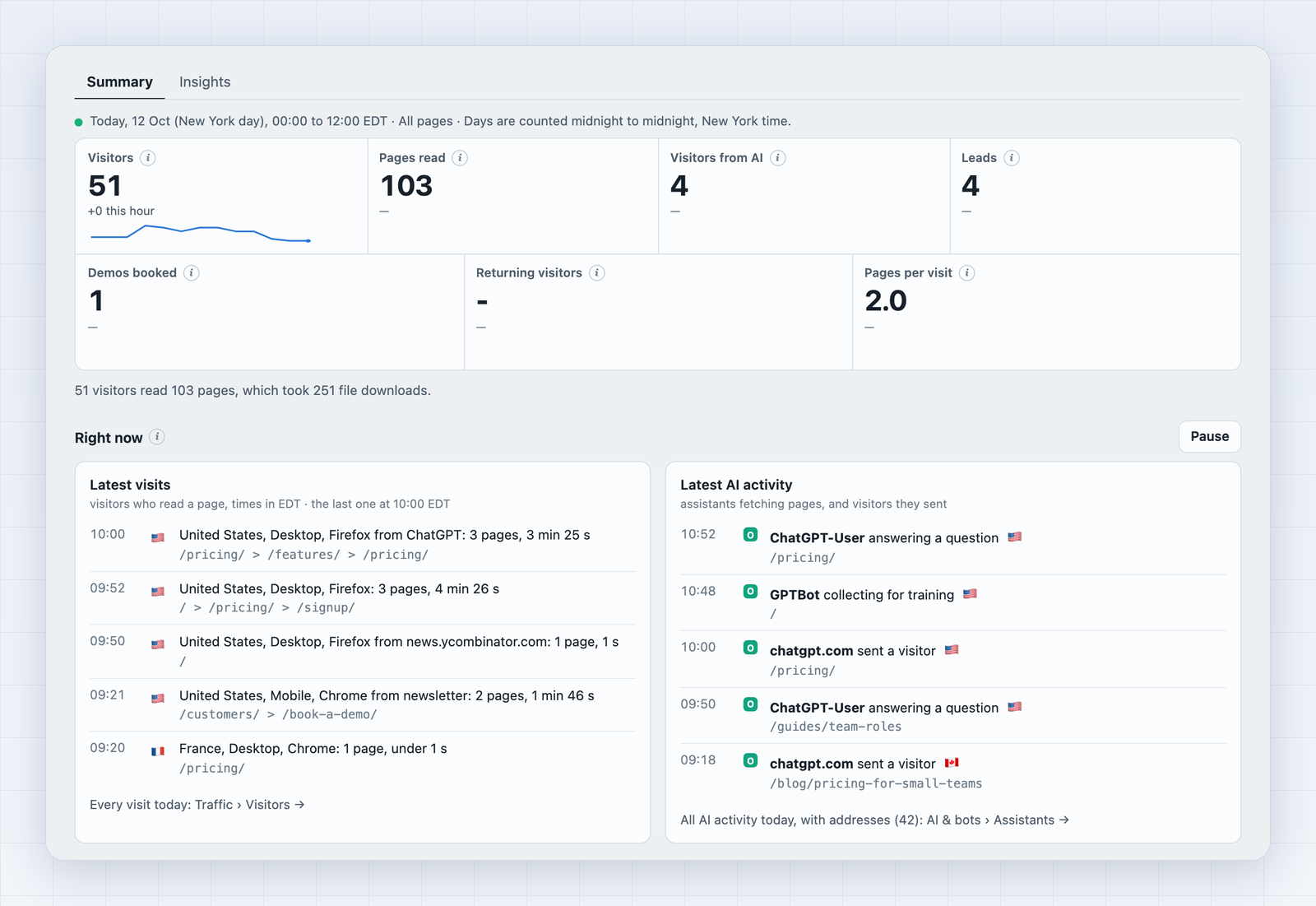 Today · Live. One switch, on every section. |
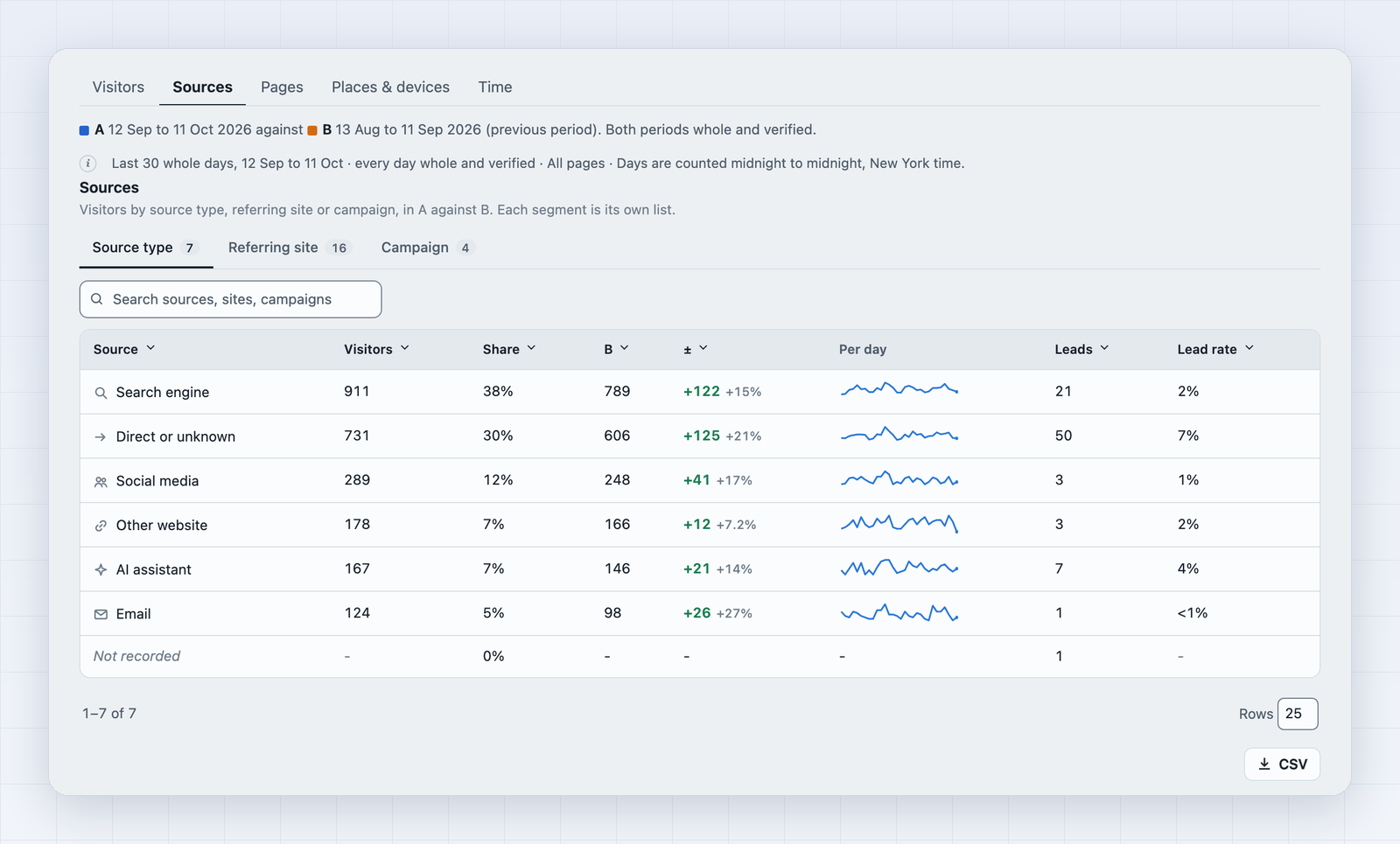 Compare with… Previous period, last year or any period, on every section. |
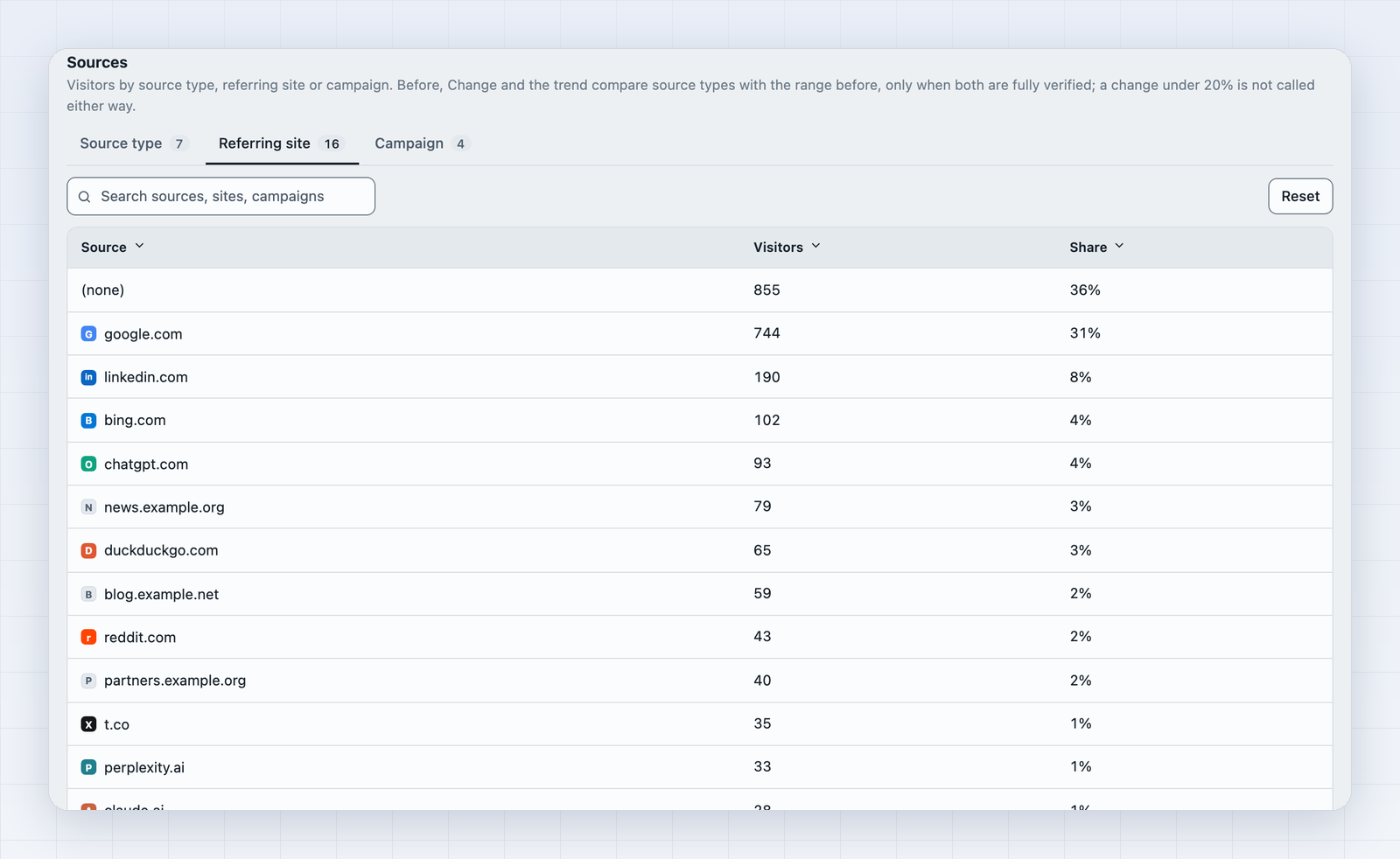 Traffic › Sources. One grid; search, filters and sort kept in the address. |
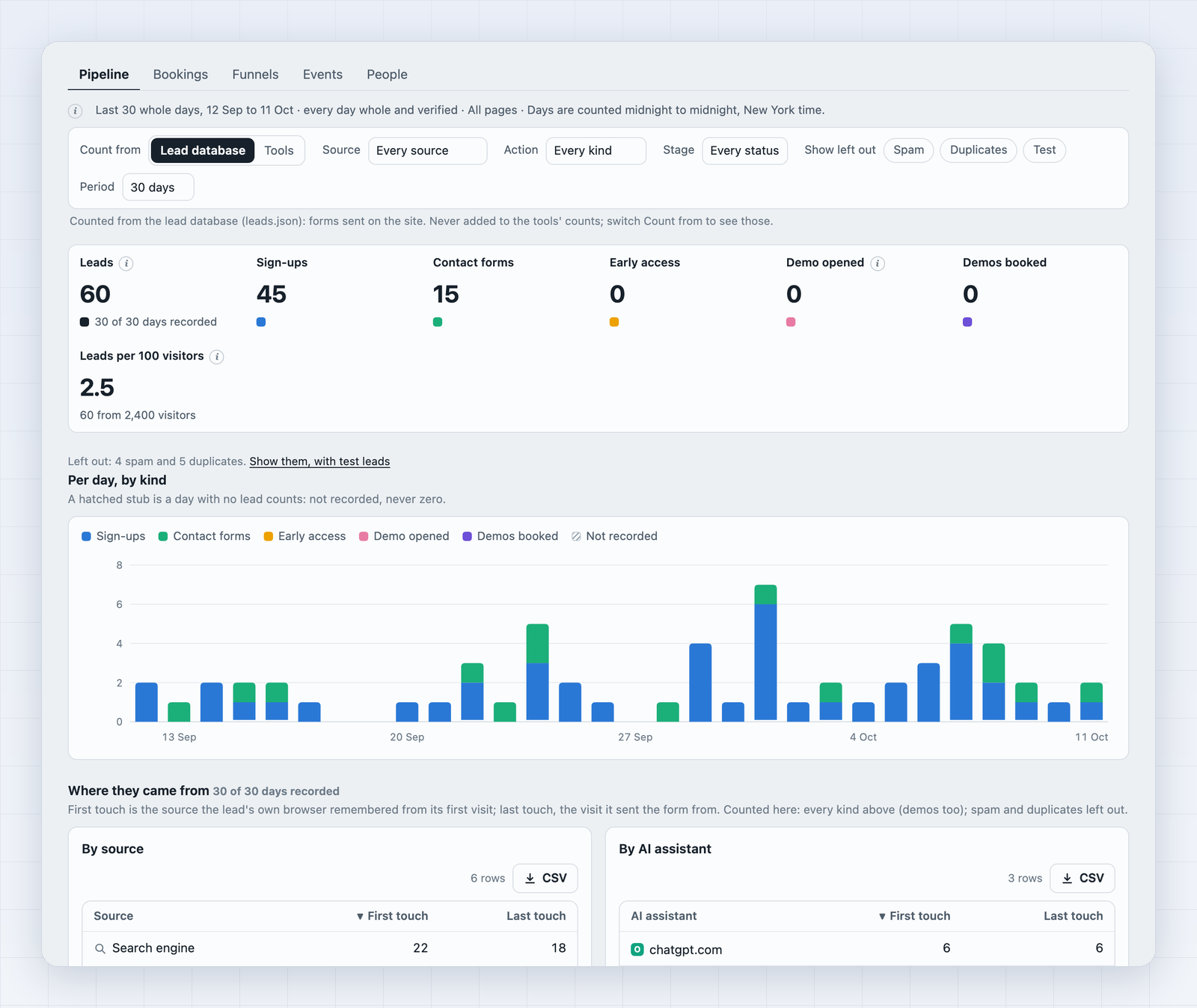 Leads & sales › Pipeline. One row of options, every lead by stage. |
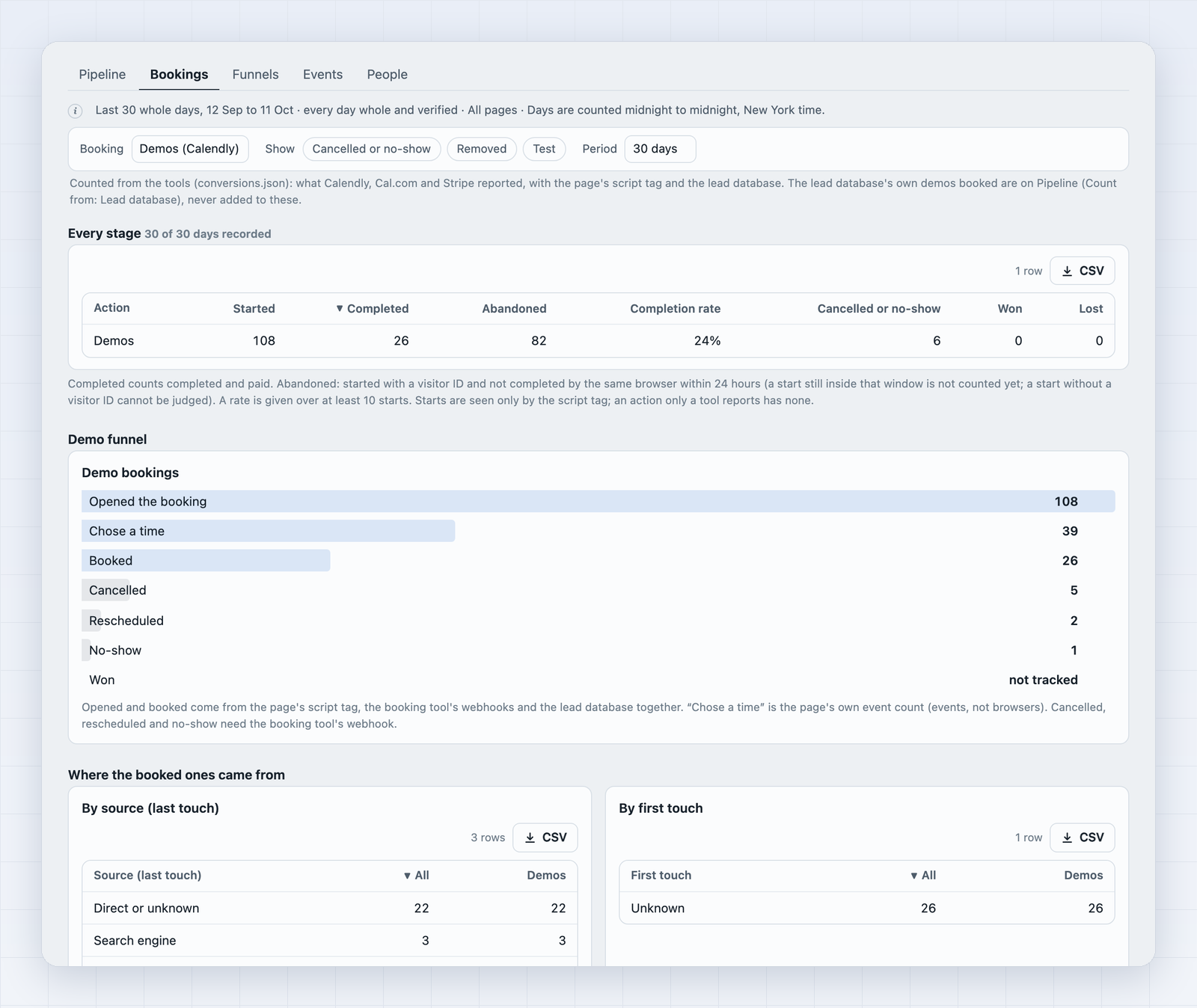 Bookings. Every stage, cancelled and removed ones too. |
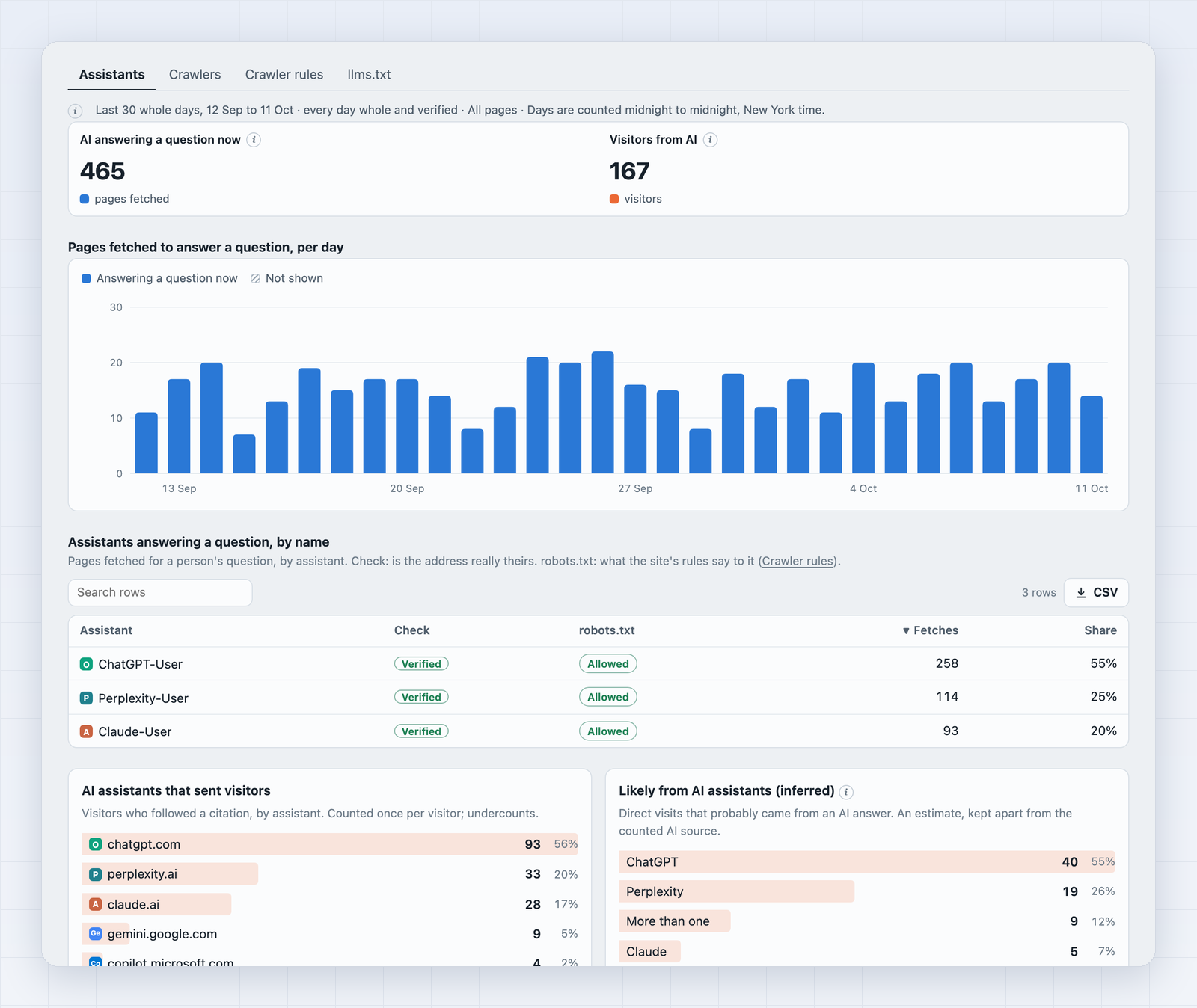 AI & bots › Assistants. Who read your pages to answer someone, and who came from it. |
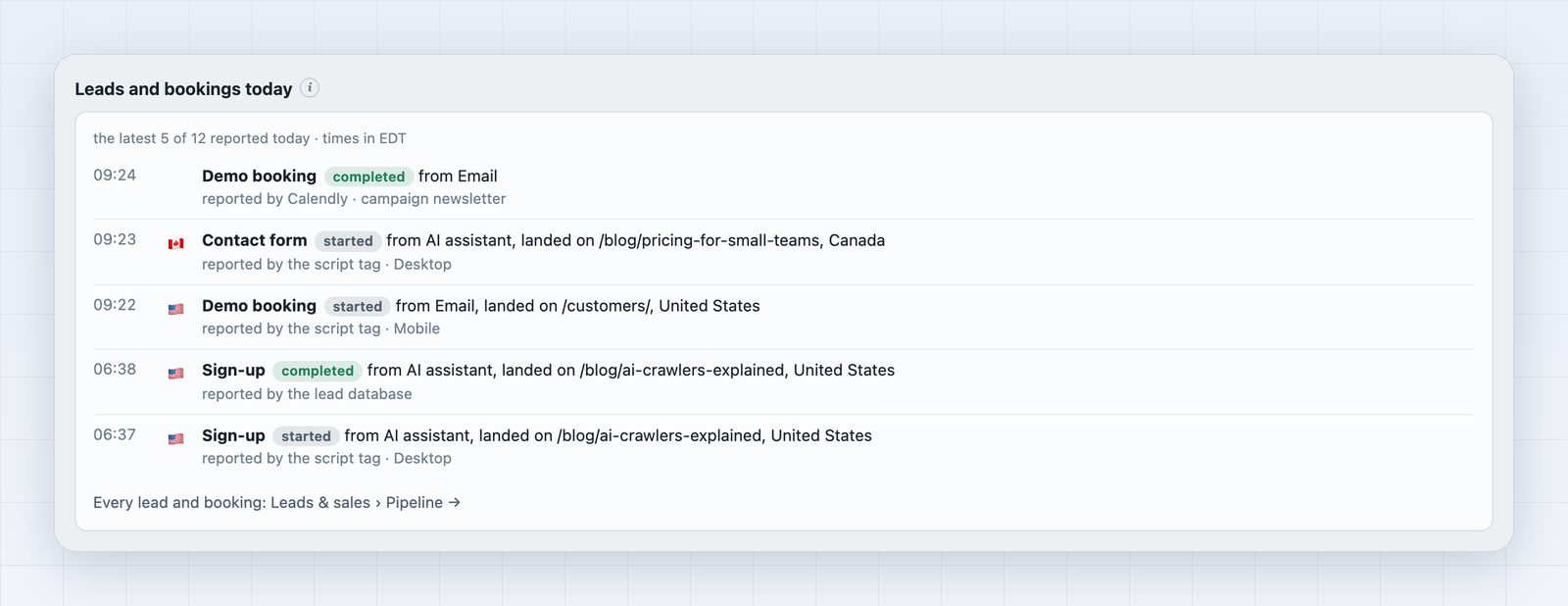 Live leads. Each lead and booking as it lands. |
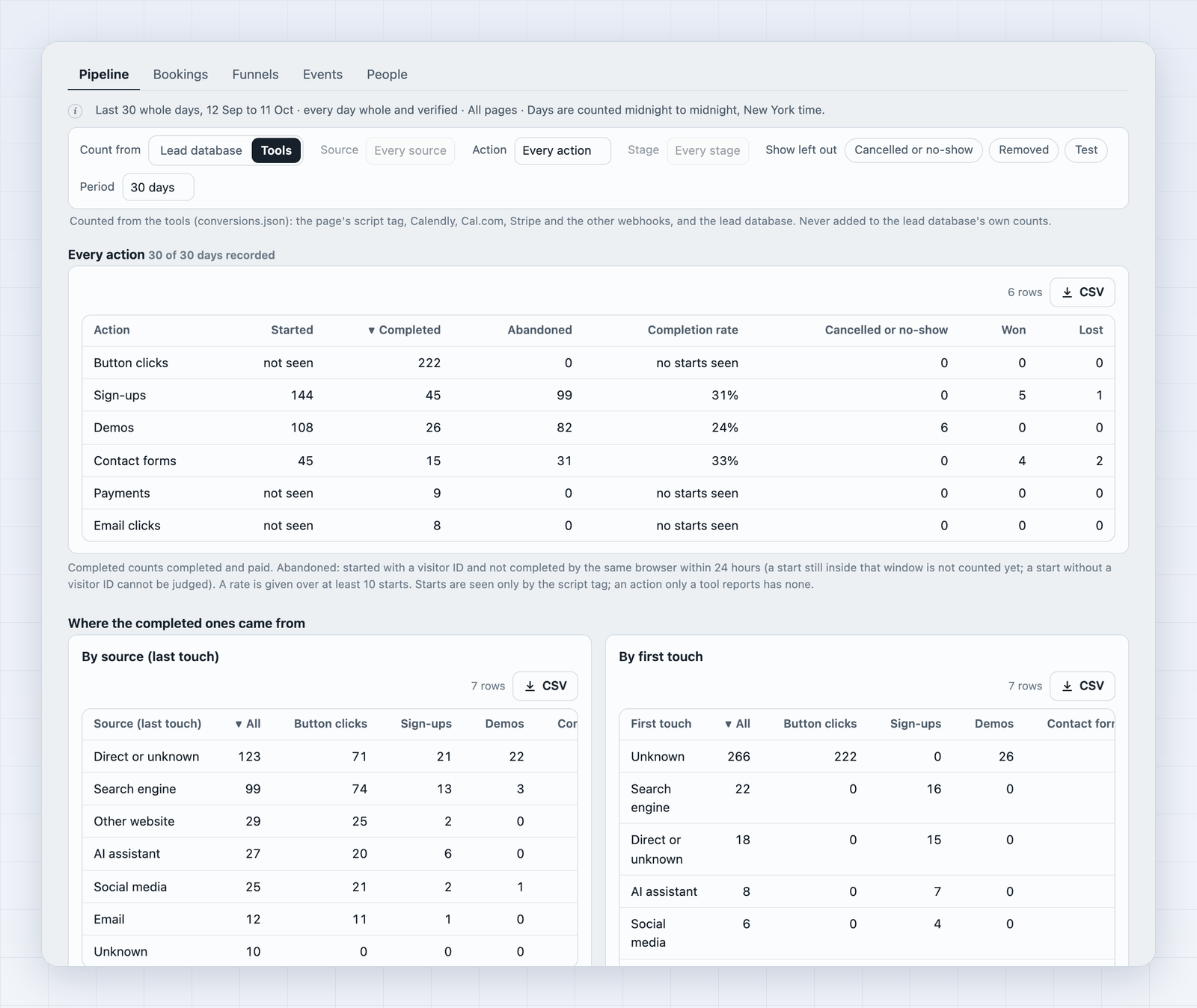 Conversions. Started, completed, abandoned. |
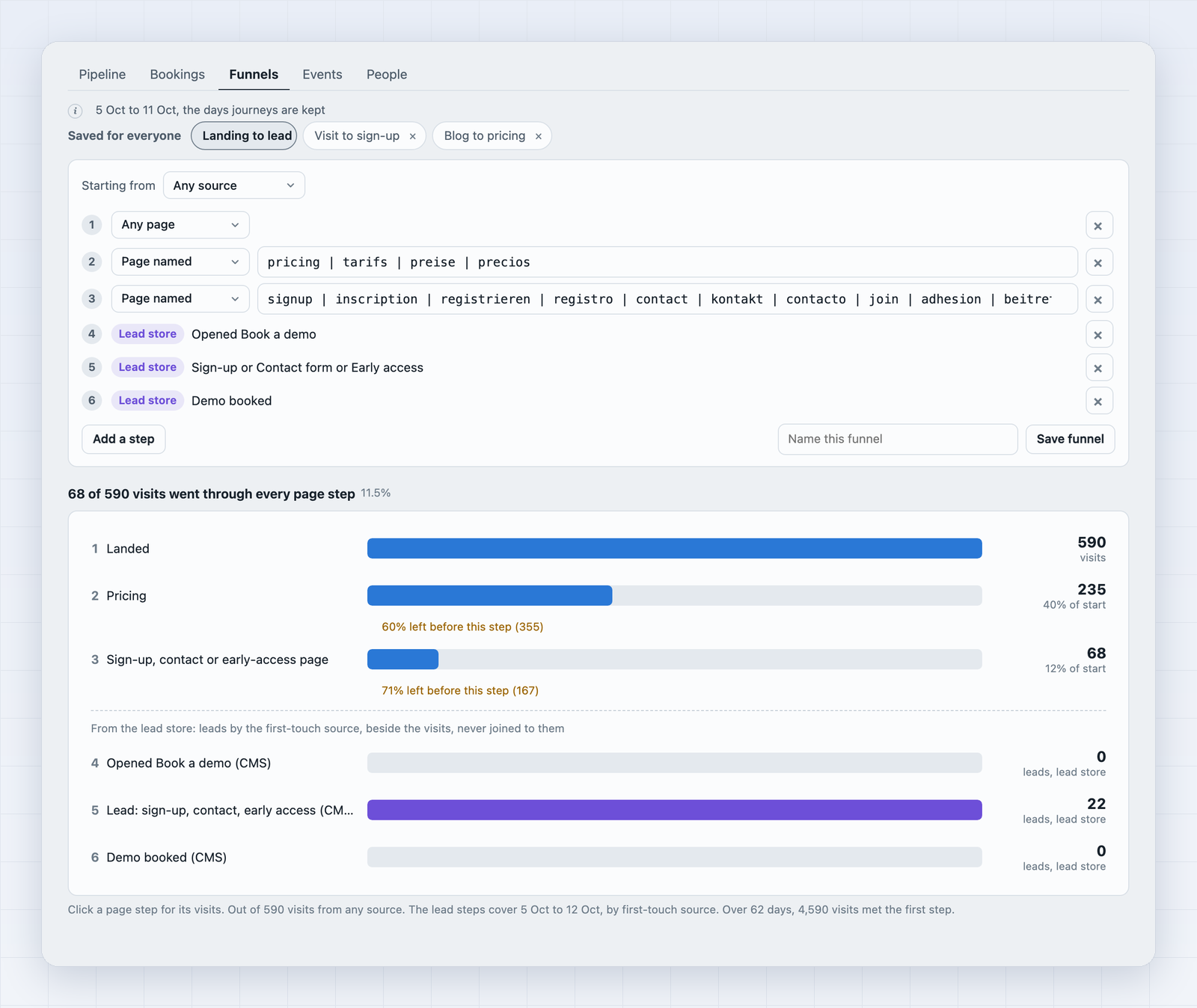 Funnels. Saved once, counted every day. |
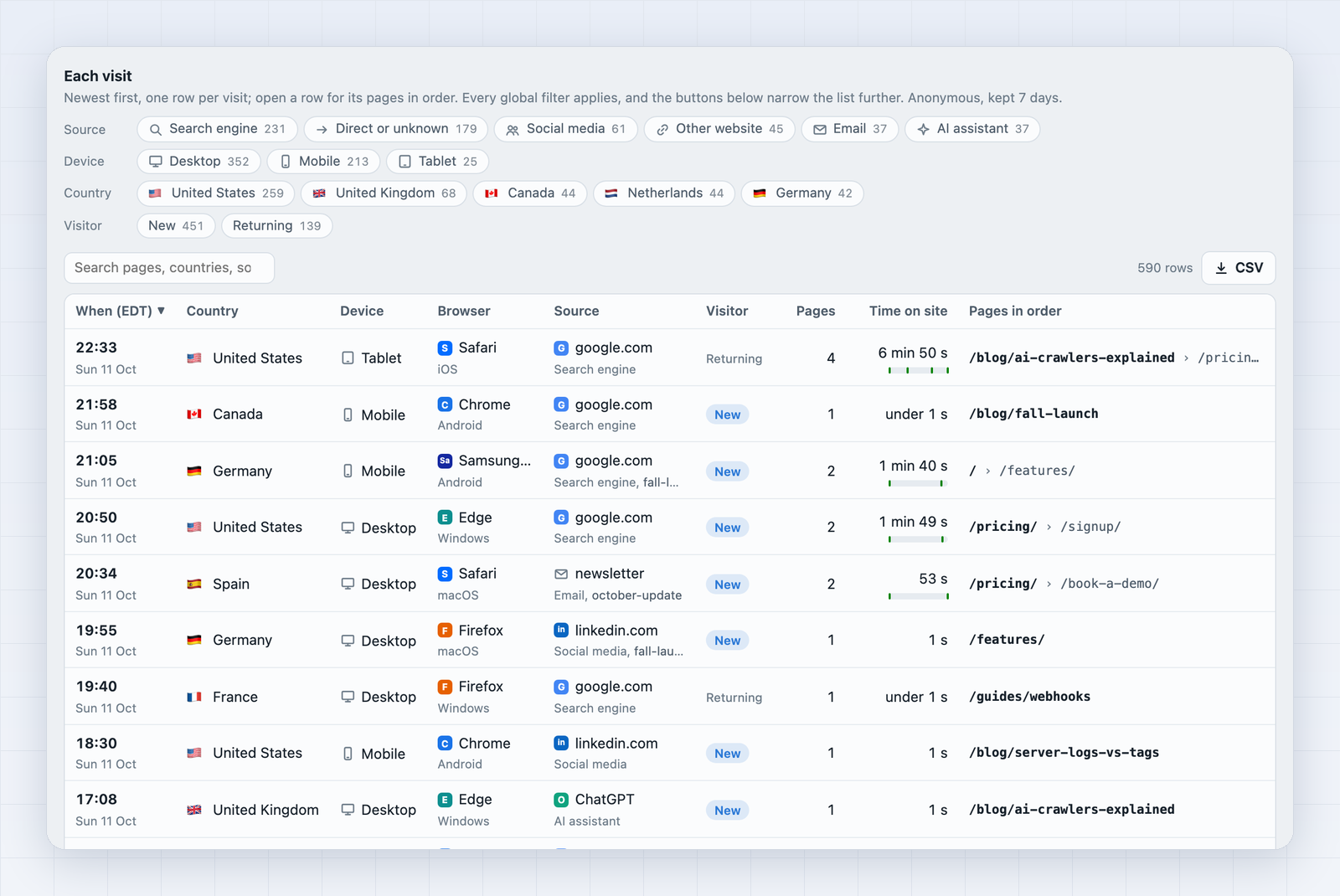 Visitors. Each visit, page by page, a flag beside every country. |
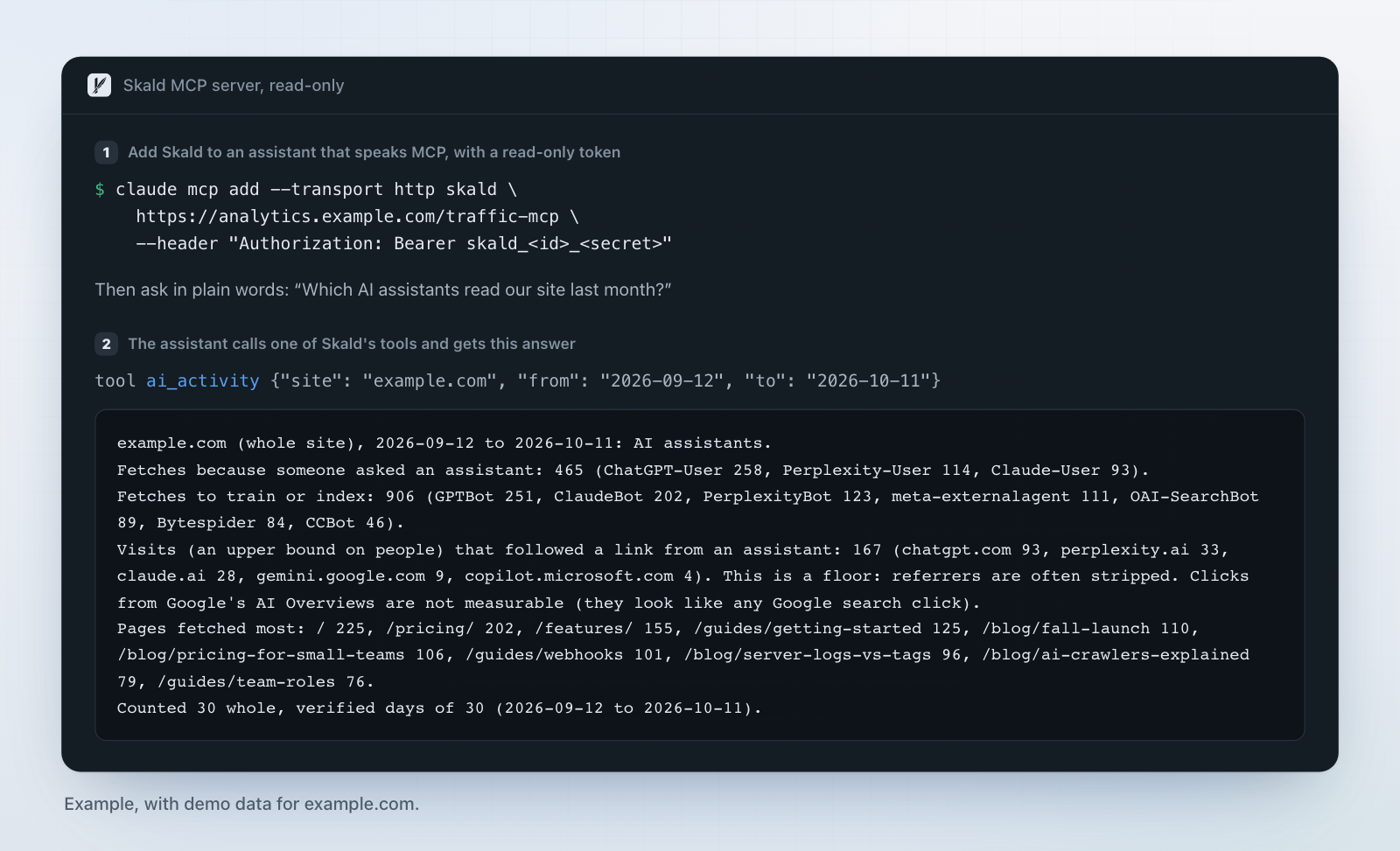 MCP in Claude. Ask about your traffic in plain words. |
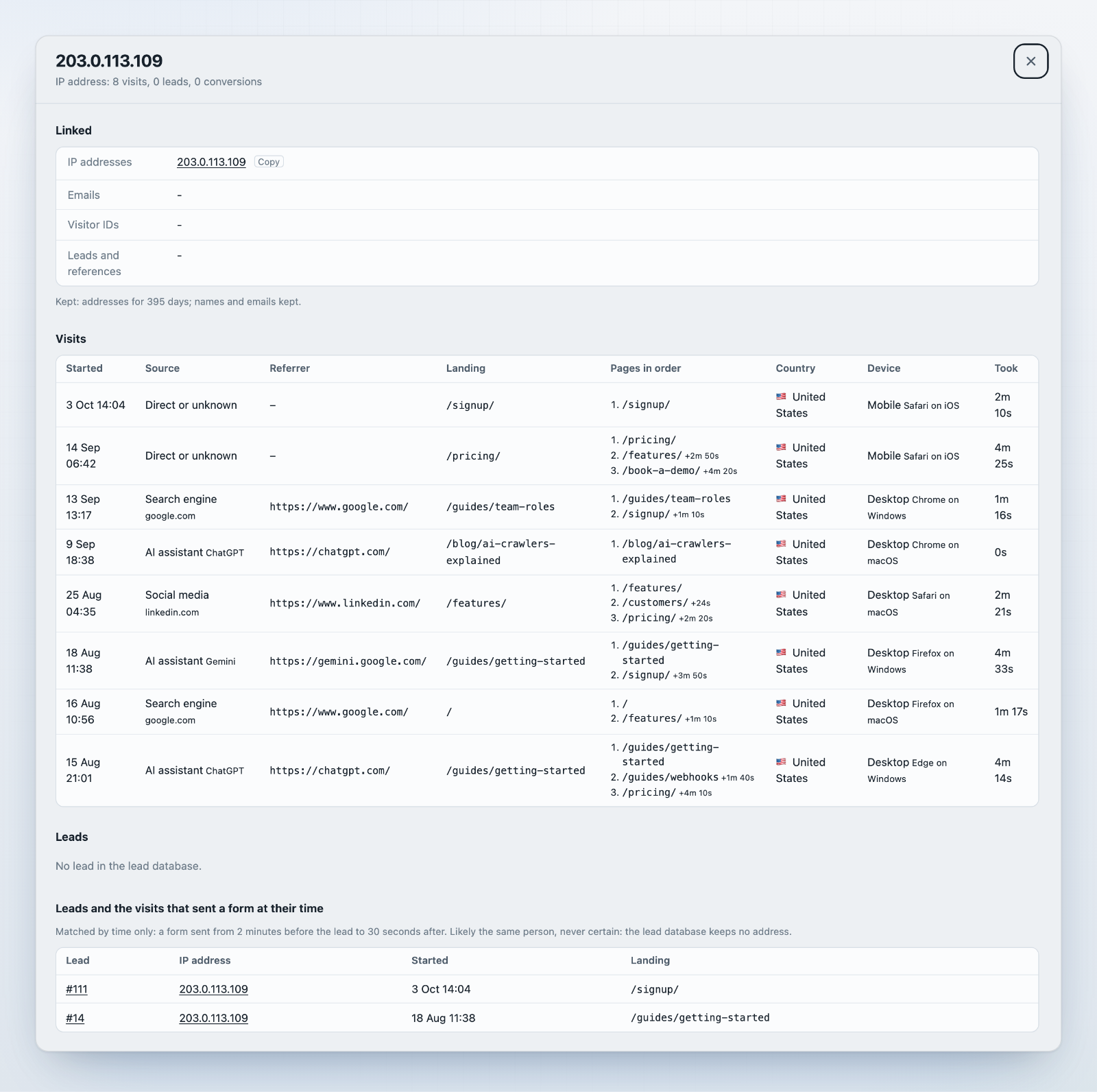 Person search. One address: every visit kept, across days, and the leads it sent. |
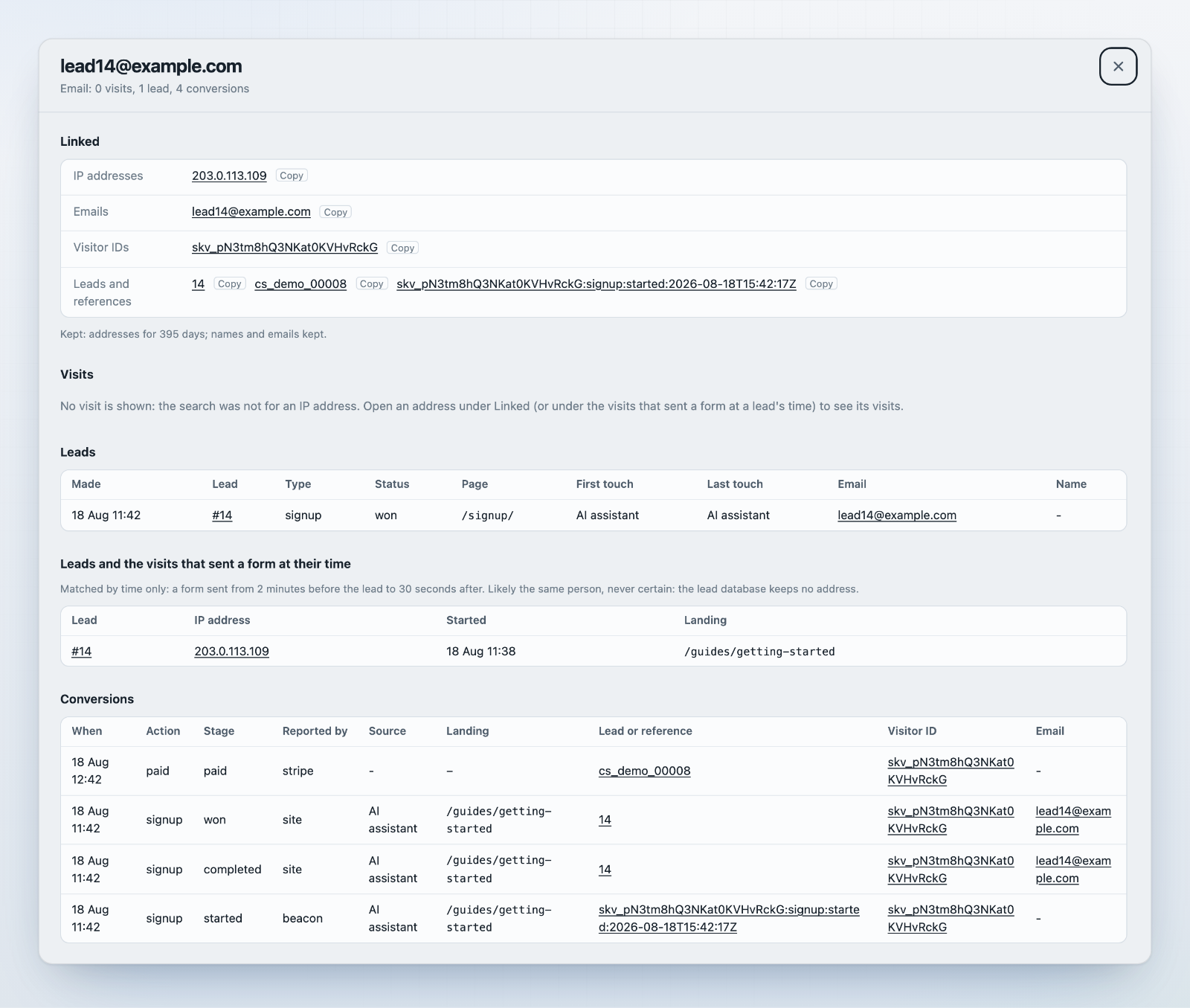 One lead, linked. Its email, address, visitor ID, form visit and conversions. |
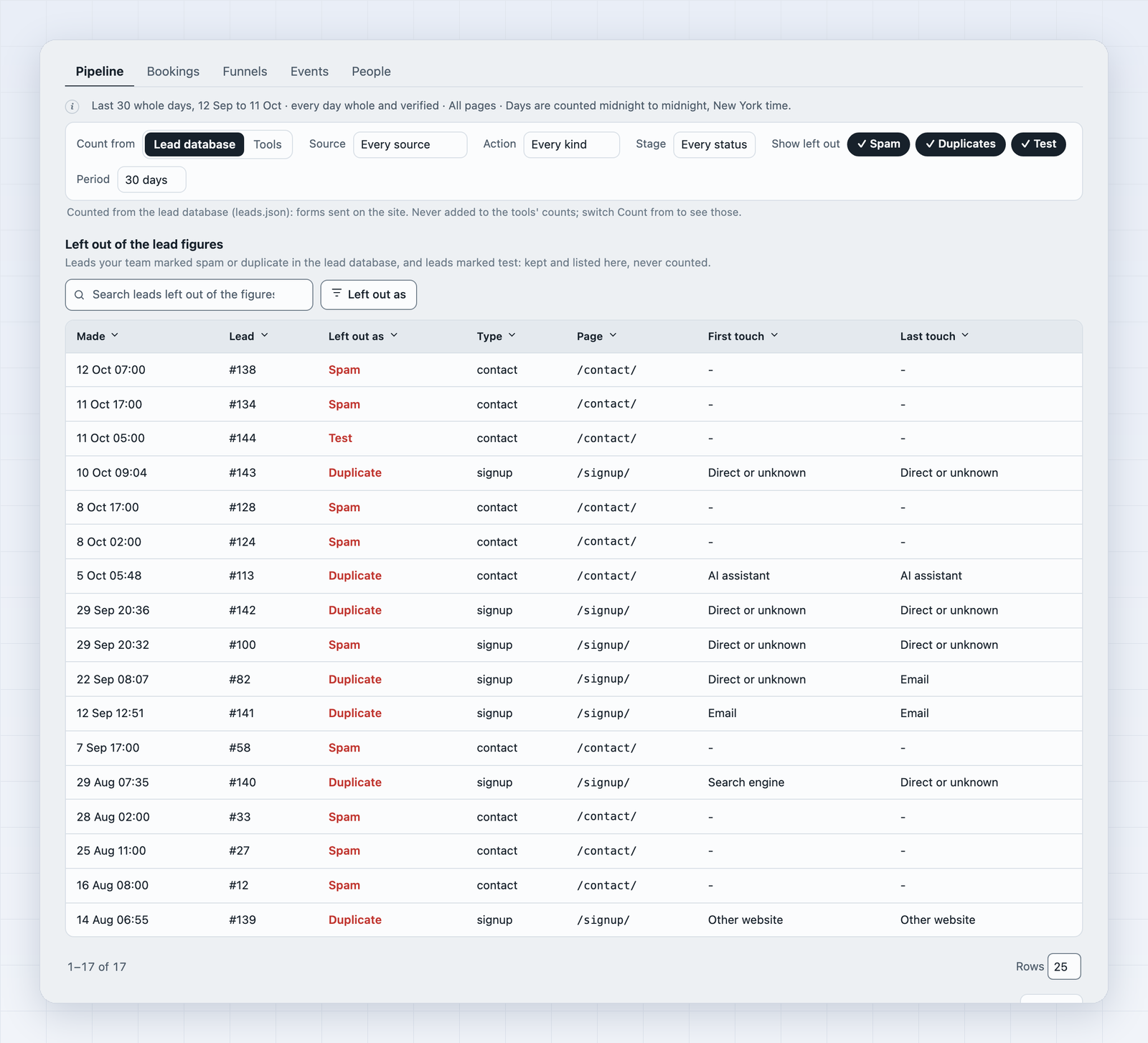 Left out, still listed. Spam, duplicates and test, never just dropped. |
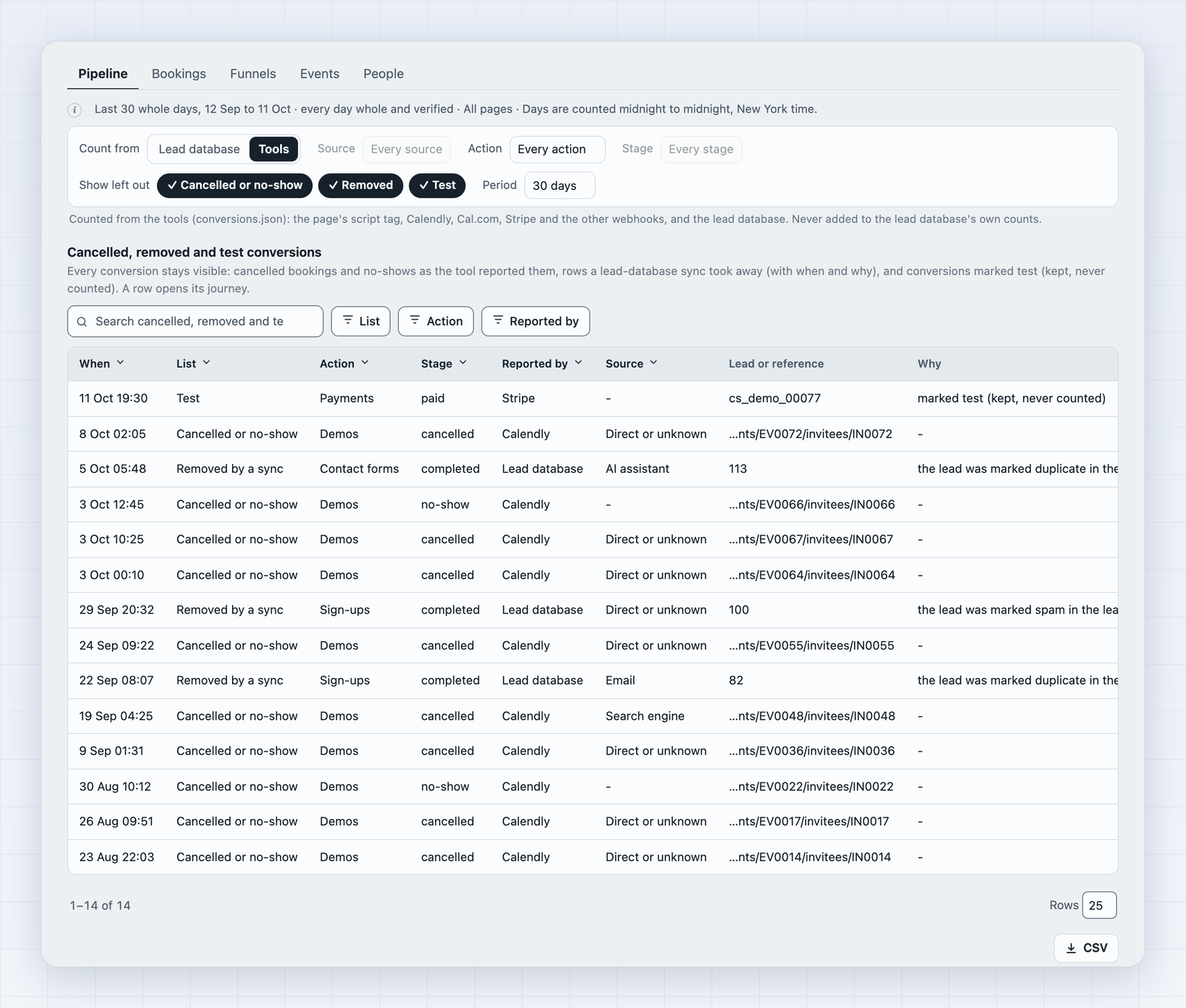 Removed, with when and why. Cancelled, removed and test conversions. |
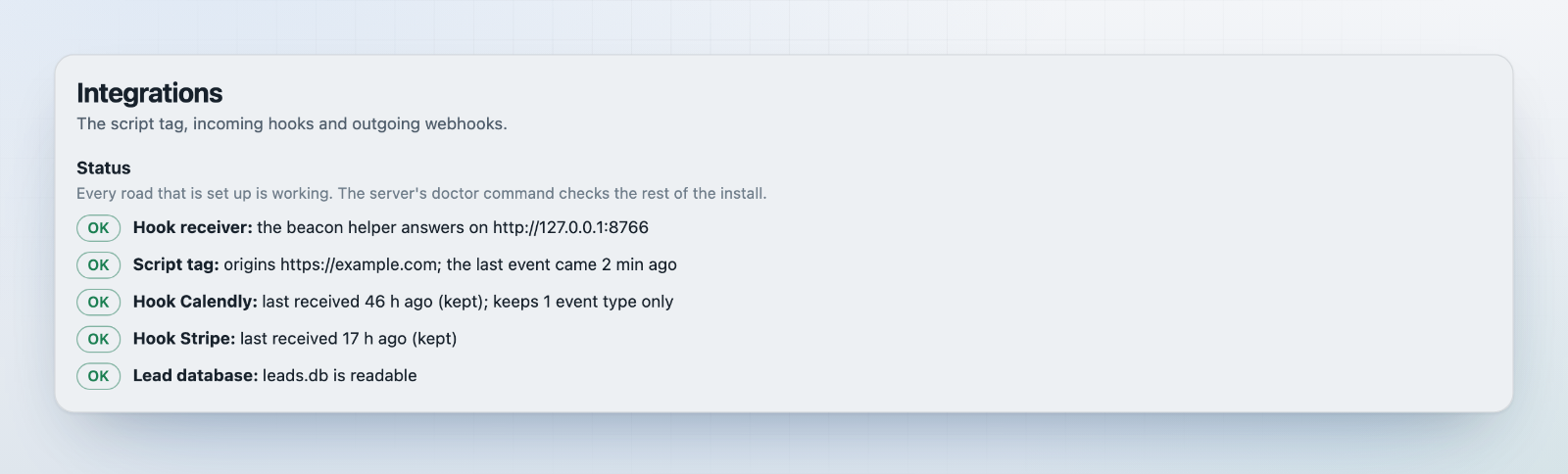 Integrations status. Each road: working, or what to fix. |
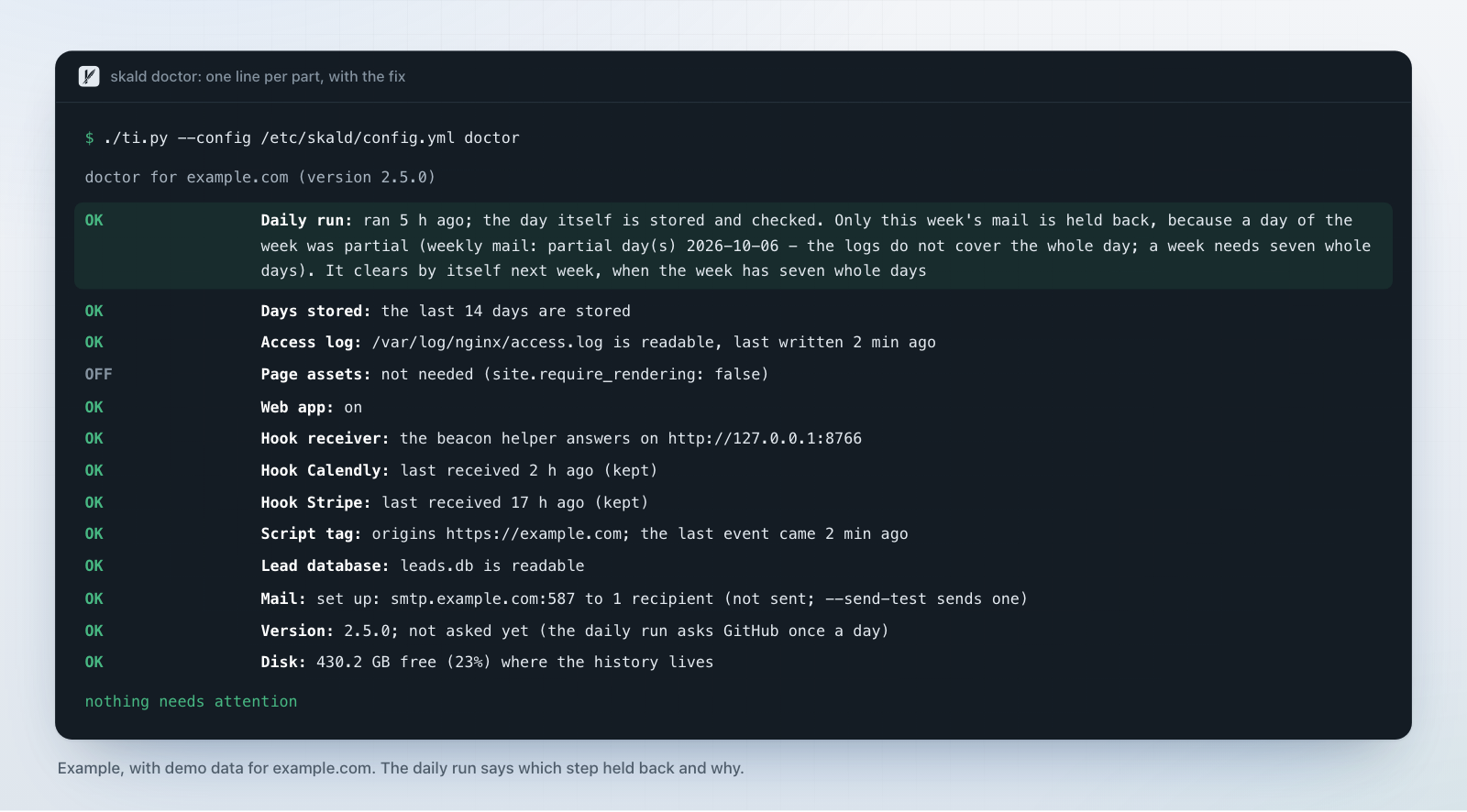 skald doctor. Every part checked; a held-back run names its step. |
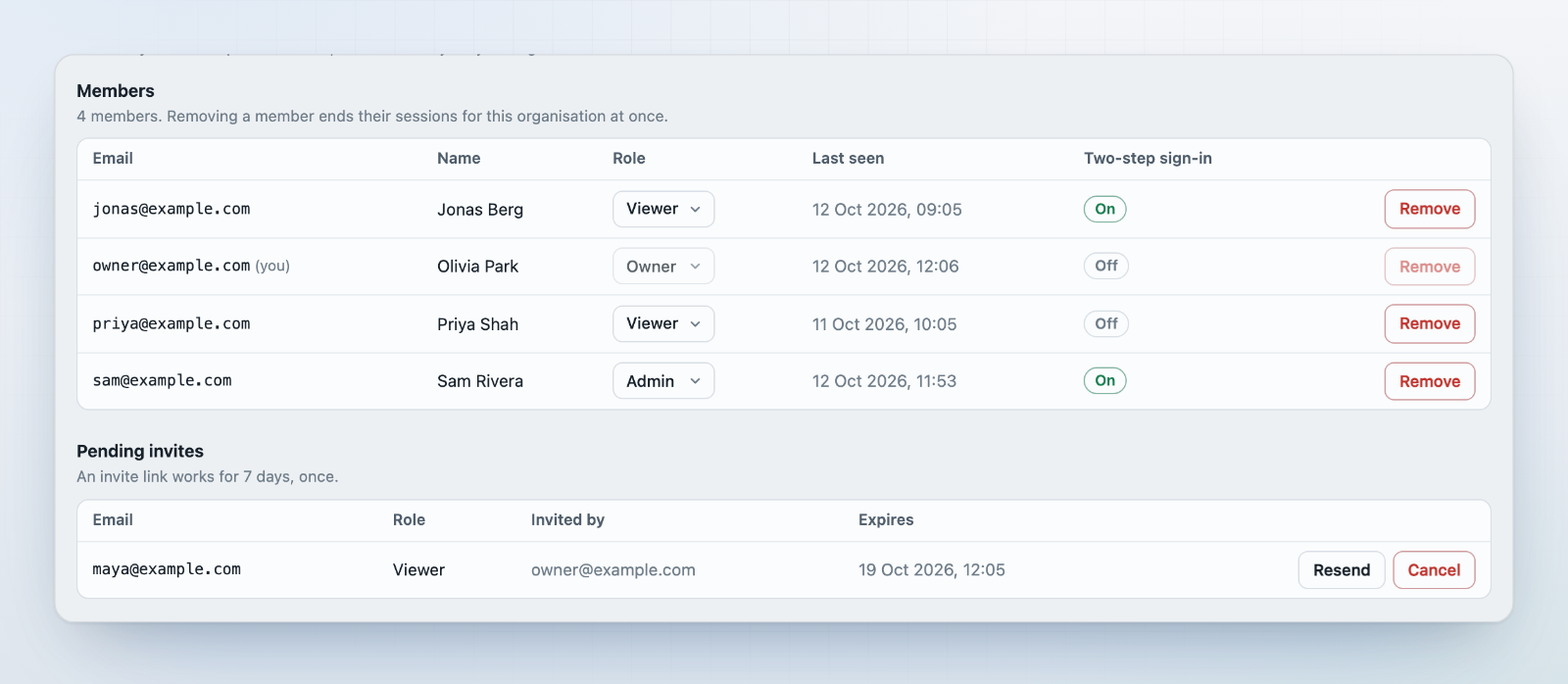 Team & access. Roles, invites, two-step sign-in. |
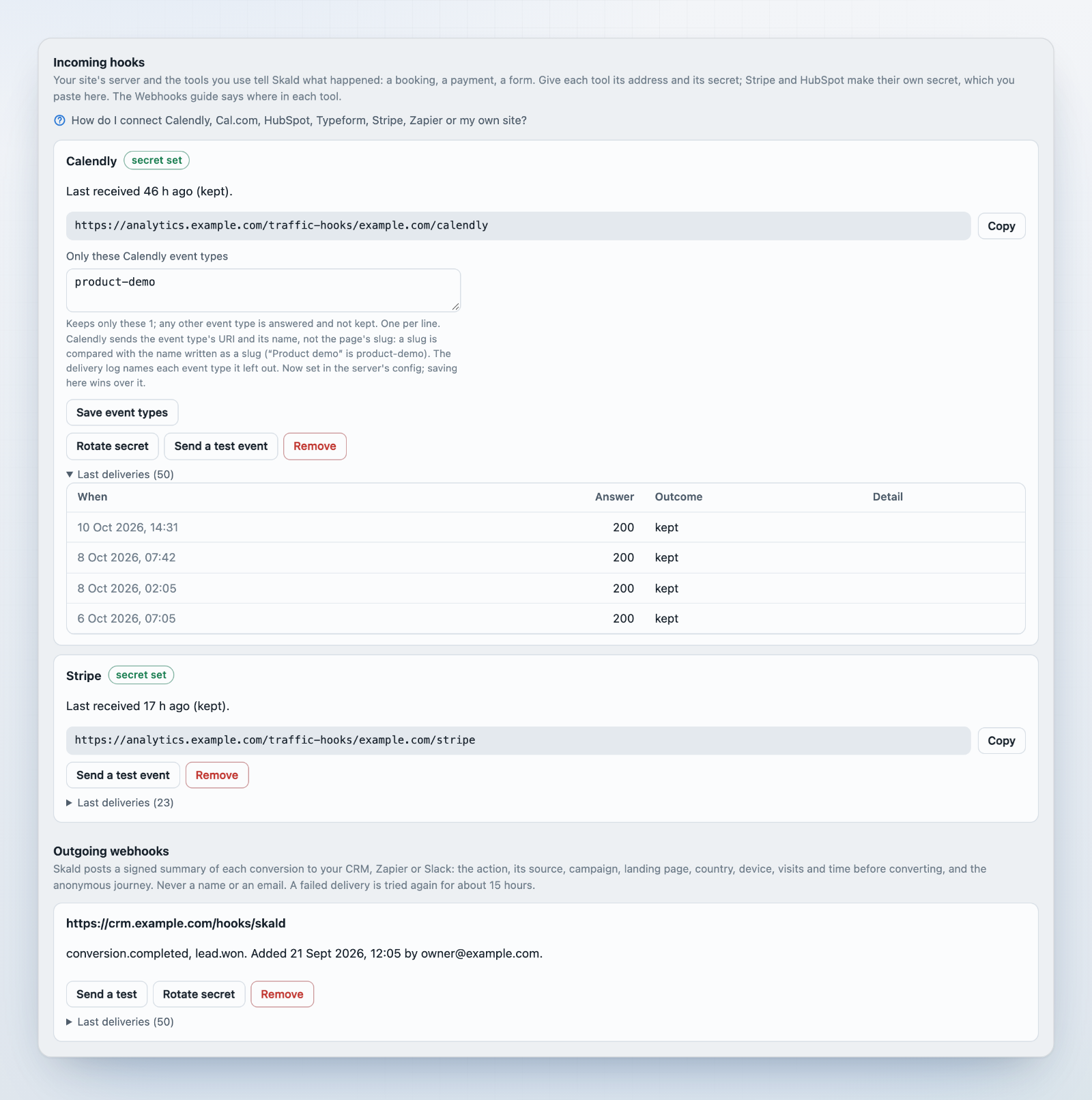 Integrations. Signed webhooks from the tools you use. |
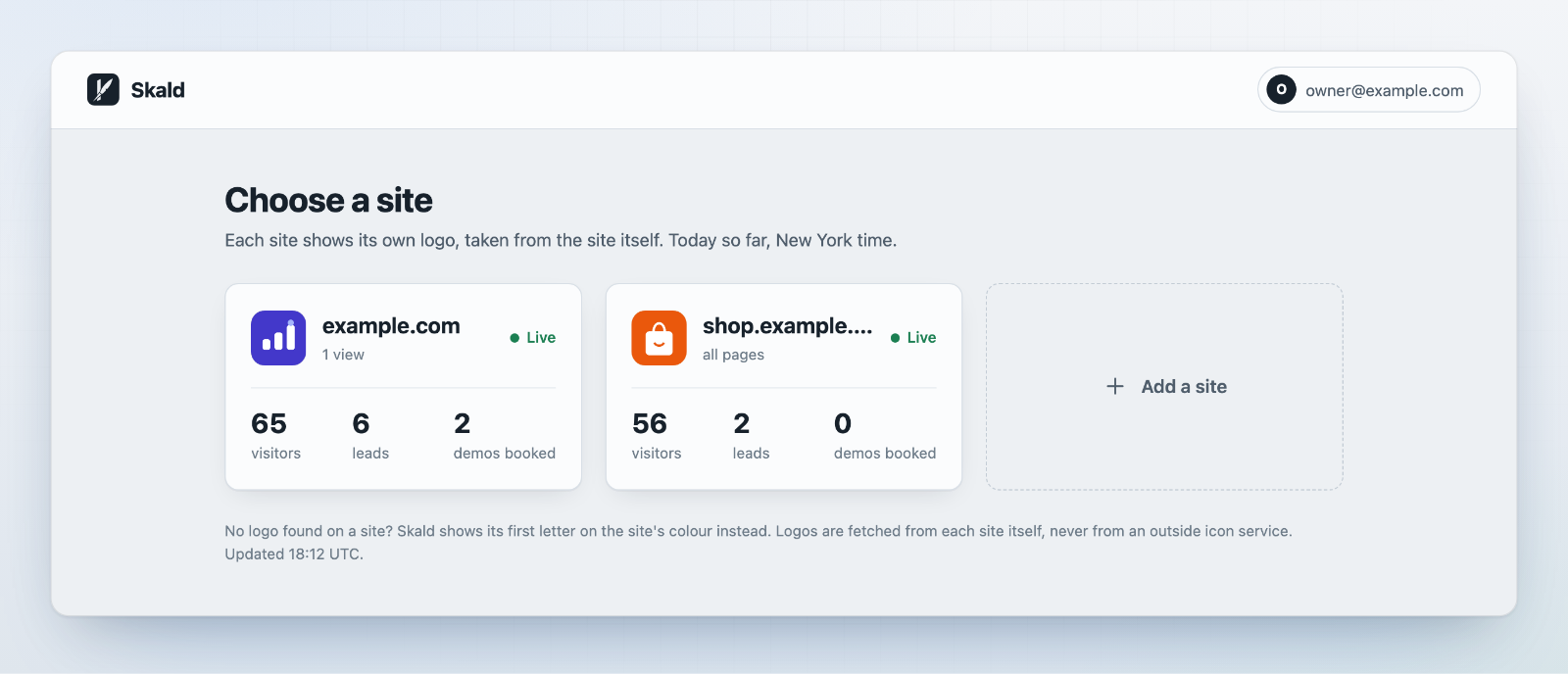 Choose a site. Each site's logo and today so far. |
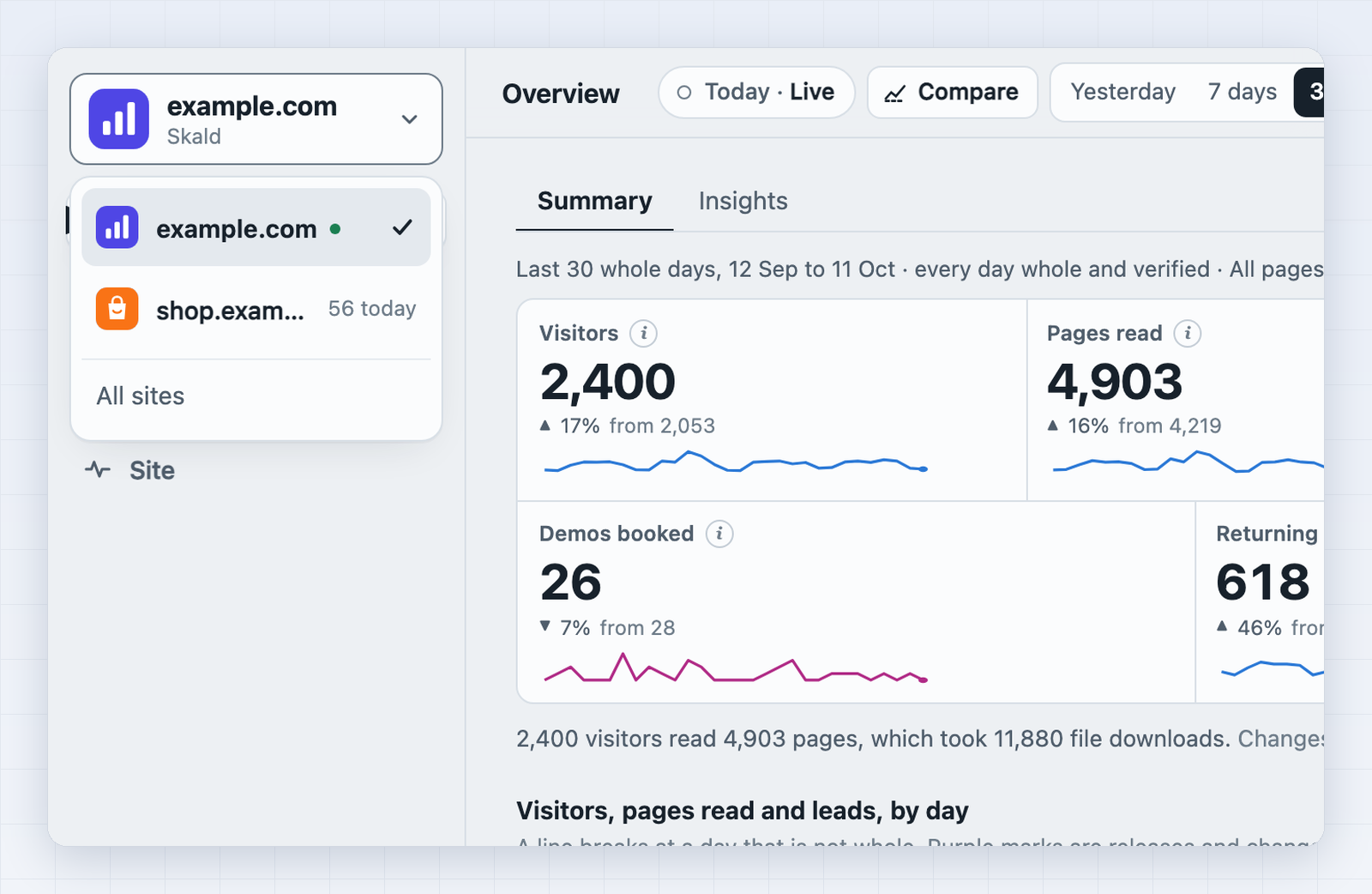 Site switcher. Every site with its logo, one click away. |
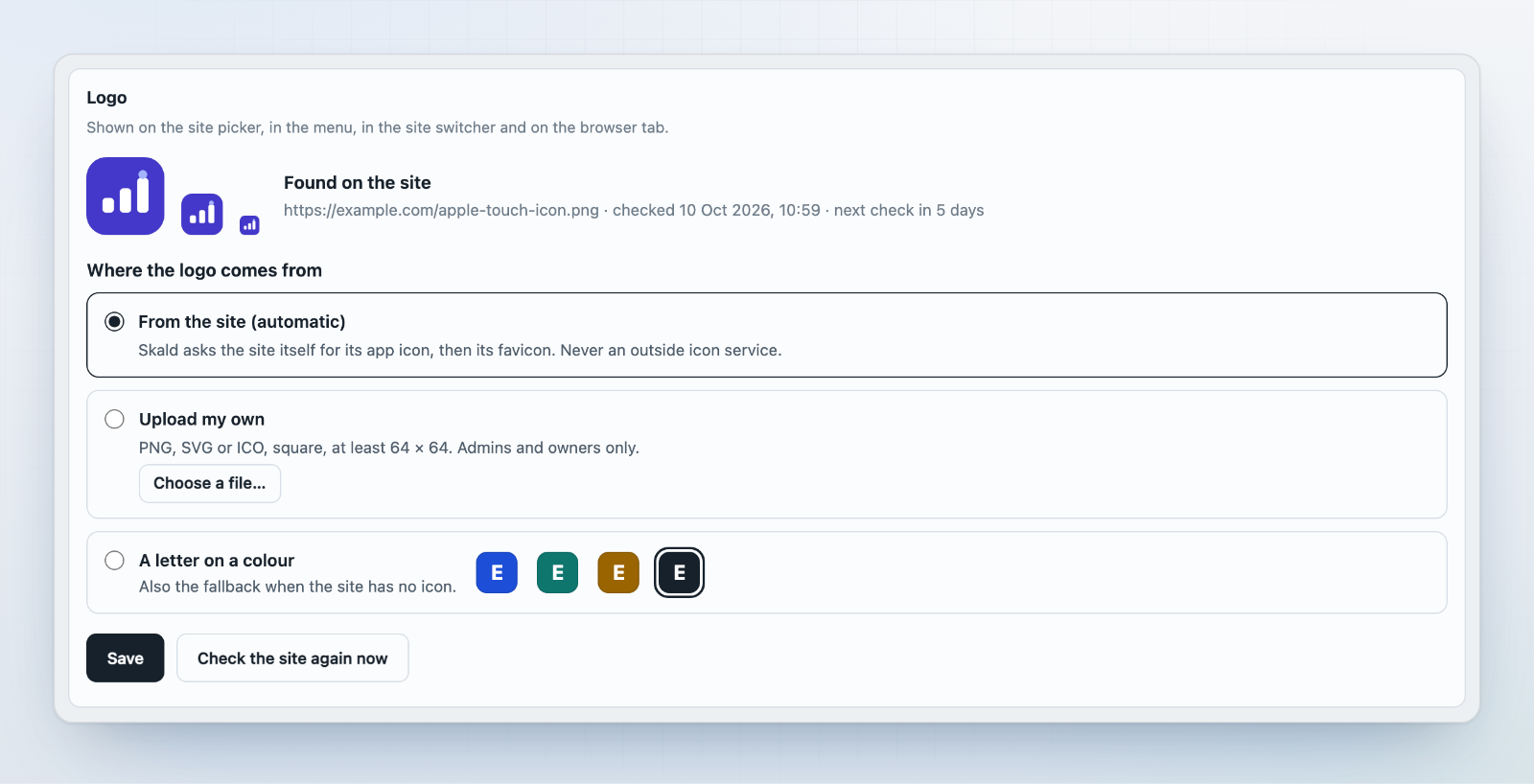 Site logo. From the site, an upload, or a letter on a colour. |
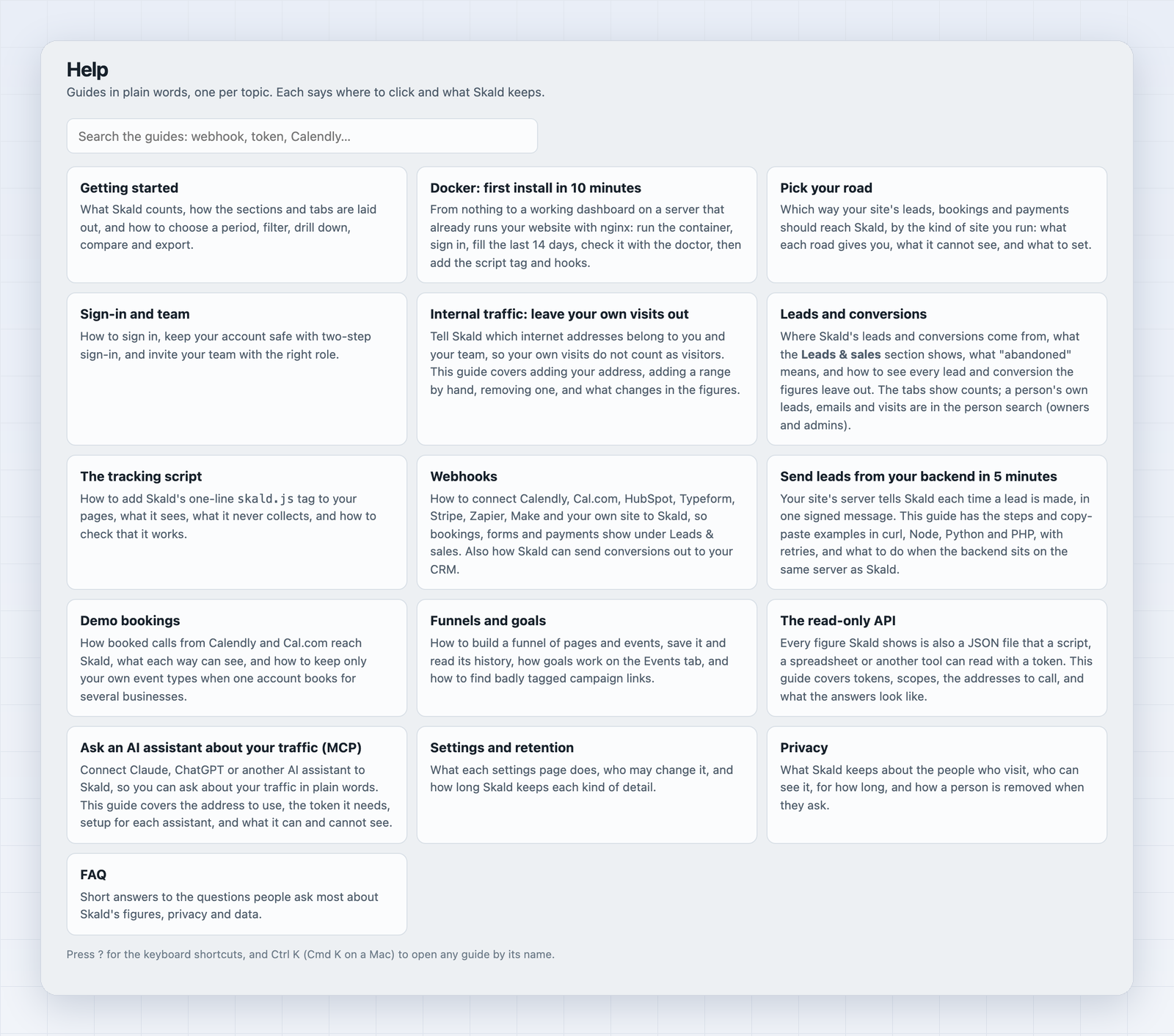 Help. Every page explained, and four how-to guides. |
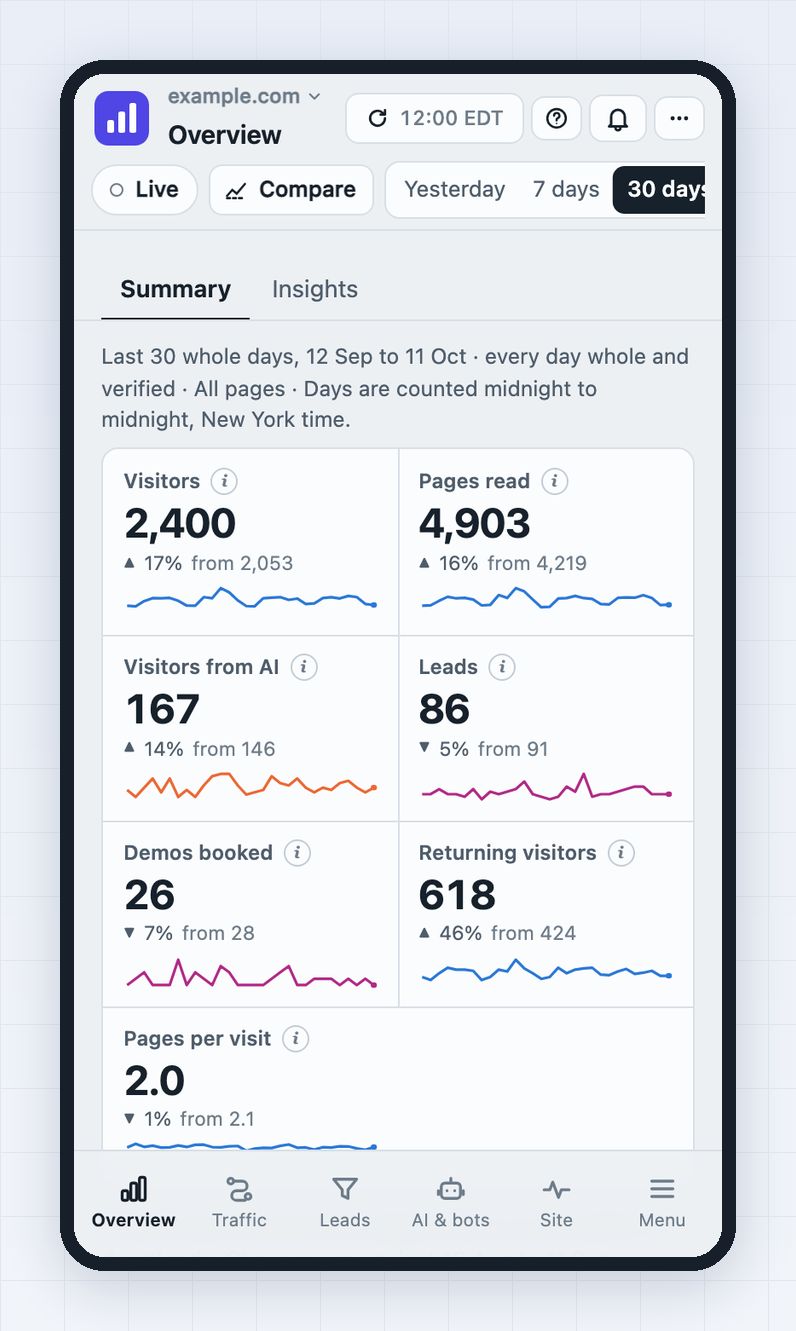
On a phone: the same figures, the site's logo and name in the top bar, a drawer menu and a bottom bar.
Quick start in 60 seconds
You need a server whose access log Skald can read. Full guide, all options and troubleshooting:
docs/INSTALL.md. Hosting choices (Railway, Render, Fly.io, a VPS) and how to
measure sites on Vercel, Netlify or Cloudflare: docs/HOSTING.md. Site on Vercel? Follow docs/VERCEL.md.
Hosting: 
(a paid instance with a disk; render.yaml sets it up). Railway, Fly.io and Kubernetes:
step by step in docs/HOSTING.md. A one-click Railway button comes once a
Railway template is published.
Option 1: Docker (fastest)
1. Start it with your web server's log mounted read-only:
docker run -d --name skald -p 127.0.0.1:8080:8080 \
  -v /var/log/nginx:/logs:ro \
  -v skald-data:/var/lib/skald \
  ghcr.io/spcaeo/skald:latest
2. Open http://localhost:8080. The port is published on this machine only. To reach it from
elsewhere, put HTTPS in front: your web server proxying to 127.0.0.1:8080, or the bundled Caddy
(Option 2). docs/INSTALL.md has both recipes.
3. Make the first owner. This prints a link to set your password:
docker exec -it skald skald accounts init --org "Example Co" --owner-email [email protected]
4. Open the link, set a password, sign in. Your history lives in the skald-data volume.
5. Fill the history and check it. docker exec skald skald backfill --days 14 adds the days your
logs still hold; docker exec skald skald doctor then says, one line per part, what works and
what to fix. The full walk-through is the Help guide "Docker: first install in 10 minutes".
Settings come from environment variables (SKALD_SITE, SKALD_HOSTS, SKALD_TIMEZONE,SKALD_BASE_URL, SKALD_EMAIL, SKALD_SMTP_*, SMTP_USER, SMTP_PASSWORD, SKALD_KEEP_IPS,SKALD_IDENTITY) or a config file mounted at /etc/skald/config.yml. The
log must be readable by group adm (gid 4), as it is on stock Debian and Ubuntu.
Sign-in needs HTTPS. The session cookie is
Secure, so plainhttp://works only atlocalhost. On a remote server, put HTTPS in front (below).
Option 2: Docker Compose
git clone https://github.com/spcaeo/skald && cd skald
docker compose up -d
docker compose exec skald skald accounts init --org "Example Co" --owner-email [email protected]
docker-compose.yml is at the root of the repository. Edit its log path first if your logs are
not in /var/log/nginx.
On a server with your own domain
Either let your host's nginx or Caddy proxy /traffic* to 127.0.0.1:8080 over HTTPS, or start the
bundled Caddy, which gets a certificate for you:
SKALD_DOMAIN=stats.example.com docker compose --profile https up -d
Option 3: Install script (Debian, Ubuntu and similar)
The quick way, pinned to a release:
curl -fsSL https://raw.githubusercontent.com/spcaeo/skald/v2.7.0/install.sh | sudo bash -s -- --ref v2.7.0
This runs a script from the internet as root. To check it first, download the release and its
checksums, verify, then run it:
curl -fsSLO https://github.com/spcaeo/skald/releases/download/v2.7.0/skald-2.7.0.tar.gz
curl -fsSLO https://github.com/spcaeo/skald/releases/download/v2.7.0/SHA256SUMS
sha256sum --ignore-missing -c SHA256SUMS      # must print: skald-2.7.0.tar.gz: OK
tar -xzf skald-2.7.0.tar.gz && cd skald-2.7.0 && less install.sh && sudo ./install.sh
It installs into /opt/skald, with config in /etc/skald and data in /var/lib/skald, and puts
the skald command in /usr/local/bin.
Upgrading later: sudo skald upgrade (a backup, migrations, a health check, a rollback), update notices
and optional automatic upgrades, and the :2 Docker tag: docs/UPGRADING.md.
Option 4: From source
git clone https://github.com/spcaeo/skald && cd skald && sudo ./install.sh
Then the daily run and the live panel come from one command (it runs as the skald user, with/etc/skald/config.yml, so use sudo):
sudo skald check            # verify yesterday's figures; store nothing
sudo skald run-daily        # check, collect, audit, dashboard, mail (the cron entry)
sudo skald live             # "Today so far"; safe every 2 minutes
sudo skald version          # brand, version and release
Needs: Python 3.11 or newer (tested on 3.11 to 3.14; install.sh installs 3.11 on Ubuntu
22.04, which ships 3.10). Nothing else: the standard library is enough. PyYAML is used only if it
is already installed, and Pillow, if installed, turns fetched site icons into small PNGs. The account that runs Skald must be able
to read the log (on Debian and Ubuntu, the adm group).
Integrations
The script tag (optional). One line in your page's <head> adds page views, form steps, phone,
mail and outbound clicks, 75% scroll, and Calendly, Cal.com and HubSpot meeting bookings. It is under
6 KB of plain JavaScript, served from your own site and posting to your own site. No third-party code,
no cookie by default, and Do Not Track and Global Privacy Control are respected.
<script src="/traffic-js/skald.js" data-site="example.com" defer></script>
skald('track', 'cta_click', {id: 'pricing_top'});   // your own events
skald('consent', true);                             // with data-consent="required"
Incoming webhooks. Each tool's own signature is checked on the raw body; a repeat changes nothing.
The receiver runs on every install, Docker or install script, with or without the script tag.
| Tool | What Skald records |
|---|---|
| Calendly, Cal.com | demo: booked, cancelled, rescheduled (Calendly also no-show); keep only your own event types when one account books for several businesses |
| HubSpot | meetings as demo, contacts and workflows as contact, deals as deal (won at closed-won) |
| Stripe | paid (a checkout paid) |
| Typeform | contact |
| Zapier, Make, n8n, any script | the signed json hook, any short action name |
| Your own server | the signed lead hook (sign-ups, contacts, trials) |
Which road fits your site (a form plugin, Next.js on Vercel, a Postgres backend, no code,
Calendly, Stripe, HubSpot) is in the Help guide "Pick your road"; "Send leads from your backend in
5 minutes" has signed examples in curl, Node, Python and PHP. Settings > Integrations shows each
road's state (ready, never received, last received 2 h ago) and flags a lead that arrived by two
roads, which would count twice. skald doctor on the server says the same, with the fix.
Outgoing webhooks. Signed, HTTPS only, never to a private address, retried five times over about
15 hours. They never carry a name or an email.
Cloudflare on any plan. The Skald Worker counts the pages Cloudflare serves from its cache. It
asks for your Skald's ingest address and the site's token, then needs your site's route; see
docs/HOSTING.md.
API. A read-only JSON API over every dashboard figure, with revocable, scoped tokens
(skald_<id>_<secret>). See docs/API.md.
MCP for AI agents. 14 read-only tools: overview, breakdown, top_pages, ai_activity,leads, funnel, compare, page_story, live_today, data_quality, site_health,conversions (its by breaks completed actions and leads down by source, first touch, landing
page, country, campaign, device or tool), list_sites and, with the read_private scope only,find_person. Answers call visits "an upper bound on people" and name every
withheld day. It cannot change anything.
claude mcp add --transport http skald https://stats.example.com/traffic-mcp \
  --header "Authorization: Bearer skald_<id>_<secret>"
Claude Desktop, ChatGPT (through the API) and any MCP client that can send a header work too. OAuth
sign-in is not offered yet. See docs/MCP.md.
How Skald compares
Facts about other tools come from each vendor's own docs, pricing pages or source code, checked on
2026-10-07. Rows added after that date were not checked for other tools and say so. The full matrix,
with a source for every cell, is in docs/COMPARISON.md.
✓ yes · ◐ partly, or on some plans or setups · ✗ no, or not found in its docs · ? not confirmed on
the vendor's pages · – does not apply · nc = not checked
| Skald | GA4 | Plausible | Umami ¹ | Matomo | PostHog | Cloudflare ² | GoAccess | |
|---|---|---|---|---|---|---|---|---|
| How it collects | Server access log | JS tag | JS snippet | JS tracker | JS tag, or log import | JS SDK | JS beacon; AI Crawl Control at the edge | Server access log |
| Nothing runs in the visitor's browser | ✓ | ✗ | ✗ | ✗ | ◐ | ✗ | ◐ | ✓ |
| Counts visitors with an ad-blocker | ✓ | ✗ | ◐ | nc | ◐ | ◐ | ✗ | ✓ |
| AI training crawlers (GPTBot, ClaudeBot) | ✓ | ✗ | ✗ | ✗ ³ | ◐ | ✗ | ✓ | ✓ |
| AI assistants fetching a page to answer someone | ✓ | ✗ | ✗ | ✗ ³ | ◐ | ✗ | ✓ | ✓ |
| People who clicked through from an AI answer | ✓ | ✓ | ✓ | ✓ | ✓ | ✓ | ◐ | ✗ |
| Splits AI traffic by why it came | ✓ | ✗ | ✗ | nc | ? | ✗ | ? | ✗ |
| Checks a crawler is who it claims to be | ✓ | – | – | nc | ? | – | ◐ | ✗ |
| Totals must add up, or the day is withheld | ✓ | ✗ | ✗ | nc | ✗ | ✗ | ✗ | ✗ |
| A second, independent recount of every figure | ✓ | ✗ | ✗ | nc | ✗ | ✗ | ✗ | ✗ |
| Events inside the page | ✓ ⁴ | ✓ | ✓ | nc | ✓ | ✓ | ✗ | ✗ |
| Funnels | ✓ | ✓ | ◐ | nc | ◐ | ✓ | ✗ | ✗ |
| Search queries, impressions, position | planned | ◐ | ◐ | nc | ◐ | ? | ✗ | ✗ |
| Ad cost and Google Ads link | ✗ | ✓ | ✗ | nc | ? | ? | ✗ | ✗ |
| Runs on your own server | ✓ | ✗ | ◐ | ✓ | ✓ | ◐ | ✗ | ✓ |
| Deleting one visitor on request | ✓ | ? | – | nc | ✓ | ? | – | ✗ |
| AI agents can query it (MCP) | ✓ | nc | nc | nc | nc | nc | nc | nc |
| Licence | ELv2 (source-available) | Closed, SaaS | AGPLv3 (Community Edition) | MIT | GPL | MIT (self-host) | Closed, SaaS | MIT |
| Price | Free to self-host | Free; 360 on request | From $9/month; self-host free | Cloud free to 100k events | Cloud from EUR 29/month; self-host free | 1M events/month free | Web Analytics free | Free |
¹ Umami is in the "Also checked" list of docs/COMPARISON.md, not in its
full matrix; only its collection method, bot handling, AI referral channel, licence and price were
checked. ² Cloudflare Web Analytics (the beacon) together with AI Crawl Control, which needs your
traffic to pass through Cloudflare. ³ Umami excludes bots by default. ⁴ With the optional skald.js
tag or beacon.
Where others lead (honestly)
- Search itself. Queries, impressions and ranking come only from Search Console and Bing
Webmaster Tools. Keep them. A Search Console import is on Skald's roadmap. - Deep in-page analysis and ad spend. GA4 and PostHog see far more inside the page, and GA4
links to Google Ads. Skald's tag sends clicks, form steps and bookings, but no more. - Any host, any cache. Script tools work anywhere. Skald needs a log: a page a CDN serves from
its cache never reaches your server's log unless you feed Skald the CDN's own log. - Charging AI crawlers. Cloudflare can charge per crawl. Skald can block, not charge.
Who should use what
- What people searched for, and where you rank: Search Console and Bing Webmaster Tools.
- Clicks, scrolls, funnels and ad spend inside the page: GA4 or PostHog.
- Simple cookie-free counts on any host: Plausible.
- Every visitor, crawler and AI fetch, with checked figures, on your own server: Skald. It sits
beside the tools above. Even the gap between Skald's count and GA4's is useful: it shows how much
the script misses.
Who it is for
- Founders and marketers who need to know whether ChatGPT, Claude and Perplexity read their
site, and whether those answers send people and leads. - Agencies and SEO teams who report AI visibility to clients and need figures that hold up.
- Engineers and site owners who want analytics with no third-party script, no cookie banner for
counting, and data that stays on their own server. - Privacy-minded organisations that must answer a deletion request with one command.
More in docs/POSITIONING.md and the story in
docs/WHY-WE-BUILT-SKALD.md.
Tech stack
| Layer | What it uses |
|---|---|
| Language | Python 3.11+, standard library only. No pip install. PyYAML and Pillow optional. |
| Storage | SQLite: history.sqlite (daily totals), accounts.sqlite, conversions.sqlite. One file each, easy to back up. |
| Dashboard | Vanilla ES modules and plain CSS. No build step, no framework, no third-party JavaScript, no web fonts, no request to anywhere else. A strict Content-Security-Policy. |
| Branded HTML reports with inline styles, plain-text alternative, nothing fetched from outside the mail. | |
| Web server | nginx or Caddy in front for HTTPS (the Docker https profile adds Caddy with automatic certificates). The reference nginx setup adds a sign-in check with auth_request and rate limits. Reads nginx, Apache and Caddy logs. |
| Running | cron and systemd on a plain Linux server, or the Docker image. Two small local helpers on 127.0.0.1 (or a Unix socket). |
| Security | scrypt password hashes, HMAC-SHA256 for visitor keys and webhook checks, TOTP (RFC 6238) two-step sign-in. |
| Tests | 1,800+ tests, standard library unittest, exact numbers against hand-built logs. |
Architecture
flowchart LR
  subgraph Visitors
    P[People]
    A[AI assistants and crawlers]
    B[Search engines and bots]
  end
  P & A & B --> W[Your web server<br/>nginx, Apache or Caddy]
  CDN[CDN logs<br/>Cloudflare, CloudFront, Fastly] --> L
  SHIP[skald-ship on another server] -->|HTTPS, ingest token| H
  W --> L[(Access log)]
  L --> C[skald collect and live<br/>classify, verify crawlers]
  C --> AU[Independent audit<br/>second count]
  AU -->|agrees| HI[(history.sqlite<br/>totals and labels only)]
  AU -->|disagrees| WH[Day withheld]
  HI --> D[Data files JSON]
  D --> UI[Dashboard<br/>ES modules, no build]
  D --> M[Daily and weekly mail]
  D --> API[Read-only API]
  D --> MCP[MCP server<br/>Claude, ChatGPT]
  TAG[skald.js tag and webhooks<br/>Calendly, Stripe, HubSpot...] --> BH[Beacon helper]
  BH --> CV[(conversions.sqlite<br/>conversions, people's visits)]
  CV --> D
  H[Refresh helper<br/>sessions, settings, tokens] --- UI
  H --> ACC[(accounts.sqlite)]
Security and privacy
- No addresses in history. Stored history holds totals and labels only. Returning visitors use
a keyed one-way hash, deleted after 30 days. - People, as a switch. A new install keeps each visit with its IP address and browser
(privacy.keep_ips, 395 days by default) and leads' names and emails (conversions.identity: full), apart from history and behind sign-in, so admins can follow a person across days. An
install upgraded from before 2.4.0 keeps neither until you turn them on (Settings > Data
retention > People, orSKALD_KEEP_IPS=1/SKALD_IDENTITY=full). Your privacy notice must say
so first. Off, raw addresses stay only in your own log (14 days), the 6-hour request log (Site > Requests) and
today's AI activity. - One true delete.
skald forgetremoves a person's address, visits, conversions, name and
email everywhere Skald keeps them. Every person search is written to the audit log. - Webhooks keep only what counts. Phone numbers, form answers, addresses and browser strings
are dropped before anything is written; a name and email only when the site keeps them. - Signed everything. Webhooks are checked against each tool's signature; outgoing hooks are
signed and HTTPS only. - Hardened sign-in. scrypt hashes, HttpOnly + Secure session cookie (only its SHA-256 stored),
CSRF tokens, slow-down after failed sign-ins (no lock-out), optional TOTP, scoped tokens shown
once, an audit log that never stores a password, token or address. - Two security reviews were done on the 2.0 platform code (sign-in and sessions, sites, mail,
webhooks) before this release, and their fixes are in it. For example, a site added in the
dashboard must prove its domain before Skald collects for it. - Secrets stay out of the repo. Secrets typed in the dashboard are write-only and kept in a
0600file; SMTP logins come from an env file the config names.
Read SECURITY.md for what Skald stores, the hardening checklist and how to report a
vulnerability privately.
FAQ
Is Skald open source?
Skald is source-available under the Elastic License 2.0. You can read, use, change
and self-host it for free, for your own sites or your clients' sites, including at work. The one
thing you may not do without a commercial licence is offer Skald to others as a hosted or managed
service. Because of that limit, ELv2 is not an OSI-approved open-source licence, and we do not call it
one. Questions: contact us.
Can I use it for my agency's clients?
Yes, if you run it for them. Selling access to a hosted Skald that others sign up for is the case that
needs a licence. If you are unsure, ask.
Why do my numbers differ from Google Analytics?
They count different things. GA4 counts browsers that run its script and accept it; ad-blockers and
refused consent hide many visits from it. Skald reads the log, so it sees those, plus AI and bots in
their own groups. Skald's "people" is an upper bound, because a browser's name is self-reported.
Does it replace Google Analytics or Search Console?
No. Keep Search Console for queries and ranking, and GA4 or PostHog for deep in-page analysis and ad
spend. Skald sits beside them.
Can it tell me how often ChatGPT cites me?
Partly. Skald sees each live fetch an assistant makes for a user's question, and each person who
clicks through, but not the answer the assistant gives. Clicks are a floor, because referrers are
often stripped. Clicks from Google AI Overviews look like ordinary Google clicks and cannot be told
apart.
Does Skald keep IP addresses or emails?
On a new install, yes: each visit with its IP address and browser (395 days by default), and a
lead's name and email, so an admin can follow one person across days. Both are settings (Settings >
Data retention > People). An install upgraded from before 2.4.0 keeps neither until you turn it
on; update your privacy notice first. Stored history never holds an address, and forget deletes a
person everywhere.
Does it need cookies or a consent banner?
Counting from the log needs no cookie and nothing in the browser. The optional tag sets no cookie by
default and can wait for consent. Signing in to the dashboard uses one session cookie for you. Your
own legal duties depend on your country and setup.
What if my site is on Vercel, Netlify or a static host?
Vercel and Netlify can send every request to Skald with a log drain (Vercel Pro, Netlify
Enterprise); step by step for Vercel: docs/VERCEL.md. Behind Cloudflare, use
Logpush or the Skald Worker. Otherwise use a CDN's log, ship the log from another server withskald-ship, or use beacon-only mode (people only). See docs/HOSTING.md.
What happens when the figures do not add up?
The day is withheld: the dashboard says so, the mail for it is refused, and nothing is shown as zero.
How heavy is it?
A busy day's log takes about a second for the live view, and only today's files are opened. No
database server, no queue, no build step.
Is there a hosted version?
Not yet. Sign-up, plans and Stripe billing are built and switched off. See below.
Roadmap
- Search Console import (queries, impressions, position beside Skald's own figures).
- An outside uptime check, beside today's same-server heartbeat.
- OAuth sign-in for MCP clients, so connector screens can add Skald without a header.
- Rotation of the returning-visitor key.
- More crawler owners verified (Baidu next).
- Counting refinements listed in docs/ROADMAP.md: HEAD requests,
/pricingequal to/pricing/,%xxdecoding. - Hosted Skald.
Have a need that is not here? Open a feature request.
Contributing
Bug reports, fixes and docs are welcome. Two house rules matter most: every new figure gets a
second, independent count, and no file grows past 1,000 lines. Setup takes a minute because
there is nothing to install:
git clone https://github.com/spcaeo/skald && cd skald
python3 -m unittest discover tests
Read CONTRIBUTING.md (including the short contributor licence agreement) and the
Code of Conduct. Changes are listed in CHANGELOG.md.
Hosted Skald and commercial licences
Want Skald without running a server, or want to offer Skald to your own customers as a service?
That needs a commercial licence from Space-O Technologies.
Talk to us and say "Skald" in your message.
Licence
Elastic License 2.0. Copyright 2026 Space-O Technologies. "Skald" and the Skald logo are
trademarks of Space-O Technologies; see NOTICE.
Author
|
Rakesh Patel built Skald.
Skald began as a tool for one question on our own website: is AI reading us, and does it send |
If Skald shows you something your analytics could not, give it a ⭐ star so others
find it, and Watch → Releases to hear about new versions.
Star Skald on GitHub ·
Report an issue ·
Ask a question
Reviews (0)
Sign in to leave a review.
Leave a reviewNo results found