autoprompt-skill
Health Pass
- License — License: MIT
- Description — Repository has a description
- Active repo — Last push 0 days ago
- Community trust — 205 GitHub stars
Code Fail
- fs module — File system access in .github/workflows/label-sync.yml
- fs module — File system access in agents/claude/workflow/agent-definitions-cli.js
- os.homedir — User home directory access in agents/claude/workflow/model-casting.js
- fs module — File system access in agents/claude/workflow/model-casting.js
Permissions Pass
- Permissions — No dangerous permissions requested
No AI report is available for this listing yet.
Autoprompt is a coding-agent skill that cuts failures by 45% on agentic coding tasks.

Autoprompt is a coding-agent skill that cuts failures by 45% on agentic coding tasks.




English | 中文 | 한국어 | Español | العربية
Contents
Install · Benchmarks · Invocation · Run controls · Workflow · Agents · Examples · FAQ · License
Install
Use the CLI below, or download an installer from GitHub Releases.
1. Install the CLI
npm install -g autoprompt-skill
2. Launch the installer
autoprompt
3. Install
Choose your coding agent, confirm its path, and install. N means enter another path.
For another CLI or IDE, choose Custom coding agent and use the compatibility guide.
git clone https://github.com/Spielewoy/autoprompt-skill
cd autoprompt-skill
npm install -g .
autoprompt
Requirements
- Node.js 20+
- Python 3.11+ exposed as
python, with PyYAML - Bash 4.3+ on macOS or Linux
- Git only for the GitHub checkout method
Support
| Status | Coding agent | Audited requirement | Key |
|---|---|---|---|
| Working | Claude Code | 2.1.219+; audited 2.1.233 | claude |
| Working | Codex | Subagent-capable build; audited 0.147.0 | codex |
| Working | OpenCode | 1.18.7+; audited 1.18.18 | opencode |
| Working | Kilo Code | 7.4.22+; audited 7.4.22 | kilo |
| Working | VS Code | 1.133+; audited 1.133.0 with Copilot 0.61.0 | vscode |
| Working | Prime Agent | 0.7.2; audited 0.7.2; native package adapter | prime |
Check, update, or remove an installation
- Check every detected installation:
autoprompt doctor --strict - Check one provider:
autoprompt doctor PROVIDER --strict - Update or repair:
autoprompt, then choose an installed provider - Uninstall interactively:
autoprompt uninstall - Uninstall one provider:
autoprompt uninstall PROVIDER - Show every command:
autoprompt help
Replace PROVIDER with a key from the support table, such as claude, codex, or prime.
Benchmarks
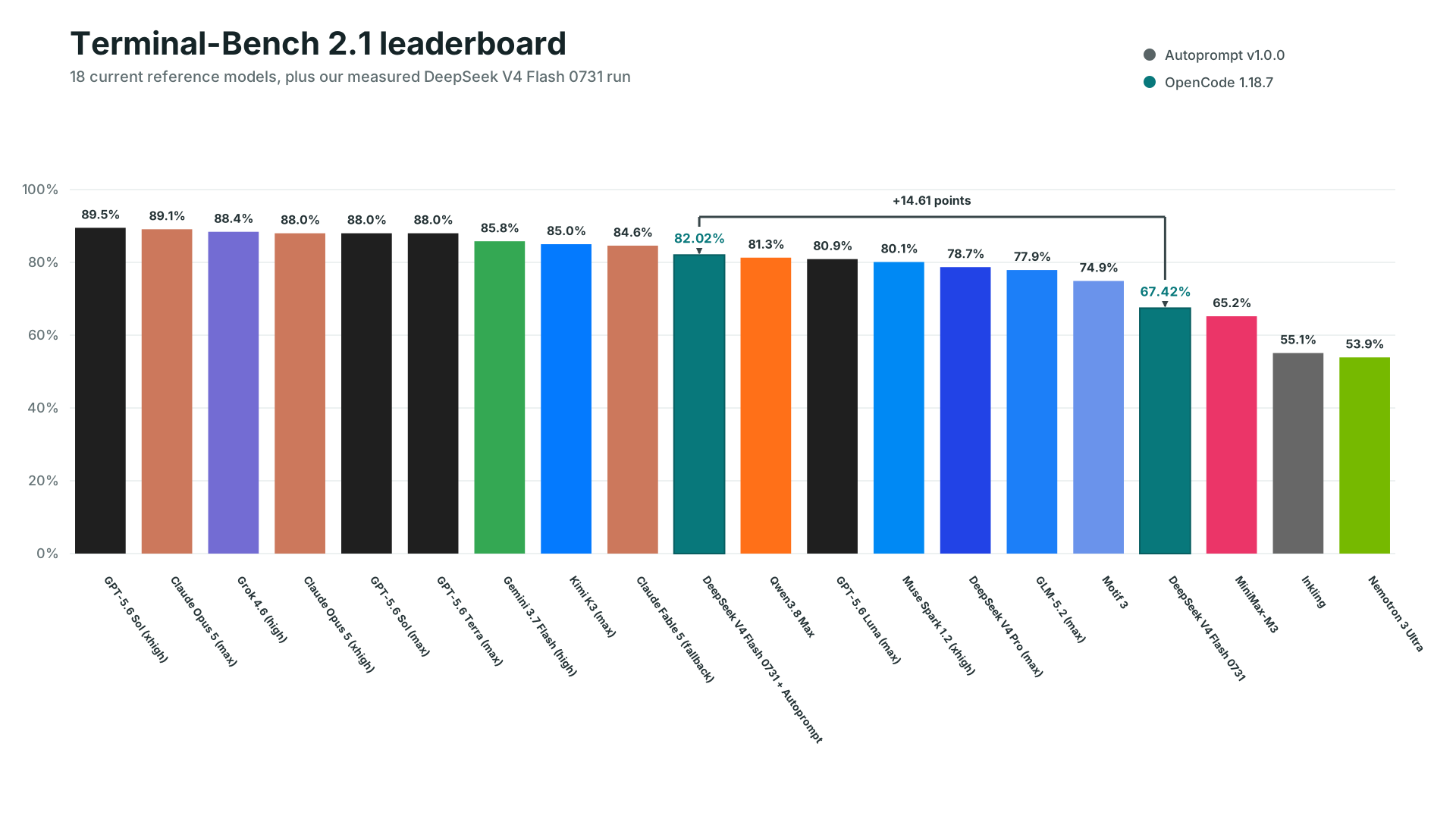
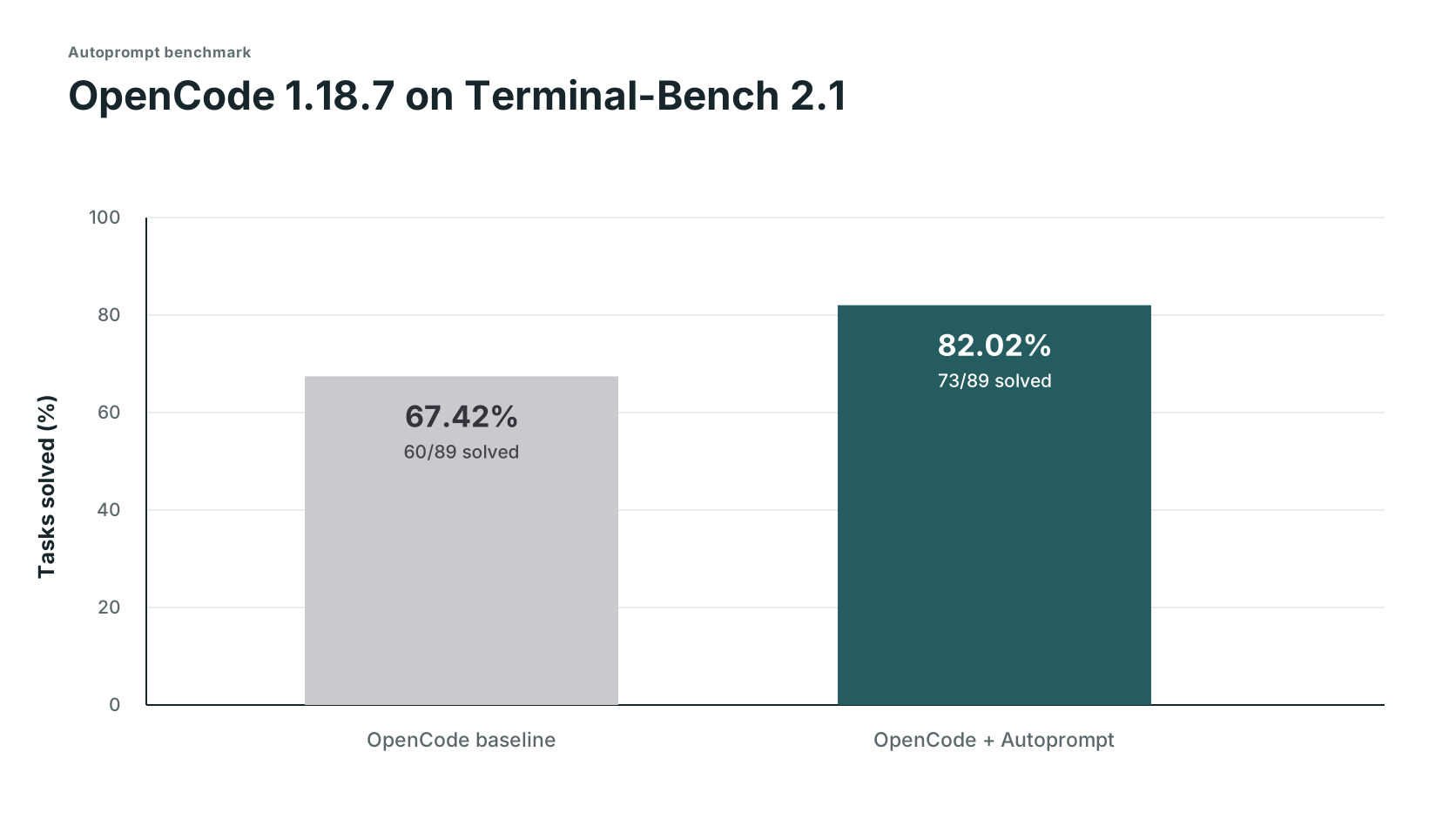
| Track | Solved | Score | Failed |
|---|---|---|---|
| OpenCode | 60/89 | 67.42% | 29 |
| OpenCode + Autoprompt | 73/89 | 82.02% | 16 |
| Change | +13 solves | +14.61 points | 45% fewer |
DeepSeek's 82.7% used its own test setup, so it is a reference point, not a comparable third run. Read the setup and evidence boundaries, or request another benchmark.
Expected trade-off: about 3x the time and 2x the tokens.Timing and token logs were not retained, so these are planning estimates based on user experience reports, not measured benchmark results. The measured result was 29 to 16 failures (45% fewer) in this run, which translates to about 2x fewer mistakes. Note: for very small tasks, this may differ heavily.
Anatomy of an invocation

Run controls
Use mode= to set concurrency. Use agents= to route models where the host supports it. Custom model setup
| Control | Claude Code | Codex | OpenCode | Kilo | VS Code | Prime Agent |
|---|---|---|---|---|---|---|
mode= |
✓ | ✓ | ✓ | ✓ | ✓ | ✓ |
Custom agents= routing |
✓ | ✓ | ✕ Not available - inherits active model | ✕ Not available - inherits active model | ✕ Not available - inherits active model | ✕ Not available - inherits selected parent model |
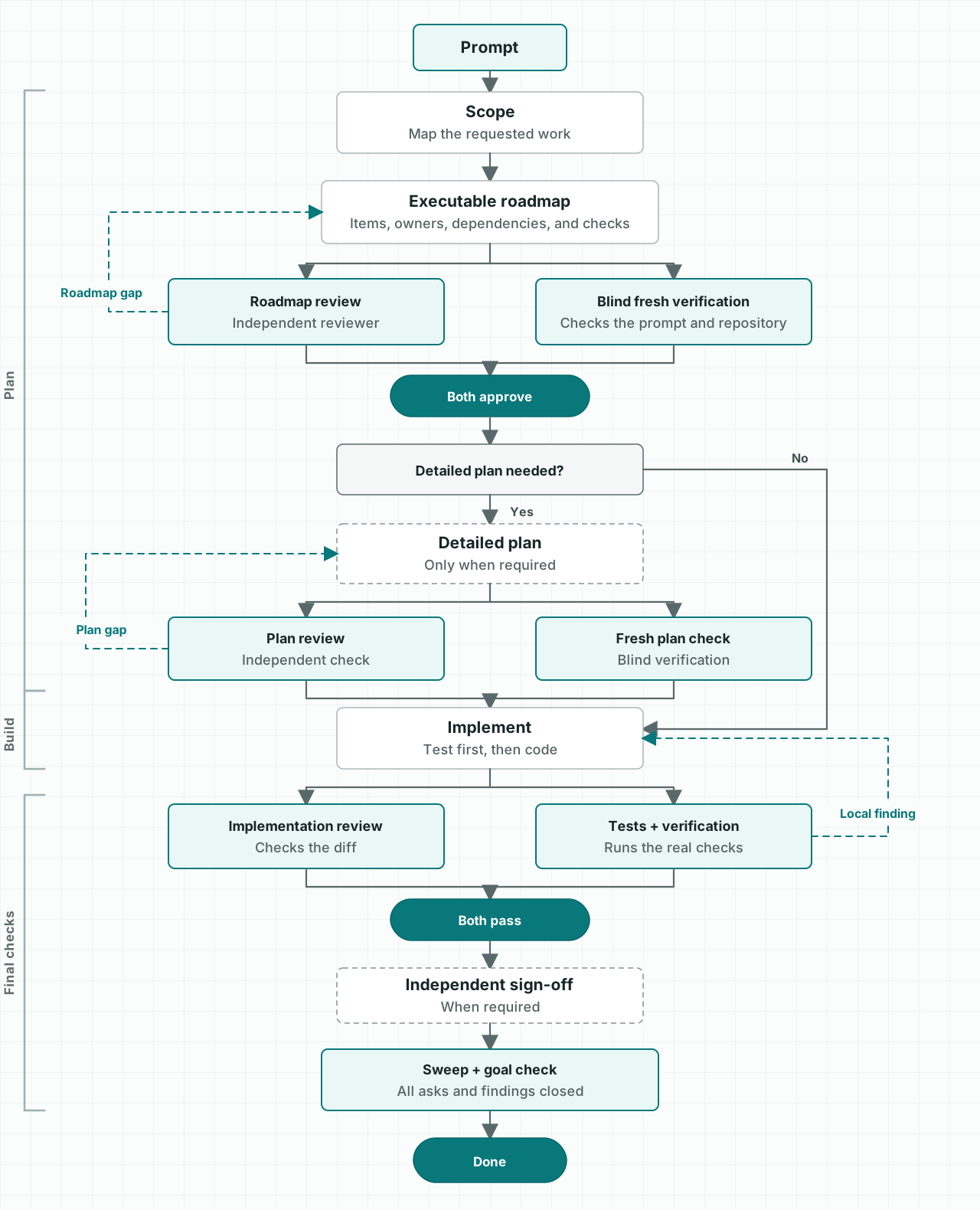
How it works
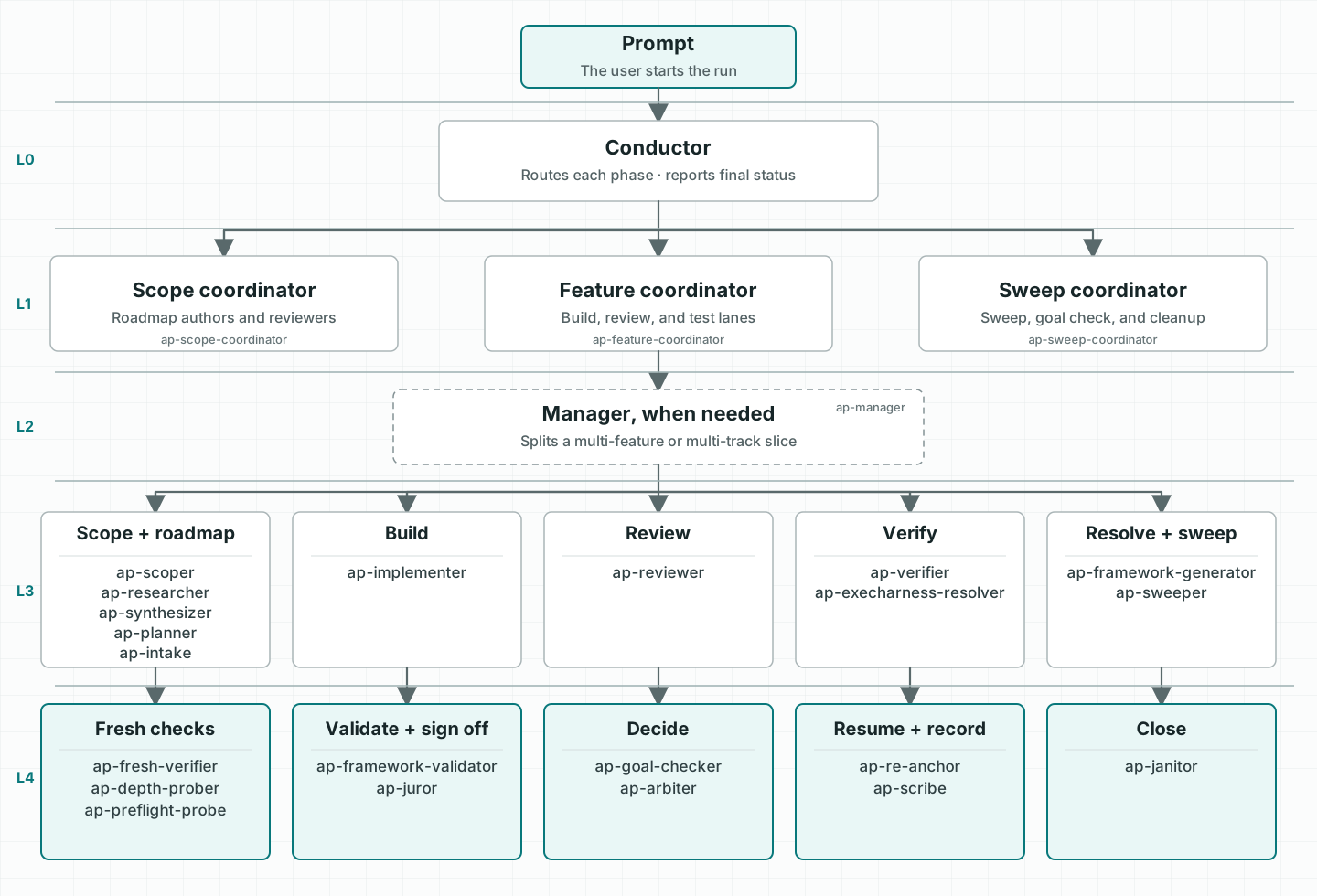
The agents
Examples
| Goal | Prompt |
|---|---|
| Fix | /autoprompt fix the registration race and add a regression test |
| Build | /autoprompt mode=wide build the booking flow from API to checkout |
| Research | /autoprompt compare job queues against this codebase and recommend one |
| Limit parallel work | /autoprompt mode=custom max_subs=4 migrate every model |
Use $autoprompt instead of /autoprompt in Codex.
FAQ
Does Autoprompt mean I literally do not have to prompt?No. Give it a clear goal, constraints, and success criteria. Autoprompt handles the execution loop, so you do not have to prompt every step. Details
How autonomous is Autoprompt?It can scope, implement, test, review, repair, and verify a goal. It stops for choices that change the result, actions that need your authority, or blockers it cannot safely resolve. Details
What are the layers for?The layers separate coordination, management, execution, and independent judgment. That separation keeps one agent from planning, approving, and verifying its own work. Details
What do `mode`, `max_subs`, and `agents` do?mode=tokensaver caps active subagents at six. mode=wide opens every ready lane. mode=custom max_subs=N sets your own ceiling. agents controls model routing where the host supports it. Details
Because it changes cost, time, and workflow. Start it explicitly with /autoprompt <goal>, or $autoprompt in Codex.
License
MIT. Copyright 2026 Spielewoy.
Community: Contributing, Code of Conduct, Security, and Support.
Reviews (0)
Sign in to leave a review.
Leave a reviewNo results found