context-carwash
Health Warn
- License — License: MIT
- Description — Repository has a description
- Active repo — Last push 0 days ago
- Low visibility — Only 5 GitHub stars
Code Warn
- process.env — Environment variable access in spikes/log-hook.mjs
- fs module — File system access in spikes/run.sh
- process.env — Environment variable access in spikes/statusline.mjs
- process.env — Environment variable access in src/cli.mjs
Permissions Pass
- Permissions — No dangerous permissions requested
No AI report is available for this listing yet.
Context Carwash: ________________ ⟡ full session context size, revealed ⟡ fresh starts with no lost details and no folder clutter ⟡
Context Carwash
Long Claude Code and Codex sessions get slow and forgetful. Run it through the wash: keep what matters, drop the rest, start fresh.
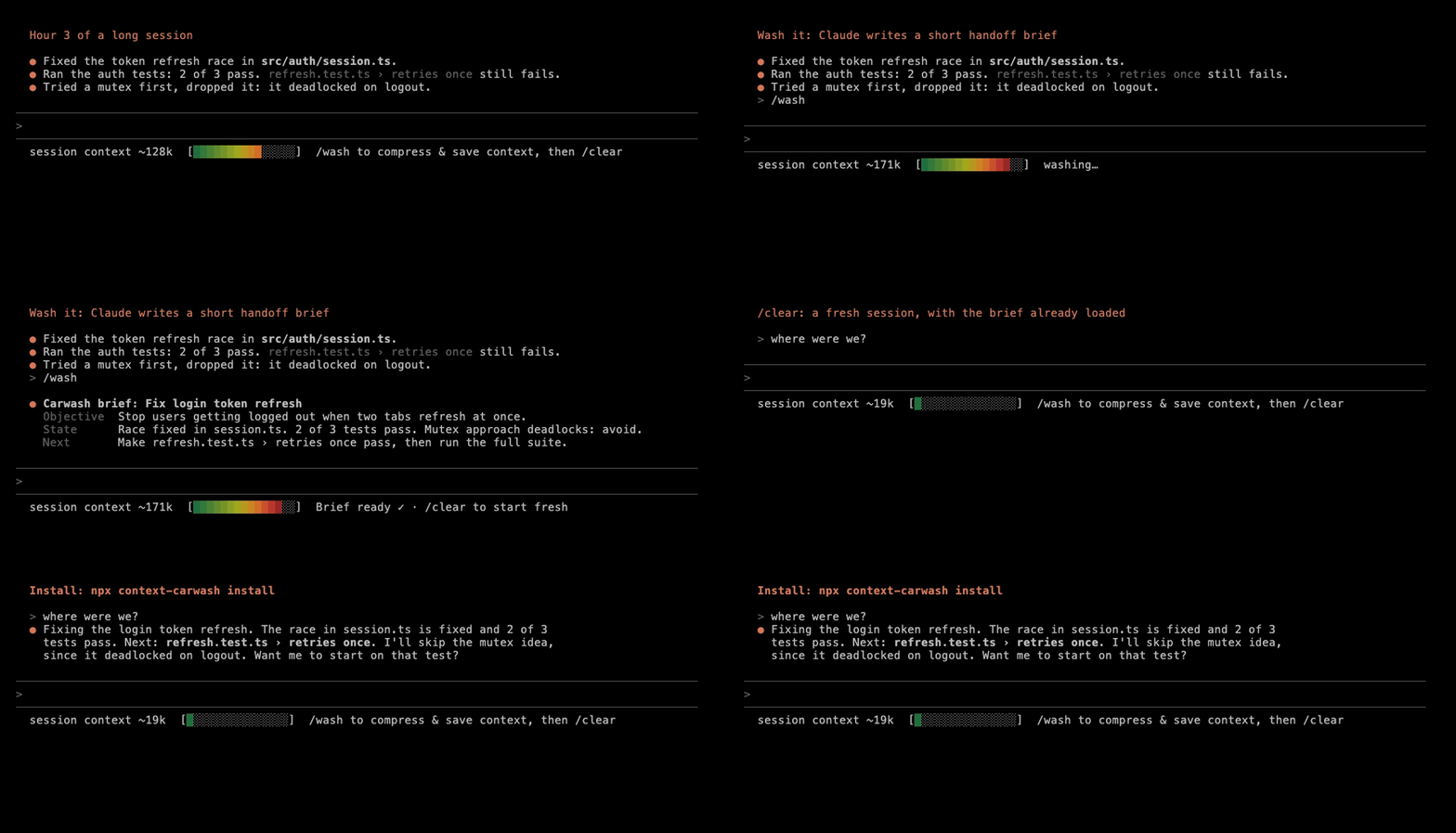
Context Carwash adds a line to Claude Code in your terminal that:
- The Meter: shows the current conversation's context size.
- /wash: lets you compress your context and start a new session without losing important details.
It works in Codex too: see Codex.
Pretty simple app, but I've found it helpful. Everything is local, but you can share your token savings anonymously with me if you'd like with npx context-carwash stats --share.
Install
You'll need Node 18 or later.
npx context-carwash install
It shows you what it's going to change and asks before doing anything. Then start a new Claude Code session and you're set. If you use Codex as well, it sets that up in the same go.
When there's a new version, a line under the meter will tell you. To update, run npx context-carwash@latest install.
Under the hood, it adds a status line, three hooks and one read-only permission to ~/.claude/settings.json (after whatever you already have there) and a /wash command in ~/.claude/skills/wash. The permission lets Claude search ~/.carwash/recall without asking, and nothing else. For Codex, it adds three hooks to ~/.codex/hooks.json and a $wash command in ~/.codex/skills/wash.
The Meter
session context ~136k [██████████░░░░░] /wash to compress & save context, then /clear keeps compressed context
The number is roughly how many tokens your conversation is using (Claude Code's estimate). The bar shows how full the context window is and changes colour as it fills up. In a narrow window the text shortens to fit. It's just a meter, so it never does anything on its own.
/wash
- Type
/wash. Claude writes a short brief: what you're working on, where things stand, and what's next. The status line switches toBrief ready ✓. - Type
/clear. Your new session starts with the brief already loaded.
Your old conversation isn't gone. You can still find it in /resume, and the fresh session can search a text copy of it when it needs an exact detail the brief left out, like an error message or a file path. It only searches when it needs to, so otherwise it costs nothing extra.
| Command | What it does |
|---|---|
/wash |
Write a mid brief |
/wash light |
Goal, current state, next step |
/wash mid |
Adds constraints, decisions, state detail, pitfalls |
/wash detailed |
Adds rationale, history, test results, risks, a step checklist |
/wash discard |
Drop the brief. /clear is a normal clear again |
/wash load [id] |
Make a waiting brief the one your next /clear uses |
/wash stats |
How much context your washes have saved |
/wash help |
Explain the meter and these options |
A few things worth knowing:
- You can name anything the brief must keep:
/wash keep the exact error and the rollback plan. It goes in its own section near the top and is never cut to save space. A note on its own gets amidbrief. For another level, put the level first:/wash detailed keep the test names. - If you
/clearwithout a brief ready, it's just a normal clear. - Writing a brief is a normal Claude reply, so it uses some tokens.
help,discardandloadare free. - Bigger conversations get bigger briefs.
/wash helpshows the size limit for each level. - Closed the terminal before you got to
/clear? Runclaudein the same folder and your brief loads. If there's more than one waiting, it'll list them so you can pick with/wash load <id>. - Briefs expire after 48 hours. The text copy of the conversation is deleted after 7 days, or as soon as you discard the brief.
Codex
If you have Codex, install sets it up too. It works the same way, with a few differences:
- The command is
$wash(Codex keeps/for its own commands). Same options:$wash light,$wash discard,$wash helpand so on. - Codex asks you to approve new hooks before it runs them. The first time you start Codex after installing, choose Trust all and continue.
- After
/clear, send your next message (even just "continue"). The brief loads with it, because that's when Codex starts the new session. - The meter shows up as a line after each reply, because Codex's status line can only show its own items:
session context ~70k [████░░░░░░░░░░░] $wash to compress, then /clear
The bar is in colour from Codex 0.162.0 on (plain text before that, or withNO_COLOR). It's shown to you only, never sent to the model, so it costs no tokens. - A brief written in Claude Code isn't picked up by Codex on its own, and the other way round. To use one anyway, run
$wash load <id>(or/wash load <id>). codex execruns never use up a brief.
Stats
npx context-carwash stats
Carwash stats, since 3 Oct 2026 (12 days)

  Briefs written              7  (light 1 · mid 5 · detailed 1)
  Started fresh with one      6
  Prompts in fresh sessions   94  (410 requests to Claude)
  Context not re-sent         ~11M tokens  (at most ~21M tokens)
  Spent writing briefs        ~0.9M tokens
  Net saved                   ~10M tokens  (at most ~20M tokens)
Every request to Claude or Codex sends the whole conversation again. After a wash, each request starts from the small brief instead, so Carwash counts the requests you actually made and adds up the difference. Counting stops where the old conversation would have filled up and compacted on its own.
You wouldn't have kept going in the old conversation forever, so the main number only counts the first part of the prompts after each wash. That's two-thirds to begin with. Carwash then adjusts it by looking at how far your own past conversations went once they were that big, so if you usually clear around 300k, a wash at 300k counts for less. Anything the fresh conversation had to read again, like a file the old one already had open, is taken off too. "At most" counts every prompt. All of this is worked out on your computer from Claude Code's own history files, and only a few numbers per conversation are kept.
Repeated context is charged at a fraction of the price: a twentieth of the normal input price on Opus 5.5 and Sonnet 5.5, and about a tenth on most older models. So in dollars you're saving that fraction of these numbers. You can also see this inside Claude Code with /wash stats.
If you run stats --share, it shows you exactly what it would send before asking.
Something not working?
npx context-carwash doctor
This checks that everything's still installed and working, and shows your versions and any recent errors. Paste the output into a new issue and I'll take a look. Issues are public and errors can include folder names, so give it a quick read first.
Where things are kept
Your briefs, stats, error logs and the text copies of old conversations live in ~/.carwash, and only you can read them. Nothing goes in your project folders. The text copies leave out images, so they're small: usually under a megabyte each. Nothing about you gets uploaded. Once a day, Carwash checks npm for a newer version. If you'd rather it didn't, set CARWASH_NO_UPDATE_CHECK=1.
Uninstall
npx context-carwash uninstall
This puts settings.json back exactly as it was. If you've edited the file since installing, it only removes Carwash's status line, hooks and permission and leaves your changes alone. Codex's hooks.json gets the same treatment. It also removes the /wash and $wash commands and deletes ~/.carwash, including any waiting briefs, text copies and your stats.
Platforms
Built and tested on macOS, with Claude Code and with Codex. Automated tests also run on Linux and Windows, but I haven't tried those by hand yet.
License
MIT
Reviews (0)
Sign in to leave a review.
Leave a reviewNo results found