ng-checkup
Health Warn
- License — License: MIT
- Description — Repository has a description
- Active repo — Last push 0 days ago
- Low visibility — Only 8 GitHub stars
Code Fail
- rm -rf — Recursive force deletion command in action.yml
- process.env — Environment variable access in action.yml
- fs module — File system access in action.yml
Permissions Pass
- Permissions — No dangerous permissions requested
No AI report is available for this listing yet.
A one-minute modernization report for any Angular codebase: upgrade blockers, zoneless and signals readiness, testing, type safety, security, accessibility and translations. CLI, CI, VS Code and MCP.
ng-checkup



Renamed on npm: since 1.6.1 the package is
ng-checkup-cli(npx ng-checkup-cli). Versions up to 1.5.0 are still on npm asng-checkup. The command it installs is stillng-checkup.
A one-minute modernization report for any Angular codebase.
Point it at a repository and it tells you how far the code is from current Angular, what will break on the next upgrade, and where the work is. Twelve areas get a grade, from the Angular version and third-party packages to security and bundle size, translation keys that resolve to nothing and accessibility defects are listed beside them (and a thirteenth graded area for AngularJS code still waiting to be migrated), every finding names the files, and the HTML report is one self-contained page you can hand to your team lead.
npx ng-checkup-cli
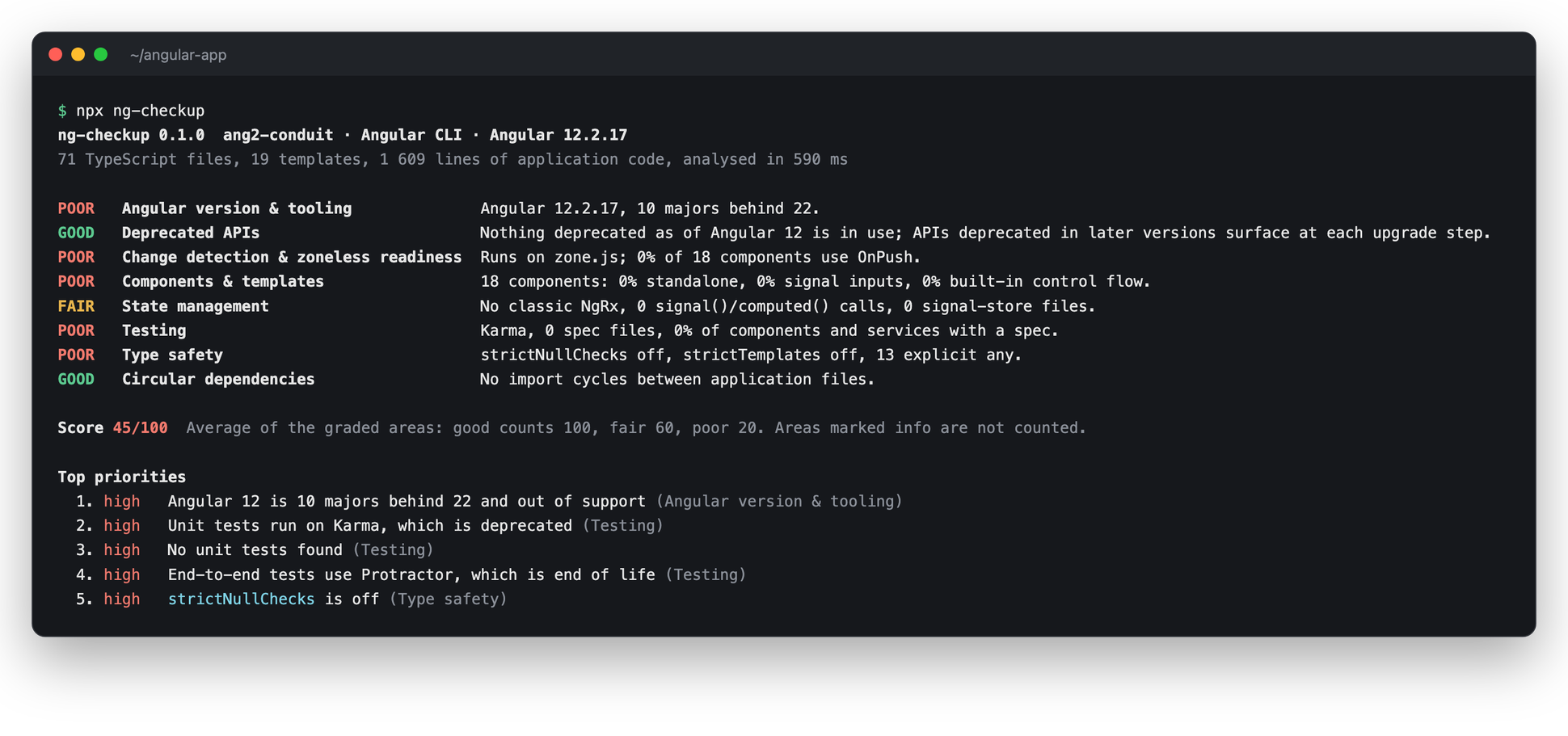
See a full example report → (the Angular 12 version of the RealWorld example app)
Contents
- Quick start
- Set it up in a project
- Configuration
- Baseline: adopt it on legacy code
- Watch mode
- Only what a branch changed
- History
- Upgrade plan
- AngularJS and hybrid apps
- Primo VE to NDE
- A live site
- Monorepos
- Many repositories
- Before and after
- Client report
- What it checks
- Reports
- A badge for the README
- A backlog from the findings
- In CI
- Programmatic API
- What leaves your machine
- How it works
- FAQ
- VS Code extension
- MCP server for editor agents
- Contributing
Quick start
Run it in the root of an Angular CLI or Nx workspace. It needs Node 22 or newer and nothing else; your project does not have to build.
# 1. The summary in your terminal
npx ng-checkup-cli

# 2. The full report as a page to share
npx ng-checkup-cli --report checkup.html

# 3. Record today's numbers, then fail CI only when one gets worse
npx ng-checkup-cli baseline
npx ng-checkup-cli --fail-on regression
No npm install needed. Without node_modules, the exact versions come from the lockfile (npm, yarn or pnpm), and the Angular type definitions the deprecated-API check reads are downloaded once for those versions and cached. So it works on a fresh clone and in a CI job before npm ci.
Or check a repository without cloning it yourself:
npx ng-checkup-cli github:owner/repo --report checkup.html
npx ng-checkup-cli https://gitlab.com/group/app#release-2.4
It clones only the one commit into a temporary folder, runs, and deletes it. Nothing from the repository is installed or run.
Set it up in a project
To keep the checkup in the project, with a script, a config file and a CI step:
ng add ng-checkup-cli        # Angular CLI: installs it and asks which CI to use
# or
npx ng-checkup-cli init      # any workspace, including Nx
Both make the same changes and list what they changed:
| File | Change |
|---|---|
package.json |
a "checkup": "ng-checkup" script, and ng-checkup-cli in devDependencies (init only; ng add installs it itself) |
ng-checkup.config.json |
writes checkup.html on every run, and an empty ignore list |
.gitignore |
the generated reports, if the repository has a .gitignore |
ng-checkup.baseline.json |
today's numbers, so CI fails only when one gets worse (baseline) |
.github/workflows/ng-checkup.yml |
runs on every pull request with --fail-on regression, uploads the reports (when .github/ exists) |
ng-checkup.gitlab-ci.yml |
the GitLab job: Code Quality in merge requests and an MR comment; add include: [{ local: ng-checkup.gitlab-ci.yml }] to your .gitlab-ci.yml (when that file exists) |
ng-checkup.azure-pipelines.yml |
an Azure Pipelines pipeline beside your main one: the SARIF report as the CodeAnalysisLogs artifact for the Scans tab, the HTML report as an artifact; create a pipeline from it and add it as a build validation (when azure-pipelines.yml exists) |
bitbucket-pipelines.yml |
a pull-request step that keeps the reports as artifacts; when the file exists already, init leaves it alone and prints the step to paste |
After that it is npm run checkup (or pnpm checkup, yarn checkup; the lockfile decides). Running either command again changes nothing. It never overwrites a file you wrote: an existing workflow or config is kept, and a different checkup script is kept unless you pass --force.
npx ng-checkup-cli init --dry-run      # show the changes, write nothing
npx ng-checkup-cli init --ci gitlab    # pick the CI instead of detecting it (github, gitlab, azure, bitbucket, none)
Configuration
ng-checkup.config.json in the project root. Every key is optional, and every command-line flag overrides its key.
{
  "reports": ["checkup.html"],
  "failOn": "poor",
  "maxExamples": 5,
  "offline": false,
  "ignore": ["src/legacy", "**/generated", "apps/*/e2e"]
}
| Key | Meaning | Flag |
|---|---|---|
reports |
report files to write, relative to the config file | --report |
failOn |
exit with 1 when an area is poor (or fair), or with regression when a measure is worse than the baseline |
--fail-on |
maxExamples |
example files listed per finding | --max-examples |
offline |
skip the npm lookup of the latest Angular version | --offline |
ignore |
paths left out of the analysis; a path matches everything below it, * stays within a folder, ** crosses folders |
|
baseline |
the baseline file, relative to the config file (default ng-checkup.baseline.json in the root) |
|
plan |
add the upgrade plan to every run | --plan |
attributeSelectors |
also list directives, and components with an attribute selector, that no template matches, and inputs and outputs no template binds | --attribute-selectors |
only |
report only these areas, by check id (["security", "dependencies"]) |
--only |
skip |
leave these areas out of the report, the score and the baseline | --skip |
An unknown key or a wrong type stops the run with an error, so a typo cannot silently switch off a CI threshold. Use --config path/to/file.json for a file elsewhere.
Baseline: adopt it on legacy code
A ten-year-old Angular app will not pass --fail-on poor on day one, and a CI check that is red from the start gets switched off. The baseline fixes that: it records today's numbers, and CI fails only when one of them gets worse.
npx ng-checkup-cli baseline                    # writes ng-checkup.baseline.json; commit it
npx ng-checkup-cli --fail-on regression        # in CI: fails only on a number that went up
Baseline  2 worse
  worse  Type safety: Explicit any in application code 13 → 15
  worse  Type safety: Non-null assertions (x!) 0 → 1
- It records counts, not grades: explicit
any,x!, files in import cycles, components without OnPush or a spec, NgModule-declared components, deprecated API uses, sanitizer bypasses, eager routes, manual subscriptions and 56 more, 61 in all. Lower is better for every one. - It only goes down. When numbers drop, the run says so;
npx ng-checkup-cli baselinelocks the new numbers in. If a number went up,baselinerefuses and lists it, so a regression cannot be waved through by re-running the command.--forceaccepts it, which is the moment someone has to explain why in review. - It is a plain, sorted JSON file, so lowering a number is a one-line diff in a merge request.
- In a monorepo it holds each project too, so
--projectruns gate on their own numbers (monorepos). - The gap to the latest Angular is not in it. That grows when Angular ships, not when the code gets worse.
ng add ng-checkup-cli and npx ng-checkup-cli init create the first baseline and set CI to --fail-on regression for you.
Watch mode
npx ng-checkup-cli --watch
Re-runs on every save and prints, under the usual summary, how the score and every measure moved since the watch started:
Score 72 -> 76 (+4 since the watch started)
  down Explicit any: 41 -> 37
  down Components without OnPush: 12 -> 11
Only the changed files are parsed again, and the registry is asked again only when package.json or a lockfile changes, so a run after a save takes a fraction of the first one. Keep it open next to the editor while working through a refactor; run npx ng-checkup-cli baseline in another terminal to lock a drop in, and the next run compares against it.
Only what a branch changed
npx ng-checkup-cli --since origin/main --report checkup.comment.md
Keeps only the findings in files the branch changed since its merge base with origin/main, committed or not, untracked files included: the list a pull-request comment wants, without the backlog the repository already had. The analysis still reads everything, since a cycle or an unused file only shows against the rest, and the grades, score and measures stay the whole repository's, so --fail-on regression means the same with and without it. Every report format says the findings were narrowed. In CI the target branch has to be fetched (actions/checkout with fetch-depth: 0); a shallow clone has no merge base, and the run says so.
History
npx ng-checkup-cli history --report history.html
ng-checkup 1.0.0  history of angular-realworld-example-app, 19 points (shortened)

  date        commit   Angular   score     lines
  2023-10-30  0d28f5c  16.2.11      60     1 407
  2023-12-19  bcc6d42  17.0.7       64     1 360
  2024-05-24  932dff0  18.0.0       68     1 441
  2025-05-29  a420aa2  20.0.0       72     1 401
  2025-11-10  987b634  20.3.9       76     1 356
  2026-01-30  6809ae9  21.1.1       91     1 471
  2026-10-23  now      21.2.12      91     1 709

Moved most since the first point
      -27  *ngIf / *ngFor / [ngSwitch] uses (27 -> 0)
      -16  Components with eager change detection (16 -> 0)
       -9  Components and services without a spec (27 -> 18)
       -7  Explicit any in application code (7 -> 0)
How the score and every measure moved over the last months, without having to collect it as you go. It takes the last commit of each month from git (--points 12 months by default; a month without a commit is skipped), extracts it into a temporary folder with git archive, runs the checkup offline on it, and ends with the working tree as it is, uncommitted changes included. Your checkout is never touched. The HTML report has a chart of the score and one per measure that moved most; .md and .json work too.
It is the slide for "what did the refactoring buy us", and the first thing to look at on a codebase you inherit: whether the debt is shrinking or growing. A shallow clone has no history, so in CI fetch it in full (fetch-depth: 0).
Upgrade plan
npx ng-checkup-cli --plan --report plan.md
--plan adds the way from your Angular version to the latest, one major at a time as ng update requires:
Upgrade plan  12 → 22, 10 steps, one major at a time
  Before you start
    · Move from TSLint to ESLint  ng add @angular-eslint/schematics
  → 13  ng update @angular/core@13 @angular/cli@13
        Node.js ^12.20.0 || ^14.15.0 || >=16.10.0 · TypeScript >=4.4.2 <4.7 (now 4.3.5)
  ...
  → 16  ng update @angular/core@16 @angular/cli@16
        Node.js ^16.14.0 || >=18.10.0 · TypeScript >=4.9.3 <5.2 · zone.js ~0.13.0 (now 0.11.8)
        · Convert NgModule components to standalone (18)  ng generate @angular/core:standalone
  → 17  ng update @angular/core@17 @angular/cli@17
        · Move templates to built-in control flow (13)  ng generate @angular/core:control-flow
  ...
- The same for everyone: each step's
ng updatecommand (with Material and NgRx when you use them) and the Node.js, TypeScript, RxJS and zone.js ranges that major requires, from the versions' published package metadata. A range your project is outside of today is flagged at the step that has to move it. - Specific to your code: the migrations your findings call for (standalone, built-in control flow, the esbuild builder, signal inputs, Vitest, zoneless), each scheduled at the first step where Angular ships it, with the number of places it touches. Migrations your code does not need are left out.
- No time estimate. Counts are measured; days would be a guess.
The plan is in every format, including the HTML report (example) and the JSON (report.plan).
AngularJS and hybrid apps
npx ng-checkup-cli github:orientechnologies/orientdb-studio --plan
When a repository still has AngularJS (1.x), a thirteenth area comes first in the report, AngularJS migration. It reads the JavaScript as well as the TypeScript, in every registration style real apps use (angular.module('app').component(…) chains, modules held in variables, ES-module AngularJS), and counts what there is to move: components, directives and controllers, services, filters, and templates with AngularJS syntax. It names what makes a piece hard to move: controllers and ng-controller, $scope, scope events used as a message bus, runtime $compile, $watch, ng-include, and directives using compile, replace or terminal, which UpgradeComponent cannot wrap. AngularJS packages get their Angular replacement (angular-route, angular-translate, AngularJS Material, ...), and the version comes from package.json, the lockfile, bower.json, a CDN script tag or a checked-in angular.js.
In a hybrid app (UpgradeModule, downgradeModule or the old UpgradeAdapter) it measures how far the migration has come: the share of components already on Angular, and what crosses the border in each direction. An Angular class registered for AngularJS with downgradeComponent or downgradeInjectable counts as migrated.
[POOR]  AngularJS migration   Hybrid AngularJS 1.5.9 and Angular 4: 35% of components on Angular, 115 AngularJS components left.
         high   AngularJS 1.5.9 is end of life since January 2022
         medium 88 controllers registered with `.controller()`, 83 bound with `ng-controller`
         medium 5 directives use `compile`, `replace` or `terminal`
         medium 64 scope events (`$broadcast`, `$emit`, `$rootScope.$on`) used as a message bus
With --plan the report adds the migration plan, in the order of the Angular upgrade guide and with this codebase's counts on every item: prepare on AngularJS (1.8, TypeScript, controllers to components, state off $scope), run Angular next to AngularJS, move the code bottom up (services, filters, components, templates, packages), remove AngularJS. A hybrid app on an old Angular gets the Angular upgrade plan next to it, and the client report puts both in its roadmap.
Every count is a measure, so a baseline in CI holds a running migration to one rule: AngularJS only ever shrinks.
Primo VE to NDE
npx ng-checkup-cli github:Swiss-Library-Service-Platform/swisscovery --plan
Libraries on Ex Libris Primo VE customize it with an AngularJS package, and those customizations do not carry over to the New Discovery Experience, announced as the only Primo UI from January 2028: NDE is extended through an Angular custom module (ExLibrisGroup/customModule). When ng-checkup finds a Primo VE package (the viewCustom module, components named after Primo's hooks), the AngularJS area becomes Primo NDE migration, view by view:
- the hooks the package fills (
prm-search-bar-after, …), each one an Angular component to build in the custom module, and the helper components they render; - the reads of
parentCtrl, the VE hook's handle on Primo's internal controller, which NDE replaces withhostComponentand the NgRx app state, with the paths read most (parentCtrl.loc.items, …): that is where the effort and the risk sit; - third-party integrations (BrowZine and LibKey, Altmetric, Unpaywall, LibChat, analytics, …), the static home pages per language, and a network's central package, which moves first.
A js/custom.js built from the view's other files and copies outside the view folders are not counted twice. With --plan, the plan has four phases (decide what NDE still needs and set up the module, branding and home pages, rebuild the hooks, test in proxy mode and switch view by view), and the client report puts them in its roadmap.
A live site
npx ng-checkup-cli url https://app.example.com
ng-checkup  https://my.example-saas.de/  Login
Read the page and 5 scripts (36.7 MB) from my.example-saas.de

  AngularJS 1.8.3        seen in vendor.bundle.js
  React 19.2.3           seen in react.bundle.js

  high   AngularJS 1.8.3 is end of life since January 2022
         It runs next to React, so a migration is under way. Until it is finished, the app ships a framework without security fixes.
Which framework a public web app runs, without its code: the page and the scripts of the same site it loads, including the chunks they import, up to 12 requests. It recognises AngularJS and Angular with their versions (from the license header, the version object or new Version("…") in the bundle, and ng-version), whether zone.js is loaded, and React, Vue, Next.js and Nuxt, also several at once. Third-party scripts are skipped (a chat widget built with React does not make a site a React app), except AngularJS from a public CDN. It reads only what any browser downloads: nothing is submitted, nothing behind a sign-in is reached. --json prints the result for scripts.
Useful before a first conversation: what a company's product runs on, how far behind it is, and whether a migration has started.
Monorepos
In an Angular CLI workspace with several projects or an Nx workspace, the report adds a table with one row per project, worst score first (here nx-examples, shortened):
Projects  5, worst first, graded on their own code
   65  products            apps/products            poor: Change detection & zoneless readiness, Components & templates, Type safety  fair: State management
   80  products-home-page  libs/products/home-page  poor: Type safety  fair: Components & templates, State management
   80  shared-cart-state   libs/shared/cart/state   poor: Type safety  fair: State management
Each project is graded on the files it owns (a nested library keeps its own) with its own tsconfig. The Angular version and the third-party packages are shared, so they are graded once, for the workspace. Projects that import nothing from Angular (React apps, Node services, Cypress e2e folders) get no row.
An Angular app in a subfolder. A repository whose root is no Angular workspace (a Python or Java server with its web UI in server/static, say) is analysed from its root all the same: when exactly one subfolder has an angular.json, ng-checkup reads the workspace there (its package.json, lockfile, tsconfig and build targets) and the header says Angular CLI in server/static. With several such subfolders it names them, and you run it on the one you mean: npx ng-checkup-cli server/static.
--project <name> narrows the whole report to one project, which is how a team owning one app runs it in CI:
npx ng-checkup-cli --project admin --report admin.html
Each project has its own baseline. In a workspace with several projects, npx ng-checkup-cli baseline records each project's numbers next to the workspace's, so the team owning one app gates on its own code:
npx ng-checkup-cli --project admin --fail-on regression
That run fails when admin's numbers get worse, not when another team's library does. The Angular version and the third-party packages are shared, so they stay with the whole-workspace run. Every project follows the same rule as the workspace: its numbers only go down, and baseline refuses one that went up even when the workspace total stayed put because code moved from one project to another. A baseline written before 1.5.0 has no project numbers; run npx ng-checkup-cli baseline once to add them.
Many repositories
npx ng-checkup-cli fleet repos.txt --report fleet.html
One page across all of them, worst first: the Angular version, the score, the number of high findings and a grade per area for each repository. repos.txt names one per line, a local path (relative to the file) or a remote repository as the main command takes it (github:acme/portal#release), with # for comments. Remote entries are cloned shallow into a temporary folder and deleted; an entry that cannot be checked is a row saying why. The runs are offline unless you pass --online, since across many repositories the registry lookups are most of the time and the comparison is between them. .md and .json work too.
Before and after
npx ng-checkup-cli --report before.json
# ... the work ...
npx ng-checkup-cli --report after.json
npx ng-checkup-cli diff before.json after.json --report diff.html
The proof of a piece of work: the score, the grades that moved, the measures that went up or down, and the findings that are new or resolved. It reads the two files and nothing else, so it runs anywhere and on reports of any age. .md and .json work too, and it exits 0 even when things got worse, since --fail-on regression is what gates a build.
Findings are matched as a whole, by what they are about, and not file by file, because a report lists only a few example files per finding. What only one report has is neither better nor worse: a measure a newer version added is listed apart. The report says so when the two come from different versions of the tool, since a new finding may then come from a new rule, and when a --since report makes the findings impossible to compare.
Client report
For consultants and tech leads who hand the result to someone else: --client turns the HTML report into a deliverable for a paid Health Check or an upgrade proposal.
npx ng-checkup-cli --client "Acme GmbH" --prepared-by "Jane Doe, jane.dev" --notes acme.md --history --report acme-health-check.html
- For management, in front: a cover, a summary in sentences ("Angular 17.1.1, 5 majors behind 22. Of 10 graded areas, 3 are poor…"), the key figures, a table of what to act on with the number of places each touches, and the roadmap one major at a time.
- Your recommendations next:
--notesis a Markdown file for what the tool cannot know: your summary, estimates and price. The first run creates it as a template, prefilled with one row per upgrade step and an empty estimate column; fill it in and run the same command again. Guidance in the template sits in HTML comments and never reaches the client, and a section left empty is left out. - How the code got here, with
--history: the score and the measures that moved most over the last twelve months, as charts, from the git history of a local checkout. - Where to start: the known vulnerabilities and what the next Angular major removes among the imports in the key figures, and the hotspots (large files changed most often) as the place a refactoring pays off first.
- The full report as an appendix, for the team.
- Print to PDF from the browser: the cover, the recommendations and the appendix each start on a new page.
The codebase is named by its repository and commit, never by a path on your disk. NG_CHECKUP_PREPARED_BY sets the name on the cover for every run. Nothing in the generated part is an estimate; numbers are measurements, and the estimate column is yours.
What it checks
| Area | It looks at | Poor when |
|---|---|---|
| Primo NDE migration (only for a Primo VE customization package) | hooks to rebuild per view, parentCtrl reads and the paths read most, third-party integrations, home pages, the central package |
parentCtrl is read, or more than ten hooks |
| AngularJS migration (only with AngularJS code or packages) | AngularJS components, directives, controllers, services, filters and templates; $scope, scope events, $compile, directives UpgradeComponent cannot wrap; AngularJS packages; hybrid progress |
any AngularJS code left, unless a hybrid app has 80% of its components on Angular |
| Angular version & tooling | installed vs. latest Angular, mixed @angular/* majors, webpack builder, end-of-life packages |
three or more majors behind, i.e. out of support |
| Deprecated APIs | every imported Angular/NgRx symbol your installed version tags @deprecated, plus *ngIf / *ngFor in templates; what the next major removes or newly deprecates among your imports, from its own typings (a prerelease during an Angular RC) |
something deprecated two majors ago is still used, or an import the next major no longer exports |
| Third-party compatibility | the @angular/core peer range of every installed package (PrimeNG, Kendo, ng-bootstrap, NGXS, ...), the release that supports the next majors, npm deprecations |
a package does not accept the installed Angular, or no release supports the latest |
| Change detection | zoneless or zone.js, OnPush coverage, NgZone, zone-only test helpers |
zone.js with less than half the components on OnPush |
| Components & templates | standalone, signal inputs and outputs, built-in control flow, @defer, manual .subscribe() calls, and outside the grade: *ngFor without trackBy, track $index, method calls in bindings, impure pipes |
average adoption below 40% |
| State management | classic NgRx, NgRx signal store, signals, BehaviorSubject services |
the removed @Effect() decorator |
| Architecture | eager vs. lazy routes (following loadChildren into lazy modules), files over 500 and 1 000 lines, hotspots (large files changed most often, from git), dead code (files nothing imports, components and pipes no template uses; directives, inputs and outputs with --attribute-selectors), constructor injection, class-based guards and interceptors |
ten eager routes and none lazy |
| Testing | Karma / Jest / Vitest, which components, services, stores and utilities have a spec (beside them or importing them), tests that assert nothing, assertions in a subscribe the test does not wait for, NO_ERRORS_SCHEMA, Protractor / Playwright / Cypress |
Karma, Protractor or no specs |
| Type safety | strictNullChecks, strictTemplates, noImplicitAny, any, x!, @ts-ignore, $any() |
both strictNullChecks and strictTemplates off |
| Security | known vulnerabilities of the dependencies (from osv.dev, AngularJS included), bypassSecurityTrust*, HTML written straight into the DOM (innerHTML =, insertAdjacentHTML, Renderer2.setProperty), eval, [innerHTML] bindings |
a high or critical advisory in a runtime dependency, HTML written into the DOM past the sanitizer, or eval |
| Translations | literal ngx-translate and Transloco keys against the JSON bundles of every language, merged per language, Transloco scopes included | never graded: the missing keys are a finding and a baseline measure, so --fail-on regression catches a new one |
| Accessibility | form controls without a label, buttons without a name, (click) on a div with no key handler, images without alt, tabindex above 0 (WCAG level A) |
never graded: findings and baseline measures, so --fail-on regression catches a new one |
| Circular dependencies | import cycles through relative paths, barrels and tsconfig paths |
more than three groups or ten files in loops |
| Bundle size | the initial bundle from the last ng build --stats-json (esbuild or webpack) against the build's budget, its largest packages, lazy chunks, and outside the grade: moment, whole lodash, rxjs-compat and jquery at startup |
over the initial error budget (1 MB by default) |
--only security,dependencies reports just those areas, and --skip bundle leaves one out; the score is then the average of what is left. Each finding says why it matters and which ng generate migration fixes it. Every check, its grading and its fix →
Defaults that changed between versions are applied per version: a component without standalone is standalone from Angular 19, one without changeDetection is OnPush from 22, and an app without a zone provider is zoneless from 21.
Reports
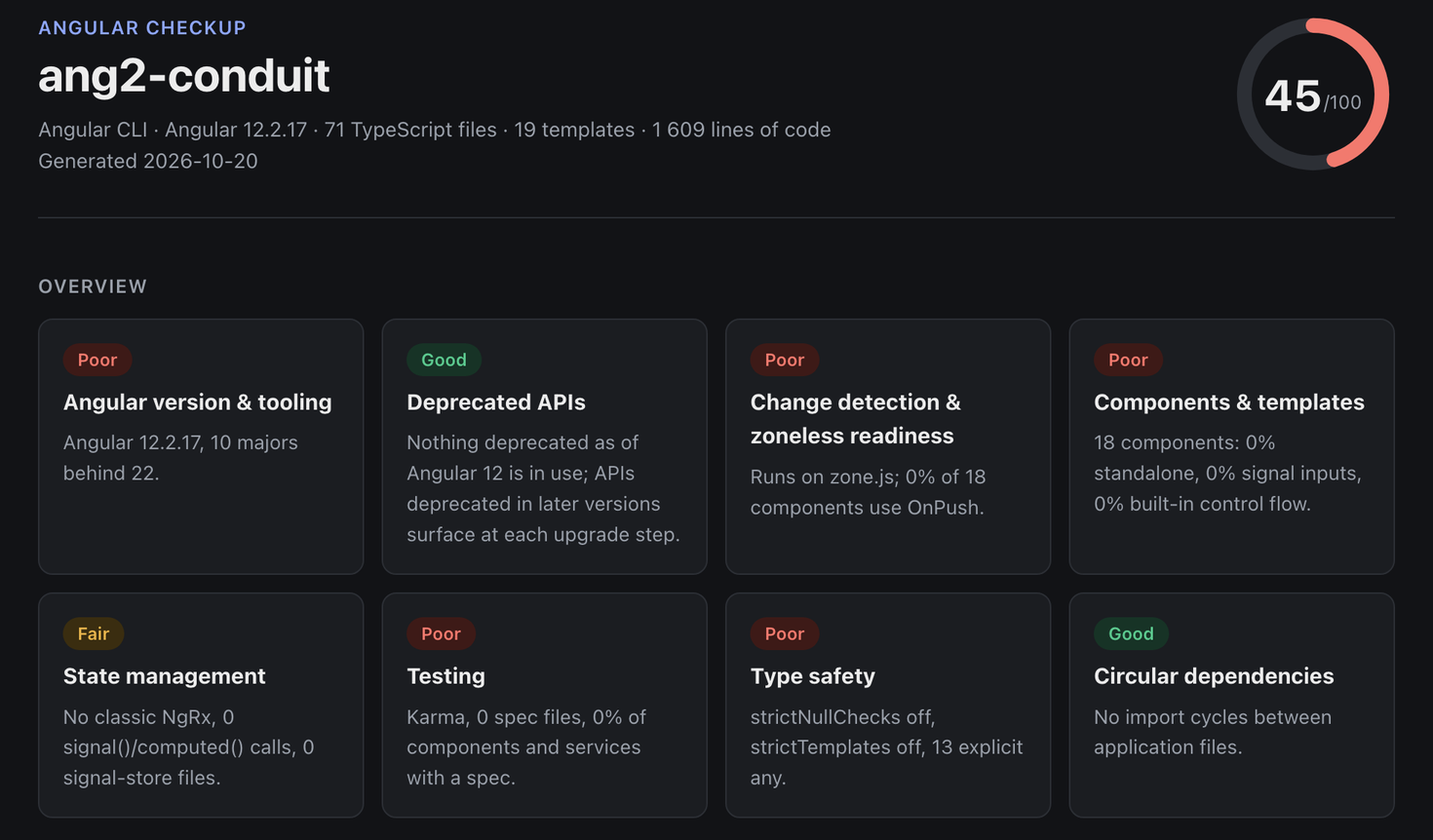
| Command | Output |
|---|---|
npx ng-checkup-cli |
summary and top five priorities in the terminal |
npx ng-checkup-cli --verbose |
every finding with its files in the terminal |
npx ng-checkup-cli --report checkup.html |
self-contained page: light and dark mode, prints cleanly to PDF, loads nothing from the network |
npx ng-checkup-cli --report checkup.md |
Markdown for a pull request, an issue or a wiki |
npx ng-checkup-cli --report checkup.json |
everything, machine-readable |
npx ng-checkup-cli --report checkup.sarif |
SARIF 2.1.0 for GitHub code scanning and other SARIF viewers |
npx ng-checkup-cli --report checkup.codequality.json |
GitLab Code Quality, for the merge request widget |
npx ng-checkup-cli --report checkup.comment.md |
a short pull-request comment: what changed against the baseline, a grade per area, the top priorities |
npx ng-checkup-cli --report badge.svg |
the score as a README badge |
npx ng-checkup-cli --report badge.json |
the same badge as a shields.io endpoint; x.badge.json works too, any other .json is the full report |
npx ng-checkup-cli --report checkup.issues.csv |
a backlog: one row per finding with all its files, for a spreadsheet or the Jira importer |
npx ng-checkup-cli --report checkup.issues.md |
the same backlog as a checklist for a GitHub or GitLab issue |
npx ng-checkup-cli --json |
the JSON on stdout, for piping |
--report is repeatable, so one run can write all three files.
Usage: ng-checkup [path | repository] [options]
       ng-checkup init [path] [init options]
       ng-checkup baseline [path] [--force]
       ng-checkup url <address> [--json] [--offline]
       ng-checkup history [path] [--points <n>] [--report <file>] [--json]
       ng-checkup fleet <list> [--report <file>] [--online] [--json]
       ng-checkup diff <before.json> <after.json> [--report <file>] [--json]
       ng-checkup mcp

A one-minute modernization report for an Angular codebase. Reads the code,
never changes it, and sends nothing anywhere except package names and
versions: to the npm registry, to look up the latest Angular and compatible
releases, and to osv.dev, for known vulnerabilities (skip both with --offline).

Arguments:
  path                   Repository root (default: current directory)
  repository             Or a remote repository, cloned shallow into a temporary
                         folder and removed afterwards: github:owner/repo,
                         gitlab:owner/repo, a GitHub/GitLab URL, or any .git URL;
                         #<branch|tag|sha> picks a revision

Options:
  -r, --report <file>    Write the full report; format from the extension:
                         .html, .md, .json, .sarif (GitHub code scanning),
                         .codequality.json (GitLab merge request widget),
                         .comment.md (a short pull-request comment), .svg (a
                         README badge), badge.json (the badge for shields.io),
                         .issues.csv or .issues.md (a backlog, one item per
                         finding, with all its files). Repeatable.
      --json             Print the report as JSON to stdout instead of the summary
  -v, --verbose          Print every finding with its files
      --plan             Add an upgrade plan to the latest Angular, one major
                         at a time, with the migrations this code needs, and
                         the migration plan for AngularJS code
  -p, --project <name>   Analyse one project of an Angular CLI or Nx workspace.
                         Without it, a multi-project workspace also gets a
                         per-project table
      --client <name>    Write the HTML report as a client deliverable: a cover,
                         a management summary, what to act on and the roadmap,
                         with the full report as an appendix (implies --plan)
      --prepared-by <text>
                         Name on the cover (default: $NG_CHECKUP_PREPARED_BY)
      --notes <file.md>  Your recommendations, estimates and price, in Markdown,
                         placed after the roadmap. A missing file is created as
                         a template prefilled with the upgrade steps
      --history          Add the last twelve months from git to the client
                         report: the score and the measures that moved most
      --trend <file>     Compare with a trend file: the score, the initial
                         bundle and the measures over the last 30 days, in
                         every report (the CI integrations keep this file)
      --trend-record     Also add this run to the trend file (on the default
                         branch)
  -w, --watch            Re-run on every change and show how the score and the
                         measures moved since the watch started
      --fail-on <grade>  Exit with code 1 if any area is graded <grade> or worse
                         (poor or fair), or with regression if a measure is
                         worse than the baseline (for CI)
      --only <ids>       Report only these areas, comma-separated check ids
                         (security,testing); the rest stay out of the score
      --skip <ids>       Leave these areas out of the report and the score
      --max-examples <n> Example files listed per finding (default 5)
      --since <ref>      Keep only the findings in files changed since the merge
                         base of <ref> and HEAD (origin/main); grades, score
                         and baseline stay the whole repository's
      --attribute-selectors
                         Also list directives, and components with an attribute
                         selector ([appTooltip], button[mat-button]), that no
                         template matches, and inputs and outputs no template
                         binds
      --offline          Nothing online: no npm registry, no osv.dev lookup
      --config <file>    Config file (default: ng-checkup.config.json in the root)
      --no-color         Plain output (also off when NO_COLOR is set or not a TTY)
  -h, --help             Show this help
      --version          Show the version

Init options (ng-checkup init):
      --ci <provider>    auto (default), github, gitlab, azure, bitbucket or none
      --dry-run          Show what would change without writing anything
      --force            Replace an existing "checkup" script

Baseline options (ng-checkup baseline):
                         Records the whole workspace and, in a workspace with
                         several projects, each project: --project runs then
                         compare with their own numbers
      --force            Accept measures that went up since the last baseline

Url (ng-checkup url <address>):
                         Which framework a public web app runs, from what a
                         browser downloads: AngularJS and Angular with their
                         versions, zone.js, React, Vue, Next.js, Nuxt. Reads
                         the page and up to 12 scripts of the same site
      --json             Print the result as JSON

History (ng-checkup history [path]):
                         How the score and the measures moved over the last
                         months: checks out one commit per month into a
                         temporary folder (the working tree is never touched),
                         runs the checkup offline on each, and ends with now.
                         Needs the full git history, not a shallow clone
      --points <n>       Months back (default 12)
  -r, --report <file>    Write it as .html (with charts), .md or .json
      --json             Print it as JSON

Fleet (ng-checkup fleet <list>):
                         One page across many repositories, worst first: the
                         list file names one local path (relative to it) or
                         github:owner/repo per line, # for comments
  -r, --report <file>    Write it as .html, .md or .json
      --online           Ask the npm registry and osv.dev for each (slower)
      --json             Print it as JSON

Diff (ng-checkup diff <before.json> <after.json>):
                         What changed between two reports saved with
                         --report x.json: score, grades, measures, new and
                         resolved findings. Runs nothing, reads only the files
  -r, --report <file>    Write it as .html, .md or .json
      --json             Print it as JSON

MCP server (ng-checkup mcp):
                         Serves the checkup to an editor agent over the Model
                         Context Protocol (stdio): tools checkup, findings
                         and upgrade_plan. Register it as the command
                         npx -y ng-checkup-cli mcp
Exit codes: 0 done, 1 --fail-on tripped, 2 usage error (including --fail-on regression without a baseline). Areas graded info never fail a run.
A badge for the README
The score and its colour, in the same bands as the tables: green from 80, amber from 50, red below, grey when nothing was graded. A badge is only as fresh as the job that writes it, and the tool never commits anything itself, so pick one of two ways.
Commit the SVG. Nothing outside the repository is involved, but the job needs permission to push:
# .github/workflows/badge.yml
on:
  push:
    branches: [main]
permissions:
  contents: write
jobs:
  badge:
    runs-on: ubuntu-latest
    steps:
      - uses: actions/checkout@v4
      - uses: actions/setup-node@v4
        with:
          node-version: 22
      - run: npx ng-checkup-cli --offline --report docs/ng-checkup.svg
      - run: |
          git config user.name "github-actions[bot]"
          git config user.email "41898282+github-actions[bot]@users.noreply.github.com"
          git add docs/ng-checkup.svg
          git diff --cached --quiet || (git commit -m "Update the ng-checkup badge" && git push)

Publish the JSON. Put badge.json anywhere public (GitHub Pages, a gist, a bucket) and shields.io draws the badge, with no write access to the repository. shields.io reads the file, so the score is public, and it caches the result for a while:
npx ng-checkup-cli --offline --report public/badge.json

A backlog from the findings
npx ng-checkup-cli --report checkup.issues.csv --report checkup.issues.md
One item per finding, most urgent first, with its area, priority, description and a fingerprint that stays the same while the finding is the same, whatever its count. These two list every file of a finding, where the other reports show the first few (--max-examples). The tool creates no tasks: you import or paste the file.
The CSV has the columns Summary, Priority (High, Medium, Low), Labels, Description, Area, Files and Fingerprint, in UTF-8 without a byte-order mark. Summary is the one column Jira's importer requires, and its wizard lets you map the rest; Description includes the file list, since that field takes one column. A cell a spreadsheet would run as a formula gets a leading apostrophe, because messages and paths come from the repository being checked. A cell stops at Excel's limit of 32 767 characters and then says how many files it left out. A bare .csv is refused, since it names no format.
GitHub limits an issue body to 65 536 characters, and a large codebase's checklist can go over that, so split it or use --only.
In CI
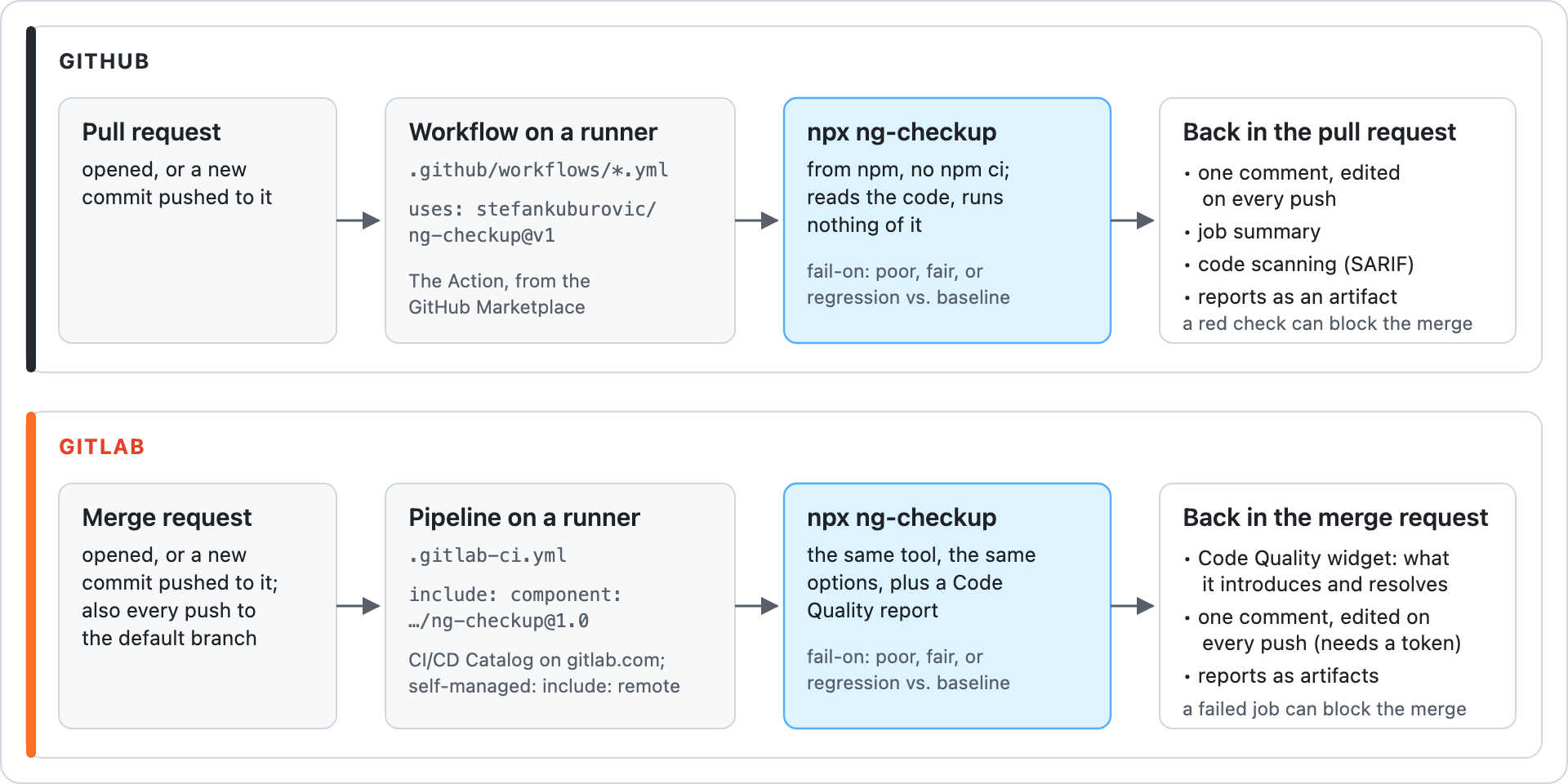
The same tool runs in both: a pull request (GitHub) or merge request (GitLab) starts a job on a runner, the job runs npx ng-checkup-cli from npm without installing your project, and the results come back where the review happens. With fail-on the job turns red, which blocks the merge when the branch requires the check.
GitHub Action (on the Marketplace). One comment on every pull request, edited in place on each push, with what got worse or better than the baseline, a grade per area and the top priorities. Plus the job summary, the full reports as an artifact, and optionally annotations on the changed lines:
name: ng-checkup
on:
  pull_request:
  push:
    branches: [main]        # the default branch records the trend
permissions:
  contents: read
  pull-requests: write      # the comment
  security-events: write    # only with sarif: true
jobs:
  checkup:
    runs-on: ubuntu-latest
    steps:
      - uses: actions/checkout@v4
      - uses: stefankuburovic/ng-checkup@v2
        with:
          fail-on: regression   # needs a committed baseline: npx ng-checkup-cli baseline
          sarif: true
No npm ci needed: versions come from the lockfile. Inputs: path (a folder in a monorepo), fail-on (poor, fair, regression), plan, comment, sarif, artifact, offline, trend, args (any other option, such as --project admin), version, node-version.
The trend. Every run on the default branch adds a point (the score, every measure, and the initial bundle when a build with --stats-json ran before the step) to a small file in the CI cache, and pull and merge requests show where the default branch has been heading: Score 72, +4 since 2026-09-23 ▃▄▄▆▇ · initial bundle 812 kB, +23 kB. Unlike ng-checkup history, which rebuilds the past from git without building anything, this follows the bundle too, from the first recorded run on. On by default in the Action (trend: false turns it off) and in both GitLab integrations (trend input, NG_CHECKUP_TREND). By hand: --trend <file.json>, plus --trend-record on the default branch. Outputs: score, exit-code. On a pull request from a fork the token cannot write, so the comment is skipped with a warning and the job summary still has it.
ng add ng-checkup-cli and npx ng-checkup-cli init write a plain workflow for you instead. By hand:
GitHub Actions, without the Action
- uses: actions/setup-node@v4
  with:
    node-version: 22
- run: npm ci
- run: npx ng-checkup-cli --fail-on regression --report checkup.md --report checkup.html
- uses: actions/upload-artifact@v4
  if: always()
  with:
    name: ng-checkup
    path: checkup.*
GitLab CI. One include gives merge requests the same: the findings in the Code Quality widget, where GitLab lists what the MR introduces and what it resolves against the target branch (on every tier, self-hosted included), the reports as artifacts, and one comment on the merge request, edited on every push. On gitlab.com, use the CI/CD Catalog component, configured through inputs (path, fail-on, args, job-name for one checkup per app, ...):
include:
  - component: $CI_SERVER_FQDN/stefankuburovic/ng-checkup/ng-checkup@2
    inputs:
      fail-on: regression
On a self-managed GitLab, which cannot include components from gitlab.com, use the template:
include:
  - remote: https://raw.githubusercontent.com/stefankuburovic/ng-checkup/v2/gitlab/ng-checkup.yml

ng-checkup:
  variables:
    NG_CHECKUP_FAIL_ON: regression   # optional; also NG_CHECKUP_PATH, NG_CHECKUP_ARGS
The job runs on merge requests and on the default branch, which is what the widget compares with. For the comment, add a token with the api scope as the CI/CD variable NG_CHECKUP_TOKEN, masked but not protected (merge request branches are not protected, so a protected variable never reaches them). A project access token comments as a bot; on gitlab.com Free, where those need Premium, a personal access token works and comments as you. GitLab's own job token cannot write comments, so without the variable the comment is skipped and the rest runs. A live example: ng-checkup-demo. npx ng-checkup-cli init writes this for a repository with a .gitlab-ci.yml. If your GitLab cannot reach GitHub, copy gitlab/ng-checkup.yml into the repository and include it with local:.
GitHub code scanning
--report ng-checkup.sarif writes SARIF, so findings show up as annotations on the changed lines of a pull request and in the Security tab:
permissions:
  security-events: write
steps:
  - uses: actions/checkout@v4
  - run: npm ci
  - run: npx ng-checkup-cli --offline --max-examples 1000 --report ng-checkup.sarif
  - uses: github/codeql-action/upload-sarif@v3
    if: always()
    with:
      sarif_file: ng-checkup.sarif
      category: ng-checkup
One rule per area, so alerts survive a rerun; a finding about the whole project (the Angular version, a package that blocks the upgrade) is placed on package.json. --max-examples decides how many locations each finding reports. Code scanning is free on public repositories and needs GitHub Advanced Security on private ones.
On an existing codebase, start with a baseline and --fail-on regression. --fail-on poor and --fail-on fair are for codebases that are already in good shape and want to stay there.
Programmatic API
import { writeFile } from 'node:fs/promises';
import { runCheckup, renderMarkdown, overallScore } from 'ng-checkup-cli';

const report = await runCheckup('path/to/app', { offline: true });

console.log(overallScore(report)); // e.g. 45
for (const check of report.checks) {
  console.log(check.id, check.grade, check.summary);
}

// The same Markdown the CLI writes, e.g. to post as a pull-request comment.
await writeFile('checkup.md', renderMarkdown(report));
runCheckup never writes anything. Its options mirror the flags (offline, plan, attributeSelectors, project, ignore, only, skip, maxExamples), plus cache from createAnalysisCache() to make repeated runs incremental. renderHtml, renderMarkdown, renderSarif, overallScore, topPriorities, loadConfig, planInit (what init would change, without writing it), collectHistory with renderHistoryHtml and renderHistoryMarkdown, and the baseline functions (createBaseline, compareWithBaseline, baselineMeasures, readBaseline, serializeBaseline) are exported too, along with the Report, CheckResult, Finding and Grade types. Report is also the schema of the JSON output.
What leaves your machine
Package names and versions, to two public services. To the npm registry: the latest @angular/core version (three-second timeout); for every third-party package that depends on Angular, its public metadata, to find the release that supports the next Angular and whether it is deprecated (eight at a time, four-second timeout each); the published tarballs of the @angular/*, @ngrx/* and rxjs versions your code imports when node_modules is missing, and of the next Angular major's @angular/* and @ngrx/* packages it imports, to see what that major removes; of each only package.json and .d.ts files are kept, in ~/.cache/ng-checkup (NG_CHECKUP_CACHE moves it). To osv.dev: the direct dependencies with their exact versions, to look up known vulnerabilities (eight-second timeout). --offline skips all of it and uses only what is already cached; the report then compares against the newest major this release knows and says so. A remote repository argument also clones it from its host. No source, no file names, no telemetry. The tool reads files and writes only the reports you ask for.
How it works
- Syntax only. Every
.tsfile is parsed once with the TypeScript compiler API, without a type checker and without building your project. That is why it takes seconds on a large monorepo and works on a repository that does not compile. Identifiers are matched through their imports, so a local helper calledsignalis not counted as Angular's. - Deprecations come from the versions you run. It reads the
@deprecatedtags in the@angular/*,@ngrx/*andrxjstype definitions (installed, or downloaded for the versions your lockfile pins), following Angular's re-exports between its bundled.d.tschunks, in both the current package layout and the older one. The report always matches the version you actually run, in Angular's own words. - Lines of code are lines that hold code. Blank lines and lines that are only a comment do not count, so a fully documented codebase (JSDoc on every member) is not reported as full of large files, and the
anydensity is measured against the code itself. - Generated code is left out of the counts. A file a tool wrote (a leading
@generatedor "do not edit" comment, a name likegenerated-types.tsorapi.generated.ts, ageneratedfolder) does not count towardsany, file sizes or lines of code, since nobody fixes it by hand; it stays in the import graph. The report says how many were left out. - Cycles are counted as groups. A strongly connected component is one thing to untangle; counting individual cycles grows combinatorially.
FAQ
Does it change my code? No. It only reads. The fixes it suggests are Angular's own ng generate migrations, which you run yourself.
Why is the deprecated-API check "info"? The Angular type definitions could not be read: dependencies are not installed and the run was --offline (or the registry was unreachable) before they were ever cached. Run once online, or npm install.
My app is on Angular 12 and deprecated APIs are "good". Is that right? Yes, for Angular 12: nothing that Angular 12 deprecates is in use. Each upgrade step deprecates more, and the version check is where that gap shows.
Is "with a spec" my test coverage? No. It counts the components, services, stores and utilities that have an x.spec.ts next to them or that some spec imports. It needs no test run, which is what keeps the tool fast and usable on a repository it has never seen.
Does it support Nx? Yes: it reads project.json targets and tsconfig paths, and reports each project separately as well as the whole workspace.
Does it need RxJS or NgRx? No. Checks report what they find: an app without RxJS has nothing for the RxJS deprecations to flag, and one without a state library is graded on signals and services. Other libraries (NGXS, Akita, PrimeNG, Kendo, Material) are covered where it matters for an upgrade, through their Angular peer ranges in the third-party check.
Why is bundle size "info"? It reads the stats file of your last build instead of running one. ng build --stats-json writes it; run the checkup after that.
Which Angular versions? Angular 2 and newer, and AngularJS 1.x on its way there: AngularJS code gets its own area and a migration plan. Checks whose rules changed between versions (standalone, OnPush, zoneless defaults) apply the rules of the version you run.
VS Code extension
ng-checkup for VS Code shows the findings inline: every finding at its file and line in the Problems panel, why it matters on hover, and the score in the status bar, with the HTML report one click away. It runs on open and after each save, re-parsing only the files that changed, and reads ng-checkup.config.json. Cursor and VSCodium install it from Open VSX; the source is in ng-checkup-vscode.
Ideas and bug reports are welcome in issues.
MCP server for editor agents
npx -y ng-checkup-cli mcp
Serves the checkup over the Model Context Protocol on stdio, so Claude Code, Cursor, Copilot or any MCP client can ask about the workspace directly. Three tools: checkup (the Markdown report, narrowed by only, project or since), findings (JSON, filtered by area, minimum severity or one file: "what is wrong with this component") and upgrade_plan. Runs are offline unless a call asks for online, and the server keeps one analysis cache per folder, so a second question re-parses only what changed. Register it with your client as the command npx -y ng-checkup-cli mcp; in Claude Code:
claude mcp add ng-checkup -- npx -y ng-checkup-cli mcp
Contributing
git clone https://github.com/stefankuburovic/ng-checkup.git
cd ng-checkup
npm install
npm test            # builds, then runs the Vitest suite against the fixture apps in test/fixtures
npm run typecheck
node dist/cli.js path/to/some/angular/app
Each check is one file in src/checks/ and a pure function of the analysis context, so a new check is a new file plus a fixture that shows it.
The corpus. npm run corpus runs ng-checkup on 19 public repositories pinned to one commit each (corpus/repos.json: Angular 12 to 22, AngularJS and hybrid apps, two Primo VE packages, CLI and Nx workspaces, Ionic, a 180 000-line app) and compares the result with corpus/snapshots/. CI runs it on every push. A rule change that moves any number shows up as a diff; read it, and run npm run corpus -- --update only when every changed line is an improvement. The repositories are fetched shallow into .corpus/ and their dependencies are never installed.
Need help acting on the report?
I'm Stefan Kuburovic, and modernizing large Angular codebases is my job. If you'd rather have someone walk through the report with your team, or do the upgrade with you, have a look at the Angular Health Check.
License
MIT
Reviews (0)
Sign in to leave a review.
Leave a reviewNo results found