Skeepto
Health Warn
- License — License: MIT
- Description — Repository has a description
- Active repo — Last push 0 days ago
- Low visibility — Only 6 GitHub stars
Code Warn
- network request — Outbound network request in Node/Client/SkClientLogin.mjs
- process.env — Environment variable access in Node/Client/SkFillData.mjs
- network request — Outbound network request in Node/Client/SkFillData.mjs
- process.env — Environment variable access in Node/Client/SkInitServer.mjs
- network request — Outbound network request in Node/Client/SkWebInterface.mjs
- fs module — File system access in Node/IACursor/patch-tunnel-env.sh
Permissions Pass
- Permissions — No dangerous permissions requested
No AI report is available for this listing yet.
Professional spreadsheet: C++20 engine compiled to WebAssembly, React UI, same binary in the browser and Node.js. Self-hosted.
Skeepto



Embed a spreadsheet calculation core in your software. 344 Excel-compatible
functions (XLOOKUP, FILTER, LET, dynamic arrays), incremental recalc,
same C++20 binary compiled to WebAssembly for the browser and Node.js.
MIT.
This repository is the reference UI (React grid, desktop window, optional
collab server). The engine lives in
SkeeptoEngine.
const ss = new SpreadSheet.UISpreadSheet();
ss.NewWorkBook("demo");
ss.Value("A1", "10", "Sheet1");
ss.Value("A2", "20", "Sheet1");
ss.Value("B1", "=SUM(A1:A2)", "Sheet1");
let B1=ss.GetValue("B1", "Sheet1");   // "30"
The prebuilt WASM module is in public/ (SkReactSpreadSheet.mjs + .wasm).
Load it, then use SpreadSheet.UISpreadSheet (~150 methods). The same surface
is tApi in C++. There is no npm package yet — clone this app or the engine.
| SheetJS / ExcelJS | HyperFormula | Skeepto | |
|---|---|---|---|
Read / write .xlsx |
yes | no | yes |
| Evaluate Excel formulas | no | JavaScript | C++ → WASM |
| Same binary in browser and Node | — | — | yes |
Want to see the grid around that engine? Build or download the desktop app
below.
Desktop app (Electron)
Build the Electron app on your machine. You need Node.js 18+ and npm.
The WebAssembly engine is already in public/, so no C++ toolchain is
required. Electron loads the compiled front-end from build/.
Run it locally:
npm install
npm run build        # Electron loads this output
npm run electron     # open the window
Package an installer into dist-electron/. Each script must run on the
operating system it packages. It checks that both WASM modules are already
compiled — the browser module in public/ and the Node module inNode/Server/ — then builds the React app and the installer. These scripts
do not recompile the C++ engine.
macOS (.dmg and .zip):
./build-mac.sh                 # host architecture (Apple Silicon = arm64)
./build-mac.sh --universal     # Intel + Apple Silicon
./build-mac.sh --open          # then open the generated .dmg
Windows (NSIS .exe and .zip). build-win.cmd bypasses a Restricted
PowerShell execution policy:
.\build-win.cmd
.\build-win.cmd -Open          # then launch the generated installer
Linux (AppImage and .deb, host architecture):
./build-unix.sh
Otherwise you can download a prebuilt binary. Those files are not signed by
a publisher, so macOS and Windows will show security errors — the app looks
damaged, or “Windows protected your PC”. A build you make locally does not
hit that Gatekeeper / SmartScreen path.



macOS Intel · Linux .deb · All files
If you use a prebuilt download anyway: on a Mac, click Cancel when the
system offers the Trash. Copy Skeepto.app to Applications, then:
xattr -dr com.apple.quarantine /Applications/Skeepto.app
open /Applications/Skeepto.app
The same note is inside the disk image. On Windows, choose More info,
then Run anyway.
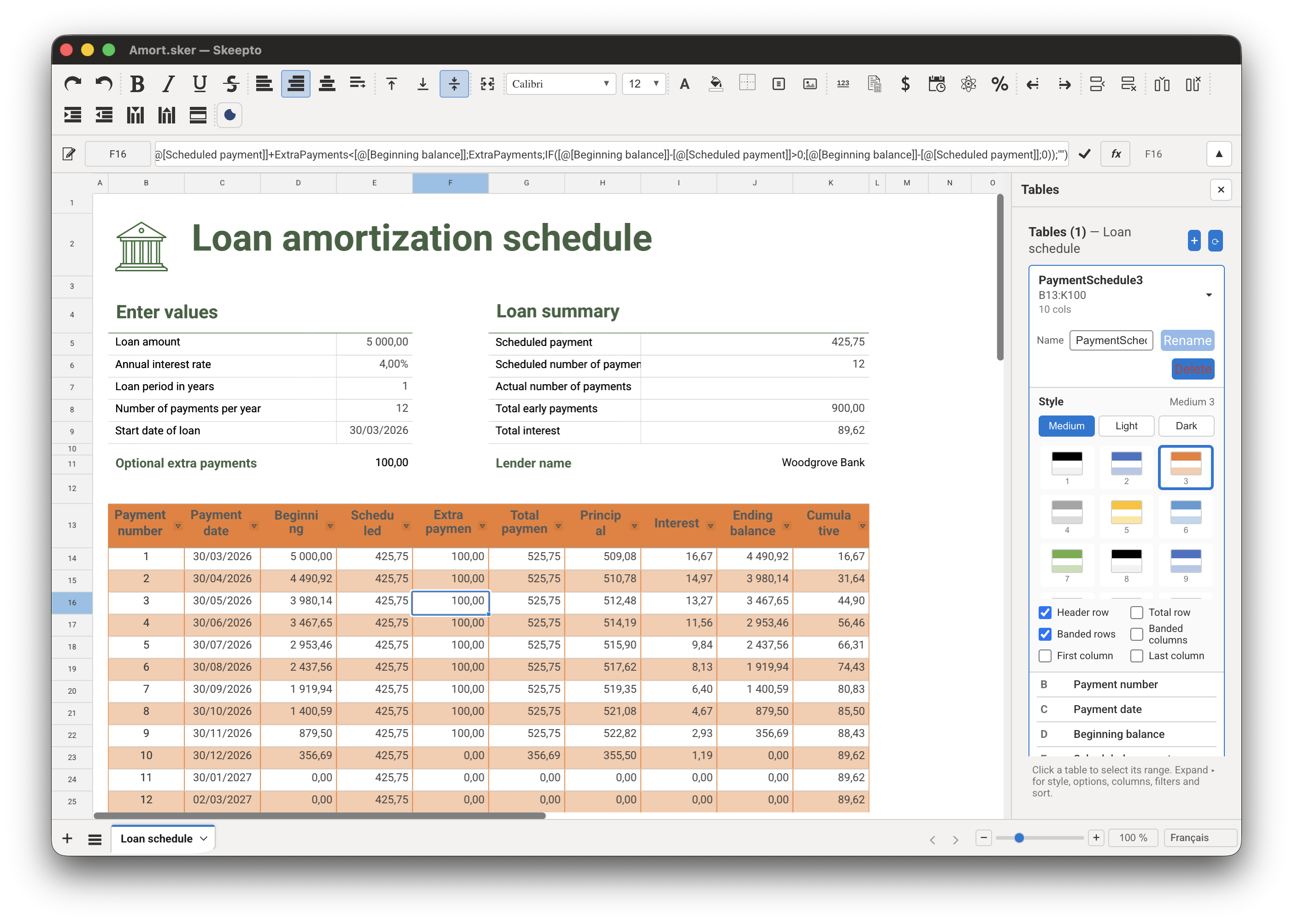
- Calculate offline. A desktop window around the same engine. No MongoDB, no server, no login. Open a
.skeror a.xlsxfrom the File menu. - Bring an Excel file with you. Convert a
.xlsx, then keep working. On the collaborative app this starts from the virtual disk (how). - Host the same engine. Collaboration, PDF export, and AI agents (MCP) run on machines you control.
Why Skeepto?
SheetJS reads workbooks; it does not calculate them. HyperFormula calculates
in JavaScript. Excel and LibreOffice are apps, not an embeddable core.
Skeepto is the missing piece: drop the engine into your product, keep your
UI — or use this React grid as a starting point.
- One codebase, two hosts — browser WASM and Node.js WASM. Native C++ in the engine repo.
- Excel-class formulas — 344 worksheet functions, incremental recalc (dirty graph, not a full-sheet sweep).
- You run it — optional collab server and MCP on infrastructure you control. The desktop build needs neither.
Desktop app — development and extra pack commands
Hot reload runs the CRA dev server and Electron together (loadshttp://localhost:3000):
npm run electron:dev
The same pack steps without the WASM check:
npm run pack                 # unpacked build (quick local test)
npm run dist                 # packaged installer for the current platform
npm run dist:mac             # macOS .dmg / .zip
npm run dist:mac:universal   # macOS universal (Intel + Apple Silicon)
npm run dist:win             # Windows NSIS installer and .zip
npm run dist:linux           # Linux AppImage and .deb
The engine runs in the renderer process; WebAssembly Memory64 is enabled by
default (Chromium ≥ 133), so no extra V8 flag is required.
Want login, virtual disk, and real-time collaboration? Follow the web setup
below.
Collaborative web app
This mode needs MongoDB and the Node.js server. Use it when you want accounts,
the virtual disk, and multi-user editing.
Prerequisites
- Node.js (version 18 or higher)
- npm (usually bundled with Node.js)
- MongoDB (version 5.0 or higher)
The C++ engine source is on GitHub:
Stephane-76/SkeeptoEngine
(CMake-only; local clone often namedskeepto-engine).
A Rust port is also in progress (see Engine source).
Installing MongoDB
Option A — Docker (simplest, cross-platform)
docker run -d --name skeepto-mongo -p 27017:27017 mongo:7
Option B — macOS (Homebrew)
brew tap mongodb/brew
brew install mongodb-community
brew services start mongodb-community
Option C — Linux (Ubuntu/Debian, official MongoDB repo)
# Follow the current instructions for your distribution at:
# https://www.mongodb.com/docs/manual/administration/install-on-linux/
sudo systemctl start mongod
sudo systemctl enable mongod
Option D — Windows
Download and install MongoDB from
mongodb.com/try/download/community.
Verify that MongoDB is running:
mongosh --version
Installation & startup
Copy .env.example to .env at the project root (or Node/Server/.env) and
adjust values if needed. Full reference: docs/Env.md.
cp .env.example Node/Server/.env
1. Install dependencies
npm install
cd Node/Server && npm install
cd ../Client && npm install
cd ../..
2. Build the application
Do not use npm start at the project root. Build with:
npm run build
This compiles the React application in production mode into build/ (the
server serves the app from there).
3. Start the server
In a first terminal:
cd Node/Server
npm start
The server listens on port 8000 by default.
4. Initialize users
In a second terminal:
cd Node/Client
node SkInitServer.mjs
This creates the first users and sample virtual-disk folders.
After initialization you can sign in with:
| Password | |
|---|---|
[email protected] |
sallez |
5. Open the application
http://localhost:8000
Hard-refresh the browser (Cmd+Shift+R) so the WASM module is reloaded.
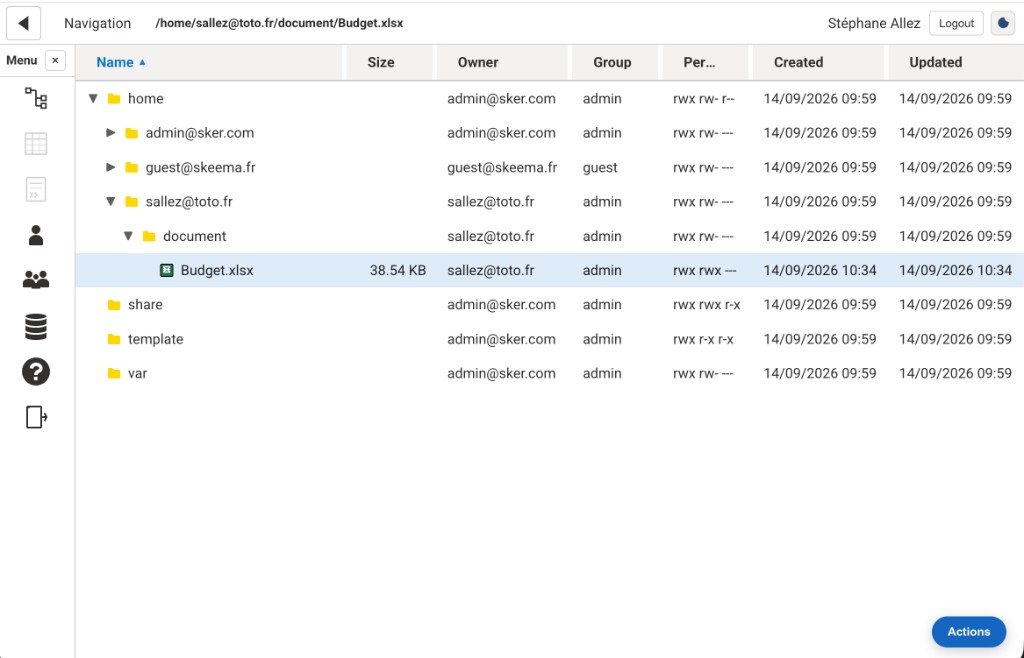
The virtual disk is the signed-in file tree: folders, .sker workbooks, HTML files, and Excel files. Select an item, then open Actions at the bottom right. The menu groups the operations:
| Section | What it does |
|---|---|
| Create | Upload a file, or create a folder, a spreadsheet, or an HTML file |
| Sharing | Set who can access the selection |
| File | Download the file, or open an .xlsx in Excel |
| Workbook history | Save a snapshot of a .sker, or open its versions |
| Excel interchange | Convert Excel turns the selected .xlsx into a .sker next to it. Export to Excel writes a .sker back to .xlsx |
| Organize | Rename the selection |
| Remove | Delete the selection |
Double-click the new .sker to open it in the grid. Step-by-step: docs/Import-Excel.md.
Project structure
skeepto/
├── Node/
│   ├── Server/          # Fastify server (WASM pool, REST/WS API)
│   │   └── SkServer.mjs
│   ├── Client/          # First-run init (SkInitServer.mjs)
│   └── MetaModel/       # Metamodel used by the server
├── electron/            # Electron desktop app (main + preload)
├── src/                 # React source
├── public/              # Static assets + prebuilt WASM engine
└── build/               # Compiled output (after npm run build)
Configuration
MongoDB
By default the application connects to MongoDB on localhost:27017, databaseskeepto. Connection settings are read from environment variables.
Environment variables
Create a .env file at the project root or in Node/Server/. It is
gitignored (never pushed to GitHub). Copy .env.example
and see docs/Env.md for every variable (mail, auth, AI,
Excel pool).
Minimal local file:
PORT=8000
BIND_HOST=127.0.0.1
MONGO_URL=mongodb://localhost:27017/skeepto
MONGO_NO_AUTH=1
Restart the server after editing .env. Set SMTP_* to send registration
verification emails. On Linux, if SMTP_HOST is unset, the server falls back
to the system msmtp command. macOS and Windows have no msmtp by default,
so SMTP_HOST is required there.
Development
After changing the React / front-end code, rebuild and restart:
npm run build
cd Node/Server && npm start
For the desktop app, rebuild then relaunch Electron (or use npm run electron:dev):
npm run build
npm run electron
The C++ engine is compiled with Emscripten in
SkeeptoEngine. A wasm
build copies the browser module intopublic/and the Node module
intoNode/Server/(they are not interchangeable: Node is built with-DSK_NODE). After that, copypublic/SkReactSpreadSheet.{mjs,wasm,wasm.map}
intobuild/(npm run buildor a manual copy) — do not overwriteNode/Server/with thepublic/files. Hard-refresh (Cmd+Shift+R).
Architecture
Skeepto uses:
- C++20 — high-performance calculation engine compiled to WebAssembly
- React — canvas-based grid with viewport virtualization
- Node.js — backend with a pool of WebAssembly instances
- MongoDB — persistence (
Directory,Spreadsheet, GridFS for large files) - WebSocket — real-time collaboration
Engine source
This repository currently ships the engine as prebuilt WebAssembly binaries
(public/ for the browser, Node/Server/ for Node). The C++ source is in
Stephane-76/SkeeptoEngine
(CMake only; clone next to this repo as skeepto-engine if you use the default
sibling path). From there:
cmake -B build-wasm -DSK_PLATFORM=wasm -DSK_SKEEPTO_DIR=/path/to/skeepto
cmake --build build-wasm --parallel
That copies the two modules into this tree. Then sync public/ → build/
(npm run build or copy the three browser files).
A Rust rewrite of the same engine is also underway, developed with
Claude. The goal is a second implementation of the spreadsheet core, still
compiled to WebAssembly, without changing the React UI or the Node.js server
contract.
See Node/Server/Model/DATABASE_SCHEMA.md
for the MongoDB schema, docs/Import-Excel.md to
import .xlsx files, anddocs/Spreadsheet-React-Classes.md for
the React chrome and the engine Unit classes, anddocs/Spreadsheet-CellClass.md for the
extensible CellClass widgets (SkCellClassCheck, charts, and subclasses).
WebAssembly instance pool
The server uses a pool of WebAssembly instances for:
- Workbook isolation (one workbook = one instance)
- Auto-scaling under load
- Continuous health monitoring
- Smart load balancing
Troubleshooting
The desktop window does not open
- Make sure you ran
npm run buildat the project root (Electron loadsbuild/) - Run
npm installso theelectronpackage is available - Check the terminal for renderer / WASM errors
The server won't start
- Make sure MongoDB is running:
mongosh - Check that port 8000 is not already in use
- Review the console logs
- From
Node/Server, usenpm start(loads.env) rather thannode SkServer.mjsalone
The application won't load ({"message":"Not Found"})
- Make sure you ran
npm run buildat the project root - Restart the server after the first build (
build/is resolved at startup) - Hard-refresh the browser (Cmd+Shift+R)
- Check the browser console for errors
MongoDB errors
- Verify MongoDB is installed and running
- Check your
MONGO_*variables (database name:skeepto) - Review the MongoDB logs
Important notes
- Fastest first run —
npm install→npm run build→npm run electron. - Do not use
npm startat the project root — it does not serve the app. - Always build before starting the web server —
npm run build. - Web startup order — MongoDB → Build → Server → Initialization → Browser.
Contributing
Contributions are welcome. Please follow the existing code conventions and test
your changes before submitting a pull request. Most of the app (UI,
rendering, server, AI integration) is JavaScript and hackable without touching
the engine.
The C++ core lives in
SkeeptoEngine; this repo keeps
the prebuilt WASM binary so the app runs without a C++ toolchain. The Rust port
is experimental and not required to run or contribute to the application.
Discussions
Please use the project's
GitHub Discussions
for questions, ideas, and feedback. Do not hesitate to post there — it keeps
the conversation public and useful for everyone.
Bugs and pull requests still go through GitHub Issues and PRs.
Python (optional)
A native Python client of the same engine — not pandas — lives in
SkeeptoPython. Useful if you
already drive workbooks from Python; not required to embed the WASM core.
License
This project is distributed under the MIT license — see theLICENSE file.
Copyright © 2026 Stéphane ALLEZ.
Skeepto — built with care for the most demanding professional applications.
Reviews (0)
Sign in to leave a review.
Leave a reviewNo results found