human
Health Pass
- License — License: MIT
- Description — Repository has a description
- Active repo — Last push 0 days ago
- Community trust — 47 GitHub stars
Code Pass
- Code scan — Scanned 7 files during light audit, no dangerous patterns found
Permissions Pass
- Permissions — No dangerous permissions requested
No AI report is available for this listing yet.
The AI Software Factory. Tickets, docs, designs, and analytics in. Shipped code out. One secure pipeline from idea to review — Claude on the line, human on the floor.





human
The AI Software Factory. Tickets, docs, designs, and analytics in. Shipped code out. One secure pipeline from idea to review. Claude on the line, human on the floor. You in control.
- Pipeline Dashboard — Monitor running agents, token usage, tracker issues, and pipeline state in real time
- Secure Devcontainer — OAuth, MCP, browser access, Chrome Bridge, firewall — all configured out of the box
- Context Management — Connectors for every source with cross-tracker and Notion search
- Lifecycle Skills — Ideate, plan, execute, review. One command (
/human-sprint) runs the full pipeline
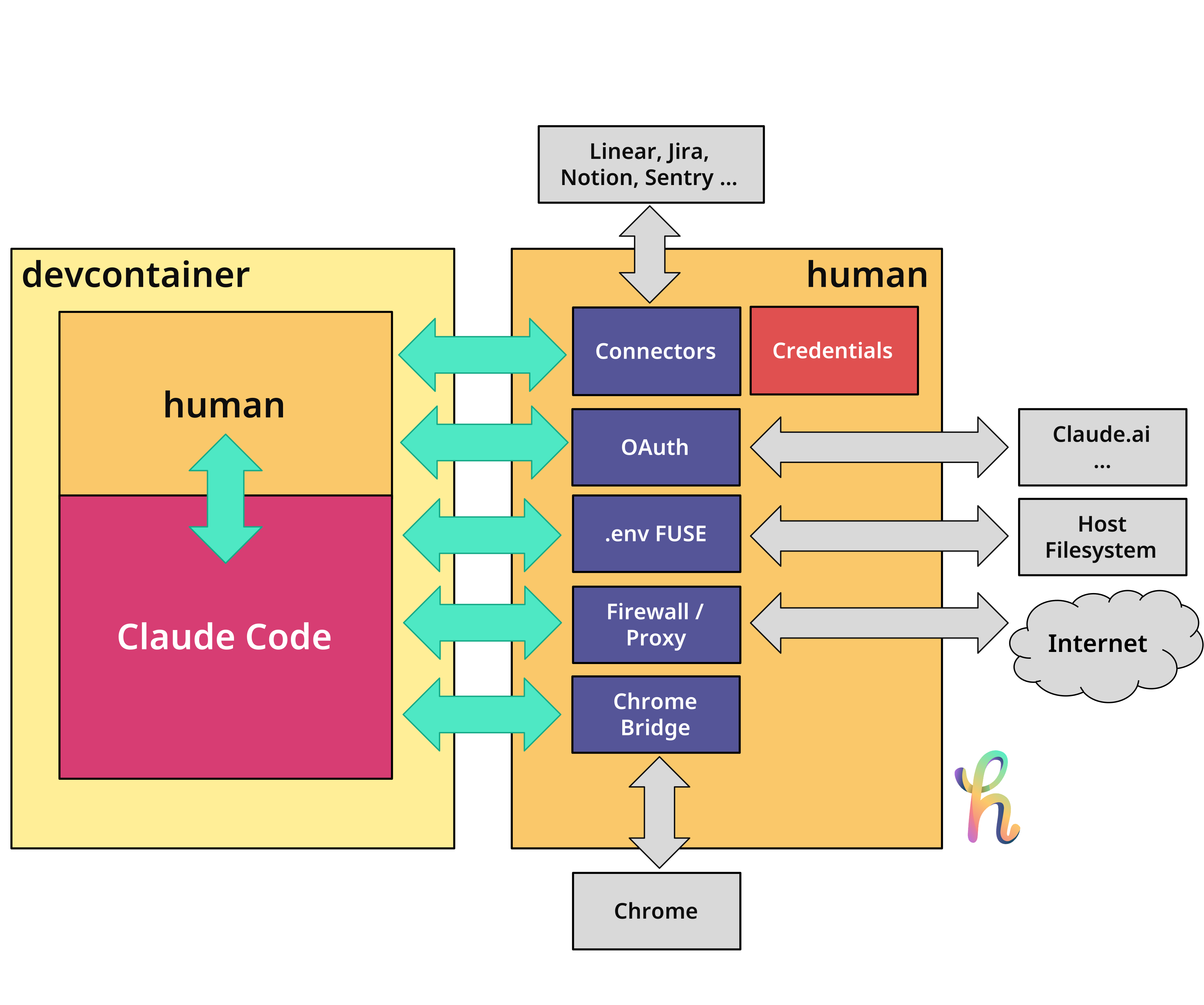
Architecture
Install
curl -sSfL gethuman.sh/install.sh | bash
Or with Homebrew:
brew install gethuman-sh/tap/human
Or with mise:
mise use -g github:gethuman-sh/human
Or with Go:
go install github.com/gethuman-sh/human@latest
Or add as a devcontainer Feature:
{ "features": { "ghcr.io/gethuman-sh/treehouse/human:1": {} } }
Quick start
human init
The wizard configures your services, generates devcontainer.json with daemon, Chrome proxy, firewall, and installs the Claude Code integration. Set the API tokens it prints, then start:
human daemon start
devcontainer up --workspace-folder .
What's included
| Category | Services |
|---|---|
| Issue Trackers | Jira, GitHub, GitLab, Linear, Azure DevOps, Shortcut |
| Docs & Knowledge | Notion (search, pages, databases), ClickUp (Docs, wikis, knowledge base) |
| Design | Figma (files, components, comments, export) |
| Analytics | Amplitude (events, funnels, retention, cohorts) |
| Messaging | Telegram (bot messages as task inbox), Slack (notifications) |
| Infrastructure | Daemon mode, HTTPS proxy/firewall, Chrome Bridge, OAuth forwarding |
| Governance | Declarative policy rules in .humanconfig (block/confirm agent operations) |
| Skills | Ideate, sprint, ready, brainstorm, plan, execute, review, done, findbugs, security |
| Dashboard | TUI with agent monitoring, token usage, tracker issues, pipeline state |
| Search | Cross-tracker and Notion full-text index |
Dashboard
human tui
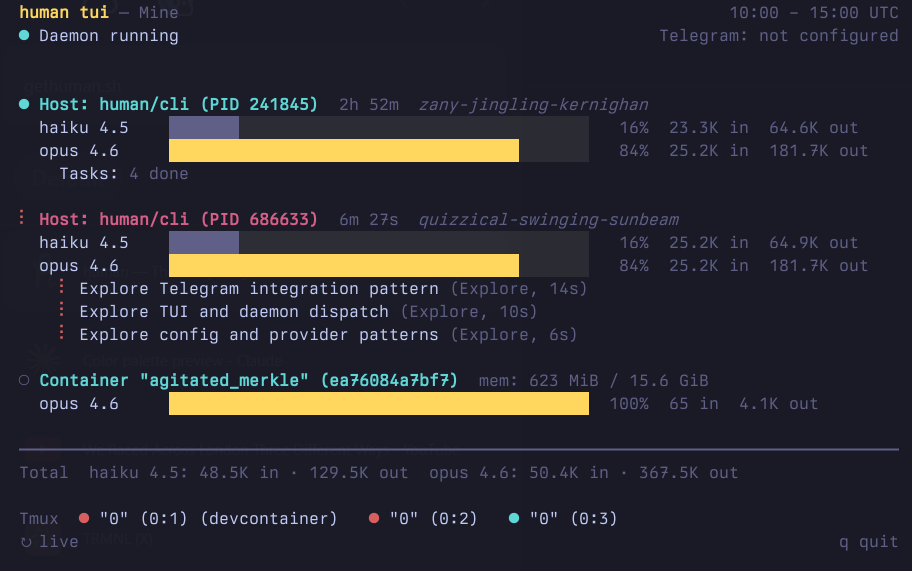
The TUI shows running Claude Code instances, token usage per 5-hour window, daemon status, and connected containers — all in one view. It auto-starts the daemon if needed.
CLI usage
Quick commands auto-detect the tracker from the key format. Use --table for human-readable output.
human get KAN-1                        # get an issue
human list --project=KAN               # list issues
human status KAN-1 "Done"             # set status
human jira issue start KAN-1           # transition + assign
human jira issue edit KAN-1 --title "New title"
human jira issue comment add KAN-1 "Shipped"

human search "retry logic"             # cross-tracker search
human notion search "quarterly report" # Notion
human figma file get <file-key>        # Figma
human amplitude events list            # Amplitude
human telegram list                    # Telegram
Devcontainer / Remote mode
Quick start: Use the treehouse devcontainer Feature — it installs
human, sets up OAuth browser forwarding, and optionally configures the HTTPS proxy. Add it to yourdevcontainer.jsonand you're done.
AI agents running inside devcontainers need access to issue trackers, Notion, Figma, and Amplitude, but credentials should stay on the host. The daemon mode splits human into two roles: a daemon on the host (holds credentials, executes commands) and a client inside the container (forwards CLI args, prints results). You need human installed on both sides: on the host (via Homebrew, curl, etc.) to run the daemon, and inside the container (via the devcontainer Feature) as the client. It's the same binary — the mode is determined by the HUMAN_DAEMON_ADDR environment variable.
On the host:
human daemon start          # prints token, listens on :19285
human daemon token          # print token for copy/paste
human daemon status         # check if daemon is reachable
In devcontainer.json, add the devcontainer Feature to install human and configure the daemon connection:
{
  "features": {
    "ghcr.io/gethuman-sh/treehouse/human:1": {}
  },
  "forwardPorts": [19285, 19286],
  "remoteEnv": {
    "HUMAN_DAEMON_ADDR": "host.docker.internal:19285",
    "HUMAN_DAEMON_TOKEN": "<paste from 'human daemon token'>",
    "HUMAN_CHROME_ADDR": "host.docker.internal:19286",
    "BROWSER": "human-browser"
  }
}
Inside the container, all commands work transparently:
human jira issues list --project=KAN       # forwarded to host daemon
human figma file get ABC123                # forwarded to host daemon
human notion search "quarterly report"     # forwarded to host daemon
Chrome Bridge
When using Claude Code inside a devcontainer, the Chrome MCP bridge needs a Unix socket that Claude can discover. The chrome-bridge command creates this socket and tunnels traffic to the daemon on the host.
human chrome-bridge                        # daemonizes, prints PID and socket path
claude                                     # runs immediately after
The bridge requires HUMAN_CHROME_ADDR and HUMAN_DAEMON_TOKEN environment variables (included in the devcontainer.json example above). Use --foreground for debugging. Logs are written to ~/.human/chrome-bridge.log.
OAuth / browser forwarding
Tools like Claude Code require OAuth authentication, which needs to open a browser on the host. The treehouse Feature handles this automatically by creating a human-browser symlink and setting BROWSER=human-browser. When Claude Code triggers OAuth, human-browser forwards the request to the daemon, which opens the real browser on the host and relays the callback back to the container.
If you're not using the treehouse Feature, add "BROWSER": "human-browser" to your remoteEnv and ensure the human-browser symlink exists in the container (pointing to the human binary).
HTTPS proxy
The daemon includes a transparent HTTPS proxy on port 19287 that filters outbound traffic from devcontainers by domain. It reads the SNI from TLS ClientHello — no certificates needed, no traffic decryption.
Configure allowed domains in .humanconfig.yaml:
proxy:
  mode: allowlist    # or "blocklist"
  domains:
    - "*.github.com"
    - "api.openai.com"
    - "registry.npmjs.org"
allowlist: only listed domains pass, everything else blockedblocklist: only listed domains blocked, everything else passes- No
proxy:section: block all (safe default)
Enable in devcontainer.json using the treehouse devcontainer Feature:
{
  "features": {
    "ghcr.io/gethuman-sh/treehouse/human:1": {
      "proxy": true
    }
  },
  "capAdd": ["NET_ADMIN"],
  "remoteEnv": {
    "HUMAN_DAEMON_ADDR": "host.docker.internal:19285",
    "HUMAN_DAEMON_TOKEN": "<paste from 'human daemon token'>",
    "HUMAN_CHROME_ADDR": "host.docker.internal:19286",
    "HUMAN_PROXY_ADDR": "host.docker.internal:19287",
    "BROWSER": "human-browser"
  },
  "forwardPorts": [19285, 19286],
  "postStartCommand": "sudo human-proxy-setup"
}
See the treehouse README for full setup instructions.
Claude Code skills
Install the Claude Code skills and agents into your project:
human install --agent claude
This writes skill and agent files to .claude/ in the current directory. Re-run after upgrading human to pick up changes.
| Skill | Description |
|---|---|
/human-ideate |
Challenge an idea with forcing questions and create a ready PM ticket |
/human-sprint |
Run the full pipeline in one command: ideate → plan → execute → review |
/human-ready |
Evaluates a ticket against a Definition of Ready checklist |
/human-brainstorm |
Explores the codebase and generates 2-3 implementation approaches |
/human-plan |
Fetches a ticket and produces a structured implementation plan |
/human-bug-plan |
Analyzes a bug ticket for root cause and writes a fix plan |
/human-execute |
Loads a plan, executes step by step, runs a review checkpoint |
/human-review |
Diffs the current branch against acceptance criteria |
/human-findbugs |
Multi-agent pipeline to find logic errors, race conditions, and security issues |
/human-security |
Deep security audit with attack chain analysis and OWASP Top 10 coverage |
/human-gardening |
Multi-agent pipeline for codebase health analysis, refactoring triage, and automated fixes |
# Full pipeline in one command
/human-sprint "add rate limiting to the API"

# Or step by step
/human-ideate "add rate limiting"  # challenge idea, create PM ticket
/human-plan 42                     # create engineering plan
/human-execute HUM-43              # implement the plan
/human-review HUM-43               # review changes
All outputs are saved to .human/ (plans, reviews, done reports, bug analyses, security audits, health reports).
Configuration
The fastest way to get started:
human init
The interactive wizard lets you pick trackers and tools, then writes .humanconfig.yaml and prints the environment variables to set.
Alternatively, configure manually:
# Issue trackers
jiras:
  - name: work
    url: https://work.atlassian.net
    user: [email protected]
    key: your-api-token

githubs:
  - name: oss
    token: ghp_abc123

linears:
  - name: work
    projects:
      - ENG

# Tools
notions:
  - name: work
    token: ntn_abc123

figmas:
  - name: design
    token: figd_abc123

amplitudes:
  - name: product
    url: https://analytics.eu.amplitude.com

# Messaging
telegrams:
  - name: bot
    allowed_users:
      - 12345678

# Outbound proxy
proxy:
  mode: allowlist
  domains:
    - "*.github.com"
Tokens can also be set via environment variables using the pattern <TRACKER>_<NAME>_TOKEN (e.g. JIRA_WORK_KEY, NOTION_WORK_TOKEN, FIGMA_DESIGN_TOKEN, AMPLITUDE_PRODUCT_KEY + AMPLITUDE_PRODUCT_SECRET).
See documentation.md for full configuration details.
Build
make build
Star History
Reviews (0)
Sign in to leave a review.
Leave a reviewNo results found