mirage
Health Warn
- License — License: Apache-2.0
- Description — Repository has a description
- Active repo — Last push 0 days ago
- Low visibility — Only 6 GitHub stars
Code Pass
- Code scan — Scanned 12 files during light audit, no dangerous patterns found
Permissions Pass
- Permissions — No dangerous permissions requested
This tool provides a unified virtual filesystem for AI agents, allowing them to interact with various cloud services (like AWS S3, Google Drive, Slack, and GitHub) using standard Unix-like commands within a simulated environment.
Security Assessment
Because of its core design, the tool inherently executes shell-like commands and makes external network requests to interact with backend APIs. Consequently, it will access potentially sensitive data across whatever platforms you choose to connect it to. The automated code scan checked 12 files and found no dangerous patterns or hardcoded secrets. Furthermore, the project does not request any inherently dangerous system permissions. Overall risk is rated as Medium, primarily because the tool acts as a bridge to your external cloud data, making proper API configuration and strict access scopes essential.
Quality Assessment
The project is clearly maintained, with repository activity as recent as today. It benefits from comprehensive documentation and a clear development structure. The code uses the standard Apache-2.0 license, which is highly permissive and safe for integration. However, it currently suffers from very low community visibility. With only 6 stars on GitHub, the project has not yet been battle-tested by a wide audience, meaning you may encounter undocumented bugs.
Verdict
Use with caution: the code itself appears clean and actively maintained, but its low community adoption and inherent access to sensitive cloud data warrant careful sandboxing and strict API permission controls during implementation.
A Unified Virtual Filesystem For AI Agents








Mirage is a Unified Virtual File System for AI Agents: a single tree that mounts services and data sources like S3, Google Drive, Slack, Gmail, and Redis side-by-side as one filesystem.
AI agents reach every backend with the same handful of Unix-like tools, and pipelines compose across services as naturally as on a local disk. It's a simulated environment, agents see one filesystem underneath. Any LLM that already knows bash can use Mirage out of the box, with zero new vocabulary.
const ws = new Workspace({
  '/data':   new RAMResource(),
  '/s3':     new S3Resource({ bucket: 'logs' }),
  '/slack':  new SlackResource({}),
  '/github': new GitHubResource({}),
})

await ws.execute('grep alert /slack/general/*.json | wc -l')
await ws.execute('cat /github/mirage/README.md')
await ws.execute('cp /s3/report.csv /data/local.csv')

// Register a new command, available across every mount.
ws.command('summarize', ...)

// Override a command for a specific resource + filetype —
// `cat` on a Parquet file in /s3 renders rows as JSON instead of raw bytes.
ws.command('cat', { resource: 's3', filetype: 'parquet' }, ...)

await ws.execute('summarize /github/mirage/README.md')
await ws.execute('cat /s3/events/2026-05-06.parquet | jq .user')
About
- One filesystem, every backend. Every service speaks the same filesystem semantics, so agents reason about one abstraction instead of N SDKs and M MCPs, leaning on the filesystem and bash vocabulary LLMs are most fluent in.
- Multiple resources, one filesystem: RAM, Disk, Redis, S3 / R2 / OCI / Supabase / GCS, Gmail / GDrive / GDocs / GSheets / GSlides, GitHub / Linear / Notion / Trello, Slack / Discord / Telegram / Email, MongoDB, SSH, and more, mounted side-by-side under a single root.
- Familiar bash tools across every mount. Agents reuse the same handful of Unix-like tools instead of learning a new API per service, and pipelines compose across services as naturally as on a local disk, the exact corpus modern LLMs are most heavily trained on.
- Portable workspaces: clone, snapshot, and version your environment. Move agent runs between machines without restarting or reconfiguring the system.
- Embed in your apps and services: Python and TypeScript SDKs let you give your AI agents a virtual filesystem directly inside FastAPI, Express, browser apps, or any async runtime, no separate process required. Clone, snapshot, and version the workspace from inside your code.
- Works with major agent application frameworks: OpenAI Agents SDK, Vercel AI SDK (TypeScript), LangChain, Pydantic AI, CAMEL, and OpenHands.
- Lightweight CLI + daemon: plugs into coding agents like Claude Code and Codex so they reach every mounted resource through familiar bash, getting more useful work done per turn.
Architecture
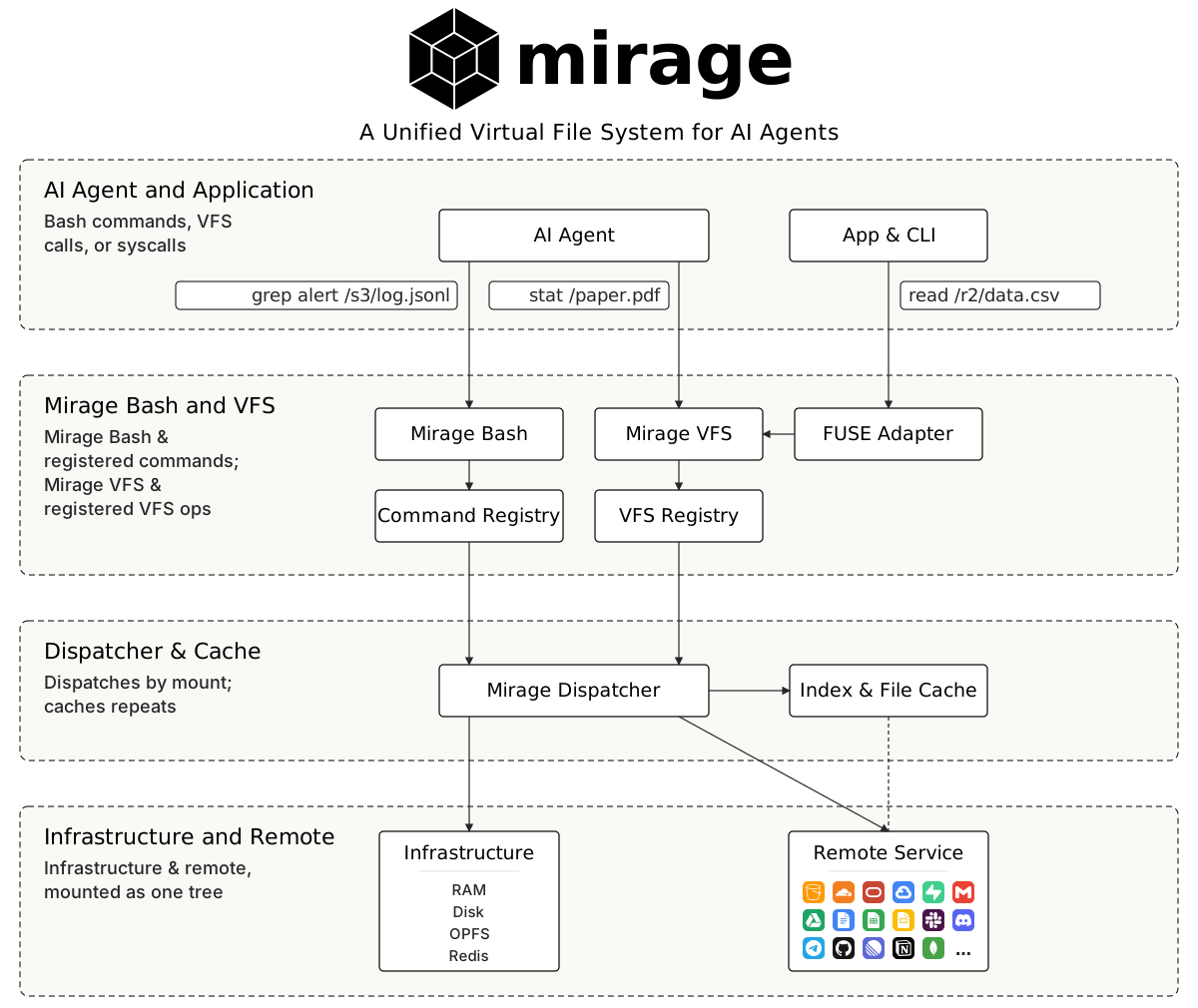
Installation
Prerequisites
- Python ≥ 3.12 for the
mirage-aipackage and themirageCLI - Node.js ≥ 20 for the TypeScript SDK
- macOS or Linux (FUSE-based mounts require platform support)
Python
uv add mirage-ai
This installs both the mirage library and the mirage CLI binary.
TypeScript
Pick the package that matches your runtime:
npm install @struktoai/mirage-node      # Node.js servers and CLIs
npm install @struktoai/mirage-browser   # browser / edge runtimes
npm install @struktoai/mirage-core      # runtime-agnostic primitives
@struktoai/mirage-node and @struktoai/mirage-browser both pull in @struktoai/mirage-core automatically.
CLI
curl -fsSL https://strukto.ai/mirage/install.sh | sh
Or via your package manager of choice:
npm install -g @struktoai/mirage-cli
uvx mirage-ai
npx @struktoai/mirage-cli
Quickstart (Python)
from mirage import Workspace
from mirage.resource.gdocs import GDocsConfig, GDocsResource
from mirage.resource.ram import RAMResource
from mirage.resource.s3 import S3Config, S3Resource
from mirage.resource.slack import SlackConfig, SlackResource

ws = Workspace({
    "/data":  RAMResource(),
    "/s3":    S3Resource(S3Config(bucket="my-bucket")),
    "/slack": SlackResource(SlackConfig()),
    "/docs":  GDocsResource(GDocsConfig()),
})

await ws.execute("cp /s3/report.csv /data/report.csv")
await ws.execute("grep alert /s3/data/log.jsonl | wc -l")

ws.snapshot("demo.tar")
Quickstart (TypeScript)
import {
  Workspace,
  RAMResource,
  S3Resource,
  SlackResource,
  GDocsResource,
} from '@struktoai/mirage-browser'

const ws = new Workspace({
  '/data':  new RAMResource(),
  '/s3':    new S3Resource({ bucket: 'my-bucket' }),
  '/slack': new SlackResource({}),
  '/docs':  new GDocsResource({}),
})

await ws.execute('cp /s3/report.csv /data/report.csv')
await ws.execute('grep alert /s3/data/log.jsonl | wc -l')
Quickstart (CLI)
mirage workspace create ws.yaml --id demo
mirage execute   --workspace_id demo --command "cp /s3/report.csv /data/report.csv"
mirage provision --workspace_id demo --command "cat /s3/data/large.jsonl"
mirage workspace snapshot demo demo.tar
mirage workspace load demo.tar --id demo-restored
Agent Frameworks
Mirage drops into the major agent application frameworks as a sandbox or tool layer. Your agent runs against the same mount tree it would in bash, so swapping the model or runtime never changes the surface.
OpenAI Agents SDK (Python)
The MirageSandboxClient plugs a Workspace into the OpenAI Agents SDK as a sandbox: bash commands the agent runs execute against your mounts.
from agents import Runner
from agents.run import RunConfig
from agents.sandbox import SandboxAgent, SandboxRunConfig

from mirage.agents.openai_agents import MirageSandboxClient

client = MirageSandboxClient(ws)
agent = SandboxAgent(
    name="Mirage Sandbox Agent",
    model="gpt-5.4-nano",
    instructions=ws.file_prompt,
)

result = await Runner.run(
    agent,
    "Summarize /s3/data/report.parquet into /report.txt.",
    run_config=RunConfig(sandbox=SandboxRunConfig(client=client)),
)
Vercel AI SDK (TypeScript)
mirageTools(ws) exposes the workspace as a typed AI SDK tool set, so any model wired into the AI SDK can read and write across mounts, in Node or the browser.
import { generateText } from 'ai'
import { openai } from '@ai-sdk/openai'
import { mirageTools } from '@struktoai/mirage-agents/vercel'
import { buildSystemPrompt } from '@struktoai/mirage-agents/openai'

const { text } = await generateText({
  model: openai('gpt-5.4-nano'),
  system: buildSystemPrompt({ mountInfo: { '/': 'In-memory filesystem' } }),
  prompt: "Use readFile to read /docs/paper.pdf, then describe what's in it.",
  tools: mirageTools(ws),
})
LangChain, Pydantic AI, CAMEL, OpenHands, and Mastra adapters live alongside these.
Cache
Every Workspace ships with a two-layer cache so repeated work against remote backends (S3, GDrive, Slack, …) hits local state instead of the network:
- Index cache. Listings and metadata. The first directory walk hits the API; subsequent ones serve from the index until TTL expires.
- File cache. Object bytes. The first read streams from origin; later pipelines read from cache.
- Pluggable backends. Each layer is a store with two built-ins:
- RAM (default): in-process, zero setup, 512 MB file cache and 10-minute index TTL. Best for single-process apps and notebooks.
- Redis: shared across workers, processes, and machines. Best for serverless, multi-replica services, or when you want cache state to survive restarts.
import { RedisFileCacheStore, RedisIndexCacheStore, Workspace } from 'mirage/node'

const ws = new Workspace(
  { '/s3': new S3Resource({ bucket: 'my-bucket' }) },
  {
    cache: new RedisFileCacheStore({ url: 'redis://localhost:6379/0', limit: '8GB' }),
    index: new RedisIndexCacheStore({ url: 'redis://localhost:6379/0', ttl: 600 }),
  },
)
import { S3Resource, Workspace } from 'mirage/node'

const ws = new Workspace({ '/s3': new S3Resource({ bucket: 'my-bucket' }) })

// 1. Index miss → S3 LIST. Listing stored in index cache.
await ws.execute('ls /s3/data/')

// 2. Index hit → 0 network calls.
await ws.execute('find /s3/data/ -name "*.jsonl"')

// 3. File miss → S3 GET. Bytes stored in file cache.
await ws.execute('cat /s3/data/log.jsonl | wc -l')

// 4. File hit → 0 network calls.
await ws.execute('grep alert /s3/data/log.jsonl')
Reviews (0)
Sign in to leave a review.
Leave a reviewNo results found