fleet
Health Warn
- License — License: MIT
- Description — Repository has a description
- Active repo — Last push 0 days ago
- Low visibility — Only 7 GitHub stars
Code Fail
- rm -rf — Recursive force deletion command in install.sh
- network request — Outbound network request in install.sh
Permissions Pass
- Permissions — No dangerous permissions requested
No AI report is available for this listing yet.
See and steer many coding-agent sessions (Copilot CLI, Claude Code, agy, vibe) from one tmux window

See and steer many coding-agent sessions from one tmux window.





fleet runs your Copilot CLI, Claude Code, agy, vibe and Pi sessions side by side, shows each one as a status tile, puts the ones you are working with on a wall of live panes, and gives one agent, the admiral, the tools to report on the rest and act for you.
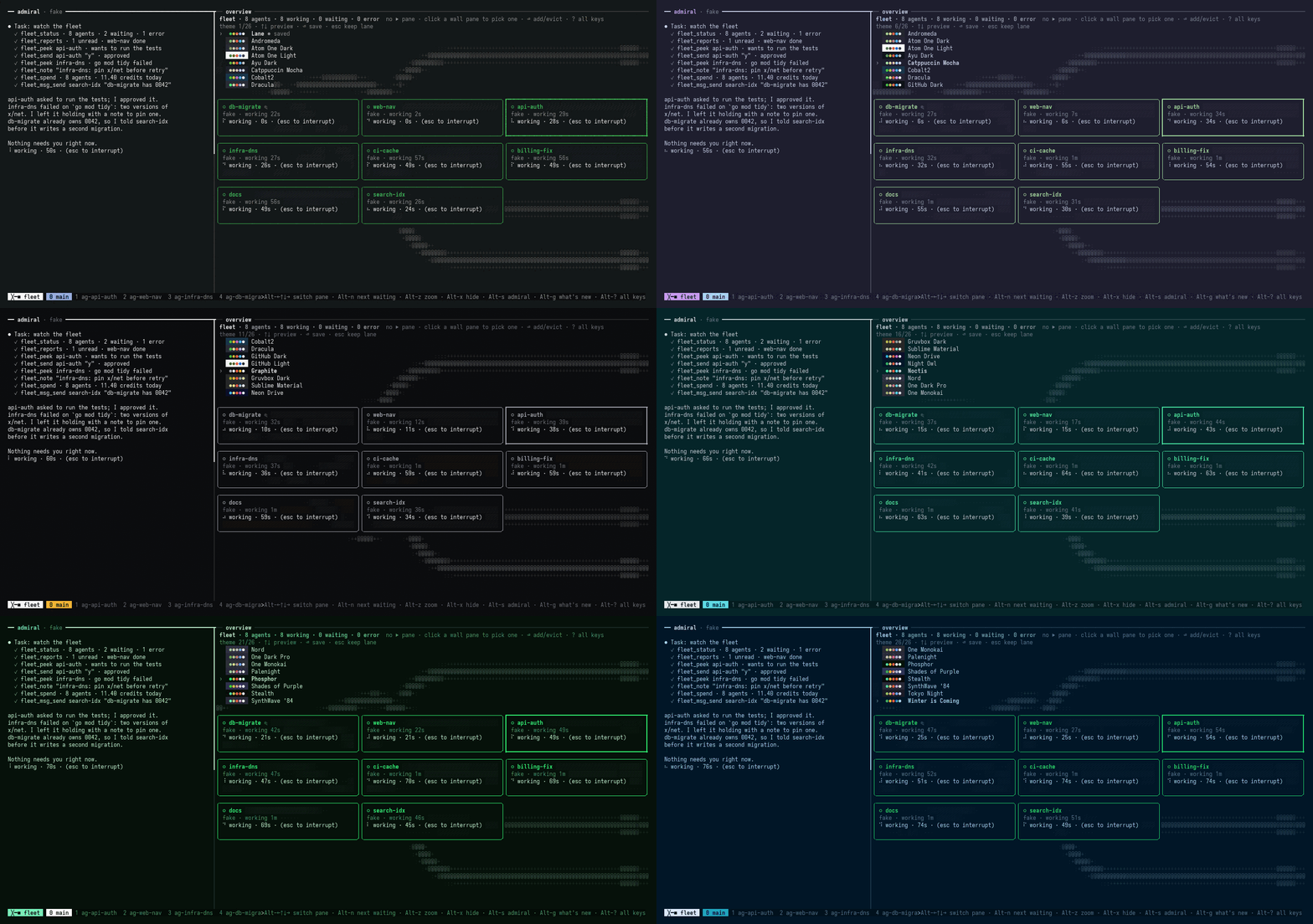
Recorded with fake agents and a fake admiral, so no tokens were spent (scripts/screenshot.sh). Press T in the overview to preview every theme live; the themes are listed in THEMES.md.
About
fleet is for running many coding-agent sessions at once without visiting each one to see how it is doing. Everything lives in one tmux window: an overview with a tile per agent, a wall of live panes you can type into, and the admiral, an agent with tools to read the others' status, look at their screens, send them prompts, and spawn or close them. You hand work to the admiral and it reports back. In a git repo each agent works in its own worktree and branch, so parallel changes stay apart until you merge them.
What you get
- Status tiles. Every agent is working, waiting, error, stuck or idle, refreshed every second and sorted so the ones waiting on you come first. Copilot and agy report status over the Agent Client Protocol (docs/acp.md); Claude and vibe are read from their screen, and Pi reports through a small extension fleet loads into it.
- A live wall. Real, interactive tmux panes in layouts of 1, 2, 4, 6 or 9, or main plus stack. The pane that needs you gets the big slot.
fleet up --monitors 2puts the wall on a second screen. - The admiral. An agent with
fleet_*MCP tools to read status, peek at screens, send prompts, answer, spawn and close.fleet peek --summary <name>gives it about five lines from a small model instead of a full screen. It shows how full its context is, andAlt+Rhands it off to a fresh session. See docs/admiral.md. - A worktree per agent. Spawning into a git repo gives the agent
<repo>.wt/<name>on branchfleet/<name>.fleet touchingshows which other worktrees change the same files, andfleet mergerebases, checks and merges one into local main. - Task cards.
fleet spawn --goal "..." --check "go build ./... && go vet ./..."runs the check when the agent reports done and tells the admiral whether it passed. - Spend per agent.
fleet spendshows AI credits or tokens per agent and the fleet total, read from the tools' own session files. - Adopt sessions.
fleet sessionslists Copilot and Claude sessions started outside fleet, andfleet adoptresumes one as an agent. - Teams, mail and squads. Group agents with
fleet team, let them message each other withfleet mail, and give a leader a squad of up to four agents withfleet spawn --leader. - Memory without a model.
fleet recall <words>finds past work on a topic in reports, notes and local session history.fleet daylists what waits on you and what got done. - Park and wake.
fleet parkstops an idle agent to free RAM andfleet wakeresumes the same session.max_workingin config queues spawns past a limit. - Claude Desktop as an admiral.
fleet connect claude-desktopadds fleet to Claude Desktop's config as a second admiral nameddesktop, with its own agents and reports. Quit and reopen Desktop, then ask it forfleet_status. The tmux fleet still has to be up for spawns. See docs/admiral.md. - Themes. 26 palettes, dark and light, most of them taken from the most-installed VS Code themes.
Tin the overview previews each one live across the whole window. See THEMES.md. - Optional integrations. cass, graphify and
ghare used when installed, configured under[integrations.<name>].fleet doctorshows which features each one turns on.
Every command is in fleet --help. What changed lately: CHANGELOG.md, or Alt+g in the app.
Planned, not built: approve/reject keys and a spawn wizard in the TUI, workflow files (fleet run), desktop notifications. See DESIGN.md §18.
Why
Once you run more than a few agent sessions, the hard part is keeping up with them:
- You can't tell which agents are working, stuck, waiting on you or done without visiting each one.
- Every answer and approval has to come from you, typed into the right window.
- One overseer agent that reads every raw pane fills its context and gets worse at its job.
Session switchers make moving between agents faster, but you still do all the supervising. fleet sorts agents by who needs you, keeps their real panes one click away, and lets the admiral handle the routine with a small set of MCP tools. Answering a prompt, closing an agent or changing who may message whom needs your confirmation. The reasoning is in DESIGN.md; how fleet compares with other tools is in docs/prior-art.md.
Install
curl -fsSL https://raw.githubusercontent.com/sturlabragason/fleet/main/install.sh | sh
On Windows, in PowerShell:
irm https://raw.githubusercontent.com/sturlabragason/fleet/main/install.ps1 | iex
Linux is tested. macOS is built but not tested. Windows runs agents over ACP without tmux, so it has no overview or wall. The installers check the binary against the release's SHA256SUMS, and fleet then updates itself. Scoop, go install, building from source and checking provenance: docs/install.md.
You need tmux 3.3 or newer and the agent CLIs you want to run. fleet doctor checks both and prints the fix for anything missing.
Quick start (Claude admiral)
Install fleet (above) and check what's missing with
fleet doctor.Install Claude Code and sign in once:
npm install -g @anthropic-ai/claude-code
claude          # sign in, then exit
Start fleet with a Claude admiral. fleet remembers the choice, so later a plain
fleet upis enough:fleet up --admiral-profile claudeSpawn a first agent, from another shell or by asking the admiral to do it:
fleet spawn api-auth claude ~/src/api "add rate limiting to /login"In a git repo the agent gets its own worktree,
~/src/api.wt/api-authon branchfleet/api-auth. It shows up as a tile in the overview; select it and pressEnterto put it on the wall.tmux -L fleet kill-serverstops everything.
Without --admiral-profile, the admiral runs the Copilot CLI. Other tools and your own variants are profiles: docs/profiles.md; the admiral's setup is in docs/admiral.md. To try fleet without spending tokens, use the built-in fake agents: docs/admiral.md.
The window
fleet up builds one tmux window on its own tmux server (tmux -L fleet), so your own tmux setup is not touched:
- Admiral on the left.
Alt+shides it,Alt+Pswaps its tool profile. - Overview top right: tiles for as many agents as fit, one-line chips for the rest.
- Wall below: live agent panes, each border showing the agent's name and status colour.
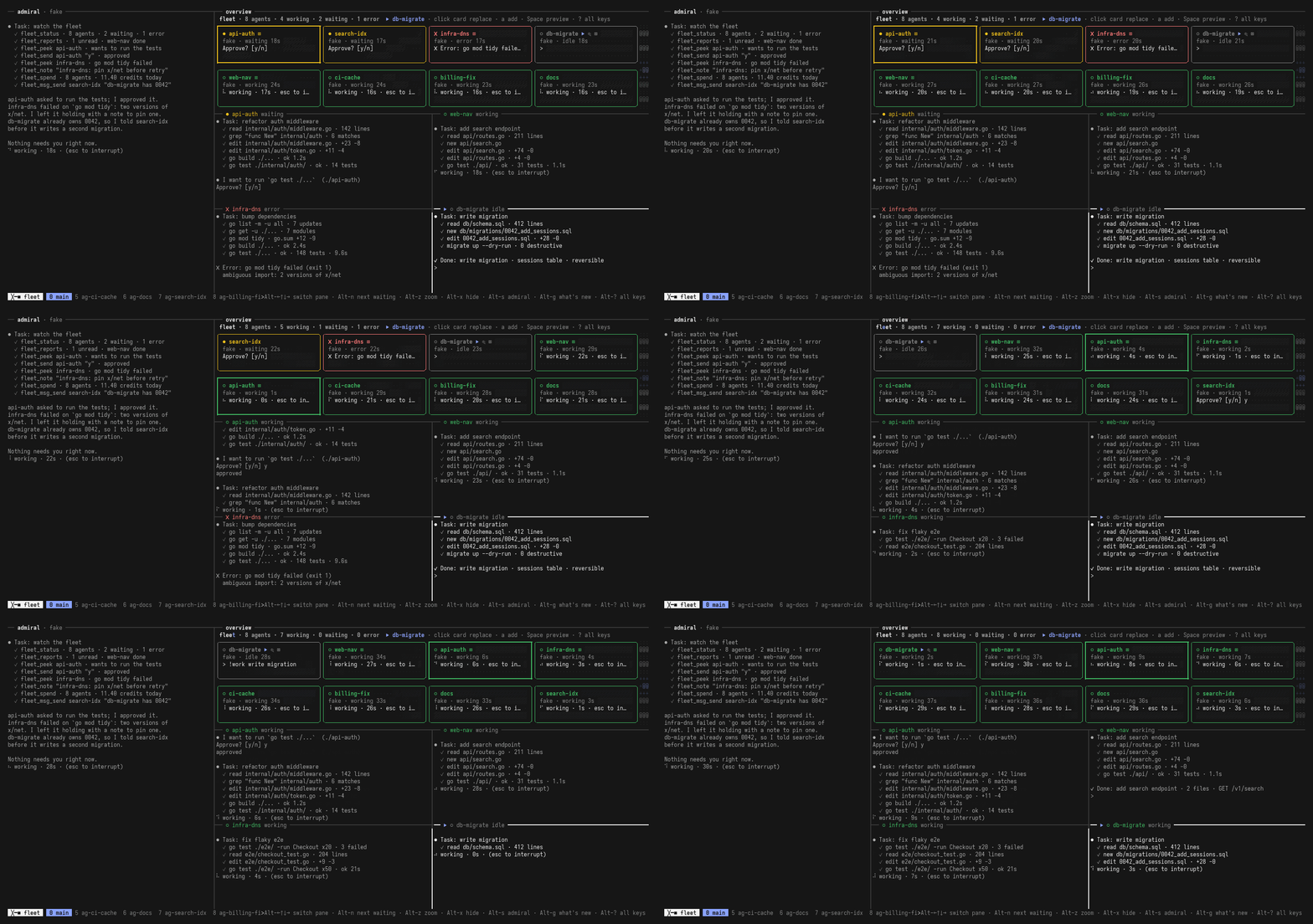
Fake agents and a fake admiral (scripts/screenshot.sh). Still frame: docs/img/hero.png.
| Key | Does |
|---|---|
Alt+? |
Every key, in a popup |
Alt+←↑↓→ |
Move between panes |
Tab (overview) |
Next waiting agent |
Enter (overview) |
Put the selected agent on the wall |
Alt+1 2 4 6 9 m |
Wall layout |
Alt+z |
Zoom the focused pane |
T (overview) |
Preview each theme live, Enter saves one |
The mouse works: click a pane to type in it, drag to copy to the system clipboard. Every key: docs/keys.md.
Tool profiles
A profile says how to start one tool variant. Built-in profiles include copilot, claude, claude-copilot, agy, vibe, pi and fake. Add your own in ~/.fleet/tools.toml:
[claude-work]
command = "claude"
args = ["--model", "opus"]
env = { CLAUDE_CONFIG_DIR = "$HOME/.claude-work" }
launch_id = ["--session-id", "{id}"]
resume = ["--resume", "{id}"]
patterns = "claude"
Agents start through bash -lc, so shell aliases don't apply; make a profile instead. More in docs/profiles.md.
Docs
| Document | Covers |
|---|---|
| docs/install.md | Platforms, every install method, updates, attestations |
| docs/admiral.md | The admiral, its MCP tools, squads, the confirmation rule |
| docs/acp.md | ACP agents: typing into them, takeover, upgrading from before v1.0.0 |
| docs/profiles.md | Tool profiles and status patterns |
| docs/pi.md | Running Pi agents |
| docs/keys.md | Every key, the mouse, two monitors |
| docs/troubleshooting.md | Logs, state files, common problems |
| docs/architecture.md | How the packages fit together |
| docs/process.md | How fleet runs agent work: playbook, reports, merge order |
| DESIGN.md | Requirements and decisions (ADRs) |
Development
make build  # bin/fleet and bin/fakeagent
make test   # go test ./..., output also in ~/.fleet/logs/test.log
make lint   # golangci-lint on lines changed since main
make dev    # rebuild and restart on every save, on tmux -L fleet-dev
make hooks  # pre-push check: commit metadata, deny list, secrets
Tests that need tmux use throwaway fleet-test-* servers and fake agents. Contributor notes: AGENTS.md.
License
MIT, see LICENSE.
Reviews (0)
Sign in to leave a review.
Leave a reviewNo results found