StyleSwift
Health Pass
- License — License: NOASSERTION
- Description — Repository has a description
- Active repo — Last push 0 days ago
- Community trust — 19 GitHub stars
Code Warn
- network request — Outbound network request in extension/sidepanel/agent-loop.js
- network request — Outbound network request in extension/sidepanel/api.js
Permissions Pass
- Permissions — No dangerous permissions requested
StyleSwift is a Chrome browser extension that acts as an AI agent to generate and apply custom CSS themes for any website based on a single natural language prompt. It supports a wide variety of large language models (such as OpenAI, Anthropic, and Google) to analyze page structures and dynamically restyle sites locally.
Security Assessment
Risk Rating: Medium
The tool does not request dangerous browser permissions and operates mostly locally by injecting CSS styles. However, the automated scanner flagged outbound network requests within two core JavaScript files (`agent-loop.js` and `api.js`). These requests are highly likely the mechanism used to send your prompts and website HTML structures to third-party LLM APIs (like OpenAI, Anthropic, etc.) to generate the CSS. While the description claims a "privacy-first design," sending page DOM structures to AI providers inherently exposes potentially sensitive data. Additionally, the license is marked as `NOASSERTION`, meaning the legal terms for using or modifying the open-source code are undefined.
Quality Assessment
The project appears to be actively maintained, with its last push occurring very recently. It has a modest but growing community footprint with 19 GitHub stars. The repository includes detailed documentation, comprehensive feature lists, and screenshots. However, the lack of a formally declared open-source license is a notable drawback for developers looking to fork or integrate the code.
Verdict
Use with caution — verify how your LLM API keys are handled and be mindful of the site data you share with AI providers.
custom themes for any website with one sentence. AI analyzes, generates CSS, applies — all locally. Privacy-first design.一句话,让 AI 给网站换皮肤。智能解析、精准生成、隐私优先。
数字女娲 (StyleSwift)
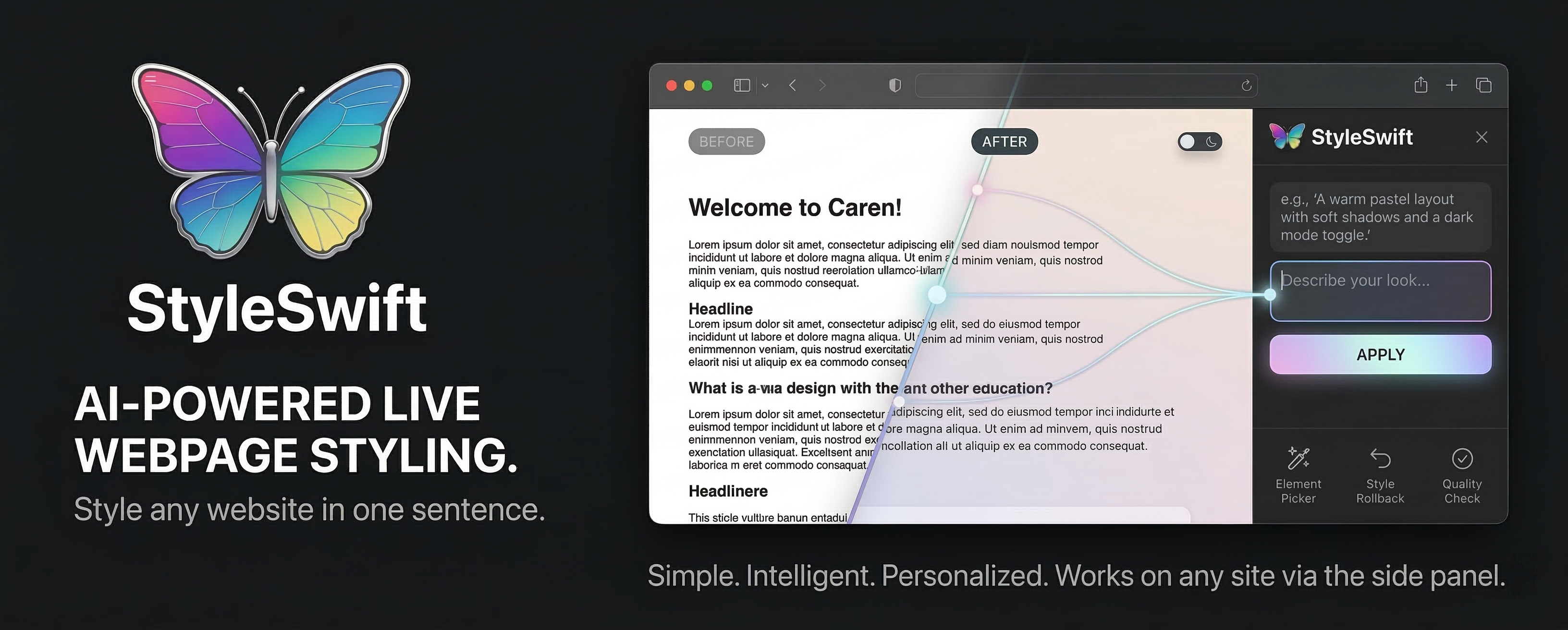











中文
项目简介
数字女娲 (StyleSwift) 是一个 AI Agent 系统,专注于网页样式个性化。
核心是一个遵循"模型即智能体"设计理念的 Agent 内核——代码只提供原子化能力(工具),模型负责推理、规划和决策。用户用自然语言描述意图,Agent 自主分析页面、规划执行步骤、调用工具完成任务。
Chrome 扩展是 Agent 的运行载体,提供与用户交互的界面和与浏览器页面通信的能力。这种架构设计使 Agent 内核与平台解耦,理论上可以适配其他运行环境。
Agent 核心能力:
| 能力 | 说明 |
|---|---|
| 自然语言理解 | 解析用户意图,自主规划执行步骤,无需预设工作流 |
| 自主页面分析 | 模型决定需要哪些页面信息,按需调用 get_page_structure 或 grep 工具 |
| 动态样式生成 | 根意图和页面特征,生成最优 CSS 规则,支持回滚 |
| 视觉质检循环 | 样式应用后自动检测问题(对比度、可访问性),发现缺陷可自主修复 |
| 风格学习迁移 | 提取视觉特征,跨网站复用风格,持续学习用户偏好 |
| 多轮对话记忆 | 会话隔离、上下文管理、历史压缩,支持长对话场景 |
设计哲学:
The model already knows how to be an agent. Your job is to get out of the way.
传统方案预设工作流,代码做决策;本系统的 Agent 让模型自己决定流程,灵活适应用户需求:
- 用户说"把标题改成红色"→ Agent 自己推理:不需要获取整个页面结构,直接调用
grep找标题元素 - 用户说"撤销"→ Agent 理解意图,调用
apply_styles(mode='rollback_last') - 模型能力提升时,系统自动获益,无需修改代码
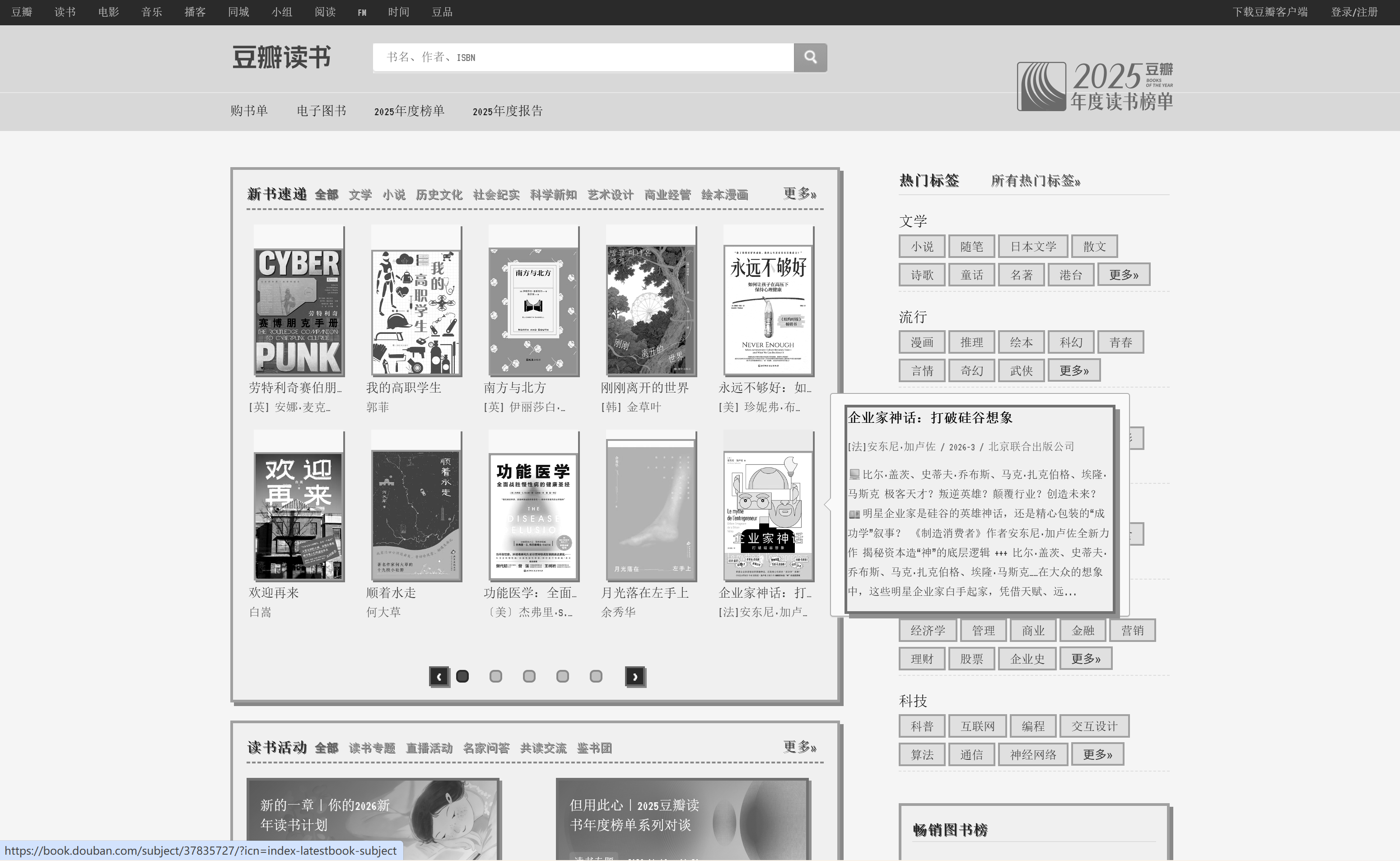
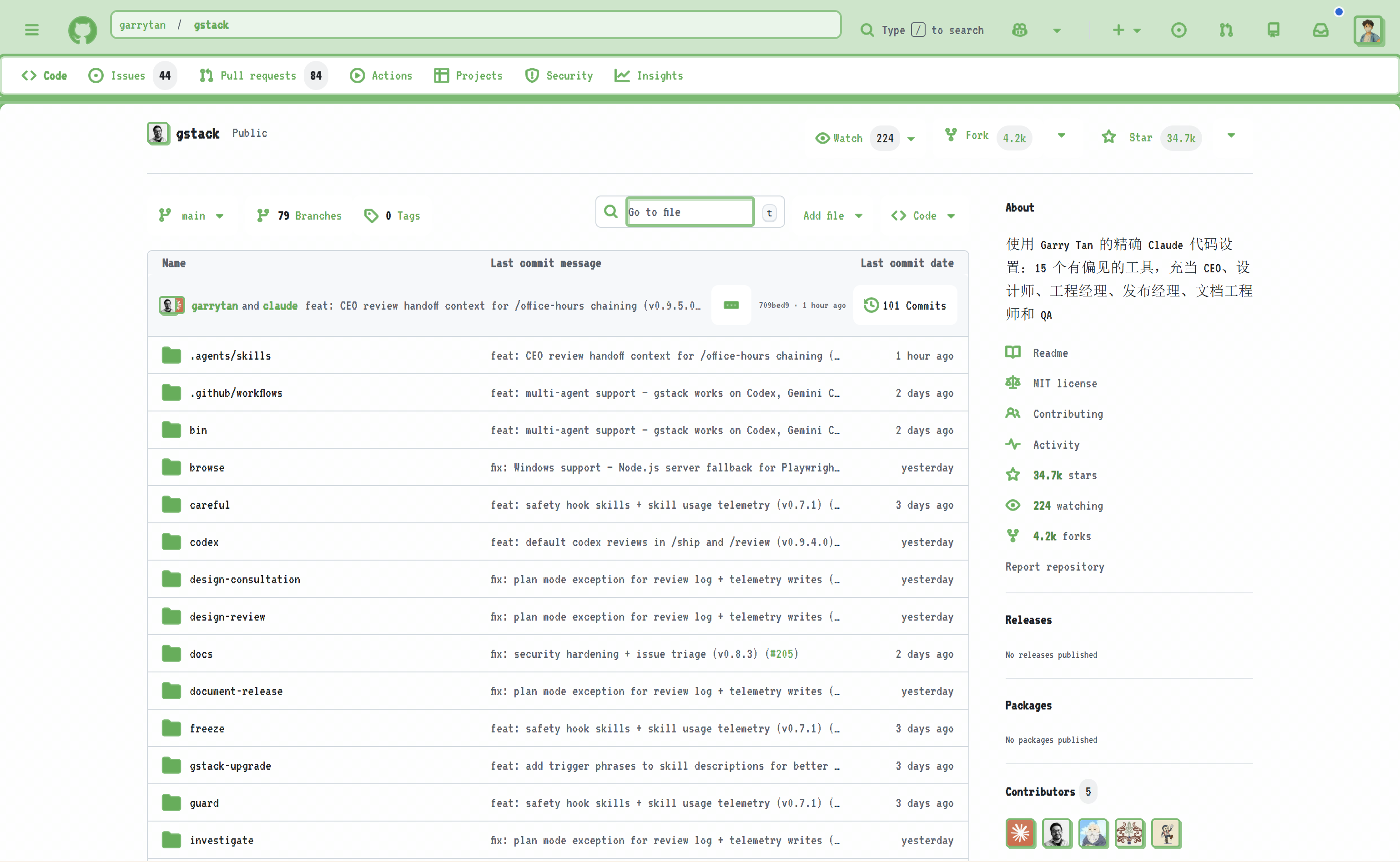
效果预览
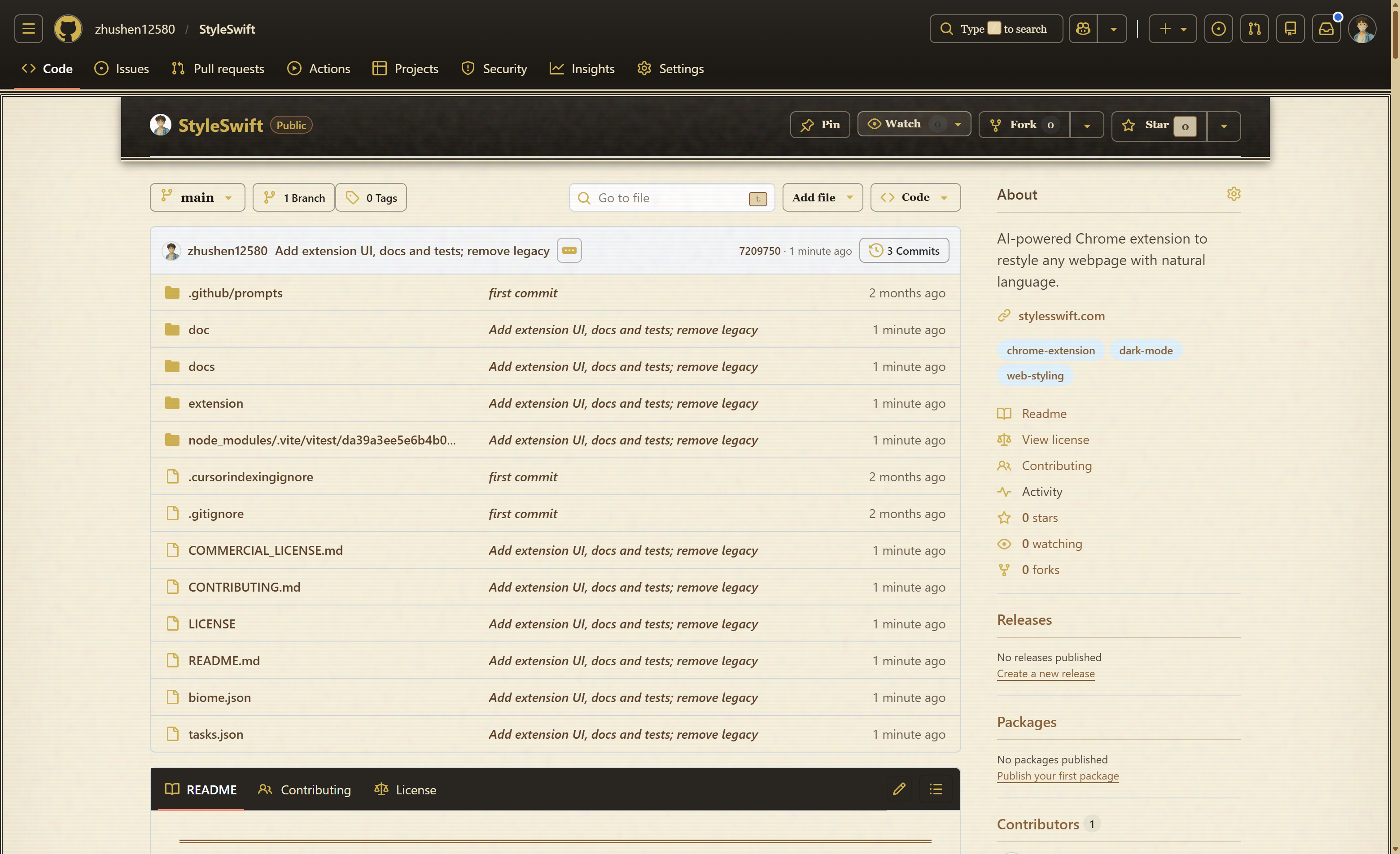 |
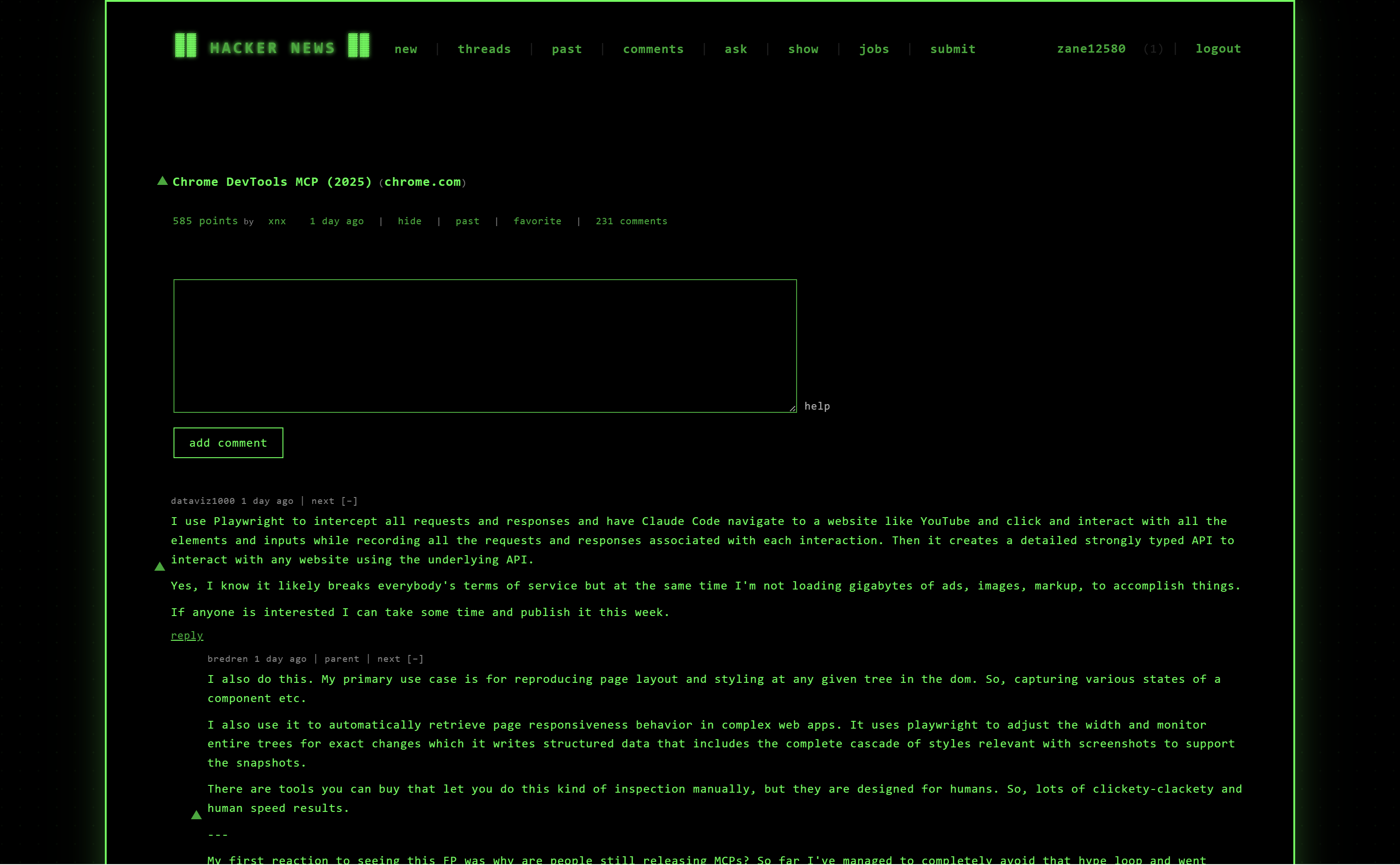 |
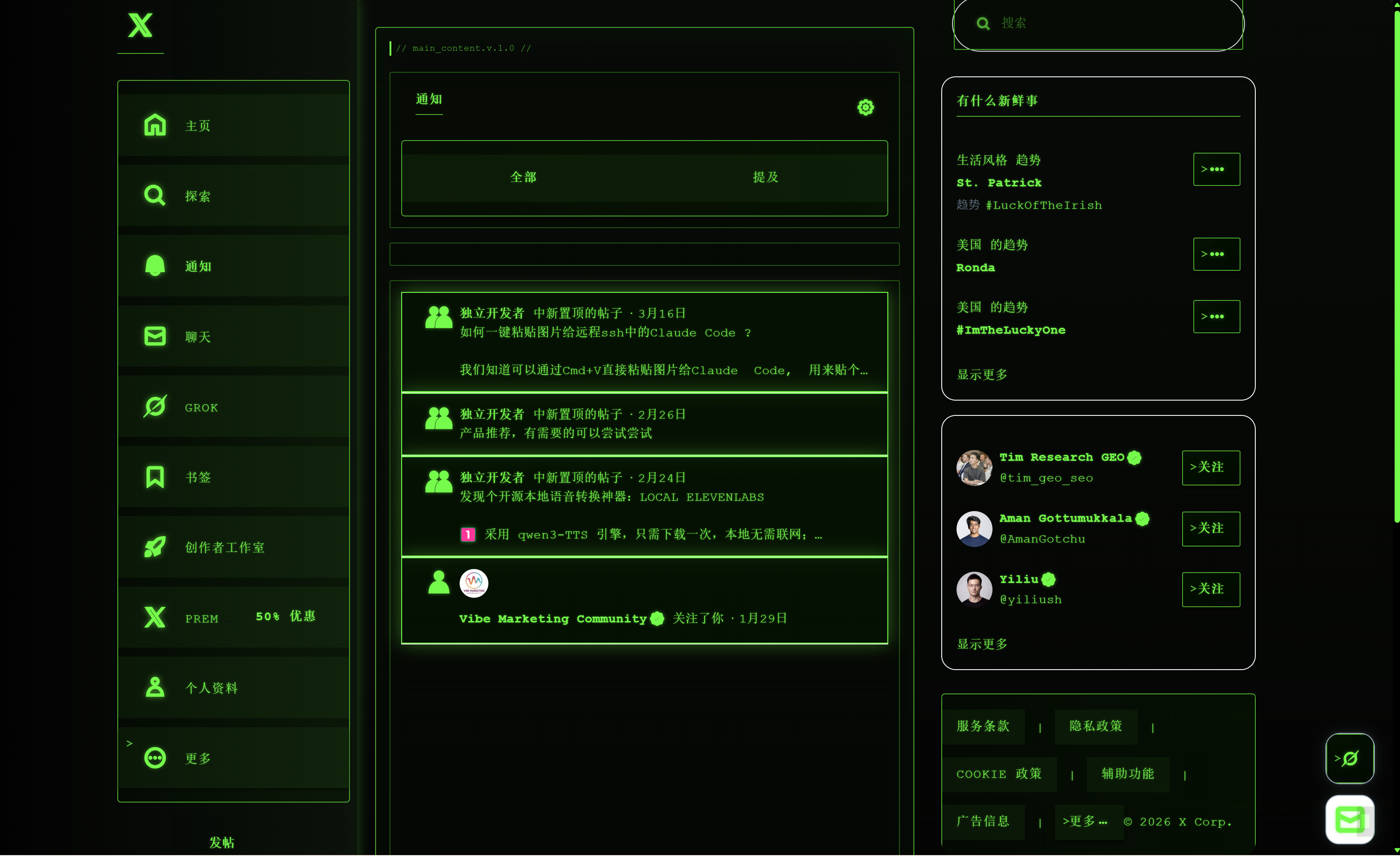 |
|---|---|---|
| 旧报纸风格设计 | 黑客帝国风格设计 | 风格一键迁移 |
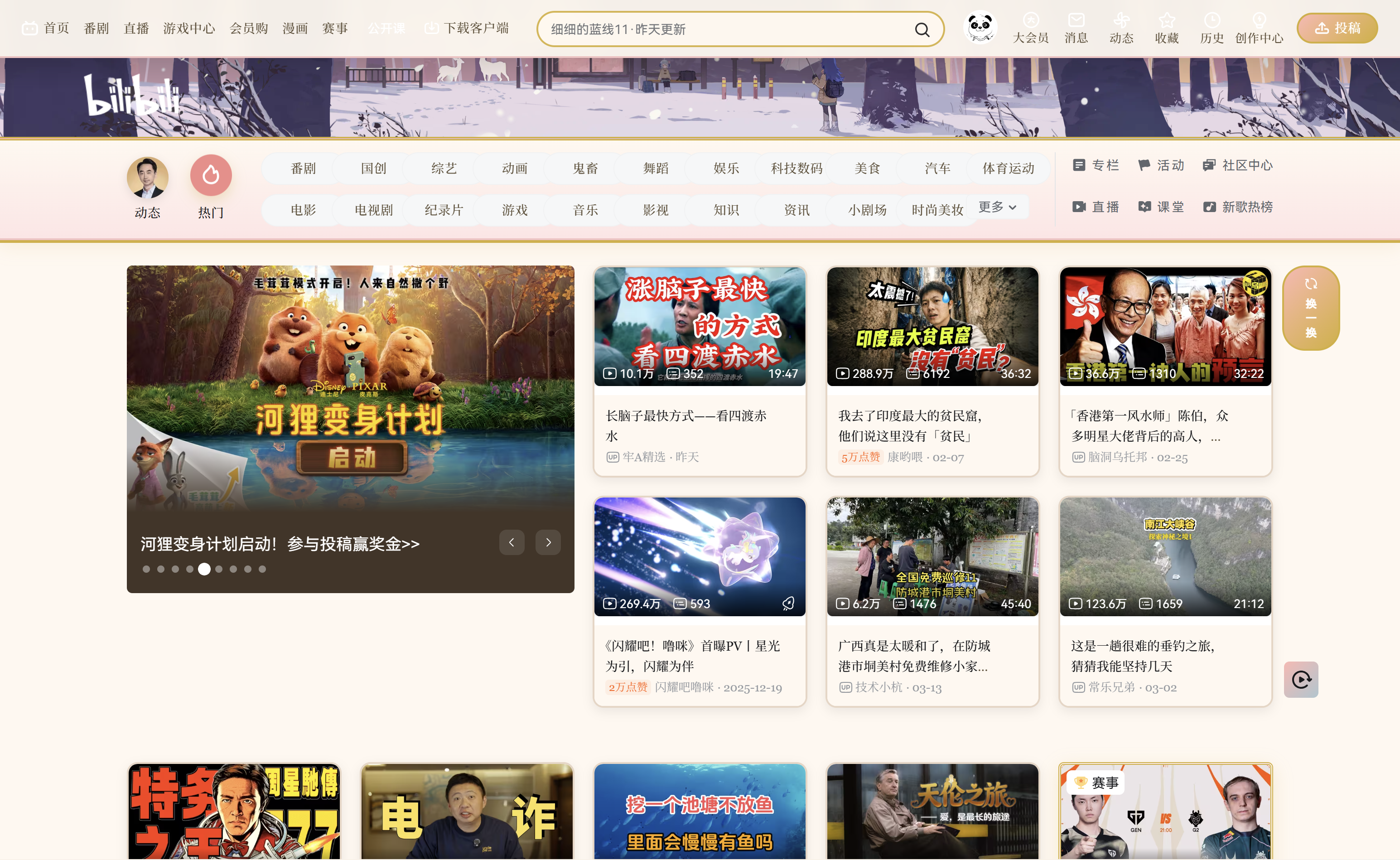 |
 |
 |
|---|---|---|
| B站韦斯安德森风格 | 豆瓣墨水屏风格 | GitHub像素风 |
只需一句话,数字女娲 即可理解你的设计意图并智能应用样式。无论是什么网站,都能为你打造独特的视觉体验。
快速入手
安装
已上架 Chrome 应用商店:https://chromewebstore.google.com/detail/styleswift/llchggmimjgnbjlcgpkjmplhfbkjjcli
从源码安装:
git clone https://github.com/StyleSwift/StyleSwift.git
cd StyleSwift
加载扩展:
- 打开 Chrome,访问
chrome://extensions/ - 启用「开发者模式」
- 点击「加载已解压的扩展程序」
- 选择
extension文件夹
使用
- 配置 API:首次启动输入 API Key(支持 OpenAI 和 Anthropic 格式)
- 打开面板:点击扩展图标打开 Side Panel
- 自然语言交互:描述你的需求
- 「给这个页面换个深色模式」
- 「把导航栏放大一点」
- 「隐藏这个广告」(先点元素选择器)
- 风格迁移:保存成功的风格,在其他网站复用
Agent 架构
┌─────────────────────────────────────────────────────────────────────┐
│                          Agent 核心循环                              │
│                                                                     │
│   用户消息 → 构建上下文 → 模型推理 → 工具调用 → 执行结果 → 循环判断    │
│                              ↓                                      │
│                    ┌─────────────────────┐                         │
│                    │     工具系统         │                         │
│                    └─────────────────────┘                         │
│                              ↓                                      │
│   ┌───────────────────────────┼───────────────────────────┐        │
│   ↓                           ↓                           ↓        │
│ 页面操作                    样式管理                    画像/技能   │
│ • get_page_structure        • apply_styles              • get_user_profile
│ • grep                      • edit_css                  • update_user_profile
│                             • get_current_styles        • load_skill
│                                                         • save_style_skill
│                                                         • list/delete_style_skill
│   ┌───────────────────────────┴───────────────────────────┐        │
│   ↓                           ↓                           ↓        │
│ 任务管理                    子智能体                      截屏      │
│ • TodoWrite                 • Task(QualityAudit)         • capture_screenshot
│                                                                     │
└─────────────────────────────────────────────────────────────────────┘
                              ↓
┌─────────────────────────────────────────────────────────────────────┐
│                      运行载体 (Chrome Extension)                     │
│                                                                     │
│   ┌──────────────┐    ┌──────────────┐    ┌──────────────┐        │
│   │  Side Panel  │    │ Content      │    │  Storage     │        │
│   │  (Agent宿主) │←──→│ Script       │    │  (会话/画像)  │        │
│   └──────────────┘    │ (页面操作)   │    └──────────────┘        │
│                       └──────────────┘                             │
└─────────────────────────────────────────────────────────────────────┘
Agent 核心:
- Agent Loop:运行在 Side Panel,驱动对话循环、上下文管理、工具调度
- 工具系统:13 个原子化工具,每个只做一件事
- 子智能体:可启动质检子任务(QualityAudit),隔离上下文运行
- 上下文管理:Token 预算、历史压缩、去重保护、迭代上限
运行载体:
- Side Panel:UI 交互、会话管理、API 调用、工具调度
- Content Script:页面结构提取、元素搜索、CSS 注入/回滚
- Storage:会话数据、用户画像、风格技能持久化
会话管理
采用三层隔离架构,支持多网站并行工作:
┌─────────────────────────────────────────────────────────────┐
│ 全局层:用户画像(跨站点偏好)                              │
│ Storage Key: userProfile                                   │
└─────────────────────────────────────────────────────────────┘
                              │
                              ▼
┌─────────────────────────────────────────────────────────────┐
│ 域名层:每个域名的会话列表                                  │
│ Storage Key: sessions:{domain}:index                        │
│ 限制:每域名最多 20 个会话                                  │
└─────────────────────────────────────────────────────────────┘
                              │
                              ▼
┌─────────────────────────────────────────────────────────────┐
│ 会话层:单个会话数据                                        │
│   • sessions:{domain}:{id}:meta     (标题等元数据)         │
│   • sessions:{domain}:{id}:styles    (当前 CSS)            │
│   • sessions:{domain}:{id}:styles_history (CSS 回滚栈)     │
│   • IndexedDB: {domain}:{id}         (对话历史)            │
└─────────────────────────────────────────────────────────────┘
                              │
                              ▼
┌─────────────────────────────────────────────────────────────┐
│ 活动镜像:当前激活样式(刷新恢复)                          │
│ Storage Key: active_styles:{domain}                        │
│ Purpose: 页面刷新时 prevent FOUC (无闪烁恢复)              │
└─────────────────────────────────────────────────────────────┘
关键特性:
- 域名隔离:不同网站独立会话,互不干扰
- 回滚支持:CSS 历史栈支持无限撤销
- 刷新恢复:
active_styles镜像确保刷新后样式不丢失 - 自动清理:90 天未访问的会话自动清理
Agent 设计理念
The model already knows how to be an agent. Your job is to get out of its way.
核心哲学:代码只提供原子化能力(工具),模型负责推理和决策。
传统方案 vs 本系统:
| 传统方案 | 本系统 |
|---|---|
| 预设工作流(代码做决策) | 模型自主规划执行步骤 |
| 硬编码判断逻辑 | 系统提示词引导推理 |
| 边界情况需不断打补丁 | 模型能力提升自动获益 |
示例:
用户:「把标题改成蓝色」

传统方案:
1. 代码自动调用 get_page_structure(固定流程)
2. 代码分析页面结构
3. 代码调用样式工具

本系统(模型推理):
1. 模型判断:不需要整个页面结构,只需找标题
2. 模型决定:调用 grep(query="h1, h2, .title")
3. 模型分析返回结果,确定目标选择器
4. 模型调用 apply_styles
Agent 核心机制
意图分类(Intent Classification)
系统提示词要求模型首先对用户请求进行分类:
| 层级 | 类型 | 示例 | 行为 |
|---|---|---|---|
| Tier 1 | Specific | 「标题改成红色」 | 直接执行,验证选择器后应用 |
| Tier 2 | Vague | 「让页面好看点」 | 先问1-2个澄清问题 |
| Tier 3 | Complex | 「创建品牌主题」 | 先加载技能知识库,制定计划 |
任务规划(TodoWrite)
多步骤任务自动触发规划机制:
- 模型调用
TodoWrite列出所有步骤 - 用户确认或编辑步骤
- 模型按顺序执行,更新状态
pending → in_progress → completed
上下文管理
Token 预算: 50,000 tokens(系统提示词 + 工具定义约 4,000 tokens)
┌─────────────────────────────────────────────────────────────────┐
│                      消息构建流程                              │
├─────────────────────────────────────────────────────────────────┤
│ Layer 0: SYSTEM_BASE(固定指令)                               │
│         - 身份定义、安全规则、意图分类                         │
│         - 任务规划、页面探索、样式操作                         │
│         - CSS 规范、设计约束、质量审计                         │
│         约 600 行,~4,000 tokens                               │
├─────────────────────────────────────────────────────────────────┤
│ Layer 1: Session Context(动态上下文)                          │
│         - Domain: 当前域名                                     │
│         - Session: 会话标题                                    │
│         - User Style Preference: 用户偏好摘要                   │
├─────────────────────────────────────────────────────────────────┤
│ Layer 2: Available Skills(动态能力)                           │
│         - 静态技能:frontend-design, audit 等                   │
│         - 用户技能:skill:{id} 形式的保存风格                   │
└─────────────────────────────────────────────────────────────────┘
压缩策略(当超过预算时触发):
| 阶段 | 操作 | 说明 |
|---|---|---|
| 1. 边界计算 | findKeepBoundary() |
保留 40% 预算 + 最近 6 条消息 |
| 2. LLM 摘要 | summarizeOldTurns() |
结构化摘要:已应用样式、用户偏好、待处理请求 |
| 3. 标记压缩 | _isCompressed: true |
保留在存储,排除于 LLM 历史 |
| 4. 截断后备 | truncateLargeToolResults() |
超过 3000 字符的 tool_result 截断为 1000 |
Token 估算规则:
- CJK 字符: 1.5 tokens/字符
- ASCII 字符: 0.25 tokens/字符
- 图片: 固定 1000 tokens 占位
历史消息标记:
_isSummary: AI 生成的对话摘要_isCompressed: 已压缩的旧消息(存储保留,不发 LLM)_isLearned: 确认已学习摘要的助手消息_reasoning: 推理链内容(仅最后一条保留)
特殊处理:
- 图片仅保留在最后一条用户消息中(视觉模型支持)
- tool_result 消息不能作为压缩切割点(会破坏 tool_use/tool_result 配对)
- 压缩时排除
_isLearned确认消息
死循环保护
系统监测重复工具调用,连续3次相同 tool+args 触发警告:
检测到死循环:grep 被连续调用3次
→ 返回提示:「请尝试不同的方法」
→ 重置调用历史
子智能体(Task)
质检子智能体(QualityAudit)在隔离上下文中运行:
- 独立的 token 预算(40,000)
- 独立的工具集(含截屏能力)
- 自动注入页面截屏
- 返回结构化审计报告
工具设计原则:
- 原子性:每个工具只做一件事,组合使用完成复杂任务
- 事实输出:返回数据和状态,不做判断推荐
- 幂等性:相同输入产生相同结果,无副作用
Agent 决策示例:
用户:"把页面标题改成蓝色"

模型推理:
1. 不需要 get_page_structure(粒度太粗)
2. 调用 grep(query="h1, h2, .title") 找标题
3. 分析返回结果,确定目标选择器
4. 调用 apply_styles(selectors, {color: blue})
5. 完成

vs 传统预设流程:
1. 获取整个页面结构(冗余)
2. 硬编码逻辑找标题
3. 应用样式
运行环境:Chrome 扩展
Agent 内核需要一个运行载体。目前实现的载体是 Chrome 扩展,提供:
- 用户界面(Side Panel)
- 页面操作能力(Content Script)
- 数据持久化(Chrome Storage + IndexedDB)
交互流程
┌──────────┐     ┌──────────┐     ┌──────────┐     ┌──────────┐
│  用户输入  │ ──→ │ Agent Loop│ ──→ │ 模型推理  │ ──→ │ 工具调用  │
└──────────┘     └──────────┘     └──────────┘     └──────────┘
      ↑                                                    │
      │                                                    ↓
      │                                              ┌──────────┐
      │                                              │ 页面操作  │
      │                                              │ Content  │
      │                                              │ Script   │
      │                                              └──────────┘
      │                                                    │
      └──────────────────── 结果反馈 ←─────────────────────┘
Agent 特性:
- 多轮对话:像和设计师对话,持续优化
- 撤销回滚:支持回退操作历史
- 自主学习:记住风格偏好,智能推荐
架构设计决策
本项目使用 ADR (Architecture Decision Records) 记录重要设计决策:
| ADR | 主题 | 说明 |
|---|---|---|
| ADR-001 | Side Panel vs Popup | 为什么选择 Side Panel |
| ADR-002 | 双 Content Script 策略 | 早期注入 + 延迟操作 |
| ADR-003 | 双层存储架构 | chrome.storage + IndexedDB |
| ADR-004 | 风格迁移方案 | 跨网站风格复用 |
| ADR-005 | 会话隔离模型 | 域名级隔离 |
| ADR-006 | Agent 设计理念 | 模型即智能体 |
| ADR-007 | Tab 锁定机制 | 并发控制 |
核心设计原则:
| 原则 | 说明 |
|---|---|
| 模型即智能体 | 代码只提供能力,模型负责推理——不预设工作流 |
| 能力原子化 | 每个工具只做一件事,不含判断逻辑 |
| 上下文珍贵 | Token 预算、按需获取、历史压缩 |
| 会话隔离 | 按域名分割,支持多会话并行 |
| 零部署 | 纯扩展形态,用户自带 API Key |
详细架构文档:ARCHITECTURE.md
项目结构
StyleSwift/
├── extension/                 # 运行载体实现
│   ├── sidepanel/            # Agent 宿主环境
│   │   ├── panel.js          # UI 逻辑
│   │   ├── agent-loop.js     # Agent 决策循环 ⭐
│   │   ├── api.js            # LLM API 调用
│   │   ├── tools.js          # 工具定义 ⭐
│   │   ├── session.js        # 会话管理
│   │   └── style-skill.js    # 风格技能
│   ├── content/              # 页面操作层
│   │   ├── early-inject.js   # 早期注入
│   │   └── content.js        # DOM 操作
│   ├── background/           # 生命周期管理
│   │   └── service-worker.js
│   └── skills/               # 预置风格模板
├── doc/                      # 架构文档
│   ├── ARCHITECTURE.md       # 架构总览
│   ├── ADR/                  # 架构决策记录
│   └── features/             # 功能设计
└── tests/                    # 测试
技术栈
Agent 内核:
- LLM Provider API(OpenAI / Anthropic 兼容格式)
- Function Calling(工具调用协议)
运行载体:
- Manifest V3(Chrome 扩展标准)
- Side Panel API(现代化扩展 UI)
- Content Script(页面操作能力)
- Chrome Storage API + IndexedDB(数据持久化)
许可证
数字女娲是开源项目,采用 Server Side Public License (SSPL) 开源许可证,详情请参阅 LICENSE 文件。
致谢
- 感谢所有贡献者
- 感谢 impeccable 项目,为样式生成质量提供了重要帮助
- 感谢 learn-claude-code 项目,本项目遵循了其 Agent 设计哲学
- 感谢 ui-ux-pro-max-skill 项目,为本项目提供了风格提示词参考
- 灵感来源于用户对个性化浏览体验的需求
联系方式

扫码添加 builder 微信,交流使用心得、反馈问题。
English
Introduction
数字女娲 (StyleSwift) is an AI Agent system focused on web page style personalization.
At its core is an Agent kernel following the "Model as Agent" design philosophy—code provides only atomic capabilities (tools), while the model handles reasoning, planning, and decision-making. Users describe their intent in natural language, and the Agent autonomously analyzes the page, plans execution steps, and invokes tools to complete tasks.
The Chrome extension serves as the runtime carrier for the Agent, providing user interface and browser page communication capabilities. This architecture decouples the Agent kernel from the platform, theoretically enabling adaptation to other runtime environments.
Agent Core Capabilities:
| Capability | Description |
|---|---|
| Natural Language Understanding | Parses user intent, autonomously plans execution steps without preset workflows |
| Autonomous Page Analysis | Model decides what page information is needed, invokes get_page_structure or grep tools on demand |
| Dynamic Style Generation | Generates optimal CSS rules based on intent and page characteristics, supports rollback |
| Visual Quality Loop | Automatically detects issues after style application (contrast, accessibility), can self-repair defects |
| Style Learning & Transfer | Extracts visual features, reuses styles across websites, continuously learns user preferences |
| Multi-turn Dialogue Memory | Session isolation, context management, history compression for long conversations |
Design Philosophy:
The model already knows how to be an agent. Your job is to get out of the way.
Traditional approaches preset workflows where code makes decisions; this system's Agent lets the model decide the flow itself, flexibly adapting to user needs:
- User says "change the title to red" → Agent reasons: don't need entire page structure, directly invoke
grepto find title elements - User says "undo" → Agent understands intent, invokes
apply_styles(mode='rollback_last') - When model capabilities improve, the system benefits automatically without code changes
Effect Preview
|
|
|
|---|---|---|
| Old Newspaper Style | The Matrix Style | One-Click Style Transfer |
|
|
|
|---|---|---|
| Bilibili Wes Anderson Style | Douban E-ink Style | GitHub Pixel Art Style |
Simply describe your design intent, and 数字女娲 understands and intelligently applies styles. No matter what website, it creates unique visual experiences for you.
Quick Start
Installation
Available on Chrome Web Store: https://chromewebstore.google.com/detail/styleswift/llchggmimjgnbjlcgpkjmplhfbkjjcli
Install from Source:
git clone https://github.com/StyleSwift/StyleSwift.git
cd StyleSwift
Load Extension:
- Open Chrome, navigate to
chrome://extensions/ - Enable "Developer mode"
- Click "Load unpacked"
- Select
extensionfolder
Usage
- Configure API: Enter API Key on first launch (supports OpenAI and Anthropic format)
- Open Panel: Click extension icon to open Side Panel
- Natural Language Interaction: Describe your needs
- "Give this page a dark mode"
- "Make the navigation larger"
- "Hide this ad" (click element picker first)
- Style Transfer: Save successful styles, reuse on other websites
Agent Architecture
┌─────────────────────────────────────────────────────────────────────┐
│                          Agent Core Loop                            │
│                                                                     │
│   User Msg → Build Context → Model Reasoning → Tool Call → Result   │
│                              ↓                                      │
│                    ┌─────────────────────┐                         │
│                    │     Tools System     │                         │
│                    └─────────────────────┘                         │
│                              ↓                                      │
│   ┌───────────────────────────┼───────────────────────────┐        │
│   ↓                           ↓                           ↓        │
│ Page Operations            Style Mgmt              Profile/Skills   │
│ • get_page_structure       • apply_styles           • get_user_profile
│ • grep                      • edit_css               • update_user_profile
│                             • get_current_styles     • load_skill
│                                                      • save_style_skill
│                                                      • list/delete_style_skill
│   ┌───────────────────────────┴───────────────────────────┐        │
│   ↓                           ↓                           ↓        │
│ Task Mgmt                  Sub-agent                  Screenshot    │
│ • TodoWrite                • Task(QualityAudit)       • capture_screenshot
│                                                                     │
└─────────────────────────────────────────────────────────────────────┘
                              ↓
┌─────────────────────────────────────────────────────────────────────┐
│                   Runtime Carrier (Chrome Extension)                 │
│                                                                     │
│   ┌──────────────┐    ┌──────────────┐    ┌──────────────┐        │
│   │  Side Panel  │    │ Content      │    │  Storage     │        │
│   │ (Agent Host) │←──→│ Script       │    │ (Sessions)   │        │
│   └──────────────┘    │ (Page Ops)   │    └──────────────┘        │
│                       └──────────────┘                             │
└─────────────────────────────────────────────────────────────────────┘
Agent Core:
- Agent Loop: Runs in Side Panel, drives dialogue loop, context management, tool dispatch
- Tools System: 13 atomic tools, each doing one thing
- Sub-agent: Can launch QualityAudit sub-task with isolated context
- Context Management: Token budget, history compression, deduplication protection, iteration limit
Runtime Carrier:
- Side Panel: UI interaction, session management, API calls, tool dispatch
- Content Script: Page structure extraction, element search, CSS injection/rollback
- Storage: Session data, user profile, style skills persistence
Session Management
Three-tier isolation architecture for multi-site parallel work:
┌─────────────────────────────────────────────────────────────┐
│ GLOBAL LAYER: User Profile (cross-site preferences)        │
│ Storage Key: userProfile                                    │
└─────────────────────────────────────────────────────────────┘
                              │
                              ▼
┌─────────────────────────────────────────────────────────────┐
│ DOMAIN LAYER: Sessions per domain                           │
│ Storage Key: sessions:{domain}:index                        │
│ Limit: Max 20 sessions per domain                           │
└─────────────────────────────────────────────────────────────┘
                              │
                              ▼
┌─────────────────────────────────────────────────────────────┐
│ SESSION LAYER: Per-session data                             │
│   • sessions:{domain}:{id}:meta     (title and metadata)  │
│   • sessions:{domain}:{id}:styles    (current CSS)         │
│   • sessions:{domain}:{id}:styles_history (CSS rollback)   │
│   • IndexedDB: {domain}:{id}         (conversation history)  │
└─────────────────────────────────────────────────────────────┘
                              │
                              ▼
┌─────────────────────────────────────────────────────────────┐
│ ACTIVE MIRROR: Current active styles (refresh recovery)    │
│ Storage Key: active_styles:{domain}                         │
│ Purpose: Prevent FOUC on page refresh                       │
└─────────────────────────────────────────────────────────────┘
Key Features:
- Domain Isolation: Separate sessions for different websites
- Rollback Support: CSS history stack enables unlimited undo
- Refresh Recovery:
active_stylesmirror ensures styles persist across refresh - Auto-cleanup: Sessions not accessed for 90 days are automatically cleaned
Agent Design Philosophy
The model already knows how to be an agent. Your job is to get out of its way.
Core philosophy: Code provides only atomic capabilities (tools), while the model handles reasoning and decision-making.
Traditional vs This System:
| Traditional Approach | This System |
|---|---|
| Preset workflows (code decides) | Model autonomously plans execution steps |
| Hardcoded decision logic | System prompt guides reasoning |
| Edge cases need constant patches | Model capability improvements automatically benefit system |
Example:
User: "Change the title to blue"

Traditional:
1. Code auto-calls get_page_structure (fixed flow)
2. Code analyzes page structure
3. Code calls style tool

This System (model reasoning):
1. Model decides: don't need entire page, just find title
2. Model calls grep(query="h1, h2, .title")
3. Model analyzes results, determines target selector
4. Model calls apply_styles
Agent Core Mechanisms
Intent Classification
System prompt requires model to first classify user requests:
| Tier | Type | Example | Behavior |
|---|---|---|---|
| Tier 1 | Specific | "Change title to red" | Execute directly after selector validation |
| Tier 2 | Vague | "Make it look better" | Ask 1-2 clarifying questions first |
| Tier 3 | Complex | "Create brand theme" | Load skill knowledge, then confirm plan |
Task Planning (TodoWrite)
Multi-step tasks automatically trigger planning mechanism:
- Model calls
TodoWriteto list all steps - User confirms or edits steps
- Model executes sequentially, updating status
pending → in_progress → completed
Context Management
Token Budget: 50,000 tokens (system prompt + tool definitions ~4,000 tokens)
┌─────────────────────────────────────────────────────────────────┐
│                      Message Building Flow                      │
├─────────────────────────────────────────────────────────────────┤
│ Layer 0: SYSTEM_BASE (Fixed Instructions)                      │
│         - Identity, security rules, intent classification      │
│         - Task planning, page exploration, style operations     │
│         - CSS rules, design constraints, quality audit          │
│         ~600 lines, ~4,000 tokens                              │
├─────────────────────────────────────────────────────────────────┤
│ Layer 1: Session Context (Dynamic)                              │
│         - Domain: current domain                                │
│         - Session: session title                               │
│         - User Style Preference: user preference summary         │
├─────────────────────────────────────────────────────────────────┤
│ Layer 2: Available Skills (Dynamic Capabilities)                │
│         - Static skills: frontend-design, audit, etc.           │
│         - User skills: saved styles in skill:{id} format        │
└─────────────────────────────────────────────────────────────────┘
Compression Strategy (triggered when budget exceeded):
| Phase | Operation | Description |
|---|---|---|
| 1. Boundary | findKeepBoundary() |
Keep 40% budget + last 6 messages |
| 2. LLM Summary | summarizeOldTurns() |
Structured: applied styles, preferences, pending requests |
| 3. Mark Compressed | _isCompressed: true |
Keep in storage, exclude from LLM history |
| 4. Truncation Fallback | truncateLargeToolResults() |
Tool results >3000 chars truncated to 1000 |
Token Estimation Rules:
- CJK characters: 1.5 tokens/char
- ASCII characters: 0.25 tokens/char
- Images: Fixed 1000 tokens placeholder
History Message Markers:
_isSummary: AI-generated conversation summary_isCompressed: Old compressed messages (kept in storage, excluded from LLM)_isLearned: Assistant confirmation of learning the summary_reasoning: Reasoning content (keep only last one)
Special Handling:
- Images preserved only in last user message (vision model support)
- tool_result messages cannot be compression cut points (breaks tool_use/tool_result pairing)
_isLearnedconfirmation messages excluded from summary generation
Dead Loop Protection
System monitors repeated tool calls, 3 consecutive identical tool+args triggers warning:
Dead loop detected: grep called 3 times
→ Returns prompt: "Try a different approach"
→ Resets call history
Sub-agent (Task)
QualityAudit sub-agent runs in isolated context:
- Independent token budget (40,000)
- Independent tool set (includes screenshot capability)
- Auto-injects page screenshot
- Returns structured audit report
Agent Tools System
The Agent kernel interacts with pages through atomic tools. Each tool does one thing without reasoning logic—judgment is left to the model.
| Tool | Function | Description |
|---|---|---|
get_page_structure |
Get page structure | Returns DOM tree as text |
grep |
Element search | Search by selector or keyword |
apply_styles |
Apply/rollback styles | Inject CSS, supports save/rollback |
edit_css |
Edit styles precisely | Modify applied CSS rules |
get_current_styles |
Get current styles | View all applied CSS |
get_user_profile |
Get user profile | Read user style preferences |
update_user_profile |
Update user profile | Record new preference insights |
load_skill |
Load skill | Load built-in knowledge or user style skill |
save_style_skill |
Save style skill | Extract current style as reusable skill |
list_style_skills |
List style skills | View saved style skills |
delete_style_skill |
Delete style skill | Delete specified style skill |
TodoWrite |
Task planning | Plan complex tasks, track progress |
Task |
Sub-agent call | Call QualityAudit sub-agent, etc. |
Tool Layers:
- Base Tools (BASE_TOOLS): Page operations, style management, user profile
- Sub-agent Tools (SUBAGENT_TOOLS): Base tools + screenshot capability
- All Tools (ALL_TOOLS): Base tools +
Tasksub-agent dispatch
Sub-agent Types:
QualityAudit: Style quality inspector, validates visual effects, accessibility, consistency
Tool Design Principles:
- Atomicity: Each tool does one thing, combined use for complex tasks
- Factual Output: Returns data and status, no judgment or recommendations
- Idempotency: Same input produces same result, no side effects
Agent Decision Example:
User: "Change page title to blue"

Model Reasoning:
1. Don't need get_page_structure (too coarse)
2. Call grep(query="h1, h2, .title") to find titles
3. Analyze results, determine target selector
4. Call apply_styles(selectors, {color: blue})
5. Done

vs Traditional Preset Workflow:
1. Get entire page structure (redundant)
2. Hardcoded logic to find title
3. Apply styles
Runtime Environment: Chrome Extension
The Agent kernel needs a runtime carrier. Current implementation is a Chrome extension, providing:
- User interface (Side Panel)
- Page operation capability (Content Script)
- Data persistence (Chrome Storage + IndexedDB)
Interaction Flow
┌──────────┐     ┌──────────┐     ┌──────────┐     ┌──────────┐
│ User In  │ ──→ │Agent Loop│ ──→ │  Model   │ ──→ │Tool Call │
└──────────┘     └──────────┘     └──────────┘     └──────────┘
      ↑                                                    │
      │                                                    ↓
      │                                              ┌──────────┐
      │                                              │Page Ops  │
      │                                              │Content   │
      │                                              │Script    │
      │                                              └──────────┘
      │                                                    │
      └──────────────────── Result Feed ←─────────────────┘
Agent Features:
- Multi-turn Dialogue: Like talking to a designer, continuous optimization
- Undo/Rollback: Support reverting operation history
- Autonomous Learning: Remembers style preferences, smart recommendations
Architecture Design Decisions
This project uses ADR (Architecture Decision Records) to document important design decisions:
| ADR | Topic | Description |
|---|---|---|
| ADR-001 | Side Panel vs Popup | Why Side Panel was chosen |
| ADR-002 | Dual Content Script Strategy | Early injection + delayed operations |
| ADR-003 | Dual Storage Architecture | chrome.storage + IndexedDB |
| ADR-004 | Style Transfer Solution | Cross-site style reuse |
| ADR-005 | Session Isolation Model | Domain-level isolation |
| ADR-006 | Agent Design Philosophy | Model as Agent |
| ADR-007 | Tab Locking Mechanism | Concurrency control |
Core Design Principles:
| Principle | Description |
|---|---|
| Model as Agent | Code provides capabilities, model reasons—no preset workflows |
| Atomic Capabilities | Each tool does one thing, no judgment logic |
| Context Efficiency | Token budget, fetch on demand, history compression |
| Session Isolation | Split by domain, support parallel sessions |
| Zero Deployment | Pure extension, user brings API Key |
Full architecture documentation: ARCHITECTURE.md
Project Structure
StyleSwift/
├── extension/                 # Runtime carrier implementation
│   ├── sidepanel/            # Agent host environment
│   │   ├── panel.js          # UI logic
│   │   ├── agent-loop.js     # Agent decision loop ⭐
│   │   ├── api.js            # LLM API calls
│   │   ├── tools.js          # Tool definitions ⭐
│   │   ├── session.js        # Session management
│   │   └── style-skill.js    # Style skills
│   ├── content/              # Page operation layer
│   │   ├── early-inject.js   # Early injection
│   │   └── content.js        # DOM operations
│   ├── background/           # Lifecycle management
│   │   └── service-worker.js
│   └── skills/               # Preset style templates
├── doc/                      # Architecture docs
│   ├── ARCHITECTURE.md       # Architecture overview
│   ├── ADR/                  # Architecture Decision Records
│   └── features/             # Feature design
└── tests/                    # Tests
Tech Stack
Agent Core:
- LLM Provider API (OpenAI / Anthropic compatible format)
- Function Calling (tool invocation protocol)
Runtime Carrier:
- Manifest V3 (Chrome extension standard)
- Side Panel API (modern extension UI)
- Content Script (page operation capability)
- Chrome Storage API + IndexedDB (data persistence)
License
数字女娲 is an open source project licensed under the Server Side Public License (SSPL). See LICENSE file for details.
Acknowledgments
- Thanks to all contributors
- Thanks to impeccable project for significantly improving style generation quality
- Thanks to learn-claude-code project—this project follows its Agent design philosophy
- Thanks to ui-ux-pro-max-skill project for providing style prompt references
- Inspired by users' need for personalized browsing experience
Contact
Scan to add builder on WeChat for discussions and feedback.
Made by 数字女娲 Team
Reviews (0)
Sign in to leave a review.
Leave a reviewNo results found