tinybot
Health Pass
- License — License: MIT
- Description — Repository has a description
- Active repo — Last push 0 days ago
- Community trust — 18 GitHub stars
Code Pass
- Code scan — Scanned 12 files during light audit, no dangerous patterns found
Permissions Pass
- Permissions — No dangerous permissions requested
No AI report is available for this listing yet.
Tinybot is a lightweight personal AI Agent that is constantly evolving
Tinybot





中文文档 | Quick Start | Features | Commands
A lightweight personal AI assistant framework that integrates Large Language Models with multiple chat platforms, tool systems, and automation mechanisms.
✨ Core Highlights
🧠 Agentic DAG Task Scheduling
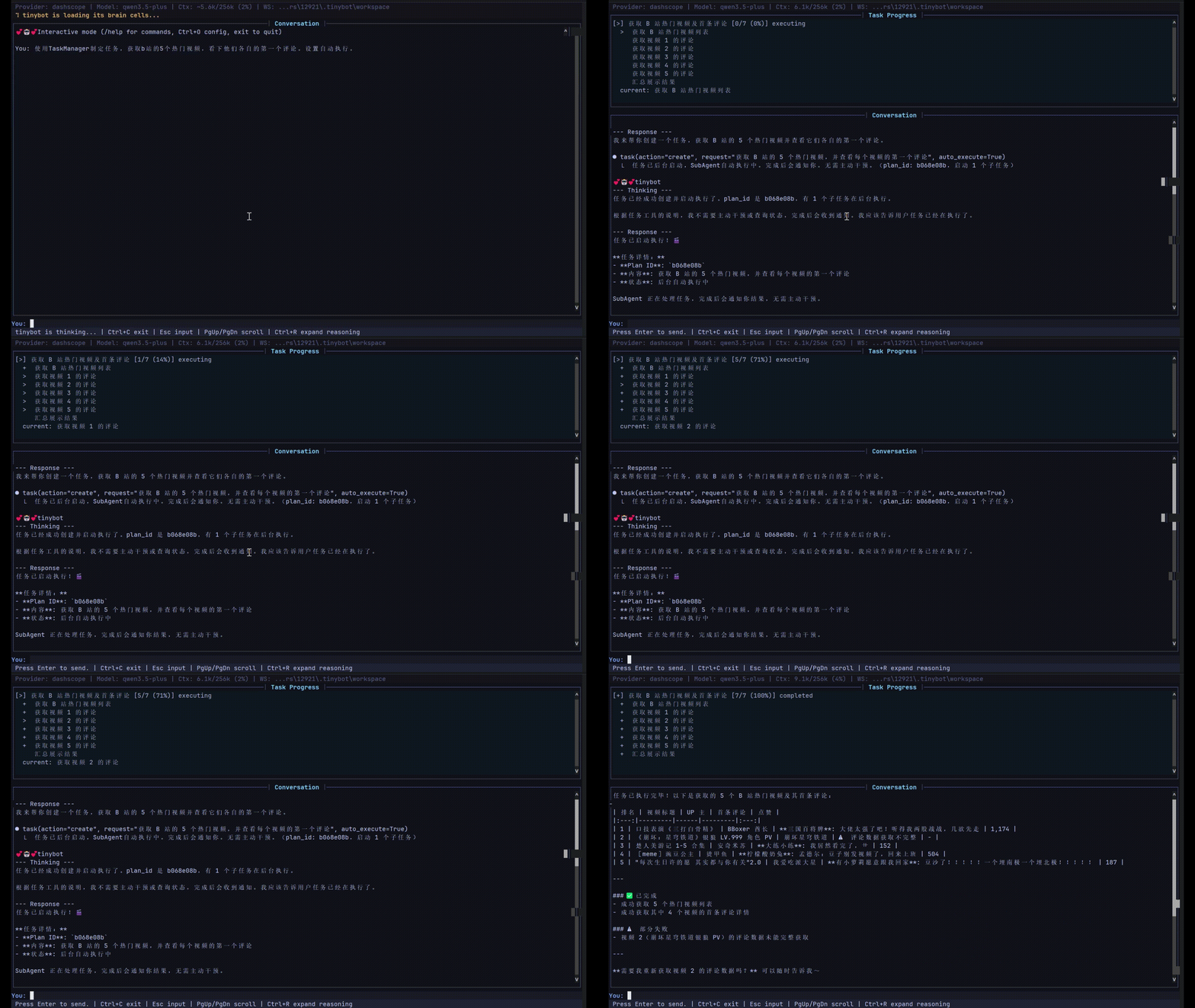
Automatically decomposes complex tasks into executable subtask DAGs, supporting:
- Intelligent Decomposition — LLM analyzes tasks and generates dependency-based subtask graphs
- Automatic Chain Execution — SubAgent completions automatically trigger dependent tasks
- Parallel Execution — Parallel-safe tasks run simultaneously for maximum efficiency
- Dynamic Adjustment — Add/remove subtasks during runtime
🔄 Experience Self-Evolution System
A self-learning system that continuously improves from problem-solving experiences:
{
  "id": "exp_86788c0e",
  "timestamp": "2026-04-20T21:19:17",
  "tool_name": "exec",
  "error_type": "argument error",
  "error_message": "",
  "params": {},
  "outcome": "resolved",
  "resolution": "当使用opencli的scroll命令时,确保只传递一个参数,避免参数过多错误。检查命令调用格式,正确示例为`scroll(distance)`或`scroll(selector)`,而非多个参数。在工具调用前验证参数数量,可参考opencli文档或使用测试命令确认API要求。",
  "context_summary": "网页自动化执行:使用opencli执行JavaScript命令时参数错误和代码语法/类型错误,通过调整命令和防御性编程解决",
  "confidence": 0.7,
  "session_key": "cli:direct",
  "merged_count": 0,
  "last_used_at": "2026-04-20T21:19:17",
  "category": "api",
  "tags": ["opencli", "scroll", "参数错误", "浏览器自动化"],
  "use_count": 0,
  "success_count": 0,
  "feedback_positive": 0,
  "feedback_negative": 0
}
- Semantic Experience Search — Vector-based search understands problem intent, not just keywords
- Auto Context Injection — Relevant past solutions automatically appear when you need them
- Proactive Error Diagnosis — Tool failures trigger automatic suggestions from resolved experiences
- Smart Confidence Model — Multi-dimensional scoring: usage frequency, success rate, freshness, feedback
- Automatic Categorization — Experiences tagged by category (path, permission, encoding, network, etc.)
🤖 SubAgent Asynchronous Execution
- Non-blocking Execution — Background tasks don't block main conversation
- Concurrency Control — Configurable max concurrency to prevent overload
- Heartbeat Monitoring — Auto-detects timeout tasks, prevents zombie processes
- Auto-notification — Automatically triggers main Agent to summarize results when complete
💭 Dream Memory Processing
Two-phase autonomous memory consolidation during idle periods:
- Phase 1: Analysis — LLM analyzes conversation history, extracts insights
- Phase 2: Editing — AgentRunner makes targeted edits to memory files
- Phase 3: Experience Update — Merges similar experiences, updates strategy documents
- Vector Storage Integration — Semantic search across consolidated memories
📊 CLI Real-time Progress Display
Task execution shows real-time progress in CLI without disrupting main conversation
⚙️ Integrated Configuration Editor
Full-screen terminal configuration editor accessible directly within the interactive chat:
- Press
Ctrl+Oor type/configto open the editor - No need to exit the chat session
- Edit provider settings, model parameters, tool configs, etc.
- Press
qto save and return to chat
🔌 MCP (Model Context Protocol) Support
Connect to external MCP servers and use their tools seamlessly:
- Native Tool Wrapping — MCP tools appear as native tinybot tools
- Multiple Server Support — Connect to multiple MCP servers simultaneously
- Auto Tool Discovery — Automatically discovers and registers available tools
🚀 Basic Features
- Multi-platform Integration — Built-in WeChat, DingTalk, Feishu channels; plugin extensibility
- Rich Tools — File read/write, shell execution, browser automation, web search, scheduled tasks
- Intelligent Memory — Vector storage-based memory system with session integration and semantic search
- Multi-LLM Support — Compatible with OpenAI, DeepSeek, Zhipu, Qwen, Gemini, and 14+ providers
- Skills System — Define skills via Markdown files, teach Agent specific workflows without coding
- Automation — Cron scheduled tasks + heartbeat service for periodic auto-execution
- OpenAI Compatible API — Run as OpenAI-compatible backend service, integrate with any OpenAI client
- Session Management — Persistent conversation history with checkpoint recovery
- Security — Workspace restriction, command audit, encrypted credential storage
Quick Start
# Install
uv sync

# Initialize configuration (interactive wizard)
uv run tinybot onboard

# Interactive chat mode
uv run tinybot agent

# Send single message
uv run tinybot agent -m "Hello"

# Start gateway (multi-channel + scheduled tasks + heartbeat)
uv run tinybot gateway

# Run as OpenAI-compatible API server
uv run tinybot api
Interactive Chat Commands
When in interactive mode, the following commands are available:
| Command | Description |
|---|---|
/config or Ctrl+O |
Open configuration editor |
/help |
Show available commands |
/clear |
Clear conversation history |
/new |
Start new conversation session |
/exit or :q |
Exit the chat |
Skills System
Define custom skills through simple Markdown files.
Skills are automatically loaded and the Agent follows defined workflows when conditions match.
Experience Tools
The Agent can actively manage its learning experiences:
| Tool | Description |
|---|---|
query_experience |
Search past problem-solving experiences |
save_experience |
Save a new solution for future reference |
feedback_experience |
Mark an experience as helpful or not |
delete_experience |
Remove outdated or incorrect experiences |
Requirements
- Python >= 3.13
License
Reviews (0)
Sign in to leave a review.
Leave a reviewNo results found