CADCLAW
Health Warn
- License — License: MIT
- Description — Repository has a description
- Active repo — Last push 0 days ago
- Low visibility — Only 5 GitHub stars
Code Fail
- rm -rf — Recursive force deletion command in cadclaw/doctor.py
Permissions Pass
- Permissions — No dangerous permissions requested
No AI report is available for this listing yet.
The testing framework CAD never had — automated validation, interference detection, and structural analysis for STEP assemblies. Like pytest for mechanical design.
CADCLAW

An automated check suite for STEP-based CAD assemblies.
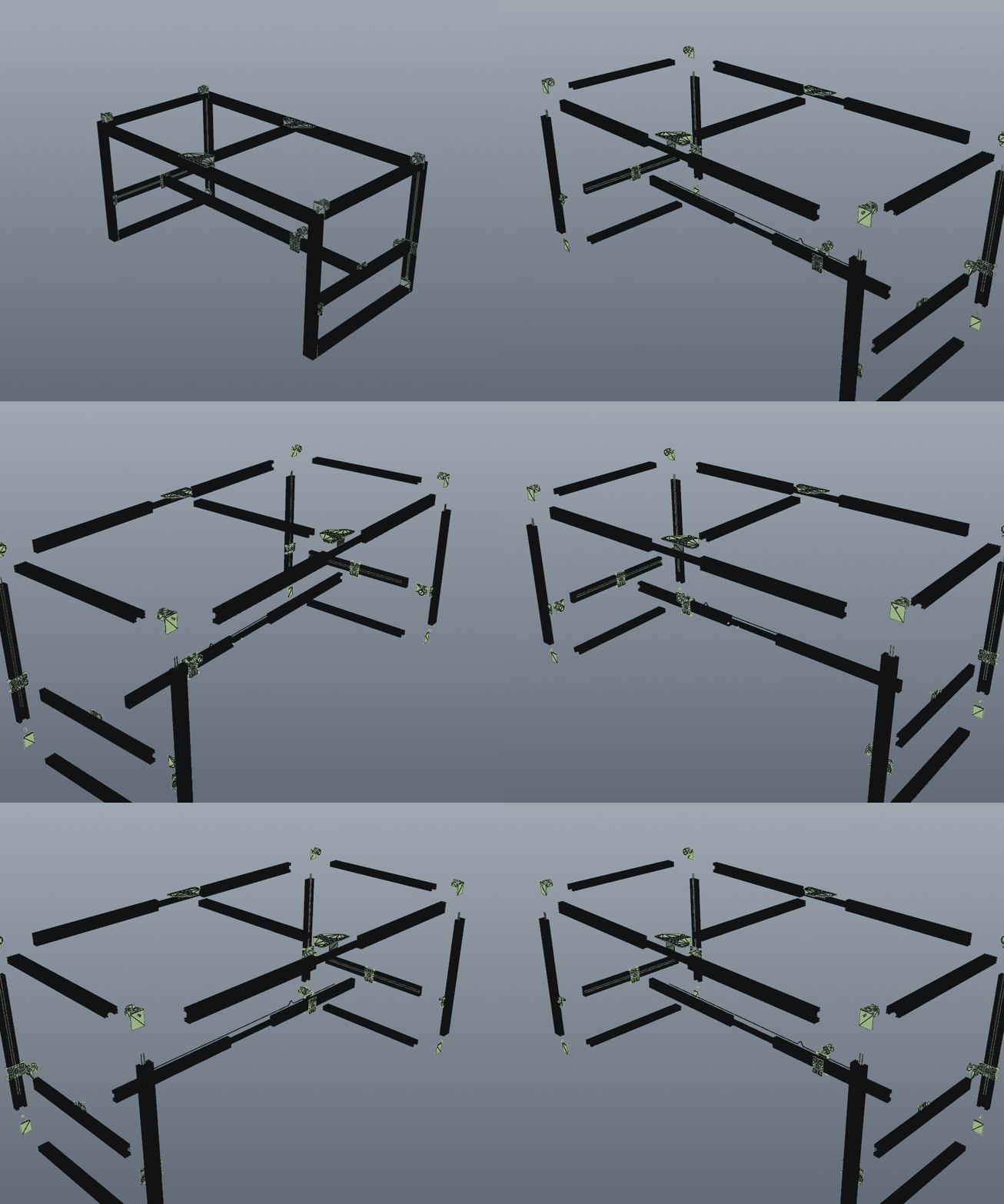
Generated end-to-end with render_radial_explode_gif("M3-2_Assembly.step", "out.gif") — parts explode radially from the centroid, then camera orbits 360°. 99+ parts, no manual animation work.
Automated geometric checks (inventory, interference, adjacency, dimensional, tolerance stacking) plus a BOM-vs-CAD audit and an honesty toolchain (doctor, publish-audit, claim-audit) for STEP assemblies. Like pytest for mechanical design — in spirit. Real CAD has analog characteristics pytest doesn't have (a part isn't binary present/absent — it can be slightly the wrong size, slightly clipping, slightly misplaced); CADCLAW reports findings with severity, evidence, and a confidence budget rather than just pass/fail.
The Problem
CAD assemblies break silently. Parts clip into each other, BOMs drift from geometry, motor mounts end up 600mm from the motor. Engineers catch these errors by eye — if they catch them at all. CADCLAW automates the geometric checks. It does not replace engineering judgment, structural certification, or physical-build validation.
What CADCLAW Does
CADCLAW validates STEP assemblies + BOM JSON through a chain of automated gates:
| Gate | What it catches |
|---|---|
| Inventory | Missing/extra parts. Labels by bbox signature, counts against expected. Per-region (axis-aligned) constraints supported. |
| Interference | Solid-solid overlaps. BRep boolean intersection, not just bbox. |
| Adjacency | Parts that should be near each other but aren't (motor 600mm from mount). |
| Dimensional | Wrong thickness, swapped box() args, impossible dimensions. |
| Kinematics | Beam deflection, motor torque budgets, belt tension, racking. |
| Tolerance | Worst-case, RSS, Monte Carlo tolerance stacking with Cpk and variance decomposition. |
| Parity | STEP-vs-STEP comparison; flags the Fusion visibility-toggle bug. |
| BOM audit (v0.6) | BOM JSON ↔ CAD assembly: qty, mfg_type, required/forbidden text terms, CAD-side count. |
| Disassembly | Sequenced part removal, radial exploded views, animation frame export. |
| Render | STEP → PNG → animated GIF via offscreen VTK. |
All gates run against a single loaded STEP file. Configure once in cadclaw.yaml, run from cadclaw harness. Every report includes a confidence budget that lists what was checked, what was not, and what assumptions were made.
CADCLAW also includes an MCP Server — the same modules exposed as MCP tools, so an MCP-compatible assistant can call them directly. The MCP server only exposes CADCLAW's own checks; it does not give the assistant access to your CAD application or to anything outside what cadclaw itself can do. The full loop is: prompt → modify CadQuery script → regenerate STEP → run CADCLAW gates → inspect report.
What CADCLAW Does NOT Prove
CADCLAW checks the geometry of a STEP file, the JSON of a BOM, and the text of your README against rules you write. It does not prove:
- That the native CAD model (Fusion, SolidWorks, etc.) has no hidden or suppressed parts. CADCLAW reads the STEP export, which can silently drop invisible parts.
- That the physical build matches the CAD. CAD passing CADCLAW says nothing about whether the parts on your bench match the file.
- That a vendor part is in stock, available, or the price you assumed.
- That a printed part is strong enough for production use. CADCLAW's kinematics gates do bare-beam math; they don't simulate printed-PLA fatigue, layer adhesion, or thermal creep.
- That a structural claim is physically certified, unless you've attached measurement data with an evidence tag.
- That an AI-generated CAD change is correct without passing the gates. CADCLAW is the check; not passing it doesn't make a change correct, only "passed the gates we have."
Each report includes a confidence budget per gate: checked, not_checked, assumptions. Read it.
Honesty toolchain
cadclaw doctor— environment diagnostic. Run this first.cadclaw publish-audit— scans the working tree for private data before you commit.cadclaw claim-audit— text linter that flags overclaims and untagged numeric assertions in your README and BOM notes.
These three tools exist because the truthfulness of CADCLAW's reports is only as good as the truthfulness of the docs and BOM that surround them.
Using CADCLAW with an AI assistant
If an AI assistant is editing your CAD code, point it at AGENTS.md. The short version: place authored parts; do not generate them. CADCLAW verifies geometry the user authored in Fusion/Rhino — only genuinely parametric stock (extrusion bars, V-wheels) should ever be generated by the assistant. AGENTS.md exists because field tests showed that AI-generated plates and motor mounts ship with hole patterns that don't align with their assemblies.
For diagnostic queries (signature histogram, "what is this part", "what overlaps with X"), use cadclaw inspect rather than writing throwaway probe scripts.
Quick Start
pip install cadclaw
# cadquery, pyyaml, pydantic are pulled in automatically.
# For editable dev installs:
#   git clone https://github.com/sunnyday-technologies/CADCLAW.git
#   cd CADCLAW && pip install -e .

cadclaw doctor                          # verify your environment first
Programmatic API
from cadclaw.harness import Harness
from cadclaw.adjacency import AdjacencyRule

h = Harness("my_assembly.step")

h.add_inventory(
    labels={(40.0, 80.0, 1000.0): 'beam', (56.4, 56.4, 76.6): 'motor'},
    expected={'beam': 4, 'motor': 2, 'belt': 3}
)

h.add_interference(skip_labels={'belt', 'wheel'})

h.add_adjacency(rules=[
    AdjacencyRule('motor', 'bracket', max_distance=50)
])

report = h.run()
print(report)
# CAD HARNESS REPORT — PASSED
#   Parts: 42
#   Time:  3200ms
#
#   [PASS] inventory (120ms)
#   [PASS] interference (2800ms)
#   [PASS] adjacency (15ms)
CLI workflow (v0.6)
Configure once in cadclaw.yaml — labels, expected inventory, regions, BOM
rules, claim-audit terms, publish-audit globs — then drive everything from
the cadclaw console script:
cadclaw doctor                                    # 1. verify the environment
python examples/init_rules.py --step my.step      # 2. scaffold cadclaw.yaml
                              --bom bom.json
cadclaw harness --rules cadclaw.yaml              # 3. run every gate the rule file declares
cadclaw bom-audit --rules cadclaw.yaml            # or run a single gate
cadclaw publish-audit --rules cadclaw.yaml        # before `git push`
cadclaw claim-audit --rules cadclaw.yaml --report-format md -o report.md
Exit codes: 0 pass, 1 fail, 2 warn-only (no fails), 3 internal error.
BOM-vs-CAD audit (the v0.6 headline)
# cadclaw.yaml fragment
bom_audit:
  bom_path: bom/data.json
  rules:
    - id: 5
      expected_qty: 12
      expected_label: connector_bar
      forbidden_terms: ["maximum rigidity", "primary stiffness"]
    - id: 65
      expected_qty: 3
      expected_unit: "bars (1.0m each)"
      expected_mfg_type: buy
      required_terms: ["1m", "friction-fit"]
      forbidden_terms: ["JB Weld", "West System", "custom 2m cut"]
The audit catches:
- BOM
qty/mfg_type/unitmismatches - Required-term-missing / forbidden-term-present in
name + description + notes - CAD-side count drift (CAD has 16 connectors, BOM expects 12)
- BOM items with no CAD geometry (suppressed for
mfg_type: consumable / electronic / fastener) - CAD parts with no covering BOM rule
Private BOM fields (vendors, sku, unit_cost, anything starting with _)
are dropped at the serializer level and never appear in any report.
How It Works
Every solid in a STEP file has a bounding box. The sorted dimensions (dx, dy, dz) rounded to 0.1mm form a signature — a fingerprint that identifies part types without needing part names or metadata.
(40.0, 80.0, 1000.0) → "beam"     # 4080 C-beam extrusion
(56.4, 56.4, 76.6)   → "motor"    # NEMA23 stepper
(4.0, 80.0, 96.0)    → "mount"    # motor mount plate
This works because mechanical parts have characteristic dimensions. A NEMA23 is always 56.4mm square. A 4080 extrusion is always 40x80mm. The harness exploits this invariant to label, count, and validate without parsing STEP metadata.
Author
CADCLAW is authored and maintained by Sunnyday Technologies, led by Nicholas Sonnentag (ORCID 0009-0002-1897-384X). Development uses Sunnyday Technologies' LLM-assisted engineering practice; design decisions, engineering judgment, test fixtures, and direction are owned by the Sunnyday Technologies team.
Contact: [email protected]
Citation
If you use CADCLAW in published research or derivative work, please cite:
Sonnentag, N. (2026). CADCLAW: Automated validation framework for
STEP-based CAD assemblies. Sunnyday Technologies.
https://github.com/sunnyday-technologies/CADCLAW
DOI: 10.5281/zenodo.19647391
A CITATION.cff file is included for automated citation tooling.
Origin Story
CADCLAW was developed alongside the M3-CRETE open-source concrete 3D printer project — built out of a practical need to properly position and validate components during assembly of a large, part-dense machine, using Sunnyday Technologies' LLM-assisted engineering practice. The harness:
- Caught 53 solid-solid interferences in a single run
- Reduced STEP file size from 70MB to 13MB by identifying geometry bloat
- Checked 150+ assembly changes across 15 design sessions without visual inspection [analysis]
- Prevented 3 regressions that would have shipped broken geometry to builders
See examples/m3_crete/ for the reference implementation.
Modules
cadclaw.inventory
Label parts by bbox signature, count them, compare to expected inventory.
cadclaw.interference
Pairwise solid-solid overlap using OCC BRepAlgoAPI_Common. Bbox pre-filter for performance. Reports overlap volume in mm^3.
cadclaw.adjacency
Validate that parts of type A have a part of type B within N mm. Catches misplaced/scattered components.
cadclaw.dimensional
Check part dimensions against expected ranges. Catches wrong thickness, swapped args, scaling errors.
cadclaw.kinematics
Structural analysis from assembly parameters. Beam deflection (Euler-Bernoulli), motor torque budgets, belt tension, GT2 tooth skip resistance.
cadclaw.tolerance
Tolerance stack analysis: define dimension chains, compute worst-case / RSS / Monte Carlo accumulation, report Cpk process capability and per-dimension variance contribution. Identifies which dimension dominates the stack.
cadclaw.disassembly
Disassembly sequence generation: auto-orders parts by type priority and distance from centroid, computes radial explosion vectors, exports individual STEP frames for animation or a single exploded-view STEP.
cadclaw.render
Offscreen VTK rendering of STEP files to PNG, plus GIF stitching. make_disassembly_gif(step, gif) is one call — generates the disassembly frames, rasterizes them, and writes an animated GIF.
cadclaw.harness
The runner. Chains gates, loads parts once, reports pass/fail with timing.
cadclaw_mcp/
MCP Server exposing all modules as tools for MCP-compatible hosts such as Claude Desktop, Cursor, and other clients that support the protocol. The user describes what to check; the assistant calls the tools directly. No code generation needed — MCP is an open protocol, so any compliant client can drive the harness.
CI/CD Integration
# .github/workflows/cad-check.yml
- name: Validate assembly
  run: |
    pip install cadclaw
    python check.py assembly.step
Exit code 0 = passed. Exit code 1 = failed. Works in any CI system.
Who This Is For
- Open-source hardware projects — catch assembly errors before builders hit them
- CadQuery/FreeCAD users — the testing layer the ecosystem is missing
- Small manufacturing teams — automated QA between design and procurement
- AI-assisted CAD workflows — validate that AI-generated changes don't break the assembly
Running Tests
git clone https://github.com/sunnyday-technologies/CADCLAW.git
cd CADCLAW
pip install cadquery

# Generate test fixture STEP assemblies (L1-L3, good + bad variants)
python tests/generate_fixtures.py

# Run the test suite (73 tests across every module)
python -m unittest tests.test_harness -v
The test fixtures are generated from CadQuery — no external downloads needed.
Three tiers of increasing complexity:
| Level | Parts | Tests |
|---|---|---|
| L1: Bracket assembly | 5 | Inventory, interference |
| L2: Motor mount | 10 | Inventory, adjacency |
| L3: Gantry corner | 18 | Full 4-gate harness |
Each level has a "good" variant (should pass) and "bad" variant (deliberate errors
for the harness to catch: clipping, missing parts, scattered motors).
The suite also exercises tolerance stacking math against hand-calculated answers,
the full disassembly pipeline, the MCP server over real JSON-RPC, and end-to-end
GIF rendering.
Requirements
- Python 3.10+
- CadQuery 2.7+ (provides OCC/STEP support)
- pyyaml 6+ and pydantic 2.5+ (pulled in automatically)
- No commercial CAD software needed for CADCLAW's own checks. Validation that depends on the native CAD application — feature-tree review, native-format parametric checks — is outside CADCLAW's scope.
Run cadclaw doctor after install to verify your environment.
License
MIT License. Copyright (c) 2026 Sunnyday Technologies.
Built during the M3-CRETE project — an open-source concrete
3D printer where CADCLAW caught 53 interferences, reduced STEP file size from
70 MB to 13 MB, and ran 150+ assembly checks across a human-AI design collaboration [analysis].
Reviews (0)
Sign in to leave a review.
Leave a reviewNo results found