awesome-second-brain
Health Warn
- License — License: MIT
- Description — Repository has a description
- Active repo — Last push 0 days ago
- Low visibility — Only 5 GitHub stars
Code Fail
- child_process — Shell command execution capability in .claude/scripts/check-prerequisites.js
- execSync — Synchronous shell command execution in .claude/scripts/check-prerequisites.js
- fs module — File system access in .claude/scripts/hooks/lib/io.ts
Permissions Pass
- Permissions — No dangerous permissions requested
This tool is an AI-assisted personal knowledge framework that integrates with Obsidian and Claude Code. It connects your notes, ideas, and tasks to provide persistent context for agentic workflows, aiming to prevent information loss across sessions.
Security Assessment
Overall risk: Medium. The tool directly accesses the local file system via the `fs` module, which is expected given its note-taking integration. However, the codebase also executes synchronous shell commands using `child_process` in its prerequisite checks. While this is a common pattern for setup scripts, it inherently opens the door to local system execution and requires careful review. No dangerous permissions or hardcoded secrets were found. Because it handles personal notes and tasks, it inherently interacts with sensitive user data.
Quality Assessment
Quality and community trust are currently very low. The project is licensed under the standard MIT license, is actively maintained with very recent updates, and is moving fast as an early v2.0 release. However, it suffers from extremely low visibility with only 5 GitHub stars, meaning it has not yet been broadly tested or vetted by the developer community.
Verdict
Use with caution: the tool is actively maintained and licensed correctly, but its early stage, low community adoption, and local shell execution capabilities warrant a thorough manual review of the setup scripts before running it on your machine.
The AI-assisted second brain that connects your notes, ideas, and tasks into persistent context for agentic workflows using Claude Code + Obsidian

🧠 Awesome Second Brain




The AI-assisted second brain that connects your notes, ideas, and tasks into persistent context for agentic workflows.
[!IMPORTANT]
Awesome Second Brain is currently at v2.0.0. We’re moving fast, so expect frequent updates and some breaking changes as the project evolves. If you’re into AI-assisted productivity, we’d love your feedback.
🌪️ The Problem
Context evaporates instead of compounding. Every conversation ends, and the decisions, constraints, and rationale that went into it vanish with the tab. You keep re-making the same calls, re-explaining the same project, re-training the same model on the same facts. The work you already did is invisible to the tool meant to accelerate it.
💡 The Solution
Give your agent an Awesome Second Brain.
Awesome Second Brain (ASB) is an open-source framework that gives your AI a spotless context layer, organized knowledge, and automated processing pipelines — so your AI operates with the same goals, history, and strategic intent as you do.
Before ASB vs After ASB
| Before ASB | With ASB |
|---|---|
| Re-explain your project every session | Claude loads last session, decisions, next steps |
| Notes scattered across five apps | One vault. Everything queryable. Nothing lost. |
| AI gives generic answers | AI that knows your projects, decisions, and history |
| Context resets on every new chat | Context compounds across sessions |
| Decisions buried in old chat logs | Decisions indexed, linked, and recallable |
| Tasks scattered across Notes, Todoist, Slack | One master task list, synced from every domain |
| Ideas captured but never processed | /brain-dump routes ideas to the right project |
| Your vault is passive storage | Your vault is an active collaborator that executes |
📊 Features at a Glance
ASB v2.0 — Core features are stable; workflows and documentation are maturing.
| Component | Count | What They Do |
|---|---|---|
| Canonical Commands | 27 | Slash commands for structured interactions |
| Workflows | 38+ | Step-by-step processes within skills |
| Agents | 9 | Specialized AI personas for focused work |
| Hooks | 5 | Automated lifecycle actions (security, context, logging) |
| Atomic Prompts | 257 | Dormant reusable prompts — activate on demand, no autocomplete bloat. |
| Thinking Strategies | 22 | Pluggable reasoning modes (CoT, ToT, Reflexion…) for targeted task shapes. |
✨ New in v2.0
🔄 Arcontexta Inspired Hook System
A Claude Code plugin that generates complete knowledge systems from conversation.
🔍 QMD — On-Device Vault Search
A powerful local search engine for everything you need to remember.
⚡ See It In Action
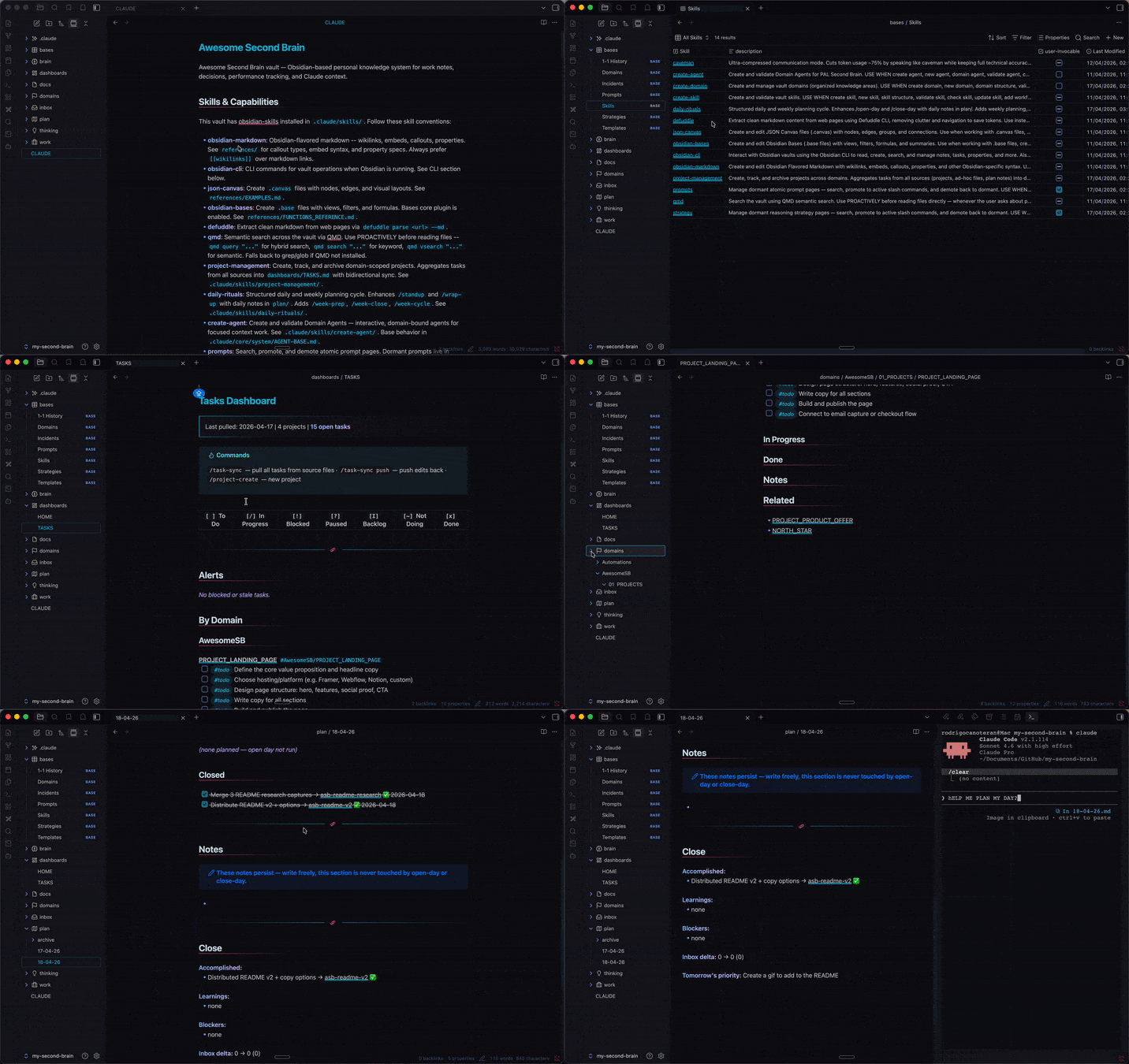
Morning kickoff:
/open-day
# → Loads North Star, active projects, open tasks, recent git changes.
# → "You have 2 active projects. The auth refactor is blocked on API contract.
#    Your 1:1 with Sarah is at 2pm — last time she flagged observability."
Capture any raw input:
/brain-dump "I've been thinking about using Redis for caching. The API is rate limited to 1000 calls/hour."
# → Extracts atomic observations: [idea] Use Redis, [fact] API limit.
# → Suggests tags: #infrastructure #caching #api
# → Stages in inbox/raw/ for later processing.
Process raw captures into structured notes:
/process
# → Scans inbox/raw/ for unprocessed notes.
# → Adds full frontmatter: domain, type, tags, description (~150 chars).
# → Flags multi-topic notes for splitting, offers `status: thinking` for scratchpads.
# → Moves ready notes to inbox/ready/ awaiting distribution.
Distribute processed notes to their permanent home:
/distribute
# → "3 notes ready. The Redis caching note → domains/Work/02_PAGES/redis-caching.md?"
# → Detects duplicates ("Absorb into existing api-rate-limits page?") and multi-topic notes (split).
# → Adds wikilinks to related pages, updates domain INDEX.md.
# → Source note kept for provenance (status: processed).
🚀 Quick Start
Automatic Install (recommended)
Setup time: ~10 minutes.
Mac / Linux:
curl -fsSL https://raw.githubusercontent.com/superuser-pal/awesome-second-brain/main/install.sh | bash
Windows (PowerShell):
irm https://raw.githubusercontent.com/superuser-pal/awesome-second-brain/main/install.ps1 | iex
The installer checks prerequisites, asks where you want your vault, installs dependencies, and configures hooks automatically.
To update: Simply run the installer command again or git pull in your vault directory.
Post-Install Setup
- Open the vault folder in Obsidian (File → Open Vault → Open Folder as Vault).
- Enable the Obsidian CLI in Settings → General (requires Obsidian 1.12+).
- Verify the installation in a new terminal:
obsidian --version - Launch your Agent in the vault directory:
cd ~/second-brain && claude - Initialize your brain:
Choose Level 2 for a guided setup of your goals, your first domain, and your dashboard./setup-context
New to Terminal? See SETUP.md for a step-by-step guide with troubleshooting.
Manual Install
git clone https://github.com/superuser-pal/awesome-second-brain
cd awesome-second-brain
npm run setup   # installs hook dependencies (Bun)
Optional: QMD Semantic Search
For semantic search across the vault. The npm package is @tobilu/qmd (published from tobi/qmd):
npm install -g @tobilu/qmd
qmd collection add . --name vault --mask "**/*.md"
qmd context add qmd://vault "Engineer's work vault: projects, decisions, incidents, people, reviews, architecture"
qmd update && qmd embed
📋 Prerequisites
Minimum setup (Starter tier)
| What | Why |
|---|---|
| Obsidian 1.12+ | Note UI and vault management. Requires "Obsidian CLI" enabled in Settings. |
| Claude Code | AI agent that powers the system. |
Full setup (Standard tier — recommended)
| What | Why |
|---|---|
| Everything above | — |
| Bun | Activates hook scripts: security, write validation, message classification. |
| Git | Version history and zero-data-loss representation. |
Power tier
| What | Why |
|---|---|
| Everything above | — |
| Obsidian CLI | Vault-aware reads, search, backlinks, and property management from the agent. |
| QMD | Semantic search across your vault. |
📂 Vault Structure
Awesome Second Brain's workspace is organized to keep focus sharp and context contained:
dashboards/: Navigation hub,HOME.md, andTASKS.md(Master task list).domains/: Your high-level workspaces (e.g.,Work,Personal). Each domain is a siloed environment.work/: Cross-domain shared operations — 1:1s, incidents, and reviews.inbox/: The entry point. Drop raw thoughts or quick tasks here to be processed.brain/: The "Operating System" —NORTH_STAR.md,MEMORIES.md,PATTERNS.md, andKEY_DECISIONS.md.plan/: Your daily and weekly rhythm files.bases/: Dynamic aggregators and template definitions (e.g.,Prompts.base,Strategies.base).thinking/: Internal logs, session transcripts, and agent scratchpads..claude/: The configuration layer containing system logic, commands, and subagents.
🛠️ How It Works
The Knowledge Pipeline
Capture raw information and transform it into structured knowledge automatically.
| Stage | Activity | Command | Result |
|---|---|---|---|
| 1. Capture | Drop notes/tasks into /inbox |
(Frictionless) | Raw capture |
| 2. Process | AI applies structure/tags | /process |
Categorized and structured markdown |
| 3. Distribute | Move to correct /domain |
/distribute |
Contextually relevant persistence |
Lifecycle Hooks
Five automated hooks handle setting up your session context:
| Hook | When | What |
|---|---|---|
| 🚀 SessionStart | On startup/resume | Injects key context, active work, recent changes, tasks, and file listing. |
| 💬 UserPromptSubmit | Every message | Classifies content (decision, incident, win, etc.) and injects routing hints. |
| ✍️ PostToolUse | After writing .md |
Validates frontmatter and checks for wikilinks. |
| 💾 PreCompact | Before context compaction | Backs up session transcript to thinking/session-logs/. |
| 🏁 Stop | End of session | Checklist: archive completed projects, update indexes, check orphans. |
⌨️ Command Palette
Run these directly in your AI agent. Symbols in parentheses are "nicknames" for the authoritative namespaced commands.
| Command | Purpose |
|---|---|
/setup-context |
Onboarding Wizard — guided setup of goals, domains, and tasks. |
/rituals:open-day (/open-day) |
Morning kickoff — reviews tasks and surfaces today's priorities. |
/capture:brain-dump (/brain-dump) |
Reflective capture — atomic extraction of facts/ideas/decisions with tags. |
/capture:quick-dump (/quick-dump) |
Power shortcut — high-confidence routing directly to domain notes. |
/rituals:close-day (/close-day) |
Session review — verify notes, indexes, links, and suggest improvements. |
/capture:1-1 (/1-1) |
Capture a meeting transcript into a structured vault note. |
/manage:project-create (/project-create) |
Create a new domain project, update INDEX.md and TASKS.md. |
/manage:task-sync (/task-sync) |
Aggregate all tasks into dashboards/TASKS.md. |
/core:audit (/audit) |
Deep vault maintenance — repair broken links and identify orphans. |
🧩 Skills
14 domain skills bundled into ASB, loaded on demand by your agent via the Skill tool. Skills are reusable capabilities — they encapsulate references, workflows, and examples for a specific domain so your agent doesn't re-derive them every session.
| Category | Skills |
|---|---|
| Obsidian native | obsidian-markdown, obsidian-cli, obsidian-bases, json-canvas |
| Search & ingest | qmd (semantic search), defuddle (web → clean markdown) |
| Vault lifecycle | create-domain, create-agent, create-skill, project-management, daily-rituals |
| Libraries | prompts (257 atomic prompts), strategy (9 reasoning strategies) |
| Voice | caveman (token-compressed output mode) |
🧠 Reasoning Strategies
22 pluggable reasoning strategies that turn ASB into the best brain sparring partner live in docs/strategies/, each a dormant page you can activate for a session. CoT is pre-promoted at setup. Pick one when the task calls for a specific thinking shape, or let /thinking:eval choose for you.
| Strategy | Command | Use when… |
|---|---|---|
| Standard | /thinking:standard |
Direct answer, no visible reasoning. Fastest output. |
| Chain-of-Thought | /thinking:cot |
Step-by-step reasoning before the answer. (Pre-promoted.) |
| Chain-of-Draft | /thinking:cod |
Step-by-step, but each step ≤5 words. Compact reasoning. |
| Atom-of-Thought | /thinking:aot |
Decompose into smallest independent sub-problems, solve, synthesize. |
| Least-to-Most | /thinking:ltm |
Order sub-problems easiest → hardest, answer each before advancing. |
| Tree-of-Thought | /thinking:tot |
Generate multiple branches, select the best one. |
| Self-Consistency | /thinking:self-consistent |
Multiple independent paths, pick the most consistent answer. |
| Self-Refinement | /thinking:self-refine |
Initial answer → brief self-critique → refined answer. |
| Reflexion | /thinking:reflexion |
Answer concisely, critique own reasoning, produce refined answer. |
Standing controls (always available):
| Command | Purpose |
|---|---|
/thinking:eval |
Recommend the best strategy for your stated goal. |
/thinking:reset |
Clear the active strategy and return to default. |
📚 Prompt Library
257 atomic prompts live dormant in docs/prompts/. Each is a self-contained reusable prompt — activate the ones you use, leave the rest shelved to avoid bloating / autocomplete. Browse with bases/Prompts.base or the prompts skill.
Management commands (from the prompts skill)
| Command / trigger | What it does |
|---|---|
| "Find a prompt about X" | Search — QMD query across all 257 dormant prompts, returns top matches + status. |
"Promote <slug>" |
Promote — flips status: active, generates /prompts:<slug> command stub. |
"Demote <slug>" |
Demote — deletes the command stub, flips back to status: dormant. |
/prompts:<slug> |
Run a promoted prompt directly (e.g. /prompts:extract-wisdom, /prompts:analyze-risk). |
Sample use cases
Representative categories from the library — promote the ones that match your workflow:
- Analysis:
analyze_claims,analyze_incident,analyze_risk,analyze_paper,analyze_sales_call,analyze_product_feedback,analyze_logs,analyze_threat_report - Creation:
create_design_document,create_coding_feature,create_keynote,create_formal_email,create_hormozi_offer,create_5_sentence_summary,create_mermaid_visualization,create_git_diff_commit - Extraction:
extract_wisdom,extract_insights,extract_recommendations,extract_main_idea,extract_references - Improvement:
improve_writing,improve_prompt,improve_report_finding - Summarization:
summarize,summarize_paper,summarize_meeting,summarize_debate - Review:
review_design,analyze_peer_work,rate_content
🎯 Why Awesome Second Brain?
- Stop starting from zero. Session hooks load identity, projects, and decisions before you type.
- Build once, reuse forever. Skills, commands, and frontmatter schemas turn your patterns into infrastructure.
- Your vault is yours. Local markdown, no cloud dependency, no vendor lock-in, no black-box state.
- Token-efficient by design. Tiered loading keeps cost low and recall high.
- Obsidian does the UI. Your agent does the work. You don't need to live in an IDE.
📝 License
Released under the MIT License.
Version: 2.0.0 | Last Updated: 2026-04-17
Reviews (0)
Sign in to leave a review.
Leave a reviewNo results found