syntropic137
Health Warn
- License — License: MIT
- Description — Repository has a description
- Active repo — Last push 0 days ago
- Low visibility — Only 5 GitHub stars
Code Pass
- Code scan — Scanned 12 files during light audit, no dangerous patterns found
Permissions Pass
- Permissions — No dangerous permissions requested
No AI report is available for this listing yet.
Open-source agentic engineering platform. Orchestrate coding agent workflows powered by Claude Code & Codex with GitHub App integration. Real-time observability, selfhostable.




Syntropic137
Scale coding agents past what a terminal can hold. Syntropic137 is multi-harness orchestration: run Claude Code and Codex across workflows, with every tool call and conversation captured. Self-hosted, so your data stays yours.
Self-hosted agentic engineering platform. Run AI agents in isolated Docker workspaces with full observability. Every tool call, token, cost, conversation, and artifact is permanently captured in a queryable event store.
- Never lose agent work: events, conversation logs, and artifacts are permanent and queryable. Analyze what agents do across sessions, workflows, repos, systems, and organizations. Enables compounding learning loops.
- Harness and model routing: every phase picks its own harness and model, so cheap phases run cheap and hard phases get the strong model. Real cost savings across multi-phase pipelines without sacrificing quality where it matters.
- Workflow marketplace: publish and consume reusable workflows via the CLI. One command to install any published workflow. Build once, run anywhere.
- Artifact pipeline: each workflow phase produces output artifacts (stored in MinIO), passed as inputs to the next phase. Research, plan, code, review. Each phase builds on the last.
- Claude Code and Codex: phases run either harness inside secure ephemeral containers, selected per phase with
agent.provider. Both share the same workspace image, isolation, and event capture. - Cross-model delegation: a Claude phase can hand work to Codex and back. Have one model write and a different one review, so the reviewer is not marking its own homework.
- Full observability: both harnesses feed the same event store with conversation logs, tool traces, token counts and errors, and git hooks capture all git-related events. Depth differs: Claude Code hooks add task, subagent, todo and hook-level detail plus per-run cost on Claude phases. A Codex phase records its conversation, command executions, file changes and tokens, with no vendor cost.
- GitHub-native triggers: integrated event triggers enable self-healing CI, auto-responses to review comments, and PR-driven workflows. Zero-config, no tunnel required. Agents respond in minutes so developers stay out of the loop.
- Security first: isolated Docker workspaces, secret injection/clearing lifecycle, read-only containers, no-new-privileges.
- Production-grade: event-sourced state, crash recovery, idempotent handlers, Docker Compose single-machine deployment.
- Workflow phases as commands: each phase is a prompt template using the
$ARGUMENTScommand standard, composable into multi-phase pipelines (research, plan, implement, review).
vs. Alternatives
| Feature | Syntropic137 | Claude Code CLI | Cursor | LangGraph |
|---|---|---|---|---|
| Full observability (tool calls + costs) | Yes | Manual | No | Partial |
| Self-hostable | Yes | Yes | No | Yes |
| Repeatable Workflows | Yes | Partial | Partial | From Scratch |
| Scale past 10 parallel agents | Yes (100+) | Limited | Limited | Yes |
| Your data stays yours | Yes | Yes | No | Yes |
| Open source | Yes | No | No | Yes |
| One-command setup | Yes | Yes | No | No |
| Run Claude Code and Codex in one pipeline | Yes | No | No | Manual |
Claude Code and Codex are compared here as the bare CLIs you would drive by hand. Both are also supported harnesses: Syntropic137 runs them, it does not replace them.
Self-Hosting (recommended)
Get your own instance running in minutes. Prerequisites: Node.js 18+ and Docker.
npx @syntropic137/setup init
The setup CLI interactively handles Docker validation, secret generation, GitHub App creation (via OAuth manifest flow), and starting the full stack.
Access: http://localhost:8137
[!NOTE]
Optional features (configurable during setup or anytime after):
- Cloudflare Tunnel: remote access + webhook delivery (highly recommended, free; required for GitHub webhook triggers; without it, manual workflow runs only and dashboard on localhost only; domain costs $10-15/year if buying new)
- 1Password: encrypted secrets management
[!WARNING]
Security: SetSYN_API_PASSWORDfor basic auth. Or protect with Cloudflare Access / VPN.
Management Commands
| Action | Command |
|---|---|
| Initialize | npx @syntropic137/setup init |
| Status | npx @syntropic137/setup status |
| Logs | npx @syntropic137/setup logs |
| Stop | npx @syntropic137/setup stop |
| Start | npx @syntropic137/setup start |
| Update | npx @syntropic137/setup update |
| Install CLI | npx @syntropic137/setup cli |
| Install plugin | npx @syntropic137/setup plugin |
| GitHub App settings | npx @syntropic137/setup github-app |
| Tunnel setup | npx @syntropic137/setup tunnel |
For Contributors (Dev Mode)
For hacking on Syntropic137 itself. Runs services on your host with hot-reload.
Prerequisites: Python 3.12+, uv, just, Docker, Git, Node.js + pnpm
git clone --recurse-submodules https://github.com/syntropic137/syntropic137.git
cd syntropic137
cp .env.example .env            # fill in ANTHROPIC_API_KEY + GitHub App keys
just dev                        # syncs deps, builds containers, seeds data, starts everything
| Service | URL |
|---|---|
| Dashboard | http://localhost:9137 |
| Vite dev server (no API proxy, do not open directly) | http://localhost:5173 |
| API | http://localhost:8137 |
| API Docs | http://localhost:8137/docs |
| MinIO Console | http://localhost:9001 |
Use just dev-fresh instead for a clean slate (wipes volumes and re-seeds).
Architecture
The system is organized into 5 bounded contexts following Vertical Slice Architecture (VSA) and DDD principles:
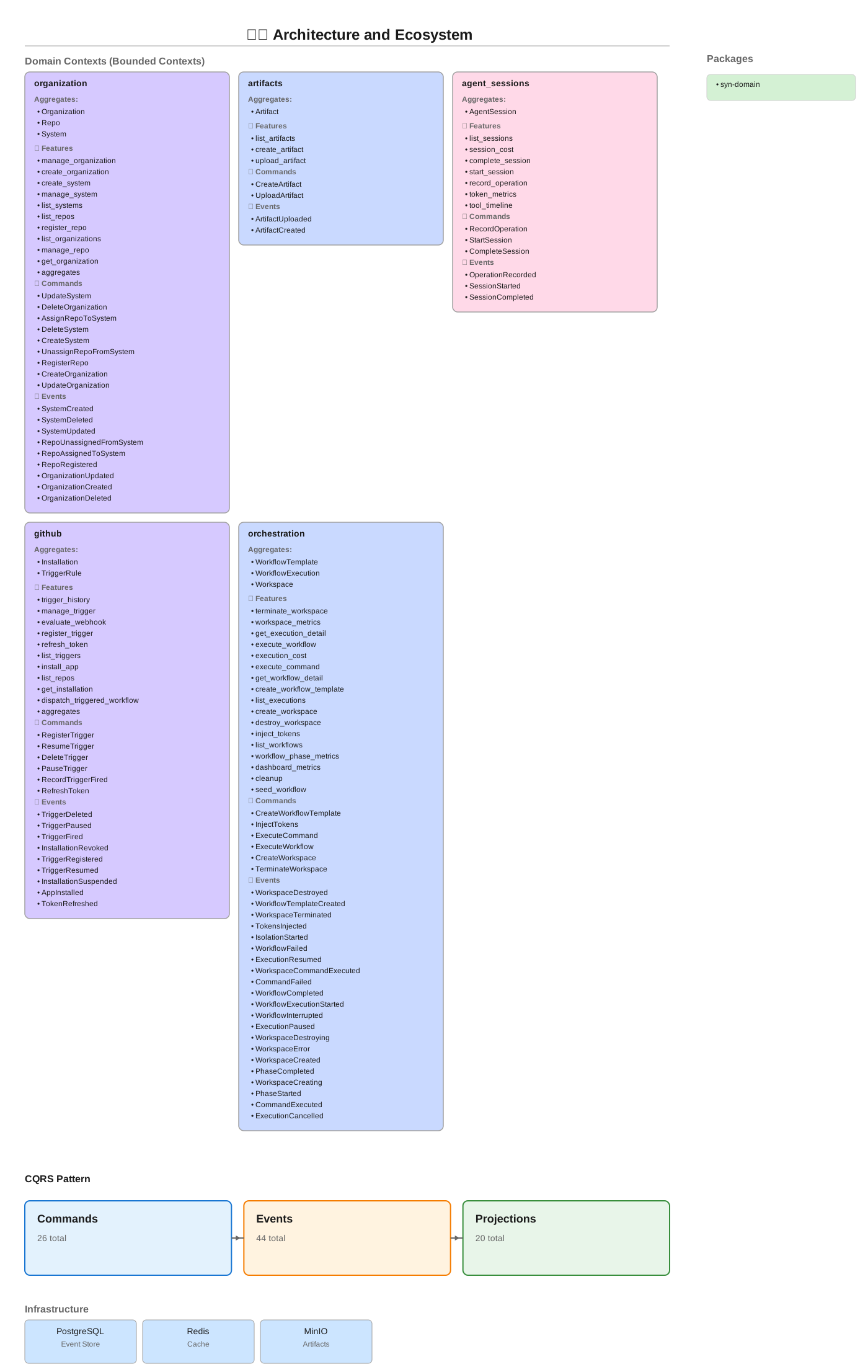
| Context | Aggregates | Purpose |
|---|---|---|
orchestration |
Workspace, WorkflowTemplate, WorkflowExecution | Workflow execution and workspace management |
organization |
Organization, System, Repo | Organization hierarchy, system and repo management |
agent_sessions |
AgentSession | Agent sessions and observability metrics |
github |
Installation, TriggerRule | GitHub App integration, webhook trigger rules |
artifacts |
Artifact | Artifact storage and retrieval |
Infrastructure: PostgreSQL (event store + projections) · Redis · MinIO
Regenerate diagram: just diagram
CLI (syn)
npx @syntropic137/cli <command>
Workflows
syn workflow list
syn workflow list --include-archived          # include archived templates
syn workflow show <id>
syn workflow create --type implementation --repo owner/repo --description "Feature X"
syn workflow delete <id>                      # archive (soft-delete) a template
syn workflow delete <id> --force              # skip confirmation prompt
syn workflow run <id> --task "Implement retry logic" --input key=value
syn workflow status <id>
syn workflow validate path/to/workflow.yaml

# Examples
syn workflow run research-workflow-v2 --task "$(gh issue view 211 --json body -q .body)"
syn workflow run github-pr --task "Add error handling" -i repository=owner/repo
Execution Control
syn control status <execution-id>
syn control pause <execution-id> --reason "investigating"
syn control resume <execution-id>
syn control cancel <execution-id>
Choosing a harness
Harness selection is per phase, declared in the workflow YAML. There is no
CLI flag or environment variable for it.
phases:
  - id: implement
    agent:
      provider: claude          # claude | codex
      model: sonnet
  - id: review
    agent:
      provider: codex           # a different model reviews the work
      model: gpt-5.6-sol        # name a concrete model, see note below
      sandbox: read-only        # codex honours this, claude does not yet
Codex phases need CODEX_AUTH_JSON set in your .env. Without it, a phase
with agent.provider: codex fails to provision.
Name a concrete model id on codex phases. Codex does not report its model on
the wire, so omitting model leaves the run unpriced rather than wrongly
priced, and no cost lands in your reports.
Artifacts
syn artifacts list --workflow <workflow-id>
syn artifacts show <artifact-id>
syn artifacts content <artifact-id> --raw
syn artifacts create --workflow <id> --type document --title "Design Doc" --content "# Overview ..."
Trigger Rules
syn triggers register --name "self-healing" --event "check_run.completed" --repository owner/repo --workflow <id>
syn triggers list --repository owner/repo
syn triggers enable <name> --repository owner/repo
syn triggers pause <id> --reason "maintenance"
GitHub
syn github repos                              # list repositories accessible to the GitHub App
syn github repos --installation <id>          # filter by installation
Config
syn config show
syn config validate
syn config env
syn version
Development Commands
| Command | Description |
|---|---|
just dev |
Start full dev stack (deps, containers, seeds, frontend) |
just dev-fresh |
Wipe volumes, rebuild, re-seed for a clean slate |
just dev-down |
Stop all services |
just dev-logs |
Tail service logs |
just dev-doctor |
Check environment health |
just qa |
Full QA: lint, format, typecheck, test, vsa-validate |
just test |
Run tests with coverage |
just test-unit |
Unit tests only |
just test-integration |
Integration tests (needs test-stack) |
just test-stack |
Spin up ephemeral test infrastructure |
just lint |
Ruff linter |
just format |
Ruff formatter |
just typecheck |
pyright (standard mode) |
just vsa-validate |
Validate Vertical Slice Architecture |
just submodules-init |
Initialize git submodules |
just submodules-update |
Pull latest submodule commits |
just diagram |
Regenerate architecture SVG |
just seed-workflows |
Seed workflow definitions |
just seed-triggers |
Seed trigger rules |
Project Structure
syntropic137/
├── apps/
│   ├── syn-api/                 # FastAPI HTTP server
│   ├── syn-cli-node/             # CLI tool ("syn") — Node.js
│   ├── syn-dashboard-ui/        # Dashboard frontend (Vite + React)
│   ├── syn-docs/                # Public documentation site (Next.js + Fumadocs)
├── packages/
│   ├── syn-domain/              # Domain events, aggregates, ports
│   ├── syn-adapters/            # Orchestration + observability adapters
│   ├── syn-collector/           # Event ingestion API
│   ├── syn-shared/              # Settings, configuration
│   ├── syn-tokens/              # Token vending and spend tracking
│   ├── syn-perf/                # Performance benchmarking
│   └── openclaw-plugin/         # OpenClaw integration
├── lib/                         # Git submodules (our own projects)
│   ├── agentic-primitives/      # Agent building blocks, isolation providers
│   ├── event-sourcing-platform/ # Rust event store, Python SDK, VSA tool
│   ├── syntropic137-claude-plugin/ # Claude Code plugin
│   └── agent-paradise-standards-system/ # Architecture fitness functions
├── infra/                       # Setup wizard, secrets, deployment scripts
├── docker/                      # Compose files (base, dev, selfhost, test, cloudflare)
└── docs/                        # Internal documentation and ADRs
Environment Configuration
Two .env files with strict separation (no variable appears in both):
- Root
.env: Application config (API keys, GitHub App, app settings). Auto-generated template:just gen-env→.env.example infra/.env: Infrastructure config (Docker, resource limits, Cloudflare, secrets). Template:infra/.env.example
[!TIP]
Both.env.examplefiles are extensively commented with descriptions, defaults, and security notes. Reference them directly for all available configuration options.
Central Session Capture (optional)
Every agent session can be forwarded to a central SeshMagic session store, so transcripts from every workspace land in one queryable corpus no matter which machine ran them. This is what makes learning loops possible across sessions that did not run under Syntropic137.
Disabled by default. Leave SYN_SESSION_STORE_URL empty and nothing changes: no capture, no extra dependency, no behaviour difference. A self-hosted deployment with no session store runs exactly as it does today.
To enable, set two values:
SYN_SESSION_STORE_URL=http://your-store:18090
SYN_SESSION_STORE_AUTH_TOKEN=op://syntropic137/session-store/write-token   # or plaintext
Sessions are tagged with execution_id, workspace_id, workflow_id, phase_id, and source:syntropic137, so any row in the store can be joined back to the execution that produced it. Tag values are percent-encoded, which is a no-op for the slug- and uuid-shaped identifiers that occur in practice but keeps an identifier containing the , or : framing delimiters recoverable rather than mangled.
The six AGENTIC_SESSION_STORE_* variables are reserved by the workspace adapter. They are set from SYN_SESSION_STORE_* alone: if a caller supplies one via a phase's environment block it is dropped (with a warning naming the key, never its value), so capture cannot be switched on, redirected, or re-partitioned from workflow input.
[!NOTE]
This is additive and independent of the two stores Syntropic137 already uses: conversation logs in MinIO and the event stream (tool calls, tokens, cost) in TimescaleDB. Both continue to work unchanged whether or not central capture is enabled.
[!TIP]
The spool inside a workspace container is not persisted. If a container is killed before its final sweep runs, that session is not uploaded. Everything else is captured on normal completion.
Secrets (1Password)
1Password integration is optional. Set APP_ENVIRONMENT to auto-derive the vault name:
APP_ENVIRONMENT |
Vault |
|---|---|
development |
syn137-dev |
beta |
syn137-beta |
staging |
syn137-staging |
production |
syn137-prod |
selfhost |
syntropic137 |
Provide the matching service account token (e.g. OP_SERVICE_ACCOUNT_TOKEN_SYN137_DEV) and all secrets resolve automatically. Anything not in 1Password falls through to .env plaintext.
Precedence: shell env > 1Password > .env file
Full setup guide: docs/development/1password-secrets.md
Star History
License
MIT
Reviews (0)
Sign in to leave a review.
Leave a reviewNo results found