ftja
Health Pass
- License — License: MIT
- Description — Repository has a description
- Active repo — Last push 0 days ago
- Community trust — 18 GitHub stars
Code Pass
- Code scan — Scanned 12 files during light audit, no dangerous patterns found
Permissions Pass
- Permissions — No dangerous permissions requested
No AI report is available for this listing yet.
A job-search agent that runs in your own Claude Code: it reads public LinkedIn postings against your criteria and shows why each role passed. Local-first, open source.
FTJA — Fine Tune Job Agent
Stop reading every job description yourself. FTJA is a job-search agent
that runs inside your own Claude Code. You give it your resume and your
standards; it reads public LinkedIn postings for you and shows only the roles
worth your attention, with the reason for each one.
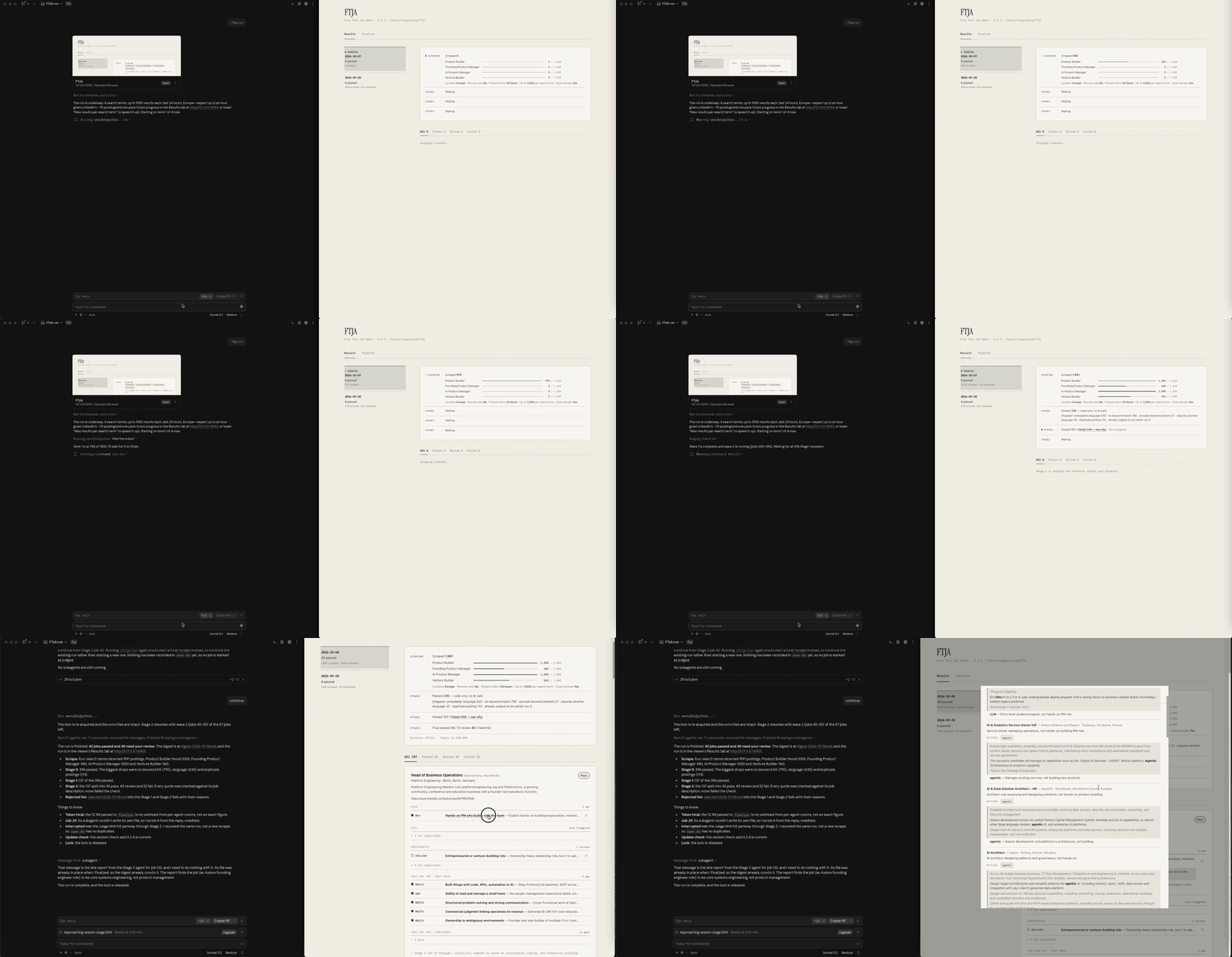
Click the recording to watch it full size.
Beta. Built and tested with Claude Code on macOS and Windows.
Scheduled runs and the "run finished" notification are macOS only.
Linux is not supported yet: most of it should work, but it is untested
and the resume chooser does not open there. Codex and other agents come
next. Until then, fork it and make it yours.
What it does
- Finds postings. Searches public LinkedIn job listings for the titles
you choose. No LinkedIn login. - Drops the obvious mismatches with plain code. Keywords, languages and
excluded words. No AI involved, so it is free and predictable. - Judges the rest against your rubric. Your agent reads each remaining
job description against the criteria you wrote and your profile. - Shows its work. For every job you see which criteria it met or missed,
each with a sentence quoted from the job description.
It is free and open source. There is no FTJA account and no FTJA server: it
is a folder on your computer and a set of skills your agent follows.
Get started
You need a Mac or a Windows PC and Claude Code.
Setup installs Git and Python if your computer does not have them yet.
Open https://ftja.vercel.app and copy the setup prompt, or
copy it from here:Set up FTJA: clone https://github.com/TaegyuJEONG/ftja.git into a new local FTJA folder, connect this session to it, then follow .claude/skills/ftja-setup/SKILL.md. Do not guess my preferences.Paste it into a new Claude Code session.
That is all. Your agent downloads FTJA, opens a web view next to the chat and
walks you through four steps: add your resume, confirm the profile it drafts,
confirm your search settings, and answer three short questions that become
your judgment rubric.
Using it day to day
- Run a search: type
/ftja-run. The web view shows the run as it
happens and then the results. - Decide on each job: mark it Applied, Not a fit, Later or
Expired, and add a short reason if you like. - Your reasons improve the next run: at the start of the next
/ftja-run, your agent reads those reasons and proposes changes to your
rubric. Nothing changes until you approve it. - Change your mind in plain words: say "I'm not interested in pure sales
roles" in the chat and the agent offers to add it to your rubric. - Choose which stages run: each judging stage has an on/off switch on
the Pipeline tab. A run that stops before Stage 2 keeps what passed, and
Continue on the Results tab takes it through one more stage. - Check how remote a job really is: switch on the Remote check. It
answers a few questions per posting (how remote, from where, which
hours, which on-site duties) from the sentences around remote keywords,
and your rule for each answer decides. Type/ftja-remoteand your
agent writes the keywords and rules for where you live; the results
download as a table. - Remove a run you don't want to keep: in the web view, use Delete at
the top right of a run in the list. It goes to the trash and its postings
are judged again next time. Click the size next to the folder path at the
top to restore a deleted run or empty the trash.
How much of your Claude plan a run uses. A run is real work for your
agent, and it scales with how many postings it reads. Our largest run so far
(4 titles, up to 1,000 postings each, 1,991 scraped) ran for well over an hour,
used roughly 12 million tokens by the agent's own estimate, and hit the
session usage limit partway through.
Start with one or two titles and 100 results per title, then widen.
Why you can trust what it tells you
- Every step is visible. How many postings were scraped, how many each
filter removed and why, and which ones reached the final judgment. - Every judgment quotes the job description. The code checks that each
quote really appears in the posting before it is shown. - The criteria are yours. You can read and edit every rule, in the web
view or as a text file. - It asks before it learns. FTJA never changes your rubric on its own.
- The code is open. You, or your agent, can read and change the pipeline.
Privacy and security
Your resume, profile, criteria, run history and results are files in your
FTJA folder. They are excluded from git, so updating FTJA never uploads them.
FTJA has no server of its own and collects nothing.
What does leave your computer:
- Your AI agent's provider. The judgment runs inside your own Claude Code
session, so the job descriptions, your rubric, your profile summary and
(during setup) the resume you select are sent to that provider under your
account with them, as with any other work you do there. - LinkedIn. Your search titles and location are sent as public,
logged-out searches. - OpenStreetMap (Nominatim). What you type in the web view's location
field is sent to look up place names. - Google Fonts. The web view loads its fonts from Google.
- GitHub. One request for the
VERSIONfile, at most twice a day, to
tell you when an update exists. It sends nothing about you. SetFTJA_NO_UPDATE_CHECK=1to turn it off.
The web view runs on 127.0.0.1 only and refuses requests from other sites.
The landing page at ftja.vercel.app is separate from the tool. It uses Vercel
Web Analytics, which counts page visits without cookies. The tool itself has
no analytics.
Roadmap
Next
- More agents: Codex and others beyond Claude Code.
- More sources: other job boards such as Indeed, and company career pages
hosted on applicant tracking systems (Greenhouse, Lever, Ashby and others). - Richer profiles: portfolio and project folders, and a more structured view
of both your background and each job description.
Then
- When you click Apply, a draft of each application-form answer written from
your profile. You review and send it yourself.
Vision
- A hiring-side agent that states what a team really needs, so that a
candidate's agent and a recruiter's agent can match on evidence, not
keywords.
The roadmap is a direction, not a schedule. BACKLOG.md records
what was deliberately deferred and why.
Feedback
This is a beta, and your reaction decides what comes next. Open an
issue for anything that broke,
confused you, or judged a job wrongly.
The skills
Skills are the instructions your agent follows. You only need the first two.
| Skill | What it does | When |
|---|---|---|
/ftja-setup |
Onboarding: profile, search settings, rubric | Once, or to start over |
/ftja-run |
Scrape, filter, judge, show results | Whenever you want a search |
/ftja-remote |
Writes the Remote check's keywords, categories and rules for where you live | When you switch the Remote check on, or move |
/ftja-keywords |
Writes the keywords for a language you started reading postings in | When you add a language |
/ftja-tune |
Adds a preference you state in chat to your rubric | When you say one |
/ftja-review |
Turns your apply/skip reasons into proposed rubric changes | Automatically at the start of a run |
/ftja-update |
Updates FTJA and tells you what changed | When a run tells you an update exists |
/ftja-profile-update |
Rewrites your profile summary from your source files | After you change your resume |
FTJA stays at the version you downloaded until you update. The web view shows
a banner when a newer version exists, and /ftja-run asks at the start of a
run whether to update first. You can also run /ftja-update at any time. It
pulls the new version, reinstalls dependencies, restarts the web view and
summarizes what changed (CHANGELOG.md). Your own files are
never touched.
Do this only after you trust the manual runs. Copy the example LaunchAgent,
replace every /path/to/FTJA in it with your FTJA folder, then load it:
cp com.ftja.run.example.plist ~/Library/LaunchAgents/com.ftja.run.plist
launchctl load ~/Library/LaunchAgents/com.ftja.run.plist
A scheduled run has no one to click "allow" on a permission prompt. Either
configure a permission allowlist for this project in .claude/settings.json
covering the commands /ftja-run makes, or accept the risk of--dangerously-skip-permissions in the plist (only if you understand what it
disables). This is a real safety tradeoff, so it is left to you. After the
first scheduled run, check launchd.err.log to confirm it ran.
To stop it:
launchctl unload ~/Library/LaunchAgents/com.ftja.run.plist
Needs Git and Python 3.10 or newer. The Python that comes with macOS
(3.9) is too old; the setup in Claude Code finds or installs a newer one.
git clone https://github.com/TaegyuJEONG/ftja.git ~/FTJA
cd ~/FTJA && python3.12 -m venv venv && venv/bin/pip install -r requirements.txt
On Windows, in PowerShell:
git clone https://github.com/TaegyuJEONG/ftja.git $HOME\FTJA
cd $HOME\FTJA; py -3 -m venv venv; venv\Scripts\pip install -r requirements.txt
Then open the folder in Claude Code and run /ftja-setup.
criteria.example.json, rubric.example.md  # public templates
criteria.json, rubric.md   # your search settings and rubric — gitignored
rubric-criteria.json       # the rubric as a list of single criteria, edited in the Pipeline tab — gitignored
remote-check.json          # the Remote check's keywords, categories and rules — gitignored
profile/                   # your resume and profile summary — gitignored
seen.db                    # which jobs were already judged (SQLite) — gitignored
digest-*.md, rejected-*.md # results of each run — gitignored
run.log, runs.jsonl        # run history — gitignored
.ftja-run/                 # each run's working files (last 5 runs) — gitignored
.ftja-trash/               # runs you deleted in the viewer, until you empty the trash — gitignored
ftja/                      # the pipeline code and the web view
.claude/skills/ftja-*/     # the skills for Claude Code
.agents/skills/ftja-*/     # the same skills adapted for Codex (no Claude-only tools)
landing.html               # the public landing page (deployed to ftja.vercel.app)
SPEC.md is the original design note. CONTRIBUTING.md
covers development and releasing.
License
Reviews (0)
Sign in to leave a review.
Leave a reviewNo results found