the-curator
Health Pass
- License — License: NOASSERTION
- Description — Repository has a description
- Active repo — Last push 0 days ago
- Community trust — 53 GitHub stars
Code Fail
- exec() — Shell command execution in mcp/graph.js
- process.env — Environment variable access in mcp/storage/local.js
- exec() — Shell command execution in mcp/tools/compile.js
Permissions Pass
- Permissions — No dangerous permissions requested
No AI report is available for this listing yet.
Your brain, then your team's brain, then your agents' brain. Drop in documents and it compounds them into an interlinked markdown wiki you own — readable in Obsidian, synced through your own private GitHub repo. Share it with a cohort. Coding agents resume from it across sessions, models and machines.
The Curator







Your brain → your team's brain → your agents' brain
The Curator is where your context lives — both the knowledge you have accumulated and the
state of the work you are doing — as plain markdown files on your own machine. Any editor opens
them. Your own private GitHub repo syncs them. Any local MCP client reads and writes them.
That last part is the whole argument. Claude Projects, ChatGPT Projects and Cursor rules each
hold your accumulated context inside one vendor's product, and you leave it behind on the day you
switch tools — or switch models, or switch machines. The Curator's answer is structural rather
than clever: there is no proprietary store to leave behind. Three layers, one format, one
owner — you.
| Layer | What it holds | How it behaves |
|---|---|---|
| 1. Your brain — a personal wiki per domain | What you have read and understood: entities, concepts, summaries, all cross-linked | Knowledge accumulates — every source adds to existing pages instead of duplicating them |
| 2. Your team's brain — Shared Brain (opt-in) | The same, built collectively by a cohort, team or research group; your other domains never leave your machine | Knowledge accumulates, collectively |
| 3. Your agents' brain — working state | Where the work stands: what is settled, what to do next, what was already tried and ruled out | State supersedes — each save replaces the previous handoff, because a resolved blocker must not come back |
Layers 1 and 2 are built by ingesting sources — that is the means, not the point. Layer 3 is
written by your coding agent at the end of a session and read at the start of the next one, so
the work survives a change of session, agent, model, harness or machine.
Your job is to curate sources, ask the right questions, and think about what it all means.
The Curator's job is everything else — summarizing, cross-referencing, filing, and bookkeeping.
Built on the Karpathy llm-wiki concept: instead of one giant notebook where everything gets lost, you maintain dedicated, compounding wikis per domain (e.g. AI/Tech, Business, Personal Growth). Each one gets smarter with every source you add.
Why portability is the product
Everything The Curator writes is a markdown file in a folder you chose:
- Open it anywhere. Obsidian, VS Code,
cat. There is no database and no export step. - Take it anywhere. It syncs through your private GitHub repo, on credentials you issue and
can revoke. Nothing routes through a service we run — we run none. - Query it from anywhere local. The My Curator MCP server exposes the whole graph, and the
working state, to any MCP client on your machine — Claude Code, Claude Desktop, Cursor.
Switching between them changes nothing about where your context lives. - Uninstall us and keep it all. The files are the product; the app is a convenience over them.
The honest boundary on "anywhere". The MCP bridge is a stdio child process — a client
has to be able to spawn a local program to reach it. Browser-only assistants cannot, so a
chat assistant running purely in a web tab is out of scope by construction, not by choice.
Does carrying state actually change the answers?
Our own measurement, not a benchmark, and small: one seeded realistic software project, one open
architecture question asked twice under each condition on two providers (Gemini and
Anthropic) — 8 runs, $0.074 total. Asked without the working state in front of it, the model
proposed a command the project had already recorded as failed in 3 of 4 runs, and an
architecture the team had explicitly ruled out for compliance reasons in 4 of 4. Asked the
same question with the handoff present: 0 of 4 for both.
That is a scenario we built and ran ourselves, at N=4 per condition. Treat it as the shape of the
effect rather than a measured constant — but the shape is the reason the third layer exists.
Capture is advisory, and that is stated rather than implied away. Nothing hooks your session
to force a save; the skill layer prompts for one. If a session ends without saving, the next read
returns the previous state — stale, never corrupted, and nothing that was saved is lost. Save
early and often rather than treating it as a ceremony at the end. The standing project brief is
human-authored; no tool writes it for you.
Licensing in one line: The Curator is MIT-licensed open source; ten Shared Brain backend files are source-available under the Curator Enterprise License — and the GitHub-backed Shared Brain stays free for everyone, forever. Full details ↓
Product Demo
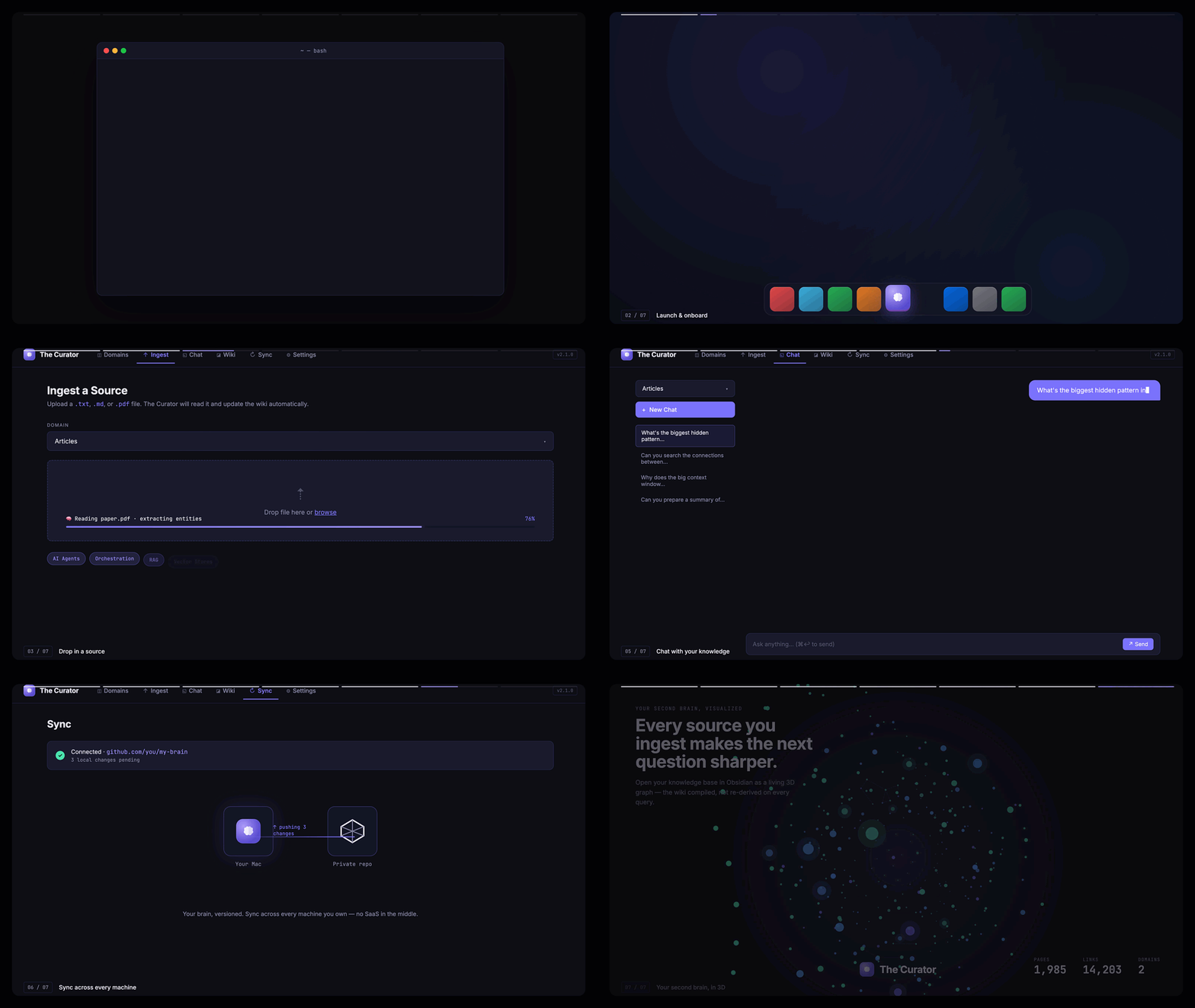
See The Curator in action: drop a PDF, watch it atomize into an interlinked wiki, explore the knowledge graph, and chat with your knowledge.
How it works
1. Drop in a PDF, article, or note
         ↓
2. The Curator reads it and writes 5–15 interlinked wiki pages
   (summary + entity pages + concept pages, with YAML frontmatter)
         ↓
3. Chat with your knowledge — multi-turn AI conversation
   with cited answers and persistent, synced history
         ↓
4. Open Obsidian → explore the auto-colored visual knowledge graph
         ↓
5. Sync now → your knowledge backs up to your private GitHub repo
         ↓
6. (v3.0.0-beta+, optional) Join a Shared Brain → your opted-in
   domain contributes to a collective wiki shared with your cohort,
   team, or research group; everyone's reading compounds together
         ↓
7. (v3.17.0, optional) Point a coding agent at a domain over MCP →
   it saves where the work stands at the end of a session and reads
   it back at the start of the next one, on any machine
Everything is stored as plain markdown files on your computer. No subscriptions, no database,
no cloud accounts — except an API key from Google Gemini, Anthropic Claude or OpenRouter (Gemini has a free tier
with strict daily quotas; pay-as-you-go costs roughly €5/month for moderate solo use, or
€10–20/month for an admin running cohort-scale synthesis weekly — see
Cost & API keys for the full breakdown).
The interface
The app is organized as a left icon rail rather than a row of tabs: Chat, Domains, Shared
Brain, Agent memory — the third layer, showing the working state your coding agents write over
MCP — and Ingest run down the side in that order (your brain → your team's brain → your
agents' brain → the way material gets in), with
Sync and Settings in the rail footer. Agent memory is read-only in the app: agents
write it, the app shows it, and if you want to edit the standing brief by hand you openstate/project.md in any editor. There's no
separate Wiki section — pages open in an overlay reader from a chat citation or from the page
browser inside Domains — and Wiki Health now lives inside each domain in Domains rather than
being its own section.
The previous interface is still available at
/oldwhile people get used to the new one.
Core Concept: Curation, Not Retrieval
Most AI integrations use RAG (Retrieval-Augmented Generation): the AI scans raw files,
retrieves chunks at query time, and forgets everything the moment the chat ends.
It rediscovers knowledge from scratch on every question. Nothing compounds.
The Curator works differently. When you ingest a source:
- The AI reads it, extracts key people/tools/ideas, and writes persistent wiki pages
- On every subsequent ingest, it updates existing pages rather than creating duplicates
- Cross-references are baked in — the contradictions are flagged, the synthesis is maintained
- The wiki compounds with every source you add
The knowledge is compiled once and kept current — not re-derived on every query.
This is the shift from a file cabinet to a neural network.
Vendor-neutral by construction — harness-, agent- and LLM-agnostic
Portability is the product. Nobody should be locked into a harness that owns their
accumulated context. That is not a slogan bolted on afterwards — it is why the storage is
plain files, why the bridge is a protocol rather than an integration, and why there is no
service of ours anywhere in the picture.
flowchart TD
    subgraph NEUTRAL["✅ NEUTRAL — no vendor, no lock-in"]
        direction TB
        S1[YOUR KNOWLEDGE<br/>plain markdown in a folder you chose<br/>no database, no proprietary format<br/>readable in Obsidian or any editor]
        S2[YOUR WORKING STATE<br/>markdown + append-only JSONL<br/>survives a change of session,<br/>harness, model or machine]
        S3[YOUR SYNC<br/>your own private GitHub repo<br/>no service we run, no account with us]
        S4[THE MCP BRIDGE<br/>stdio JSON-RPC child process<br/>ANY MCP client speaks it<br/>runs without the web app]
        S5[THE MODELS<br/>Gemini · Anthropic · OpenRouter<br/>swap providers whenever you like]
    end

    subgraph SHAPED["⚠️ CLAUDE-SHAPED TODAY — content portable, activation is not"]
        direction TB
        K1[THE TWO SKILLS<br/>bodies are pure prose and port anywhere;<br/>auto-triggering and the install path<br/>are Claude-harness mechanisms]
    end

    subgraph FUTURE["🔒 NOT AVAILABLE YET"]
        direction TB
        F1[LOCAL MODELS<br/>the Settings row exists<br/>and is marked unavailable]
    end
What is genuinely neutral, and why:
| Layer | Why it is not locked to anyone |
|---|---|
| Your wiki | Plain .md files in a folder you picked. No database, no export step, no proprietary container. Delete The Curator tomorrow and your knowledge is still sitting there, readable. |
| Your working state | Markdown plus append-only JSONL, in your domain folder. Built precisely so build context survives moving between session, harness, model and machine instead of being stranded inside one vendor's project folder. |
| Sync | Your own private GitHub repository, your own token. There is no Curator server, no Curator account, and nothing of yours passes through us. |
| The MCP bridge | A stdio JSON-RPC server spawned as a child process — any client that speaks MCP can drive it: Claude Desktop, Claude Code, Cursor, and other MCP-capable agents. It reads your markdown directly and does not need the Curator web app running. |
| The models | Three providers today — Gemini, Anthropic, and OpenRouter, which is an aggregator reaching roughly two hundred models from many vendors. You can change provider whenever you like. |
What is not yet neutral — stated plainly, because overclaiming here would be worse than the gap:
- The two agent skills are portable in content but Claude-shaped in activation. Their bodies are ordinary prose and carry no vendor-specific logic, so they work anywhere you can paste them. What is Claude-specific is how they switch on: the tool-permission frontmatter uses Claude's tool-naming convention, automatic triggering from a description field is a Claude Code / Claude Desktop mechanism, and the documented install location is Claude's skills folder. In another harness you paste the body into whatever that harness loads at the start of a session.
- The consequence is worth naming. An agent in another harness can read working state through MCP perfectly well — that half is pure protocol. What it lacks is anything telling it to save. So the store is portable; the discipline that fills it is not yet.
- A harness-neutral form is generated, not hand-copied. Rather than maintaining a second copy of a 37 KB playbook — two copies of one instruction set drifting apart is this repository's most reliably recurring defect, and it would be at its worst here because models read these files — the neutral form is derived from the same source at build time: the body verbatim with the Claude-specific frontmatter stripped, and the tool names with the host-specific prefix removed. One source, no copies.
- Local models are not available yet. The provider row exists in Settings and is explicitly marked unavailable. The OpenRouter adapter speaks an OpenAI-compatible protocol — that is the name of a wire format, not OpenAI support — which is the groundwork that makes local runtimes a natural later addition. It is not a capability today, and this README will say so when it is.
On skill portability specifically: an open format existing is not the same as other harnesses implementing it. Treat cross-harness skill loading as something you may have to do by hand, not as a feature you can assume.
Features
- Drop in a
.pdf,.txt, or.mdfile — the AI does the rest - Atomic Decomposition — automatic extraction of Entities (people, tools, companies),
Concepts (ideas, techniques, frameworks), and Summaries (source narratives) - Every page cross-references related pages with
[[wiki-links]] - YAML frontmatter on every page — structured metadata (
type,tags,created)
that powers Obsidian's Properties panel, Dataview queries, and automatic graph coloring - Auto-colored knowledge graph — type tags (
type/entity,type/concept,type/summary)
let Obsidian color-code every node automatically; set it up once, every future ingest colors itself - Multi-turn AI chat with persistent conversation history — ask follow-ups, connect the dots. Answers adapt to your question (recommendation vs. list vs. synthesis) and a Length selector (Concise · Balanced · Detailed) controls how much detail you get
across sources, pick up where you left off - Working state — your agents' brain (v3.17.0) — a small handoff your coding agent saves at
the end of a session and reads at the start of the next one: where things stand, what to do
next, what is already settled, what was tried and ruled out. It survives a change of session,
agent, model, harness or machine. Plain markdown underdomains/<project>/state/, a sibling
ofwiki/, so it syncs with the rest of your knowledge and opens in any editor. Written only
over MCP, by Claude Code, Claude Desktop, Cursor or any other local MCP client; the Agent
memory rail view renders it read-only, deliberately, so the app never becomes a second
writer to the same files. State supersedes, knowledge accumulates — each save replaces the
previous handoff, so durable material belongs on a wiki page instead.
See docs/working-state.md. - Compile to Wiki (v2.5.0) — turn any chat conversation into permanent wiki pages with one
click. The AI reads the dialogue, extracts the durable knowledge, writes a summary page plus
any new entities/concepts that emerged, and updates everything related — same merge pipeline
as ingest, no parallel write surface. Compiling the same conversation twice is a safe no-op.
After every compile (and every ingest) you see exactly which pages were created and which
were updated, with byte counts and per-section bullet deltas. - Ingest progress you can trust, and a real cost readout — a live elapsed-time indicator
keeps counting through retries instead of appearing to freeze, and amber states make clear
when the AI is retrying rather than stuck. Every ingest ends with a token/cost footer
(provider, model, calls, input/output tokens, and any prompt-cache savings) so you know
exactly what it cost — no guessing. Repeated warnings of the same kind are automatically
collapsed into one line instead of flooding the result panel. Ingest also uses prompt
caching on multi-batch documents to cut input-token cost automatically — no setup required. - Batch ingest — select multiple files at once and The Curator queues them as one durable,
resumable job: a cost estimate up front that reflects your wiki's actual current size (nothing
is spent until you confirm), files processed strictly one at a time — even against a double-clicked
Resume or two open tabs — so pages always merge correctly, Pause (finishes the current file, then
stops) vs. Cancel (stops the current file immediately — no more paid AI calls once you click it),
automatic recovery if the app restarts mid-batch (re-running an interrupted file is safe — ingest
is idempotent), an optional spending cap, and a free local Wiki Health scan once the batch finishes. - Visual knowledge graph via Obsidian (free app, reads the same files)
- Personal Sync — one-time 3-minute setup, then a single Sync now button (with optional Push-only / Pull-only advanced controls) backs up your full wiki across any number of YOUR own computers via a private GitHub repository
- Shared Brain (v3.0.0-beta+, opt-in) — contribute to a collective wiki shared with your cohort, team, or research group. Each contributor keeps a private Curator; only opted-in domains push LLM-synthesised Delta summaries to a shared private GitHub repo; the synthesised collective wiki pulls back as a separate read-only
shared-<slug>/mirror domain. Two-primitives security model (invite token = metadata only, PAT = per-contributor identity), GDPR Article 17 right-to-erasure built in, two IP modes (contributor_retainsfor cohorts /organisationalfor enterprise). A Cloudflare R2 storage backend for EU data residency is planned for a future release. See docs/shared-brain-user-guide.md - Domain management — create, rename, and delete domains from the UI; four AI-tuned templates
auto-generate the right schema - Settings — manage API keys, view version info, and check for updates from within the app
- System Check (Settings) — one click confirms the app itself is set up correctly: API key configured, knowledge folder writable, credential files locked down (
0600), and sync status. A free, instant, local-only check that never touches your wiki content — plus an optional, cost-confirmed "Verify AI connection" test (~$0.0001) that makes one tiny request to your provider so you can tell at a glance whether a failure is your key or a provider outage. (Distinct from Wiki Health, which cleans up your wiki content.) See docs/system-check.md - Wiki Health (inside each domain, in Domains) — one-click scan for broken links, orphans, duplicate entities, folder-prefix violations, and missing backlinks. Auto-fix categories rewrite in place; broken links with a suggested target get an Apply button (and a bulk Apply all suggestions action); genuine ambiguities stay review-only. AI-assisted repair runs in reviewed batches from the ⚡ Quick maintenance bar: ✨ Fix broken links plans a target (or a bracket-strip) for every unmatched link, and ✨ Rescue orphans proposes the existing page that should link to each orphan, with an AI-written bullet description — both preview the whole plan before anything is written. (The
/oldinterface instead offers a per-row ✨ Ask AI button.) A safety gate refuses an AI retarget that would change a version number or flip a negation, so[[claude-sonnet-4.5]]is never quietly repointed atclaude-sonnet-3.5. An opt-in ✨ Find duplicate pages action (in the ⚡ Quick maintenance bar, after a scan) finds pages that describe the same concept under different slugs (e.g.[[email]]+[[e-mail]],[[rag]]+[[retrieval-augmented-generation]]) — with cost preview, user-configurable ceiling, and a mandatory Preview-diff safety gate before any individual merge (high-confidence pairs can also be merged in bulk behind an explicit confirm step). Decisions persist: dismiss any review-only issue or semantic-duplicate pair once and it stops surfacing on future scans — and because dismissals live inside the wiki folder, they sync to your other computers automatically. See docs/ai-health.md. - Find the original document behind a summary — every summary page remembers the source file it was built from; ask Claude (via MCP) to pull the actual extracted source text when a summary's condensed version isn't enough. Raw files aren't synced (only your wiki pages are), so "not on this machine" after a Sync pull is expected, not an error — you still get the filename and ingest date either way.
- First-run "Getting started" guide — a dismissible checklist that points you through the three things a fresh install needs: add an API key, create a domain, ingest your first source
- Live UI updates — domain stats, wiki pages, and page counts refresh automatically after ingest and sync — no manual browser reload needed
- Auto-update — check for updates in Settings; the app pulls the latest version, rebuilds the Dock app, and restarts automatically
- One-command installer — auto-detects and installs Node.js, builds the Dock app, opens on completion
- Supports Google Gemini (recommended, very cheap), Anthropic Claude, and OpenRouter (now cheapest of the three for building a wiki — see below)
- Choose your model — a hand-measured catalogue spanning Gemini, Anthropic and OpenRouter (one
of them free), almost all of which can build your wiki, plus a much larger chat-only list you
can fetch from OpenRouter's live catalogue with one click.
One model builds your brain; you choose freely when talking to it. A single durable choice in
Settings governs everything that writes to your wiki — ingest, Health
scans and Compile — deliberately as one setting rather than three, and as one model app-wide
rather than one per provider, with the reason it is the model currently running stated on
screen (your pick, the app default, an environment override, or a pick the engine refused).
The chat composer's model picker chooses per message and leaves what your next ingest costs
untouched.
Every model that can build your wiki was probed live against the app's real
ingest prompt, and each row shows its price as billed today plus the measured trade-off — output
ceiling, hidden reasoning spend, and how thoroughly it plans a wiki — so the cost is visible at
the moment of choosing. The defaults are unchanged and remain the cheapest on each provider;
a user who picks nothing runs exactly what they ran before. See User Guide §16b - OpenRouter — one key, two lanes, and a chat list you refresh yourself. The build lane (ingest,
Health, Compile) admits only models hand-measured against the real ingest prompt; the chat lane
admits what OpenRouter's live catalogue offers, after structural filtering, labelled as
unmeasured. The reason is asymmetric consequence: a bad chat answer costs one answer you can see,
a bad ingest writes wrong pages into your wiki permanently and you already paid for it.
OpenRouter routes have been measured for the build lane — nine runs each against the
real ingest prompt — so OpenRouter can build a wiki, and its pinned default is the cheapest
route The Curator offers ($0.03/$0.12 per 1M tokens, roughly a third of the cheapest Gemini
option). And you can measure one yourself: if a model is offered for chat but not for
building, Test on my wiki runs your real ingest prompt — assembled from your own index and
pages, because that is ~99% of what a real prompt is — nine times, and reports what it actually
did. Nine is the minimum, the confirmation leads with time rather than money (8 to 57 minutes,
measured), you can stop at any point, and the result is badged as you measured this rather than
we measured this — a separate claim, kept separate on purpose. It never says verified: it
reports what it observed and over how many runs, and it cannot overturn a finding of ours. For chat, OpenRouter's own catalogue is fetched automatically when it is missing or more than a day
old — previously it arrived only if you pressed a button, which is why models "sometimes showed and
sometimes did not" — and a manual refresh is still there when you want one. It adds
everything that survives the checks: on one measured refresh, 387 listed models became 189 added,
taking the picker from 3 to 192. No standing count is printed here — that catalogue moved by seven
records inside five hours on the day it was measured — and passing the checks means nothing in
the metadata disqualifies this model, never that it works, which is exactly why fetched models
are chat-only. ⚠ Because it can build, saving an OpenRouter key makes it your active provider
— ordinary last-saved-wins, the same as the other two — so your next ingest is built by it. Free
models exist, are never picked for you, and are subject to a daily request cap and a shared
upstream pool; the app shows the real limits it reads back from your own key rather than a number
written down here./olddoes not support OpenRouter — a stated limit, since its files are
frozen. See
User Guide §16b - Four AI-tuned domain templates to start from — Tech/AI, Business/Finance, Personal Growth, Generic — plus unlimited custom domains, no terminal or file editing required
- Mac Dock app — double-click to launch, no terminal needed
Licensing
The Curator is open source under the MIT License — the app, the interface, the ingest and chat pipeline, Wiki Health, Personal Sync, the My Curator MCP server, every test suite, and all documentation.
Ten files are not. We would rather tell you here than have you discover it later. The Shared Brain backend modules — listed by exact path in LICENSES/ENTERPRISE-FILES.txt — are source-available under the Curator Enterprise License. They stay fully readable, forkable, auditable, and free for personal use; what the license reserves is paid organizational production use with storage backends other than the free GitHub one.
What that means in practice:
| What | Terms |
|---|---|
| The whole app, minus those 10 files | MIT. Unchanged. |
| Personal, educational, academic, evaluation, development, testing, research use | Free, always. |
| The GitHub-backed Shared Brain — the one that exists today | Free for everyone, forever, organizations included. That is written into the license (§3.1), not merely promised on this page. |
| All other organizational production use | Free for this release, permanently. Curator Enterprise license keys do not exist and cannot be purchased, so the license grants organizational production use of this release at no charge — and that grant does not lapse when keys appear. Later releases may drop the clause (§3.3, the grace clause). |
| Two years after any release | That release's enterprise-licensed files convert to the MIT License automatically (§5). |
| Anything you already have | Keeps the terms it shipped under, permanently (§6). |
What "GitHub-backed" means: ordinary github.com. The shipped app has api.github.com written into it with no configurable endpoint, so as distributed it cannot reach GitHub Enterprise Server or EU-residency Enterprise Cloud — those sit outside the forever-free grant, though they are still free on this release like everything else. If a future release ever reaches them, that changes things for that release only.
Nothing is being taken away from anyone. Every release already installed stays under the license it was published under; this change applies going forward only. It exists so that a future paid enterprise tier — Shared Brain running on storage the organization controls itself, for data sovereignty — can help sustain the project, without ever moving the free version behind a gate.
The test suites deliberately stay MIT: they document how Shared Brain actually behaves, and we want them readable, runnable, and contributable.
Neither licence grants rights in the name or the logo — see TRADEMARK.md, which also spells out the nominative uses ("based on The Curator", "compatible with The Curator") that need no permission at all.
The license text has not been reviewed by a lawyer, and says so at the top. If a clause blocks something reasonable, open an issue — the wording is what should change.
Three ways to explore your knowledge
| Mode | Tool | Best for |
|---|---|---|
| Chat | Built-in AI (Chat) | "How does X relate to Y?", synthesising across sources, multi-turn conversation |
| Visual | Obsidian graph view | Seeing the full knowledge map, spotting clusters, browsing pages |
| Frontier LLM | Any local MCP client via the My Curator bridge (v2.3+) — Claude Desktop, Claude Code, Cursor | Deep research over the full graph — tags, links, backlinks, topology — plus reading and writing the working state |
All three read the same markdown files — no sync or export needed between them. Set up My Curator from Settings; see docs/mcp-user-guide.md. The bridge is a stdio child process, so it works with clients that can spawn a local program and not with browser-only assistants.
Who This Is For: Use Cases
The Curator is domain-agnostic. It works for anyone who accumulates knowledge over time
and wants it organized, connected, and queryable rather than scattered.
Content Creators (Writers, Podcasters, YouTubers)
Ingest all your reading material and research. When outlining a new video or article,
open the Obsidian graph and look at the largest Concept nodes to see which themes
you naturally gravitate toward. Click any Entity node to see every source you've read
about that person or tool — generating a rich, fully cited script in minutes.
Turns passive consumption into a content assembly line.
Researchers & Academics
Batch-upload 20+ PDFs on a topic. The Curator extracts all distinct methodologies
(Concepts) and authors (Entities). Use the graph's "Idea Collisions" to identify gaps
in the literature — intersections between concepts that no existing paper has addressed.
Query the chat to synthesise findings across all papers simultaneously with source citations.
Executives & Strategists
Upload quarterly reports, competitor analyses, and meeting transcripts.
Build an "Expertise Map" where the most-referenced nodes grow largest — giving you
a visual heat map of where your intelligence is concentrated and where the gaps are.
Query: "Synthesise the main friction points from the last 20 customer interviews."
The Curator connects dots across months of documents, bypassing recency bias entirely.
Software Architects & Development Teams
Ingest architecture decision records (ADRs), API specs, post-mortems, and README files.
The app builds a dependency graph of your codebase's decisions, not just its code.
New team members can ask: "Why did we choose Postgres over MongoDB for the auth service?"
and get an answer cited directly from an ADR written years ago.
Anyone Who Codes With Agents Across Sessions, Tools and Machines
This is the third layer rather than the first, and it is the one profile that needs no
ingestion at all. You end a session; the next one starts blank. It re-derives what it can,
re-opens decisions you already closed, and walks back into a dead end you already mapped — and it
does that again every time you open a new window, switch from one assistant to another, change
model, or move from the laptop to the desktop. Point your agent at a domain over MCP: at the end
of a session it saves where things stand, what to do next, what is settled and what to avoid; at
the start of the next one it reads that back, whatever tool it happens to be running in.
Nothing is locked to a vendor because the handoff is a markdown file in your own folder.
→ docs/working-state.md
Medical & Scientific Researchers
Drop in clinical trial PDFs and academic papers. The Curator extracts Entities
(genes, proteins, drugs, compounds) and Concepts (pathways, methodologies, biomarkers).
The graph reveals hidden intersections — a compound used in one domain showing efficacy
in a completely different study — by visually bridging nodes across your entire literature corpus.
Entrepreneurs & Startup Founders
Feed the app customer interview transcripts, investor updates, and market research reports.
Build an external "Board of Advisors" from your own collected intelligence.
If considering a product pivot, see which Concept nodes are growing fastest.
Query the chat for synthesised strategic answers grounded entirely in your own research.
Personal Growth & Self-Analysis
Ingest journal entries, book highlights, therapy notes, and podcast summaries.
The app extracts recurring Entities (people, situations, environments) and
Concepts (anxiety triggers, flow states, core values). Query: "What themes recur
on high-stress days?" The Curator connects dots across months of journaling
with the objectivity of a third party.
For Teams & Organisations: Shared Brain (v3.0.0-beta+)
The use cases above are for individual users. Shared Brain extends The Curator with a collective layer where multiple contributors build a shared wiki together — each keeps their personal brain private, while one or more opted-in domains push synthesised contributions to a shared GitHub repo. Synthesis runs locally on the admin's machine using their LLM key; the collective wiki comes back to every contributor's machine as a separate read-only mirror domain.
Educational Cohorts (Universities, Bootcamps, Programmes)
A 20-student ML reading cohort each ingests papers into their personal work-ai domain and opts that one domain into the cohort Shared Brain. Synthesis runs weekly. The cohort ends the semester with a 500-page collective wiki that no single student could have built alone — every paper is in the entity graph, every concept cross-referenced, every contribution attributed. Privacy: students' other domains never leave their machines.
Research Teams & Lab Groups
Four AI-safety researchers each contribute their papers domain to a shared brain. Nightly Pull brings everyone's notes into everyone else's shared-safety/ mirror. Friday meeting: someone asks Claude (via the My Curator MCP) "Which mechanistic-interpretability papers contradict each other on the role of induction heads?" — Claude reads the collective, surfaces three contradictions with paper citations. Synthesis resolves disagreements via the Jaccard contradiction heuristic + targeted LLM call.
Consulting Firms — Institutional Memory
A boutique strategy firm with 15 consultants contributes a sanitised client-insights domain to a firm-knowledge Shared Brain (in organisational IP mode — employment contracts cover IP assignment). The collective wiki becomes accumulated institutional intelligence that survives partner departures and onboards new hires in days instead of weeks.
Enterprise Knowledge Management
A 50-person SaaS company pilots a Shared Brain for the engineering team. Each engineer opts in one engineering-knowledge domain with ADRs, post-mortems, and internal RFCs. New engineers query Claude: "Why did we pick PostgreSQL over MongoDB?" — Claude reads the collective via MCP, cites the 2023 ADR. Per-engineer attribution preserves who contributed what. shared-engineering/ is read-only for direct edits, so engineers can't accidentally overwrite the collective.
Cross-functional Product Teams
A product team (PM + designers + engineers + researcher) contributes 4 role-specific domains over 6 months. The collective wiki becomes the project's queryable memory. Six months later, the retrospective is informed by an actual searchable corpus, not just whoever happened to keep good notes.
→ More cohort & team patterns in docs/use-cases.md. Setup walkthrough in docs/shared-brain-user-guide.md. Architecture in docs/shared-brain.md. Compliance in docs/shared-brain-compliance.md.
Monetize Your Knowledge: paid Shared Brain access
Shared Brain's architecture supports paid access — domain experts, educators, researchers, artists, and consultants can charge audiences for access to a brain they curate. This works today on v3.0.0-beta.1 with zero code changes, using no-code payment platforms you already know (Gumroad, Lemon Squeezy, Stripe).
Who can monetize
- Independent researchers — sell a recurring subscription to your curated reading domain (€10-30/mo). Example: an AI safety researcher with 4 years of paper reading + weekly synthesis.
- Educators & professors — package your cognitive-science / philosophy / history domain as a paid student companion or public knowledge product.
- Artists & designers — turn your 10-year visual-reference library with commentary into a paid resource.
- Industry experts — VC analysts, biotech researchers, longevity scientists with deep niche expertise.
- Consulting firms — sell sanitised pattern recognition (anonymised) to current clients as a recurring add-on.
- SaaS companies — sell domain expertise as a recurring asset bundled with their software product.
Why this is a real opportunity
Unlike a Notion template (bought once, frozen) or a newsletter (single read, archived), a Shared Brain compounds. Buyers who pay in month 1 see the brain grow richer every synthesis run, and they can query it via Claude Desktop for deep research like "across this brain, which papers contradict each other on X?" The value keeps growing, which is exactly why subscription pricing works.
Pricing comparables:
| Product | Typical price | Why Shared Brain compares |
|---|---|---|
| Substack newsletter | €5-15/mo | Single-read content |
| Stratechery (Ben Thompson) | €15/mo | One expert's recurring analysis |
| Patreon tiers | €3-50/mo | Audience access |
| Shared Brain subscription | €5-30/mo | Compounding queryable knowledge graph + recurring synthesis + Claude integration |
The "gates" — where access is controlled
Shared Brain has four serial gates from buyer → brain access. The first is the only one you (the admin) control 100%:
- 🚪 GitHub collaborator status — pay → you add → access granted; cancel → you remove → access revoked. This is THE money gate.
- 🚪 PAT scope — you instruct buyers to create a Read-only PAT (read-only tier) or Read AND Write PAT (contributor tier). Two tiers with no code.
- 🚪 Invite token — metadata-only, safe to email or even publish publicly. Not a gate, just a UX touchpoint.
- 🚪 The Curator app — buyer installs the free open-source app on their machine.
→ More example use cases (independent experts, artists, consulting firms, SaaS companies) in docs/use-cases.md.
Quick start
Option A — One-command installer (Mac, recommended)
Paste this into Terminal and press Enter:
curl -fsSL https://raw.githubusercontent.com/talirezun/the-curator/main/install.sh | bash
The script auto-detects and installs Node.js if needed, clones the repo, installs dependencies, and builds The Curator.app — all in one step. When it finishes, the app opens automatically. A "Getting started" guide points you to API key setup on first launch.
Pin it to your Dock. The installer puts The Curator.app in
~/the-curator/but doesn't add it to your Dock automatically — open a Finder window, navigate to~/the-curator, and drag the app icon down into your Dock. Now you can launch The Curator with one click any time.
Lifecycle on macOS. The app is a local web server that opens in your browser. Closing the browser tab does not stop the server — it keeps running in the background using virtually no CPU, so clicking the Dock icon again instantly reopens it. To fully quit: right-click The Curator in the Dock → Quit.
Optional: The repo includes a
research/folder with articles and papers about second brain architecture. This is not required to run the app. If you want to save disk space after installation, you can safely delete~/the-curator/research/— the app will work perfectly without it. The research folder is available for interested users who want to explore the concepts behind The Curator.
Option B — Manual setup (Windows / Linux / Mac)
The Node.js server runs anywhere Node 18+ runs. Only the one-line installer and the auto-built .app Dock launcher are macOS-specific — the app itself is fully cross-platform.
Prerequisites
- Node.js 18+
- An API key — Google Gemini (free tier available, paid tier ~€5/month for moderate use), Anthropic Claude (paid only), or OpenRouter (one key onto many vendors, and the cheapest route to building a wiki — it can run ingest on its own)
- Obsidian for the knowledge graph (free, optional)
# 1. Clone the project
git clone https://github.com/talirezun/the-curator.git
cd the-curator

# 2. Install dependencies
npm install

# 3. Start the server
node src/server.js          # macOS / Linux
# Windows PowerShell:
# $env:CURATOR_NO_OPEN=1; node src\server.js
Open http://localhost:3333 in your browser.
Windows / Linux notes: the auto-update + Dock-app + folder-picker UI buttons are macOS-only; everything else (ingest, chat, wiki, MCP, sync, Health) works identically. Set
DOMAINS_PATH=...to point at your knowledge folder, andCURATOR_NO_OPEN=1to skip the macOS-onlyopenbrowser-launch on startup.
Install with a coding agent: Claude Code, Cursor, Augment, Cline, and other CLI-aware AI coding agents can install The Curator for you — paste the prompt from User Guide §20.
API keys: The "Getting started" guide appears on first launch and points you to add a key. You can also add or change keys anytime in Settings. Alternatively, developers can create a
.envfile manually (cp .env.example .env) and setGEMINI_API_KEYthere.
For the Mac Dock app (double-click to launch, no Terminal needed), see docs/mac-app.md.
First time? Read the full User Guide — it covers every step in plain
language, including how to get your API key, real-world cost estimates, how to use the chat, and how to set up Obsidian.
Cost — what The Curator actually costs to run
The Curator itself is free, open-source software. The only paid component is the AI provider you connect for the features that actually call an LLM. Knowing which features cost tokens and which don't makes the bill predictable.
What uses your API tokens
| Feature | Uses tokens? | Why |
|---|---|---|
| Ingest (drop in a PDF / article / note) | ✅ Yes | The LLM reads the source and writes the wiki pages. This is by far the largest consumer of tokens. Multi-batch documents benefit from automatic prompt caching (explicit on Anthropic, implicit on Gemini), which cuts repeated-context input cost — the exact token/cache split for that ingest is shown in the result panel afterward. |
| Chat (built in) | ✅ Yes | Each message + reply is one LLM call. Cheap — typically a few cents per long conversation. |
| Wiki Health — AI broken-link fix / orphan rescue | ✅ Yes | Batched: one plan for the whole domain, priced before you confirm. A single per-row ✨ Ask AI click at /old is ~$0.0001–0.0005. |
| Wiki Health — ✨ Ask AI on orphan pages (Phase 2) | ✅ Yes | One LLM call per click. ~$0.0001–0.0005 each. |
| Wiki Health — Semantic duplicate scan (Phase 3) | ✅ Yes — opt-in, cost-gated | A confirm dialog shows the estimate before you run it (typical: $0.003–$0.03 on Gemini Flash Lite). |
| Shared Brain — Push contributions (v3.0.0-beta+, contributor side) | ✅ Yes | Each push runs local LLM pre-processing to generate DeltaSummary objects from your changed pages. One LLM call per changed page. Typical: $0.001–0.01 per push on Gemini Flash Lite. |
| Shared Brain — Run synthesis (v3.0.0-beta+, admin side) | ✅ Yes — but contradiction-only | Synthesis only invokes the LLM for contradiction candidates flagged by the Jaccard heuristic. Most contributions don't conflict, so most synthesis runs are nearly free. Typical: $0.001–0.05 per synthesis on Gemini Flash Lite, scaling with disagreement rather than corpus size. |
What does NOT use any AI / tokens
| Feature | Why it's free |
|---|---|
| Browsing your wiki pages (Domains, or the reader opened from a chat citation) | Pure file rendering. No LLM call. |
| Domain management (create / rename / delete) | Filesystem operations only. |
| Settings, API keys, updates | Local. No LLM call. |
| Personal Sync (Sync now / Push only / Pull only) | A git push / git pull over HTTPS to your own private repo. |
| Wiki Health — structural scan & deterministic fixes (broken-link auto-fix, folder-prefix, hyphen variants, cross-folder dedup, missing backlinks) | Algorithmic — runs entirely on your machine. |
| My Curator MCP server (locally, on this machine) | The bridge itself is free. The frontier model you connect to it (Claude Desktop, etc.) bills you on its own plan, not through your Curator API key. |
get_raw_source (find the original document behind a summary, via MCP) |
Plain text extraction from a local file — no LLM call. |
| Shared Brain — Pull updates / Disconnect / List connections | GitHub REST API calls to read pages or list metadata — no LLM involved. |
| Shared Brain — Revoke a contributor (GDPR Article 17) | Storage operations only (delete contributions, scan + delete tainted pages, append audit log). Synthesis re-runs after — that step uses the LLM as above. |
Provider pricing
| Provider | Free tier? | Cost (paid) | Real-world cost |
|---|---|---|---|
| Google Gemini 2.5 Flash Lite (default, recommended) | Yes — 15 RPM, 1,000 requests/day, 250k tokens/min (details) | $0.10/M input · $0.40/M output | ~€5/month at heavy use (50 articles × ~10 pages, plus daily chat) |
| Anthropic Claude Haiku 4.5 | No | $1/M input · $5/M output | ~10× the Gemini bill for the same workload |
Those two rows are the defaults, not the only options. You can pick a different model — one choice, app-wide, from a single cross-provider list — and the catalogue spans Gemini, Anthropic and OpenRouter (one of the OpenRouter routes is free), almost all of it usable for building your wiki, and you can add to it by measuring an OpenRouter model against your own wiki — and the span across the measured fourteen Gemini and Anthropic models is roughly 50× on input and 62× on output, so a change there rescales the figures above. User Guide §16b covers what each one costs and what was measured about it.
About the Gemini "free tier": it exists, and it's enough to try the app — but the daily quota was tightened by 50–80% in December 2025, so a single batch ingest of 5–10 PDFs will usually exhaust it. For real use, enable billing in Google AI Studio — the per-token cost is so low that most users pay €1–€10/month total. See User Guide §19 for a full cost breakdown and pricing math.
Context window: Gemini 2.5 Flash Lite has a 1,048,576-token window (≈1M tokens), which means The Curator can in principle ingest articles of 200–300 pages in a single pass. The current ingest pipeline caps inputs at 80k characters per call (≈20k tokens) and uses a multi-phase pipeline for larger documents — books and very long PDFs work but haven't been stress-tested at the full 1M-token ceiling.
Why My Curator MCP changes everything
Building a second brain is rewarding. Querying it with a frontier model is the moment it becomes irreplaceable.
For most second-brain users, the loop is: ingest sources → admire the Obsidian graph. The graph is beautiful, the visual structure is enjoyable, and the local Chat view handles everyday lookups. But the graph is something you look at. The synapses — the actual connections between thousands of knowledge nodes accumulated over years — are mostly invisible to you while you're inside the graph.
My Curator MCP is the bridge that opens that synapse layer to a frontier model. From v2.3 onwards, The Curator ships a local MCP server that exposes your wiki to any Model Context Protocol-compatible client — most importantly Claude Desktop with Opus or Sonnet, but also VS Code with an MCP-aware coding agent, LM Studio with a local model, or any other MCP client. From v2.5.2+, the bridge is read+write — Claude can save what you discussed, clean up wiki problems, and manage dismissals without you ever leaving the conversation.
This is not "another way to read your files." It's a graph-native access path. Twenty dedicated tools — twelve read tools (eight retrieval, three explicitly graph-shaped, including reaching past a summary to the original source document it was built from, plus get_working_state) and eight health/authoring tools (compile, scan/fix Health, manage dismissals, save_working_state), of which five actually change anything on disk (compile_to_wiki, fix_wiki_issue, dismiss_wiki_issue, undismiss_wiki_issue, save_working_state) while the other three only scan and report — let the model:
- Pull a topology overview of any domain — central hubs, cluster shape, orphan sample, top tags — in one call
- Traverse multi-hop neighbourhoods around any concept or entity
- Get bidirectional backlinks — "every source that mentions Karpathy"
- Search across every domain you've ever built, simultaneously
- Pivot from a tag to its pages, from a page to its links, from a link to its incoming references
- Save research findings back into the wiki (v2.5.2+) — "compile what we discussed and add it to my second brain"
- Heal the wiki on request (v2.5.2+) — "check for problems and fix what's safe" (auto-fixes the unambiguous ones, asks before destructive merges)
What this enables in practice
Imagine you've built your second brain over years. Thousands of nodes. Dozens of domains. Articles, research papers, books, customer interviews, journal entries — all ingested, all interconnected. You sit in Claude Desktop with Opus and ask:
"What are the most important ideas in my AI domain that I have never explicitly connected to my business strategy domain?"
Opus traverses the graph. Pulls hubs from both domains. Finds the intersections. Surfaces connections you made unconsciously, over years, without ever noticing them.
Or:
"For the white paper I'm drafting on organisational resilience, pull every entity and concept tagged
crisis-responseacross all domains, group them by source, and build a citation skeleton."
Or:
"Across my last six months of journal entries, identify recurring patterns I haven't named yet, and propose names for them — citing the specific entries each pattern shows up in."
And after the research, you finish the loop:
"Compile everything we just figured out and save it as a research summary in my
businessdomain — title it 'Q2 Strategic Patterns'."
Claude calls compile_to_wiki, and the synthesis lands in your wiki as a permanent page with bidirectional links to every entity and concept it referenced. The next research session can build on it.
That is not a chat interface. That is a frontier model doing deep research over your own intellectual history — and committing the conclusions back into it — with full citations, no hallucinations beyond your wiki, and no data ever leaving your machine.
MCP + Shared Brain (v3.0.0-beta+)
When you join a Shared Brain (see docs/shared-brain-user-guide.md), the collective wiki appears on your machine as a shared-<slug>/ domain. MCP read tools work fully on it — Claude can search_wiki, get_node, get_index, search_cross_domain across the collective just like any other domain. This is where the cohort/team use cases get powerful: a research team can ask "across our shared brain, which papers contradict each other on X?" and Claude reads everyone's combined reading to surface the answer with citations.
The five mutating MCP tools refuse on shared-* mirrors by design (the read-only Health scans still work there) — direct writes wouldn't propagate to other contributors and would be overwritten on the next Pull. To contribute, Claude writes to your personal opted-in domain (e.g. work-ai/), then you click Push contributions in the Shared Brain view. The skill (skills/my-curator/SKILL.md §3.1) teaches Claude this contract so it knows where to compile when you say "save this to the shared brain."
Why this is first-of-its-kind
Most "AI for personal knowledge" tools are RAG wrappers: they re-derive answers from raw files at query time and forget everything afterwards. Nothing compounds. Nothing traverses.
My Curator inverts that: ingest builds a persistent, graph-shaped knowledge structure during writing, and MCP exposes that graph as first-class structured data at read time. The model doesn't pretend to be your second brain — it uses your second brain, the way an analyst uses a database. Topology, tags, links, backlinks — all queryable, all cited, all yours.
For teams, Shared Brain extends this further: now the analyst-database is collective — built by every cohort member's reading, queried by everyone's Claude. The first time you ask Opus about your team's combined corpus and it surfaces a contradiction between two papers your colleagues read months apart, you understand why this matters.
This is what makes the difference between "I have a folder of notes" and "I have a queryable, compounding extension of my own thinking that any frontier model can reason against on demand."
📖 Setup is under 2 minutes from Settings inside the app — see docs/mcp-user-guide.md for the wizard, prompt patterns, and the privacy/security model.
💡 The My Curator Claude skill (v2.5.7+): drop skills/my-curator/SKILL.md into Claude Code's
~/.claude/skills/— or upload it to any Claude Desktop project's knowledge files — and every conversation that touches the my-curator MCP automatically follows the playbook: ground every wikilink, refuse speculative writes on fresh domains, three-tier-track Health fixes, respect domain siloing. No more typing detailed prompts every time. Install instructions in the MCP guide.🧭 The Curator Continuity skill (v3.17.0+): the same install, for the memory layer — drop skills/curator-continuity/SKILL.md into
~/.claude/skills/and your agent resumes from where the last session left off, and saves a handoff before it runs out of context. Install it if you want working state at all: nothing forces an agent to save, so an agent that hasn't been told the discipline never writes and the store stays empty. Install instructions in the MCP guide; what it stores is in working-state.md.
Chat with your knowledge
Chat is a full multi-turn conversation interface. Ask anything about your wiki —
the AI answers from your own pages, cites its sources, and remembers the entire conversation
thread. Past conversations are saved and survive server restarts.
You:  What is RAG and why does it matter?
AI:   RAG combines retrieval with generation… [source: concepts/rag.md]

You:  How does it compare to fine-tuning?
AI:   As I mentioned, the key advantage is… [source: summaries/rag-paper.md]
The answer adapts to your question (v3.0.8). Ask for a decision ("which of these should
I write — recommend one") and you get a recommendation up front; ask for a list ("list all my
articles about X", "how many sources do I have?") and you get a focused, de-duplicated list;
anything else gets a synthesised answer. It reads what you're asking, so trigger words buried in
pasted-in text never turn a recommendation into a full-domain dump.
Control the length (v3.0.9). A Length selector above the input — Concise · Balanced ·
Detailed — dials how much detail you get, independent of the question type. Concise for a fast
answer, Detailed when you're going deep. Your choice is remembered.
Create multiple conversations per domain. Delete old ones. Pick up any thread later.
Manage your domains
Domains is a full GUI for creating, renaming, and deleting domains — no Finder or terminal needed.
Create a domain — type a display name, pick a template, and click Create. The folder and schema are generated automatically:
| Template | Best for |
|---|---|
| ⚙️ Tech / AI | Software, AI research, developer tools |
| 📈 Business / Finance | Startups, investing, strategy |
| 🌱 Personal Growth | Books, habits, mental models |
| 📁 Generic | Any other topic |
Rename — click the Rename button on the domain page. The folder is renamed on disk; all wiki pages, conversations, and Obsidian links update instantly.
Delete — click Delete. The confirmation panel shows the exact page count before you commit.
If GitHub sync is configured, a rename or delete shows a reminder to Sync now so all your computers stay consistent.
📖 Full reference: docs/domains.md — the CLAUDE.md schema, how domains relate to each other (siloed by default), and custom templates for specialised topics like history, health, or legal.
Sync across computers
Sync, in the rail footer, connects The Curator to a private GitHub repository so your wiki and chat history are available on every machine.
One-time setup (~3 minutes):
- Create a free, empty private repository on GitHub (no README/.gitignore/license)
- Create a Personal Access Token — fine-grained (recommended; Contents: Read and write on that one repo) or classic (
reposcope; can be set to never expire) - Open Sync → follow the 3-step wizard
Three ways to set it up:
- In-app wizard (most users) — Sync → 3 steps. Full guide: docs/sync.md.
- With a coding agent (Claude Code, Cursor, opencode, Aider…) — paste one prompt and it does the whole thing: docs/sync-via-coding-agent.md.
- Manual — create the repo + token yourself and enter them in the wizard.
Daily use:
- Click Sync now at the start and end of every work session — it pulls remote changes first, then pushes yours. One button, both directions.
- Need a one-way operation? Open the Advanced disclosure in Sync for Push only and Pull only buttons.
What syncs: wiki pages, chat history, domain schemas, and working state (state/).
What stays local: source files, API keys, app code.
Why working state syncs, and why it never collides. Each handoff is written to a
per-machine path, so two computers never write the same file and the pull strategy has no
conflicting hunk to resolve away. Save on the laptop, resume on the desktop — a read that names
a workstream but no machine returns the most recently written one. See
docs/working-state.md.
See docs/sync.md for the full guide, including token permissions and troubleshooting.
Shared Brain — collective wikis (v3.0.0-beta+, opt-in)
The Shared Brain lets a cohort, team, or research group contribute to a collective wiki without merging personal data. Each contributor keeps their private Curator; only opted-in domains push to a shared private GitHub repo. The LLM-synthesised collective wiki comes back as a separate read-only mirror domain on every contributor's machine.
Alice's Mac     Bob's PC       Carlos's laptop
  personal/      personal/        personal/        ← stays private
  work-ai/   →   work-ai/    →    work-ai/         ← opted-in, pushes
  shared-cohort/ shared-cohort/   shared-cohort/   ← pulled back (read-only)
        ↓             ↓                ↓
              shared GitHub repo
              (admin's private)
Use cases: educational cohorts (each student contributes a work domain), enterprise knowledge management (employees opt-in their work domain), research teams (shared research domain compounds everyone's reading).
Shared Brain is opt-in. Open Shared Brain in the rail and click Enable Shared Brain (beta), then pick a card: 📨 I have an invite token → Join if your cohort admin sent you a token, or ⚙ I'm starting a new Shared Brain → Set up if you're spinning one up for your team. The 5-step wizard (Token → Access → PAT → Domains → Save) walks through it.
Future generations: a Cloudflare R2 storage backend is planned for EU data residency and custom-domain endpoints, followed by GitHub App mode and SSO for enterprise. See the roadmap.
→ Shared Brain User Guide (step-by-step) · Architecture (concept + decisions) · Admin Operations · Compliance reference (GDPR / IP / EU residency)
Using Obsidian for the knowledge graph
After ingesting your first document, open Obsidian → Open folder as vault → select your Knowledge Base folder (shown in Domains → Knowledge Base Location). Click the graph icon to see all your knowledge as an interactive, zoomable network.
Tip: Domains shows your Knowledge Base Location path and has a Copy button — paste it directly into Obsidian's vault picker.
Activate graph colors (one-time setup): In Graph View → ⚙ → Groups, create three groups:
| Group | Query | Color |
|---|---|---|
| Entities | tag:#type/entity |
Blue |
| Concepts | tag:#type/concept |
Green |
| Summaries | tag:#type/summary |
Purple |
Every future ingest auto-colors new nodes — no manual work needed. See the User Guide for full instructions.
The Terminology
The Curator uses precise language for what it does. Understanding these terms helps you get the most out of it:
| Term | Definition |
|---|---|
| Atomic Decomposition | Breaking a large document into three discrete network components: Entities, Concepts, and Summaries |
| Entities (The Nouns) | Specific people, companies, tools, datasets — nodes with a proper name |
| Concepts (The Verbs/Ideas) | Broad theories, techniques, frameworks, principles — ideas without a single owner |
| Summaries (The Glue) | The narrative that connects specific entities to concepts for a given source |
| Semantic Intelligence | The system's ability to read raw text, comprehend context, and extract structured knowledge |
| Hidden Relations | Intersections between concepts that only become visible in the graph — what search bars can never show you |
| Contextual Provenance | The ability to trace any synthesised idea back to its exact source page |
| Network Compounding | Each new source updates existing pages rather than duplicating — knowledge builds on itself |
Shared Brain terminology (v3.0.0-beta+)
If you're working with Shared Brain, you'll see these specific terms in the UI, docs, and audit logs. Confusing them — especially invite token vs PAT — is the #1 setup mistake.
| Term | Definition | ⚠️ Don't confuse it with… |
|---|---|---|
| Shared Brain | A collective Curator wiki shared with a cohort, team, or research group. Each contributor's personal Curator stays private; only opted-in domains push to a shared private GitHub repo | Personal Sync, which backs up YOUR full wiki to YOUR own private repo |
| Contributor | Anyone in the cohort who joins and pushes contributions. There are N contributors per cohort | The Admin (just one per cohort) |
| Admin | The one person who creates the GitHub repo, generates the invite token, invites collaborators, and runs synthesis | A contributor — though the admin is also a contributor with their own data |
Invite token (sbi_...) |
Metadata-only label that tells the wizard which repo to connect to. Contains NO credentials. Safe to share with the whole cohort via Slack or email | A PAT — they are completely different things |
Personal Access Token (github_pat_...) |
Credential issued by GitHub. Each contributor creates their OWN. Never shared with anyone. Stays on the contributor's machine only | The invite token. Sharing your PAT is a security disaster |
| Opted-in domain | A personal Curator domain that the contributor explicitly chose to push to the Shared Brain. Other personal domains stay private | A shared-<slug> mirror domain (which is the pull destination, not the push source) |
Mirror domain (shared-<slug>/) |
The local read-only copy of the synthesised collective wiki, pulled to every contributor's machine | An opted-in domain. The Curator app, MCP write tools, and Health fixes refuse direct writes to mirror domains by design |
| Delta summary | The LLM-pre-processed payload that gets pushed to shared storage — {new_facts, removed_links, ...} for each changed page. Not a raw markdown file |
The wiki page itself — Delta is the structured change, not the page |
| Synthesis | The admin-triggered process that merges all contributions into the collective wiki, applies merge rules 1-5 (union facts, resolve contradictions, attribute provenance, rebuild index) | Push (which sends contributions) or Pull (which fetches synthesised pages) |
| Provenance | The auto-appended section on every collective page listing contributor UUIDs (or names, per Decision 6a) | Authorship of a personal opted-in page — that stays purely on the contributor's machine |
| Conflict marker | The ## CONFLICTING SOURCES block that synthesis inserts when two contributors disagree and the LLM can't unify their facts |
A Health-broken-link issue. Conflict markers are specific to Shared Brain synthesis |
| Data handling terms | The admin's IP-mode choice at brain setup: contributor_retains (default; educational/cohort) or organisational (enterprise IP transfer). Locked once invites go out |
Privacy controls. This is specifically about copyright in contributed content, not about who sees what |
| Revocation (GDPR Article 17) | Admin-triggered operation that permanently deletes a contributor's submissions + their facts from collective pages + appends an audit log entry. Irreversible | Removing a contributor as a GitHub collaborator (which stops future pushes but doesn't erase past contributions) |
Project structure
the-curator/
├── src/
│   ├── server.js           Express server (port 3333)
│   ├── routes/             API route handlers
│   ├── brain/
│   │   ├── llm.js          LLM abstraction (Gemini + Claude + OpenRouter)
│   │   ├── ingest.js       Ingest pipeline (single-pass + multi-phase for large docs)
│   │   ├── chat.js         Multi-turn chat with persistent conversations
│   │   ├── sync.js         GitHub sync (git --git-dir / --work-tree)
│   │   └── files.js        Filesystem helpers
│   └── public/             Web UI (vanilla JS, no build step)
├── domains/
│   └── <domain>/
│       ├── CLAUDE.md       Domain schema (instructions for the AI)
│       ├── raw/            Your original uploaded files (local only)
│       ├── wiki/           Auto-generated knowledge pages
│       ├── state/          Working state — the agent handoff (syncs; MCP-written)
│       └── conversations/  Saved chat threads
├── scripts/                Maintenance utilities (dedup, repair, bulk-reingest)
├── images/                 App icon in multiple sizes
└── docs/                   Full documentation
Documentation
For users
| User Guide | Full setup + usage — install, ingest, chat, costs, MCP, Health, sync, troubleshooting |
| Knowledge Immortality (essay) | The why — what a second brain is, why markdown matters, what compounding looks like in practice |
| My Curator MCP Guide | Connect the wiki to Claude Desktop (or any MCP client) for frontier-model research over your graph |
| AI Wiki Health Guide | AI-assisted broken-link / orphan / semantic-duplicate cleanup — what each phase does and the privacy tradeoffs |
| System Check | Settings → System Check: confirm the app setup (key, folder, credentials, sync) + an optional AI connection test |
| Working state | v3.17.0 — carry build context between coding sessions, agents, models and machines; what belongs in state vs. on a wiki page |
| Sync Guide | Personal Sync — GitHub backup of your full wiki across your own computers (wizard, token permissions, troubleshooting) |
| Sync with a coding agent | Automated sync setup via Claude Code / Cursor / opencode / Aider — one copy-paste prompt |
| Shared Brain — User Guide | v3.0.0-beta+ — step-by-step for contributors AND admins; daily workflow; troubleshooting |
| Shared Brain — Architecture | What Shared Brain is, how it works internally, engineering decisions, v3.x+ roadmap |
| Shared Brain — Admin Operations | Advanced admin reference: synthesis cadence, revocation, contributor management |
| Shared Brain — Compliance | GDPR / IP / data residency reference for organisations evaluating deployment |
| Shared Brain — Monetization | Paid Shared Brain access: how independent experts, artists, professors, consulting firms, and SaaS companies can charge for brain access today using no-code payment platforms |
| Use Cases | Detailed workflows for every user profile, including cohort & team Shared Brain scenarios |
| Mac App Setup | Double-click Dock launcher for Mac |
For developers
| Contributing | Developer setup, running the tests (npm test / npm run test:live), adding a test, cutting a release |
| Ingestion Pipeline | The deep dive on the most important code path in The Curator — every safeguard, every failure mode, the quality contract, Mermaid diagrams |
| Domains | Full reference — managing domains, the CLAUDE.md schema, siloing model, custom templates |
| Model Lifecycle | Provider/model fallback policy, retiring deprecated models |
| API Reference | REST API documentation |
| Architecture | System design for developers |
Security
- API keys can be stored via Settings (saved in
.curator-config.json) or in.env— both are gitignored, never committed. Credential files (.curator-config.json,.sync-config.json,.sharedbrain-config.json,.env) are written with0600permissions (owner-only) as of v3.0.1-beta.20 - Sync token lives in
.sync-config.json— gitignored, never committed - The app runs entirely on your local machine — the only outbound calls are to the AI provider you configured (Gemini, Claude or OpenRouter) and (when syncing) to your own private GitHub repo
- The server binds to
127.0.0.1(loopback) only, so it is not reachable from your local network, and a cross-origin guard rejects state-changing requests from other web origins (CSRF / DNS-rebinding defense). It still has no per-request authentication — it is a single-user local app and should not be reverse-proxied onto a public network
License
MIT — see LICENSE — with one documented exception: ten Shared Brain backend files are source-available under the Curator Enterprise License, listed by exact path in LICENSES/ENTERPRISE-FILES.txt. The GitHub-backed Shared Brain is free for everyone, forever, and nothing is restricted retroactively. See Licensing above for the plain-English summary.
Reviews (0)
Sign in to leave a review.
Leave a reviewNo results found