claude-code-dashboard
Health Warn
- License — License: MIT
- Description — Repository has a description
- Active repo — Last push 0 days ago
- Low visibility — Only 7 GitHub stars
Code Warn
- network request — Outbound network request in src/app/api/exchange-rate/route.ts
Permissions Pass
- Permissions — No dangerous permissions requested
No AI report is available for this listing yet.
Monitor claude code analytics.
Claude Code Analytics Dashboard
A comprehensive Next.js dashboard for monitoring Claude usage analytics, cost insights, and code statistics with real-time data visualization.




🚀 Features
- Real-time Usage Analytics: Monitor Claude usage patterns with live data updates
- Cost Insights: Track spending across different time periods (daily, weekly, monthly)
- Multi-Currency Support: View costs in USD and INR with real-time exchange rates
- Interactive Charts: Beautiful data visualizations using Recharts
- Dark/Light Theme: Toggle between dark and light modes
- Internationalization: Support for English and Hindi languages
- Responsive Design: Mobile-friendly interface built with Tailwind CSS
- Docker Support: Easy deployment with Docker and Docker Compose
📊 Dashboard Features
Analytics Overview
- Total usage statistics
- Cost breakdown by time period
- Usage trends and patterns
- Real-time data refresh
Visual Components
- Interactive bar charts
- Area charts for trend analysis
- Progress indicators
- Tabbed interface for different views
Additional Features
- Currency conversion (USD/INR)
- Multi-language support (EN/HI)
- Theme switching
- Responsive design for all devices
📷 Screenshots
Light Theme
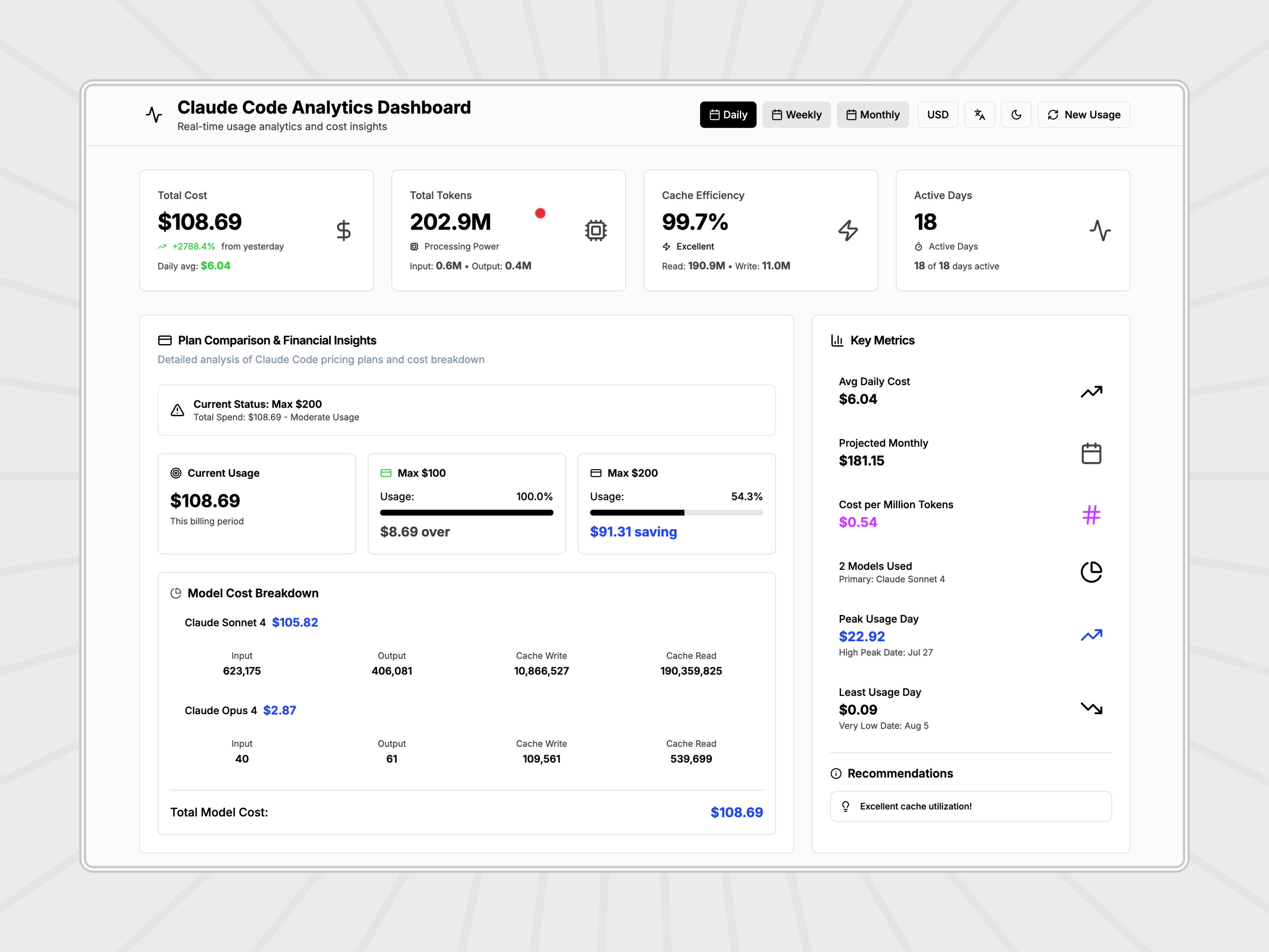
Main Dashboard - Light Theme
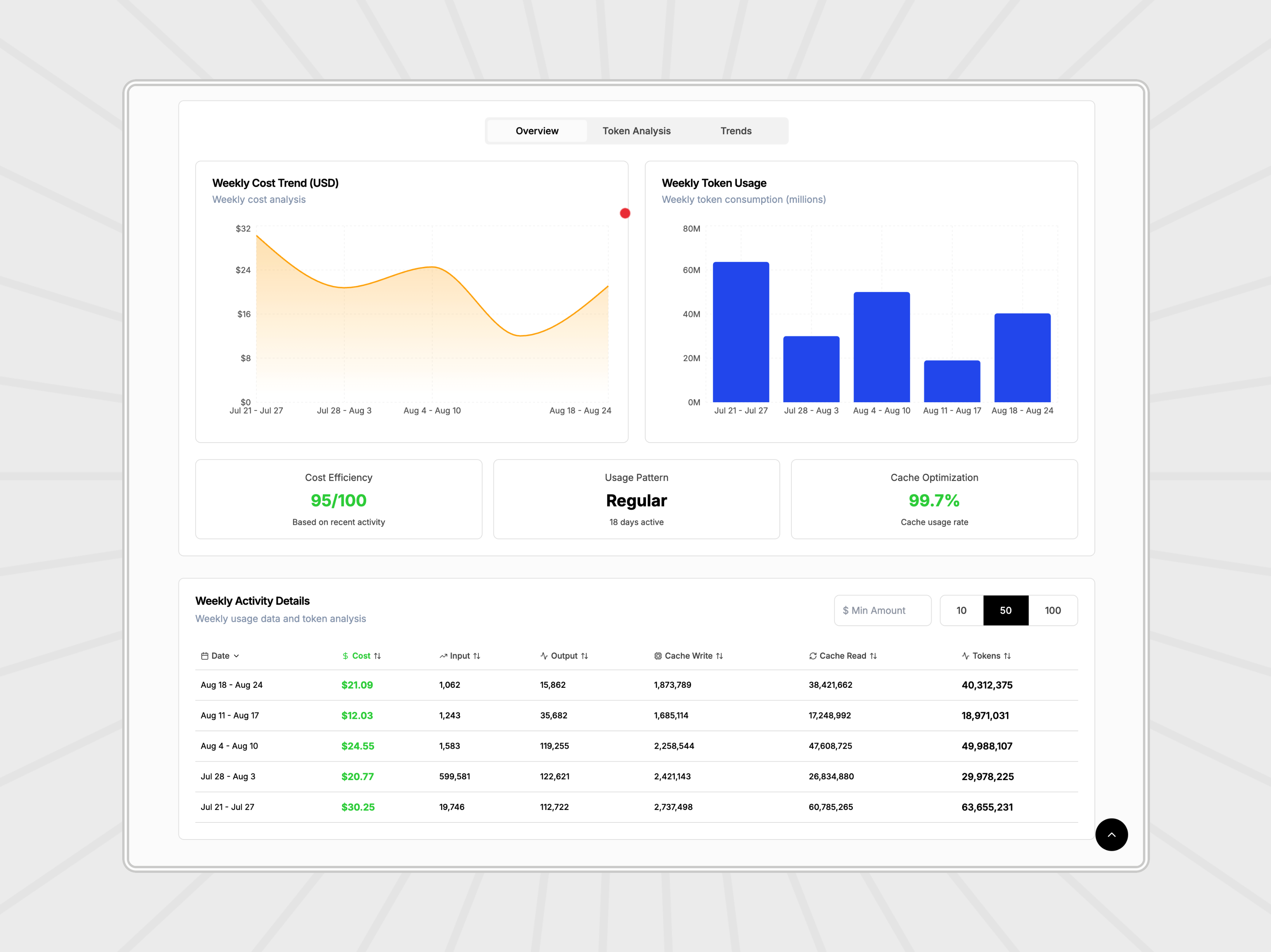
Analytics View - Light Theme
Dark Theme
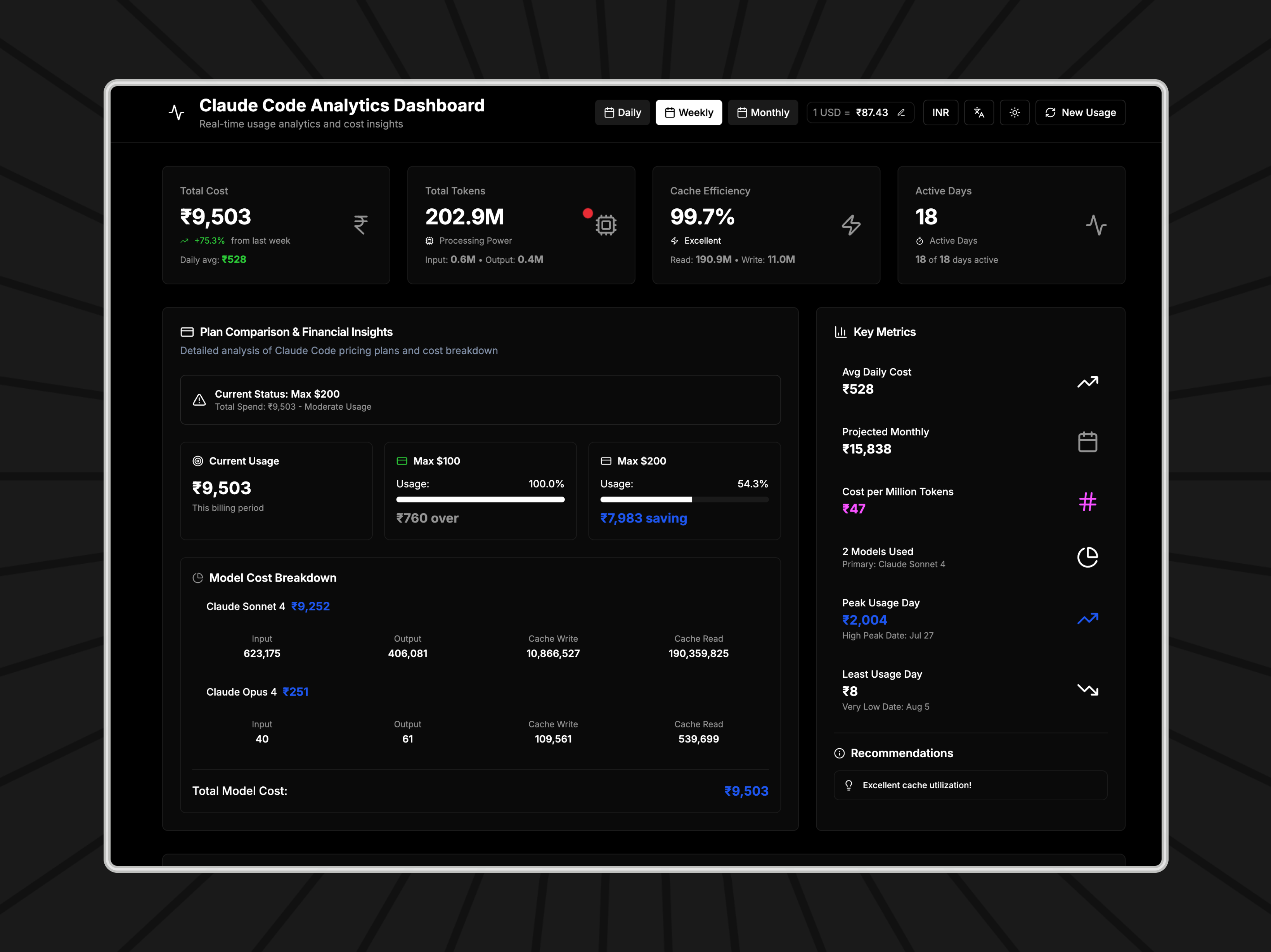
Main Dashboard - Dark Theme
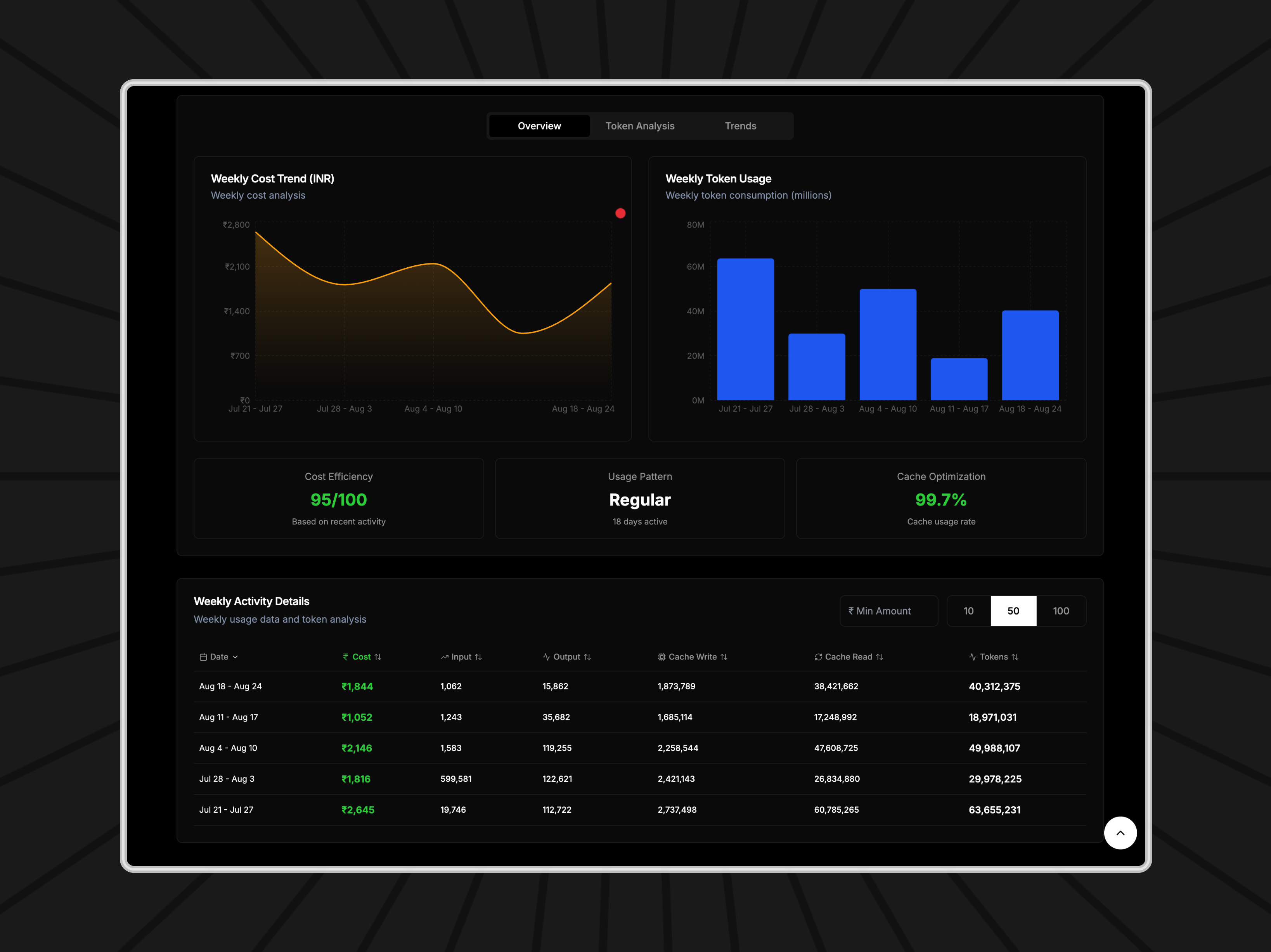
Analytics View - Dark Theme
🛠️ Tech Stack
- Framework: Next.js 15.3.3
- Language: TypeScript 5.8.3
- UI Library: React 19.1.0
- Styling: Tailwind CSS 3.4.17
- Charts: Recharts 2.15.3
- Icons: Lucide React 0.512.0
- UI Components: Radix UI
- Deployment: Docker & Docker Compose
📋 Prerequisites
- Node.js 18+ (recommended)
- npm or yarn
- Claude CLI (
ccusagepackage) - Docker (optional, for containerized deployment)
🚀 Quick Start
Local Development
Clone the repository
git clone https://github.com/tanu360/claude-code-dashboard.git
cd claude-code-dashboard
Install dependencies
npm installRun the development server
npm run devOpen your browser
Navigate to http://localhost:11111
Docker Deployment
Using Docker Compose (Recommended)
docker-compose up -dThe dashboard will be available at http://localhost:3300
Using Docker directly
docker build -t claude-dashboard .
docker run -p 11111:11111 \
  -v ~/.claude/db:/home/nextjs/.claude/db:ro \
  claude-dashboard
Production Build
npm run build
npm start
📁 Project Structure
claude-code-dashboard/
├── src/
│   ├── app/
│   │   ├── api/
│   │   │   ├── usage/          # Usage data API endpoint
│   │   │   └── exchange-rate/  # Currency exchange API
│   │   ├── globals.css         # Global styles
│   │   ├── layout.tsx          # Root layout
│   │   └── page.tsx            # Main dashboard page
│   ├── components/
│   │   ├── ui/                 # Reusable UI components
│   │   └── theme-provider.tsx  # Theme context
│   ├── lib/
│   │   └── utils.ts            # Utility functions
│   ├── locales/                # Internationalization
│   │   ├── en.ts               # English translations
│   │   ├── hi.ts               # Hindi translations
│   │   └── index.ts            # Locale exports
│   └── types/
│       └── usage.ts            # TypeScript type definitions
├── public/                     # Static assets
├── docker-compose.yml          # Docker Compose configuration
├── Dockerfile                  # Docker build configuration
└── package.json                # Dependencies and scripts
🔧 Configuration
Environment Variables
The application uses the following environment variables:
NODE_ENV: Set toproductionfor production buildsHOME: Home directory path (used in Docker)
Claude CLI Setup
Make sure you have the Claude CLI installed and configured:
npm install -g ccusage@latest
The dashboard uses the ccusage command to fetch usage statistics.
📊 API Endpoints
Usage Data
- GET
/api/usage- Fetch Claude usage statistics
Exchange Rate
- GET
/api/exchange-rate?date=YYYY-MM-DD- Get USD to INR exchange rate
🎨 Customization
Themes
The dashboard supports both light and dark themes. Theme switching is handled by the ThemeProvider component.
Localization
Add new languages by creating translation files in the src/locales/ directory and updating the locale index.
Styling
Customize the appearance by modifying the Tailwind CSS configuration in tailwind.config.js.
🚀 Deployment
Vercel (Recommended)
- Fork this repository
- Connect your GitHub account to Vercel
- Import the project
- Deploy automatically
Other Platforms
The application can be deployed on any platform that supports Next.js:
- Netlify
- Railway
- Heroku
- DigitalOcean App Platform
🤝 Contributing
- Fork the repository
- Create a feature branch (
git checkout -b feature/amazing-feature) - Commit your changes (
git commit -m 'Add some amazing feature') - Push to the branch (
git push origin feature/amazing-feature) - Open a Pull Request
📝 Scripts
npm run dev- Start development servernpm run build- Build for productionnpm run start- Start production servernpm run lint- Run ESLint
🐛 Issues
If you encounter any issues, please check the following:
- Ensure Claude CLI (
ccusage) is properly installed - Check that your Claude database is accessible
- Verify Docker permissions (for Docker deployment)
For bug reports and feature requests, please open an issue.
📄 License
This project is licensed under the MIT License - see the LICENSE file for details.
🙏 Acknowledgments
- Next.js for the amazing React framework
- Tailwind CSS for the utility-first CSS framework
- Recharts for beautiful data visualizations
- Radix UI for accessible UI components
- Lucide for the beautiful icons
📞 Support
For support, please reach out through:
- GitHub Issues: Issues Page
- Repository: Claude Code Dashboard
Made with ❤️ using Next.js and TypeScript
Reviews (0)
Sign in to leave a review.
Leave a reviewNo results found