trace
Health Warn
- License — License: AGPL-3.0
- Description — Repository has a description
- Active repo — Last push 0 days ago
- Low visibility — Only 7 GitHub stars
Code Pass
- Code scan — Scanned 12 files during light audit, no dangerous patterns found
Permissions Pass
- Permissions — No dangerous permissions requested
No AI report is available for this listing yet.
Free, open-source daily tech and AI news brief: reads 100+ sources, groups coverage of each story, summarises it with every source linked. Web feed, daily email, MCP server.
Trace
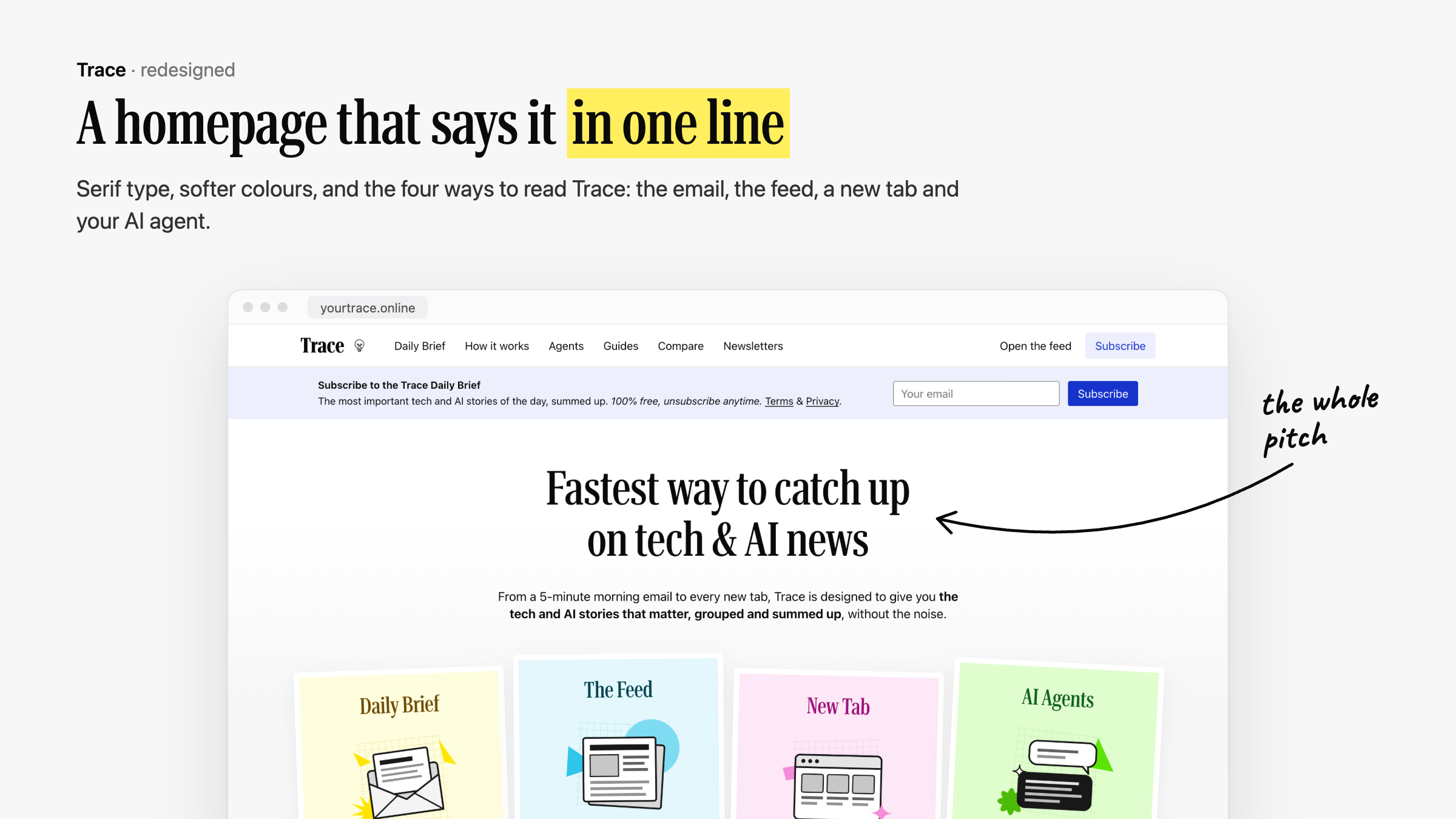
The fastest way to catch up on tech & AI news. 100+ tech sources, 10
stories, 5 minutes. Free for everyone, open source.
Trace reads tech and AI news from over a hundred sources every morning, groups
the stories everyone is covering into one card, ranks them, and summarises each
one with every source attached. Read it in the feed, in a daily email you shape
yourself, on your phone, in every new Chrome tab, or through your AI assistant.
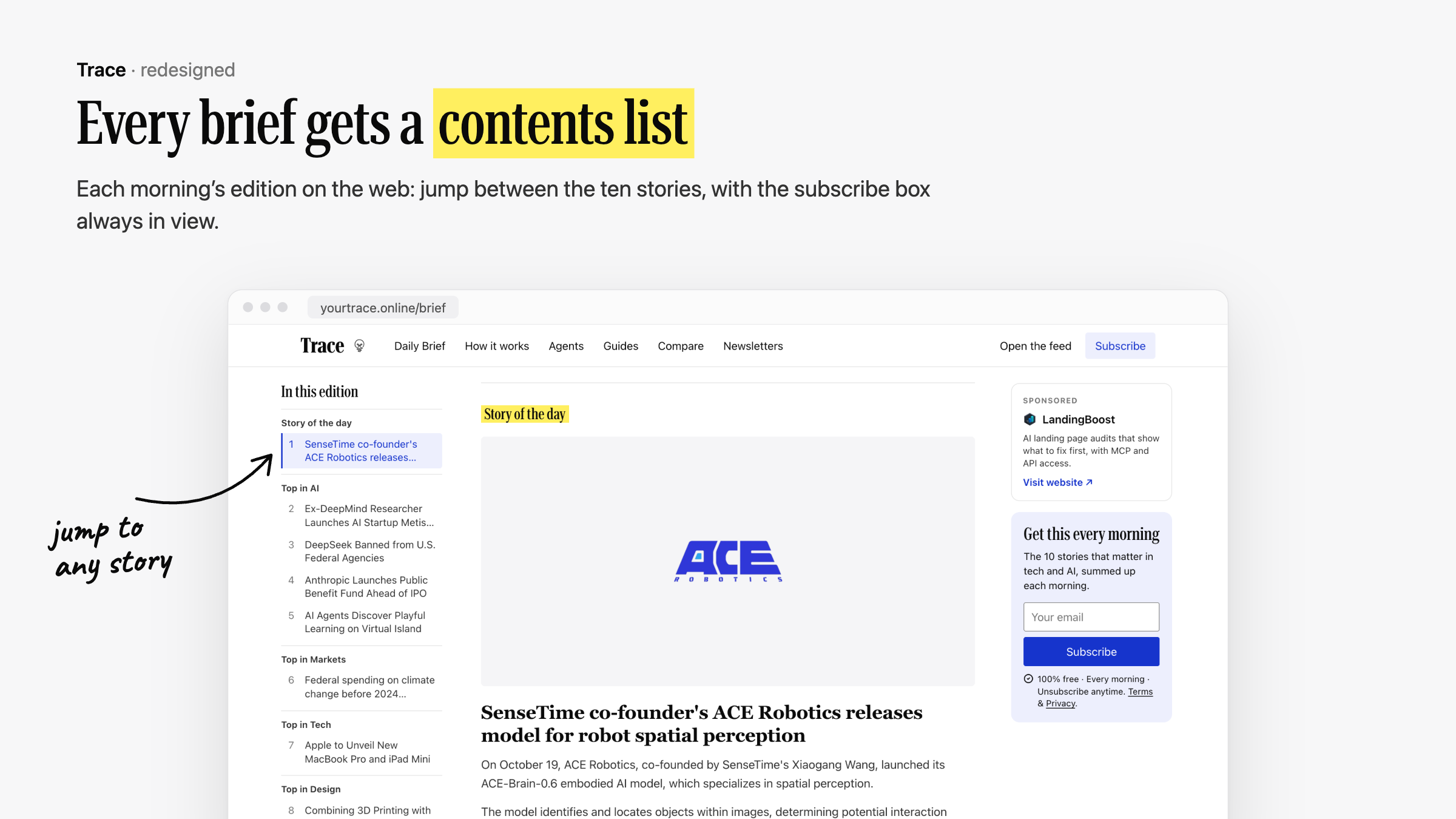
Live: yourtrace.online · Daily archive: yourtrace.online/brief · Build your brief: yourtrace.online/brief/customize
What you get
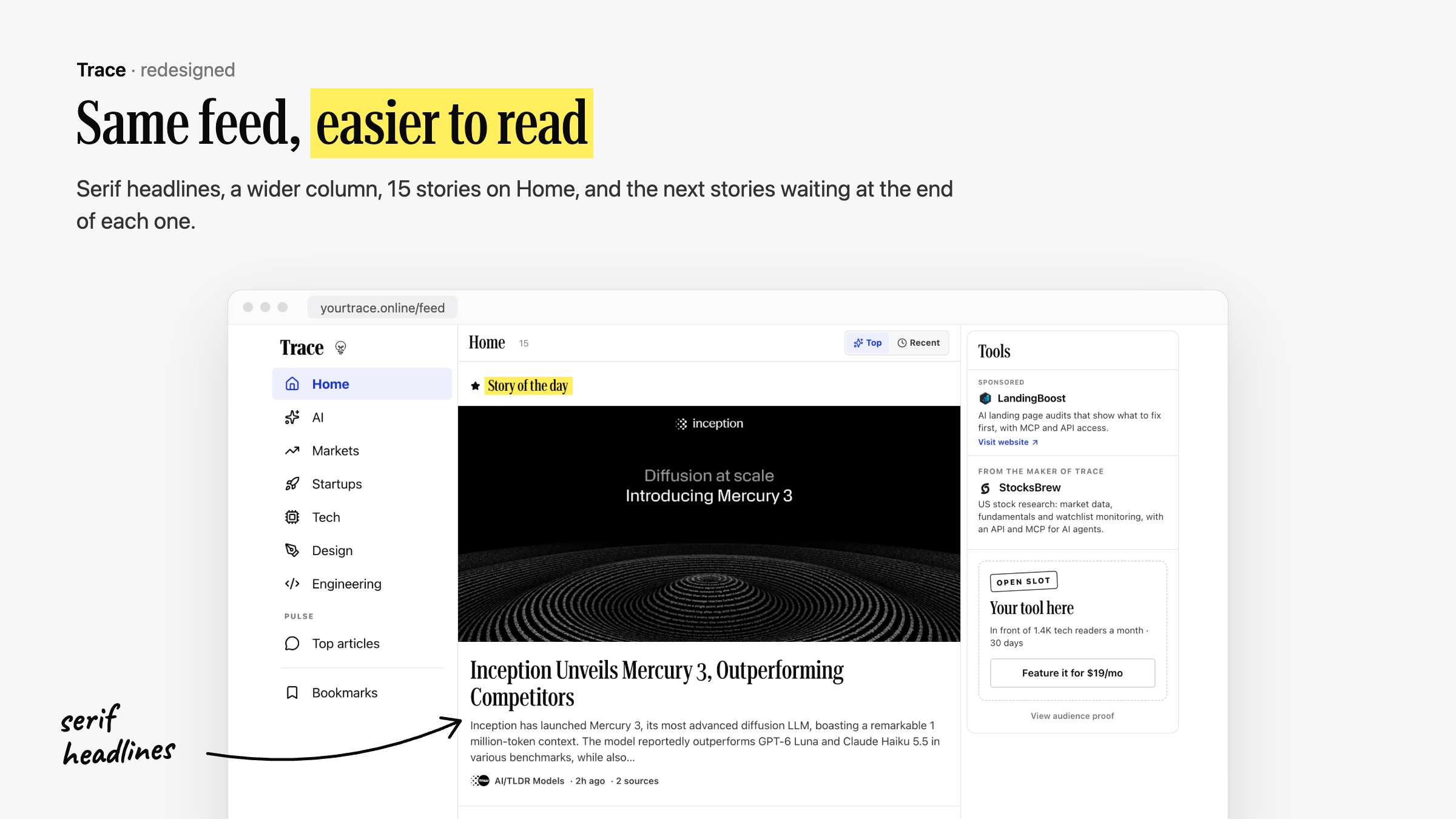
| The feed | One card per story, every source attached, ranked by how much it matters. Topic lanes (AI, Markets, Tech, Startups, Design, Robotics), Top articles, bookmarks, an archive. |
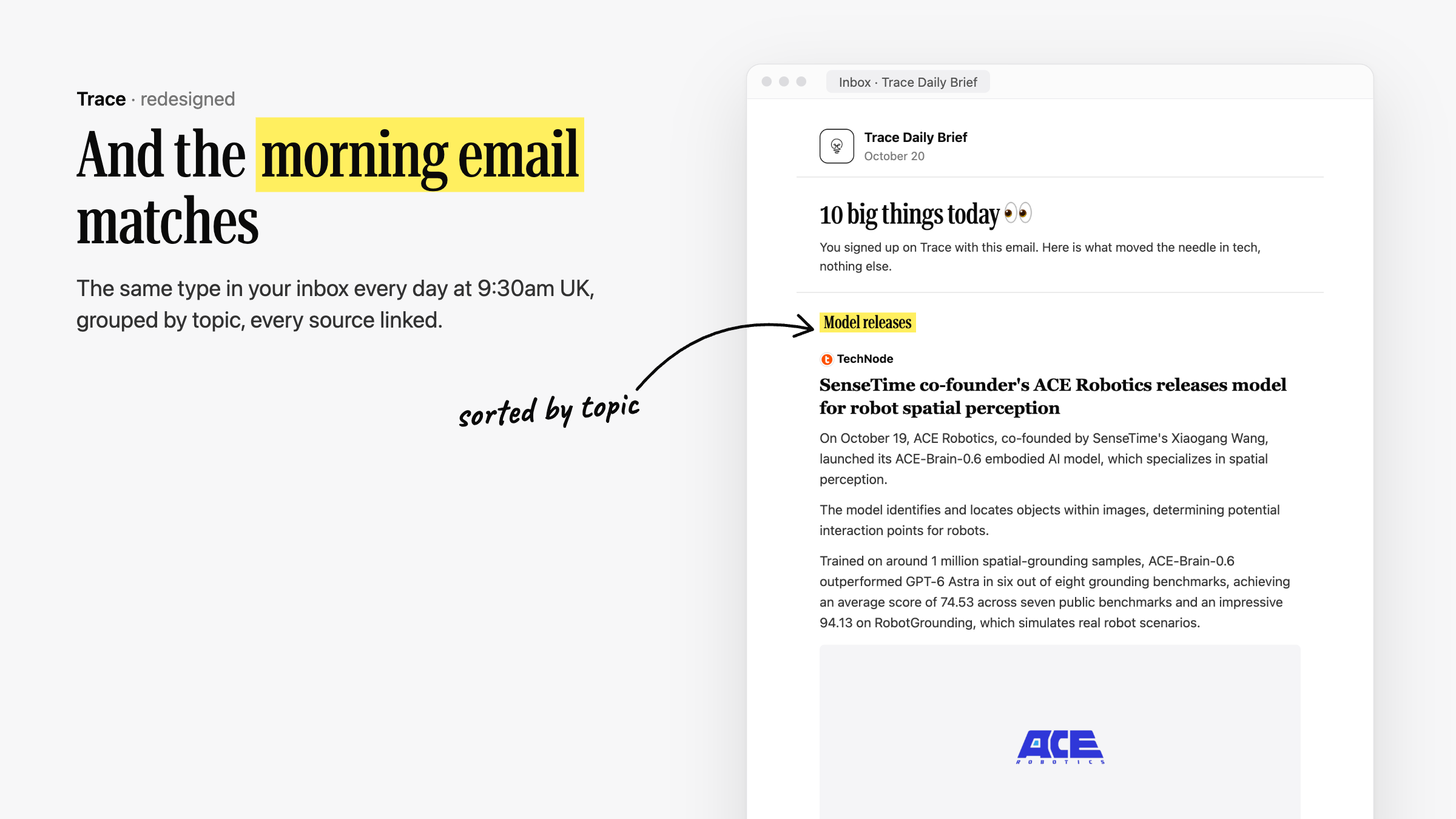
| The daily brief | A morning email. Ten stories by default; each reader picks topics, 5/10/15 stories, and summaries, headlines only, or images. The preview in the builder is the real selection. |
| Public archive | Every edition at /brief/YYYY-MM-DD, with share buttons and its own share image. |
| Mobile app | Android app on Google Play; the Expo source lives in trace/ in the main repo. |
| New tab | Chrome extension in trace-extension/: the latest stories on every new tab. |
| Agents | Paste one URL into Claude, ChatGPT, Cursor, Claude Code, Codex or Gemini CLI, sign in with Google, and your agent reads the brief (/agents). |
Connect your AI agent
Trace is a read-only remote MCP server at https://www.yourtrace.online/api/mcp.
There is no key to copy: the first time your client connects it opens a Trace
page, you sign in with Google and click Allow. Connecting also sends you the
daily brief by email (unsubscribe any time; your agent keeps access).
claude mcp add --transport http trace https://www.yourtrace.online/api/mcp   # Claude Code
codex mcp add trace --url https://www.yourtrace.online/api/mcp               # Codex
gemini mcp add --transport http trace https://www.yourtrace.online/api/mcp   # Gemini CLI
In Claude and ChatGPT, add it as a custom connector; in Cursor and most other
clients, {"mcpServers": {"trace": {"url": "https://www.yourtrace.online/api/mcp"}}}.
Step-by-step for each app, a skill file for personal agents and header-based
Agent Keys for bots are on /agents.
Under the hood it follows the MCP authorization spec: OAuth 2.1 with PKCE,
protected resource and authorization server metadata under /.well-known/,
Client ID Metadata Documents or Dynamic Client Registration, one-hour access
tokens bound to /api/mcp and rotating refresh tokens. Only SHA-256 hashes of
codes and tokens are stored (frontend/lib/oauth-*.ts). A self-hosted
instance needs oauth_clients,oauth_codes,oauth_tokens,oauth_grants inLOCALDB_ALLOWED_COLLECTIONS and TRACE_OAUTH_ORIGIN set to its public URL.
How it works
 sources (RSS/Atom, HN, Reddit, Product Hunt, X, ...)      every ~20 min / ~3 h
        |
        v
 backend/v3  pipeline ── fetch → filter → group same-event coverage → rank
        |                └─ summarise each article once (cached), pick the brief
        v
 LocalDB (SQLite, Firestore-compatible API)  ◄── frontend/ (Next.js) ── readers
        |                                             trace/ (mobile), trace-extension/
        v
 daily email: own Postfix MTA + DKIM, or Brevo
- Grouping. Articles about the same event are merged into one story, so
you see "1 story · 5 sources" instead of five near-identical links. - Ranking. Coverage, source weight, recency and an LLM editor (OpenAI
structured outputs) decide what makes the cut and what is worth an email.
Model releases get their own slot while their newest coverage is under 36
hours old; Story of the day follows the same rule. - Cost. Summaries are cached per article, so LLM cost scales with the
number of articles, not the number of readers. - The brief.
backend/v3/flows/send_audience_newsletter.pypicks each
reader's stories.frontend/lib/newsletter-select.tsis a line-for-line
TypeScript port used by the live preview; a parity test keeps them identical.
Repository layout
| Path | What |
|---|---|
frontend/ |
Next.js web app: landing, feed, /brief, builder, account, API routes |
backend/v3/ |
The pipeline: sources (v3/config), builders, ranking, summaries, scheduler, newsletter |
backend/v1/, backend/v2/ |
Shared modules the pipeline still uses (storage, email sending, templates, push notifications) |
backend/localdb/ |
Self-hosted SQLite document store with a Firestore-compatible client and HTTP server |
backend/vps/ |
systemd units, Caddy example and backup script for a single-server deployment |
trace/ |
Mobile app (Expo / React Native); not yet in the public mirror |
trace-extension/ |
Chrome new-tab extension (Manifest V3) |
docker/, docker-compose.yml |
Self-hosting stack: LocalDB + pipeline + web app |
docs/ |
Screenshots and deployment notes |
Run it yourself
Docker (everything)
Prerequisites: Docker with Compose v2, an OpenAI API key, and a free Firebase
project (used for sign-in only).
Hardware: no GPU (the model calls go to the API). Rough guide, not yet measured
on a minimal Docker install:
| Running | 2 CPU cores, 2 GB RAM. The pipeline runs for a few minutes every 20 minutes; the database process idles around 400 MB. |
| Building the web image | 3–4 GB RAM for the Next.js build. On a small server, build on another machine and copy the image over. |
| Disk | A few GB. The hosted instance's database is under 1 GB after nine months. |
To drop a source you don't trust, remove it from the config inbackend/v3/config/: trending_sources.json for news (picked up on the next
20-minute run), pulse_sources.json for Tools and builds, orbrief_sources.json for blogs, subreddits and Top articles (both picked up on
the next 3-hourly pulse).
git clone <this repo> trace && cd trace
cp .env.example .env
# set at least:
#   OPENAI_API_KEY
#   LOCALDB_API_TOKEN            openssl rand -hex 32
#   TRACE_SESSION_SECRET         openssl rand -hex 32
#   FIREBASE_SERVICE_ACCOUNT_KEY single-line service-account JSON (Firebase Auth)
#   NEXT_PUBLIC_FIREBASE_*       your Firebase web app config
#   TRACE_APP_URL                public URL; email links are built from it
docker compose up --build
Web app on http://localhost:3000. The pipeline container builds the feed every
20 minutes (pulse every 3 hours) and publishes today's /brief edition without
emailing anyone. The feed is empty until the first run finishes (a few minutes).
Piece by piece
The pipeline runs from backend/; LocalDB and the web app from the repo root.
# 1. LocalDB
export LOCALDB_API_TOKEN=... LOCALDB_ALLOWED_COLLECTIONS=...   # see .env.example
python3 -m backend.localdb.server --db data/localdb/documents.sqlite3 --port 8502

# 2. Pipeline
python3 -m venv .venv && .venv/bin/pip install -r backend/requirements.txt
cd backend
export TRACE_DB=local TRACE_LOCALDB_PATH=../data/localdb/documents.sqlite3
../.venv/bin/python -m v3.scheduler --jobs trending assemble --audience all --force-pools
../.venv/bin/python -m v3.flows.send_audience_newsletter --publish-only   # today's /brief
cd ..

# 3. Web app
cd frontend && npm install
FIRESTORE_BACKEND=local LOCALDB_URL=http://127.0.0.1:8502 LOCALDB_API_TOKEN=... npm run dev   # :5001
python -m v3.scheduler --help (from backend/) lists every job: trending,pulse, for_you, assemble, newsletter, ...
Mobile app and extension
- Mobile:
cd trace && npm install && npm run start(Expo), where the
app source is included. Point it at your web app's API in its config. - Extension: open
chrome://extensions, enable Developer mode, Load
unpacked →trace-extension/. Seetrace-extension/README.md.
The daily email
cd backend
python -m v3.flows.send_audience_newsletter --dry-run    # who would get what
python -m v3.scheduler --jobs newsletter                  # build + send
EMAIL_TRANSPORT=smtpsends through a local MTA (Postfix on127.0.0.1:25),
DKIM-signed withEMAIL_DKIM_*. Publish SPF, DKIM and DMARC for your domain.EMAIL_TRANSPORT=brevouses the Brevo API;autouses the MTA first and
Brevo for the buckets/domains you list.- Readers fall into
member(daily),winback(dormant: at most 3 emails, 4
days apart, opt-in withNEWSLETTER_WINBACK=1, Brevo only) andlanding
(email-only signups). A dormant reader who opens the feed signed in, or
clicks through from any of the emails, becomes amemberthe next morning.
Every variable is documented in .env.example.
Add a news source
Sources are plain JSON in backend/v3/config/:
| File | Feeds |
|---|---|
trending_sources.json |
The main trending feed (plus Hacker News / discovery settings) |
pulse_sources.json, brief_sources.json |
Developer pulse and brief (RSS, HN, Reddit, ...) |
for_you_sources.json, deep_dive_sources.json |
Interest-matched and long-form feeds |
{
  "interest_id": "tech",
  "name": "The Verge",
  "url": "https://www.theverge.com/rss/index.xml",
  "type": "atom",
  "exclude_title_keywords": ["deal", "review"],
  "source_weight": 1.2
}
type is rss, atom, html or ai_tldr; source_weight boosts or dampens
a source in ranking. Check a source before you open a PR:
cd backend && python -m v3.audit_sources --config v3/config/trending_sources.json --source "The Verge"
Not sure? Open a news source request.
Contributing
Pull requests are welcome: new sources, ranking and summary quality,
self-hosting, docs, bug fixes. Read CONTRIBUTING.md for
setup and the checks CI runs. Security issues: SECURITY.md.
Known limitations
- Sign-in uses Firebase Authentication even when storage is LocalDB.
Replacing it is a good contribution. - Some defaults point at the hosted site: set
TRACE_APP_URL,EMAIL_SENDER_*,EMAIL_DKIM_*,EMAIL_REPLY_TOandNEXT_PUBLIC_CONTACT_EMAILfor your deployment. Blog posts and SEO copy infrontend/describe the hosted site; edit them freely.
Support Trace
Trace is free, with one clearly labelled sponsored tool. If it saves you time,
buy me a coffee or use the Sponsor
button on this repo. Stars, bug reports and new sources help just as much.
License
GNU AGPL-3.0. If you run a modified version as a network service,
make your modified source available to its users.
Reviews (0)
Sign in to leave a review.
Leave a reviewNo results found