mcp-alphabanana
Health Warn
- License — License: MIT
- Description — Repository has a description
- Active repo — Last push 0 days ago
- Low visibility — Only 5 GitHub stars
Code Warn
- process.env — Environment variable access in src/index.ts
- process.env — Environment variable access in src/utils/gemini-client.ts
- process.env — Environment variable access in test/full.test.ts
- process.env — Environment variable access in test/helpers/mcp-client.ts
Permissions Pass
- Permissions — No dangerous permissions requested
This server acts as a local bridge for MCP-compatible clients (like Claude Desktop or VS Code) to generate image assets using Google Gemini AI. It provides features like transparent PNG/WebP output, image resizing, and reference-image guidance.
Security Assessment
Overall risk: Low. The tool requires a Google Gemini API key to function, which is securely handled via standard environment variables rather than being hardcoded into the source code. It does not request dangerous system permissions or execute arbitrary shell commands. However, it does make external network requests to the Google Gemini API to process image generation, which is its intended behavior. Users should be aware of standard data privacy considerations when sending prompts to third-party AI providers.
Quality Assessment
The project is actively maintained, with its most recent code push occurring today. It uses a permissive and standard MIT license, making it safe for integration into most workflows. The primary concern is its very low community visibility—currently sitting at only 5 GitHub stars. While the codebase appears well-structured and clean, the lack of widespread community adoption means it has undergone limited external peer review.
Verdict
Use with caution: the code is active, MIT-licensed, and safely handles credentials, but its low community adoption means it lacks extensive public validation.
A local MCP server for generating image assets using Google Gemini AI (Nano Banana 2 / Pro). Enable transparency and resize.
mcp-alphabanana



English | 日本語
mcp-alphabanana is a Model Context Protocol (MCP) server for generating image assets with Google Gemini. It is built for MCP-compatible clients and agent workflows that need fast image generation, transparent outputs, reference-image guidance, and flexible delivery formats.
Keywords: MCP server, Model Context Protocol, Gemini AI, image generation, FastMCP
Key capabilities:
- Ultra-fast Gemini image generation across Flash and Pro tiers
- Transparent PNG/WebP asset output for web and game pipelines
- Multi-image style guidance with local reference image files
- Flexible file, base64, or combined outputs for agent workflows
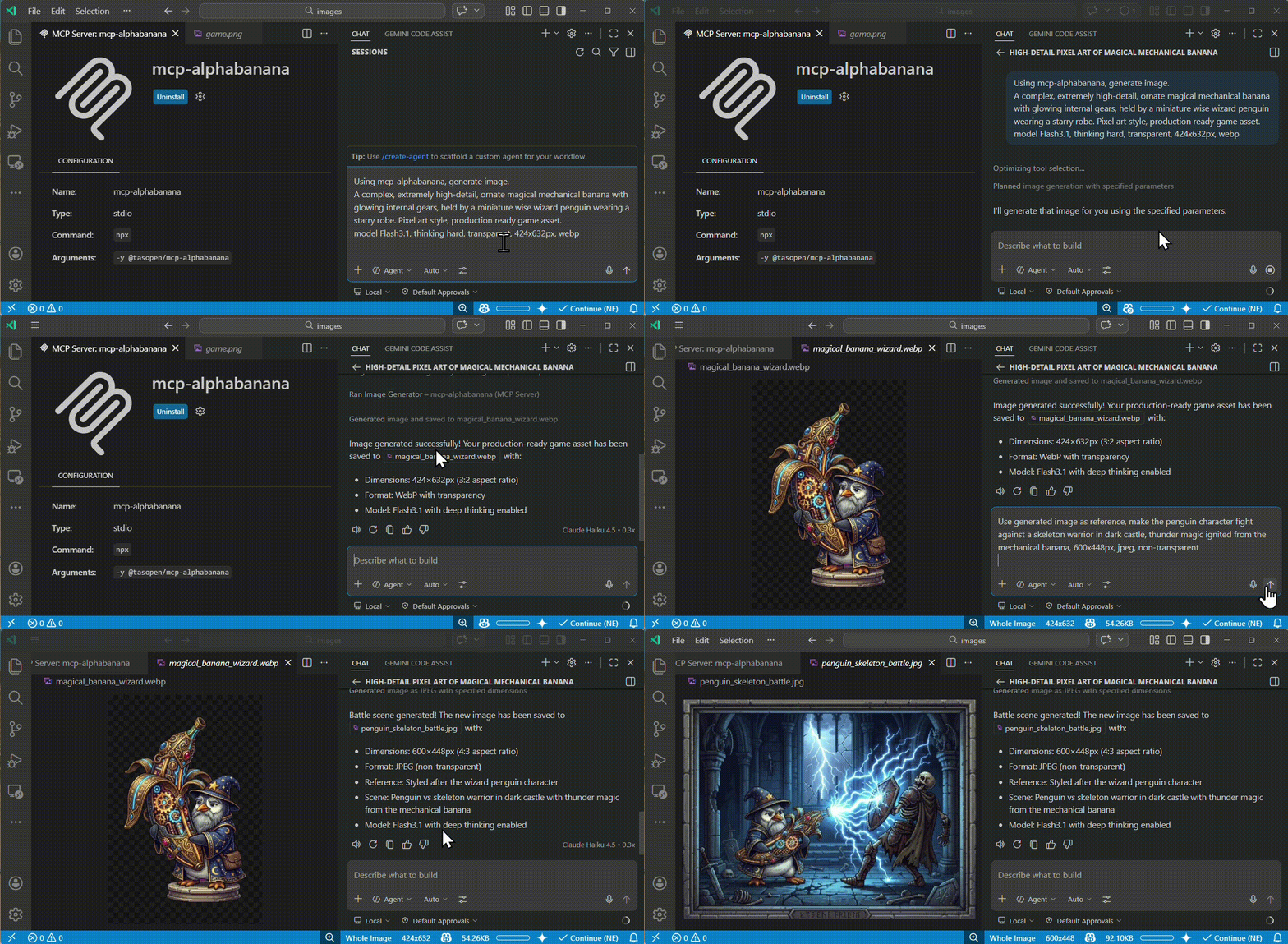
Quick Start
Run the MCP server with npx:
npx -y @tasopen/mcp-alphabanana
Or add it to your MCP configuration:
{
  "mcp": {
    "servers": {
      "alphabanana": {
        "command": "npx",
        "args": ["-y", "@tasopen/mcp-alphabanana"],
        "env": {
          "GEMINI_API_KEY": "${env:GEMINI_API_KEY}"
        }
      }
    }
  }
}
Set GEMINI_API_KEY before starting the server.
For Claude Desktop,
Download mcp-alphabanana-latest.mcpb, then add it as Extension from Claude Desktop Settings. For Windows, Recommend add 'FileSystem' extension for better local file handling.
Claude Registry
The Claude registry / MCPB package metadata is defined in manifest.json and ships with the static 512x512 icon at images/mcp-alphabanana.png.
Native sharp runtime packages are declared as optional dependencies so .mcpb installs can resolve the correct prebuilt binary on each supported platform without relying on postinstall hooks.
- Stable MCPB URL:
https://github.com/tasopen/mcp-alphabanana/releases/latest/download/mcp-alphabanana-latest.mcpb - Versioned MCPB URL pattern:
https://github.com/tasopen/mcp-alphabanana/releases/download/vVERSION/mcp-alphabanana-VERSION.mcpb - Support: GitHub Issues
MCP Server
This repository provides an MCP server that enables AI agents to generate images using Google Gemini.
It can be used with MCP-compatible clients such as:
- Claude Desktop
- VS Code MCP
- Cursor
Built with FastMCP 3 for a simplified codebase and flexible output options.
Glama MCP Server badge:
Available Tools
generate_image
Generates images using Google Gemini with optional transparency, local reference images, grounding, and reasoning metadata.
For Claude Desktop, prefer outputType=file for medium or large images. base64 and combine responses consume Claude context and can hit the client's size limit. On Windows, use the FileSystem extension to choose a writable absolute outputPath and any local referenceImages paths.
Key parameters:
prompt(string): description of the image to generatemodel:Flash3.1,Flash2.5,Pro3,flash,prooutputWidthandoutputHeight: requested final image size in pixels in normal modenoresize+aspectRatio+output_resolution: return Gemini native size without resizingoutput_resolution:0.5K,1K,2K,4Koutput_format:png,jpg,webpoutputType:file,base64,combineoutputPath: required whenoutputTypeisfileorcombinetransparent: enable transparent PNG/WebP post-processingreferenceImages: optional array of local reference image filesgrounding_typeandthinking_mode: advanced Gemini 3.1 controls
Model Selection
| Input Model ID | Internal Model ID | Description |
|---|---|---|
Flash3.1 |
gemini-3.1-flash-image-preview |
Ultra-fast, supports Thinking/Grounding. |
Flash2.5 |
gemini-2.5-flash-image |
Legacy Flash. High stability. Low cost. |
Pro3 |
gemini-3.0-pro-image-preview |
High-fidelity Pro model. |
flash |
gemini-3.1-flash-image-preview |
Alias for backward compatibility. |
pro |
gemini-3.0-pro-image-preview |
Alias for backward compatibility. |
Parameters
Full parameter reference for the generate_image tool.
| Parameter | Type | Default | Description |
|---|---|---|---|
prompt |
string | required | Description of the image to generate |
outputFileName |
string | required | Output filename (extension auto-added if missing) |
outputType |
enum | combine |
file, base64, or combine |
model |
enum | Flash3.1 |
Model: Flash3.1, Flash2.5, Pro3, flash, pro |
output_resolution |
enum | auto | 0.5K, 1K, 2K, 4K; required when noresize=true |
noresize |
boolean | false |
Skip post-generation resize and return Gemini native dimensions |
aspectRatio |
enum | optional | Required when noresize=true; e.g. 1:1, 16:9, 4:5 |
outputWidth |
integer | required unless noresize=true |
Final output width in pixels |
outputHeight |
integer | required unless noresize=true |
Final output height in pixels |
output_format |
enum | png |
png, jpg, webp |
outputPath |
string | required for file / combine |
Absolute output directory path |
transparent |
boolean | false |
Transparent background (PNG/WebP only) |
transparentColor |
string or null | null |
Color key override for transparency extraction |
colorTolerance |
integer | 30 |
Transparency color matching tolerance |
fringeMode |
enum | auto |
auto, crisp, hd |
resizeMode |
enum | crop |
crop, stretch, letterbox, contain |
grounding_type |
enum | none |
none, text, image, both (Flash3.1 only) |
thinking_mode |
enum | minimal |
minimal, high (Flash3.1 only) |
include_thoughts |
boolean | false |
Return model reasoning fields when metadata is enabled |
include_metadata |
boolean | false |
Include grounding and reasoning metadata in JSON output |
referenceImages |
array | [] |
Up to 14 local reference files (Flash3.1/Pro3), 3 for Flash2.5 |
debug |
boolean | false |
Save intermediate debug artifacts |
Why alphabanana?
- Zero Watermarks: API-native clean images.
- Thinking/Grounding Support: Higher prompt adherence and search-backed accuracy.
- Production Ready: Supports transparent WebP and exact aspect ratios for web and game assets.
Features
- Ultra-fast image generation (Gemini 3.1 Flash, 0.5K/1K/2K/4K)
- Advanced multi-image reasoning (up to 14 reference images)
- Thinking/Grounding support (Flash3.1 only)
- Transparent PNG/WebP output (color-key post-processing, despill)
- Multiple output formats: file, base64, or both
- Flexible resize modes: crop, stretch, letterbox, contain
- Multiple model tiers: Flash3.1, Flash2.5, Pro3, legacy aliases
Example Outputs
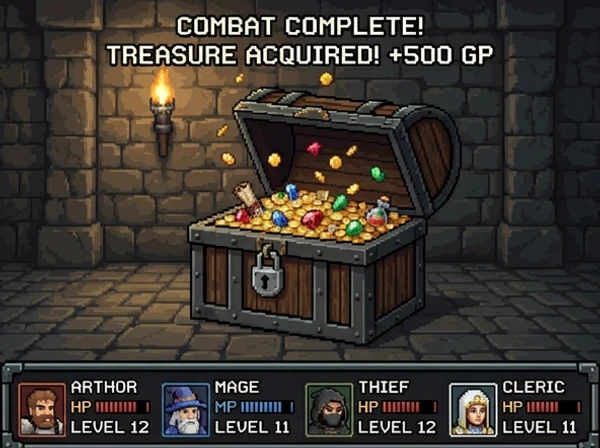
These sample outputs were generated with mcp-alphabanana and stored in images/examples.
| Pixel art asset | Reference-image game scene | Photorealistic generation |
|---|---|---|
 |
 |
 |
Configuration
Configure the GEMINI_API_KEY in your MCP configuration (for example, mcp.json).
Examples:
- Reference an OS environment variable from
mcp.json:
{
  "env": {
    "GEMINI_API_KEY": "${env:GEMINI_API_KEY}"
  }
}
- Provide the key directly in
mcp.json:
{
  "env": {
    "GEMINI_API_KEY": "your_api_key_here"
  }
}
VS Code Integration
Add to your VS Code settings (.vscode/settings.json or user settings), configuring the server env in mcp.json or via the VS Code MCP settings.
{
  "mcp": {
    "servers": {
      "mcp-alphabanana": {
        "command": "npx",
        "args": ["-y", "@tasopen/mcp-alphabanana"],
        "env": {
          "GEMINI_API_KEY": "${env:GEMINI_API_KEY}"
        }
      }
    }
  }
}
Optional: Set a custom fallback directory for write failures by adding MCP_FALLBACK_OUTPUT to the env object.
Usage Examples
Basic Generation
{
  "prompt": "A pixel art treasure chest, golden trim, wooden texture",
  "model": "Flash3.1",
  "outputFileName": "chest",
  "outputType": "base64",
  "outputWidth": 64,
  "outputHeight": 64,
  "transparent": true
}
Native Size Without Resize
{
  "prompt": "A clean app icon with a banana mascot, flat graphic design",
  "model": "Flash3.1",
  "outputFileName": "banana-icon-native",
  "outputType": "base64",
  "noresize": true,
  "aspectRatio": "1:1",
  "output_resolution": "0.5K",
  "output_format": "png"
}
This mode returns the Gemini native pixel size for the requested ratio and resolution. For example, 1:1 + 0.5K returns 512x512 without any resize pass.
Advanced (Vertical poster and thinking)
{
  "prompt": "A vertical, photorealistic travel poster advertising Magical Wings Day Tours. A joyful young couple flies high above a breathtaking European countryside at golden hour, holding hands as they soar through a partly cloudy sky. Below them are vineyards, villages, forests, a winding river, and a hilltop medieval castle. The poster uses large, elegant typography with the headline FLY THE COUNTRYSIDE at the top and Magical Wings Day Tours branding near the bottom.",
  "model": "Flash3.1",
  "output_resolution": "1K",
  "outputFileName": "photoreal-travel-poster",
  "outputType": "file",
  "outputPath": "/path/to/output",
  "outputWidth": 848,
  "outputHeight": 1264,
  "output_format": "jpg",
  "thinking_mode": "high",
  "include_metadata": true
}
Grounding Sample (Search-backed)
{
  "prompt": "A modern travel poster featuring today's weather and skyline highlights in Kuala Lumpur",
  "model": "Flash3.1",
  "outputFileName": "kl_travel_poster",
  "outputType": "base64",
  "outputWidth": 1024,
  "outputHeight": 1024,
  "grounding_type": "text",
  "thinking_mode": "high",
  "include_metadata": true,
  "include_thoughts": true
}
This sample enables Google Search grounding and returns grounding and reasoning metadata in JSON.
With Reference Images
{
  "prompt": "Use the reference image to create a game screen showing an opened treasure chest filled with coins and treasure, 8-bit dungeon crawler style, after-battle reward scene, dungeon corridor background, four-party status UI at the bottom",
  "model": "Flash3.1",
  "output_resolution": "0.5K",
  "outputFileName": "reference-image-dungeon-loot",
  "outputType": "file",
  "outputPath": "/path/to/output",
  "outputWidth": 600,
  "outputHeight": 448,
  "output_format": "webp",
  "transparent": false,
  "referenceImages": [
    {
      "description": "Treasure chest style reference",
      "filePath": "/path/to/references/pixel-art-treasure-chest.png"
    }
  ]
}
Transparency & Output Formats
- PNG: Full alpha, color-key + despill
- WebP: Full alpha, better compression (Flash3.1+)
- JPEG: No transparency (falls back to solid background)
Development
# Development mode with MCP CLI
npm run dev

# MCP Inspector (Web UI)
npm run inspect

# Build for production
npm run build
License
MIT
Reviews (0)
Sign in to leave a review.
Leave a reviewNo results found