lablink-mcp
Health Warn
- License — License: MIT
- Description — Repository has a description
- Active repo — Last push 0 days ago
- Low visibility — Only 5 GitHub stars
Code Pass
- Code scan — Scanned 12 files during light audit, no dangerous patterns found
Permissions Pass
- Permissions — No dangerous permissions requested
No AI report is available for this listing yet.
Unified & extensible MCP server enabling AI agent connectivity to all types of lab equipment — VISA/SCPI, SSH, REST, serial, and Python environments.
LabLink
Unified & extensible MCP server enabling connectivity to all types of lab equipment







Install · Quick Start · Tools · Configuration · CLI · Contributing
What is LabLink?
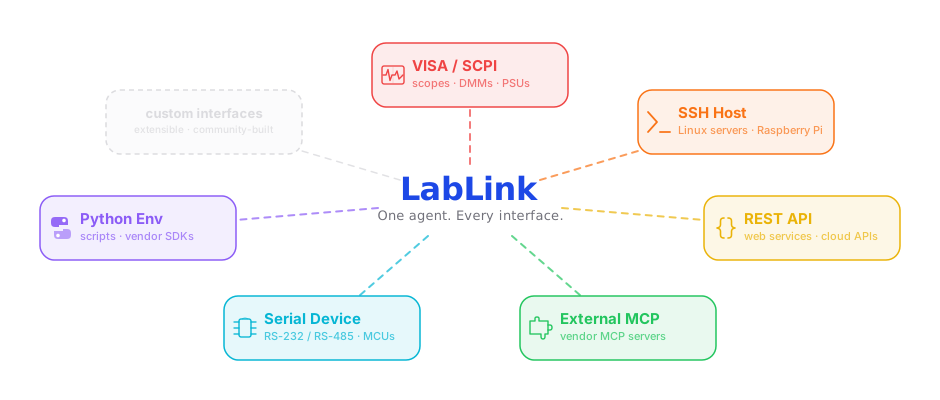
LabLink gives an AI agent direct, structured access to lab hardware and services — without a human in the loop. Connect by alias, send commands, read results, and iterate across any combination of devices in a single session.
- 5 protocol drivers out of the box: VISA/SCPI, SSH, REST, serial, and a Python subprocess shell
- Per-protocol tool names (
visa_query,ssh_exec,rest_get) — no leaky one-size-fits-all interface - Install only what you need — drivers are optional extras; the server runs with zero installed
diagnose()surfaces exactly what is missing or unreachable before the agent tries to use it- Extensible — add a driver with no changes to the core server or CLI
Supported Protocols
Each device is addressed by an alias whose config type field selects the driver.
Per-driver tools register only when that driver's dependencies are installed.
| Protocol | type |
Transport | Operation tools | Extra | Hardware-validated |
|---|---|---|---|---|---|
| VISA / SCPI | visa |
PyVISA (USB-TMC, TCPIP, GPIB, Serial) | visa_query, visa_write |
[visa] |
✅ |
| SSH | ssh |
Paramiko | ssh_exec, ssh_shell_session, ssh_start_stream, ssh_read_stream, ssh_stop_stream |
[ssh] |
✅ |
| REST | rest |
httpx | rest_get, rest_post, rest_put, rest_patch, rest_delete |
[rest] |
✅ |
| Serial | serial |
pyserial (RS232/RS422/RS485) | serial_query, serial_write, serial_read, serial_flush |
[serial] |
⚪ |
| Python shell | python_shell |
subprocess REPL | python_shell_exec, python_shell_eval |
[python_shell] |
✅ |
An external routing stub also lets a device be handled by a vendor-supplied MCP server,
surfacing routing hints to the agent on connect().
Legend — ✅ exercised end-to-end on real hardware · ⚪ covered by unit tests with the
driver library mocked (real use needs real hardware).
📦 Install
pip install lablink-mcp          # core only (no drivers)
pip install lablink-mcp[visa]    # + PyVISA
pip install lablink-mcp[ssh]     # + Paramiko
pip install lablink-mcp[all]     # all drivers
🧪 Try it with no hardware
LabLink ships a simulated bench, so you can watch an agent drive instruments
before you connect anything real.
pip install lablink-mcp[visa,rest,serial,demo]
lablink-sim --write-configs ~/.lablink/devices
That starts two simulated instruments behind real protocol front-ends:
  FG-100  SCPI    TCPIP0::127.0.0.1::5025::SOCKET
  DAQ-8   SCPI    TCPIP0::127.0.0.1::5026::SOCKET
  DAQ-8   REST    http://127.0.0.1:8080/api/v1
  DAQ-8   serial  /dev/ttys006

  wiring  FG-100:CH1 --coax--> DAQ-8:CH0
Nothing is mocked. The simulator speaks SCPI on a socket, so LabLink reaches
it through the same visa driver it uses for a bench instrument — and the
same rest and serial drivers besides. The generator's CH1 is patched into
the DAQ's CH0, so this actually works:
lablink visa query sim_fgen "SOUR1:FREQ 1000"
lablink visa query sim_fgen "SOUR1:VOLT 2.0"
lablink visa query sim_fgen "OUTP1 ON"
lablink visa query sim_daq  "MEAS:VOLT? (@0)"   # reads the waveform back
Add the topology to see why those two are connected:
cp examples/topology_sim.toml ~/.lablink/topology.toml
lablink topology show sim_daq
Then ask an agent: "set sim_fgen CH1 to a 1 kHz 2 V sine, enable the output,
then read sim_daq CH0 and tell me what you expect to see."
All four aliases address one shared bench, so a change written over SCPI is
visible over REST and serial in the same instant.
🚀 Quick Start
1. Create a device config
One TOML file per device at ~/.lablink/devices/<alias>.toml. The type field selects the driver.
VISA instrument:
# ~/.lablink/devices/tek_mso44.toml
type        = "visa"
alias       = "tek_mso44"
resource_string = "USB0::0x0699::0x0527::C012345::INSTR"
manufacturer = "Tektronix"
model_number = "MSO44"
timeout_ms  = 5000
description = "4-channel mixed signal oscilloscope"
Find your resource string:
python -c "import pyvisa; print(pyvisa.ResourceManager('@py').list_resources())"
SSH host:
# ~/.lablink/devices/rpi_dev.toml
type        = "ssh"
alias       = "rpi_dev"
host        = "192.168.1.42"
port        = 22
username    = "pi"
auth_type   = "ssh_key"
auth_ssh_key_path = "~/.ssh/id_rsa"
timeout_ms  = 10000
See examples/configs/ for templates for all drivers.
2. Verify with the CLI
lablink list                              # show all configured devices
lablink connect tek_mso44                 # open session, print identity
lablink visa query tek_mso44 "*IDN?"     # send SCPI query
3. Add to your MCP client
Claude Code — add to ~/.claude.json (global) or .mcp.json in your project root:
{
  "mcpServers": {
    "lablink-mcp": {
      "command": "lablink-mcp"
    }
  }
}
Claude Desktop — add to ~/Library/Application Support/Claude/claude_desktop_config.json:
{
  "mcpServers": {
    "lablink-mcp": {
      "command": "lablink-mcp"
    }
  }
}
MCP Tools
Shared lifecycle (all drivers)
| Tool | Description |
|---|---|
connect(alias) |
Open session, return identity, device memory, and topology slice |
disconnect(alias) |
Close session |
list_devices() |
List all configured aliases with status |
diagnose(alias?) |
Reachability and dependency check; system audit (with topology warnings) when no alias given |
system_topology(alias?) |
Return the bench wiring map; or a single device's slice |
Per-driver operation tools
| Driver | Tools |
|---|---|
visa |
visa_query, visa_write |
ssh |
ssh_exec, ssh_shell_session, ssh_start_stream, ssh_read_stream, ssh_stop_stream |
rest |
rest_get, rest_post, rest_put, rest_patch, rest_delete |
serial |
serial_query, serial_write, serial_read, serial_flush |
python_shell |
python_shell_exec, python_shell_eval |
Per-driver tools are only registered when that driver's dependencies are installed. All tools return structured dicts. On failure:
{"success": false, "error": "VISA timeout", "hint": "Check that the instrument is powered on."}
Device Configuration
One TOML file per device at ~/.lablink/devices/<alias>.toml. Override the directory:
export LABLINK_CONFIG_DIR=/path/to/devices/
Base fields (all drivers)
| Field | Required | Description |
|---|---|---|
type |
yes | Driver: visa, ssh, rest, serial, python_shell |
alias |
yes | Must match the filename (e.g. tek_mso44.toml → alias = "tek_mso44") |
timeout_ms |
yes | Default communication timeout in milliseconds |
description |
no | Shown in lablink list output |
Per-driver extras
See examples/configs/ for complete templates.
VISA — adds resource_string, manufacturer, model_number, read_termination, write_termination, techmanual_document_ids
SSH — adds host, port, username, auth fields (auth_type, auth_ssh_key_path, auth_token_env, etc.)
REST — adds base_url, auth fields
Serial — adds serial_port, baud_rate, data_bits, parity, stop_bits, read_termination, write_termination
python_shell — adds python_path (path to interpreter), working_dir
Credentials are always referenced by environment variable name — never stored in config files directly.
CLI Reference
The CLI mirrors the MCP tool surface for development and debugging.
lablink list                                    # list all configured devices
lablink diagnose                                # system dep check (all drivers)
lablink diagnose tek_mso44                      # device-specific reachability check
lablink connect tek_mso44                       # open session, print identity
lablink disconnect tek_mso44                    # close session

lablink visa query tek_mso44 "*IDN?"            # SCPI query
lablink visa write tek_mso44 "CH1:SCALE 0.5"   # SCPI write

lablink ssh exec rpi_dev "uname -a"             # run SSH command

lablink rest get my_api /status                 # HTTP GET
lablink rest post my_api /jobs --body '{"n":1}' # HTTP POST

lablink serial query my_device "MEAS?"          # serial write + read
Per-protocol commands appear only when that driver's deps are installed.
VISA Troubleshooting
list_resources() returns an empty tuple ()
- Confirm the instrument is powered on and the cable is connected.
- For USB instruments on macOS, check System Settings → Privacy & Security → USB.
- For USB instruments on Windows, pyvisa-py requires
libusb. Install viapip install libusb-package. - For GPIB instruments, pyvisa-py has limited GPIB support — consider NI-VISA.
VISA timeout on connect or query
- Increase
timeout_msin your instrument config. - Confirm no other software (e.g. NI MAX, Keysight Connection Expert) has the port locked.
VISA Backend
LabLink uses pyvisa-py by default — a pure-Python implementation with no additional software required.
To use NI-VISA instead (e.g. for GPIB or if you already have it installed):
export LABLINK_VISA_BACKEND=@ni
Using with techmanual.ai (optional)
techmanual.ai is a searchable index of technical manuals for T&M equipment. When both MCP servers are loaded, your agent can look up SCPI commands and execute them without human intervention.
Add techmanual_document_ids to your VISA config to enable targeted lookups:
techmanual_document_ids = [1291, 1323] # user manual, programming guide
When this field is set, connect() returns the IDs so the agent can fetch relevant pages without a search query.
Control your home (Home Assistant)
Home Assistant is a local-first, open-source smart-home hub. It unifies thousands of devices across ecosystems — Apple Home, Alexa, Google, Zigbee, Z-Wave, Matter — behind one local REST API. That means LabLink's existing rest driver drives your whole home through a single alias; no extra driver to install.
Create a Long-Lived Access Token in Home Assistant (Profile → Security → Long-Lived Access Tokens), export it, and point a REST config at your hub:
# ~/.lablink/devices/home_assistant.toml
type        = "rest"
alias       = "home_assistant"
timeout_ms  = 10000
base_url    = "http://homeassistant.local:8123/api"
auth_type      = "bearer"
auth_token_env = "HASS_TOKEN"          # export HASS_TOKEN=<your-token>
Then your agent can read and command anything HA manages:
lablink rest get  home_assistant /states                 # every entity's state
lablink rest post home_assistant /services/light/turn_on --body '{"entity_id": "light.kitchen"}'
See examples/configs/rest_home_assistant.toml for the full template.
Scope
LabLink ships five protocol drivers — visa, ssh, rest, serial, andpython_shell — on a shared multi-driver dispatch core. (An external routing
stub also lets a device be handled by a vendor-supplied MCP server.) GPIB is
covered by visa through PyVISA; RS232/RS422/RS485 are electrical variants of the
one serial driver.
Deliberately out of scope:
- No server component. LabLink runs on your local machine. There is no cloud
deployment or hosted endpoint. - No instrument simulation. Tests mock the driver libraries; real use needs
real hardware. - No GUI. The CLI is the only interface beyond MCP.
- Not a protocol library. LabLink sends commands and returns responses; it
does not parse or interpret SCPI or any other protocol syntax. That knowledge
lives in the agent or in techmanual.ai. - Docker is not a primary install target. USB/serial passthrough into
containers defeats the point of local lab use.
Streaming-first protocols (MQTT, WebSocket) and others (Modbus, OPC-UA, CAN, …)
are considered case-by-case as demand surfaces.
Architecture & Contributing
See docs/ARCHITECTURE.md for the data models, driver
contract, dispatch model, and a step-by-step guide to adding a new driver.
Adding a driver requires no changes to lablink/mcp_server.py or lablink/cli.py — just a newlablink/interfaces/<type>/ package and one line in each registry.
Contributions are welcome — see CONTRIBUTING.md to get started.
Running Tests
pip install -e ".[dev]"
pytest tests/
All tests mock hardware drivers — no real instruments required.
Mapping your system (optional)
Create ~/.lablink/topology.toml to give the agent a machine-readable map of how your bench is physically wired — which ports connect to which, what signals flow, and what safety limits apply.
# ~/.lablink/topology.toml
name = "rf_bench"

[[node]]
alias = "siglent_sdg6022"
role  = "signal generator"
[[node]]
alias = "tek_mso44"
role  = "oscilloscope"
[[node]]
id    = "pad_10db"          # passive gear: no alias needed
role  = "10 dB attenuator"

[[link]]
from   = "siglent_sdg6022:OUTPUT1"
to     = "pad_10db:IN"
signal = "stimulus"
params = { impedance_ohm = 50 }

[[link]]
from   = "pad_10db:OUT"
to     = "tek_mso44:CH1"
signal = "stimulus (attenuated)"

[[link]]
from   = "keysight_e36313:CH1"
to     = "dut_serial:12V_IN"
signal = "DC power"
  [[link.constraint]]
  severity = "critical"
  limit    = "voltage <= 13.5"
  note     = "DUT is damaged above 13.5 V on 12V_IN."
Call system_topology() to retrieve the full map, or system_topology(alias) to get one device's wiring slice. connect() and diagnose(alias) also inject the slice automatically as topology_context.
Constraints are advisory only. LabLink surfaces severity / limit / note to the agent; it does not and cannot enforce them (it does not parse protocol syntax). The agent is responsible for honoring limits.
Validate the file with:
lablink topology validate
lablink topology show               # full map
lablink topology show tek_mso44     # one device's slice
See examples/topology.toml for a full annotated example.
Override the default path:
export LABLINK_TOPOLOGY_FILE=/path/to/topology.toml
Environment Variables
| Variable | Default | Purpose |
|---|---|---|
LABLINK_CONFIG_DIR |
~/.lablink/devices/ |
Device config directory |
LABLINK_TOPOLOGY_FILE |
~/.lablink/topology.toml |
System topology file (independent of LABLINK_CONFIG_DIR) |
LABLINK_VISA_BACKEND |
@py |
pyvisa backend (@py or @ni) |
LABLINK_LOG_DIR |
~/.lablink/logs/ |
Event log directory; set to "" to disable |
TMAI_API_KEY |
— | techmanual.ai API key for agent-directed manual lookups |
License
LabLink is released under the MIT License.
Reviews (0)
Sign in to leave a review.
Leave a reviewNo results found