termide
Health Pass
- License — License: MIT
- Description — Repository has a description
- Active repo — Last push 0 days ago
- Community trust — 167 GitHub stars
Code Pass
- Code scan — Scanned 12 files during light audit, no dangerous patterns found
Permissions Pass
- Permissions — No dangerous permissions requested
No AI report is available for this listing yet.
All-in-one terminal workspace for desktops and servers: editor with LSP, file manager with SFTP/FTP, terminal, git, database viewer and a coding agent in one zero-config static Rust binary.
TermIDE



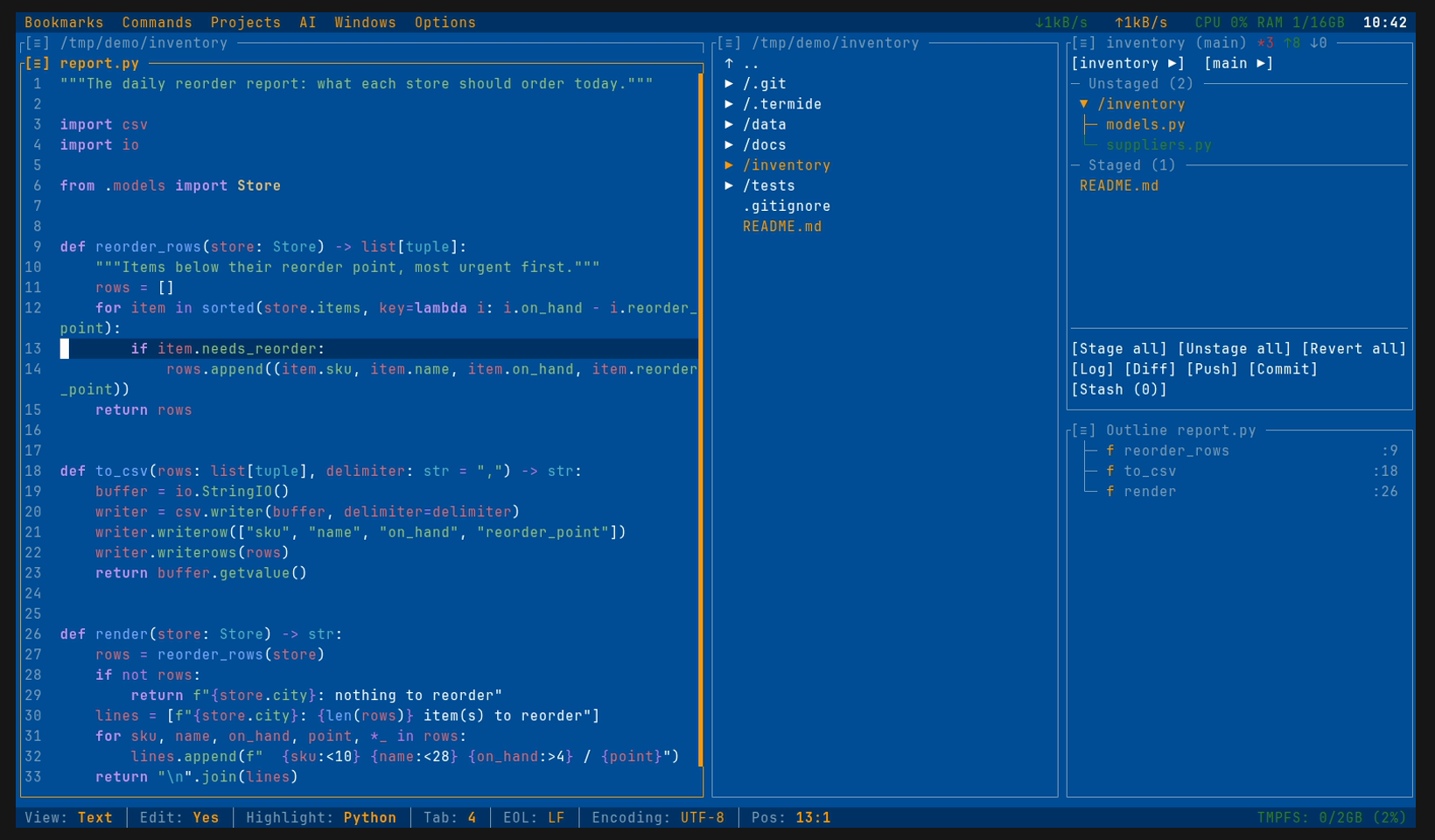
An all-in-one terminal workspace for your workstation and your servers: code editor with LSP, dual-pane file manager with SFTP/FTP, terminal, git, database viewer and a coding agent — one zero-config static binary written in Rust.
Website | Documentation | Releases | Screenshots
Why TermIDE?
Terminal editors cover the code; everything around it — files on remote hosts, databases, git, long-running shells, a coding agent — usually takes plugins or separate tools. TermIDE ships all of it in one binary that works out of the box on a laptop, a server, or a phone:
| Feature | TermIDE | Fresh | Vim/Neovim | Helix | Micro |
|---|---|---|---|---|---|
| LSP Support | ✓ | ✓ | ✓ | ✓ | plugin |
| Zero Config | ✓ | ✓ | ✗ | ✓ | ✓ |
| Script Automation | ✓ | ✓ | ✓ | ✗ | plugin |
| Built-in Coding Agent (local or hosted models) | ✓ | ✗ | plugin | ✗ | ✗ |
| External Agents (Claude Code, Codex, Gemini CLI) | ✓ | ✓ | plugin | ✗ | ✗ |
| MCP Servers | ✓ | ✗ | plugin | ✗ | ✗ |
| Remote Filesystems (SFTP/FTP) | ✓ | SSH | ✓ | ✗ | ✗ |
| Hex / Binary Viewer | ✓ | ✗ | plugin | ✗ | plugin |
| Database Viewer | ✓ | ✗ | plugin | ✗ | ✗ |
| Markdown Preview | ✓ | ✓ | plugin | ✗ | ✗ |
| Diagram Viewer (Mermaid) | ✓ | ✗ | plugin | ✗ | ✗ |
| Image Viewer | ✓ | ✗ | plugin | ✗ | ✗ |
| Built-in Terminal | ✓ | ✓ | plugin | ✗ | ✗ |
| File Manager | ✓ | tree only | plugin | ✗ | ✗ |
| Background File Operations | ✓ | ✗ | plugin | ✗ | ✗ |
| Git Integration | ✓ | ✓ | plugin | ✗ | ✗ |
| Project Layouts | ✓ | ✓ | plugin | ✗ | ✗ |
| Detachable Instances | ✓ | ✓ | ✗ | ✗ | ✗ |
| Multi-panel Layout | ✓ | ✓ | plugin | ✗ | ✗ |
| Bookmarks | ✓ | ✓ | plugin | ✗ | ✗ |
| Resource Monitor | ✓ | ✗ | ✗ | ✗ | ✗ |
TermIDE = Editor + File Manager + Terminal + Git + Agent in one TUI application.
Features
- Terminal-based IDE - Syntax highlighting for 22 languages, word navigation (Ctrl+Left/Right), paragraph/symbol navigation (Ctrl+Up/Down), toggle comment (Ctrl+/), auto-indentation, auto-close brackets
- LSP Support - Code completion, Find References (Shift+F12), Rename Symbol (F4), Go to Definition (Ctrl+Click), diagnostics
- Coding Agent - A panel (
Alt+A) where a language model reads, edits and runs commands in your project through any OpenAI-compatible endpoint (local llama.cpp / Ollama / vLLM / omlx or hosted), asking permission per tool call; skills, prompt templates, MCP servers, command hooks, and external agents over ACP (Claude Code, Codex, Gemini CLI) in the same panel - Smart File Manager - Tree view with expandable directories, nested git status, batch operations, file/content search (glob/regex), in-tree incremental search
- Remote Filesystems - Browse and edit files on remote servers from the file manager over SFTP / FTP / FTPS, copying between local and remote panels — pure Rust (russh + rustls), no native libraries, works on static musl (
smb:///nfs://via the OS mount) - Background File Operations - Copy, move, upload, download, delete and batch transfers run in the background with a per-operation progress bar, byte/elapsed readout, and pause / resume / cancel (Operations panel)
- Integrated Terminal - Full PTY support, VT100 escape sequences, mouse tracking
- Git Integration - Status panel, commit log with a coloured Unicode commit graph (ASCII fallback), staging/unstaging, branches with their worktrees, branch switching, stash management, inline blame
- Database Viewer - Read-only browser for SQLite / PostgreSQL / MySQL opened from a bookmark URL: table grid with a 2D cell cursor, server-side single-column sort and type-aware per-column filtering, sliding-window pagination, and a row-detail dialog that copies as TSV / JSON / INSERT
- Multi-panel Layout - Vertically split panel groups with adjustable per-panel heights and a one-key fullscreen toggle (
Alt+F11); smart auto-stacking when the terminal narrows; new panels open after the currently active one - Image Viewer - Native graphics in Kitty, WezTerm, iTerm2, Ghostty, foot terminals
- Hex / Binary Viewer & Editor - Hex/ASCII view (adaptive 16-byte sections) for binary files, with a byte cursor shown in both zones, drag/shift selection and clipboard copy, ASCII + hex-byte search, and a hex↔text toggle (
Ctrl+L);F4opens it for overwrite editing with a.bakbackup on save - Markdown Preview - Rendered read-only view for
.md/.markdown(headings, lists, tables, syntax-highlighted code blocks, clickable links and image pictograms) with cursor navigation, selection and clipboard copy;Ctrl+Etoggles to the editable source; embeddedmermaidblocks render as diagrams - Mermaid Diagram Viewer - Render
.mmd/.mermaidfiles as text pseudographics — flowchart, sequence, state, class, ER, gantt, pie, journey, mindmap, timeline, gitGraph, quadrant; 2D scroll, copy to clipboard, andCtrl+Eto edit the source - External Apps - Open files with system default applications (Shift+Enter)
- 38 Built-in Themes - Dark, light, retro, and cinematic themes (Dracula, Nord, Monokai, Solarized, Matrix, Pip-Boy, Norton Commander, Windows 95, etc.)
- Custom Themes - Create your own themes in TOML format
- 15 UI Languages - Bengali, Chinese, English, French, German, Hindi, Indonesian, Japanese, Korean, Portuguese, Russian, Spanish, Thai, Turkish, Vietnamese (missing keys transparently fall back to English)
- Project Management - Auto-save and restore panel layouts per project
- Detached Instances -
termide --detachedkeeps the whole instance — editors, shells, LSP servers, running jobs — alive after the terminal closes;termide --attachpicks it up again from any terminal, at any size (Unix only) - System Monitor - Real-time CPU, RAM, network I/O in menu bar and disk usage in status bar; click any indicator to open a detail modal (top processes by CPU/RAM, top processes by network connections with listening ports); repeated click on the same indicator closes the modal (toggle)
- Search & Replace - Live preview, match counter, regex support
- Custom Commands - Shell commands from
commands.toml, global and per project, in the Commands menu: hotkeys, groups, parameter forms, and terminal / background / report modes - Settings Modal - Full-screen configuration (
Alt+P) with sidebar layout, grouped fields (Appearance / Input / Layout / Performance / …), and in-place keybinding capture for all 9 keybinding scopes - Cross-platform - Linux (x86_64, ARM64), macOS (Intel, Apple Silicon), Windows (native via ConPTY, WSL)
- Full Mouse Support - Click navigation, scroll, double-click actions
- Keyboard Layouts - Cyrillic support with automatic hotkey translation
- Vim Mode - Optional Vim-style editing with Cyrillic keyboard support
- Directory Switcher - Quick directory switching with
Ctrl+\ - Bookmarks - Save and organize frequently used locations
- Command Palette - Quick access to all commands with fuzzy matching (Ctrl+P)
- Open Prompt - Open a file, directory or URL with path suggestions (Ctrl+G)
Installation
Quick Start: Download pre-built binaries from GitHub Releases or install via your package manager.
Supported Platforms: Linux (x86_64, ARM64), macOS (Intel, Apple Silicon), Windows (x86_64)
Choose Your Installation Method
📦 Pre-built Binaries (Recommended)Download the latest release for your platform from GitHub Releases:
# Linux x86_64 (also works in WSL)
wget https://github.com/termide/termide/releases/latest/download/termide-0.35.0-x86_64-unknown-linux-gnu.tar.gz
tar xzf termide-0.35.0-x86_64-unknown-linux-gnu.tar.gz
./termide

# Linux x86_64 (static musl — Alpine, distroless containers, any glibc-free system)
wget https://github.com/termide/termide/releases/latest/download/termide-0.35.0-x86_64-unknown-linux-musl.tar.gz
tar xzf termide-0.35.0-x86_64-unknown-linux-musl.tar.gz
./termide

# macOS Intel (x86_64)
curl -LO https://github.com/termide/termide/releases/latest/download/termide-0.35.0-x86_64-apple-darwin.tar.gz
tar xzf termide-0.35.0-x86_64-apple-darwin.tar.gz
./termide

# macOS Apple Silicon (ARM64)
curl -LO https://github.com/termide/termide/releases/latest/download/termide-0.35.0-aarch64-apple-darwin.tar.gz
tar xzf termide-0.35.0-aarch64-apple-darwin.tar.gz
./termide

# Linux ARM64 (Raspberry Pi, ARM servers)
wget https://github.com/termide/termide/releases/latest/download/termide-0.35.0-aarch64-unknown-linux-gnu.tar.gz
tar xzf termide-0.35.0-aarch64-unknown-linux-gnu.tar.gz
./termide

# Linux ARM64 (static musl — Android/Termux, Alpine ARM, any glibc-free ARM64)
wget https://github.com/termide/termide/releases/latest/download/termide-0.35.0-aarch64-unknown-linux-musl.tar.gz
tar xzf termide-0.35.0-aarch64-unknown-linux-musl.tar.gz
./termide

# Windows x86_64 (download .zip from Releases, extract, run in Windows Terminal)
# https://github.com/termide/termide/releases/latest/download/termide-0.35.0-x86_64-pc-windows-msvc.zip
TermIDE runs natively on Windows 10+ via ConPTY. Use Windows Terminal for
the best experience.
- Download
termide-0.35.0-x86_64-pc-windows-msvc.zipfrom GitHub Releases. - Extract the archive.
- Run
termide.exein Windows Terminal.
Configuration lives under %APPDATA%\termide\ (config, sessions) and%LOCALAPPDATA%\termide\cache\ (logs).
Alternatively, in WSL/WSL2 use the Linux x86_64 build (termide-0.35.0-x86_64-unknown-linux-gnu.tar.gz) as on any Linux.
Download and install the .deb package from GitHub Releases:
# x86_64 only (ARM64 use tar.gz above)
wget https://github.com/termide/termide/releases/latest/download/termide_0.35.0-1_amd64.deb
sudo dpkg -i termide_0.35.0-1_amd64.deb
Download and install the .rpm package from GitHub Releases:
# x86_64 only (ARM64 use tar.gz above)
wget https://github.com/termide/termide/releases/latest/download/termide-0.35.0-1.x86_64.rpm
sudo rpm -i termide-0.35.0-1.x86_64.rpm
Install from the AUR using your favorite AUR helper:
# Build from source
yay -S termide

# Or install pre-built binary
yay -S termide-bin
Or manually:
git clone https://aur.archlinux.org/termide.git
cd termide
makepkg -si
Install via Homebrew tap:
brew tap termide/termide
brew install termide
Install using Nix flakes:
# Run without installing
nix run github:termide/termide

# Install to user profile
nix profile install github:termide/termide

# Or add to NixOS configuration.nix
{
  nixpkgs.overlays = [
    (import (builtins.fetchTarball "https://github.com/termide/termide/archive/main.tar.gz")).overlays.default
  ];
  environment.systemPackages = [ pkgs.termide ];
}
Inside Termux, use the static ARM64 musl build (the
glibc aarch64-unknown-linux-gnu build won't run on Android's Bionic libc):
pkg install git openssh   # tools termide shells out to (plus any LSP servers)
wget https://github.com/termide/termide/releases/latest/download/termide-0.35.0-aarch64-unknown-linux-musl.tar.gz
tar xzf termide-0.35.0-aarch64-unknown-linux-musl.tar.gz
./termide
Notes: the system clipboard isn't available on Android (no X11/Wayland), and the
resource monitor may show partial data due to Android's restricted /proc. The
editor, file manager, git, and the integrated terminal work normally.
Build from source using Cargo:
# Clone the repository
git clone https://github.com/termide/termide.git
cd termide

# Build and run
cargo run --release
Build from source using Nix (for development):
# Clone the repository
git clone https://github.com/termide/termide.git
cd termide

# Enter development environment (includes Rust toolchain and all dependencies)
nix develop

# Build the project
cargo build --release

# Run
./target/release/termide
A fully static musl build is published with every release. It links
no shared libraries and runs on any Linux distribution, including
Alpine and minimal containers. The whole workspace is pure-Rust
(rustls + russh + russh-sftp — no OpenSSL, no libssh2), so this is
the same code, just compiled against musl.
The easiest way is to grab the pre-built tarball from the release:
wget https://github.com/termide/termide/releases/latest/download/termide-0.35.0-x86_64-unknown-linux-musl.tar.gz
tar xzf termide-0.35.0-x86_64-unknown-linux-musl.tar.gz
./termide

# Verify it's fully static — no shared libraries
ldd ./termide   # → "not a dynamic executable"
If you'd rather build it yourself (e.g. for a different musl variant),
the flake exposes the same recipe as a derivation:
nix build github:termide/termide#termide-static
./result/bin/termide
Either binary can be copied anywhere — into a container, a stripped
Alpine image, an embedded box — and it will work without needing
musl-dev or glibc installed.
Requirements
- For pre-built binaries: No additional requirements
- For building from source:
- Rust 1.70+ (stable)
- For Nix users: Nix with flakes enabled
Command-Line Options
termide [OPTIONS] [FILE]...

Arguments:
  [FILE]...            File(s) or directories to open. With a path, TermIDE
                       starts in a clean view (no project layout restored or
                       saved). Text opens in the editor, so it works as
                       $EDITOR for git, crontab, visudo, etc.; images, SQLite
                       files, other binaries and directories open in their
                       viewer, the hex editor or a file manager.

Options:
  --log-level <LEVEL>  Set log level (trace, debug, info, warn, error)
  --no-lsp             Disable LSP language servers
  --config <FILE>      Use custom config file path
  --diagnostics        Run pre-flight diagnostics and exit (no UI)
  --detached           Start a detached instance that survives the terminal
                       closing, and print its id (Unix only)
  --attach [<ID>]      Attach to a detached instance, most recent if omitted
  --list-instances     List detached instances and exit
  --completions <SHELL>
                       Print a completion script (bash, zsh, fish) and exit
  --install-completions [<SHELL>]
                       Install the completion script for $SHELL, or the named one
  -h, --help           Print help
  -V, --version        Print version
Use as your editor:
export EDITOR=termide # git commit, crontab -e, visudo, ...
Usage
Quick Start
After launching TermIDE, you'll see a width-adaptive layout:
- Wide terminals (>= 160 cols): Sidebar (Git Status stacked with Operations) + two File Manager panels
- Normal terminals (< 160 cols): Sidebar (Git Status, File Manager and Operations stacked) + File Manager panel
- Menu bar at the top, status bar at the bottom
Stacked panels share a column with adjustable per-panel heights. Alt+F11 toggles a "fullscreen current panel" preset (one panel takes the full column height, the rest collapse to their title row); Ctrl+Alt+= / Ctrl+Alt+- grow / shrink the focused panel by 3 lines.
Use Alt+←/→ to switch between panel groups, Alt+↑/↓ to navigate within a group, Alt+M to open the menu.
Documentation
For detailed documentation, see:
- English: doc/en/README.md
- Russian: doc/ru/README.md
- Chinese: doc/zh/README.md
Keyboard Shortcuts
All shortcuts are customizable in config.toml (see Configuration). The essentials:
- Navigate:
Alt+Mmenu ·Alt+Hhelp ·Alt+Qquit ·Ctrl+Pcommand palette - Panels:
Alt+←/→andAlt+↑/↓move between/within groups ·Alt+1-9jump to a panel ·Alt+Kpanel action menu - Open:
Alt+FFiles ·Alt+TTerminal ·Alt+EEditor ·Alt+GGit ·Alt+PSettings - Files & viewers:
F3preview (markdown / diagram / hex / image) ·Ctrl+Etoggle preview ↔ source ·Ctrl+Ffind ·Ctrl+Rreload from disk ·Ctrl+Ssave
📖 Full per-panel reference (file manager, editor, git, viewers): doc/en/keybindings.md.
Configuration
TermIDE follows the XDG Base Directory Specification for file organization.
Configuration file location:
- Linux/BSD:
~/.config/termide/config.toml(or$XDG_CONFIG_HOME/termide/config.toml) - macOS:
~/Library/Application Support/termide/config.toml - Windows:
%APPDATA%\termide\config.toml
A project can override any of it in <project>/.termide/config.toml. A setting
with a wrong type or value is ignored on its own and reported in the Journal;
the rest of the file still applies. Since the next save from Settings rewrites
the file without the ignored setting, the file as it was is first copied toconfig.toml.bak next to it. termide --diagnostics lists the same problems.
Project data location:
- Linux/BSD:
~/.local/share/termide/projects/(or$XDG_DATA_HOME/termide/projects/) - macOS:
~/Library/Application Support/termide/projects/ - Windows:
%APPDATA%\termide\projects\
Log file location:
- Linux/BSD:
~/.cache/termide/termide.log(or$XDG_CACHE_HOME/termide/termide.log) - macOS:
~/Library/Caches/termide/termide.log - Windows:
%LOCALAPPDATA%\termide\cache\termide.log
Bookmarks location:
- Linux/BSD:
~/.local/share/termide/bookmarks.toml(or$XDG_DATA_HOME/termide/bookmarks.toml) - macOS:
~/Library/Application Support/termide/bookmarks.toml
Example Configuration
[general]
theme = "windows-xp"
language = "auto"  # auto, bn, de, en, es, fr, hi, id, ja, ko, pt, ru, th, tr, vi, zh
vim_mode = false
project_retention_days = 30
bell_on_operation_complete = true
icon_mode = "auto"  # auto, emoji, unicode
always_detachable = false  # keep sessions alive across terminal closes (Unix)
resource_monitor_interval = 1000

[editor]
tab_size = 4
show_git_diff = true
word_wrap = true
auto_indent = true
auto_close_brackets = true

[file_manager]
extended_view_width = 50

[lsp]
enabled = true
auto_completion = true

[logging]
min_level = "info"
Available Themes
Dark Themes:
windows-xp- Default theme (Windows XP style)dracula- Popular Dracula thememonokai- Classic Monokai themenord- Nord theme with blue tonesonedark- Atom One Dark themesolarized-dark- Dark Solarized thememidnight- Midnight Commander inspiredmacos-dark- macOS dark styleayu-dark- Ayu Dark themebilliard- Billiard table green tonescatppuccin-macchiato- Catppuccin Macchiato themeeverforest- Everforest dark themegithub-dark- GitHub Dark themegruvbox- Gruvbox dark themekanagawa- Kanagawa themematerial-ocean- Material Ocean themerosepine- Rosé Pine themetokyonight- Tokyo Night theme
Light Themes:
atom-one-light- Atom One Light themeayu-light- Ayu Light themegithub-light- GitHub Light thememanuscript- Medieval manuscript with aged parchment tonesmaterial-lighter- Material Lighter themesolarized-light- Light Solarized thememacos-light- macOS light styleblue-sky- Blue Sky themegreen-backs- Green dollar bills themepinky-pie- Pinky Pie theme
Retro Themes:
far-manager- FAR Manager stylenorton-commander- Norton Commander styledos-navigator- DOS Navigator stylevolkov-commander- Volkov Commander stylewindows-95- Windows 95 stylewindows-98- Windows 98 style
Cinematic Themes:
matrix- The Matrix digital rain (green on black)pip-boy- Fallout Pip-Boy 3000 phosphor CRTterminator- Skynet HUD / Mars red aesthetics
Other Themes:
terminal- Classic terminal style (inherits terminal colors)
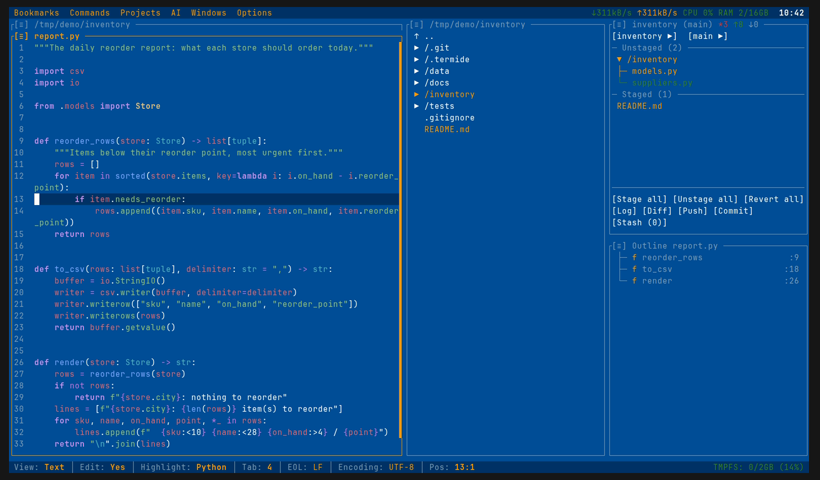
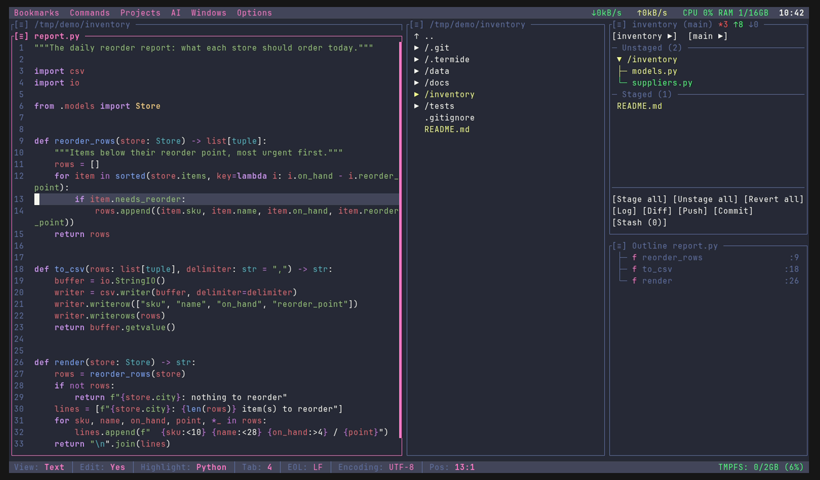
Theme Examples:
 |
 |
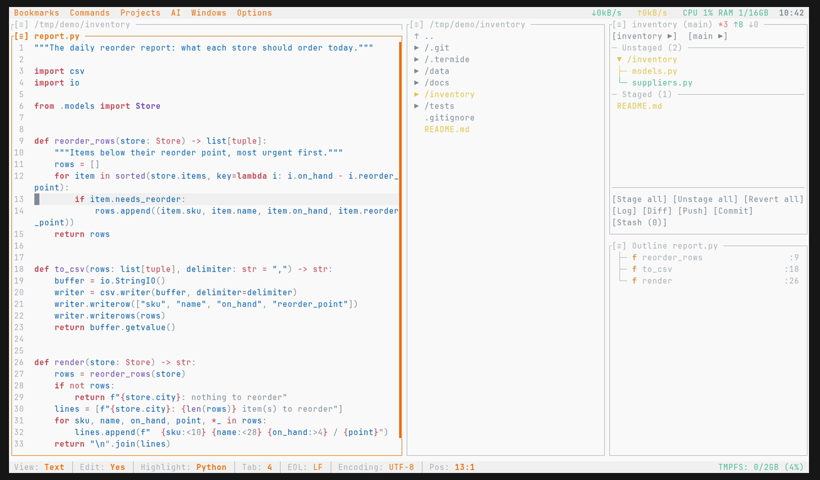 |
| Windows XP (default) | Dracula | Ayu Light |
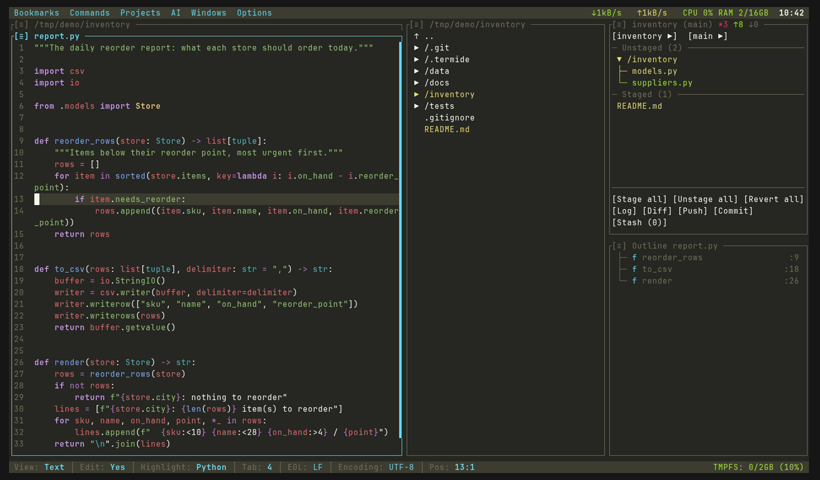 |
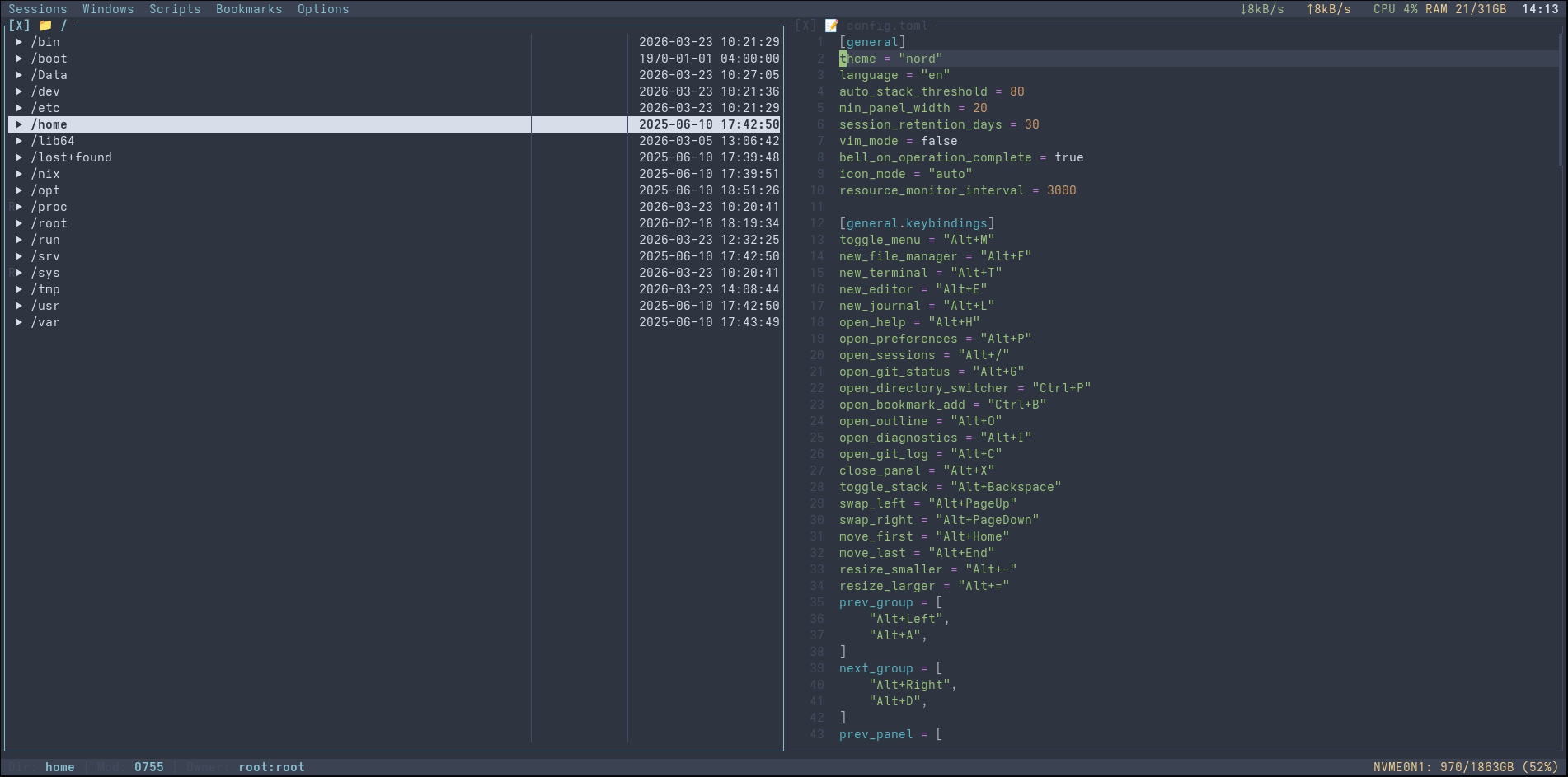 |
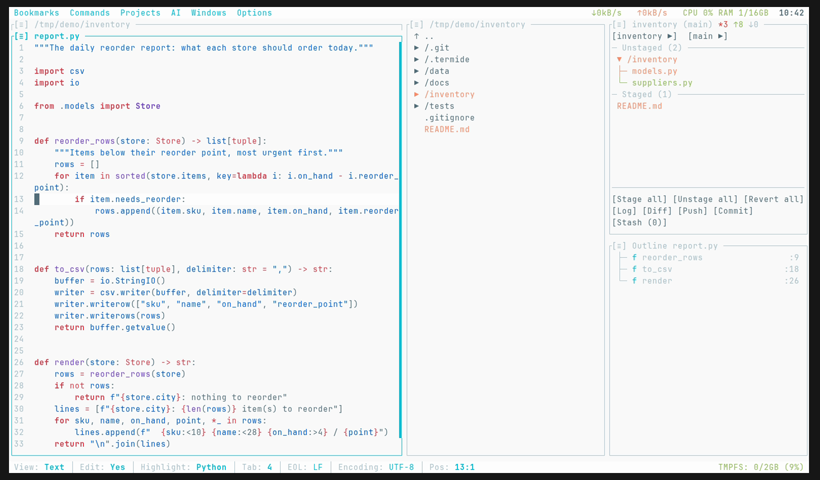 |
| Monokai | Nord | Material Lighter |
Custom Themes
You can create custom themes by placing TOML files in the themes directory:
- Linux:
~/.config/termide/themes/ - macOS:
~/Library/Application Support/termide/themes/ - Windows:
%APPDATA%\termide\themes\
User themes take priority over built-in themes with the same name. See crates/theme/themes/ directory in the repository for theme file format examples.
Custom Commands
Shell commands you run often go into commands.toml — the global one in the
configuration directory, or <project>/.termide/commands.toml for a project —
and appear in the Commands menu:
[test]
name = "Run tests"
command = "cargo nextest run"
group = "cargo"
key = "Ctrl+Shift+T"

[clippy]
command = "cargo clippy --workspace -- -D warnings"
mode = "report"  # terminal (default), background, or report
Commands → Add command... creates one through a form. See
Custom Commands for modes, parameters and hotkeys.
Development
The codebase is a Cargo workspace of modular crates. For the crate layout,
panel system, and event flow, see the
Developer Guide and
Architecture.
Building
# Development build
cargo build

# Release build with optimizations
cargo build --release

# Run tests
cargo test

# Check code quality
cargo clippy
cargo fmt --check
Nix Development
The project includes a Nix flake for reproducible development environments:
# Enter development shell
nix develop

# Build with Nix
nix build

# Run checks
nix flake check
Contributing
Contributions are welcome! Please feel free to submit issues and pull requests.
License
This project is licensed under the MIT License.
Acknowledgments
Built with:
- ratatui - Terminal UI framework
- crossterm - Cross-platform terminal manipulation
- portable-pty - PTY implementation
- tree-sitter - Syntax highlighting
- ropey - Text buffer
- sysinfo - System resource monitoring
Reviews (0)
Sign in to leave a review.
Leave a reviewNo results found