herdr-sidebar-config
Health Warn
- License — License: NOASSERTION
- Description — Repository has a description
- Active repo — Last push 0 days ago
- Low visibility — Only 5 GitHub stars
Code Pass
- Code scan — Scanned 12 files during light audit, no dangerous patterns found
Permissions Pass
- Permissions — No dangerous permissions requested
No AI report is available for this listing yet.
Workspace → tab → agent sidebar preset for Herdr, with compact single-tab groups, readable task labels, and provider icons.
Herdr Agent Sidebar
See what each agent is doing, grouped by workspace and tab.
Turn Herdr's Agents list into a compact task tree, with
readable labels, provider icons, optional animated loaders, and automatic
dimming of inactive spaces and their agents. This customizes the built-in
sidebar; it does not add a file explorer or another pane. No Herdr fork or build.
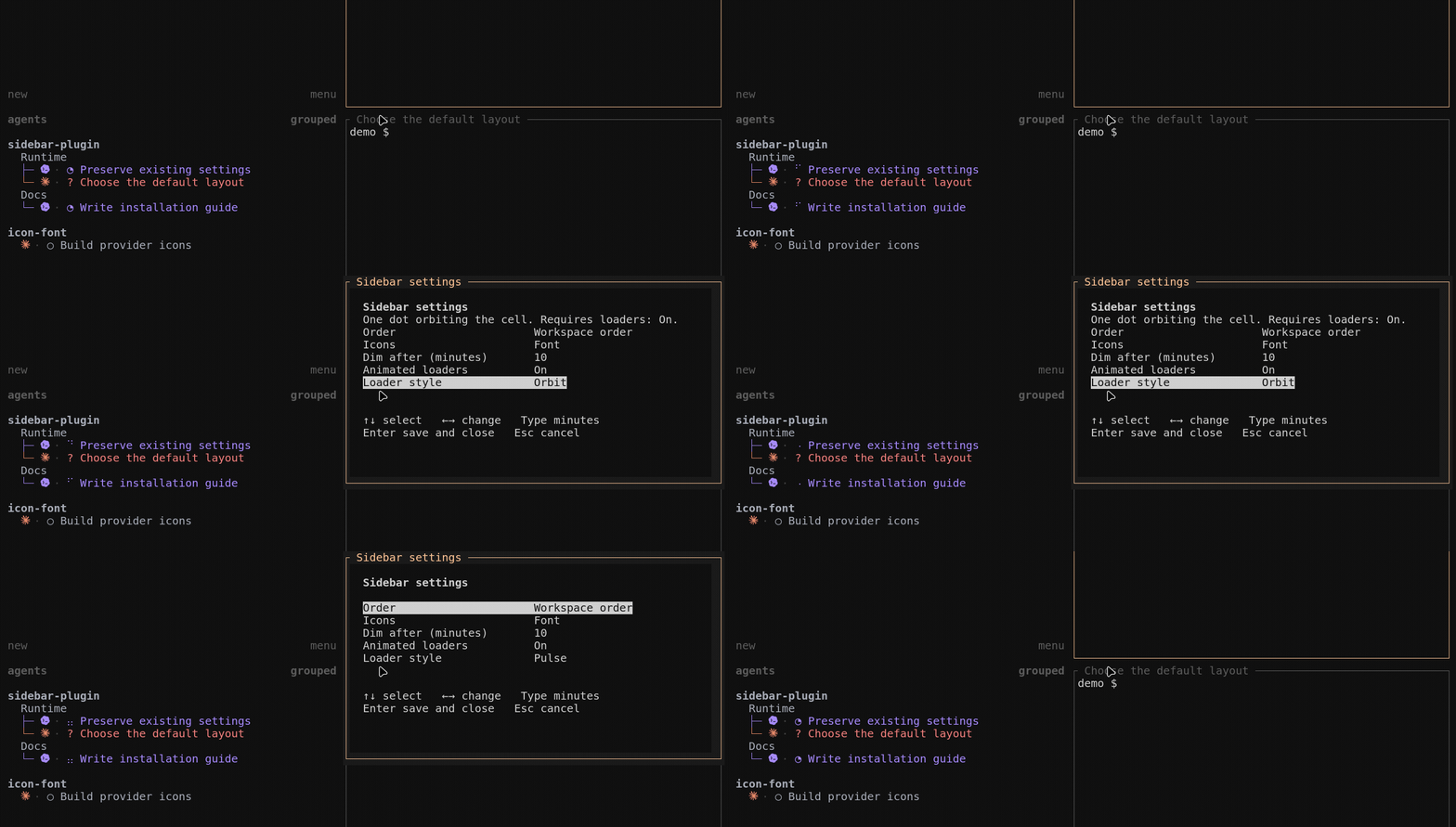
Real settings and loader demo in Herdr 0.8.2 / Ghostty 1.3.1 on Linux.
Titles and states are demonstration data; the plugin and rendering are real.
Capture details.
- Find the right agent. One-tab workspaces stay compact; multiple tabs get a
tree. Working groups can move to the top without separating their agents. - Read the task. Uses native conversation titles and local fallbacks—not
another model call. - Recognize Antigravity (AGY). Its own icon and blue agent text replace the
generic diamond. Inactive rows still dim; blocked and done retain status colors. - Animated loaders show who's working. Choose Dots, Orbit, or Pulse in
Settings. Animation is off by default; turn it off again to restore static
status marks and stop animation redraws. - Inactive spaces and agents fade into the background. After a workspace
has no working agents for ten minutes, its name in Spaces and its heading
and agent rows in Agents dim together. They brighten as soon as any agent
in that workspace starts working. Change the delay in Settings. This is visual
dimming—not hibernation or stopping agents.
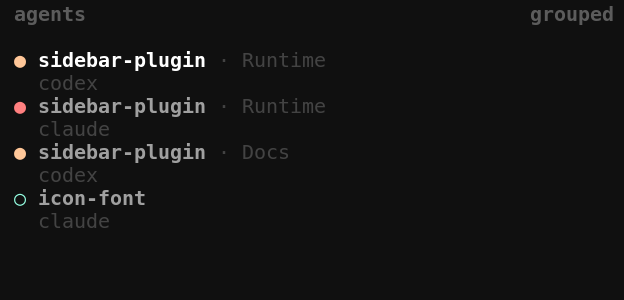
Before and after
| Before — standard agent rows | After — this preset |
|---|---|
 |
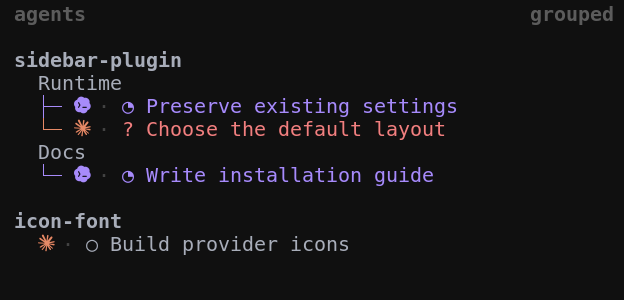 |
Same four demo agents, same session, theme, and sidebar width.
Install
Requires Herdr 0.8.2+, Python 3.11+, and Git. Icon setup targets Ghostty
on Linux or macOS. Linux/Ghostty is live-tested; macOS is not yet live-tested.
Run inside a Herdr terminal pane:
git clone https://github.com/testy-cool/herdr-sidebar-config.git
cd herdr-sidebar-config
python3 setup_sidebar.py install
python3 setup_sidebar.py doctor
Open a fresh Ghostty process to load the installed icon font, then attach to
your still-running Herdr session. A new tab alone may retain the old font cache.
Another terminal, or no font changes? Use python3 setup_sidebar.py install --text
instead. Providers use short text labels; no Ghostty restart is needed for a font.
To inspect changes first, add --dry-run to the install command.
Setup backs up the files it changes and preserves unrelated Herdr settings.
It replaces the agent-row layout and sets workspace sorting. Keep this checkout:
Herdr links it as the plugin. Custom paths and manual setup →
Make it yours
Press prefix+, or choose Sidebar settings in the command palette.
Setup adds the shortcut only when it is free. Use arrows to select and change;
Enter saves, Esc cancels. Preferences survive updates and removal.
| Setting | Choices |
|---|---|
| Order | Workspace order, or active workspace groups first |
| Icons | Automatic, font, or text |
| Dim after | Dim a space and its agent rows after no agents work there for this many minutes; default 10 |
| Animated loaders | Off by default; On animates working agents only |
| Loader style | Dots · Orbit · Pulse |
| Branch length | Standard ├─ / └─ (default), or Short ├ / └ to save one column |
Animation adds redraws at up to eight frames per second. Turning it off restores
the static indicator and stops animation wakeups.
How it works and performance caveats →
Shorter branches, same hierarchy
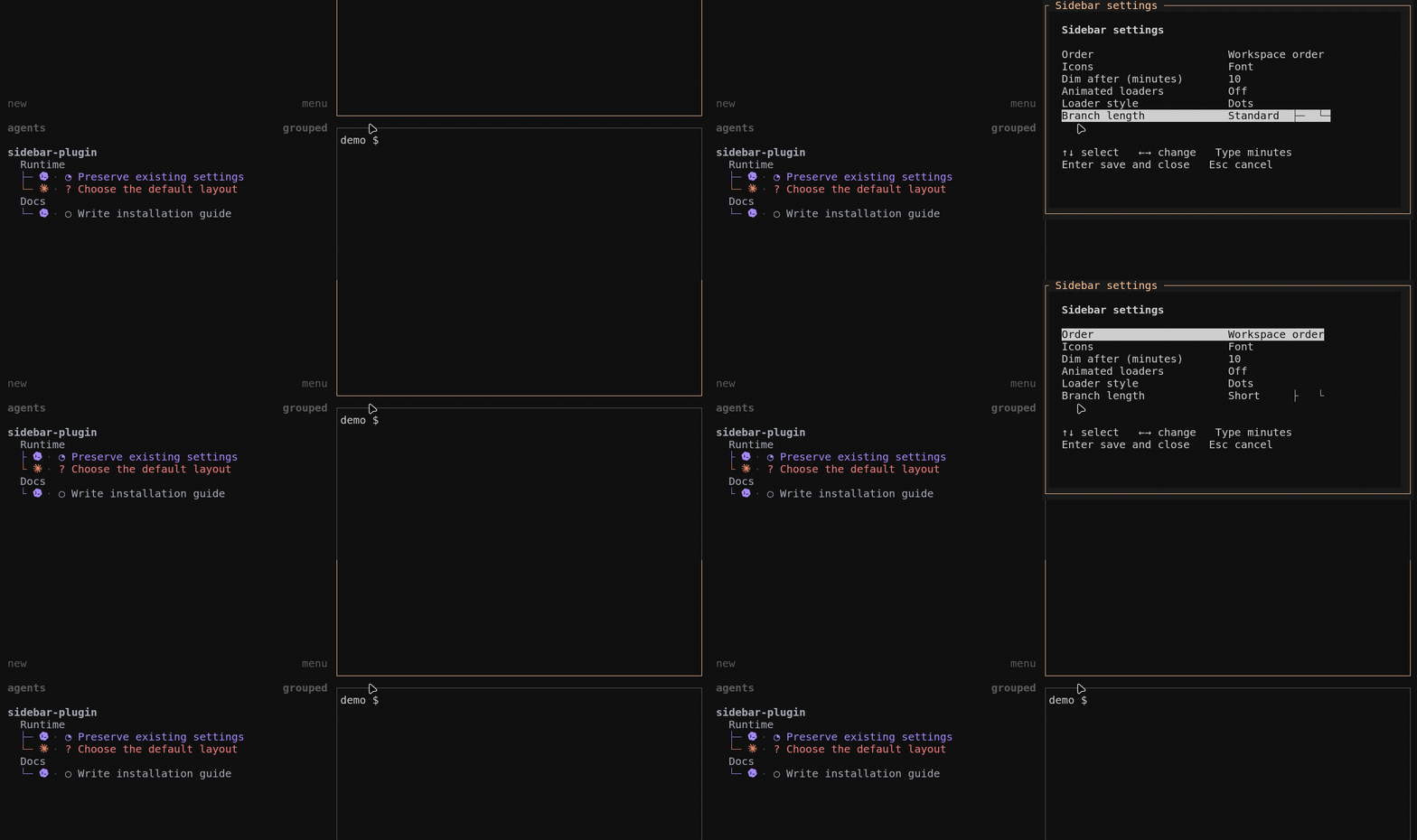
Open prefix+,, choose Branch length, then press Enter to apply.
Short saves one column; Standard restores it. Real interaction in an isolated demo session.
What stays the same
Agent status, clicks, and keyboard navigation remain Herdr's own. The tree is
visual grouping, not collapsible folders; long labels still clip to the
sidebar width. Titles describe a task, not a generated live summary of every action.
The plugin reads local session metadata and bounded history to find labels. It
does not send prompts, run models, or change agent conversations. No API key,
telemetry, or background network service. Animation is optional; normal label
refreshes are event-driven. How labels and icons work →
Update or remove
Update from this checkout, then reapply the setup:
git pull --ff-only
python3 setup_sidebar.py install
python3 setup_sidebar.py doctor
To remove it and restore the backed-up layout:
python3 setup_sidebar.py uninstall --dry-run
python3 setup_sidebar.py uninstall
Removal keeps your checkout and preferences. Setup refuses to overwrite managed
files edited since installation. Keeping custom edits and troubleshooting →
Contributing? Start with AGENTS.md and the architecture guide.
Credits and license
Adapted from moneycaringcoder/herdr-agent-icons,
with a borderless Codex mark derived from
qintmb/herdr-icon-agent-ui.
Thanks to hhdebb/herdr-radar for inspiring
the activity-focused improvements and optional loaders. Our loader styles are
implemented here, not copied from Radar.
MIT license. Provider artwork retains its original terms and
trademarks; see third-party notices.
Independent community plugin, not an official Herdr or provider product.
Reviews (0)
Sign in to leave a review.
Leave a reviewNo results found