BlackFlare
Health Warn
- No license — Repository has no license file
- Description — Repository has a description
- Active repo — Last push 0 days ago
- Low visibility — Only 8 GitHub stars
Code Pass
- Code scan — Scanned 4 files during light audit, no dangerous patterns found
Permissions Pass
- Permissions — No dangerous permissions requested
No AI report is available for this listing yet.
BlackFlare - A native macOS menu bar app for Claude Code and Codex. Keep your Mac awake during long runs, get pinged when a session finishes or needs you, switch your defaults from the menu, and watch plan usage — all on-device.

BlackFlare
Keep your Mac awake while Claude Code or Codex runs —
and get notified the moment a task finishes.




This repository hosts the public issue & feature tracker for BlackFlare.
Get BlackFlare — and read the docs — at blackflare.dev.
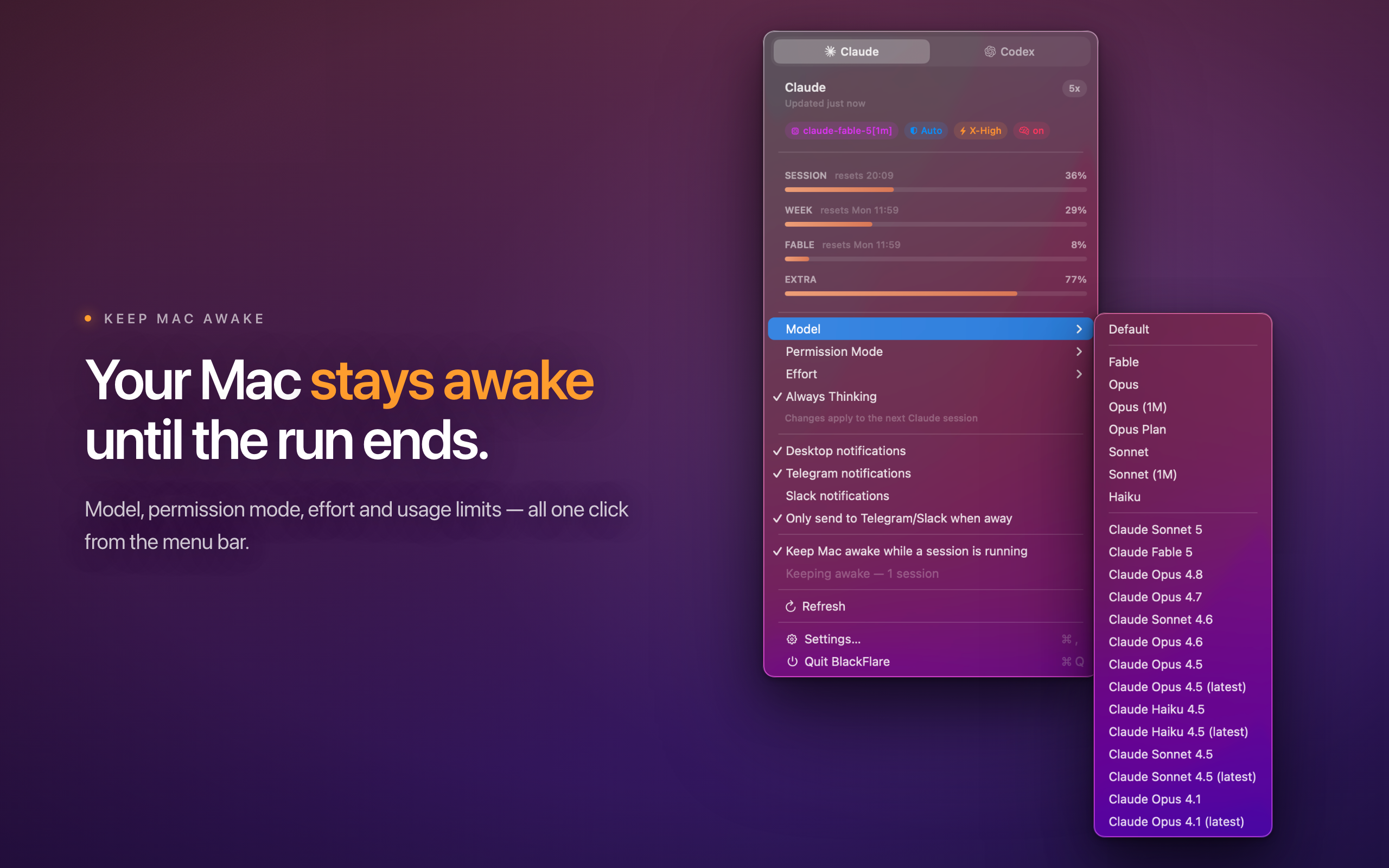
You kicked off a long Claude Code or Codex run and stepped away — but a sleeping
Mac is a stalled agent, and your overnight refactor pauses halfway. BlackFlare
fixes that first: while a session is running it keeps your Mac awake, then lets
it sleep normally the moment the work is done. Marathon test runs and overnight
refactors finish on their own.
BlackFlare is a native macOS menu bar app for developers using Claude Code
and Codex. The instant a session finishes — or needs your input — it taps you
on the shoulder. Keep those alerts on your Mac, or forward them to Telegram or
Slack so you can step away and actually touch some grass. Every session counts:
the CLI in your terminal and agents running inside VS Code or JetBrains.
Know the second it needs you
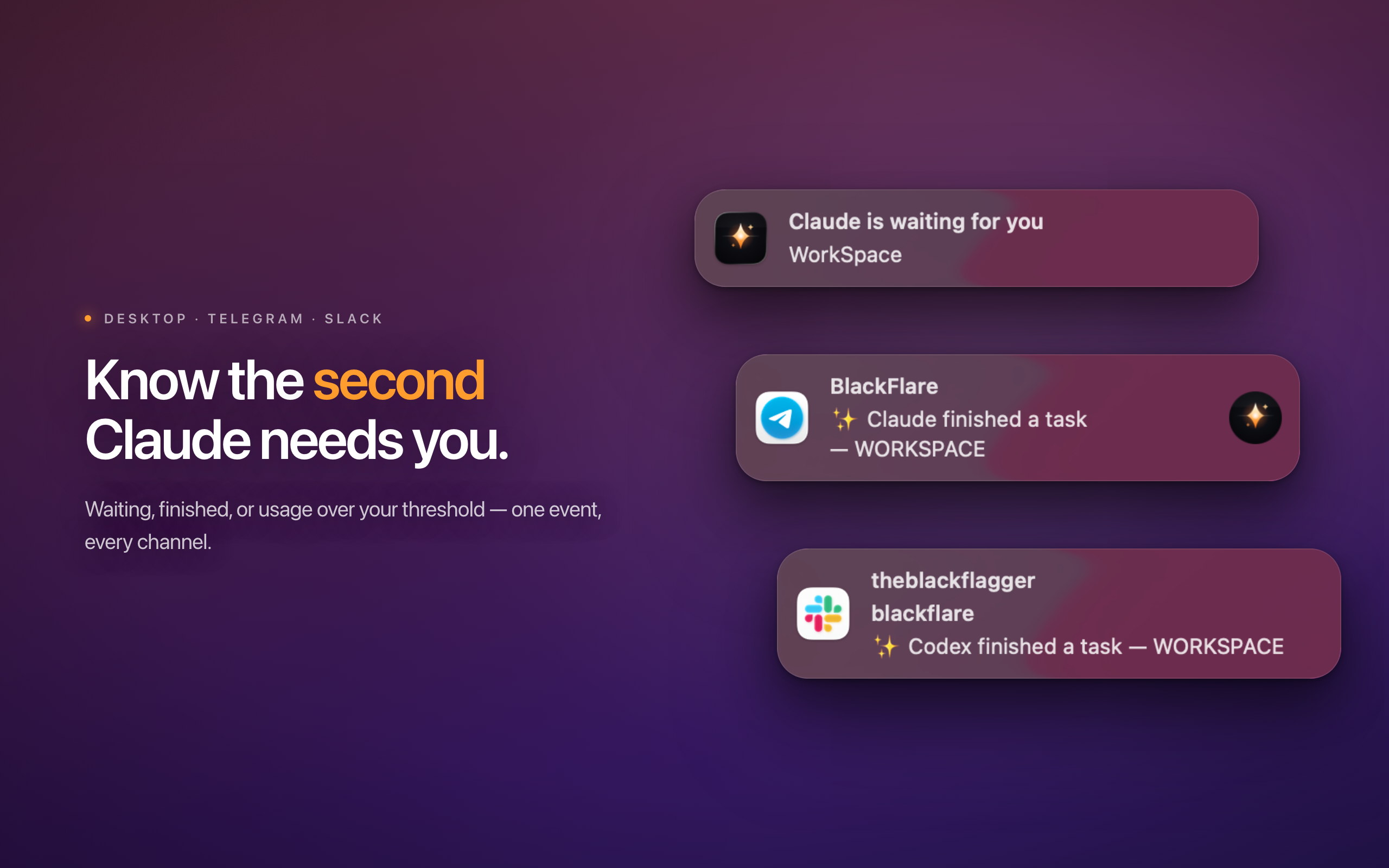
Native macOS banners the instant a Claude Code session waits for your input
or finishes a task — for terminal and IDE sessions alike, each its own
toggle. Click a banner and BlackFlare focuses the app that owns the session: the
VS Code / Cursor / Windsurf / JetBrains window, your terminal (Terminal, iTerm2,
Warp, Ghostty, WezTerm — detected generically, no hardcoded list), or the ChatGPT
desktop app. Codex reports every turn end as finished — its session files carry
no waiting signal, so BlackFlare never guesses one.
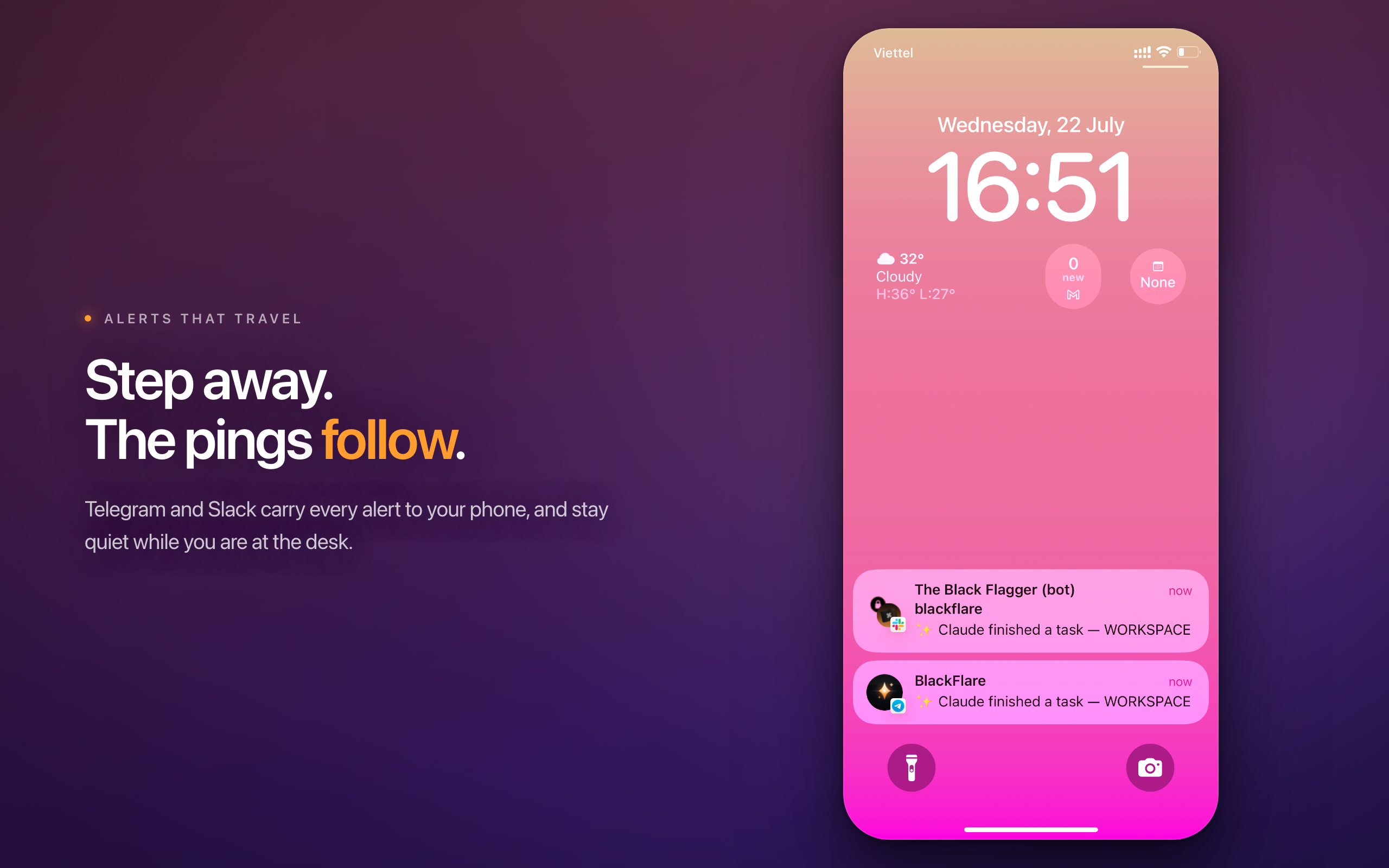
Every alert — waiting, finished, usage threshold, both providers — can also be
forwarded to Telegram (a bot you create with @BotFather) and Slack (an
incoming webhook). Turn on smart away and the remote channels only fire while
you actually are away — screen locked, or two minutes without input. Desktop
banners are never gated by it.
Keep your Mac awake
While any Claude or Codex session is actively running, BlackFlare holds a macOS
power assertion so your Mac never idle-sleeps mid-turn — the failure mode that
kills a long silent tool call: a build, a test suite, a sleep 120 that streams
nothing to the transcript.
It is fully automatic. A session counts as running from the moment you submit a
prompt, and stops counting the second it finishes a turn, asks you a question, or
you interrupt it — so a session parked on an unanswered question does not keep
your Mac up. The menu shows a live count of how many sessions are holding it
awake. Keep just the system up (like caffeinate -i), or the display too.
No caffeinate process, no IOKit, no helper — one ProcessInfo activity that
shows up honestly in pmset -g assertions.
Mission control for your defaults
Pick your model, permission mode, effort level, and thinking mode straight from
the menu bar. No flags to remember, no hand-edited JSON.
Claude Code — ~/.claude/settings.json |
Codex — ~/.codex/config.toml |
|
|---|---|---|
| Model | aliases, pinned claude-* ids (live from models.dev), custom ids |
slugs from Codex's own model cache, custom slugs |
| Effort | low · medium · high · xhigh |
exactly what the selected model advertises |
| Permission mode | default · auto · acceptEdits · plan · bypassPermissions |
Read Only · Ask for approval · Approve for me · Full Access |
| Always Thinking | on / off | — |
BlackFlare applies your pick by surgically editing each tool's own config
file — the same file you already hand-craft. Only the edited value's bytes
change: key order, comments, and formatting survive untouched (proven by
golden-diff tests). Writes are atomic, the original is backed up on first write,
a malformed file is refused rather than rewritten, and the result is re-parsed
and verified before the rename commits. Changes apply to your next session.
Usage, in plain sight
Your Claude plan utilization — the same numbers /usage reports — as bars in the
menu, plus the session percentage next to the menu bar icon, with reset times.
Codex usage comes from the local snapshot Codex itself writes: no token, no
network, and the menu is honest about how stale it is.
Set your own thresholds and BlackFlare warns you once per crossing, before you
run into the wall.
Tune it to your workflow
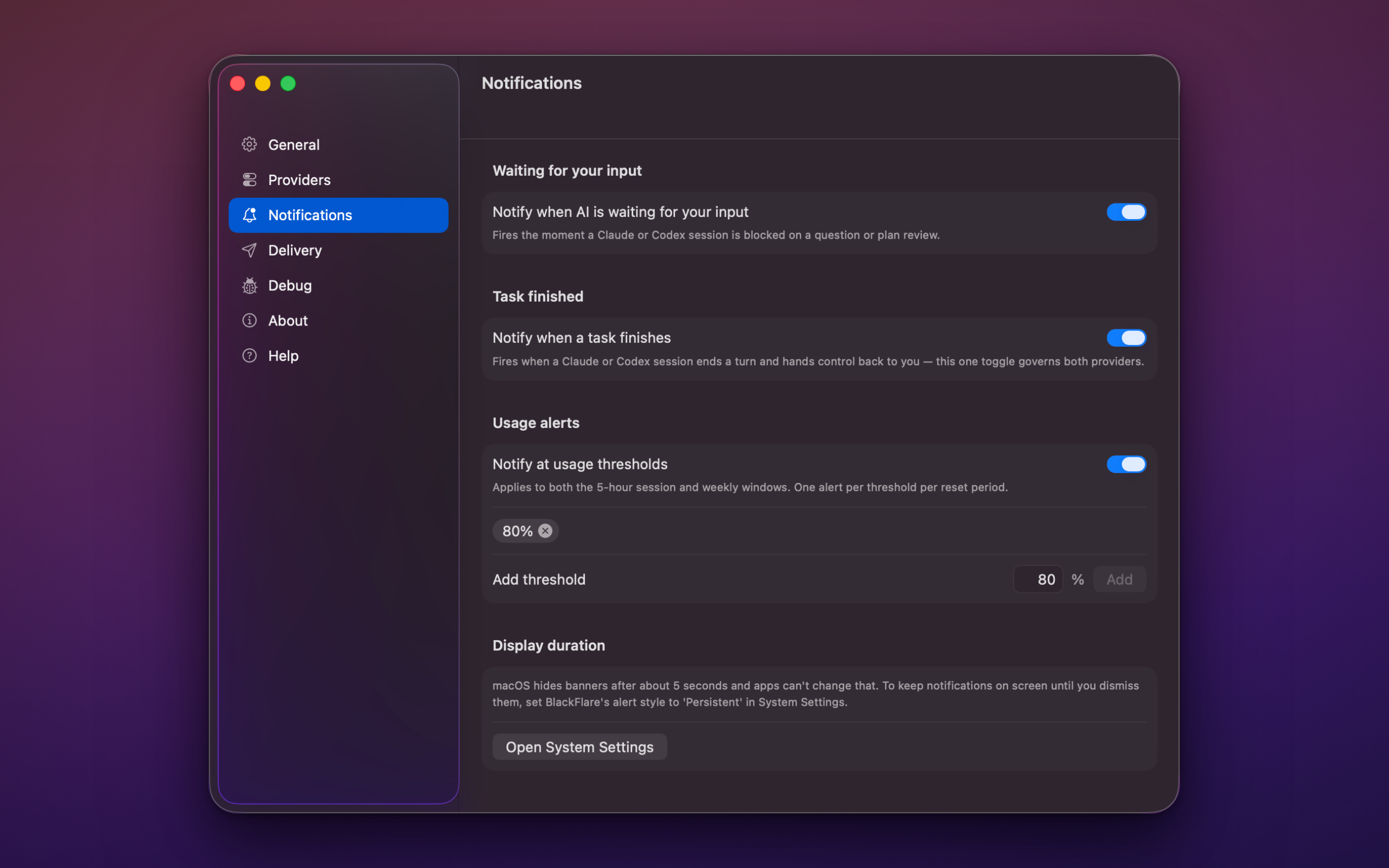
Decide what fires…
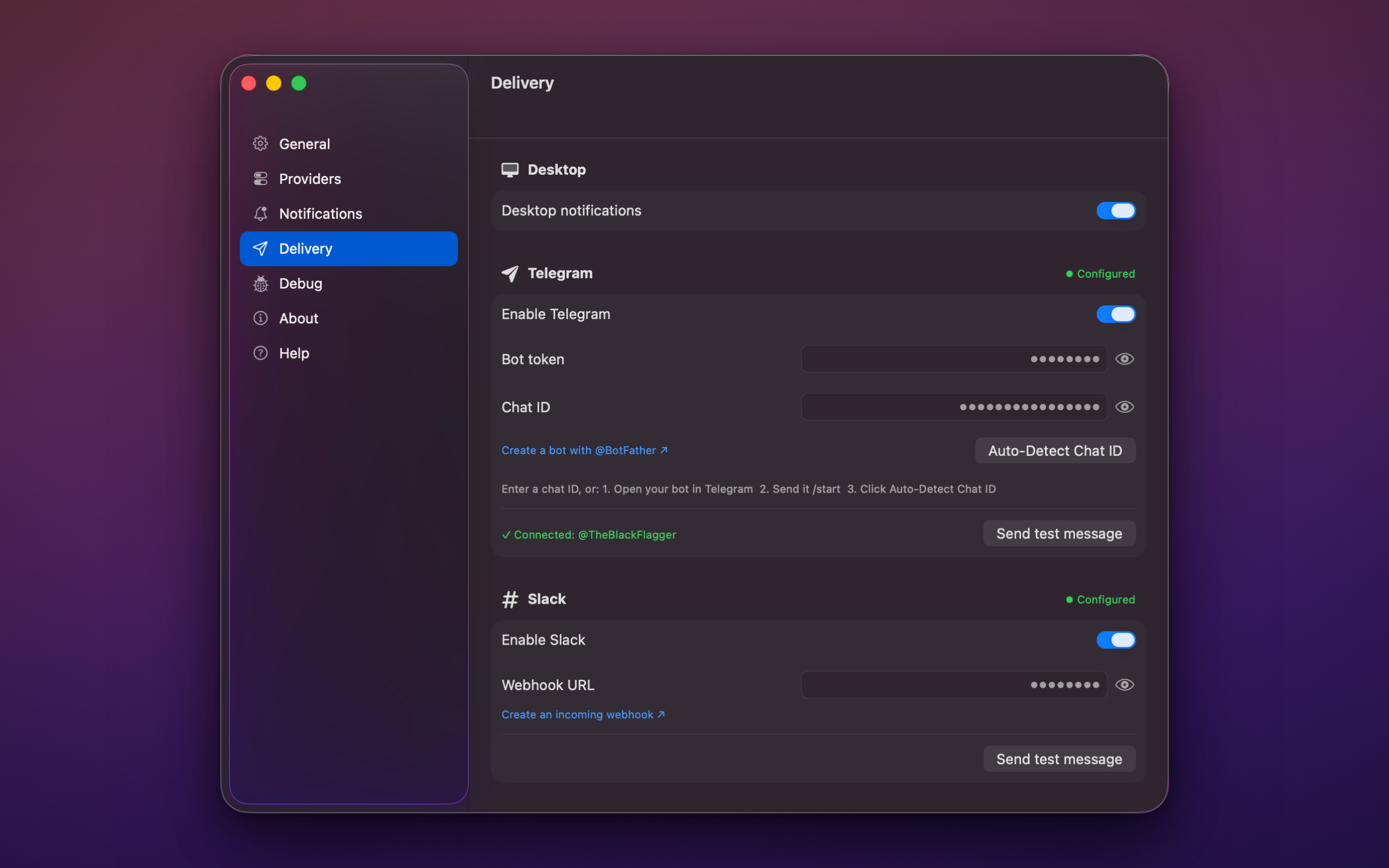
…and where it goes. Every channel has a Send test message button and shows
its last delivery error inline, so a broken webhook tells you immediately instead
of silently swallowing your alerts.
There is a global keyboard shortcut for the menu, too — set it in Settings and it
pops open from any app. It is registered through Carbon, so it needs no
Accessibility or Input-Monitoring permission. macOS never even asks.
Private by design
BlackFlare runs entirely on-device. No accounts, no analytics, no telemetry, no
backend. Nothing about you is collected, because there is nowhere to collect it
to.
- Reading Claude's token is opt-in and off by default. To show your exact
plan usage, BlackFlare reads Claude Code's own OAuth token from the Keychain —
read-only, and never without your explicit consent. Leave it off and the usage
section simply shows a hint. BlackFlare never writes to that Keychain item. - It does keep Keychain items of its own — your Telegram bot token, Slack
webhook URL, and licence key. They live in the Keychain rather than in
preferences or logs, and never appear in either. - Five network destinations, all listed — nothing else is ever contacted:
api.anthropic.com(your plan usage, only with consent),models.dev(the
public model catalogue, carrying nothing about you),api.telegram.organdhooks.slack.com(only if you configure those channels), andapi.gumroad.com(only to verify your licence key). Codex usage involves no
network call at all — it is read from a snapshot Codex writes locally. - Logs are redacted at the source. No tokens, no credentials, no config
contents. Nothing is written to disk; only the current run is kept in memory.
Full details in the privacy policy.
Requirements
- macOS 13 or later — Universal (Apple silicon & Intel)
- Claude Code or Codex already installed. BlackFlare works on the config
and session files those tools already keep in~/.claudeand~/.codex.
Documentation
| Guide | What's in it |
|---|---|
| Getting started | From the disk image to your first notification |
| Keep Mac awake | What holds the assertion, and what releases it |
| Notifications | What fires when, and how clicking focuses a session |
| Telegram & Slack | Bot setup, webhooks, and the away mode |
| Switching models | Every key BlackFlare writes, and how |
| Usage limits | Where the numbers come from, and thresholds |
| Providers | Enabling Claude Code and Codex, custom model ids |
| Troubleshooting | Start here when something is quiet |
Found a bug? Missing a feature?
That is exactly what this repository is for.
- 🐞 Report a bug — the form asks for the few details that make a report actionable
- ✨ Request a feature
- ❓ Ask a question
Please search the existing issues
first — and for anything about a purchase, a licence, or a security report, use
the contact page rather than a public issue.
 Built by The Black Flagger ·
blackflare.dev ·
tintrungnguyen.com
Built by The Black Flagger ·
blackflare.dev ·
tintrungnguyen.com



Reviews (0)
Sign in to leave a review.
Leave a reviewNo results found