monoharness
Health Warn
- License — License: MIT
- Description — Repository has a description
- Active repo — Last push 0 days ago
- Low visibility — Only 5 GitHub stars
Code Fail
- rm -rf — Recursive force deletion command in scripts/ci/test-guards.sh
- rm -rf — Recursive force deletion command in scripts/ci/test-install-zharness.sh
- rm -rf — Recursive force deletion command in scripts/ci/test-risk-facts.sh
Permissions Pass
- Permissions — No dangerous permissions requested
No AI report is available for this listing yet.
Persona taste skills and harness
mono-harness
Turn a git repository into a legible, agent-ready workspace.
zharness installs a small repository protocol and a safe updater. The
repository remains the system of record: product documents, decisions, plans,
code, tests, CI, and runtime evidence define the work.
It is not a task database, story tracker, agent orchestrator, or application
runtime. The binary scaffolds docs; it does not run the lifecycle.
Start with AGENTS.md, then .harness/WORKFLOW.md.
Give this to a coding agent
Copy the block into the consumer repository chat when you want the agent to
install, refresh, or work with zharness.
Work in this git repository. Read https://github.com/therealtinhtute/mono-harness/blob/master/README.md and, once they exist, this repo's AGENTS.md and .harness/WORKFLOW.md. If zharness is not on PATH or outdated, install/upgrade it with scripts/install-zharness.sh. If this repo has no .harness/WORKFLOW.md, run zharness install. Before upgrading, independently install the six workflow skills (brainstorm, to-plan, work, check, handoff, watzup) using the skills instructions below. If a required skill or reference is missing, report the dependency and stop workflow execution. If the repo is initialized or zharness install reports drifted files, run zharness update to refresh WORKFLOW and conservatively retire recorded legacy procedures (edited/unknown files and recovery data are retained; PROJECT.md is never overwritten, and an edited AGENTS.md block makes update refuse with a diff). Plans live only in .harness/plans/ — multi-session or complex work uses exactly one file at .harness/plans/active/{slug}.md, moved to .harness/plans/completed/ upon verified handoff. Small changes need no plan. zharness only manages the doc set (install/update/uninstall) — it does not run the lifecycle. Missing AGENTS.md: zharness install, do not invent the file. Claude Code reads CLAUDE.md, not AGENTS.md; if CLAUDE.md is missing, the consumer writes a thin file containing the line @AGENTS.md.
What it solves
Coding agents often fail for ordinary engineering reasons:
- important intent exists only in chat;
- the repository does not identify authoritative documents;
- small changes acquire unnecessary process;
- long changes lose decisions and recovery context;
- completion is claimed without behavior-level proof; and
- an agent invents product policy when the request leaves a material choice
open.
zharness provides a compact entrypoint, a navigable repository map, durable
plans only when work needs them, and mono playbooks that stay reduced for
read-only and bounded work.
Goals
- Skills and the harness are one goal. This repository builds an agent
skill set for the SDLC alongsidezharness, the protocol that keeps that
lifecycle legible and portable across coding agents. - The repository stays the system of record. Plans, decisions, and
validation live in tracked markdown that a human can read and git can
history. There is no database — tracked markdown and git history are
the only record. - Process proportional to the work. A read-only question and a
multi-session refactor should not cost the same ceremony. Reduced paths
write no lifecycle rows; durable plans exist only for work that needs
recovery context. - Invariants enforced, not assumed. Where a rule can be checked it is
checked — the pre-commit and CI plan guards fail on violation rather than
letting a broken state travel silently. What they cannot check, they say so
inskills/stages/check/references/check-durable.mdinstead of implying coverage. - Portable across agents. The spine skills are thin triggers; the
operating logic sits in independently installed skill references.
Skill-capable hosts resolve each stage through their skill metadata; the CLI
installs the repository router, not the procedures. - Diagnostics that name the next action. A finding states the violating
item, the rule it breaks, its authority, and what to do — never a bare
validation failure. - Safe to adopt and to leave.
install/update/uninstallmanage only
the doc set, merging rather than clobbering the files a project owns; the one
exception isupdatemigrating a 9-section active plan, Validation bytes kept.
Non-goals
- Not a task database, tracker, or orchestrator. zharness scaffolds and
checks documents. It does not run the lifecycle, assign work, or drive an
agent. - No database. Anything that must outlive the working copy belongs
in tracked markdown or in git history. - No hosted or shared state. The CLI makes no network calls. Everything
the harness knows lives in the working copy. - Not a replacement for git. The harness records intent and validation;
git remains the record of what changed. - No derived-fact documents. Routes, environment variables, and file
inventories are not hand-maintained indocs/— the code is authoritative
for what can be re-derived from it. - No automatic remediation. Gates report verdicts and findings; deciding
what to do about them stays with the operator.
Default workflow
Start a task with /mono <task>. The router matches one playbook, copies
its steps into a todo list, and calls the skill each step names.
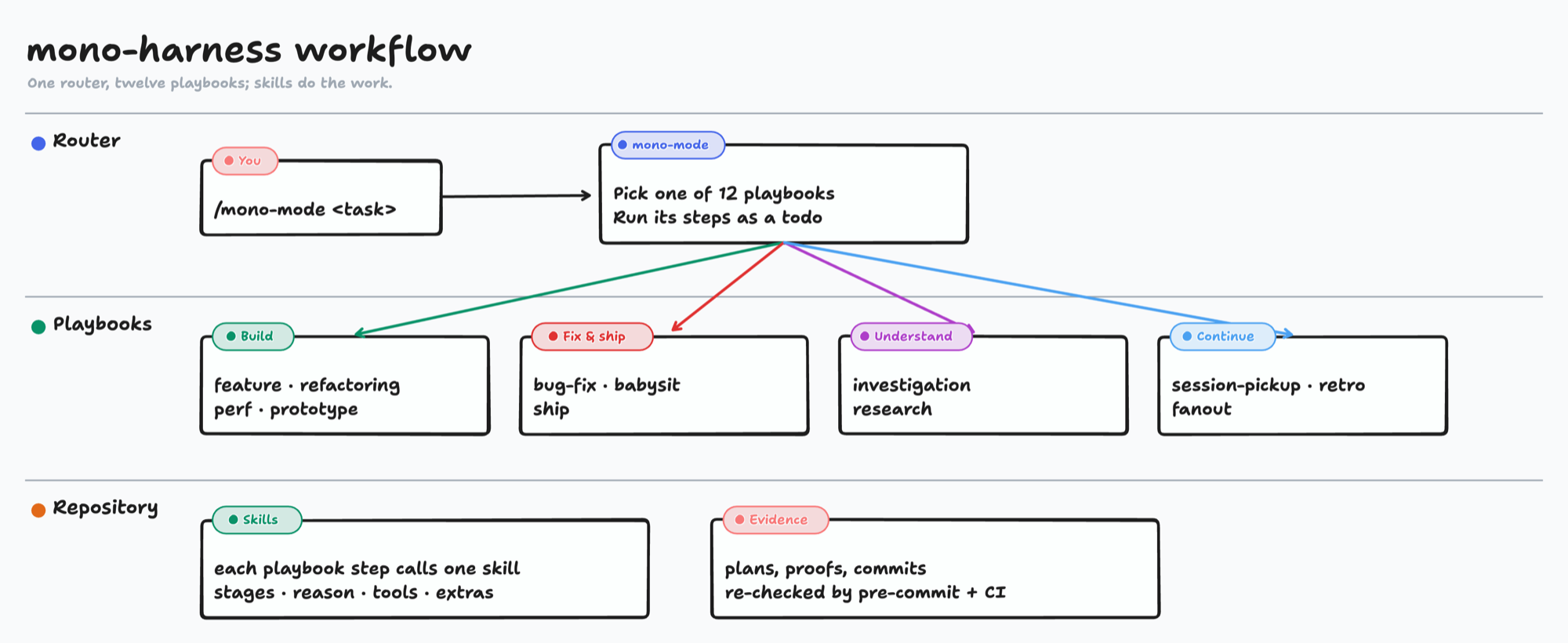
| Playbook | Steps |
|---|---|
| feature | brainstorm → to-plan (high-risk only) → work → check → git (on request) → handoff |
| bug-fix | hunt → failing test → work (bounded) → check → git (on request) |
| refactoring | think → pin behavior → work (subtract, then reshape) → check |
| perf | baseline → hunt → mantras, cheapest first → work → check before/after |
| prototype | throwaway variants → observe in the real app → decide |
| fanout | separate → spawn sub-agents → aggregate → check |
| investigation | think or hunt; read-only, changes nothing |
| research | read (search, fetch) → learn → write; notes only |
| ambition | ambition (depth, altitude or range) → lint the rewrite → route on request |
| babysit | /loop over review threads and CI until the PR is ready |
| ship | watzup → security-review → check → land → changelog → tag → verify → rollback |
| session-pickup | watzup → reconcile → route to the next playbook |
| retro | watzup → retro → save approved lessons |
A typo does not need a plan. A migration spanning sessions does: it gets one.harness/plans/active/<plan>.md, moved to .harness/plans/completed/ after
validation. When a request leaves a material product choice open, the agent
stops before mutation and asks.
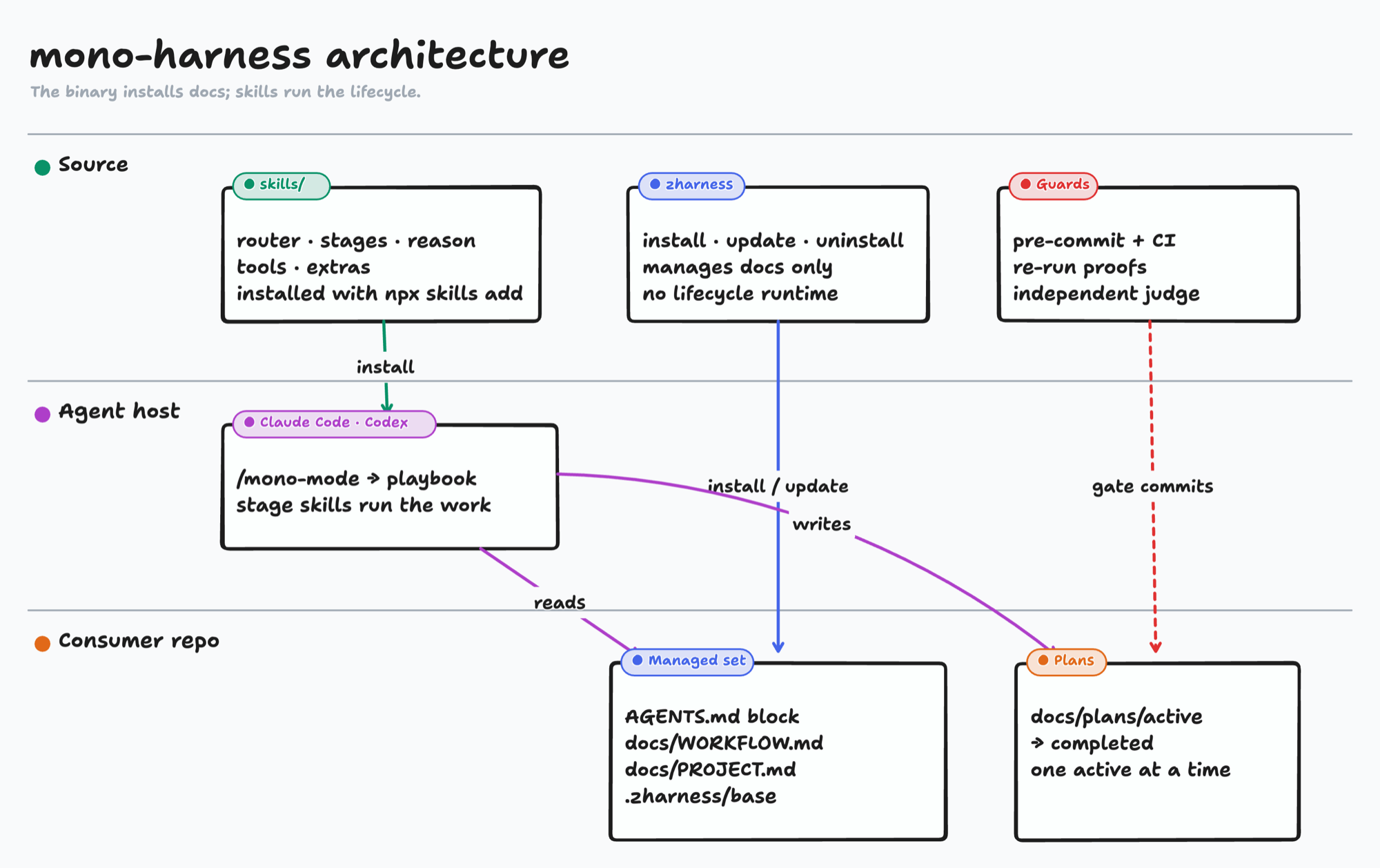
Diagram sources are tldraw files in site/assets/diagrams/.
What gets installed
The managed set is:
- a compact
AGENTS.mdentrypoint (markedZHARNESSblock only); .harness/WORKFLOW.md, the stage router;- a
.harness/PROJECT.mdidentity scaffold; .zharness/base/for update tracking (a sha256 manifest and the ownership ledger).
It does not write CLAUDE.md. It does not install application architecture,
product policy, skills, git hooks, credentials, a database, schemas,
orchestration, or background processes.
Install
From a target repository, with zharness on PATH:
zharness install
Get the binary once per machine (gh + tar; Linux or macOS, amd64 or arm64):
bash scripts/install-zharness.sh
zharness --version
install is idempotent. It records upstream hashes, prints a read-only
brownfield report, and exits 0. Use --root <dir> when cwd is not the
consumer repo.
Maintain an installation
zharness update
zharness update --force
zharness update --check [--all]
zharness uninstall
.harness/WORKFLOW.md is a pure upstream mirror: update always overwrites it
with the latest bytes. Legacy procedures are retired only using recorded hashes
and ownership. Matching installer-created copies are removed; matching copies
with proven pre-install originals are restored. Edited or uncertain files and
their recovery data are retained with notices. See the migration guide. .harness/PROJECT.md is written only
when absent; after that it belongs to the project. The marked AGENTS.md block
is replaced between its markers; if it was edited since zharness last wrote it,
update prints the diff, writes nothing, and exits non-zero until you move the
edit outside the markers or pass --force (rerunning install resets the block without asking). --check reports drift without
writing (--all: every repository in ~/.config/zharness/repos). A single active
plan in the older 9-section format is migrated in place to the 5-section format
with its ## Validation bytes unchanged; any other heading set, or more than one
active plan, is left alone with a notice. Uninstall
removes managed files only; consumer-owned bytes are never deleted.
Workflow skills and optional extensions
Install brainstorm, to-plan, work, check, handoff and watzup independently
before upgrading to skill-owned procedures. Verify that the host exposes all six
skills and can read their installed references. A missing dependency is unsupported
for workflow execution; retained legacy files are not a fallback. Other skills
are optional extensions.
mono sits at skills/mono; the other skills live in four groups: stages
(the six workflow skills plus retro), reason (think, hunt, arena, learn, ambition), tools (git,
create-skill, librarian, prompt-leverage, read, tldraw-diagram, write) and extras (create-cli,
turbo-mono-platform). retro, create-cli andturbo-mono-platform are gated: they run only from a mono playbook step or
when the user names them.
Skills are not part of zharness install. They live in this source repository,
the stable release of the skills; the former orkit-tui incubator is archived
and no longer syncs here. The repository is private, so installing over SSH
needs local SSH keys with access to it:
npx skills add [email protected]:therealtinhtute/mono-harness.git --list   # list without installing
npx skills add [email protected]:therealtinhtute/mono-harness.git -a claude-code -g -y
No skill runs during installation.
To reinstall rules and skills from scratch, from this repository:
cp setup/CLAUDE.md ~/.claude/CLAUDE.md
cp setup/rules/*.md ~/.claude/rules/
npx skills add [email protected]:therealtinhtute/mono-harness.git -a claude-code -g -y
cp never removes a rule that was dropped from setup/rules/; bash setup/install.sh
retires the known ones. npx skills add never removes a skill that was dropped from this repository.
Trash each dropped skill by name from ~/.claude/skills/ and ~/.agents/skills/
before reinstalling.
v0.16
Protocol on the v0.15 three-verb binary: absorb at handoff close, at most
one active plan, independent judge for full checks. Pin v0.14.x to keep
the old lifecycle CLI. Existing harness.db files are consumer-owned;
nothing here deletes them.
See cli/docs/CONTRACT.md anddocs/ARCHITECTURE.md.
v0.15
Breaking cut: the lifecycle CLI and SQLite were deleted. The three verbs
remain. Pin v0.14.x if you still need that binary.
Development
cd cli && cargo fmt --check && cargo clippy --all-targets -- -D warnings && cargo test
bash scripts/ci/verify-doc-links.sh
bash scripts/ci/test-guards.sh
This repository is the source of the binary and skills. Edit workflow procedures
in skills/stages/<stage>/references/. Edit the managed router incli/docs/embedded/WORKFLOW.md, then copy it to .harness/WORKFLOW.md. Machine-wide Claude Code bootstrap is setup/install.sh;
that is not how a consumer app repo receives zharness.
Contributing and security
Read CONTRIBUTING.md before opening a pull request.
Report vulnerabilities privately through SECURITY.md.
License
MIT
Reviews (0)
Sign in to leave a review.
Leave a reviewNo results found