fire-flow
Health Pass
- License — License: MIT
- Description — Repository has a description
- Active repo — Last push 0 days ago
- Community trust — 76 GitHub stars
Code Fail
- rm -rf — Recursive force deletion command in scripts/sanitize-for-publish.sh
- rm -rf — Recursive force deletion command in scripts/skill-import.sh
Permissions Pass
- Permissions — No dangerous permissions requested
No AI report is available for this listing yet.
Research-backed orchestration system for Claude Code — structured workflow, session memory, quality gates, and 118+ proven patterns.
Dominion Flow
A comprehensive orchestration platform that empowers your Claude agent.
Dominion Flow gives Claude a complete, structured way to take your project from idea to finished code — with built-in quality checks, session memory, parallel execution, and a library of proven patterns. Think of it as a project management system that lives inside Claude Code.
⭐ Love this free orchestrator? Help it grow.
Star this repo so others can find it — and when you're ready for more, the Pro version lives at calibratefactory.com.
🚀 Dominion Flow v2 is coming soon — the next generation, available on calibratefactory.com.
What Does It Do?
When you start a new project, Claude normally has no memory between sessions, no standard process, and no way to verify its own work. Dominion Flow fixes all of that:
- Structured workflow — A numbered pipeline (Plan → Execute → Verify → Handoff) so nothing gets skipped
- Session memory — Claude picks up exactly where it left off, every time
- Parallel execution — Multiple tasks run at the same time, safely, so work gets done faster
- Built-in quality gates — A comprehensive checklist verifies every phase before moving on
- Skills library — A growing collection of proven code patterns Claude can reuse instead of reinventing every time
Who Is This For?
This plugin is for anyone using Claude Code who wants:
- Consistent, repeatable results on complex projects
- Claude to remember what it was doing between sessions
- Code that gets reviewed and verified, not just written
No prior experience with orchestration or AI agents required.
Introducing Dominion Flow: Elevate Your Claude Code Workflow
Are you using Claude Code to build projects but feeling limited by session-hopping, lack of structure, or the need to constantly re-explain your requirements? Dominion Flow is a project management and orchestration plugin built to transform Claude from a simple assistant into a structured, persistent, and highly capable autonomous development agent.
What is Dominion Flow?
Dominion Flow acts as a professional-grade "operating system" inside your terminal. It introduces a formal, repeatable pipeline—Plan → Execute → Verify → Handoff—that ensures your project moves from an idea to working, verified code without skipping critical steps.
Why Use It?
Persistent Memory: Through integrated vector database support (Qdrant), Dominion Flow allows Claude to remember your codebase, past decisions, and coding patterns across different sessions.

Structured Pipeline: Stop guessing where to start. The platform uses a clear, 51-command framework to guide you through every phase of development.

Quality & Verification: Built-in quality gates and automated testing (including Playwright E2E testing) ensure that code isn't just written—it's verified.

Autonomous Capabilities: Need to go hands-off? Features like /fire-autonomous allow Claude to plan, code, and verify entire project phases on its own.

Reusable Skills Library: Stop reinventing the wheel. Dominion Flow includes a library of proven, reusable patterns for authentication, APIs, payments, and more, which Claude can automatically learn and store as you build.
Who Is It For?
Whether you are a developer looking for a consistent, professional workflow or someone who wants to maximize the potential of Claude Code, Dominion Flow provides the structure and "long-term memory" required for complex, real-world projects.
How to Get Started
Dominion Flow is designed to be easily installed as a Claude Code plugin. Simply clone the repository and run the installation command:
Bash
git clone https://github.com/ThierryN/fire-flow.git
claude install-plugin ./fire-flow
For advanced users, the repository also supports optional "Power Features" like Docker-integrated memory (Qdrant) and local embeddings (Ollama) to make the agent even more powerful.
Quick Install
Prerequisite: You need Claude Code installed first. If you don't have it yet, download and install it, then come back here.
Choose either Method A (recommended) or Method B:
Method A — Git Clone (Recommended)
Open your terminal and clone the repo:
git clone https://github.com/ThierryN/fire-flow.gitInstall the plugin from the cloned folder:
claude install-plugin ./fire-flowRestart Claude Code
Type
/fire-0-orientto check that everything is working
Method B — Download ZIP (No Git Required)
Click the green "Code" button → "Download ZIP"
Extract the ZIP file to a folder you will keep (e.g.,
Documents/fire-flow)Open your terminal and install the plugin from that folder:
Mac / Linux:
claude install-plugin ~/Documents/fire-flowWindows:
claude install-plugin C:\Users\YourName\Documents\fire-flow(Replace
YourNamewith your actual Windows username)Restart Claude Code
Type
/fire-0-orientto check that everything is working
Optional but Recommended: Power Features
The core workflow works out of the box. These extras unlock persistent memory, codebase search, and Docker Hub access — features that make Claude dramatically more capable on larger projects.
Step 1 — Install Docker Desktop
Docker Desktop is required to run Qdrant. Install it before anything else.
Windows (PC):
- Go to docker.com/products/docker-desktop and click Download for Windows
- Before running the installer, open PowerShell as Administrator and run:
wsl --update wsl --set-default-version 2 - Restart your computer
- Run the Docker installer and choose "Use WSL 2 instead of Hyper-V" when prompted
- After install, open Docker Desktop from your Start menu and wait for it to fully start (the whale icon in your taskbar stops animating)
- Verify it worked:
docker --version
Mac:
- Go to docker.com/products/docker-desktop and click Download for Mac
- Choose Apple Chip if you have an M1/M2/M3/M4 Mac, or Intel Chip for older Macs
- Not sure which? Click Apple menu → About This Mac
- Open the
.dmgfile and drag Docker to your Applications folder - Open Docker from Applications and follow the prompts
- Wait for it to fully start (whale icon in menu bar stops animating)
- Verify it worked:
docker --version
Docker Desktop must be open and running whenever you use Qdrant or hub-mcp.
Step 2 — Run Qdrant (Vector Database)
Qdrant stores Claude's persistent memory across sessions — so Claude remembers your codebase, past decisions, and patterns from previous work.
docker pull qdrant/qdrant
docker run -d \
  -p 6333:6333 \
  -p 6334:6334 \
  -v qdrant_storage:/qdrant/storage \
  --name qdrant \
  qdrant/qdrant
| Port | What it is |
|---|---|
| 6333 | REST API — main port used by Claude |
| 6334 | gRPC — high-speed operations |
Verify: Open http://localhost:6333/dashboard in your browser. If you see the Qdrant dashboard, it is running.
Step 3 — Connect Qdrant to Claude (MCP)
This is what allows Claude to read and write to your power_flow_memory database.
Mac or WSL:
claude mcp add qdrant -s user -- uvx mcp-server-qdrant \
  --url http://localhost:6333 \
  --collection-name power_flow_memory
Windows (CMD or PowerShell):
claude mcp add qdrant -s user -- cmd /c uvx mcp-server-qdrant \
  --url http://localhost:6333 \
  --collection-name power_flow_memory
Step 4 — Install Ollama (Local Embeddings)
Ollama runs locally and generates the vectors that get stored in Qdrant.
- Download and install from ollama.com
- Pull the embedding model:
ollama pull nomic-embed-text
Step 5 — Run Docker Hub MCP Server (hub-mcp)
hub-mcp lets Claude search Docker Hub, browse images and tags, and pull images by just asking.
docker pull docker/hub-mcp
docker run -d \
  -p 8080:8080 \
  --name hub-mcp \
  docker/hub-mcp
Connect to Claude Code:
claude mcp add hub-docker -s user --transport sse http://localhost:8080/sse
If port 8080 is already in use on your machine, change the left port number (e.g.,
-p 9090:8080) and update the URL to match (e.g.,http://localhost:9090/sse).
Verify Everything Is Connected
Restart Claude Code, then type /mcp. You should see:
| Server | What it does |
|---|---|
qdrant |
Claude ↔ power_flow_memory database |
hub-docker |
Claude ↔ Docker Hub image search |
Then ask Claude to confirm the database connection:
"Check if my Qdrant power_flow_memory collection is reachable and tell me how many points are stored."
Claude will query Qdrant directly and confirm it is live.
Your First Project (5 Minutes)
Start a new project with one command:
/fire-1a-new
Claude will ask you a few simple questions about your project, then set everything up automatically. After that, the numbered commands walk you through each step:
/fire-1a-new      → Start your project (asks you questions, creates the plan)
/fire-2-plan 1   → Plan the first phase of work
/fire-3-execute 1 → Build it (Claude does the coding)
/fire-4-verify 1  → Check that everything actually works
/fire-5-handoff   → Save your progress before closing
/fire-6-resume    → Pick up where you left off next session
Want Claude to handle everything automatically?
After /fire-1a-new, just run:
/fire-autonomous
Claude will plan, build, and verify every phase without you having to type each command.
How Does It Compare?
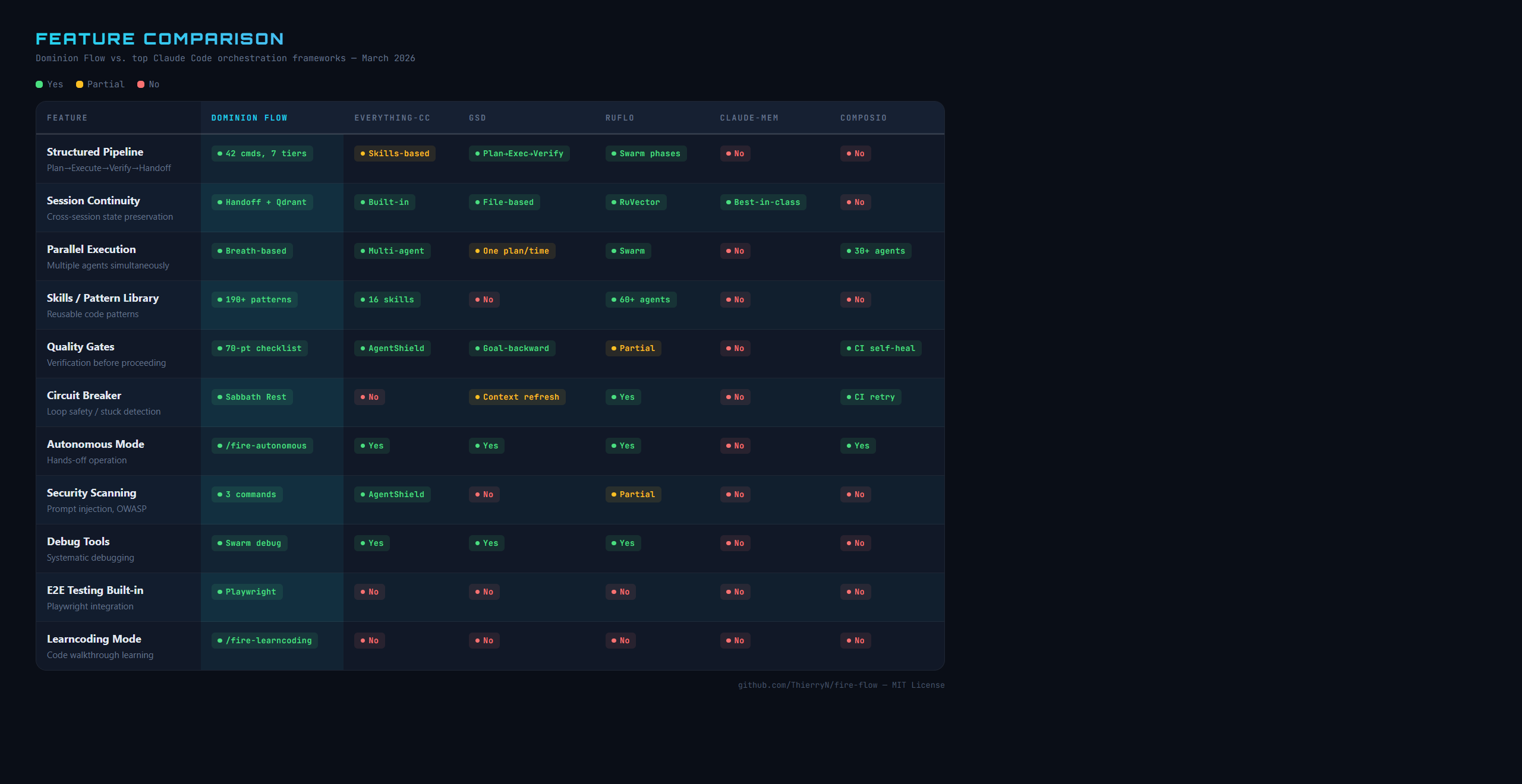
Key Features
| Feature | What It Does |
|---|---|
| 51 slash commands | Every task has a dedicated command — no guessing |
| Skills library | Proven patterns for auth, payments, APIs, and more |
| Breath-based parallelism | Independent tasks run at the same time |
| 70-point verification | Every phase gets scored before moving on |
| Session handoffs | Claude remembers everything between sessions |
| Circuit breaker | Stops loops that are stuck or going in circles |
| Auto skill extraction | Useful patterns discovered during work get saved automatically |
| Playwright E2E testing | Automated browser testing built in |
| Learncoding mode | Walk through any codebase step-by-step to learn it |
| Security scanning | Detect prompt injection, OWASP vulnerabilities, credential leaks |
All 51 Commands
Commands are grouped into 8 tiers. You only need Tier 1 for most projects.
| Tier | Purpose | Key Commands |
|---|---|---|
| 1 — Core Workflow | The main pipeline | /fire-1a-new through /fire-6-resume |
| 2 — Autonomous | Full autopilot | /fire-autonomous, /fire-loop |
| 3 — Debug & Discover | Investigate problems | /fire-debug, /fire-map-codebase |
| 4 — Verification | Quality gates | /fire-7-review, /fire-verify-uat |
| 5 — Skills | Manage the pattern library | /fire-search, /fire-add-new-skill |
| 6 — Analytics & PM | Track progress | /fire-dashboard, /fire-todos |
| 7 — Milestones | Long-term projects | /fire-new-milestone, /fire-complete-milestone |
| 8 — Learning | Code walkthroughs | /fire-learncoding |
See COMMAND-REFERENCE.md for the complete list with descriptions.
Finding More Skills
The skills library is what makes Dominion Flow powerful. Skills are reusable patterns that Claude draws on during your project — for auth, payments, APIs, database design, testing, and much more.
Where to find skills:
- aitmpl.com/skills — Curated skill collections, ready to install
- skillsmp.com — Community skill marketplace
- GitHub — Search for
claude-code-skillsordominion-flow-skillsto find repos shared by the community
Installing skills from GitHub:
claude plugin install <github-username>/<repo-name>
You can also create your own skills as you work. When Claude discovers a useful pattern, /fire-add-new-skill saves it to your library automatically.
Documentation
| File | What It Covers |
|---|---|
| QUICK-START.md | Step-by-step walkthrough of your first project |
| COMMAND-REFERENCE.md | All 51 commands with descriptions |
| references/warrior-principles.md | The WARRIOR operating principles — what they are and why they matter |
| DOMINION-FLOW-OVERVIEW.md | Full system diagrams and architecture |
| ARCHITECTURE-DIAGRAM.md | Visual overview of how everything connects |
| TROUBLESHOOTING.md | Common problems and how to fix them |
Community
Have questions, want to share what you built, or just want to connect with others learning Claude Code?
Join the Facebook group: Claude Code Community
This is where students and followers ask questions, share projects, and stay up to date.
Support This Project & Go Pro
Dominion Flow is free and open source (MIT). If you're following along and finding it useful, here's how to help — and how to get more:
Keep it free & growing — costs you nothing:
- ⭐ Star this repo — it helps others discover it
- 🔗 Share it — pass it along to anyone learning Claude Code or building AI-assisted projects
Want more power? Go Pro:
- 🚀 calibratefactory.com — the home of the paid editions, with more capability than the free orchestrator
- 🔮 Dominion Flow v2 is coming soon — the next-generation paid release, available exclusively at calibratefactory.com
This is a living project. Your stars, shares, and support keep it growing. 🙏
Architecture Diagram
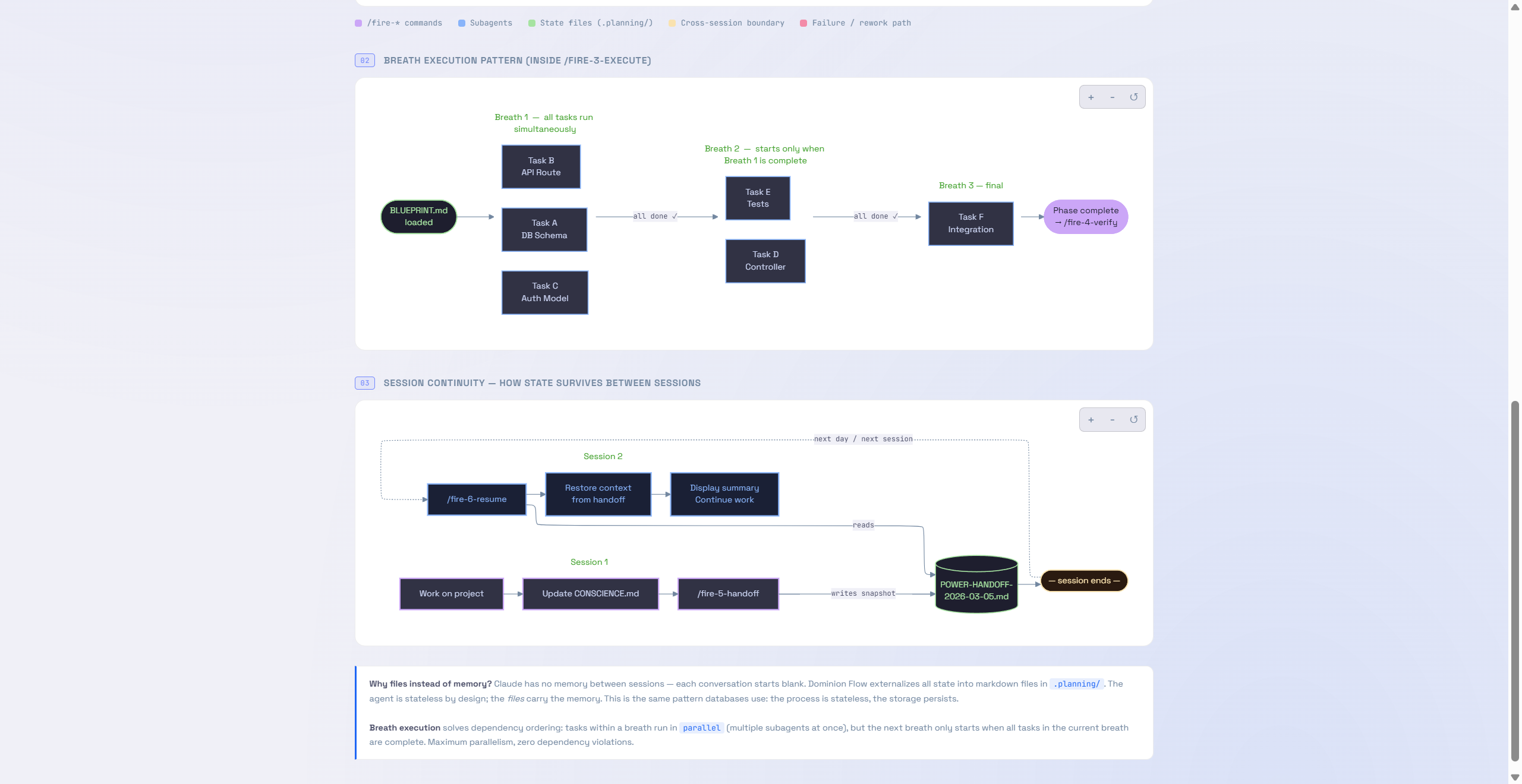
View the full interactive version: Dominion Flow Architecture (HTML) — Download and open in your browser to explore with interactive navigation.
License
MIT License — Copyright (c) 2026 ThierryN
This software is free to use, copy, modify, and distribute. See LICENSE for the full text.
Reviews (0)
Sign in to leave a review.
Leave a reviewNo results found