unclog
Health Pass
- License — License: MIT
- Description — Repository has a description
- Active repo — Last push 0 days ago
- Community trust — 11 GitHub stars
Code Pass
- Code scan — Scanned 12 files during light audit, no dangerous patterns found
Permissions Pass
- Permissions — No dangerous permissions requested
This tool scans your local Claude Code environment to identify agents, skills, and MCP servers consuming your context window tokens. It calculates token costs and provides an interactive prompt to selectively remove unwanted configurations and files.
Security Assessment
Overall risk: Low. The utility operates entirely locally, explicitly stating it makes zero network calls and collects no telemetry. Its primary function is reading configuration files from the `~/.claude/` directory and measuring their token impact. Because it is designed to curate your setup, it does execute destructive actions—specifically, permanently deleting files from your disk and renaming MCP server entries in your configuration. However, it requires no special system permissions to run, and the automated code scan found no malicious patterns, hidden payloads, or hardcoded secrets.
Quality Assessment
The project is highly transparent and in active development, with its most recent push occurring today. It is open-source under the standard, permissive MIT license. While it is a relatively new and niche tool with only 11 GitHub stars, its straightforward purpose, clean codebase (12 files scanned with no issues), and built-in development safeguards (like typing and linting via `ruff` and `mypy`) strongly indicate a reliable and safe project.
Verdict
Safe to use.
Audit MCP servers, skills, and CLAUDE.md bloat eating your Claude Code context window.
unclog


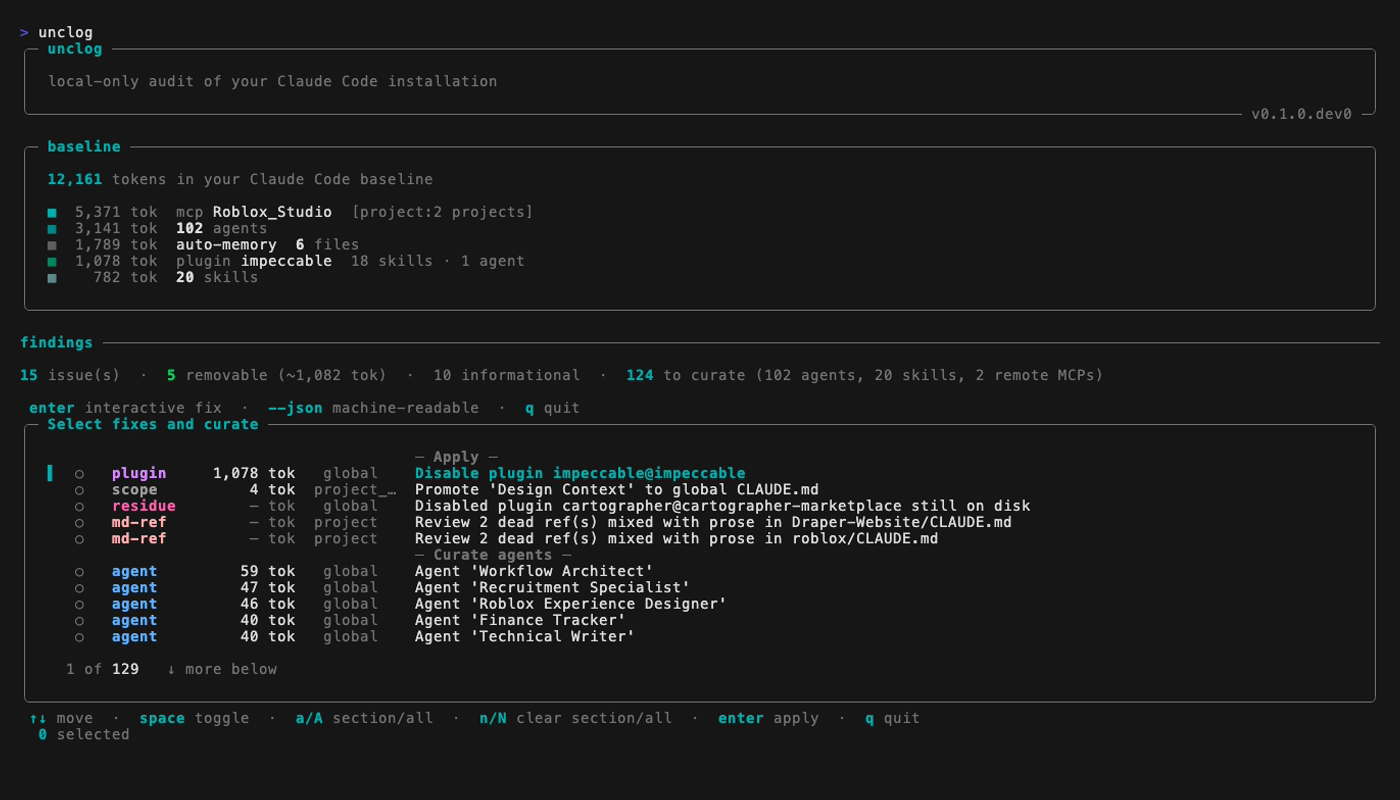
Every agent, skill, and MCP server you've installed occupies your Claude Code context window on every turn. unclog scans your install, shows you what's costing tokens, and lets you handpick what to delete — locally, with no telemetry, no accounts, and no network calls.
# install
uv tool install unclog

# run
unclog
What it shows
- Every agent in
~/.claude/agents/, with its token cost. - Every skill in
~/.claude/skills/, with its token cost. - Every slash command in
~/.claude/commands/, with its token cost. - Every MCP server declared in
~/.claude.json(global and per-project), with its measured session-token cost when available. - A baseline — the total tokens loaded before you type a single message.
Remove what's costing you

After the scan, one sectioned picker opens. Tick the agents / skills / commands / MCPs you want to remove, hit enter, confirm once, done. A post-apply line shows how many tokens you saved and the new baseline.
Picker keys: ↑↓ move · space toggle · a / A check section / all · n / N clear section / all · enter apply · q quit.
Actions are destructive. Deleted files are removed from disk — there is no undo command. MCP servers are a softer case: they're renamed to __unclog_disabled__<name> in your config, so you can revive one by hand-editing ~/.claude.json and removing the prefix.
Requirements
Python 3.11+, Claude Code ≥ 2.1.90, macOS or Linux.
Development
uv sync --all-extras --dev
uv run pytest
uv run ruff check src tests
uv run mypy src/unclog
License
MIT. See LICENSE.
Reviews (0)
Sign in to leave a review.
Leave a reviewNo results found