claude-pet
Health Warn
- License — License: GPL-3.0
- Description — Repository has a description
- Active repo — Last push 0 days ago
- Low visibility — Only 5 GitHub stars
Code Fail
- rm -rf — Recursive force deletion command in scripts/bundle.sh
- rm -rf — Recursive force deletion command in scripts/make-appcast.sh
- rm -rf — Recursive force deletion command in scripts/make-dmg.sh
- rm -rf — Recursive force deletion command in scripts/make-icon.sh
Permissions Pass
- Permissions — No dangerous permissions requested
No AI report is available for this listing yet.
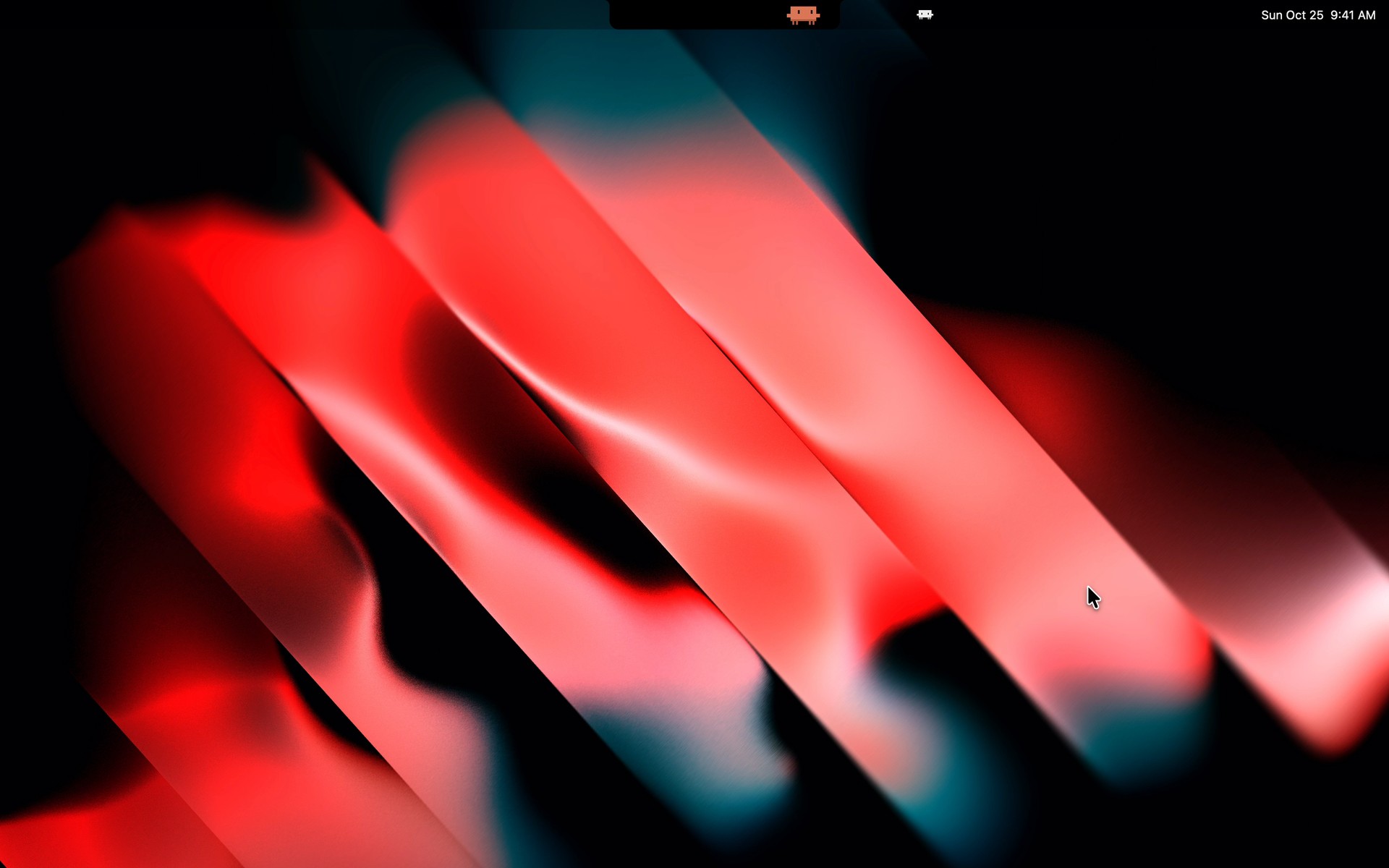
A pixel pet in your MacBook's notch for Claude Code: see what Claude is doing and answer its permission requests without switching windows.
Claude Pet
A pixel-art pet for macOS that lives in your MacBook's notch and reacts to what Claude Code is doing. It thinks while
Claude thinks, types on a tiny laptop while Claude runs commands, waves at you when Claude needs an answer, and naps
when nothing happens. When Claude asks for a permission or a question, you can answer right from the notch.
Works with the claude CLI and with the Code tab of Claude Desktop, through Claude Code's hooks. For Apple Silicon
Macs.
Website and live demo · Download
Not affiliated with Anthropic. Claude Pet is an independent, unofficial project. "Claude" and "Claude Code" are
trademarks of Anthropic, PBC.
Install
- Download ClaudePet.dmg from the latest release.
- Open it and drag Claude Pet into Applications.
- Open Claude Pet from Applications.
macOS will block it the first time. The app isn't signed with an Apple Developer ID yet, so Gatekeeper says it
can't check it for malware. To open it anyway, pick one:
Open it once, then go to System Settings › Privacy & Security, scroll down and click Open Anyway.
Or, in Terminal:
xattr -dr com.apple.quarantine "/Applications/Claude Pet.app"
If you'd rather not trust a downloaded binary, build it yourself: it takes a minute and
Gatekeeper doesn't get in the way.
Requires a Mac with Apple Silicon (M1 or later) and macOS 13 or later. The download doesn't run on Intel Macs.
The notch mode needs a MacBook with a notch; elsewhere the pet floats on your desktop.
First launch
A window lists everything that will be written before anything happens:
- the hooks, added to
~/.claude/settings.jsonnext to your own (nothing else in the file changes); - a small relay for your status line, which forwards its data to the pet and then runs your original command, so your
terminal looks the same; - a few files in
~/Library/Application Support/claude-pet/.
settings.json is backed up before every write. Decline quits without writing anything. Everything can be
repaired, uninstalled or restored later from Settings › Claude Code.
Sessions that were already open only see the hooks after a restart (or after opening /hooks).
What it does
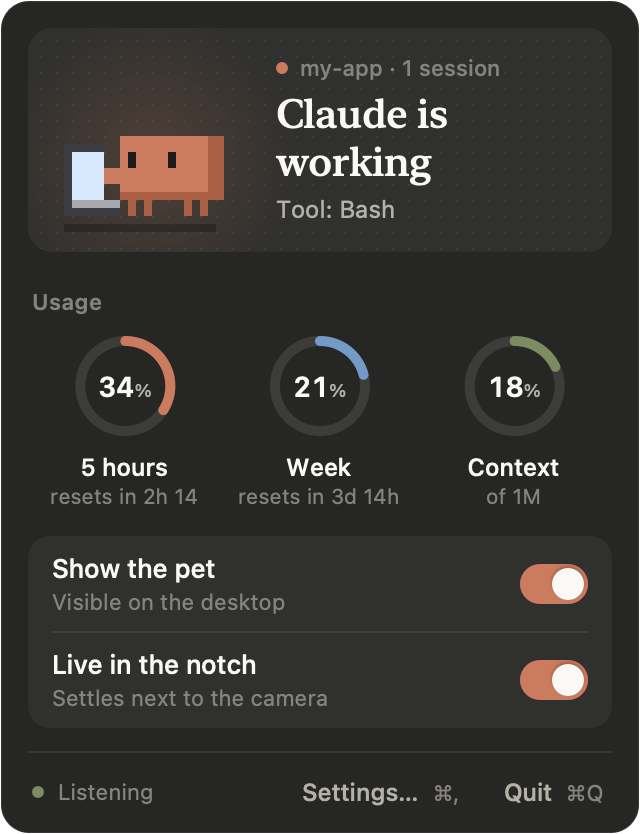
- Reacts to Claude Code: idle, thinking, working (with an icon for the tool: shell, edit, search, web, agent),
error, waiting for you, happy when a task ends, asleep after 10 s of quiet. With several sessions open, it follows
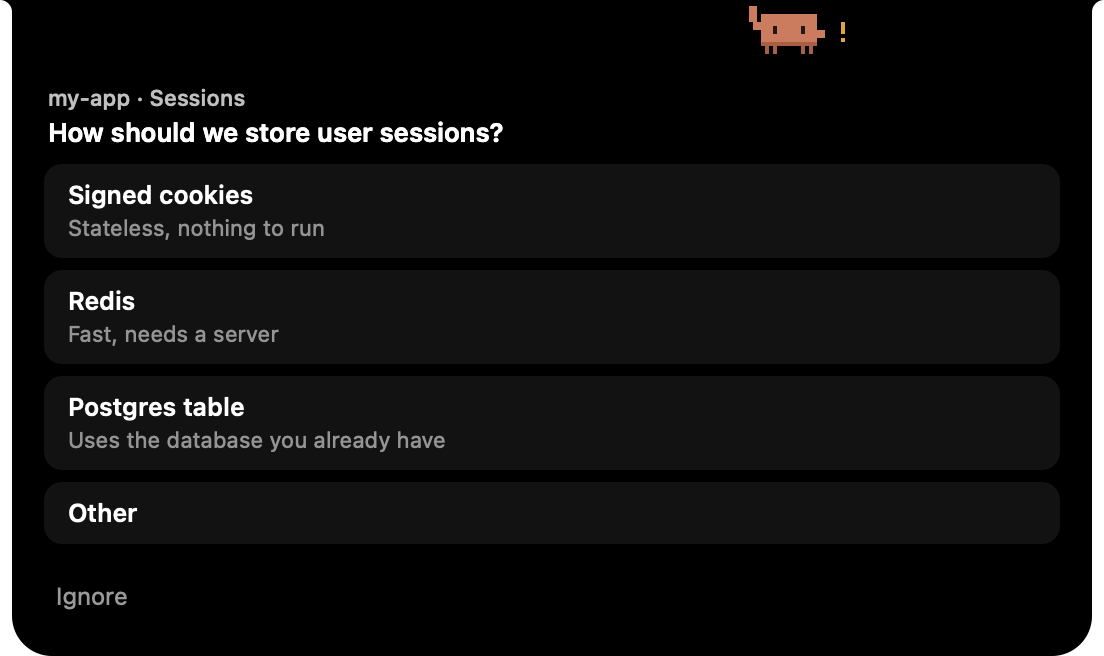
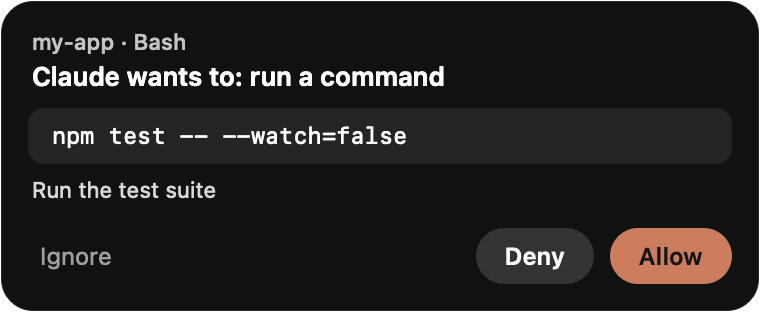
the one that matters most: one that needs you is never hidden behind one that is working. - Answers Claude for you: permission requests (Allow once, Deny, or Ignore to answer in Claude) and
AskUserQuestionprompts, including multiple choice and a free-text Other. Claude Code keeps the first answer
it gets, wherever it comes from: the pet, the terminal, Desktop. - Shows your usage: hover the notch to see your 5-hour quota, your weekly quota and the current session's
context window. - Counts your tokens: the Statistics window (menu bar panel) shows the tokens Claude Code used today, over
7 or 30 days or since the beginning, by type (input, output, cache writes, cache reads), model and project, with
curves, your busiest hours, streaks and a calendar of active days. - Lives in the notch or floats: drag it into the notch and out again, or toggle it from the menu bar.
- Stays out of the way: clicks go through it everywhere except on the pet itself, it uses no CPU while asleep and
under 1 % of one core at its busiest (measured numbers).
The interface is in English or French, following your system language.
Performance
I'm the kind of developer who can't leave an idle CPU spike alone, and an app that sits on your screen all day has no
excuse to be heavy. So, in full transparency, here are the exact numbers, measured rather than estimated.
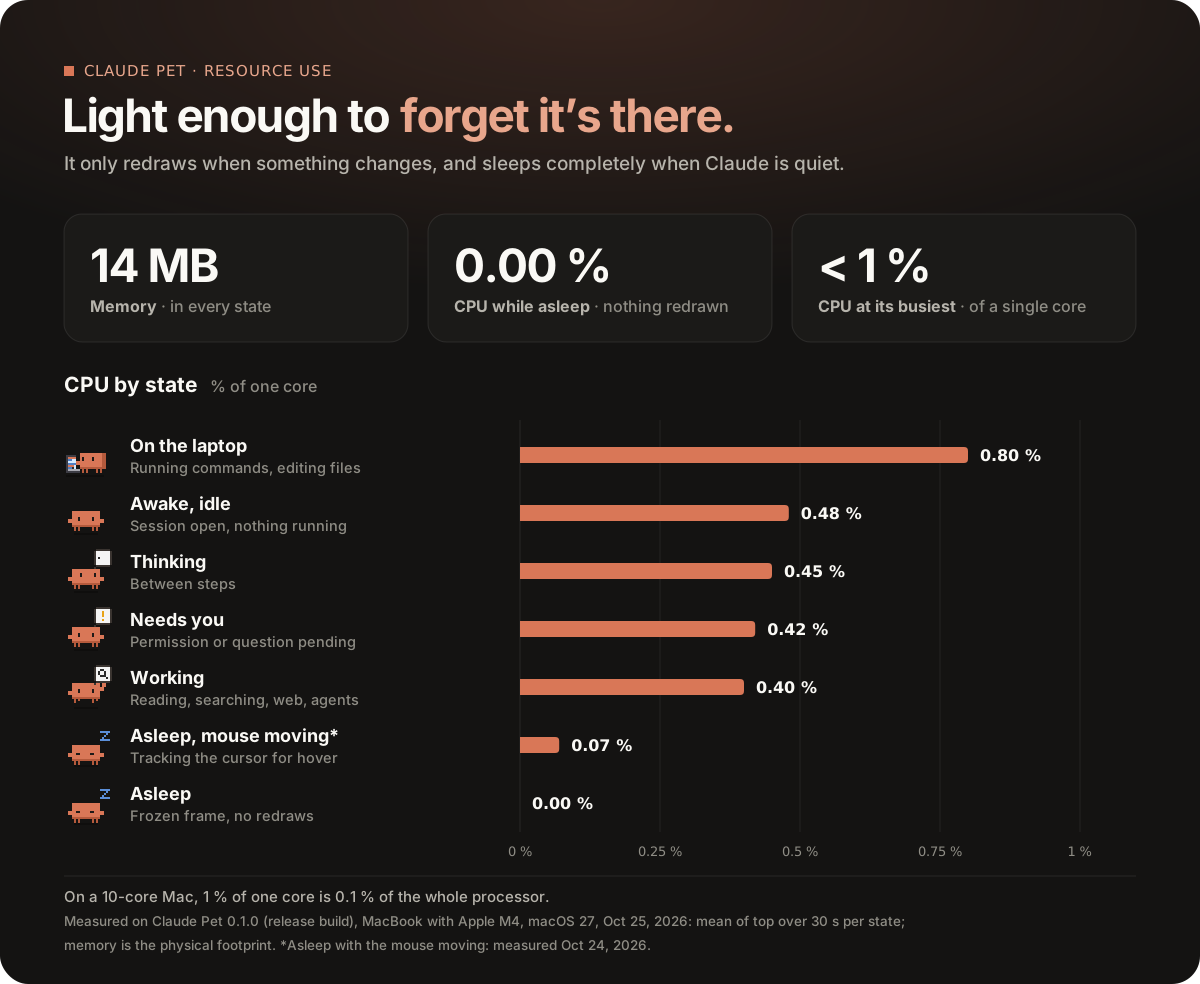
In short: about 14 MB of memory, under 1 % of a single core at its busiest, and 0 % while it sleeps. Nothing is
polled: the pet redraws only when something changes, its animation stops completely while it naps, and the mouse is
only sampled while it moves. Each hook costs Claude Code around 10 ms, and nothing at all when the app is closed.
These figures come from my MacBook (Apple M4); expect a bit more on older Macs. To measure on yours:scripts/measure-cpu.sh (it moves the mouse for 30 s for the last case).
Privacy
- Everything stays on your Mac. The app talks to Claude Code over
127.0.0.1only and refuses requests from web
pages. - Account quotas are off by default. If you turn them on (first-launch checkbox, or Settings › Data), the app
reads the login token Claude Code keeps in your Keychain and asks Anthropic's usage endpoint for your quotas every
5 minutes. The token stays in memory: it is never written, logged or sent anywhere else. When it has expired, the
app runsclaude -p /usageso Claude Code renews it itself; this sends no request to the model and uses no quota.
This endpoint is not an official API and may stop working at any time. If Claude Code isn't signed in, Connect
Claude Code runsclaude auth login: Claude Code opens its own sign-in page in your browser and stores the
login itself (the copy that comes with Claude Desktop works too). The app never sees your password and never
writes the token. - Without quotas turned on, the gauges still fill in from your status line (CLI sessions) and the session
transcript (context only). - Statistics come from the transcripts Claude Code already writes in
~/.claude/projects, read only, and only
once you open the panel or the window. The app keeps the counts it read (time, model, token numbers, session id
and project folder name, never the text of a conversation) in~/Library/Application Support/claude-pet/token-stats.json, so it doesn't read everything again and older
sessions survive Claude Code's cleanup. Delete that file to start over. - Automatic updates (since 0.2.0, with Sparkle). Once a day, the app reads a small
feed attached to the latest GitHub release. A newer version is downloaded in the background and installed when the
app quits, or right away from Restart to update in the menu bar panel. Every update is signed with a private
key only I hold (EdDSA), and the feed is signed too: the app checks both before installing anything, so a changed
file is rejected even if it comes from GitHub. Nothing about you is sent beyond what any web request carries (your
IP address, the app's name and version). Turn it off in Settings › Data; Check still works by hand.
Uninstall
Settings › Claude Code › Uninstall removes the hooks and puts your status line back, then drag the app to the
Trash. ~/.claude/settings.json.claude-pet-original is the copy of your settings from before the first install.
Build from source
You need macOS 13+ and Swift 5.10+. The Command Line Tools are enough (xcode-select --install), Xcode isn't
needed.
git clone https://github.com/thomaslorenzini/claude-pet.git
cd claude-pet
scripts/bundle.sh
open build/ClaudePet.app
scripts/bundle.sh builds in release mode and wraps the binary in build/ClaudePet.app (no Dock icon). Move it to
Applications if you want it to open at login.
Other scripts:
| Command | What it does |
|---|---|
swift run ClaudePet |
Runs the debug build (quit any running Claude Pet first) |
scripts/make-dmg.sh |
Builds build/ClaudePet.dmg, with the drag-to-Applications window |
scripts/fake-event.sh demo |
Plays fake Claude Code events, no Claude needed (multi, stop, state… without an argument for the list) |
scripts/install-hooks.py install --dry-run |
The hook installer as a script, for development (shows the diff) |
scripts/measure-cpu.sh |
Measures CPU and memory in each state |
scripts/make-icon.sh |
Regenerates the app icon from the sprite |
The version comes from the latest vX.Y.Z git tag (or VERSION=1.2.3 scripts/bundle.sh).
How it works
Claude Code ──hook──▶ curl POST 127.0.0.1:47319/event ──▶ Claude Pet ──▶ sprite
Each hook reads the port from ~/Library/Application Support/claude-pet/endpoint and checks that the pet is running
with shell built-ins only. When the pet is closed, no process is started and the hook exits at once. Otherwise it
sends the hook's JSON with curl -m 1 and always exits 0, so a stuck pet can never block Claude for more than a
second. Permission requests are the exception: that hook waits for your answer in the pet, and Claude Code shows its
own dialog at the same time.
The app is a Swift package (AppKit), whose only dependency is Sparkle for updates. The sprites are drawn in code
(Sources/ClaudePet/Sprites.swift).
Local API
For scripts and mods, on 127.0.0.1:47319 (the port can change if it's taken, see the endpoint file):
POST /event: a Claude Code hook's JSON as is, or a forced state:{"session_id": "x", "pet_state": "happy", "pet_tool": "bash", "pet_duration": 2}
(pet_state:idle|thinking|working|error|waiting|happy|sleeping;pet_tool:bash|edit|read|web|agent|other).GET /state: current state and sessions.GET /health: is the app running.
Contributing
Claude Pet is developed by one person, and that's how it will stay for now: issues are welcome, pull requests
aren't accepted. Bug reports, ideas and feedback are the most useful help. The app has been tested on one MacBook
with a notch, so reports from other setups (no notch, external displays, other macOS versions) help a lot.
License
Copyright © 2026 Thomas Lorenzini.
Claude Pet is free software under the GNU General Public License v3.0: you can use, study, modify and share
it, as long as anything you distribute based on it stays under the GPL, with its source code and this copyright
notice.
Reviews (0)
Sign in to leave a review.
Leave a reviewNo results found