admissions-ops
Health Warn
- License — License: MIT
- Description — Repository has a description
- Active repo — Last push 0 days ago
- Low visibility — Only 5 GitHub stars
Code Pass
- Code scan — Scanned 12 files during light audit, no dangerous patterns found
Permissions Pass
- Permissions — No dangerous permissions requested
No AI report is available for this listing yet.
Graduate-application planning workspace for AI agents — the LLM does the judgement, deterministic validators keep it honest. Sourced program evaluations, evidence-grounded CVs and statement drafts, nothing final without human review.
admissions-ops


English | 简体中文
A graduate admissions workspace for AI agents. Give it a program's official page and your CV: it checks your eligibility and fit against that page, then drafts a tailored academic CV or admissions resume and, when the program asks for one, a statement. Every requirement cites its official source, and every draft is built only from your own evidence and stays human-reviewed. Everything is plain local files on your own machine — no account, no server, no telemetry. What your AI agent sends to its model provider is covered in Integrity & Disclaimers.
[!TIP]
New to GitHub or the terminal? Hand the link to an AI. Paste this into any AI assistant (ChatGPT, Claude, Gemini, …), and it will walk you through the Quickstart on your own computer:I want to use https://github.com/TianCZeng/admissions-ops. Read its Quickstart, then teach me step by step how to install it and start my first run.Stuck on a step later, or seeing an error you don't understand? Paste it into the same chat.
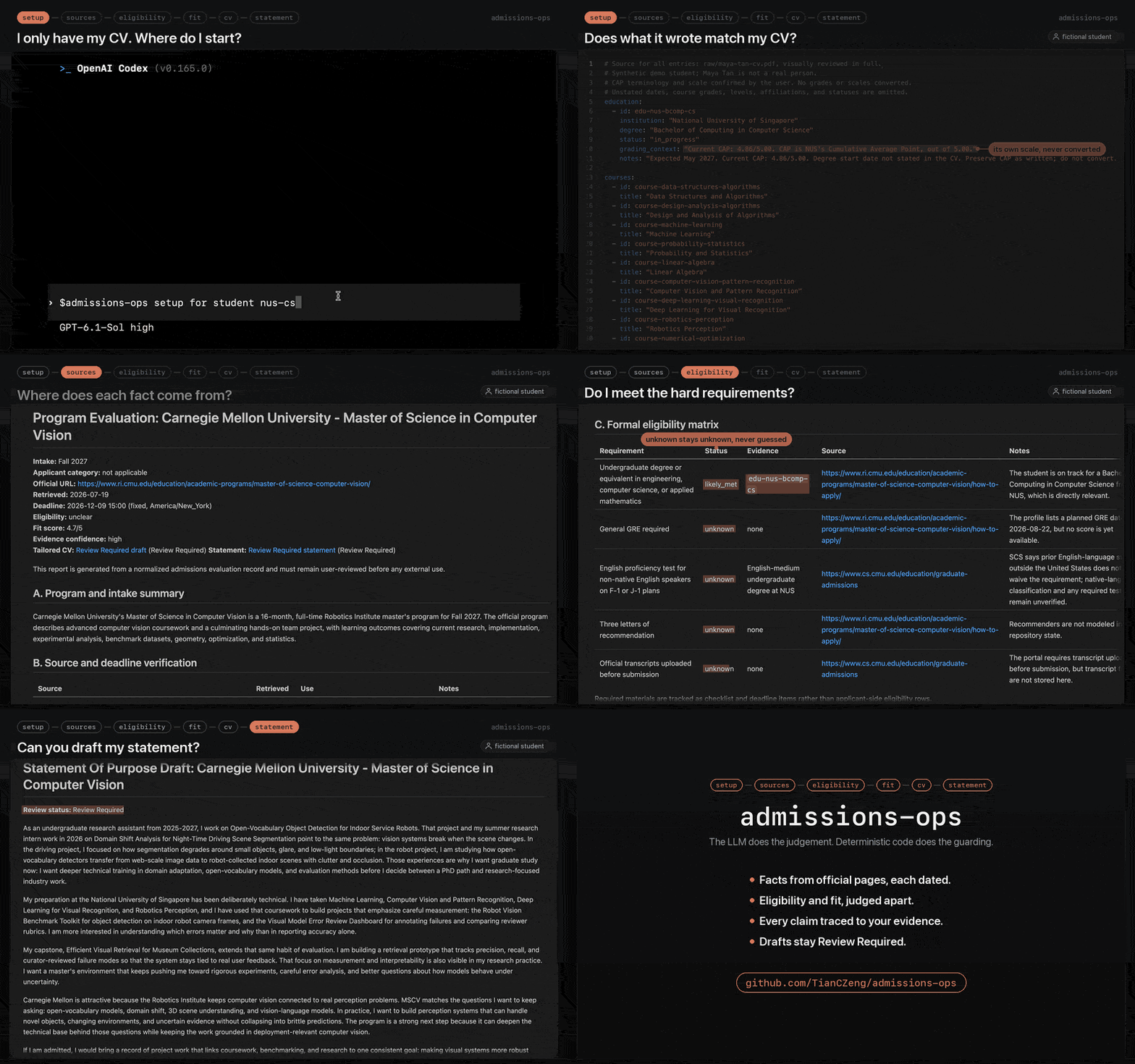
▶ Watch the full-quality MP4 (~68s)
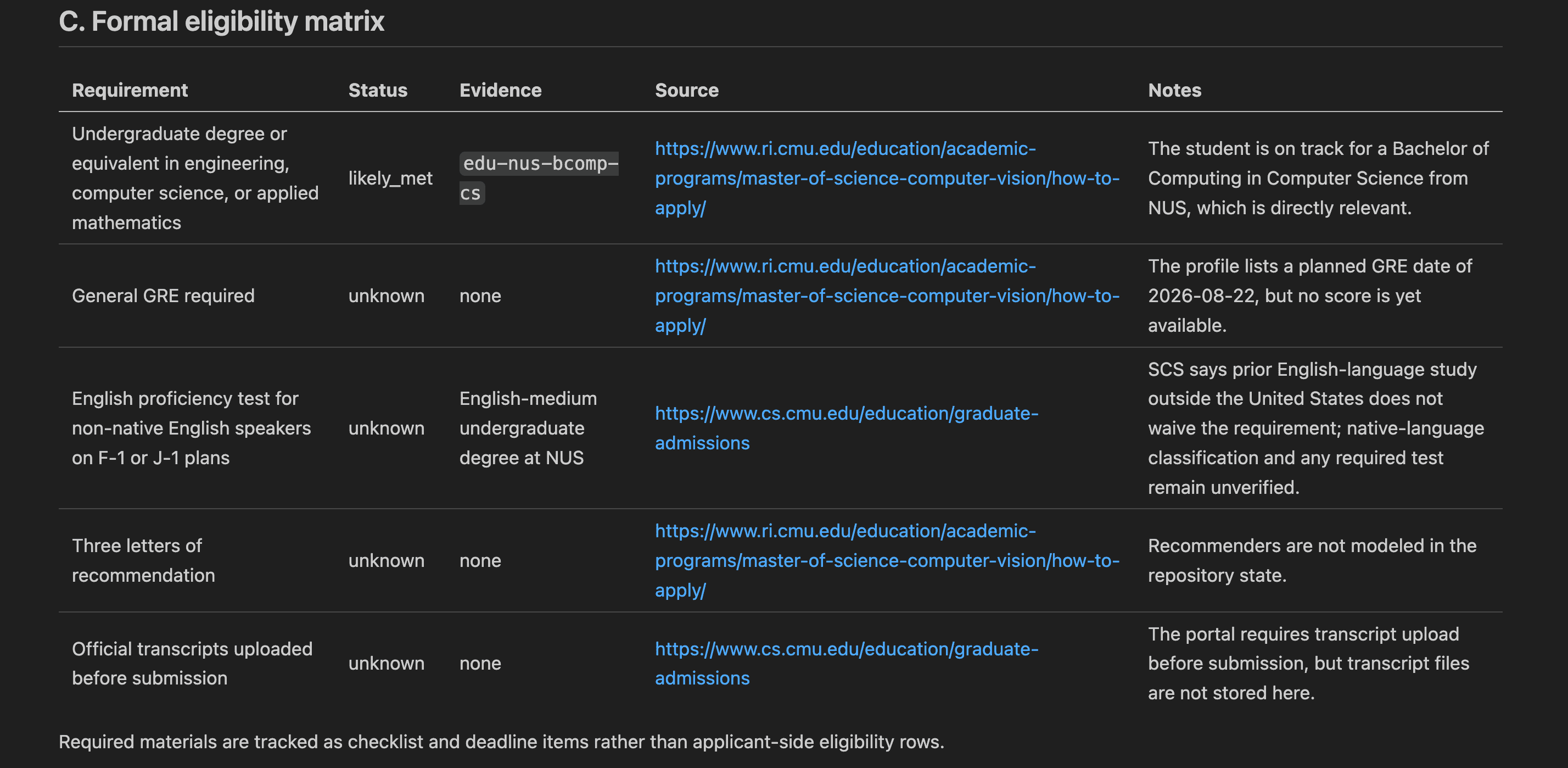
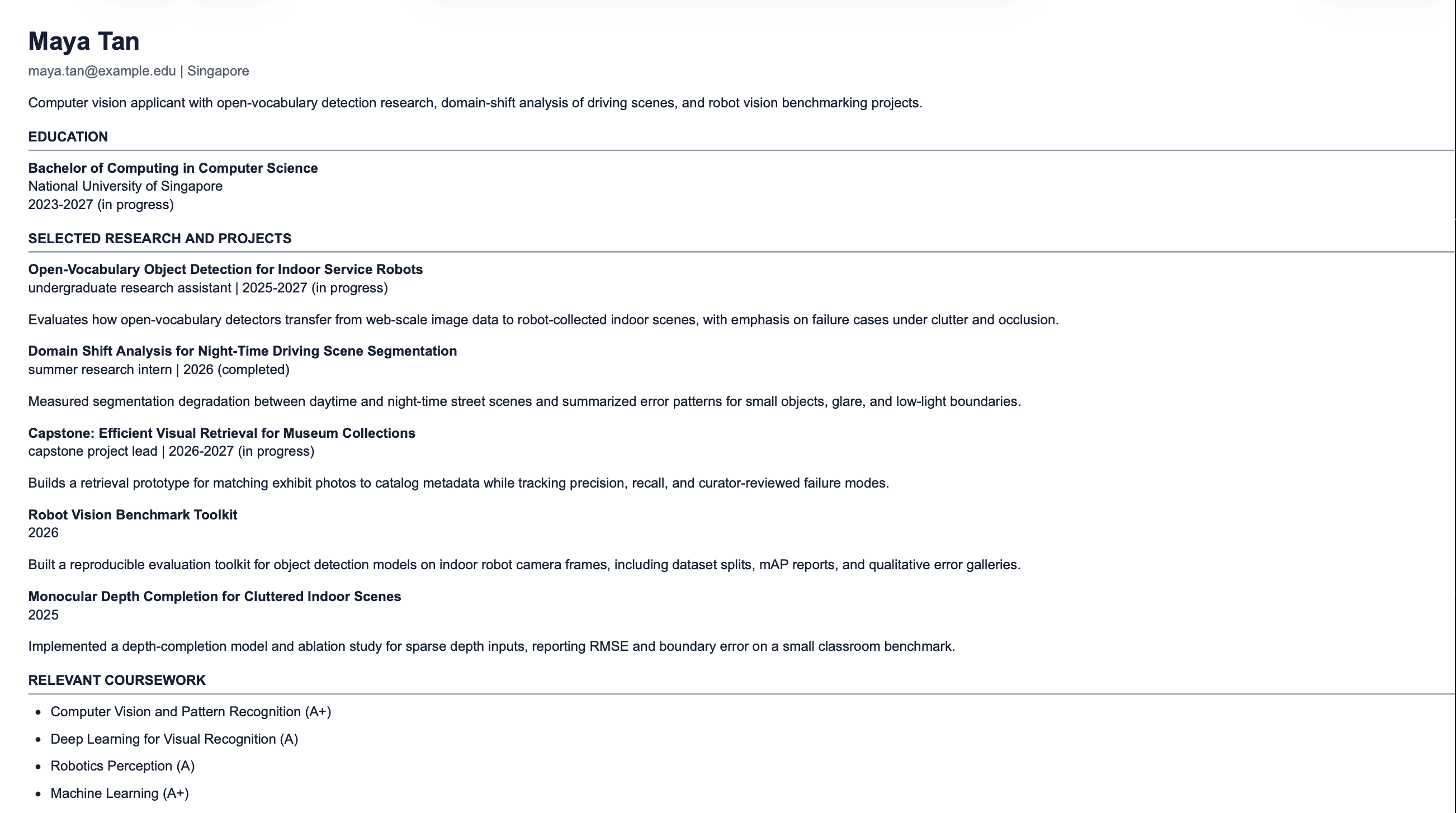
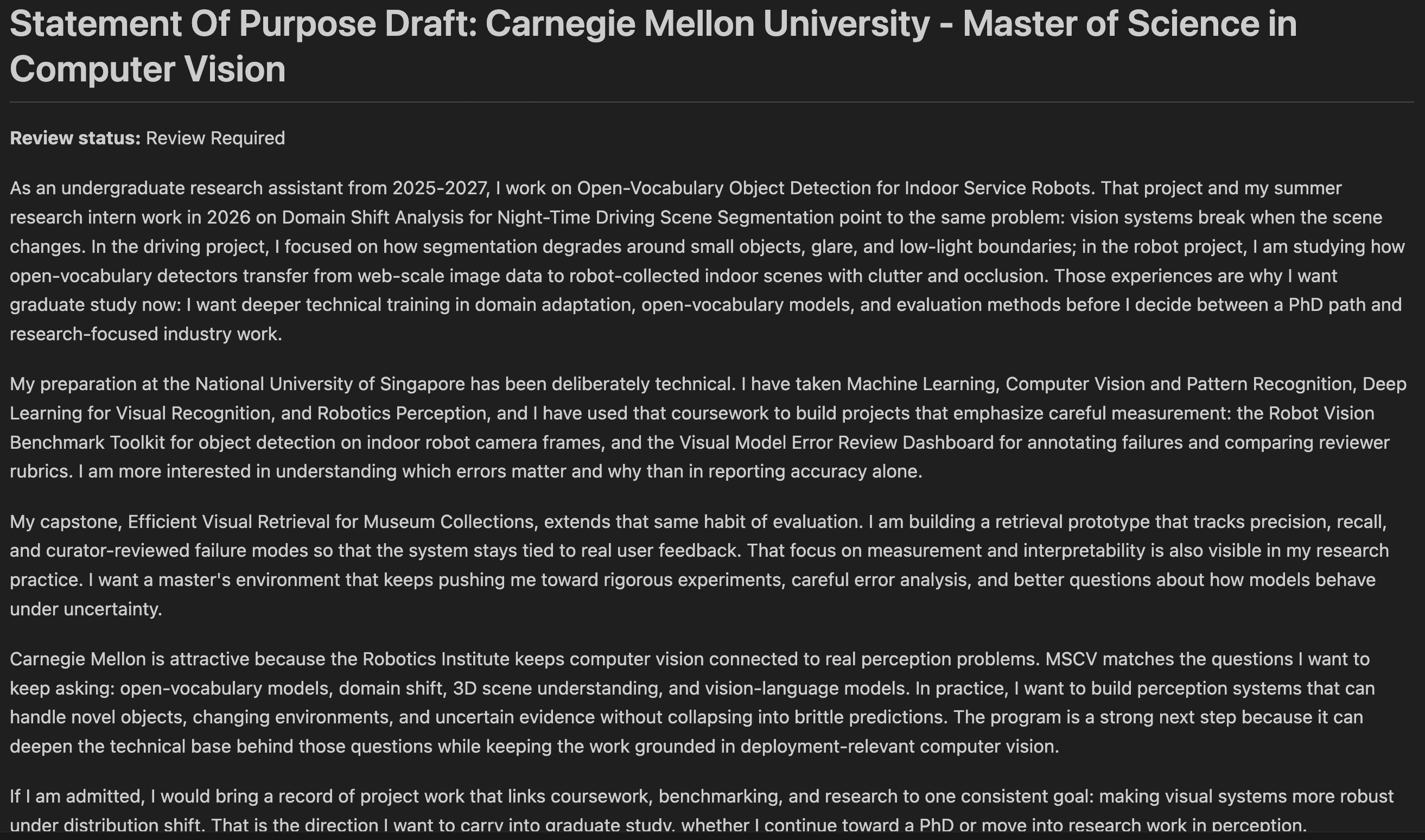
Give the agent one official program page and your evidence files, and one prompt produces:
- a sourced report — every requirement and deadline carries its official URL and retrieval date;
- an eligibility matrix of hard gates — pass/fail requirements marked
met,likely_met,not_met,unknown, ornot_applicable— where everyunknownbecomes a verification task instead of a guess; - a separate fit assessment — planning judgement, never presented as an admissions probability;
- a tailored academic CV or admissions resume, rendered only from your canonical evidence files — tailoring can never change dates, grades, authorship, titles, or publication status;
- a statement draft in which every nontrivial claim traces to your evidence or your own statement brief, marked
Review Requireduntil you review it; - a tracker row and per-program checklist, so open questions do not get lost.
A complete worked example lives in students/nus-cs/: a fully synthetic applicant ("Maya Tan") evaluated against a real official program page, including the sourced report, evaluation record, rendered resume, and statement draft. A second fully synthetic workspace, students/tsinghua-automation/, was produced from a Chinese-language chat against a Chinese percentage transcript — the conversation is Chinese, every generated artifact is English, and the percentage marks are reported as published rather than converted.
Quickstart
You need Node.js 20 or later, Git, and an agent such as Claude Code or Codex. No GitHub account needed. First time with any of these? Paste the prompt from the tip at the top into any AI assistant.
On Windows, read this before cloning.This repository contains committed symlinks (under .claude/skills/). Enable Windows Developer Mode and set git config --global core.symlinks true before cloning, or the symlinks check out as plain text files and agent skill discovery breaks.
Clone and install. Your workspace stays on your machine, and
.gitignorekeeps it out of git.git clone https://github.com/TianCZeng/admissions-ops.git cd admissions-ops npm installStart Claude Code or Codex inside the
admissions-opsfolder, or any agent that loads.agents/skills/. Start it there, not in a parent folder: the agent loads this repository's skills from the folder it starts in. The workflow is agent-led, and a full run needs live web access. Optional Codex CLI example:codex --searchfrom the folder.Put your CV or transcript in
students/<student-id>/raw/and runsetup, with a short ID you choose, such asmaya-tan. It builds your workspace with you, and whennpm run checkpasses it gives you theprogramprompt with your ID filled in:$admissions-ops setup for student <student-id>$admissions-ops program for student <student-id>: <official university or department program URL> Run the full one-program admissions pipeline for the intended intake <term/year>.
A full run takes about 7 to 20 minutes of agent time.
Private backup on GitHub (optional)Running locally is enough. If you want a backup, don't fork this repository, because forks are public. Use Use this template → Create a new repository → Private, clone your copy, and add one line to its .gitignore:
!/students/<student-id>/
Without that line the copy backs up everything except your workspace, because .gitignore ignores /students/*. With it, raw/, transcripts/, and the other document folders inside your workspace stay ignored. A template copy does not receive this repository's later updates.
npm run init -- --student <student-id> copies the example inputs into students/<student-id>/. Replace their content with your own, then run npm run check -- --student <student-id> until it passes. Prepare A Student Workspace describes each file.
Prepare A Student Workspace
Create or select students/{student-id}/ with:
students/{student-id}/profile.yml
students/{student-id}/preferences.yml
students/{student-id}/evidence.yml
students/{student-id}/master-cv.md
students/{student-id}/tracker.md
Add students/{student-id}/statement-brief.md when a program requires a statement of purpose or personal statement. Use only truthful student-authored context in the brief: narrative direction, goals, must-include points, avoid points, program notes, and allowed personal background.
Flat files under students/*.example.* show the setup shape. Files under examples/ are fictional fixtures for workflow development. The two committed demo workspaces, students/nus-cs/ and students/tsinghua-automation/, are fully synthetic — browse them to see what one full run produces; never treat them as a real person's data.
Full One-Program Pipeline
Use one prompt when you want the agent to run the complete one-program draft pipeline and stop for human review at the end:
$admissions-ops program for student <student-id>:
<official university or department program URL>

Run the full one-program admissions pipeline for the intended intake <term/year>.
Add --write-drafts when you want the agent to run the dry-runs, inspect them, and then write Review Required CV/resume and statement draft artifacts back to the selected student workspace in the same pipeline:
$admissions-ops program --write-drafts for student <student-id>:
<official university or department program URL>

Run the full one-program admissions pipeline for the intended intake
<term/year>.
For example:
$admissions-ops program --write-drafts for student nus-cs:
https://www.ri.cmu.edu/education/academic-programs/master-of-science-computer-vision/

Run the full one-program admissions pipeline for the intended intake Fall 2027.
What The Pipeline Does
The agent-led program workflow:
reads the selected
students/{student-id}/workspace;retrieves and cites official sources for the selected program only;
writes or updates shared catalog facts in
programs/catalog/;writes or updates the student-scoped evaluation, report, checklist, and tracker row;
creates or revises the CV/resume adaptation plan from
evidence.ymlandmaster-cv.md;when official instructions require a statement and
statement-brief.mdexists, creates or revisesstatement_plan, including body-only LLM-authoreddraft_markdownand a structuredclaim_map;runs the deterministic CV/resume dry-run:
npm run cv -- --student <student-id> --program <program-id>when statement prerequisites exist, runs the deterministic statement packager/validator dry-run:
npm run statement -- --student <student-id> --program <program-id>inspects dry-run outputs, links, evidence maps, word/page counts, and validation concerns;
if
--write-draftswas specified and dry-runs succeeded without blockers, reruns the applicable deterministic commands with--write;returns one final review bundle with official sources, eligibility, fit, generated paths, unresolved questions, and review tasks.
--write-drafts is approval only for post-dry-run draft writes. It is not approval to mutate canonical student inputs, mark artifacts final, or submit anything externally.
Expected Outputs
After a real program evaluation, student-specific files live under the selected student workspace:
students/{student-id}/evaluations/{program-id}.yml
students/{student-id}/reports/{###}-{institution-slug}-{YYYY-MM-DD}.md
students/{student-id}/checklists/{program-id-or-slug}.md
students/{student-id}/tracker.md
students/{student-id}/output/{program-id}/adaptation-plan.md
students/{student-id}/output/{program-id}/admissions-resume.html
students/{student-id}/output/{program-id}/change-log.md
students/{student-id}/output/{program-id}/evidence-map.yml
students/{student-id}/output/{program-id}/statement-plan.md
students/{student-id}/output/{program-id}/statement-draft.md
students/{student-id}/output/{program-id}/statement-evidence-map.yml
students/{student-id}/output/{program-id}/statement-change-log.md
Statement output exists only when official instructions require a statement and the selected student workspace has statement-brief.md. Exactly one CV artifact (academic CV or admissions resume) exists per program, matching the plan's document_type.
Shared official-source facts live separately:
programs/catalog/{program-id}.yml
Catalog records store reusable program facts only: identity, URLs, retrieval dates, deadlines, document instructions, source notes, freshness warnings, and conflicts. Student-specific eligibility, fit, evidence references, CV plans, statement plans, tracker state, reports, checklists, and output stay under students/{student-id}/.
Catalog Records Are Dated Snapshots
The committed records under programs/catalog/ are worked examples with retrieval dates, not a maintained deadline database. Official pages change; a record retrieved months ago may not describe the next intake. The workflow treats them accordingly: every record stores retrieved_at, the full pipeline re-verifies against the live official page and refreshes the record, and an evaluation that relies on an older snapshot must carry a catalog_freshness note that cites the older date and explains it. Always confirm deadlines on the official page before acting.
Direct Deterministic Commands
Use these commands when a normalized student evaluation already exists and you want to rerun packaging or validation directly.
CV/resume dry-run:
npm run cv -- --student <student-id> --program <program-id>
Statement dry-run:
npm run statement -- --student <student-id> --program <program-id>
Approved draft writes after review:
npm run cv -- --student <student-id> --program <program-id> --write
npm run statement -- --student <student-id> --program <program-id> --write
The direct commands do not perform admissions reasoning. npm run cv renders and validates the existing cv_adaptation_plan; npm run statement packages and validates the existing statement_plan.draft_markdown and claim_map.
Dry-runs write under:
validation-output/dry-run/live/{student-id}/{program-id}/
validation-output/dry-run/statement/{student-id}/{program-id}/
Approved writes may update only Review Required draft artifacts under students/{student-id}/output/{program-id}/ plus the matching report/tracker links.
Other Skill Modes
The full program pipeline runs both CV/resume rendering and statement packaging when prerequisites exist, so you normally do not invoke cv or statement directly. The modes below are for standalone refinement of one artifact after a program has already been evaluated, plus the inbox, compare, and tracker helpers:
$admissions-ops inbox              Inspect curated entries in programs/inbox.yml
$admissions-ops compare            Compare evaluated programs only
$admissions-ops tracker            Inspect tracker and checklist state
$admissions-ops cv                 Refine a CV/resume adaptation plan for an evaluated program
$admissions-ops statement          Refine a statement plan and draft for an evaluated program
Use comparison only after two or more normalized student evaluation records exist:
npm run compare -- --student <student-id> --program <program-id> --program <program-id>
Comparison reads only the selected student's evaluations, preferences, tracker, reports, and output, merging shared catalog facts when referenced. Dry-runs write under validation-output/dry-run/compare/{student-id}/.
Evidence Rules
- Official university or department pages are the proof source for deadlines, requirements, eligibility, and document instructions.
- Third-party pages may suggest leads, but they must not prove eligibility or deadlines.
- Unknown requirements create manual verification tasks.
- Tailored documents may select, reorder, or condense evidence, but must never change dates, grades, authorship, titles, publication status, or substantive meaning.
- Generated artifacts remain
Review Requireduntil human review.
Integrity & Disclaimers
- No affiliation. This project is not affiliated with or endorsed by any university, department, or application portal. Requirements and deadlines change — always verify them on the official program page before acting. The workflow is built for exactly that: every requirement it records carries a source URL and retrieval date so you can re-check it.
- Your data and the model provider. admissions-ops keeps your files in your own local repository and adds no account, hosted service, or telemetry of its own. But it runs inside an AI agent (for example Claude Code), and that agent sends the content it works on — your evidence, CV bullets, statement text, and the official pages it fetches — to whatever model provider it is configured to use. That provider's privacy, logging, and retention terms govern that content, so review them. See
SECURITY.mdbefore putting applicant data anywhere public, such as a GitHub issue or PR. - AI-assisted essays. Some programs prohibit or restrict AI-written application essays — check each program's policy before using statement drafts. This repository's own policy is deliberately conservative: statement drafts are grounded in your evidence and your own statement brief; motivation, hardship, identity, personal background, supervisors, courses, career goals, and program reasons are never invented; the packager rejects claims that trace to nothing; and every draft stays
Review Requireduntil a human reviews it. Treat drafts as a structured starting point to rewrite in your own voice, not a submission. - Synthetic demo data. Both demo applicants ("Maya Tan" under
students/nus-cs/and "Chen Shuhan" understudents/tsinghua-automation/) and all fixtures underexamples/are fully synthetic. No real student data is included in this repository. - Language. You can talk to the agent in any language. Everything it writes is English — reports, checklists, tracker cells, CV and resume prose, statement drafts, and the evidence records behind them — because the programs these documents are submitted to require English. There is no setting for this. Accented Latin (
Saarbrücken,Kovač) is fine; a non-English source transcript is translated with you in chat, and the translated proper nouns become verification tasks rather than settled facts. - No admissions predictions. Eligibility is a documented hard-gate check; fit is a separate planning judgement. Nothing in this tool estimates your probability of admission.
Why It Looks Like This
Most admissions AI is "the model writes your essay" — and it has a trust problem. admissions-ops is built on the opposite premise: the model is good at judgement (reading official pages, separating hard eligibility from academic fit, choosing which of your evidence matters for this program), and code is good at integrity (schemas, traceability, reproducibility). So the agent authors every judgement, and deterministic validators reject anything that does not trace back to an official source or your own evidence. Hand-edited artifacts and hallucinated claims fail validation. Nothing is ever marked final without human review.
How It Keeps The Agent Honest
For agent builders: this repository is a worked example of the "LLM authors, deterministic layer guards" architecture — agent skills plus file contracts plus 13 deterministic validators.
- The agent authors all judgement — eligibility calls, fit reasoning, evidence selection and priorities, document type, tailored summaries, statement prose (
statement_plan.draft_markdown) and its structured claim map (statement_plan.claim_map) — and records it in schema-checked YAML and markdown. - Node renders and guards; it never authors.
npm run cvandnpm run statementserialize exactly what the agent's plan specifies. When a required decision is missing or malformed they fail with a preflight error; they never substitute a heuristic, re-rank, or paraphrase. - Provenance is mandatory. Official-source facts carry URLs and retrieval dates; CV bullets map to evidence IDs; statement claims map to evidence, official sources, or the student's own brief. The packager rejects claims that trace to nothing.
- Generated output is reproducible.
verify:generatedre-renders every committed workspace and rejects any hand-edited artifact. - Review is a hard state. Every generated artifact stays
Review Required; no code path marks anything final.
The full suite is npm run verify (also aliased as npm test) — 13 targets covering schemas, contracts, fixtures, catalog integrity, cross-artifact consistency, and generated-output reproduction. CI runs it on every push and pull request.
Repository Shape
.agents/skills/admissions-ops/  Agent command router (the main agent skill)
modes/                          Prompt modules for admissions workflows
students/                       Setup examples, demo workspace, and your private applicant workspaces
programs/                       Curated inbox examples and shared official-source catalog
templates/                      Status and document templates
examples/                       Fictional fixtures for workflow development
scripts/                        Deterministic renderers, packagers, and validators
reports/, output/               Empty placeholders kept for layout; live artifacts are student-scoped
validation-output/              Gitignored dry-run and validation artifacts
Status & Roadmap
The hardened core is the single-program loop: sourced evaluation, CV/resume rendering, statement packaging, and the 13-target verify suite. Batch evaluation queues, a tracker dashboard, and program discovery are planned but deliberately sequenced after the core loop; planned work is tracked through GitHub issues.
Origins
admissions-ops is inspired by the local-first, plain-file workflow patterns of career-ops. The admissions version deliberately adapts those ideas to a different domain: official-source graduate program evaluation, eligibility/fit separation, and evidence-grounded CV, resume, and statement drafting.
Contributing
npm run verify must pass, committed student content must stay fictional, and changes that weaken the integrity invariants will not be merged — see CONTRIBUTING.md. Note that some documentation phrases are asserted by scripts/verify/layout.js as policy guards, so doc changes may require updating those assertions in the same PR.
License
Reviews (0)
Sign in to leave a review.
Leave a reviewNo results found