callpilot
Health Pass
- License — License: Apache-2.0
- Description — Repository has a description
- Active repo — Last push 0 days ago
- Community trust — 13 GitHub stars
Code Pass
- Code scan — Scanned 12 files during light audit, no dangerous patterns found
Permissions Pass
- Permissions — No dangerous permissions requested
No AI report is available for this listing yet.
Your calls, handled by AI — open-source AI phone agent on a Quectel EC20/EG25 4G modem. Auto-answers calls with realtime voice AI (Qwen/OpenAI/Doubao), dials out, sends SMS, navigates IVR menus.
CallPilot
Your phone calls — answered and made by AI, on your SIM and hardware.



CallPilot turns a ~$20 4G modem into a realtime AI phone agent. It answers your
incoming calls and talks to the caller with a live voice model, dials out, sends and
reads SMS, works through IVR menus (DTMF), and records + summarizes every call.
Unlike cloud call-screening apps, everything runs on hardware you own — your SIM,
your API keys, your recordings and messages stay on your machine.
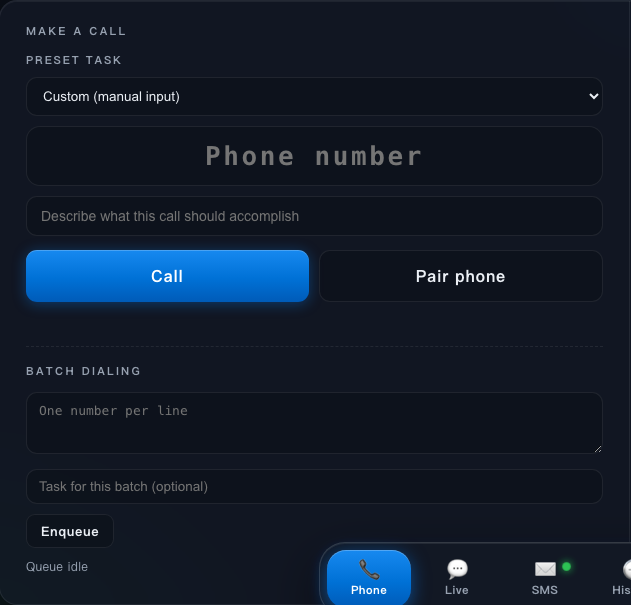
Start an AI-handled call: pick a preset task, type a number, describe the goal — the AI dials and talks for you.
Why CallPilot is different
- ☎️ Real cellular calls, not VoIP — driven by hardware AT events (
RING → ATA) on a Quectel EC20/EG25 modem, not screen automation or a SIP trunk. - 🔒 Privacy-first & self-hosted — call/SMS content lives on your machine (the Edge); the optional cloud relays in transit only and stores nothing.
- 🧠 Bring your own brain — realtime speech-to-speech via Qwen Omni / OpenAI Realtime / Doubao, or a fully on-device VAD→STT→LLM→TTS pipeline where audio never leaves your Mac.
- 🖥️📱 A full stack, not a script — a signed macOS desktop app, native iOS & Android remote handsets, and a Cloudflare control plane to pair and dial from anywhere.
| Platform | Status |
|---|---|
| macOS desktop (signed & notarized DMG) | ✅ Beta — download v0.6.0 |
| Cloud control plane (pair + dial remotely) | ✅ Beta |
| Windows desktop | 🧪 code-complete, awaiting hardware reports |
| iOS remote handset | 🚧 TestFlight internal (0.7.0 in dev) |
| Android remote handset | 🚧 release-signed, real-device verification in progress (0.7.0 in dev) |
▶ Quick start · 🛒 Get the hardware (~$20) · 🗺 Roadmap · 🇨🇳 中文
English
What it is
CallPilot bridges a cellular modem to a cloud realtime voice model, so an AI
"assistant" answers and makes phone calls on your behalf:
Phone call → EC20 modem ──(AT: RING/ATA/CLCC)── CallPilot
                │ 8kHz PCM                         │
          Audio bridge ────── VoiceAgent (Qwen Omni / Doubao / OpenAI realtime)
                                    │
             EventHub → web dashboard (served as a desktop app or browser)
- AI brain: cloud realtime speech-to-speech (Alibaba Qwen Omni by default,
ByteDance Doubao or OpenAI Realtime optional). No local ML models to install. - Telephony: hardware AT events from an EC20/EG25 modem — clean
RING → ATA,
not screen automation. - Features: auto-answer, outbound dialing (single + batch with whitelist),
SMS send/receive (Chinese UCS2), AI tool-calling (send SMS / hang up / read OTP /
DTMF keypad), per-call recording + latency metrics + LLM summary, live
transcript, local speaker monitoring, bilingual (English/Chinese) desktop UI.
Local three-stage provider (AGENT_PROVIDER=local, added in v0.5.0):
on-device VAD → STT → text LLM → on-device TTS. Audio never leaves your
machine; only the transcript goes to the text brain (default qwen-plus,
same DashScope key, an order of magnitude cheaper than realtime audio).
Setup: pip install 'callpilot[local]' thenpython -m agentcall.local_models (one-time ~300 MB model download).
Tools, transcripts, summaries and presets all work the same.
v0.4.0 adds several call-quality controls for outbound work:
- Task preset library: first launch seeds the local library from
data/number_profiles.example.json.
Use the Presets page to create, edit, duplicate, disable, or delete entries;
advanced users can still editdata/number_profiles.json. Everylabel/task/scenario/openingfield supports a string or{zh,en}object.
Full schema and writing guide:docs/number-profiles.md(Chinese). - Preset dialing with sub-topics: choosing a preset fills the number and
topic, while the topic box stays editable for the exact sub-topic of this call
without losing the preset match. - Dynamic scenario prompts: when no preset matches, a lightweight text model
can draft the call scenario and opening before connection (PROMPT_GEN_*). - More IVR control: DTMF is in-band by default (
DTMF_MODE=inband), so keypad
tones are synthesized into the call audio path. Experimental manual response
control (MANUAL_RESPONSE_CONTROL=falseby default) can merge long IVR menu
speech before the AI replies once. - Voice settings: Settings includes Qwen/OpenAI voice pickers with official
preview links, plusVOICE_STYLEfor a free-text speaking-style hint. - OpenAI model choice: the OpenAI Realtime provider defaults to
gpt-realtime-2.1-minifor lower call latency, withgpt-realtime-2.1,gpt-realtime-2,gpt-realtime, andgpt-realtime-ministill selectable in.env/ Settings.
Hardware & platform support
| Item | Status |
|---|---|
Quectel EC20 (this build tested against EC20CEFAGR08A03M4G) |
✅ verified |
| macOS (Apple Silicon & Intel via Rosetta) | ✅ verified |
| Windows 10/11 (official Quectel driver, native COM port) | 🧪 full support implemented, awaiting hardware reports |
| Linux (native serial port) | ⚠️ code paths exist, not verified |
Audio: uac_ffmpeg (ffmpeg via UAC sound card) |
✅ verified — macOS only |
Audio: uac (PortAudio/WASAPI) |
🧪 the Windows path, awaiting verification (broken on macOS) |
Audio: nmea (USB serial PCM) |
❌ crashes USB on macOS — do not use |
| SIM | needs voice + SMS service; VoLTE/CS voice depends on carrier |
macOS has no native serial port for Quectel vendor interfaces, so a
USB→PTY bridge (scripts/ec20_usb_pty.py) exposes /tmp/ec20-at.
Get the hardware
You need a Quectel EC20 or EG25 4G modem (this build is verified againstEC20CEFAGR08A03M4G). The common mini-PCIe module also needs:
- a USB adapter board with a SIM slot (turns the mini-PCIe module into a USB device),
- a 4G antenna,
- a SIM with voice + SMS service (voice + SMS confirmed working; VoLTE / CS voice
depends on your carrier).
A full EC20 module + adapter kit is roughly ¥100–200 / $15–30 — search AliExpress
or Taobao for "EC20 USB adapter".
Requirements
- For the DMG path: an EC20/EG25 modem with an active SIM. The app bundles its
Python runtime, CallPilot code,ffmpeg, andlibusb. - No manual AT setup for audio: the service enables UAC voice automatically at
startup (AT+QCFG="USBCFG"+AT+QPCMV=1,2). If the module has never had UAC
enabled before, replug USB once so the new USB config takes effect. - For the developer path: Python 3.12+, a working
ffmpegon PATH, and on
macOSbrew install libusbfor the USB→PTY bridge. - A DashScope API key (for Qwen). Get one at
https://dashscope.console.aliyun.com/. International users go through Alibaba Cloud's
Model Studio (a different endpoint — advanced users can point at it via theDASHSCOPE_REALTIME_URLenv var in.env).
(Doubao is experimental; outbound calls may be silent. OpenAI credentials are optional.)
Install for regular users (macOS DMG)
Download CallPilot.dmg from the
latest GitHub Release,
open it, and drag CallPilot.app to /Applications. Official release DMGs are
signed with Developer ID, notarized, and stapled, so Gatekeeper should allow the
normal open flow without right-clicking. The DMG is built bypackaging/build_installer.sh, which also
verifies the signed/notarized artifact when release signing variables are set.
On first launch, open http://127.0.0.1:47100 from the menu bar app. The setup
wizard guides you through hardware status, provider credentials, owner/persona
settings, and an optional test SMS, so you do not need to hand-edit .env for
normal installation.
Developer path (macOS from source)
git clone https://github.com/tianye1999/callpilot.git callpilot && cd callpilot
bash scripts/setup.sh         # one command: checks Python 3.12+/ffmpeg, creates .venv + .env

# terminal 1 — USB→PTY bridge (exposes /tmp/ec20-at)
.venv/bin/python scripts/ec20_usb_pty.py --map 2:/tmp/ec20-at

# terminal 2 — the service (opens http://127.0.0.1:47100)
.venv/bin/python app.py
setup.sh does)
python3 -m venv .venv
.venv/bin/pip install -e ".[dev]"
cp .env.example .env          # then edit .env (see below)
Minimum .env:
DASHSCOPE_API_KEY=sk-your-key
MODEM_PORT=/tmp/ec20-at
MODEM_AUDIO_MODE=uac_ffmpeg
MODEM_AUDIO_KEYWORD=Interface
OWNER_NAME=Your Name        # shown to callers; blank = neutral "the owner"
AGENT_LANGUAGE=en           # language the AI speaks on calls & summaries (zh|en); default zh
Then open http://127.0.0.1:47100 and follow the first-run wizard, or edit.env manually if you prefer. Call the modem's SIM number — the AI should
auto-answer. All settings are editable live in the Settings panel of the UI.
For the full configuration list, keep .env.example as the
source of truth; v0.4.0 options there include NUMBER_PROFILES_ENABLED,NUMBER_PROFILES_FILE, PROMPT_GEN_ENABLED, PROMPT_GEN_MODEL,PROMPT_GEN_TIMEOUT, PROMPT_GEN_WAIT_SECONDS, DTMF_MODE,MANUAL_RESPONSE_CONTROL, MANUAL_RESPONSE_SILENCE_MS,MANUAL_RESPONSE_MAX_WAIT_MS, QWEN_VOICE, OPENAI_VOICE, and VOICE_STYLE.
Forward received SMS to email
This opt-in feature is off by default. In Settings → Dialing & SMS, enter
one recipient address and the sender account's SMTP host, port, TLS mode,
username, app password, and From address, then enable Forward received SMS to
email. New modem SMS messages are queued without blocking the modem listener.
When a verification code is reliably detected, the email subject begins with【验证码 <code>】; unrelated numbers are not promoted as codes.
For Google Workspace/Gmail, the usual values are smtp.gmail.com, port 587,starttls, the complete mailbox address as username/From, and a Google App
Password rather than the normal account password. CallPilot stores that
secret only in the local, git-ignored .env and never returns it from the
settings API. Public DMG/EXE builds intentionally contain no shared sender
credential. Enabling forwarding sends SMS content to the configured mailbox.
Remote Web Dialer
Issue #31 and #31.1 add an off-by-default remote handset: pair a phone once
from the local dial panel, then reuse a fixed HTTPS page to place calls through the
Dongle SIM. Each call still receives a new short-lived LiveKit credential. The
durable phone credential is an HttpOnly, Secure, SameSite cookie; Edge persists
only its hash and lets the local dashboard revoke a paired phone immediately.
The public tunnel must target the dedicated loopback gateway127.0.0.1:47445, not the privileged admin port WEB_PORT (47100). The gateway
serves only the dialer/PWA and pairing/session endpoints; SMS, settings, recordings,
and arbitrary modem APIs do not exist on it. Fill the REMOTE_* / LIVEKIT_*
settings in .env.example, restart after enabling, and route the
fixed HTTPS domain to REMOTE_GATEWAY_PORT. The original one-time mobile link is
kept as a fallback. See ADR-001.
Mobile background/lock-screen calling and inbound takeover still require a later
native app.
Issue #42 adds a company-hosted Beta mode. With REMOTE_CLOUD_ENABLED=true, the
Edge makes an outbound WSS connection to REMOTE_CLOUD_URL; users do not operate
a Cloudflare Tunnel and the Edge does not receive a LiveKit API Secret. Enrollment
uses a one-time Beta code, while the resulting Edge credential and Ed25519 device
key stay in Keychain/Credential Manager. The existing loopback gateway remains an
explicit diagnostic fallback.
Quick start (Windows) — awaiting hardware reports
Windows needs no USB bridge: install the official Quectel EC20 Windows
driver and the modem shows up as native COM ports. MODEM_PORT=auto (the
Windows default) scans for the Quectel AT port by USB VID; audio usesMODEM_AUDIO_MODE=uac (PortAudio/WASAPI — uac_ffmpeg is macOS-only).
git clone https://github.com/tianye1999/callpilot.git callpilot; cd callpilot
powershell -ExecutionPolicy Bypass -File scripts\windows\setup.ps1   # checks Python/ffmpeg, creates .venv + .env
.venv\Scripts\python app.py
# auto-start at logon (Task Scheduler):
powershell -ExecutionPolicy Bypass -File scripts\windows\install.ps1 install
setup.ps1 does)
python -m venv .venv
.venv\Scripts\pip install -e ".[dev]"
copy .env.example .env             # then edit .env
Details in scripts/windows/README.md. This path
is code-complete and CI-tested but not yet verified on real hardware — if
you have an EC20 on Windows, please report back!
Desktop app vs installer
# macOS
.venv/bin/pip install pyinstaller   # pywebview is already a core dependency
bash scripts/build_app.sh          # → dist/CallPilot.app
# standalone installer
bash packaging/build_installer.sh  # → dist/CallPilot.app + dist/CallPilot.dmg
# Windows
powershell -ExecutionPolicy Bypass -File scripts\windows\build_app.ps1   # → dist\CallPilot\CallPilot.exe
On macOS CallPilot.app is a menu-bar app: a phone icon sits in the menu bar
(green = service running, gray = stopped) with Open dashboard / Restart service /
Quit. scripts/build_app.sh builds a thin app over your local checkout for
development. packaging/build_installer.sh builds the standalone DMG with the
runtime and native dependencies bundled; official release builds set signing and
notarization variables so the app + DMG are Developer ID signed, notarized,
stapled, and self-verified.
Verify it works, without a human on the line
- Dial your own mobile: the simplest check — pick up and you hear the AI talk.
- Dial your carrier's customer-service hotline (an IVR that speaks back): if the AI
holds a coherent multi-turn exchange with the voice menu, both audio directions work. - SMS a balance query to your carrier's service number: you should receive a reply
SMS — proves send + receive, including non-ASCII (UCS2) decoding. - Run the hardware regression script:
.venv/bin/python scripts/regression_call.py --task "check plan usage"
places one test call through the local web API, waits for the recording, and
exits PASS/FAIL; add--no-dialto replay the latest recording instead.
Troubleshooting
New-user install & first-run Q&A: docs/faq.md (Chinese).
| Symptom | Likely cause / fix |
|---|---|
App can't open /tmp/ec20-at |
USB bridge not running, or modem replugged (bridge auto-reconnects; the service also re-opens the serial port) |
| Modem drops off USB repeatedly | #1 cause: system sleep re-enumerates USB and stalls the modem's endpoints. The launchd plists wrap both processes in caffeinate -s; if you run manually, caffeinate -s .venv/bin/python ... or set pmset -a sleep 0. The bridge also does a dev.reset() on reconnect and backs off 1→30 s; after 6 fast failures it exits so launchd can cold-restart it |
| No audio at all on macOS | MODEM_AUDIO_MODE must be uac_ffmpeg; PortAudio/nmea don't work here |
PortAudio -9986 / -66740 |
stuck coreaudiod: sudo killall coreaudiod |
| Can't hear the AI in the room | enable Monitor on this Mac in Settings; raise MONITOR_UPLINK_GAIN for the caller side |
| Caller (non-AI) voice too quiet | raise MONITOR_UPLINK_GAIN (default 8, we ran 15 on real hardware) |
| Second call is silent | fixed — the voice channel is re-armed per call |
Safety, privacy & legal
Read before using on a real line.
- Not for emergency calls. Do not rely on CallPilot for any life-safety
communication. - Recording laws vary by jurisdiction — call recording is off by default
and stored locally only when enabled. Choose explicitly during first-run setup,
and change it later in Settings or withRECORDING_ENABLED=false. You are
responsible for obtaining any consent the law requires. - Anti-harassment / telemarketing rules apply to outbound and batch dialing.
Use the dial whitelist and dial your own numbers for testing. - You bear all carrier charges and API costs.
- Your API keys stay in your local
.env(git-ignored). Never commit them. - SMS-to-email forwarding is a data export. It is disabled by default; when
enabled, SMS sender, timestamp, and body leave the app through your configured
TLS-protected SMTP account. Use an app password and never commit it. - Provided as-is, no warranty (Apache-2.0).
Contributing
Mac Beta still wants hardware reproduction reports. If you have an EC20, please
open an issue with your modem firmware, macOS version, and what worked / didn't.
Tests: .venv/bin/pytest (no hardware needed — uses fake modem/bridge/agent).
For architecture and where-to-change-what, see docs/architecture.md.
To learn or test a single modem primitive (raw AT, dial, SMS, DTMF) in isolation, seeexamples/modem/.
License: Apache-2.0.
中文
你的电话——由 AI 接听和拨打,跑在你自己的 SIM 卡和硬件上。
CallPilot 把一个 ~¥150 的 4G 模组变成实时 AI 电话 agent:它接听来电并用实时语音模型和对方对话,外呼、收发短信、按 IVR 菜单键(DTMF),每通电话录音 + 摘要。
和云端挡电话服务不同,一切都跑在你拥有的硬件上——你的 SIM、你的 API Key,通话录音和短信都留在你自己机器上。
发起一通 AI 代打电话:选预设任务、填号码、描述目标——AI 替你拨打并对话。
CallPilot 有何不同
- ☎️ 真实蜂窝通话,不是 VoIP —— 由 Quectel EC20/EG25 模组的硬件 AT 事件(
RING → ATA)驱动,不是屏幕自动化或 SIP 中继。 - 🔒 隐私优先、可自托管 —— 通话/短信内容留在你的机器(Edge);可选云端只做传输中转,不存储任何内容。
- 🧠 自带大脑 —— 实时端到端语音走 Qwen Omni / OpenAI Realtime / 豆包,或完全本地的 VAD→STT→LLM→TTS 流水线,音频不出本机。
- 🖥️📱 完整栈,不是脚本 —— 签名公证的 macOS 桌面 App、原生 iOS & Android 远程手柄、可远程配对拨号的 Cloudflare 控制面。
| 平台 | 状态 |
|---|---|
| macOS 桌面(签名公证 DMG) | ✅ Beta —— 下载 v0.6.0 |
| 云控制面(远程配对 + 拨号) | ✅ Beta |
| Windows 桌面 | 🧪 代码完备,待硬件反馈 |
| iOS 远程手柄 | 🚧 TestFlight 内测(0.7.0 开发中) |
| Android 远程手柄 | 🚧 已 release 签名,真机验收进行中(0.7.0 开发中) |
▶ 快速开始 · 🛒 准备硬件(~¥150) · 🗺 路线图 · 🇬🇧 English
这是什么
CallPilot 把 4G 模组接到云端实时语音大模型,让 AI「助理」替你接打电话:插上
Quectel EC20/EG25,来电自动接听并与对方对话,可外呼、收发短信、按 IVR 菜单键、
每通电话录音+延迟打点+AI 摘要——全部跑在你自己的硬件和 API Key 上。
- AI 大脑:云端端到端实时语音(默认阿里 Qwen Omni,可选字节 Doubao 或
OpenAI Realtime),无需安装本地模型。 - 电话通道:EC20/EG25 模组的硬件 AT 事件(
RING → ATA),非屏幕自动化。 - 能力:自动接听、外呼(单个+批量带白名单)、中文短信收发、AI 工具调用
(发短信/挂断/查验证码/DTMF 按键)、通话录音+摘要、实时转写、本机监听、
中英双语桌面界面。
本地三段式 provider(AGENT_PROVIDER=local,v0.5.0 引入):本地 VAD →
本地转写 → 云端文本模型 → 本地合成。音频不出本机,只有转写文本上云(默认qwen-plus,同一个 DashScope key,比 realtime 音频便宜一个量级)。启用:pip install 'callpilot[local]' 后运行 python -m agentcall.local_models
一次性下载 ~300MB 模型。工具调用/转写/摘要/预设库全部照常。
v0.4.0 增加了几项面向外呼质量的控制:
- 预调教任务库:首次启动会从
data/number_profiles.example.json
初始化本地任务库;可在「任务库」页面新建、编辑、复制、停用或删除预设,高级用户仍可直接编辑data/number_profiles.json。label/task/scenario/opening字段均支持普通字符串或{zh,en}双语对象。完整结构与编写指南见docs/number-profiles.md。 - 拨号下拉 + 子主题:选择预设会自动填号码和事项,事项框仍可改成本通的具体子主题,
同时保留预设命中。 - 动态场景提示词:预设未命中时,可在接通前用轻量文本模型生成本通场景与开场白
(PROMPT_GEN_*配置)。 - 更稳的 IVR 控制:DTMF 默认走带内音频(
DTMF_MODE=inband),按键音直接合成进通话音频流;
实验性的手动应答控制默认关闭(MANUAL_RESPONSE_CONTROL=false),可把连续 IVR 菜单合并后再让 AI 回复一次。 - 音色设置:设置面板提供 Qwen/OpenAI 音色下拉和官网试听链接,
VOICE_STYLE可补充自由文本说话风格。 - OpenAI 模型选择:OpenAI Realtime provider 默认使用
gpt-realtime-2.1-mini
以优先降低电话链路延迟;仍可在.env/ 设置面板切换到gpt-realtime-2.1、gpt-realtime-2、gpt-realtime或gpt-realtime-mini。
硬件与平台支持
| 项 | 状态 |
|---|---|
Quectel EC20(本版本对 EC20CEFAGR08A03M4G 验证) |
✅ 已验证 |
| macOS(Apple Silicon 与 Intel/Rosetta) | ✅ 已验证 |
| Windows 10/11(Quectel 官方驱动,原生 COM 口) | 🧪 已完整支持,待硬件复现反馈 |
| Linux(原生串口) | ⚠️ 代码路径存在,未验证 |
音频 uac_ffmpeg(ffmpeg 走 UAC 声卡) |
✅ 已验证——仅 macOS |
音频 uac(PortAudio/WASAPI) |
🧪 Windows 主路径,待验证(macOS 上不可用) |
音频 nmea(USB 串口 PCM) |
❌ macOS 会崩 USB,勿用 |
| SIM 卡 | 需语音+短信服务;VoLTE/CS 语音取决于运营商 |
macOS 没有 Quectel 厂商串口的原生设备,需先跑 USB→PTY 桥(scripts/ec20_usb_pty.py)
暴露出 /tmp/ec20-at。
硬件准备
需要一个 Quectel EC20 或 EG25 4G 模组(本版本对 EC20CEFAGR08A03M4G 验证)。
常见的 mini-PCIe 模组还需要:带 SIM 卡座的 USB 转接板(把模组变成 USB 设备)、
4G 天线、一张开通语音+短信的 SIM(已在真机验证;VoLTE 取决于运营商)。
模组+转接板全套约 ¥100–200,淘宝搜「EC20 USB 转接板」。
前置
- 普通用户 DMG 路径:一张有效 SIM 的 EC20/EG25 模组;App 已内置 Python runtime、
CallPilot 代码、ffmpeg与libusb。 - 音频无需手动发 AT:服务启动时自动启用 UAC 语音(
AT+QCFG="USBCFG"+AT+QPCMV=1,2);
模组此前从未启用过 UAC 的话,重插一次 USB 让新配置生效。 - 开发者源码路径:Python 3.12+、PATH 里有
ffmpeg;macOS 还需brew install libusb(USB→PTY 桥的 pyusb 依赖系统库)。 - DashScope API Key(Qwen 用),申请:https://dashscope.console.aliyun.com/。
豆包 provider 仍为 experimental,外呼可能不出声;OpenAI 凭证可选。
普通用户安装(macOS DMG)
从 最新 GitHub Release
下载 CallPilot.dmg,打开后把 CallPilot.app 拖到 /Applications。官方发布 DMG
已用 Developer ID 签名、完成公证并 staple,Gatekeeper 应可直接按正常方式打开,无需右键。
这个 DMG 由 packaging/build_installer.sh 构建;发布签名变量
存在时脚本也会自检签名、公证与 staple 状态。
首次启动后,从菜单栏 App 打开 http://127.0.0.1:47100。首启向导会引导检查硬件、
填写 provider 凭证、设置机主/人设,并可发送一条测试短信;普通安装无需手改 .env。
开发者路径(macOS 源码运行)
git clone https://github.com/tianye1999/callpilot.git callpilot && cd callpilot
bash scripts/setup.sh         # 一条命令:检查 Python 3.12+/ffmpeg,创建 .venv + .env

# 终端 1 — USB→PTY 桥
.venv/bin/python scripts/ec20_usb_pty.py --map 2:/tmp/ec20-at

# 终端 2 — 服务(打开 http://127.0.0.1:47100)
.venv/bin/python app.py
setup.sh 做的事)
python3 -m venv .venv
.venv/bin/pip install -e ".[dev]"
cp .env.example .env          # 编辑 .env
打开 http://127.0.0.1:47100 跟随首启向导,或按上方英文段手动写最小 .env。
之后拨打模组 SIM 卡号码即可,AI 应自动接听;所有配置都能在界面「设置」面板里实时修改。
完整配置以 .env.example 为准;v0.4.0 新增/相关项包括NUMBER_PROFILES_ENABLED、NUMBER_PROFILES_FILE、PROMPT_GEN_ENABLED、PROMPT_GEN_MODEL、PROMPT_GEN_TIMEOUT、PROMPT_GEN_WAIT_SECONDS、DTMF_MODE、MANUAL_RESPONSE_CONTROL、MANUAL_RESPONSE_SILENCE_MS、MANUAL_RESPONSE_MAX_WAIT_MS、QWEN_VOICE、OPENAI_VOICE、VOICE_STYLE。
收到短信后转发到邮箱
该功能默认关闭。在「设置 → 外呼与短信」中填写一个收件邮箱,以及发件账号的
SMTP 主机、端口、加密方式、用户名、应用密码和发件地址,再打开「收到短信后转发到
邮箱」。新短信只做非阻塞入队,不会卡住模组监听;可靠识别到验证码时,邮件标题以【验证码 <code>】 开头,普通数字不会被误当验证码。
Google Workspace/Gmail 通常填写 smtp.gmail.com、端口 587、starttls,用户名和
发件地址填写完整邮箱,密码填写 Google 应用专用密码而不是账号登录密码。密钥只存
在本机且被 git 忽略的 .env,设置 API 不会回显。公开 DMG/EXE 不内置任何共享发件
凭证。开启此功能即表示短信发件号码、时间和正文会通过 TLS SMTP 发往所填收件邮箱。
远程网页拨号
issue #31 与 #31.1 新增一个默认关闭的远程手柄:先从本机拨号面板把手机配对
一次,之后反复打开固定 HTTPS 页面,即可通过 Dongle SIM 外呼。每通仍签发新的短期
LiveKit 凭证;长期手机凭证只存在 HttpOnly、Secure、SameSite Cookie 中,Edge 本地
只保存哈希,并可从本机面板立即撤销设备。
公网隧道必须指向独立的最小权限网关 127.0.0.1:47445,绝不能指向管理端口WEB_PORT(47100)。该网关只有拨号页/PWA、配对和单通会话接口,不存在短信、设置、
录音或任意模组 API。按 .env.example 填写 REMOTE_* / LIVEKIT_*,
启用后重启,再把固定 HTTPS 域名转发到 REMOTE_GATEWAY_PORT。原来的一次性手机链接
继续作为故障排查后备入口。安全边界见
ADR-001。锁屏后台与入站接管仍需后续
原生 App。
快速开始(Windows)—— 待硬件复现反馈
Windows 不需要 USB 桥:装 Quectel 官方 EC20 Windows 驱动后模组直接暴露原生
COM 口。MODEM_PORT=auto(Windows 默认)按 USB VID 自动扫描 AT 口;音频用MODEM_AUDIO_MODE=uac(PortAudio/WASAPI,uac_ffmpeg 仅 macOS)。
git clone https://github.com/tianye1999/callpilot.git callpilot; cd callpilot
powershell -ExecutionPolicy Bypass -File scripts\windows\setup.ps1   # 检查 Python/ffmpeg,创建 .venv + .env
.venv\Scripts\python app.py
# 开机常驻(计划任务):
powershell -ExecutionPolicy Bypass -File scripts\windows\install.ps1 install
setup.ps1 做的事)
python -m venv .venv
.venv\Scripts\pip install -e ".[dev]"
copy .env.example .env             # 编辑 .env
详见 scripts/windows/README.md。该路径代码完备且
过 CI,但尚未真机验证——如果你有 EC20 + Windows,欢迎提 issue 反馈!
桌面 App 与安装包
# macOS
.venv/bin/pip install pyinstaller   # pywebview 已是核心依赖
bash scripts/build_app.sh          # → dist/CallPilot.app
# 独立安装包
bash packaging/build_installer.sh  # → dist/CallPilot.app + dist/CallPilot.dmg
# Windows
powershell -ExecutionPolicy Bypass -File scripts\windows\build_app.ps1   # → dist\CallPilot\CallPilot.exe
macOS 上 CallPilot.app 是菜单栏 App:顶栏一个电话图标(绿=服务运行中,
灰=已停止),菜单含「打开控制台 / 重启服务 / 退出」。它只是本地代码仓库的薄壳
控制面板——接电话的服务在后台常驻(launchd),关掉面板窗口不影响接打电话。scripts/build_app.sh 适合开发调试;packaging/build_installer.sh 会把 runtime 和原生依赖
打进独立 DMG;官方发布构建会设置签名与公证变量,使 App + DMG 完成 Developer ID
签名、公证、staple 和自检。
无需真人也能自测
- 拨你的运营商客服/IVR 热线:若 AI 能与语音菜单连贯多轮对话,说明双向语音都通。
- 向运营商服务号发送余额查询短信:会收到回复短信,验证发+收+中文编解码全链路。
- 跑真机回归脚本:
.venv/bin/python scripts/regression_call.py --task "查询套餐使用情况"
会通过本地 Web API 发起一通测试外呼、等待录音并以 PASS/FAIL 退出;加--no-dial
可直接回放最近一通录音。
排障
新手安装与首启常见问题见 docs/faq.md。
| 现象 | 可能原因 / 解决 |
|---|---|
打不开 /tmp/ec20-at |
桥没跑或模组重插(桥会自动重连,服务也会重开串口) |
| 模组反复从 USB 掉线 | 首要诱因是系统睡眠导致 USB 重枚举、端点 stall。launchd plist 已用 caffeinate -s 包裹进程;手动运行请加 caffeinate -s 前缀或 pmset -a sleep 0。桥重连时会先 dev.reset() 并指数退避(1→30s),连续快速失败达阈值后退出交给 launchd 冷重启 |
| macOS 完全没声音 | MODEM_AUDIO_MODE 必须是 uac_ffmpeg |
PortAudio 报 -9986 / -66740 |
coreaudiod 卡死:sudo killall coreaudiod |
| 电脑上听不到 AI | 设置里开「本机监听」;对方声音小就调大 MONITOR_UPLINK_GAIN |
| 第二通电话没声音 | 已修复(每通电话重新启用语音通道) |
安全、隐私与合规
上真机前务必阅读。 不用于紧急电话;通话录音默认关闭,首启时需明确选择,开启后
仅存储在本地,可在设置面板或 RECORDING_ENABLED=false 关闭——是否录音、是否需征得对方同意由你按
当地法律负责;外呼/批量呼叫须遵守反骚扰与营销合规;运营商资费与 API 费用由你自行
承担;API Key 和 SMTP 应用密码只存于本地 .env(已 git 忽略),切勿提交。短信邮件
转发默认关闭;开启后,短信发件号码、接收时间和正文会离开 App 并发往配置邮箱。本软件按「原样」提供,
不作任何担保(Apache-2.0)。
贡献
Mac Beta 阶段仍最需要同型号硬件的复现反馈。有 EC20 的话,欢迎带上模组固件、
macOS 版本、以及哪里成功/失败开 issue。测试:.venv/bin/pytest(无需硬件)。
架构与「想改 X 去哪」见 docs/architecture.md;想单独学习/验证某个
模组原子能力(原始 AT、拨号、短信、DTMF),见 examples/modem/。
许可证:Apache-2.0。
Reviews (0)
Sign in to leave a review.
Leave a reviewNo results found