terminal
Health Warn
- License — License: GPL-3.0
- Description — Repository has a description
- Active repo — Last push 0 days ago
- Low visibility — Only 5 GitHub stars
Code Fail
- rm -rf — Recursive force deletion command in .claude/settings.json
Permissions Pass
- Permissions — No dangerous permissions requested
No AI report is available for this listing yet.
A macOS-native terminal workspace designed for AI-driven development
Terminal
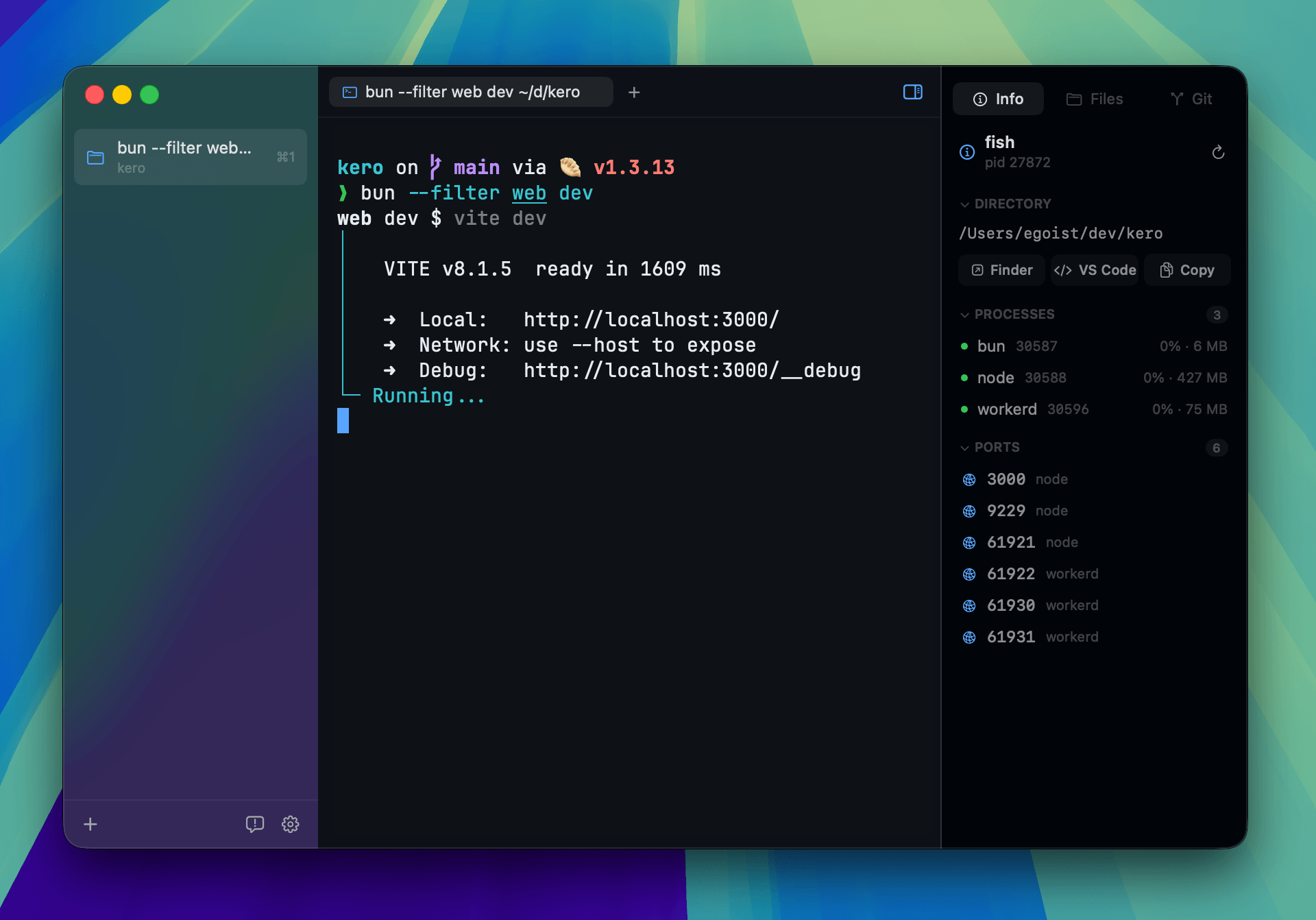
A macOS-native terminal workspace designed for AI-driven development. You run
your coding agents in the shell exactly as you already do — Claude Code, Codex,
Cursor, whatever you have — and the workspace gives you what agent work
actually needs around it: the files they touched, the Git state they left, and
a full diff and compare view, all one pane away from the shell that made them.
Terminal is a fork of Kero. Download the latest .dmg from
Releases or build it
from source; there is no brew install or tap for this fork.
tigercosmos.github.io/terminal —
the full feature list, every keyboard shortcut, and the changelog.
Features
- Your agents, in your shell — Terminal hosts the shell you already run,
so any agent CLI works unchanged, with your prompt, aliases, and dotfiles
intact. Nothing is wrapped, proxied, or rewritten on its way through. - Read what the agent wrote — working-tree status, per-file diffs, and
per-line blame in the sidebar, so a change gets reviewed where it was made
instead of in a Git GUI or a second app. - Compare before you trust it — ⇧⌘C puts any branch or commit beside your
working tree, editable on your side, with blame and per-file revert. - Run several at once — each repository is a project with its own tabs and
split panes, so parallel agent runs stay separated and come back on
relaunch. - Watch what they started — the focused shell's working directory, the
processes running under it, and the ports they are listening on; long
commands and bells reach Notification Center when the pane is unfocused. - Terminal first — the Alacritty emulator core by default, with libghostty
a switch away, a command palette, and a file tree and editor in panes beside
the shell rather than in a separate window. - Native and localized — macOS appearance and keyboard conventions, in
English, Simplified Chinese, and Japanese.
Beyond Kero
What this fork adds on top of Kero:
- Compare against any branch or commit — ⇧⌘C opens a Compare panel: pick a
target by searching branches and recent commits, or type any revision Git
understands, and every file that differs is listed. Opening one gives the
target on the left, read-only, and your live file on the right, still
editable and saveable. Each line shows who last changed it, and any file can
be reverted to the target. - The panels follow you over ssh — connect to another machine in a terminal
and Files, Git, and Compare all describe that machine rather than a stale
local tree. Folders expand, files open, Git reads the branch, tracking,
history and changed files, and Compare puts any revision beside that host's
working tree — all over the connection you already have, multiplexed onto it
so browsing costs a round trip rather than a second login; a host that would
need a password says so instead of hanging. They follow you as youcd
around that host with nothing to install or configure there — Terminal asks
the host which of its processes your connection is talking to. A remote
repository is read-only, so committing, staging, discarding and reverting
stay with the checkout on your Mac. - Faster files — switching back to an already-open file is instant and
keeps its undo history, instead of rebuilding and reparsing the editor. Large
files no longer stall while scrolled away from the top: the gutter numbers
what is on screen rather than walking the whole document on every scroll tick. - Scrollback that glides — a trackpad scrolls the scrollback by the pixel
instead of a row at a time, tracking your fingers and coming to rest wherever
you let go. This is why Alacritty is the default backend: Terminal draws that
grid itself, so it can scroll between rows, which libghostty's fused emulator
and renderer give a host no way to ask for. Switch backends in Settings →
Terminal if you would rather have Ghostty's. - Hardened against untrusted input — opening a folder no longer lets that
repository's own Git configuration run commands on your machine. Terminal
links that would leave your browser and launch an application ask first,
showing where the link really leads. Editing a symlinked file writes through
the link, saving a file that changed on disk offers to overwrite or reload
rather than silently discarding the other change, the CLI bridge signs its
requests, and saved terminal history is readable only by your user account. - Build from source without ceremony — a Makefile covers the common tasks
(make build,run,test,install), and installs are unsigned by
default so the app launches without a Developer ID. - Written-down conventions — STYLE.md for how the code is
written, and.claude/skills and hooks shared by Claude Code, Codex, and
Cursor.
Install
Grab the .dmg from the
latest release and
drag Terminal to Applications. This fork has no Developer ID, so the build is
unsigned and macOS quarantines it — clear the flag once and it opens normally:
xattr -dr com.apple.quarantine /Applications/Terminal.app
There is no Homebrew tap and no in-app updater; new versions come from the same
releases page. Or build it from source:
git clone --recurse-submodules https://github.com/tigercosmos/terminal.git
cd terminal
make run
Building needs Xcode 27 — the project uses the macOS 27 SDK and a file
format earlier versions refuse to open — plus a Rust toolchain for the
Alacritty backend's bridge. The built app itself runs on macOS 15.6 or later.make install puts a Release build in /Applications, and make on its own
lists the rest. CONTRIBUTING.md covers the details,
including how to point builds at a beta Xcode.
Contributing
License
GPLv3 — see LICENSE. Terminal is forked from
Kero, and the copyright on the inherited work remains with
EGOIST.
Reviews (0)
Sign in to leave a review.
Leave a reviewNo results found