claude-brief
Health Warn
- License — License: BSD-3-Clause
- Description — Repository has a description
- Active repo — Last push 0 days ago
- Low visibility — Only 5 GitHub stars
Code Pass
- Code scan — Scanned 12 files during light audit, no dangerous patterns found
Permissions Pass
- Permissions — No dangerous permissions requested
No AI report is available for this listing yet.
A live, docked per-session brief for Claude Code — stay oriented across parallel sessions.
Claude Brief — a live per-session summary brief beside your Claude Code terminal





I've been managing multiple concurrent Claude Code sessions for a while now, and I always
struggle a bit to get my bearings when I have a large number of sessions that have scrolled
into a wall of code and tool calls, and the thread gets lost — what path forward did I
decide for the sessions? What feature or bug is this screen working on? What's next?
The problem really compounds the more Claude Code sessions you have active at once -
every time you context-switch back to one, you cold-start — re-reading the transcript
to try and remember where it was and what it had already decided. A brief docked beside each
session turns that into a single glance, so tabbing between agents stops costing
you the thread.
claude-brief docks a per-session, auto-refreshing brief —
State · Tried · Gotchas · Decisions · Next — right beside your session, so that
thread is always one glance away instead of buried in the scrollback.
Each turn that does real work, a quick Claude Haiku call updates the brief;
trivial turns — no tool calls, barely any new output — are skipped, so it only spends
a cent or two when there's something new, and nothing when there isn't. The dock is
pluggable: iTerm2 (the most developed, as it's my daily driver), tmux,
kitty, WezTerm, ghostty, and Apple Terminal are auto-detected, with a generic fallback for anything else.
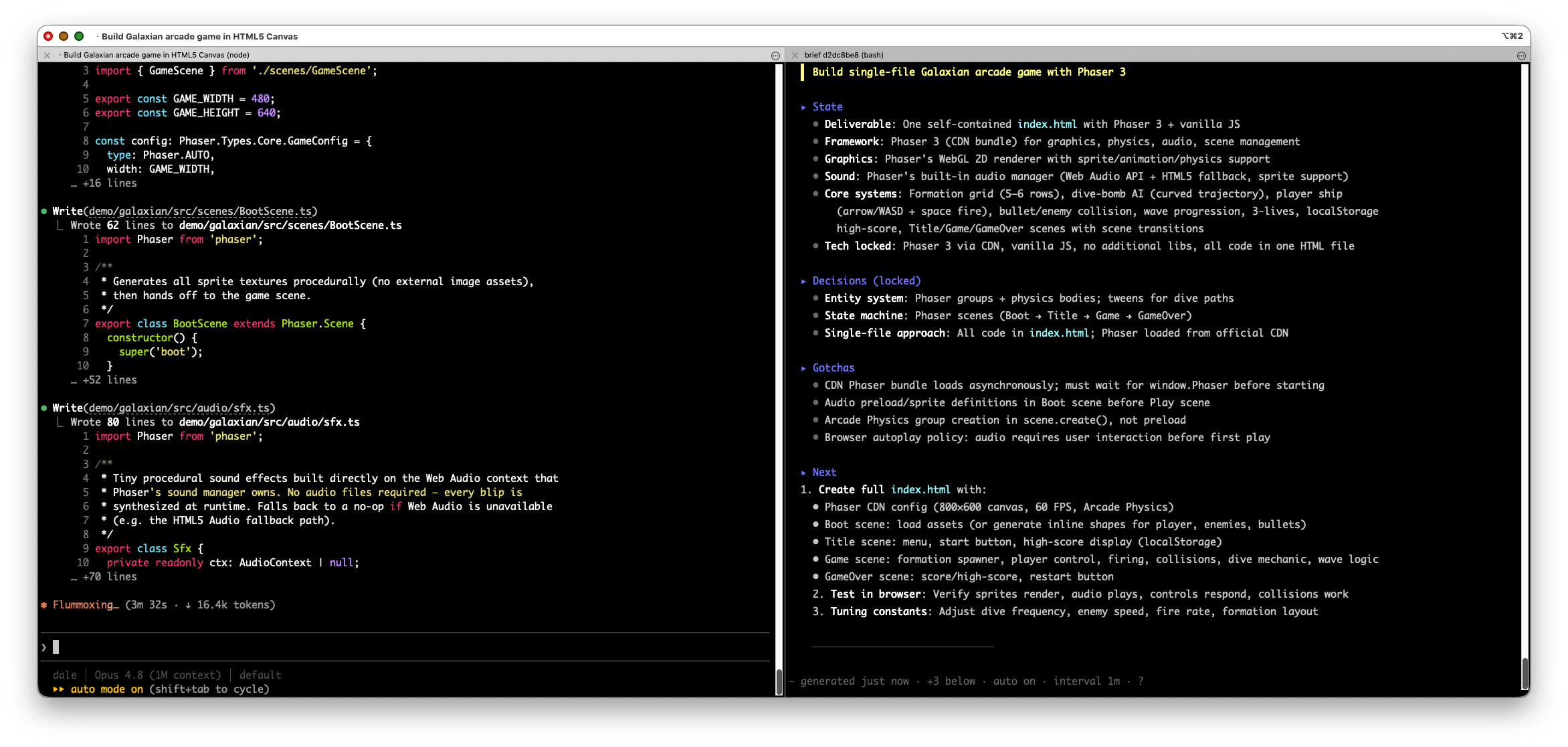
The session (left) is a wall of code — the brief (right) keeps what's been decided, what's happening now, and what's next one glance away.
Quick start
As a Claude Code plugin (recommended) — one command, hooks auto-wire (no settings.json editing):
/plugin marketplace add tigerquoll/claude-brief
/plugin install claude-brief@claude-brief
Then run /claude-brief:brief in any session — or just type /brief and press
Tab: Claude Code's command autocomplete resolves the partial name to/claude-brief:brief, so you rarely need to type the full plugin prefix.
Prereqs:
bash ≥ 5andjqare required (andglowfor rich rendering)./plugin install
runs no dependency check, so install them first —brew install bash jq glow— otherwise the dock
just flags whatever's missing at session start. Details: Requirements.
Not using the plugin system — installing into ~/.claude by hand, or hacking on the
code? See Install & setup (deps in Requirements).
Commands
Open and manage the dock with slash commands (type /brief and press Tab —
autocomplete fills in the claude-brief: prefix for you):
| Command | What it does |
|---|---|
/claude-brief:brief |
Open or refocus the docked split with this session's live brief (State · Tried · Gotchas · Decisions · Next) |
/claude-brief:brief float |
Open it as a separate window instead of an in-window split |
/claude-brief:brief refresh |
Regenerate the brief now, instead of waiting for the next turn |
/claude-brief:brief close |
Tear the dock down — a clean, no-prompt close on every backend |
/claude-brief:brief help |
Print the usage, the in-dock keys, and docs pointers — no dock action |
/claude-brief:brief debug |
Print a sanitised diagnostic report for bug reports — env presence/shapes only (never values), no brief/transcript content, plus one tiny probe summary call. Safe to paste into a GitHub issue |
Once it's open, the in-dock keys are what you'll use most — click the pane, then press:
| Key | What it does |
|---|---|
r |
Refresh the brief now |
a |
Toggle auto-refresh at the end of each turn (on by default) |
i |
Toggle periodic refresh during a long turn (fires only on new activity, so idle never costs) |
+ / - |
Adjust the refresh interval (30s–1h) |
? |
Show the key help |
q |
Close the dock |
How it works
A Stop hook runs a cheap Haiku summary each completed turn (cost-gated: it
skips trivial turns) and writes ~/.claude/state/<sid>.brief.md. /claude-brief:brief opens a
docked split (or a companion window) running the live viewer beside your session; it
auto-refreshes at the end of each turn. A SessionEnd hook closes the dock and
deletes that session's state, so nothing lingers on disk.
Privacy — what each summary call sends: a display-size directive, the
conversation title, the previous brief, your latest prompt, and the recent
conversation (the last ~14 user/assistant message text blocks, truncated to a
few KB). Tool calls and their outputs are stripped, so raw file contents /
command output are not sent (though the assistant's prose may quote paths, code, or
errors). It goes to the same service Claude Code already uses — via the claude CLI on
subscription auth, or straight to your configured ANTHROPIC_BASE_URL endpoint on
API-billed sessions — or wherever you point $BRIEF_SUMMARIZER
(see Customizing the summary model).
Full privacy policy — local storage, retention, and what the maintainer can (and can't) see.
Terminals
Auto-detected; force one with BRIEF_TERMINAL=<name>. Most need no setup — a few do:
- iTerm2 (macOS) — real in-window split. No setup; the best-tested backend, as it's my daily driver.
- WezTerm (macOS/Linux) — real split via
wezterm cli, no config and no tty
needed (the dock split refocuses your session pane). No setup. - tmux (macOS/Linux) — real split inside any host terminal (incl. Apple
Terminal); wins detection when$TMUXis set. No setup. - ghostty (macOS) — real in-window split via AppleScript; first
/claude-brief:briefneeds
a one-time macOS Automation approval. - Apple Terminal (macOS) — no scriptable split panes, so the dock is a companion
window beside the main one; first run needs the Automation approval. - kitty (macOS/Linux) — needs socket remote control (because
/claude-brief:briefhas no
controlling tty, a tty-only setup can't be reached). Add tokitty.conf, then
restart kitty:allow_remote_control yes listen_on unix:/tmp/kitty enabled_layouts splits,stack - Tabby — manual dock only. Tabby has no scriptable split, no targetable/closable
CLI, and no AppleScript, so/claude-brief:briefcan't auto-dock — it prints split-it-yourself
instructions and thebrief-view.sh <sid>command. (A true dock would need a Tabby
plugin.) - Anything else → generic —
/claude-brief:briefprints thebrief-view.sh <sid>command for
you to run in a split you open yourself.
Troubleshooting
First step for anything: run /claude-brief:brief debug — a sanitised
diagnostic report (env presence/shapes only, never values; no conversation, brief,
or window-title content) that you can paste straight into a
GitHub issue. It checks the
install, the session's summary state, the dock backend (including a per-terminal
preflight), and runs one tiny probe summary call.
Two things that look like breakage but aren't:
- "No brief yet" after a turn — trivial turns (no tool calls, barely any new
output) are cost-gated and skipped on purpose. The brief appears after the
next turn that does real work, or immediately via/claude-brief:brief refresh. - The brief stops updating after a few failures — 3 consecutive summary
failures trigger a 10-minute backoff (the dock footer shows "summary failing —
auto-retry in ~Nm"). The first success resets it. The debug report'sfailures:line shows the countdown and thelast failure:line shows why
(as a category —timeout,auth,network, … — never the raw error text).
Common real ones: the dock pane opens then instantly dies → the login-shell
PATH resolves bash < 5 (brew install bash; the debug report's login-shell bash: line checks this); kitty does nothing → socket remote control isn't set up
(see Terminals); ghostty / Apple Terminal / iTerm2 do nothing → the
one-time macOS Automation approval was missed or denied (the debug preflight showsTCC -1743; re-allow under System Settings ▸ Privacy & Security ▸ Automation).
Dock styling
1.2× line spacing noticeably improves reading the brief at a glance — the extra
breathing room lets you take in State · Decisions · Next in a single look rather than
line by line. That's why the dock leans on it, and why iTerm2 (my daily driver) gets
the most complete treatment: it can scope that spacing to just the dock, leaving
your session pane untouched. The snag is that most other terminals can't control line
spacing per-pane at all — so reproducing this elsewhere ranges from a global-only
compromise to outright impossible, as the table below lays out.
The dock can use a brief profile = your profile + 1.2× line spacing. iTerm2
ships iterm2/DynamicProfiles/brief.json (auto-loaded; inherits your Default profile
live). Apple Terminal generates one at install via bin/brief-term-profile.sh —
from the profile you install from — and imports it once (Terminal can't inherit or
auto-load, so it's a snapshot; re-run the helper to refresh).
Only iTerm2 and Apple Terminal can give the dock its own profile; every other
backend can at most widen line spacing globally (which also affects your session
pane). What each backend can scope to just the dock:
| Backend | Dock-scoped line spacing (the brief profile's whole point) |
Other per-pane styling it can do | Global ~1.2× spacing lever |
|---|---|---|---|
| iTerm2 | ✅ DynamicProfile (live-inherits Default) | full brief profile |
— (built in) |
| Apple Terminal | ✅ imported .terminal snapshot |
full brief profile |
— (built in) |
| ghostty | ❌ no line-height key/action | per-surface font size only | adjust-cell-height = 20% |
| kitty | ❌ font metrics are global | per-window colors (kitty @ set-colors) |
modify_font cell_height 120% |
| WezTerm | ❌ one global config | none via the CLI | config.line_height = 1.2 |
| tmux | ❌ shares the host terminal's font | none — can't change the font at all | (host terminal's font) |
So kitty, WezTerm, ghostty, and tmux all hit the same wall: no dock-scopedbrief spacing — the global lever (last column) is the only workaround, and it
widens your session pane too. $BRIEF_PROFILE overrides the profile name (iTerm2 /
Apple Terminal); $BRIEF_FONT_BUMP=N (Apple Terminal) also enlarges the font.
Unfocused-pane dimming is a global app setting, not a dock profile, so you set it
once yourself: on iTerm2 uncheck Settings ▸ Appearance ▸ Dimming ▸ Dim inactive
split panes (otherwise the dock fades while you type in the session pane); on
ghostty add unfocused-split-opacity = 1 to ~/.config/ghostty/config (plusadjust-cell-height = 20% for ~1.2× spacing); on kitty addmodify_font cell_height 120% to ~/.config/kitty/kitty.conf (reload with
ctrl+shift+f5); on WezTerm set config.line_height = 1.2 in ~/.wezterm.lua.
These are global — none of these terminals can scope them to just the dock.
Customizing the summary model
By default the brief is a Haiku claude -p call on the same gateway Claude Code
uses — the right choice on a subscription, where it's included in the plan:
Cheaper, API-direct path: calls the Anthropic Messages API directly — skips
the CLI's ~30k-token prefix, ~5× cheaper. This is selected automatically when
the session is API-billed:ANTHROPIC_AUTH_TOKENis set (gateway / non-OAuth
auth), anANTHROPIC_API_KEYthat Claude Code has approved for CLI use is
present, or anyBRIEF_API_*/brief-summarizer.envconfig is in place.
Subscription (OAuth) sessions are never switched. (apiKeyHelper-based auth is
not auto-detected — setBRIEF_SUMMARIZERmanually in that case.)- Force it on: put any
BRIEF_API_*setting (orbrief-summarizer.env) in
place — that alone selects the API path. (On a manual install you can also pinexport BRIEF_SUMMARIZER="$HOME/.claude/bin/brief-summarize-api.sh"— but not on
a plugin install, where the script lives in the plugin, not~/.claude/bin/.
ABRIEF_SUMMARIZERthat doesn't resolve is reported at session start and
treated as unset.) - Force it off:
export BRIEF_AUTO_API=0(skips auto-detection entirely) - Configure independently of the main session via
BRIEF_API_BASE/BRIEF_API_TOKEN/BRIEF_API_MODEL(override the sharedANTHROPIC_*), or
put them in~/.claude/brief-summarizer.env(chmod 600) to keep the token
out of settings.json and the main session's environment.
- Force it on: put any
Your own model/script: point
$BRIEF_SUMMARIZERat a script under~/.claude/
— contract in DEVELOPING.md.
Requirements
bash ≥ 5 for the dock viewer (brew install bash) · jq · perl (built-in) · theclaude CLI · one terminal from Terminals above. Optional: glow
(brew install glow) renders the brief best; bat is a lighter fallback (highlighted
source, not fully rendered); with neither, it's plain text. The hooks + drivers
themselves are bash-3.2-safe. ./install.sh checks these up front; installed as a plugin,
the SessionStart hook flags anything missing (required deps keep flagging until installed).
Install & setup
Using the plugin? Skip this section.
/plugin installwires the hooks and copies the
iTerm2 profile for you — there's noinstall.shstep and nothing to add tosettings.json.
The steps below are the manual~/.claudeinstall, used only when you're not using
the plugin system. Don't run both — the plugin andinstall.shwire the same hooks, so
running both double-fires every summary.
1. Get the code — either grab the latest release tarball:
curl -fsSL https://github.com/tigerquoll/claude-brief/releases/latest/download/claude-brief.tar.gz \
  | tar xz && cd claude-brief-*/
…or clone the repo (use this if you're hacking on it — install.sh then installs your
working checkout):
git clone https://github.com/tigerquoll/claude-brief.git && cd claude-brief
2. Install:
./install.sh— runs a dependency check, then copies repo →~/.claude(+ the
iTerm2 profile). Exits non-zero if a required dep is missing. Use to restore or set
up a new machine../install.sh --check— run only the dependency check (reports which terminals are
available and the one auto-detected here); install nothing.
3. Wire the hooks — add the entries to ~/.claude/settings.json by hand (it isn't
committed, to avoid leaking config):
UserPromptSubmit -> bash "$HOME/.claude/hooks/task-prompt-hook.sh"
Stop             -> bash "$HOME/.claude/hooks/task-summary-hook.sh"
SessionEnd       -> bash "$HOME/.claude/hooks/session-end-hook.sh"
SessionStart     -> bash "$HOME/.claude/hooks/session-start-hook.sh"   (optional, recommended)
The SessionStart line is what surfaces warnings at session start — missing
dependencies, and a BRIEF_SUMMARIZER override that was rejected (and why). The
plugin wires it automatically; without it on a manual install, those warnings are
written to ~/.claude/state/ but never shown. (It's idempotent and cheap — it also
re-checks the iTerm2 dock profile that install.sh set up.)
Then run /brief in any session — on a manual install the command keeps its bare name
(no claude-brief: plugin prefix), so there's no Tab-completion step.
Contributing or porting — architecture, the driver contract, adding a terminal, ./test.sh,
ShellCheck → DEVELOPING.md.
Prior art & comparison
There's an active ecosystem of "what is each of my sessions doing" tools. They
split along three axes: what they surface (a model-written brief vs. a raw
status/event feed vs. usage metrics), where it renders (a docked terminal
pane vs. the tmux status bar vs. a web dashboard vs. an in-app list), and whether
they pay for a per-turn model summary. No tool I'm aware of combines all of
this project's choices — a structured, model-written brief, cost-gated, in a
docked pane with pluggable terminal backends.
| Project | What it surfaces | Where it renders | Per-turn model brief | Terminal scope |
|---|---|---|---|---|
| claude-brief (this) | Structured brief — State · Tried · Gotchas · Decisions · Next | Docked pane beside the session | ✅ Haiku, cost-gated; pluggable, auto-uses a ~4× cheaper API-direct path on API-billed sessions | iTerm2 · tmux · kitty · WezTerm · ghostty · Apple Terminal (+ generic) |
| Quickchat AI — tmux summaries | 2–3 sentence summary | tmux status bar (2-line) | ✅ Haiku via claude -p, no gating |
tmux only |
| tmux-agent-sidebar | Raw activity: prompts, tool calls, wait reason, subagent tree, git/worktrees | Docked tmux sidebar | ❌ monitor only | tmux 3.0+ |
| tmux-agent-status | Working / idle / done / parked + fzf jumper | tmux sidebar + status line | ❌ | tmux |
| Claude Code Agent View (official) | Session list: last response, waiting?, timestamp; needs-you floats to top | In-app CLI list | ❌ shows last message | in-app (any terminal) |
| multi-agent observability & forks | 12 lifecycle hook events, optional tool-I/O summary | Web dashboard | ⚠️ optional --summarize |
web (browser) |
| claude-code-monitor | Status icons + last messages + focus-switch | TUI + mobile web | ❌ | iTerm2 / Terminal / Ghostty (focus) |
| ccusage / claude-statusline | Context % · cost · branch | bottom status line | ❌ | in-app |
- Closest in mechanism: Quickchat AI's tmux summaries — same
Stophook →
Haiku → glanceable summary path. It renders a one-liner into a 2-line tmux
status bar (vs. this project's full structured brief in a real pane), is
tmux-only, and has no cost gating or API-direct cheaper path. - Closest in form factor: tmux-agent-sidebar — a real docked pane you tab
to, but it's a monitor (raw prompts/tool-calls/status), not a model-written
brief, and tmux-only. - Official / first-party: Agent View and the desktop app's recap solve the
same re-orientation problem at the fleet level (a list of last-messages, sorted
by who needs you) rather than a per-session brief docked beside the work. - Different paradigm: the observability dashboards stream granular hook events
to a browser — telemetry, not a glanceable "where was I" brief in the terminal.
License
BSD 3-Clause — see LICENSE. © 2026 Dale <[email protected]>.
Reviews (0)
Sign in to leave a review.
Leave a reviewNo results found